check KIA TELLURIDE 2020 Navigation System Quick Reference Guide
[x] Cancel search | Manufacturer: KIA, Model Year: 2020, Model line: TELLURIDE, Model: KIA TELLURIDE 2020Pages: 219, PDF Size: 9.16 MB
Page 52 of 219
2-14
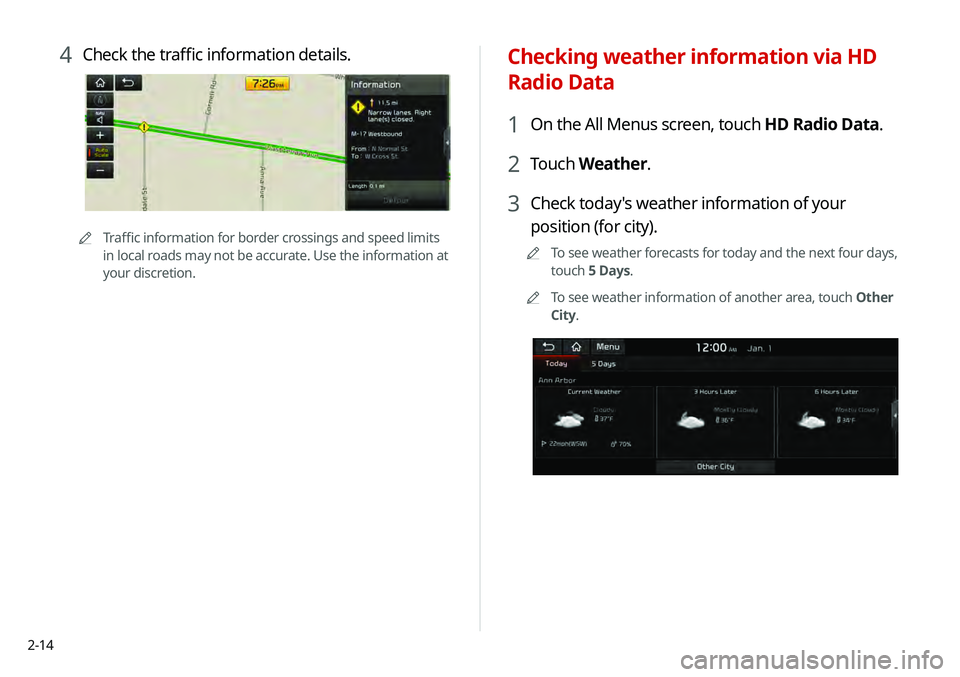
Checking weather information via HD
Radio Data
1 On the All Menus screen, touch HD Radio Data.
2 Touch Weather.
3 Check today's weather information of your
position (for city).
0000
A
To see weather forecasts for today and the next four days,
touch 5 Days.
0000
A
To see weather information of another area, touch Other
City.
4 Check the traffic information details.
0000
A
Traffic information for border crossings and speed limits
in local roads may not be accurate. Use the information at
your discretion.
Page 53 of 219
2-15
Using the sound mood lamp (if
equipped)
You can set to implement various lighting effects by synchronizing
with the playing music.
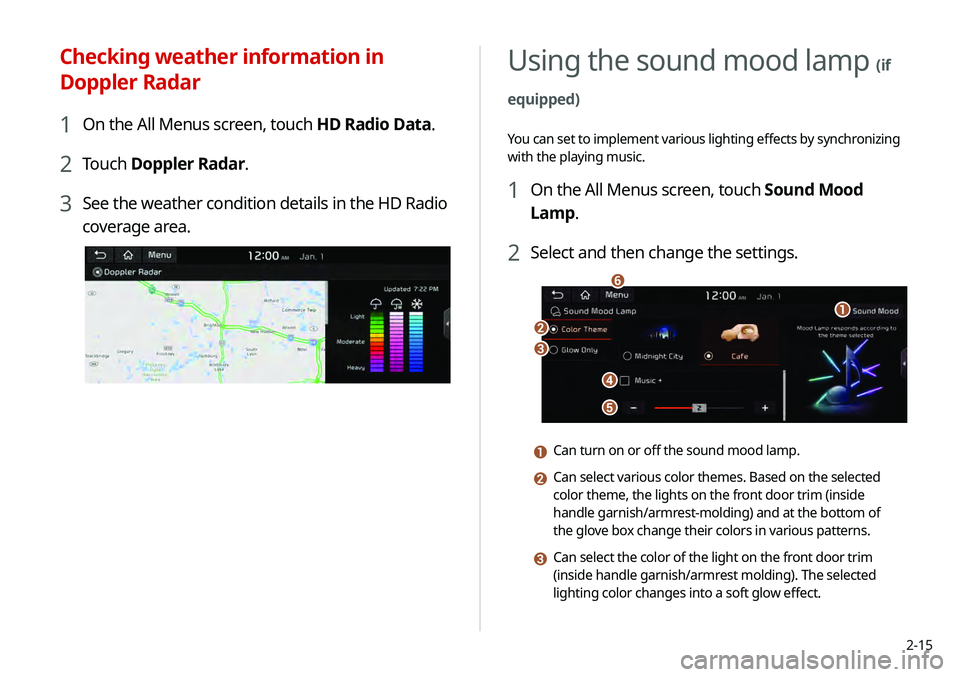
1 On the All Menus screen, touch Sound Mood
Lamp.
2 Select and then change the settings.
\037
\036
\035
\034
\033
\032
a Can turn on or off the sound mood lamp.
b Can select various color themes. Based on the selected
color theme, the lights on the front door trim (inside
handle garnish/armrest-molding) and at the bottom of
the glove box change their colors in various patterns.
c Can select the color of the light on the front door trim
(inside handle garnish/armrest molding). The selected
lighting color changes into a soft glow effect.
Checking weather information in
Doppler Radar
1 On the All Menus screen, touch HD Radio Data.
2 Touch Doppler Radar.
3 See the weather condition details in the HD Radio
coverage area.
Page 54 of 219
2-16
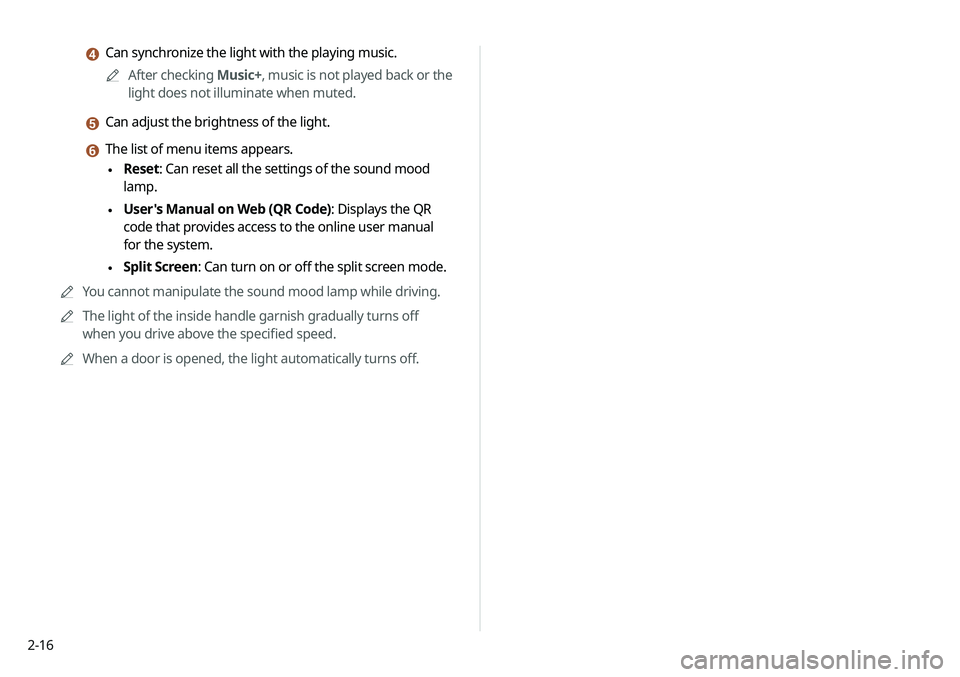
d Can synchronize the light with the playing music.0000
A
After checking Music+, music is not played back or the
light does not illuminate when muted.
e Can adjust the brightness of the light.
f The list of menu items appears.
\225 Reset: Can reset all the settings of the sound mood
lamp.
\225User's Manual on Web (QR Code): Displays the QR
code that provides access to the online user manual
for the system.
\225Split Screen: Can turn on or off the split screen mode.
0000
A
You cannot manipulate the sound mood lamp while driving.
0000
A
The light of the inside handle garnish gradually turns off
when you drive above the specified speed.
0000
A
When a door is opened, the light automatically turns off.
Page 79 of 219
5-3
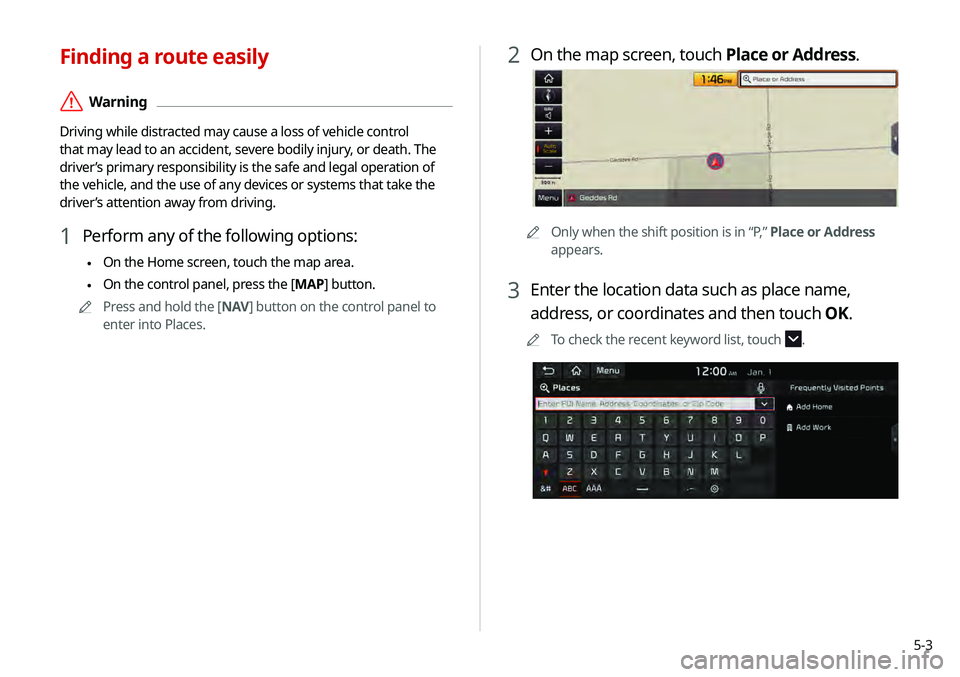
2 On the map screen, touch Place or Address.
0000AOnly when the shift position is in “P,” Place or Address
appears.
3 Enter the location data such as place name,
address, or coordinates and then touch OK.
0000
A
To check the recent keyword list, touch .
Finding a route easily
\335Warning
Driving while distracted may cause a loss of vehicle control
that may lead to an accident, severe bodily injury, or death. The
driver’s primary responsibility is the safe and legal operation of
the vehicle, and the use of any devices or systems that take the
driver’s attention away from driving.
1 Perform any of the following options:
\225On the Home screen, touch the map area.
\225On the control panel, press the [
MAP] button.
0000
A
Press and hold the [ NAV] button on the control panel to
enter into Places.
Page 83 of 219
5-7
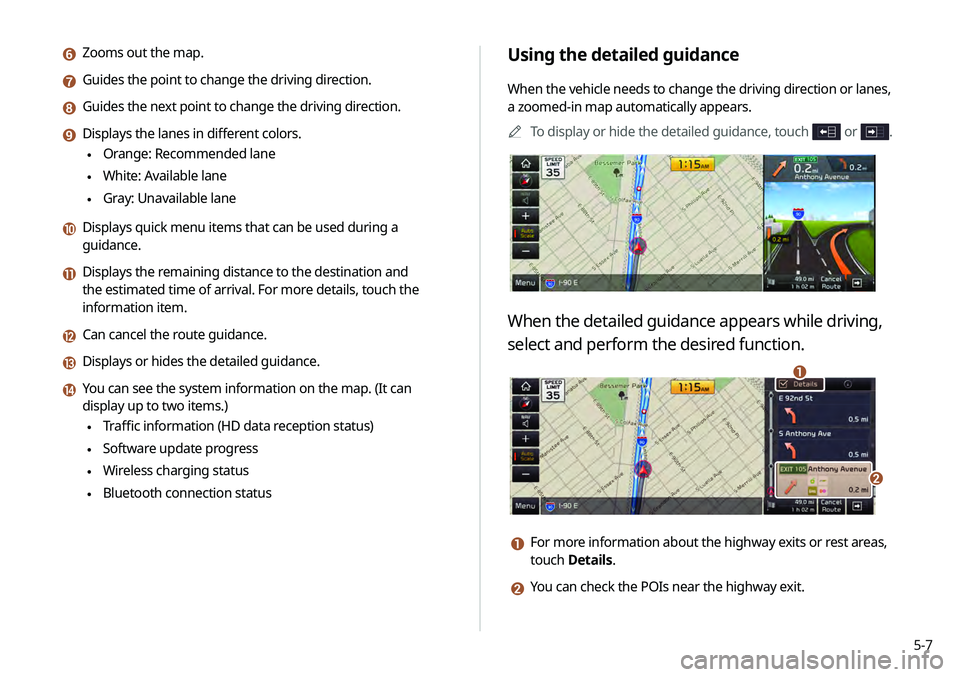
Using the detailed guidance
When the vehicle needs to change the driving direction or lanes,
a zoomed-in map automatically appears.0000
A
To display or hide the detailed guidance, touch
or .
When the detailed guidance appears while driving,
select and perform the desired function.
\037
\036
a For more information about the highway exits or rest areas,
touch Details.
b You can check the POIs near the highway exit.
f Zooms out the map.
g Guides the point to change the driving direction.
h Guides the next point to change the driving direction.
i Displays the lanes in different colors.
\225Orange: Recommended lane
\225White: Available lane
\225Gray: Unavailable lane
j Displays quick menu items that can be used during a
guidance.
k Displays the remaining distance to the destination and
the estimated time of arrival. For more details, touch the
information item.
l Can cancel the route guidance.
m Displays or hides the detailed guidance.
n You can see the system information on the map. (It can
display up to two items.)
\225Traffic information (HD data reception status)
\225Software update progress
\225Wireless charging status
\225Bluetooth connection status
Page 84 of 219
5-8
Adjusting the navigation volume
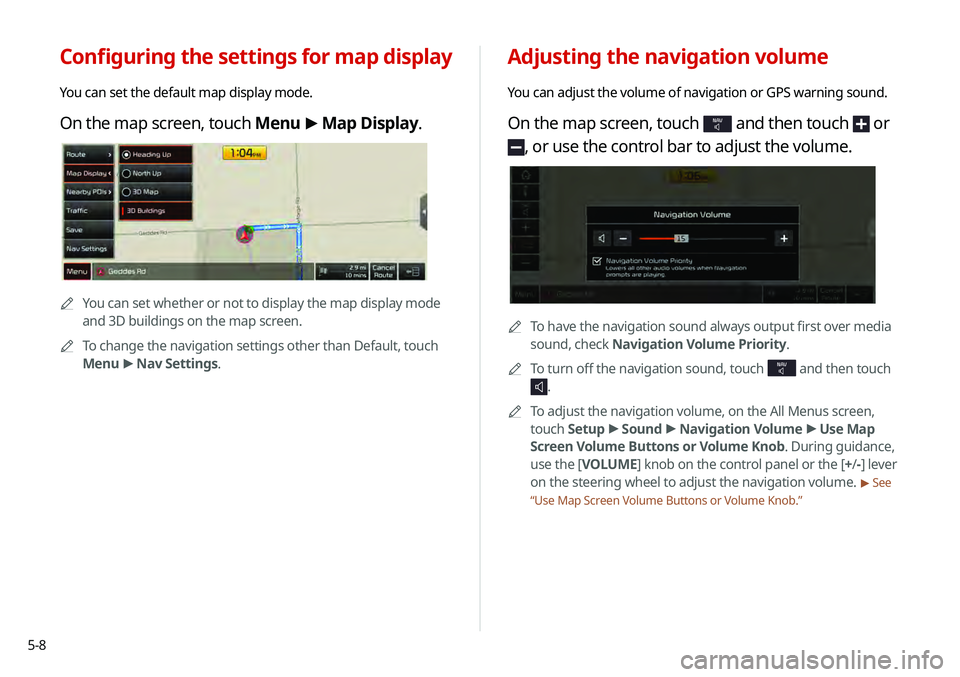
You can adjust the volume of navigation or GPS warning sound.
On the map screen, touch NAV and then touch or
, or use the control bar to adjust the volume.
0000ATo have the navigation sound always output first over media
sound, check Navigation Volume Priority.
0000
A
To turn off the navigation sound, touch
NAV and then touch
.
0000
A
To adjust the navigation volume, on the All Menus screen,
touch Setup >
Sound >
Navigation Volume >
Use Map
Screen Volume Buttons or Volume Knob . During guidance,
use the [ VOLUME] knob on the control panel or the [+ /-] lever
on the steering wheel to adjust the navigation volume.
> See
“ Use Map Screen Volume Buttons or Volume Knob .”
Configuring the settings for map display
You can set the default map display mode.
On the map screen, touch Menu >
Map Display.
0000A
You can set whether or not to display the map display mode
and 3D buildings on the map screen.
0000
A
To change the navigation settings other than Default, touch
Menu >
Nav Settings.
Page 85 of 219
5-9
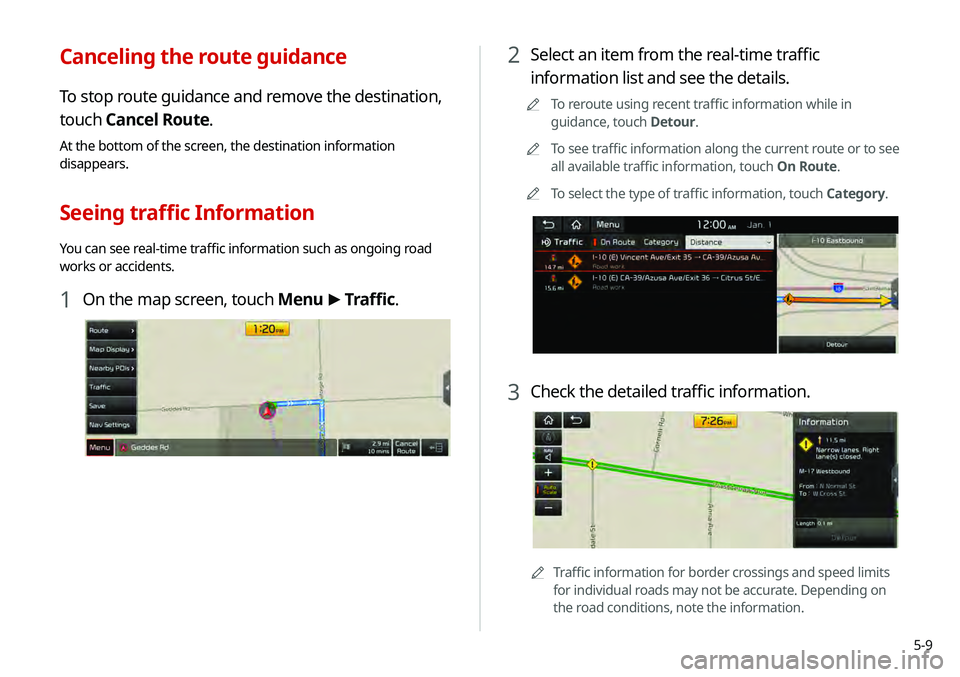
2 Select an item from the real-time traffic
information list and see the details.
0000
A
To reroute using recent traffic information while in
guidance, touch Detour.
0000
A
To see traffic information along the current route or to see
all available traffic information, touch On Route.
0000
A
To select the type of traffic information, touch Category.
3 Check the detailed traffic information.
0000
A
Traffic information for border crossings and speed limits
for individual roads may not be accurate. Depending on
the road conditions, note the information.
Canceling the route guidance
To stop route guidance and remove the destination,
touch Cancel Route.
At the bottom of the screen, the destination information
disappears.
Seeing traffic Information
You can see real-time traffic information such as ongoing road
works or accidents.
1 On the map screen, touch Menu >
Traffic.
Page 87 of 219
5-11
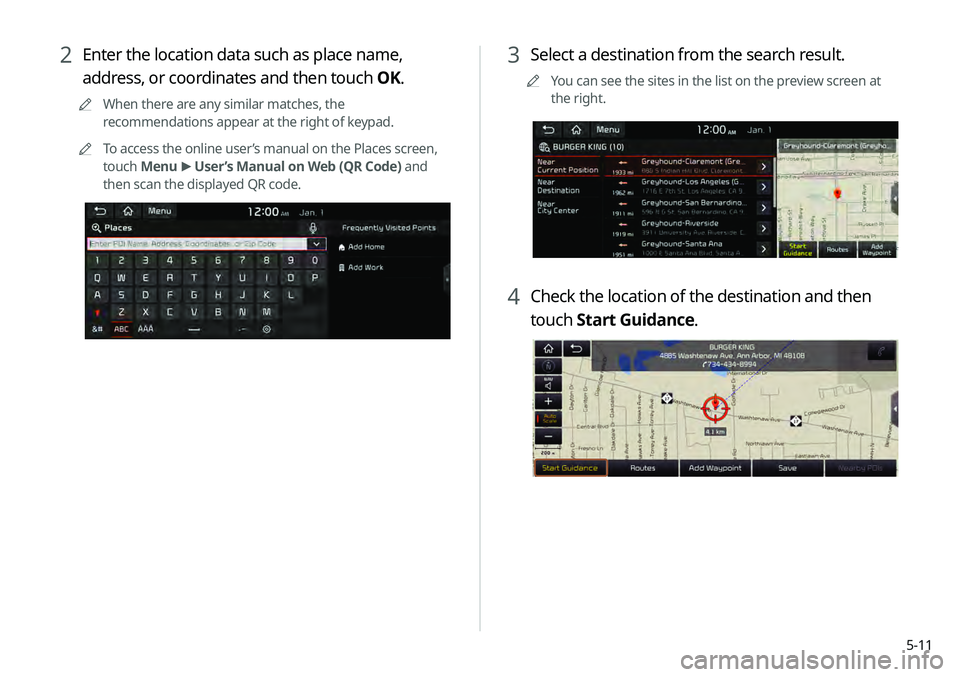
3 Select a destination from the search result.
0000
A
You can see the sites in the list on the preview screen at
the right.
4 Check the location of the destination and then
touch Start Guidance.
2 Enter the location data such as place name,
address, or coordinates and then touch OK.
0000
A
When there are any similar matches, the
recommendations appear at the right of keypad.
0000
A
To access the online user’s manual on the Places screen,
touch Menu >
User’s Manual on Web (QR Code) and
then scan the displayed QR code.
Page 88 of 219
5-12
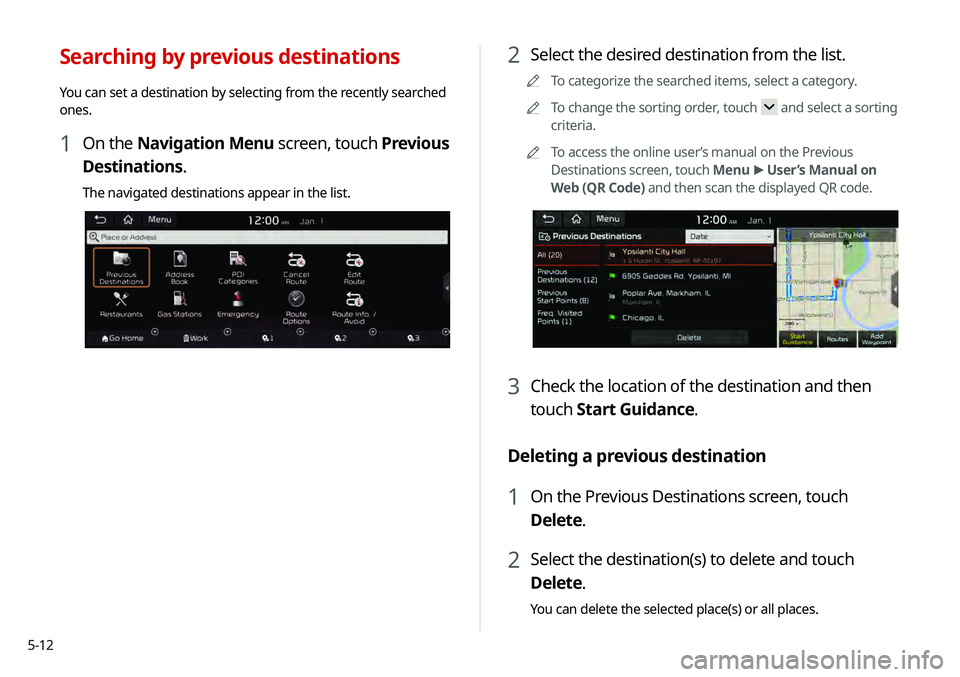
2 Select the desired destination from the list.
0000
A
To categorize the searched items, select a category.
0000
A
To change the sorting order, touch
and select a sorting
criteria.
0000
A
To access the online user’s manual on the Previous
Destinations screen, touch Menu >
User’s Manual on
Web (QR Code) and then scan the displayed QR code.
3 Check the location of the destination and then
touch Start Guidance.
Deleting a previous destination
1 On the Previous Destinations screen, touch
Delete.
2 Select the destination(s) to delete and touch
Delete.
You can delete the selected place(s) or all places.
Searching by previous destinations
You can set a destination by selecting from the recently searched
ones.
1 On the Navigation Menu screen, touch Previous
Destinations.
The navigated destinations appear in the list.
Page 90 of 219
5-14
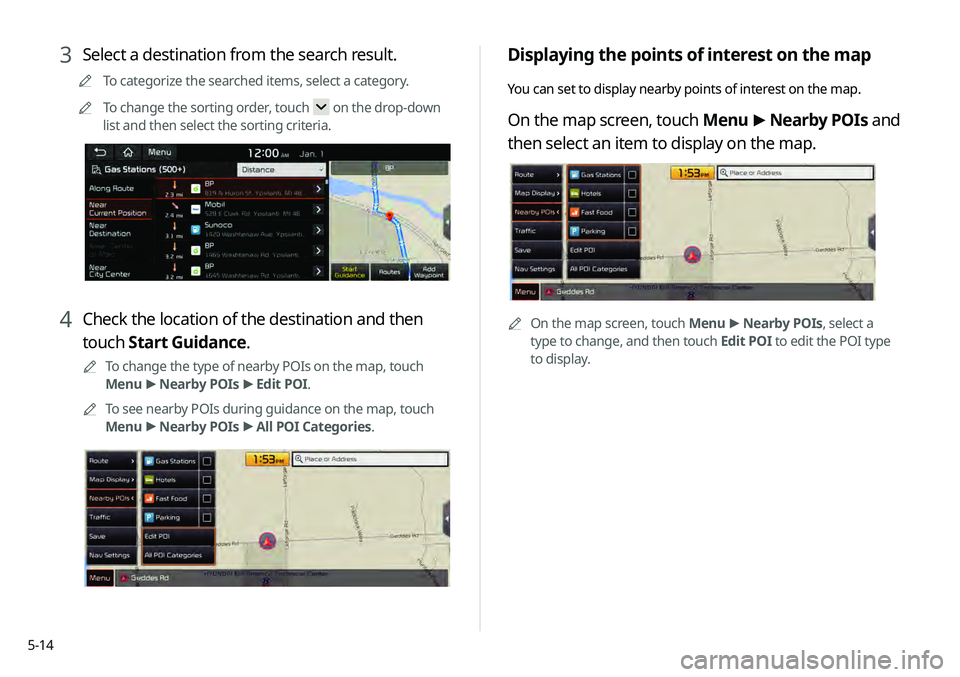
Displaying the points of interest on the map
You can set to display nearby points of interest on the map.
On the map screen, touch Menu >
Nearby POIs and
then select an item to display on the map.
0000A On the map screen, touch Menu >
Nearby POIs, select a
type to change, and then touch Edit POI to edit the POI type
to display.
3 Select a destination from the search result.
0000
A
To categorize the searched items, select a category.
0000
A
To change the sorting order, touch
on the drop-down
list and then select the sorting criteria.
4 Check the location of the destination and then
touch Start Guidance.
0000
A
To change the type of nearby POIs on the map, touch
Menu >
Nearby POIs >
Edit POI.
0000
A
To see nearby POIs during guidance on the map, touch
Menu >
Nearby POIs >
All POI Categories.