display KIA TELLURIDE 2020 Navigation System Quick Reference Guide
[x] Cancel search | Manufacturer: KIA, Model Year: 2020, Model line: TELLURIDE, Model: KIA TELLURIDE 2020Pages: 219, PDF Size: 9.16 MB
Page 20 of 219
10
10 Appendix
Solutions 10-2
System status indicator icons 10-9
FAQ 10-11
Product specifications 10-13
Important information 10-17
Index 10-20
Trademarks 10-24
Configuring the navigation settings 9-15
Display 9-16
Voice Guidance 9-17
Traffic 9-17
Volume Control 9-18
Reset 9-18
Configuring the UVO settings 9-19
Activate UVO 9-19
911 Connect 9-19
Modem Information 9-20
Modem Status 9-20
Configuring the general system settings 9-21
Date/Time 9-21
Language 9-22
Keyboard 9-22
Screen Saver 9-23
System Info 9-23
Configuring the display settings 9-24
Mode 9-25
Illumination 9-25
Reset 9-26
Updating the system software and map 9-26
Page 22 of 219
1-2
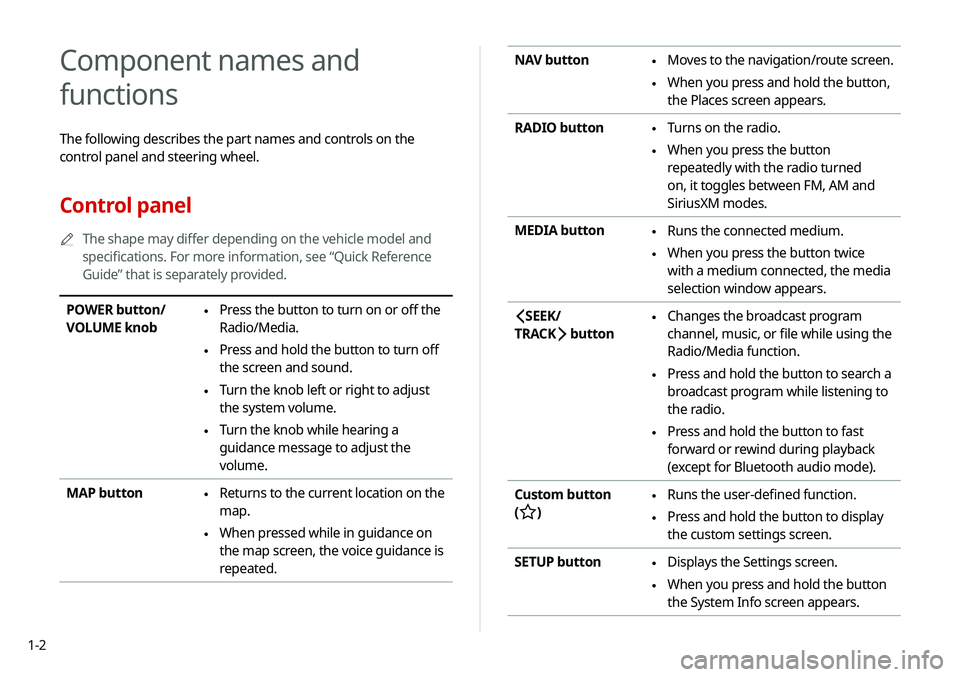
NAV button \225Moves to the navigation/route screen.
\225When you press and hold the button,
the Places screen appears.
RADIO button
\225 Turns on the radio.
\225When you press the button
repeatedly with the radio turned
on, it toggles between FM, AM and
SiriusXM modes.
MEDIA button
\225 Runs the connected medium.
\225When you press the button twice
with a medium connected, the media
selection window appears.
SEEK/
TRACK
button
\225 Changes the broadcast program
channel, music, or file while using the
Radio/Media function.
\225Press and hold the button to search a
broadcast program while listening to
the radio.
\225Press and hold the button to fast
forward or rewind during playback
(except for Bluetooth audio mode).
Custom button
(
)
\225 Runs the user-defined function.
\225Press and hold the button to display
the custom settings screen.
SETUP button
\225 Displays the Settings screen.
\225When you press and hold the button
the System Info screen appears.
Component names and
functions
The following describes the part names and controls on the
control panel and steering wheel.
Control panel
0000
A
The shape may differ depending on the vehicle model and
specifications. For more information, see “Quick Reference
Guide” that is separately provided.
POWER button/
VOLUME knob \225Press the button to turn on or off the
Radio/Media.
\225Press and hold the button to turn off
the screen and sound.
\225Turn the knob left or right to adjust
the system volume.
\225Turn the knob while hearing a
guidance message to adjust the
volume.
MAP button
\225 Returns to the current location on the
map.
\225When pressed while in guidance on
the map screen, the voice guidance is
repeated.
Page 23 of 219
1-3
Steering wheel remote control
0000
A
The shape may differ depending on the vehicle model and
specifications. For more information, see “Quick Reference
Guide” that is separately provided.
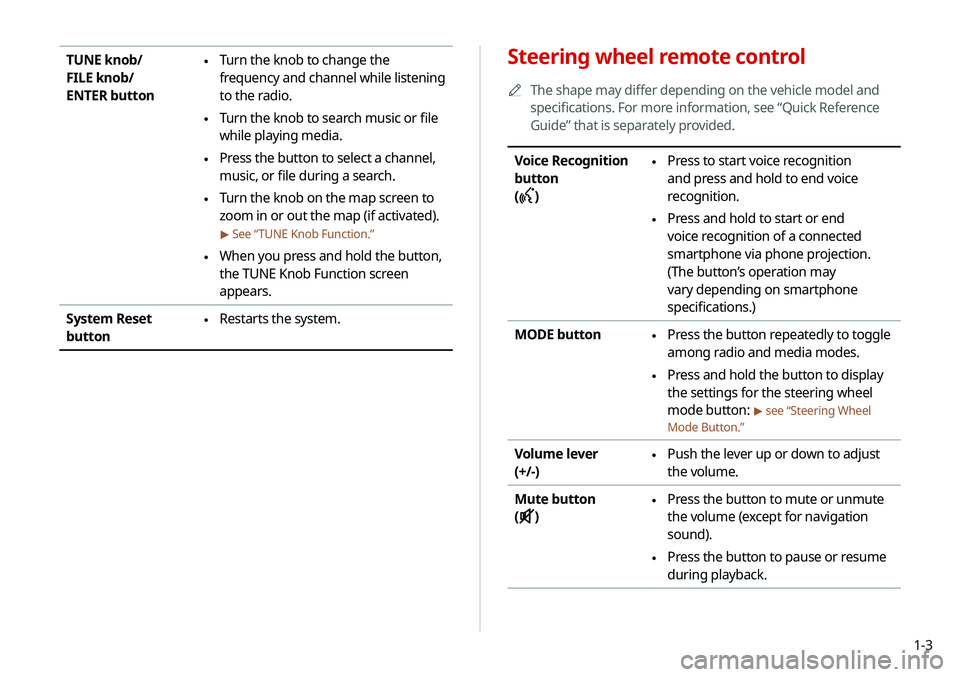
Voice Recognition
button
(
)
\225 Press to start voice recognition
and press and hold to end voice
recognition.
\225Press and hold to start or end
voice recognition of a connected
smartphone via phone projection.
(The button’s operation may
vary depending on smartphone
specifications.)
MODE button
\225 Press the button repeatedly to toggle
among radio and media modes.
\225Press and hold the button to display
the settings for the steering wheel
mode button:
> see “Steering Wheel
Mode Button.”
Volume lever
(+/-) \225 Push the lever up or down to adjust
the volume.
Mute button
(
)
\225 Press the button to mute or unmute
the volume (except for navigation
sound).
\225Press the button to pause or resume
during playback.
TUNE knob/
FILE knob/
ENTER button \225Turn the knob to change the
frequency and channel while listening
to the radio.
\225Turn the knob to search music or file
while playing media.
\225Press the button to select a channel,
music, or file during a search.
\225Turn the knob on the map screen to
zoom in or out the map (if activated).
> See “
TUNE Knob Function.”
\225When you press and hold the button,
the TUNE Knob Function screen
appears.
System Reset
button
\225 Restarts the system.
Page 24 of 219
1-4
Turning the system on or off
The following explains how to turn on or off the system. Before
using the system, be sure to read the user's manual for safe and
convenient manipulation.
Turning on the system
1 Turn on the vehicle.
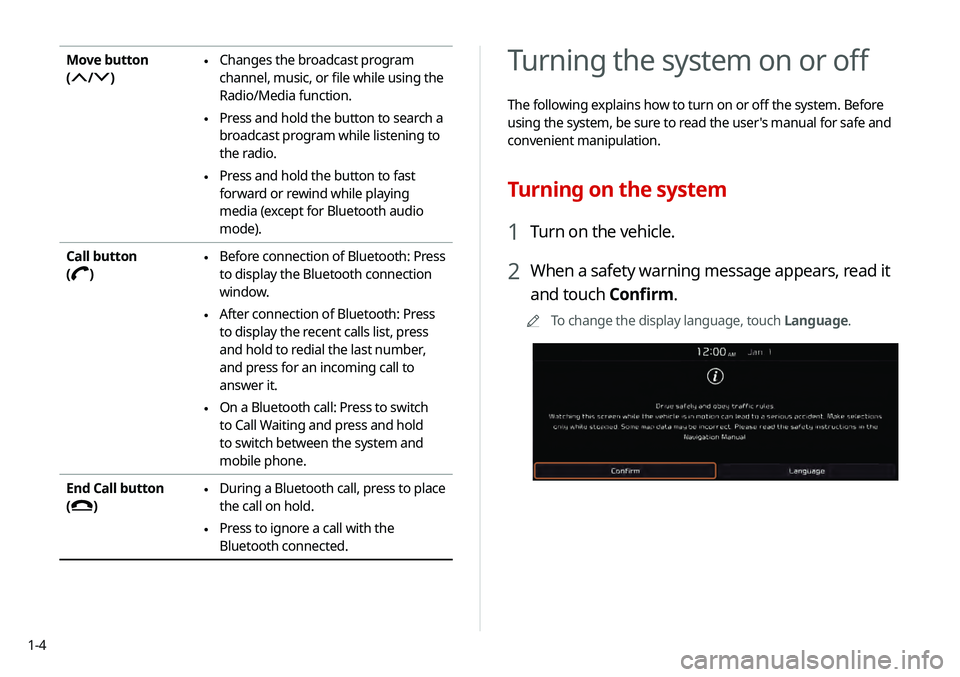
2 When a safety warning message appears, read it
and touch Confirm.
0000
A
To change the display language, touch Language.
Move button
(
/)
\225Changes the broadcast program
channel, music, or file while using the
Radio/Media function.
\225Press and hold the button to search a
broadcast program while listening to
the radio.
\225Press and hold the button to fast
forward or rewind while playing
media (except for Bluetooth audio
mode).
Call button
(
)
\225 Before connection of Bluetooth: Press
to display the Bluetooth connection
window.
\225After connection of Bluetooth: Press
to display the recent calls list, press
and hold to redial the last number,
and press for an incoming call to
answer it.
\225On a Bluetooth call: Press to switch
to Call Waiting and press and hold
to switch between the system and
mobile phone.
End Call button
(
)
\225 During a Bluetooth call, press to place
the call on hold.
\225Press to ignore a call with the
Bluetooth connected.
Page 25 of 219

1-5
\335Warning
\225 Driving while distracted can result in a loss of vehicle control
that may lead to an accident, severe bodily injury, or death.
The driver's primary responsibility is the safe and legal
operation of the vehicle, and the use of any vehicle systems,
including the touch screen and steering wheel controls, which
take the driver's eyes, attention, and focus away from the safe
operation of the vehicle, or which are not permissible by law,
should never be used during the operation of the vehicle.
\225 Some functions may not be active while driving to ensure
safety. Those functions run only when the vehicle is stationary.
In order to use them, first stop the vehicle.
\225 When the screen is not displayed, the volume is muted, or
other system failures occur, immediately stop using the
system. When you use the faulty system continuously, it may
cause fire, electric shock, or fatal system failure.
Turning off the system
To turn off the system while driving, press and hold
the [POWER] button on the panel.
The screen and sound are turned off.
0000
A
To use the system again, press the [ POWER] button.
0000
A
When a specified period of time elapses after turning off the
vehicle, the system automatically shuts down. When you open
the driver's door, the system immediately shuts down.
Page 30 of 219
1-10
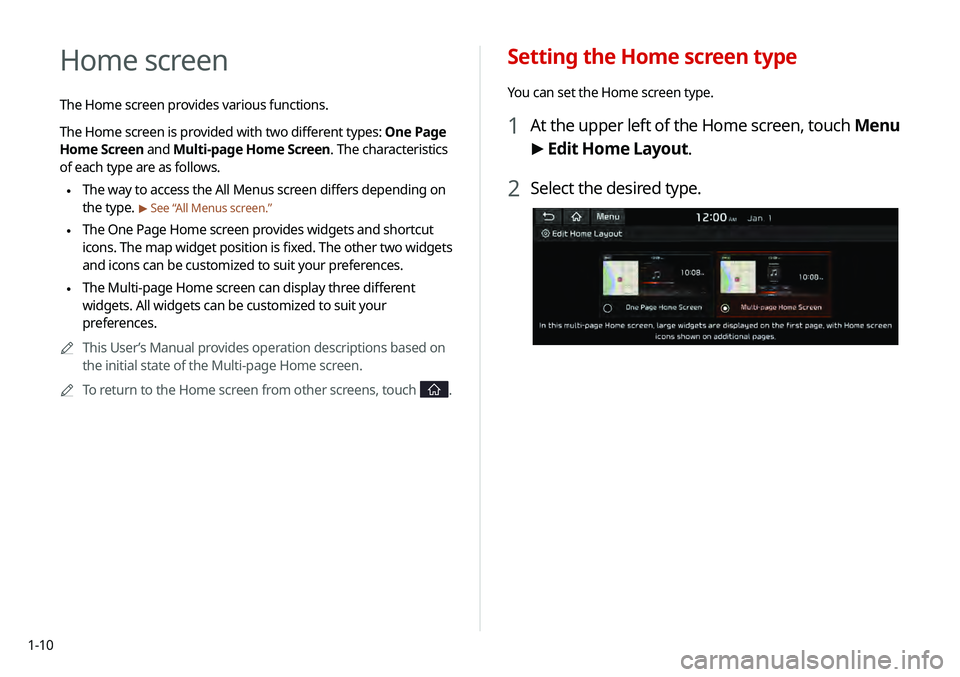
Setting the Home screen type
You can set the Home screen type.
1 At the upper left of the Home screen, touch Menu
> Edit Home Layout.
2 Select the desired type.
Home screen
The Home screen provides various functions.
The Home screen is provided with two different types: One Page
Home Screen and Multi-page Home Screen. The characteristics
of each type are as follows.
\225 The way to access the All Menus screen differs depending on
the type.
> See “
All Menus screen.”
\225The One Page Home screen provides widgets and shortcut
icons. The map widget position is fixed. The other two widgets
and icons can be customized to suit your preferences.
\225The Multi-page Home screen can display three different
widgets. All widgets can be customized to suit your
preferences.
0000
A
This User’s Manual provides operation descriptions based on
the initial state of the Multi-page Home screen.
0000
A
To return to the Home screen from other screens, touch
.
Page 31 of 219
1-11
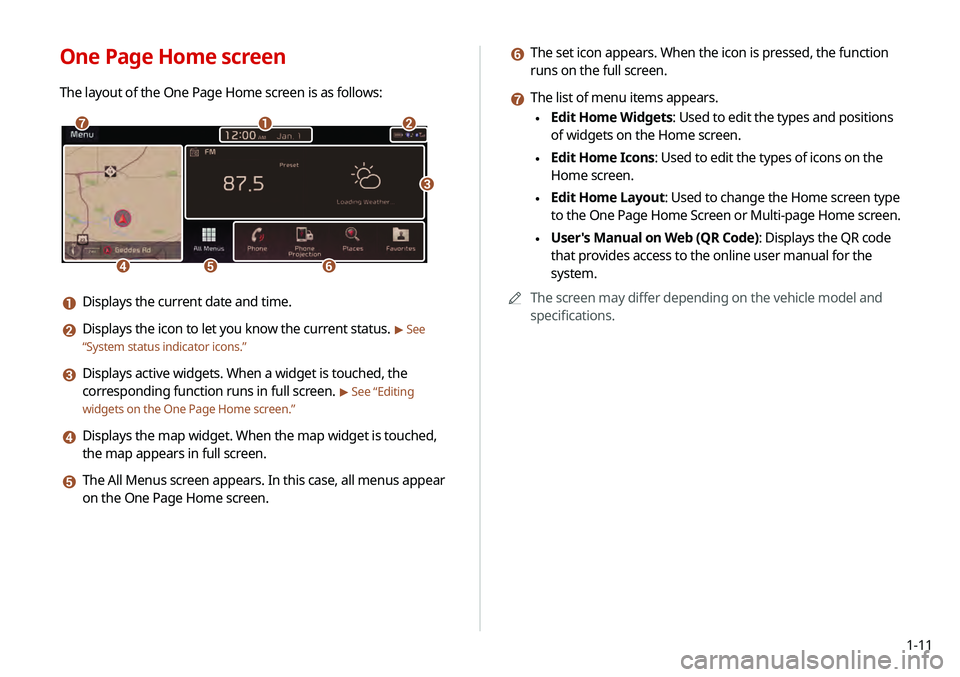
f The set icon appears. When the icon is pressed, the function
runs on the full screen.
g The list of menu items appears.
\225Edit Home Widgets: Used to edit the types and positions
of widgets on the Home screen.
\225Edit Home Icons: Used to edit the types of icons on the
Home screen.
\225Edit Home Layout: Used to change the Home screen type
to the One Page Home Screen or Multi-page Home screen.
\225User's Manual on Web (QR Code): Displays the QR code
that provides access to the online user manual for the
system.
0000
A
The screen may differ depending on the vehicle model and
specifications.
One Page Home screen
The layout of the One Page Home screen is as follows:
\037\036
\035
\034\033
\032
\031
a Displays the current date and time.
b Displays the icon to let you know the current status. > See
“ System status indicator icons.”
c Displays active widgets. When a widget is touched, the
corresponding function runs in full screen.
> See “Editing
widgets on the One Page Home screen.”
d Displays the map widget. When the map widget is touched,
the map appears in full screen.
e The All Menus screen appears. In this case, all menus appear
on the One Page Home screen.
Page 32 of 219
1-12
Editing icons on the One Page Home screen
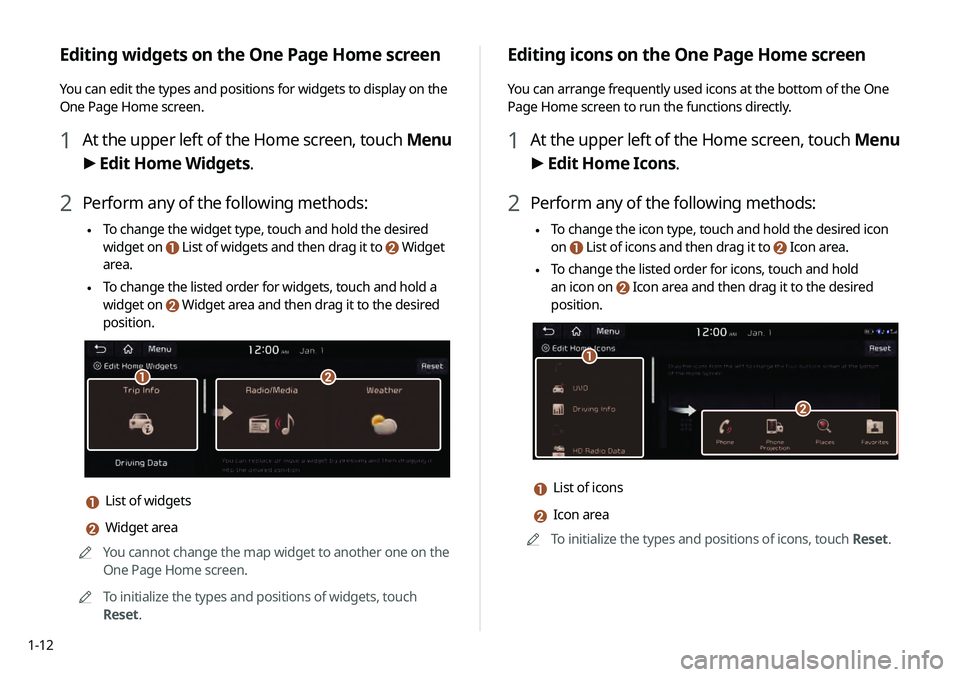
You can arrange frequently used icons at the bottom of the One
Page Home screen to run the functions directly.
1 At the upper left of the Home screen, touch Menu
> Edit Home Icons.
2 Perform any of the following methods:
\225 To change the icon type, touch and hold the desired icon
on
List of icons and then drag it to Icon area.
\225To change the listed order for icons, touch and hold
an icon on
Icon area and then drag it to the desired
position.
\037
\036
a List of icons
b Icon area
0000
A
To initialize the types and positions of icons, touch Reset.
Editing widgets on the One Page Home screen
You can edit the types and positions for widgets to display on the
One Page Home screen.
1 At the upper left of the Home screen, touch Menu
> Edit Home Widgets.
2 Perform any of the following methods:
\225 To change the widget type, touch and hold the desired
widget on
List of widgets and then drag it to Widget
area.
\225To change the listed order for widgets, touch and hold a
widget on
Widget area and then drag it to the desired
position.
\037\036
a List of widgets
b Widget area
0000
A
You cannot change the map widget to another one on the
One Page Home screen.
0000
A
To initialize the types and positions of widgets, touch
Reset.
Page 33 of 219
1-13
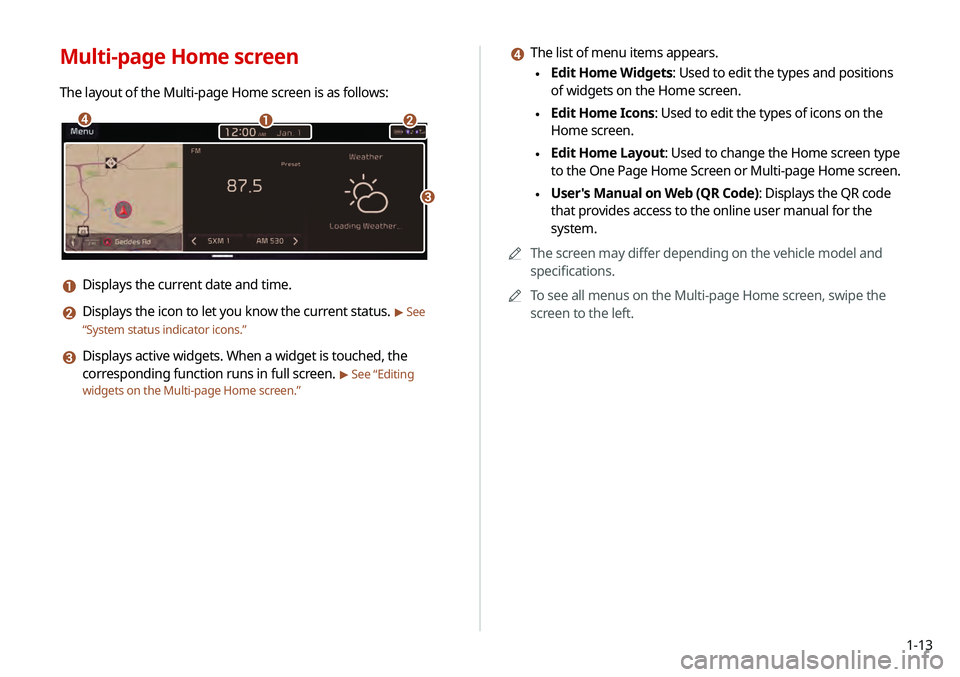
d The list of menu items appears.
\225Edit Home Widgets: Used to edit the types and positions
of widgets on the Home screen.
\225Edit Home Icons: Used to edit the types of icons on the
Home screen.
\225Edit Home Layout: Used to change the Home screen type
to the One Page Home Screen or Multi-page Home screen.
\225User's Manual on Web (QR Code): Displays the QR code
that provides access to the online user manual for the
system.
0000
A
The screen may differ depending on the vehicle model and
specifications.
0000
A
To see all menus on the Multi-page Home screen, swipe the
screen to the left.
Multi-page Home screen
The layout of the Multi-page Home screen is as follows:
\037\036
\035
\034
a Displays the current date and time.
b Displays the icon to let you know the current status. > See
“ System status indicator icons.”
c Displays active widgets. When a widget is touched, the
corresponding function runs in full screen.
> See “Editing
widgets on the Multi-page Home screen .”
Page 34 of 219
1-14
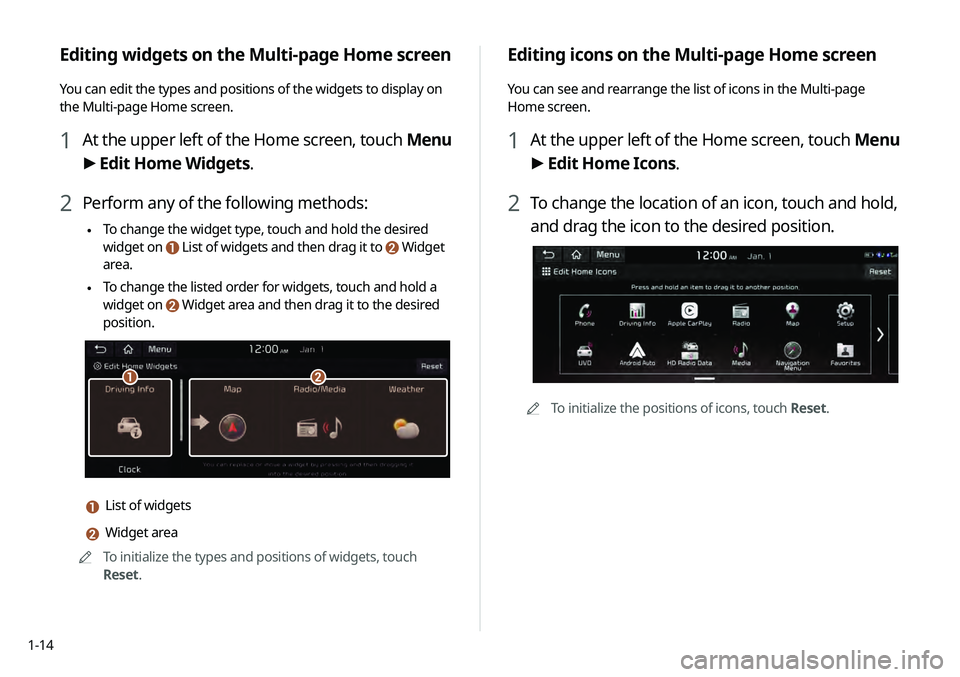
Editing icons on the Multi-page Home screen
You can see and rearrange the list of icons in the Multi-page
Home screen.
1 At the upper left of the Home screen, touch Menu
> Edit Home Icons.
2 To change the location of an icon, touch and hold,
and drag the icon to the desired position.
0000
A
To initialize the positions of icons, touch Reset.
Editing widgets on the Multi-page Home screen
You can edit the types and positions of the widgets to display on
the Multi-page Home screen.
1 At the upper left of the Home screen, touch Menu
> Edit Home Widgets.
2 Perform any of the following methods:
\225 To change the widget type, touch and hold the desired
widget on
List of widgets and then drag it to Widget
area.
\225To change the listed order for widgets, touch and hold a
widget on
Widget area and then drag it to the desired
position.
\037\036
a List of widgets
b Widget area
0000
A
To initialize the types and positions of widgets, touch
Reset.