display KIA TELLURIDE 2020 Navigation System Quick Reference Guide
[x] Cancel search | Manufacturer: KIA, Model Year: 2020, Model line: TELLURIDE, Model: KIA TELLURIDE 2020Pages: 219, PDF Size: 9.16 MB
Page 83 of 219
5-7
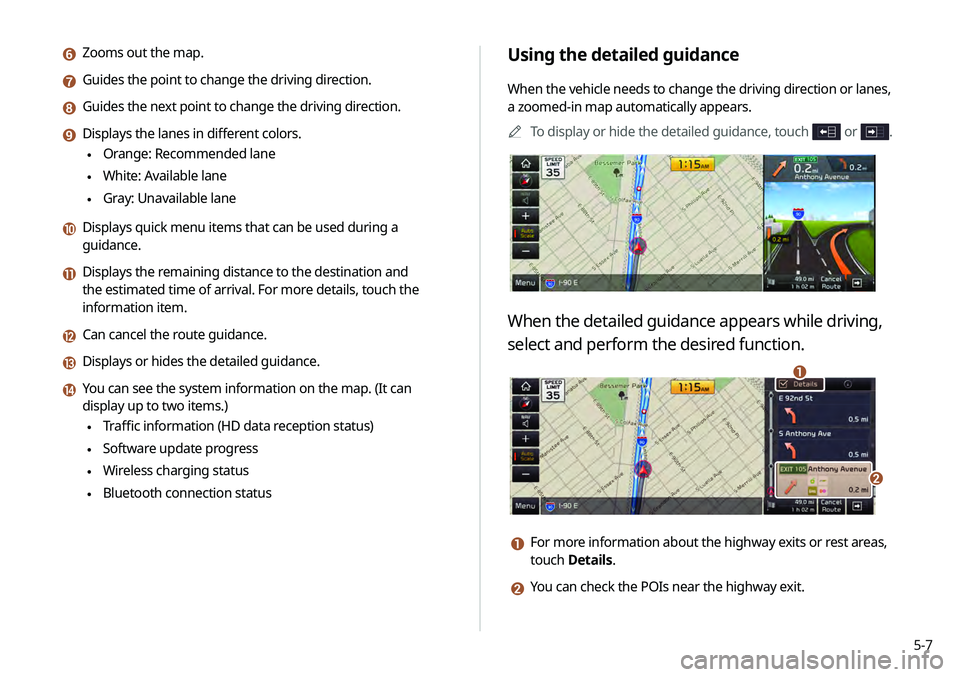
Using the detailed guidance
When the vehicle needs to change the driving direction or lanes,
a zoomed-in map automatically appears.0000
A
To display or hide the detailed guidance, touch
or .
When the detailed guidance appears while driving,
select and perform the desired function.
\037
\036
a For more information about the highway exits or rest areas,
touch Details.
b You can check the POIs near the highway exit.
f Zooms out the map.
g Guides the point to change the driving direction.
h Guides the next point to change the driving direction.
i Displays the lanes in different colors.
\225Orange: Recommended lane
\225White: Available lane
\225Gray: Unavailable lane
j Displays quick menu items that can be used during a
guidance.
k Displays the remaining distance to the destination and
the estimated time of arrival. For more details, touch the
information item.
l Can cancel the route guidance.
m Displays or hides the detailed guidance.
n You can see the system information on the map. (It can
display up to two items.)
\225Traffic information (HD data reception status)
\225Software update progress
\225Wireless charging status
\225Bluetooth connection status
Page 84 of 219
5-8
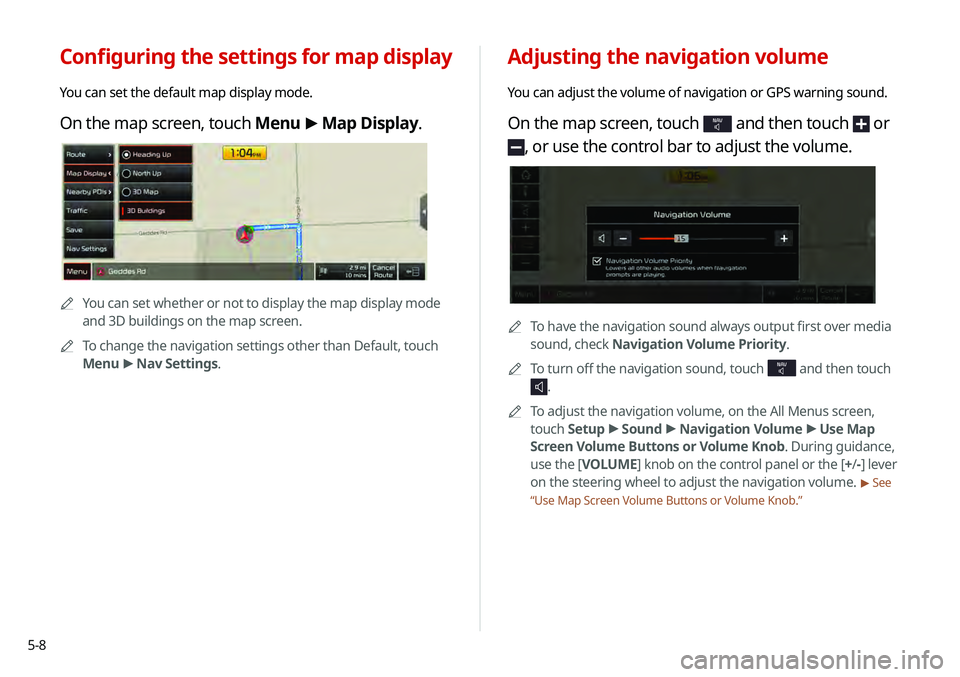
Adjusting the navigation volume
You can adjust the volume of navigation or GPS warning sound.
On the map screen, touch NAV and then touch or
, or use the control bar to adjust the volume.
0000ATo have the navigation sound always output first over media
sound, check Navigation Volume Priority.
0000
A
To turn off the navigation sound, touch
NAV and then touch
.
0000
A
To adjust the navigation volume, on the All Menus screen,
touch Setup >
Sound >
Navigation Volume >
Use Map
Screen Volume Buttons or Volume Knob . During guidance,
use the [ VOLUME] knob on the control panel or the [+ /-] lever
on the steering wheel to adjust the navigation volume.
> See
“ Use Map Screen Volume Buttons or Volume Knob .”
Configuring the settings for map display
You can set the default map display mode.
On the map screen, touch Menu >
Map Display.
0000A
You can set whether or not to display the map display mode
and 3D buildings on the map screen.
0000
A
To change the navigation settings other than Default, touch
Menu >
Nav Settings.
Page 87 of 219
5-11
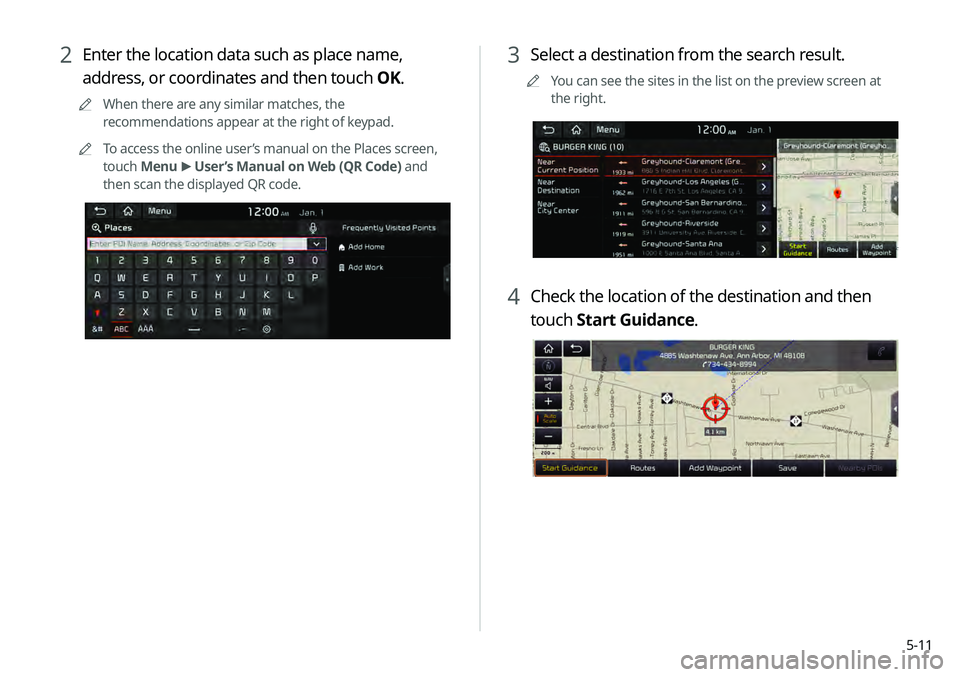
3 Select a destination from the search result.
0000
A
You can see the sites in the list on the preview screen at
the right.
4 Check the location of the destination and then
touch Start Guidance.
2 Enter the location data such as place name,
address, or coordinates and then touch OK.
0000
A
When there are any similar matches, the
recommendations appear at the right of keypad.
0000
A
To access the online user’s manual on the Places screen,
touch Menu >
User’s Manual on Web (QR Code) and
then scan the displayed QR code.
Page 88 of 219
5-12
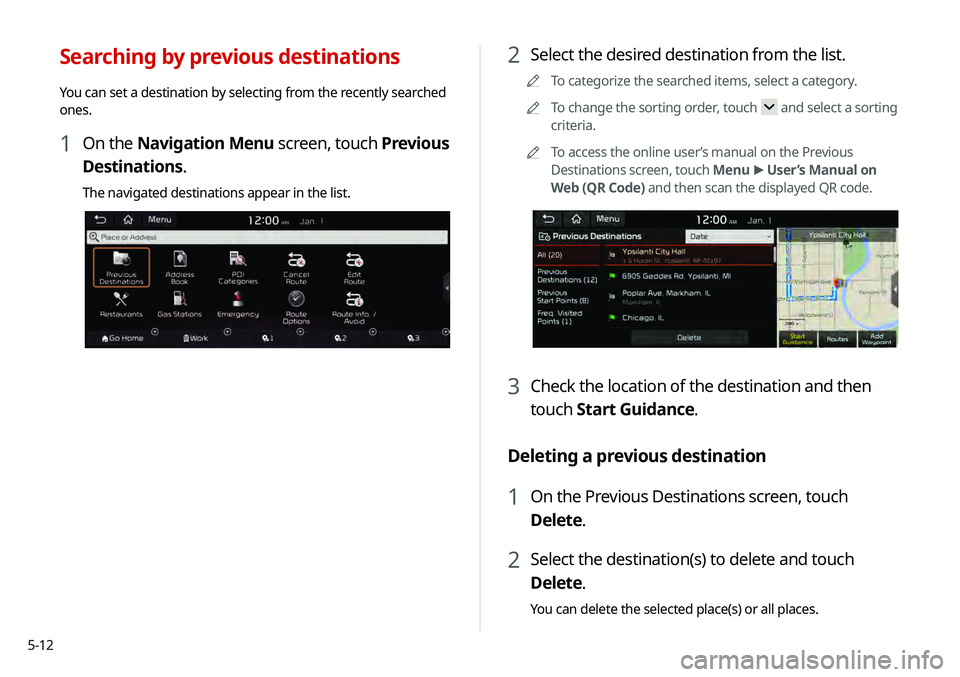
2 Select the desired destination from the list.
0000
A
To categorize the searched items, select a category.
0000
A
To change the sorting order, touch
and select a sorting
criteria.
0000
A
To access the online user’s manual on the Previous
Destinations screen, touch Menu >
User’s Manual on
Web (QR Code) and then scan the displayed QR code.
3 Check the location of the destination and then
touch Start Guidance.
Deleting a previous destination
1 On the Previous Destinations screen, touch
Delete.
2 Select the destination(s) to delete and touch
Delete.
You can delete the selected place(s) or all places.
Searching by previous destinations
You can set a destination by selecting from the recently searched
ones.
1 On the Navigation Menu screen, touch Previous
Destinations.
The navigated destinations appear in the list.
Page 89 of 219
5-13
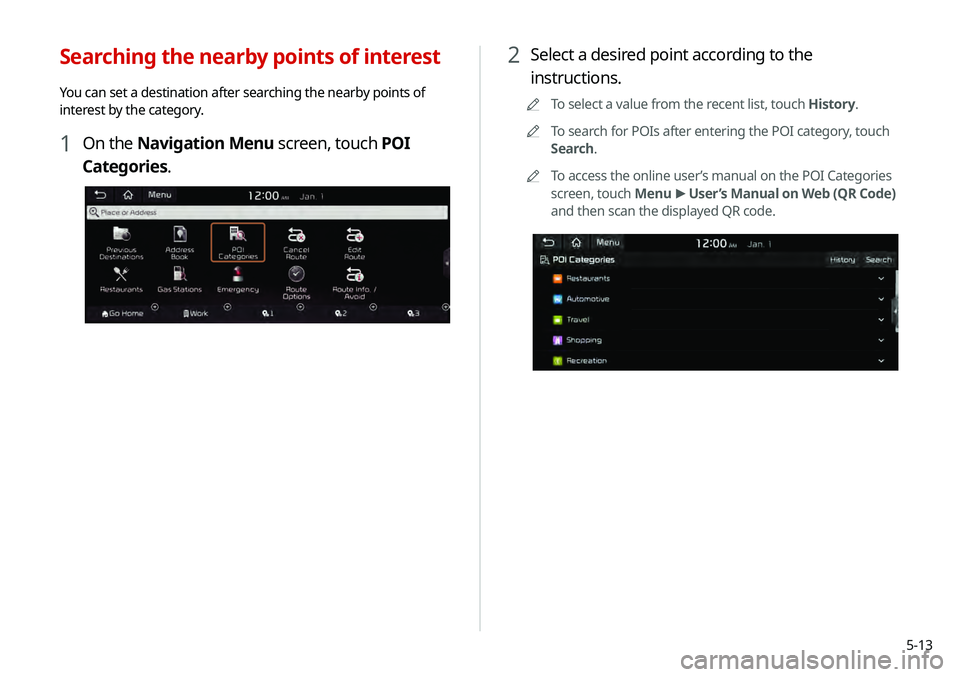
2 Select a desired point according to the
instructions.
0000
A
To select a value from the recent list, touch History.
0000
A
To search for POIs after entering the POI category, touch
Search.
0000
A
To access the online user’s manual on the POI Categories
screen, touch Menu >
User’s Manual on Web (QR Code)
and then scan the displayed QR code.
Searching the nearby points of interest
You can set a destination after searching the nearby points of
interest by the category.
1 On the Navigation Menu screen, touch POI
Categories.
Page 90 of 219
5-14
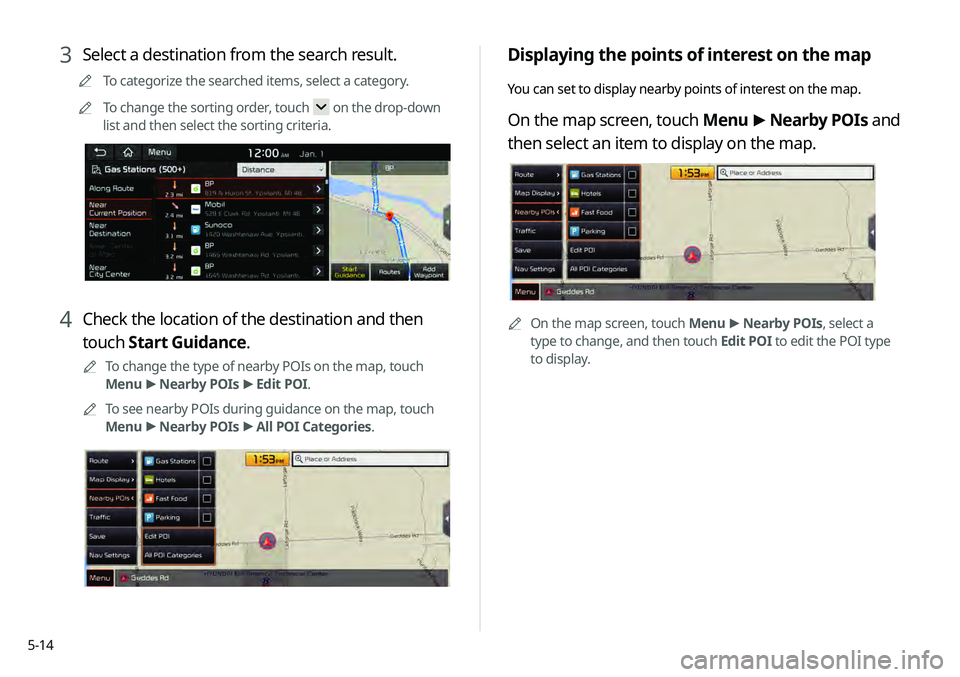
Displaying the points of interest on the map
You can set to display nearby points of interest on the map.
On the map screen, touch Menu >
Nearby POIs and
then select an item to display on the map.
0000A On the map screen, touch Menu >
Nearby POIs, select a
type to change, and then touch Edit POI to edit the POI type
to display.
3 Select a destination from the search result.
0000
A
To categorize the searched items, select a category.
0000
A
To change the sorting order, touch
on the drop-down
list and then select the sorting criteria.
4 Check the location of the destination and then
touch Start Guidance.
0000
A
To change the type of nearby POIs on the map, touch
Menu >
Nearby POIs >
Edit POI.
0000
A
To see nearby POIs during guidance on the map, touch
Menu >
Nearby POIs >
All POI Categories.
Page 91 of 219
5-15
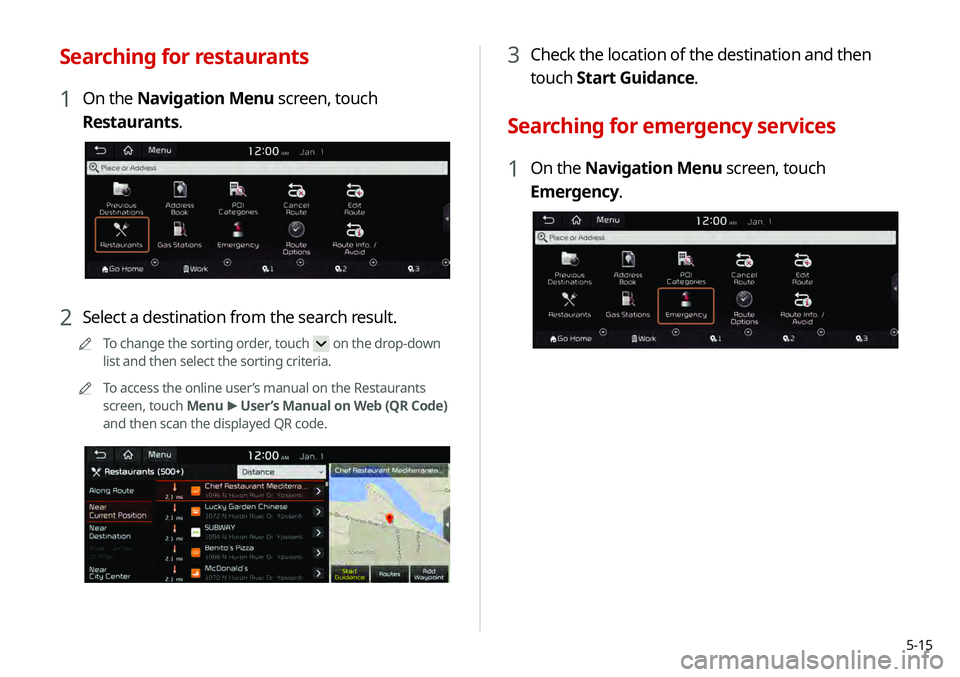
3 Check the location of the destination and then
touch Start Guidance.
Searching for emergency services
1 On the Navigation Menu screen, touch
Emergency.
Searching for restaurants
1 On the Navigation Menu screen, touch
Restaurants.
2 Select a destination from the search result.
0000
A
To change the sorting order, touch on the drop-down
list and then select the sorting criteria.
0000
A
To access the online user’s manual on the Restaurants
screen, touch Menu >
User’s Manual on Web (QR Code)
and then scan the displayed QR code.
Page 92 of 219
5-16
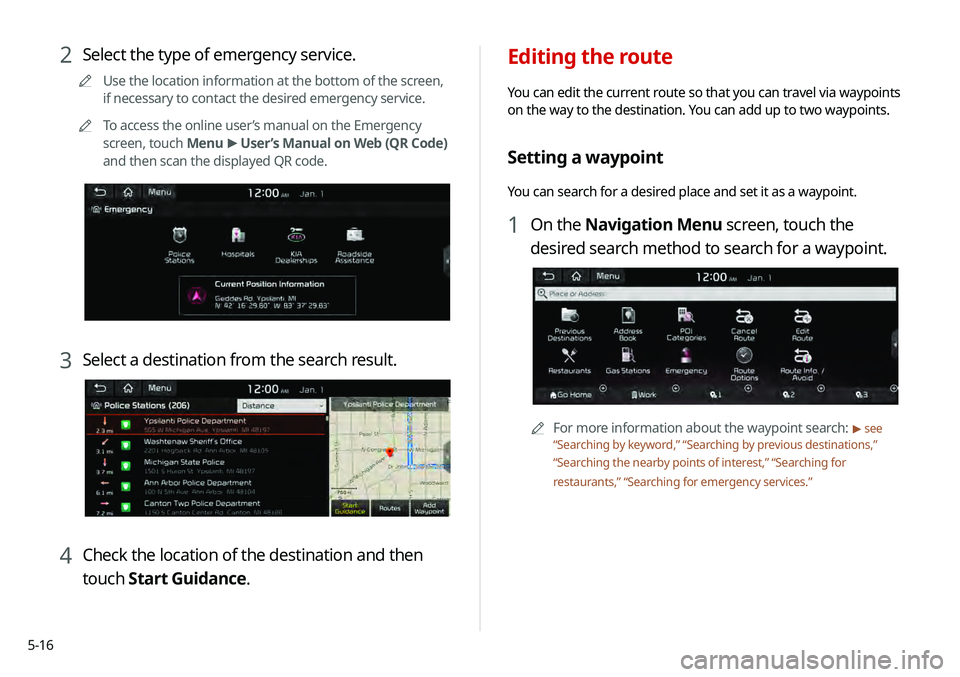
Editing the route
You can edit the current route so that you can travel via waypoints
on the way to the destination. You can add up to two waypoints.
Setting a waypoint
You can search for a desired place and set it as a waypoint.
1 On the Navigation Menu screen, touch the
desired search method to search for a waypoint.
0000
A
For more information about the waypoint search: > see
“ Searching by keyword,” “Searching by previous destinations,”
“ Searching the nearby points of interest ,” “Searching for
restaurants,” “Searching for emergency services.”
2 Select the type of emergency service.
0000
A
Use the location information at the bottom of the screen,
if necessary to contact the desired emergency service.
0000
A
To access the online user’s manual on the Emergency
screen, touch Menu >
User’s Manual on Web (QR Code)
and then scan the displayed QR code.
3 Select a destination from the search result.
4 Check the location of the destination and then
touch Start Guidance.
Page 93 of 219
5-17
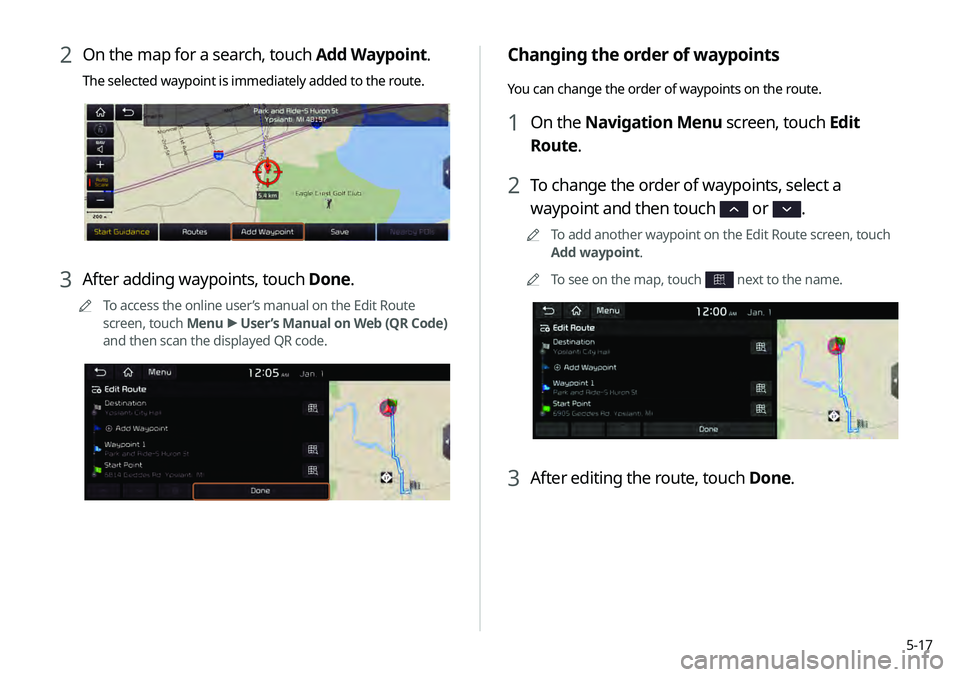
Changing the order of waypoints
You can change the order of waypoints on the route.
1 On the Navigation Menu screen, touch Edit
Route.
2 To change the order of waypoints, select a
waypoint and then touch
or .
0000
A
To add another waypoint on the Edit Route screen, touch
Add waypoint.
0000
A
To see on the map, touch
next to the name.
3 After editing the route, touch Done.
2 On the map for a search, touch Add Waypoint.
The selected waypoint is immediately added to the route.
3 After adding waypoints, touch Done.
0000
A
To access the online user’s manual on the Edit Route
screen, touch Menu >
User’s Manual on Web (QR Code)
and then scan the displayed QR code.
Page 94 of 219
5-18
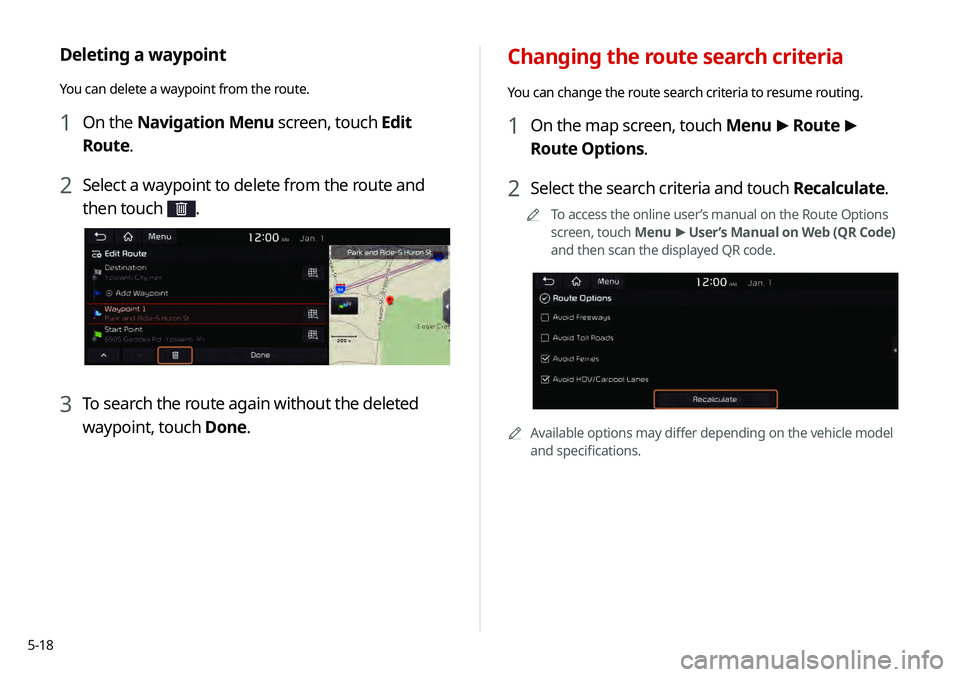
Changing the route search criteria
You can change the route search criteria to resume routing.
1 On the map screen, touch Menu >
Route >
Route Options.
2 Select the search criteria and touch Recalculate.
0000
A
To access the online user’s manual on the Route Options
screen, touch Menu >
User’s Manual on Web (QR Code)
and then scan the displayed QR code.
0000A Available options may differ depending on the vehicle model
and specifications.
Deleting a waypoint
You can delete a waypoint from the route.
1 On the Navigation Menu screen, touch Edit
Route.
2 Select a waypoint to delete from the route and
then touch
.
3 To search the route again without the deleted
waypoint, touch Done.