lights Lancia Delta 2014 Owner handbook (in English)
[x] Cancel search | Manufacturer: LANCIA, Model Year: 2014, Model line: Delta, Model: Lancia Delta 2014Pages: 291, PDF Size: 5.24 MB
Page 32 of 291

30KNOWING YOUR CAR
Selection of an option from main menu
without submenu:
– press the S ET button briefly to select the main menu s et-
ting you wis h to change;
– press
Õor Ô(with single presse s) to s elect the new s et-
ting;
– press the SET button briefl y to s tore the new s etting and
go back to the main menu option selected previous ly .
S electing an option from the main menu with a
submenu:
– briefly press the SET button to di splay the firs t submenu
option;
– press
Õor Ô(with single presse s) to s croll through all
the submenu option s;
– briefly press the S ET button to s elect the display ed sub-
menu option and to open the relevant settings menu;
– press
Õor Ôto select the new s etting for this s ubmenu
option;
– press the SET button briefl y to s tore the new s etting and
go back to the previou s s ubmenu option.
MENU ITEMS
Lig hting (Passeng er compartment lig ht adjustment)
This function is used to s et the brightne ss of the instru-
ment panel, s ound system control s and automatic climate
control system controls (for versions/markets where pro-
vided) to 8 level s.
Proceed as follows to adjus t the brightness:
– press the S ET button briefly to make the display flash
the previous ly s et level;
– press button
Õor Ôto adjus t the brightness level;
– briefly press the S ET button to go back to the menu
s creen or hold the button down to go back to the standard
s creen without s aving.
S peed warning (Speed limit)
This function allows the car speed limit to be s et (km/h
or mph) and the driver will be notified when it i s exceed-
ed (s ee “Warning lights on panel” section in chapter 1).
To set the des ired speed limit, proceed a s follows :
– press the S ET button briefly , the display will s how the
dedicated message;
– press the
Õor Ôbutton to s elect speed limit activation
(On) or deactivation (Off);
– when the function is activated (On), press the
Õor Ô
button to select the des ired speed limit and press SET to
confirm the choice.
001-154 Delta GB 2ed 27/01/14 10.46 Pagina 30
Page 33 of 291

KNOWING YOUR CAR31
1
IMPORTANT Setting is possible between 30 and 200
km/h, or 20 and 125 mph, according to the previou sly s et
unit. See the “Meas urement unit adjus tment (Measure-
ment unit)” paragraph de scribed below. The s etting will
increas e/decreas e by five units each time
Õ/Ôis pressed.
Hold down button
Õ/Ôto increas e/decrease the setting
rapidly . Complete the adjus tment with single presses of
the button when y ou approach the de sired value.
– briefly press the S ET button to go back to the menu
s creen or hold the button down to go back to the standard
s creen without s aving.
To cancel the s etting, proceed as follows:
– press the S ET button briefly to make the display flash
(On);
– press the
Ôbutton to make the di splay flash (Off);
– press the SET button briefl y to return to the menu s creen
or press the button for longer to return to the standard
s creen without memori sing. Headlig
ht sensor (automatic/dusk sensor
headlig hts sensitivity adjustment)
(for vers ions/markets , where provided)
This function is used to adjus t the dusk sens or sens itivi-
t y to three levels (level 1 = minimum, level 2 = medium,
level 3 = maximum); the higher the sens itivity , the lower
the amount of external light needed to switch the head-
lights on.
Proceed as follows to set:
– pre ss the S ET button briefly to make the display flash
the previous ly s et level;
– p
re ss
Õor Ôto make y our choice;
– briefly press SET to go back to the menu screen or hold
the button down to go back to the standard screen with-
out saving.
001-154 Delta GB 2ed 27/01/14 10.46 Pagina 31
Page 34 of 291

32KNOWING YOUR CAR
Cornering lights (activation/deactivation of
cornering lights - fog lights with cornerin g
function) (for versions/markets where provided)
This function activate s/deactivates the cornering lights.
To activate/deactivate (ON/OFF) the light s, proceed as
follows :
– press the S ET button briefly , the display will s how “On”
or “Off” fla shing depending on the previou s s etting;
– press
Õor Ôto make y our choice;
– briefly press the S ET button to go back to the menu
s creen or hold the button down to go back to the standard
s creen without s aving.
Trip B data/activation (Trip B enablement)
This function can be us ed to activate (On) or deactivate
(Off) the Trip B dis play (partial trip).
For further information see “Trip computer”.
Proceed as follows to switch the function on/off:
– press the S ET button briefly to make the display flash
On or Off depending on the previou s s etting;
– pre ss
Õor Ôto make y our choice;
– briefly press SET to go back to the menu screen or hold
the button down to go back to the standard screen with-
out saving. Time adjustment (
Clock adjustment)
This function enables the clock to be set through two sub-
menus : “Time” and “Format”.
To carry out the adjus tment, proceed as follows:
– briefly press the S ET button and two s ubmenus “Time”
and “Format” are dis played;
– press the
Õor Ôbutton to move between the two sub-
menus ;
– once y ou have s elected a s ub-menu, pre ss SET briefly ;
– when y ou select “Time”, briefly pressing SET makes the
hours flash on the di splay ;
– press
Õor Ôto adjus t the value;
– briefly press the S ET button and the minute s will flas h
on the dis play;
– press
Õor Ôto adjus t the value.
001-154 Delta GB 2ed 27/01/14 10.46 Pagina 32
Page 40 of 291
38KNOWING YOUR CAR
Daytime lig hts (D.R.L. - Day time Running Lights)
With this function is possible to turn the day time run-
ning lights on and off.
Proceed as follows to activate or deactivate thi s function:
– press the S ET button briefly to display a submenu;
– press the S ET button briefly to make the display flash
On or Off depending on the previou s s etting;
– pre ss
ÕorÔto make y our choice;
– press the S ET button briefly to return to the s ubmenu
s creen or hold the button down to return to the main menu
s creen without s aving;
– hold down the SET button again to return to the stan-
dard screen or to the main menu according to where you
are in the menu.
Menu exit
This is the las t function that clos es the cy cle of s ettings
lis ted in the menu s creen. Pressing the S ET button briefly
will return the dis play to the s tandard screen without stor-
ing. Press
Ôto return to the firs t menu option (Speed
Beep). DIS
PLAY READINGS
IMPORTANT Failure indications display ed are divided
into two categorie s: very s erious and less serious failures .
Ve r y s erious faults prompt a prolonged cy cle of signals.
Less s erious faults prompt a s horter cycle of signals.
The dis playing cy cle of both failure categories can be
s topped by pressing the button SET. The warning light (or
symbol) will stay on until the fault is eliminated.
Lugga ge compartment not properl y shut
(red)
This symbol (for vers ions/markets wher
e provid-
ed) switches on in the dis play when the luggage compart-
ment i s not properl y s hut. The di splay s hows the dedicat-
ed message.
R
Bonnet not properl y shut (red)
This symbol (for ver sions /markets where pro-
vided) switches on in the dis play when the bon-
net is not properl y s hut. The dis play will s how the
dedicated message.
S
001-154 Delta GB 2ed 27/01/14 10.46 Pagina 38
Page 47 of 291
KNOWING YOUR CAR45
1
fig. 14L0E0104m
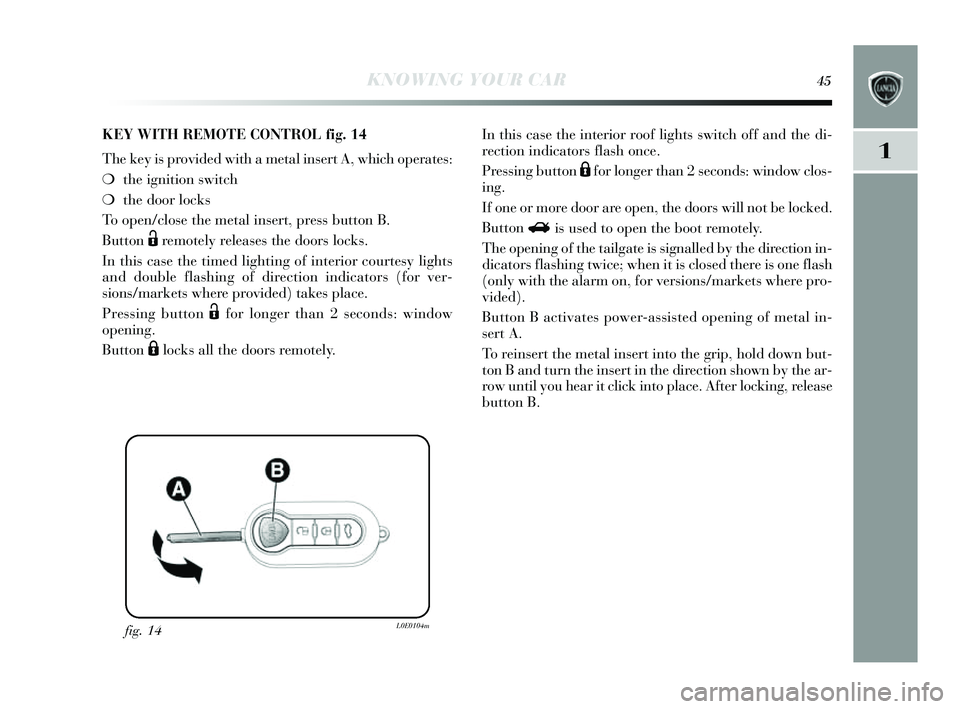
KEY WITH REMOTE CONTROL fig.14
The key is provided with a metal ins ert A, which operates:
❍ the ignition s witch
❍ the door lock s
To open/clo se the metal ins ert, press button B.
Button
Ëremotely releases the doors locks.
In this case the timed lighting of interior courtesy lights
and double flas hing of direction indicator s (for ver-
s ions /markets where provided) takes place.
Pressing button
Ëfor longer than 2 s econds: window
opening.
Button
Álocks all the door s remotely . In this
case the interior roof light s s witch off and the di-
rection indicators flash once.
Pressing button
Áfor longer than 2 seconds : window clo s-
ing.
If one or more door are open, the door s will not be locked.
Button
Ri s u sed to open the boot remotel y.
The opening of the tailgate i s s ignalled b y the direction in-
dicators flashing twice; when it is closed there is one flash
(only with the alarm on, for ver sions /markets where pro-
vided).
Button B activates power-assisted opening of metal in-
s ert A.
To reins ert the metal ins ert into the grip, hold down but-
ton B and turn the ins ert in the direction shown by the ar-
row until y ou hear it click into place. After locking, relea se
button B.
001-154 Delta GB 2ed 27/01/14 10.46 Pagina 45
Page 52 of 291
50KNOWING YOUR CAR
VOLUMETRIC/ANTI-LIFT PROTEC TION
To guarantee the correct operation of the protection sys-
tem it is advisable to s hut all the s ide windows and the sun
roof (for ver sions /markets where provided).
If necessary , the function can be turned off (if, for exam-
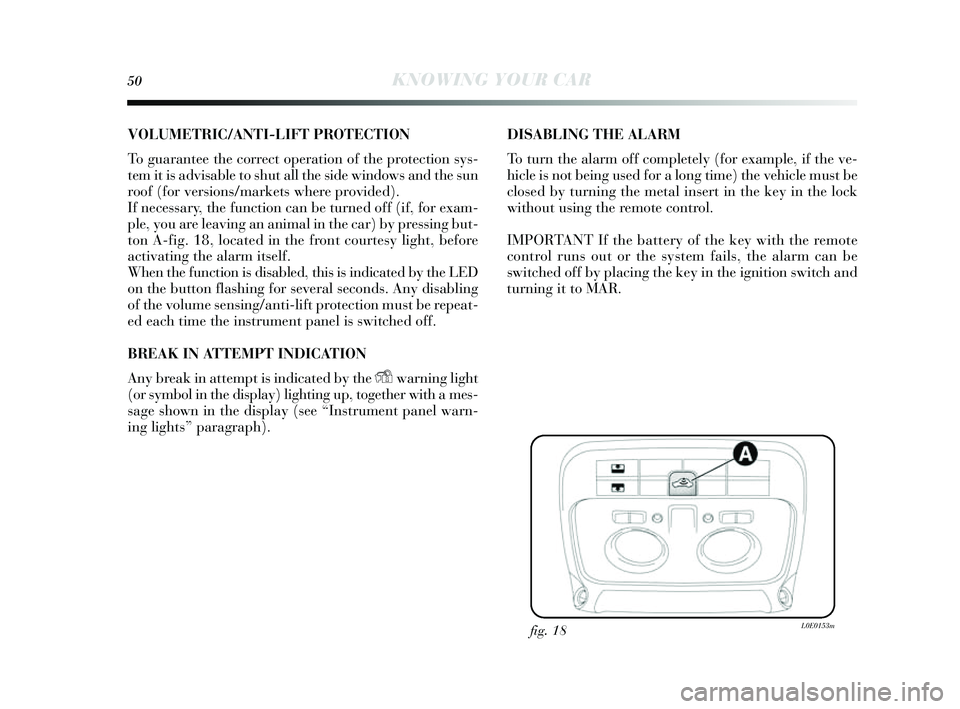
ple, you are leaving an animal in the car) b y pressing but-
ton A-fig. 18, located in the front courtesy light, before
activating the alarm it self.
When the function is disabled, this is indicated by the LED
on the button flas hing for several seconds . Any disabling
of the volume s ensing/anti-lift protection mu st be repeat-
ed each time the ins trument panel is switched off.
BREAK IN ATTEMPT INDI CAT I O N
Any break in attempt i s indicated by the
Ywarning light
(or symbol in the dis play) lighting up, together with a mes -
s age shown in the dis play (see “Ins trument panel warn-
ing lights ” paragraph). DIS
ABLING THE ALARM
To turn the alarm off completel y (for example, if the ve-
hicle is not being us ed for a long time) the vehicle mu st be
clos ed by turning the metal ins ert in the key in the lock
without us ing the remote control.
IMPORTANT If the batter y of the key with the remote
control runs out or the system fails , the alarm can be
s witched off by placing the key in the ignition s witch and
turning it to MAR.
fig. 18L0E0153m
001-154 Delta GB 2ed 27/01/14 10.46 Pagina 50
Page 69 of 291

KNOWING YOUR CAR67
1
Switching the climate control compressor on/off
I - fi g. 31
Press button
❄to switch on the climate control system
compressor.
C ompressor eng agement
❍ the LED on button
❄is lit up;
❍ symbol
❄is s hown on the di splay .
C ompressor off
❍ the LED on button
❄is off;
❍ symbol
❄off on the dis play;
❍ internal air recirculation i s excluded;
❍ the AQS function is disabled.
With the climate control compressor switched off, air can-
not be introduced into the pa ssenger compartment at a
lower temperature than the out side temperature; in thi s
cas e the
❄symbol on the di splay will flas h.
The deactivation of the climate control compressor is
memoris ed even after the engine ha s s topped. To turn the
climate control compre ssor back on, press button
❄again
or press AUTO: if y ou press AUTO, the other manual set-
tings will be cancelled.
EXTERNAL LIGHTS
The left stalk fig. 32 operate s mo st of the external light s.
The ignition key has to be in the MAR pos ition for the
exterior lights to come on. The in strument panel and the
various dashboard control s will come on with the exter-
nal light s.
DAYTIME RUNNING LIGHT S (DRL)
(for vers ions/markets where provided)
With the ignition key turned to MAR and the twi st switch
turned to pos ition Othe day time running lights are au-
tomatically activated; the other light s and interior light-
ing remain off. The automatic operation of the da ytime
running lights can be activated/deactivated via the di s-
play menu (s ee “Display” paragraph in this chapter). If
the day time running light s are deactivated, no light come s
on when the twis t switch is turned to O .
fig. 32L0E0019m
001-154 Delta GB 2ed 27/01/14 10.46 Pagina 67
Page 70 of 291

68KNOWING YOUR CAR
Activation
When the ring nut is turned to the AUTO pos ition the
external lights automatically s witch on depending on the
exterior brightne ss.
The headlight s can only be flashed with the s ensor on.
Deactivation
When the lights are switched off by the sensor, the dipped
beam headlight s and s ide lights are switched off and the
day lights are switched on (if activated).
The sens or is not capable of detecting the pre sence of fog
therefore, in thes e circumstances, the lights have to be
turned on manuall y.
FRONT FOG LIGHT S WITH
C ORNERING LIGHTS FUNCTION
When the dipped beam headlights are on and the speed is
below 40 km/h, if the s teering wheel rotation angle is large
or the direction indicators are on, a light (incorporated
in the fog light) will come on on the relevant side to im-
pr
ove vis ibility at night time. The function can be acti-
vated/deactivated via the di splay menu (s ee “Display”
paragraph in thi s chapter).
AUTOMATIC
HEADLIGHT S ENSOR (dusk sensor)
(for vers ions/markets , where provided)
It detects variation s in brightness outs ide the vehicle de-
pending on the light setting: the greater the sens itivity , the
less outs ide light needed to activate the exterior light s be-
ing turned on. The sens itivity of the dus k sens or may be
adjus ted, us ing the “S etup menu” on the ins trument pan-
el.
The daytime running lights are an alterna-
tive to the dipped beam headlights for driving
during the daytime in countries where it is
compulsory to have lights on during the day, and
they are also permitted in those countries where this
is not obligatory.
Daytime running lights cannot replace dipped beam
headlights when driving at night or through tunnels.
The use of daytime running lights is governed by
the highway code of the country in which you are
driving. Comply with the prescriptions.
001-154 Delta GB 2ed 27/01/14 10.46 Pagina 68
Page 71 of 291

KNOWING YOUR CAR69
1
DIPPED BEAM HEADLIGHTS/S IDE LIGHT S
With the ignition ke y turned to MAR, turn the twi st switch
to 2. If the dipped beam headlight s are activated, the
day time running light s are s witched off and the side lights ,
dipped beam headlights and number plate lights are
s witched on. The
3warning light on the ins trument pan-
el comes on. When the ignition ke y i s turned to STOP or
removed and the twi st switch is turned from
Oto 2, all
the side lights and number plate light s come on. The
3warning light in the in strument panel come s on.
Parking function
With the s ide lights on and the ignition ke y in the OFF po-
s ition or extracted, it i s possible to select the lighting on
the des ired side by operating the lights lever downwards
(left side) or upwards (right side). In this case the
3warning light in the in strument panel will go out.
MAIN BEAM HEADLIGHT S
With twis t switch in pos ition 2, pus h the s talk forward
toward the da shboard (s table position). The 1 warning
light on the ins trument panel will come on. They are
s witched off by pulling the lever towards the steering
wheel.
Flashing
You can flas h the beams pulling the s talk toward the s teer-
ing wheel (uns table position). The
1warning light on the
ins trument panel will come on. DIREC
TION INDIC ATORS fig. 33
Bring the s talk to the (s table) position:
– up (pos ition
a): activates the right direction indicator;
– down (pos ition
b): activates the left direction indicator.
The
¥or Îwarning light s tarts flashing on the ins trument
panel. The direction indicator s switch off automaticall y
when the s teering wheel is straightened.
fig. 33L0E0020m
001-154 Delta GB 2ed 27/01/14 10.46 Pagina 69
Page 72 of 291

70KNOWING YOUR CAR
LANE CHANGE FUNC TION
If you wis h to signal a lane change, place the left stalk in
the uns table pos ition for less than half a s econd. The di-
rection indicator on the side selected will flas h five times
and then s witch off automaticall y.
“FOLLOW ME HOME” DEVIC E
This allows the space surrounding the car to be lit up for
a certain period of time.
Activation
With the ignition key in the STOP pos ition or extracted,
pull the s talk towards the steering wheel and move it with-
in 2 minute s of the engine s witching off. Each time the
s talk is moved, the light s s tay on for an extra 30 seconds
up to a maximum of 210 seconds ; then the light s are
s witched off automaticall y. Each time the lever i s oper-
ated, the warning light 3 on the in strument panel come s
on and the dis play s hows how long the function will r
e-
main active. The warning light come s on when the s talk
i s pulled for the firs t time and stays lit until the function
s witches itself off automatically . Each time the stalk is ac-
tivated it increas es the time that the lights remain on.
Deactivation
Keep the s talk pulled towards the steering wheel for more
than two s econds.
WINDOW CLEANING
The right-hand lever fig. 34 control s winds creen wiper/
was her and rear window wiper/wa sher operation.
WINDSCREEN WIPER/WAS HER
This operates only with the ignition key turned to
MAR.
The right hand lever can take up five different po sitions :
A: winds creen wiper off.
B: intermittent operation.
With the s talk in pos ition B, turn ring nut F to s elect one
of four different s peeds for the intermittent operation
mode:
, = very slow intermittent operation
■= slow intermittent operation.
■■= normal intermittent operation
■■■= fas t intermittent operation.
C: continuou s s low operation;
D: continuou s fas t operation;
E: temporary fast operation (un stable pos ition).
001-154 Delta GB 2ed 27/01/14 10.46 Pagina 70