check oil Lancia Voyager 2014 Owner handbook (in English)
[x] Cancel search | Manufacturer: LANCIA, Model Year: 2014, Model line: Voyager, Model: Lancia Voyager 2014Pages: 364, PDF Size: 3.49 MB
Page 28 of 364
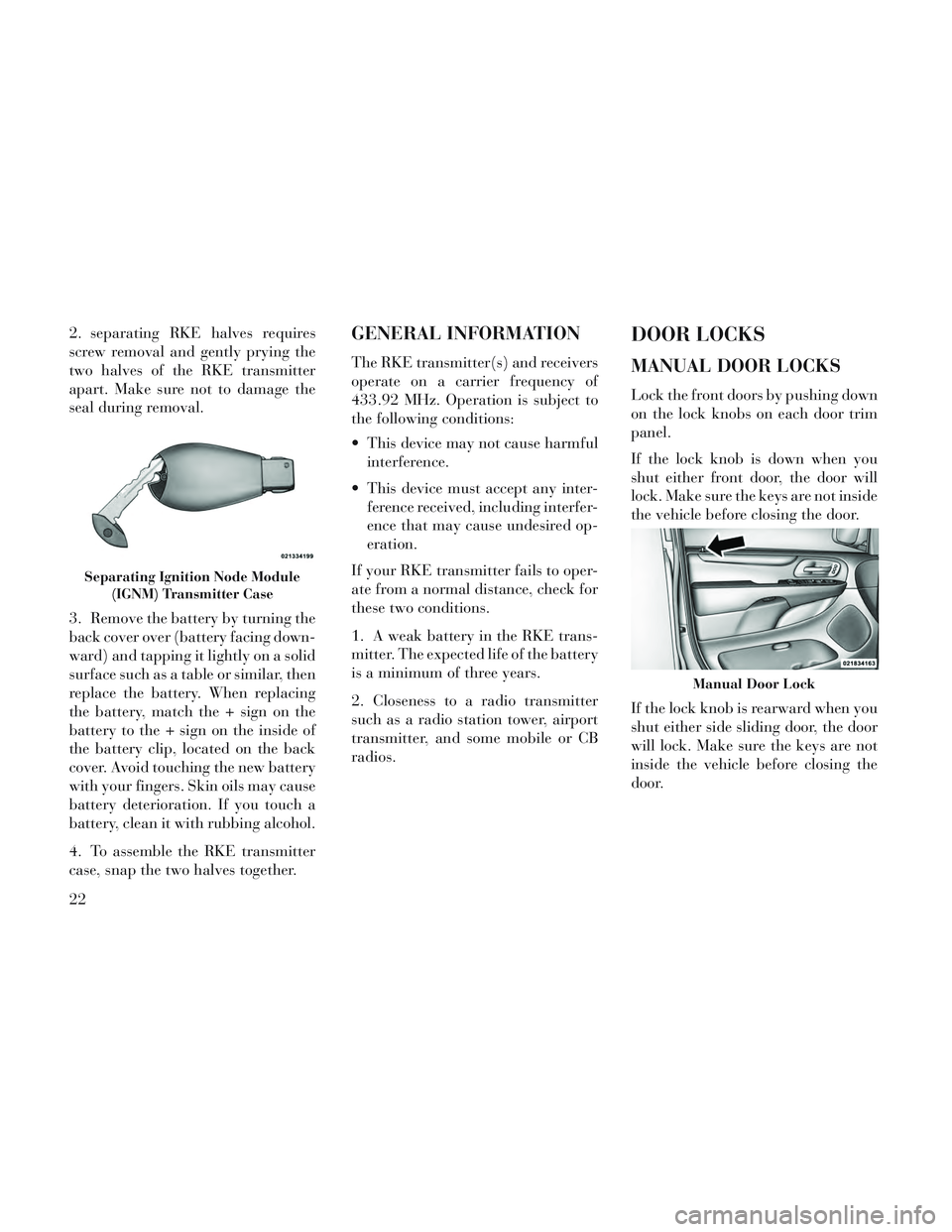
2. separating RKE halves requires
screw removal and gently prying the
two halves of the RKE transmitter
apart. Make sure not to damage the
seal during removal.
3. Remove the battery by turning the
back cover over (battery facing down-
ward) and tapping it lightly on a solid
surface such as a table or similar, then
replace the battery. When replacing
the battery, match the + sign on the
battery to the + sign on the inside of
the battery clip, located on the back
cover. Avoid touching the new battery
with your fingers. Skin oils may cause
battery deterioration. If you touch a
battery, clean it with rubbing alcohol.
4. To assemble the RKE transmitter
case, snap the two halves together.GENERAL INFORMATION
The RKE transmitter(s) and receivers
operate on a carrier frequency of
433.92 MHz. Operation is subject to
the following conditions:
This device may not cause harmfulinterference.
This device must accept any inter- ference received, including interfer-
ence that may cause undesired op-
eration.
If your RKE transmitter fails to oper-
ate from a normal distance, check for
these two conditions.
1. A weak battery in the RKE trans-
mitter. The expected life of the battery
is a minimum of three years.
2. Closeness to a radio transmitter
such as a radio station tower, airport
transmitter, and some mobile or CB
radios.
DOOR LOCKS
MANUAL DOOR LOCKS
Lock the front doors by pushing down
on the lock knobs on each door trim
panel.
If the lock knob is down when you
shut either front door, the door will
lock. Make sure the keys are not inside
the vehicle before closing the door.
If the lock knob is rearward when you
shut either side sliding door, the door
will lock. Make sure the keys are not
inside the vehicle before closing the
door.
Separating Ignition Node Module (IGNM) Transmitter Case
Manual Door Lock
22
Page 75 of 364
EXHAUST GAS
WARNING!
Exhaust gases can injure or kill.
They contain carbon monoxide
(CO), which is colorless and odor-
less. Breathing it can make you un-
conscious and can eventually poi-
son you. To avoid breathing (CO),
follow these safety tips:
Do not run the engine in a closedgarage or in confined areas any
longer than needed to move your
vehicle in or out of the area.
If you are required to drive with the trunk/liftgate/rear doors
open, make sure that all windows
are closed and the climate control
BLOWER switch is set at high
speed. DO NOT use the recircula-
tion mode.
If it is necessary to sit in a parked vehicle with the engine running,
adjust your heating or cooling
controls to force outside air into
the vehicle. Set the blower at high
speed. The best protection against carbon
monoxide entry into the vehicle body
is a properly maintained engine ex-
haust system.
Whenever a change is noticed in the
sound of the exhaust system, when
exhaust fumes can be detected inside
the vehicle, or when the underside or
rear of the vehicle is damaged, have a
competent mechanic inspect the com-
plete exhaust system and adjacent
body areas for broken, damaged, de-
teriorated, or mispositioned parts.
Open seams or loose connections
could permit exhaust fumes to seep
into the passenger compartment. In
addition, inspect the exhaust system
each time the vehicle is raised for lu-
brication or oil change. Replace as
required.
SAFETY CHECKS YOU
SHOULD MAKE INSIDE
THE VEHICLE
Seat Belts
Inspect the belt system periodically,
checking for cuts, frays, and loose parts. Damaged parts must be re-
placed immediately. Do not disas-
semble or modify the system.
Front seat belt assemblies must be
replaced after a collision. Rear seat
belt assemblies must be replaced after
a collision if they have been damaged
(i.e., bent retractor, torn webbing,
etc.). If there is any question regard-
ing belt or retractor condition, replace
the belt.
Air Bag Warning Light
The light should come on
and remain on for four to
eight seconds as a bulb
check when the ignition
switch is first turned ON. If the light is
not lit during starting, see your autho-
rized dealer. If the light stays on,
flickers, or comes on while driving,
have the system checked by an autho-
rized dealer.
Defroster
Check operation by selecting the de-
frost mode and place the blower con-
trol on high speed. You should be able
69
Page 77 of 364
PERIODIC SAFETY
CHECKS YOU SHOULD
MAKE OUTSIDE THE
VEHICLE
Tires
Examine tires for excessive tread wear
and uneven wear patterns. Check for
stones, nails, glass, or other objects
lodged in the tread or sidewall. In-
spect the tread for cuts and cracks.
Inspect sidewalls for cuts, cracks and
bulges. Check the wheel nuts for
tightness. Check the tires (including
spare) for proper cold inflation pres-
sure.
Lights
Have someone observe the operation
of brake lights and exterior lights
while you work the controls. Check
turn signal and high beam indicator
lights on the instrument panel.Door Latches
Check for positive closing, latching,
and locking.
Fluid Leaks
Check area under vehicle after over-
night parking for fuel, engine coolant,
oil, or other fluid leaks. Also, if gaso-
line fumes are detected or if fuel,
power steering fluid (if equipped), or
brake fluid leaks are suspected, the
cause should be located and corrected
immediately.
71
Page 179 of 364
CHAngE OIL
Your vehicle is equipped with an en-
gine oil change indicator system. The
CHAngE OILmessage will flash in
the instrument cluster odometer for
approximately 12 seconds, after a
single chime has sounded, to indicate
the next scheduled oil change inter-
val. The engine oil change indicator
system is duty cycle-based, which
means the engine oil change interval
may fluctuate dependent upon your
personal driving style.
Unless reset, this message will con-
tinue to display each time you turn the
ignition switch to the ON/RUN posi-
tion. To turn off the message tempo-
rarily, press and release the STEP
button on the steering wheel. To reset
the oil change indicator system (after
performing the scheduled mainte-
nance), perform the following steps.
1. Turn the ignition switch to the ON/
RUN position (do not start the en-
gine).
2. Fully depress the accelerator pedal,
slowly, three times within 10 seconds. 3. Turn the ignition switch to the
OFF/LOCK position.
NOTE: If the indicator message
illuminates when you start the en-
gine, the oil change indicator sys-
tem did not reset. If necessary, re-
peat these steps.
Electronic Vehicle Information
Center (EVIC) Display (for versions/
markets, where provided)
The Electronic Vehicle Information
Center (EVIC) features a driver-
interactive display that is located in
the instrument cluster. For further in-
formation, refer to “Electronic Ve-
hicle Information Center (EVIC)”.
7. Anti-Lock Brake (ABS) Light
This light monitors the
Anti-Lock Brake System
(ABS). The light will turn
on when the ignition switch
is turned to the ON/RUN position and
may stay on for as long as four sec-
onds.
If the ABS light remains on or turns on
while driving, it indicates that the Anti-Lock portion of the brake sys-
tem is not functioning and that service
is required. However, the conven-
tional brake system will continue to
operate normally if the BRAKE warn-
ing light is not on.
If the ABS light is on, the brake sys-
tem should be serviced as soon as
possible to restore the benefits of
Anti-Lock brakes. If the ABS light
does not turn on when the ignition
switch is turned to the ON/RUN posi-
tion, have the light inspected by an
authorized dealer.
8. Tire Pressure Monitoring Tell-
tale Light (for versions/markets,
where provided)
Each tire, including the
spare (if provided), should
be checked monthly when
cold and inflated to the in-
flation pressure recommended by the
vehicle manufacturer on the vehicle
placard or tire inflation pressure la-
bel.
As an added safety feature, your ve-
hicle has been equipped with a Tire
Pressure Monitoring System (TPMS)
173
Page 186 of 364
Unstored Messages
This message type is displayed indefi-
nitely or until the condition that acti-
vated the message is cleared. Ex-
amples of this message type are "Turn
Signal On" (if a turn signal is left on)
and "Lights On" (if driver leaves the
vehicle).
Unstored Messages Until RUN
This message type is displayed until
the ignition is in the RUN state. Ex-
ample of this message type is "Press
Brake Pedal and Push Button to
Start".
Five Second Unstored Messages
When the appropriate conditions oc-
cur, this type of message takes control
of the main display area for five sec-
onds and then returns to the previous
screen. Examples of this message type
are "Memory System Unavailable -
Not in Park" and "Automatic High
Beams On".
The Reconfigurable Telltales section
is divided into the white telltales area
on the right, amber telltales in the
middle, and red telltales on the left.When the appropriate conditions ex-
ist, the EVIC displays the following
messages:
Key in ignition
Ignition or Accessory On
Wrong Key
Damaged Key
Key not programmed
Vehicle Not in Park
Key Left Vehicle
Key Not Detected
Press Brake Pedal and Push Button
to Start
Liftgate Ajar (chime will sound when vehicle starts moving)
Low Tire Pressure
Service TPM System (refer to “Tire Pressure Monitoring System” in
“Starting And Operating”)
Premium system Tire Pressure dis- play screen With Low Tire(s) “In-
flate Tire to XX” Turn Signal On
RKE Battery Low
Service Keyless System
LOW WASHER FLUID
Oil Change Required
Check Gascap
Left Front Turn Signal Lamp Out
Left Rear Turn Signal Lamp Out
Right Front Turn Signal Lamp Out
Right Rear Turn Signal Lamp Out
Park Assist Disabled
Service Park Assist System
Personal Settings Not Available —
Vehicle Not in Park
Blind Spot System Off — This mes- sage is displayed when the ignition
is turned to ON to indicate the Blind
Spot System has been turned off.
Blind Spot System Not Available — This message is displayed to indi-
cate the Blind Spot Monitor (BSM)
system is temporarily unavailable
180
Page 189 of 364
Door AjarThis light will turn on to
indicate that one or more
doors may be ajar.
Oil Pressure Warning Light This light indicates low engine
oil pressure. The light should
turn on momentarily when the engine
is started. If the light turns on while
driving, stop the vehicle and shut off
the engine as soon as possible. A
chime will sound when this light turns
on.
Do not operate the vehicle until the
cause is corrected. This light does not
show how much oil is in the engine.
The engine oil level must be checked
under the hood.
Charging System Light
This light shows the status of
the electrical charging system.
The light should come on when the
ignition switch is first turned ON and
remain on briefly as a bulb check. If
the light stays on or comes on while
driving, turn off some of the vehicle's non-essential electrical devices or in-
crease engine speed (if at idle). If the
charging system light remains on, it
means that the vehicle is experiencing
a problem with the charging system.
Obtain SERVICE IMMEDIATELY.
See an authorized dealer.
If jump starting is required, refer to
“Jump Starting Procedures” in “What
To Do In Emergencies”.
Electronic Throttle Control
(ETC) Light
This light informs you of a
problem with the Electronic
Throttle Control (ETC) sys-
tem. The light will come on
when the ignition is first turned ON
and remain on briefly as a bulb check.
If the light does not come on during
starting, have the system checked by
an authorized dealer.
If a problem is detected, the light will
come on while the engine is running.
Cycle the ignition key when the ve-
hicle has completely stopped and the
shift lever is placed in the PARK posi-
tion. The light should turn off. If the light remains lit with the engine
running, your vehicle will usually be
drivable. However, see an authorized
dealer for service as soon as possible.
If the light is flashing when the engine
is running, immediate service is re-
quired. You may experience reduced
performance, an elevated/rough idle
or engine stall and your vehicle may
require towing.
Engine Temperature Warning
Light
This light warns of an over-
heated engine condition. As
temperatures rise and the gauge ap-
proaches H,this indicator will illumi-
nate and a single chime will sound
after reaching a set threshold. Further
overheating will cause the tempera-
ture gauge to pass H,a continuous
chime will occur until the engine is
allowed to cool.
If the light turns on while driving,
safely pull over and stop the vehicle. If
the A/C system is on, turn it off. Also,
shift the transmission into NEUTRAL
183
Page 192 of 364
TIRE BAR
Press and release the UP or DOWN
button until ”Tire BAR” displays
highlighted in the EVIC. Press the
SELECT button to view a graphic of
the vehicle with a tire pressure value
at each corner of the graphic.
VEHICLE INFO
(CUSTOMER
INFORMATION FEATURES)
Press and release the UP or DOWN
button until “Vehicle Info” displays in
the EVIC and press the SELECT but-
ton. Press the UP and DOWN button
to scroll through the selections below:
Coolant Temp
Displays the actual coolant tempera-
ture.
Oil Pressure
Displays the actual oil pressure.
Engine Hours
Displays the number of hours of en-
gine operation.
MESSAGES
Press and release the UP or DOWN
button until “Messages: XX” displays
highlighted in the EVIC. If there is
more than one message, pressing the
SELECT button will display a stored
warning message. Press and release
the UP and DOWN buttons if there is
more than one message to step
through the remaining stored mes-
sages. If there are no message, press-
ing the SELECT button will do noth-
ing.
UNITS
Press and release the UP or DOWN
button until “Units” displays high-
lighted in the EVIC and press the
SELECT button. The EVIC, odom-
eter, and navigation system (for
versions/markets, where provided)
can be changed between English and
Metric units of measure. To make
your selection, scroll up or down until
the preferred setting is highlighted,
then press and release the SELECT
button until a check-mark appears
next to the setting, showing that the
setting has been selected.
KEYLESS ENTER-N-GO™
DISPLAY (for
versions/markets, where
provided)
When the ENGINE START/STOP
button is pressed to change ignition
switch position, current ignition sta-
tus will be displayed in the lower right
corner of the EVIC display to the right
of the odometer value.
Refer to “Keyless Enter-N-Go™” in
“Starting And Operating” for more
information.
COMPASS /
TEMPERATURE DISPLAY
(for versions/markets,
where provided)
The compass readings indicate the di-
rection the vehicle is facing. The
EVIC will display one of eight com-
pass readings and the outside tem-
perature.
NOTE: The system will display
the last known outside tempera-
ture when starting the vehicle and
186
Page 293 of 364

WHEEL AND TIRE
TORQUE
SPECIFICATIONS
Proper lug nut/bolt torque is very im-
portant to ensure that the wheel is
properly mounted to the vehicle. Any
time a wheel has been removed and
reinstalled on the vehicle the lug nuts/
bolts should be torqued using a prop-
erly calibrated torque wrench.
TORQUE SPECIFICATIONS
Lug Nut/Bolt
Torque **Lug
Nut/Bolt
Size Lug
Nut/Bolt Socket Size
135 N·m M12 x
1.25 19 mm
**Use only LANCIA recommended
lug nuts/bolts and clean or remove
any dirt or oil before tightening.
Inspect the wheel mounting surface
prior to mounting the tire and remove
any corrosion or loose particles. Tighten the lug nuts/bolts in a star
pattern until each nut/bolt has been
tightened twice.
After 40 km check the lug nut/bolt
torque to be sure that all the lug nuts/
bolts are properly seated against the
wheel.
WARNING!
To avoid the risk of forcing the ve-
hicle off the jack, do not tighten the
lug nuts fully until the vehicle has
been lowered. Failure to follow this
warning may result in personal in-
jury.
JACKING AND TIRE
CHANGING
WARNING!
Do not attempt to change a tire on
the side of the vehicle close to
moving traffic. Pull far enough
off the road to avoid the danger of
being hit when operating the jack
or changing the wheel.
(Continued)
Wheel Mounting Surface
Torque Patterns
287
Page 314 of 364
CAUTION!(Continued)
Car maintenance should be doneat a LANCIA Dealership. For
routine and minor maintenance
operations you wish to carry out
yourself, we do recommend you
have the proper equipment,
genuine LANCIA spare parts and
the necessary fluids; do not how-
ever carry out these operations if
you have no experience.
Your vehicle has been built with improved fluids that protect the
performance and durability of
your vehicle and also allow ex-
tended maintenance intervals. Do
not use chemical flushes in these
components as the chemicals can
damage your engine, transmis-
sion, power steering or air condi-
tioning. Such damage is not cov-
ered by the New Vehicle Limited
Warranty. If a flush is needed be-
cause of component malfunction,
use only the specified fluid for the
flushing procedure.
ENGINE OIL
Checking Oil Level
To assure proper engine lubrication,
the engine oil must be maintained at
the correct level. Check the oil level at
regular intervals, such as every fuel
stop.
The best time to check the engine oil
level is about five minutes after a fully
warmed engine is shut off.
Checking the oil while the vehicle is
on level ground will improve the ac-
curacy of the oil level readings. Main-
tain the oil level between the MIN and
MAX markings on the dipstick. Add-
ing one quart of oil when the reading
is at the MIN mark will result in a
MAX reading on these engines.
CAUTION!
Overfilling or underfilling will
cause oil aeration or loss of oil pres-
sure. This could damage your en-
gine.
CAUTION!
Car maintenance should be done at
a LANCIA Dealership. For routine
and minor maintenance operations
you wish to carry out yourself, we
do recommend you have the proper
equipment, genuine LANCIA spare
parts and the necessary fluids; do
not however carry out these opera-
tions if you have no experience.
Change Engine Oil – All Engines
The oil change indicator system will
remind you that it is time to take your
vehicle in for scheduled maintenance.
Refer to “Maintenance Schedule” for
further information on this system.
Engine Oil Selection – 3.6L
Engine
SAE Grade 5W-20 SELENIA K
POWER fully synthetic engine oil that
meets FIAT Qualification 9.55535-
CR1 API SN, ILSAC GF-5 or equiva-
lent.
The engine oil filler cap also shows the
recommended engine oil viscosity for
308
Page 320 of 364
grease should be removed. Particular
attention should also be given to hood
latching components to ensure proper
function. When performing other un-
derhood services, the hood latch, re-
lease mechanism and safety catch
should be cleaned and lubricated.
The external lock cylinders should be
lubricated twice a year, preferably in
the Fall and Spring. Apply a small
amount of a high quality lubricant
directly into the lock cylinder.
CAUTION!
Car maintenance should be done at
a LANCIA Dealership. For routine
and minor maintenance operations
you wish to carry out yourself, we
do recommend you have the proper
equipment, genuine LANCIA spare
parts and the necessary fluids; do
not however carry out these opera-
tions if you have no experience.
WINDSHIELD WIPER
BLADES
Clean the rubber edges of the wiper
blades and the windshield periodi-
cally with a sponge or soft cloth and a
mild nonabrasive cleaner. This will
remove accumulations of salt or road
film.
Operation of the wipers on dry glass
for long periods may cause deteriora-
tion of the wiper blades. Always use
washer fluid when using the wipers to
remove salt or dirt from a dry wind-
shield.
Avoid using the wiper blades to re-
move frost or ice from the windshield.
Keep the blade rubber out of contact
with petroleum products such as en-
gine oil, gasoline, etc.
NOTE: Life expectancy of wiper
blades varies depending on geo-
graphical area and frequency of
use. Examples of poor blade per-
formance include chattering,
marks, water lines, and wet spots.If any of these conditions are pres-
ent, clean the wiper blades or re-
place as necessary.
Adding Washer Fluid
The windshield, rear window, and
headlamp washers share a common
fluid reservoir. It is located in the en-
gine compartment and should be
checked at regular intervals. Fill the
reservoir with windshield washer sol-
vent (not radiator antifreeze) and op-
erate the system for a few seconds to
flush out any residual water.
When refilling the washer fluid reser-
voir, apply some washer fluid to a
cloth or towel and wipe the wiper
blades clean. This will help blade per-
formance.
To prevent freeze-up of your wind-
shield washer system in cold weather,
select a solution or mixture that meets
or exceeds the temperature range of
your climate. This rating information
can be found on most washer fluid
containers.
314