reset LAND ROVER FRELANDER 2 2006 User Guide
[x] Cancel search | Manufacturer: LAND ROVER, Model Year: 2006, Model line: FRELANDER 2, Model: LAND ROVER FRELANDER 2 2006Pages: 3229, PDF Size: 78.5 MB
Page 1795 of 3229
The current vehicle operat ing mode, s hown in parenthes is above, i s dis played in the odomet er for 5 s econds when t hevehi cl e first ent ers power mode 6.
• NOTE: 'Nor' is only di s pl ayed in t he Odometer when t he vehicle operat ing mode is changed t o normal from any of theother vehi cle operat ing modes . Under al l ot her condit ions , 'Nor' is not di spl ayed.
The vehi cl e operat ing mode can be changed us i ng the Land Rover approved di agnos ti c sys t em.
Gear Position
The gear pos it ion i ndicat or s hows the current aut omati c t ransmis s ion s elector l ever posi ti on. During normal operat ion thedis play wi ll s how P (park), R (revers e), N (neutral) and D (drive). W hen the t rans mis s ion is operat ed in 'CommandShi ft ™'mode, the odomet er di spl ays the current ly sel ect ed manual gear; 1, 2, 3, 4, 5 or 6.
In the event of eit her a CAN bus fai lure, or if t he TCM det ect s a t rans mi ss i on overheat s it uati on, t he odometer wi ll dis playt he let ter 'E' in the s ame area of t he dis play as t he 'CommandShift™' s elected gear informat ion.
Supplemental Restrain System Warning Indicator
If the i nst rument clus ter det ect s the Supplement al Res t raint Sys tem (SRS) warni ng indicator has fai led, t he mes sage 'SrS'wil l be dis played in the odomet er and a DTC s tored. The DTC can be ret rieved from the ins trument cl us t er us i ng the LandRover approved diagnost ic sys tem.
Service Interval Indicator
The Service Interval Indi cat or (SII) i nforms t he driver when t he next vehicle servi ce is due. The ins t rument clus ter monit orst he dis tance t he vehi cl e has travel ed and t he ti me el aps ed s ince t he las t s ervice.
If vehicle dis tance is the t rigger for the SII, 'SERVICE' will be di s pl ayed in t he odometer accompanied by a dis tancequal ifier (ei ther 'MILES' or 'KM' dependi ng on t he ins trument cl ust er s pecificati on). A di st ance counter wi ll als o be di s pl ayedin the t op Ri ght Hand (RH) corner of t he odometer. If t he point at which a servi ce is requi red is pas sed, t he count er wi lldis play a negat ive value. W hen acti vat ed, t he SII is di spl ayed for 5 s econds when t he vehi cl e enters power mode 6.
If ti me i s the trigger for the SII, 'SERVICE' wil l be di s pl ayed in t he odometer accompanied by a clock symbol . A count er willals o be di spl ayed i n t he t op RH corner of the odomet er. If t he point at which a s ervice is required is pas s ed, t he count erwil l dis play a negati ve val ue. Agai n, when act ivated t he SII is dis played for 5 s econds when t he vehi cl e enters power mode6.
If bot h t he dis tance and t ime triggers are acti vat ed, t he SII wil l di s pl ay the di s tance informat ion for 5 s econds, foll owedby t he ti me i nformati on for 5 s econds .
W hen a service has been carri ed out , t he SII wi ll need t o be re-s et. This can be done us ing t he Land Rover approveddiagnost ic s ys tem or foll owing a manual re-s et procedure. The manual re-s et mode is ent ered by carrying out the foll owingrout ine:
Pres s and hold the t ri p res et butt on wi th the vehicle st ati onary and in a power mode les s t han 6.W hi le holdi ng the trip res et but ton, enter t he vehi cl e int o power mode 6.Releas e the trip res et but ton wit hi n 10 s econds of entering power mode 6.
If the manual re-set mode has been s ucces s full y entered 'dISt ' or 'DATE' wi ll be di spl ayed i n t he odomet er, dependi ng onwhich t ri gger has been acti vat ed.
To clear the 'dISt ' trigger pres s, and hold the t rip reset but ton for more than 5 s econds wit hi n 10 s econds of entering t hemanual re-s et mode. If s ucces s ful, 'RESET' wil l be dis played in the odometer for 5 seconds. If t he dat e t ri gger has notbeen act ivated 'END' wil l t hen be dis played i n t he odomet er.
• NOTE: The dis t ance t ri gger wi ll not res et if t he dis t ance t he vehi cle has t raveled i s les s t han 20% of t he next s ervi ceint erval val ue.
If the dat e trigger has been act ivated, 'DATE' wil l be dis played in t he odometer. To clear the t ri gger, pres s and hold t het rip res et but t on for more t han 5 s econds wit hin 10 s econds of 'DATE' being di s pl ayed. If succes s ful , 'RESET' wi ll bedis played wit hin the odomet er for 5 s econds fol lowed by 'END'. The odomet er wil l now exit re-s et mode.
AMBIENT AIR TEMPERATURE
The ins t rument clus ter can dis play t he ambient air t emperature readi ng in ei ther degrees Cels ius or Fahrenhei t. Theambient air t emperat ure s ignal ori gi nat es i n the ambient air t emperature s ens or. The s ens or i s a Negati ve TemperatureCoefficient (NTC) t hermi st or, and i s mounted i n t he LH door mirror. A t emperature value i s cal cul ated by t he ECM andbroadcas t over the hi gh speed CAN bus to t he i ns t rument clus ter.
If the t emperat ure value fall s bel ow 4ºC (39ºF) t he mes sage center wi ll flas h the low ambi ent ai r temperat ure icon 5t imes . Thi s i s accompanied by a chime from the i nst rument clus t er s ounder. The low ambient air t emperature icon wi ll berepeated if t he ambient air t emperature ri s es above 6ºC (43ºF) t hen drops below 4ºC (39ºF) again or a new ignit ion cycleis st art ed.
Page 1819 of 3229
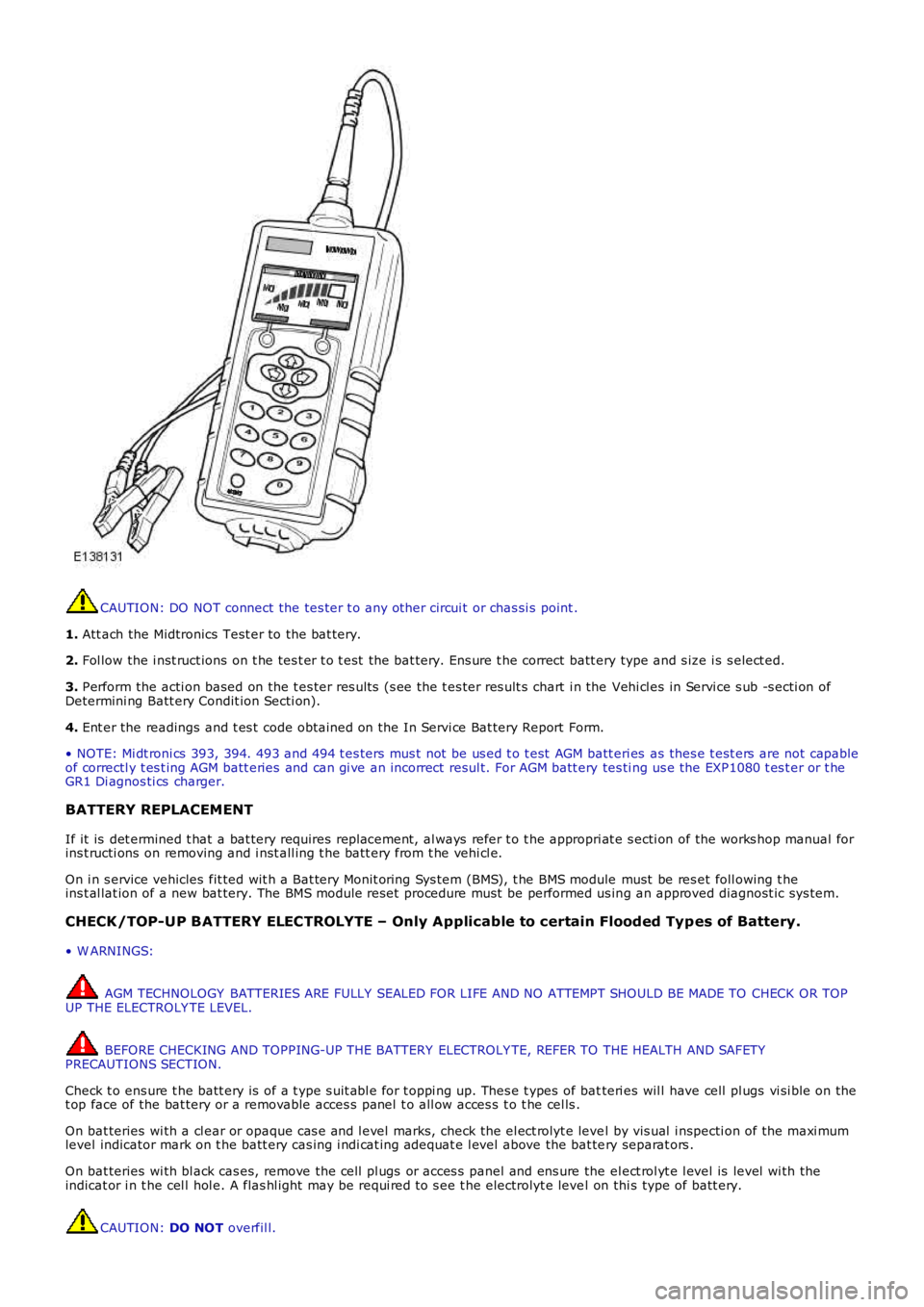
CAUTION: DO NOT connect the tes ter t o any other circui t or chas si s point .
1. Att ach the Midtronics Test er to the bat tery.
2. Fol low the i nst ruct ions on t he tes t er t o t est the bat tery. Ens ure t he correct batt ery type and s ize i s s elect ed.
3. Perform the acti on based on the t es ter res ult s (s ee the t es ter res ult s chart i n the Vehi cl es in Servi ce s ub -s ecti on ofDetermini ng Batt ery Condit ion Secti on).
4. Ent er the readings and t es t code obtained on the In Servi ce Bat tery Report Form.
• NOTE: Mi dt roni cs 393, 394. 493 and 494 t es ters mus t not be us ed t o t est AGM batt eri es as thes e t est ers are not capableof correctl y t es t ing AGM batt eries and can gi ve an incorrect resul t. For AGM batt ery tes ti ng us e the EXP1080 t es t er or t heGR1 Di agnos ti cs charger.
BATTERY REPLACEMENT
If it is det ermined t hat a bat tery requires repl acement, al ways refer t o t he appropri at e s ecti on of the works hop manual forins t ructi ons on removing and i nst all ing t he batt ery from t he vehi cl e.
On i n s ervice vehicles fit ted wit h a Bat tery Monit oring Sys tem (BMS), t he BMS module must be res et foll owing t heins t al lat ion of a new bat tery. The BMS module reset procedure must be performed us ing an approved diagnost ic sys tem.
CHECK/TOP-UP BATTERY ELECTROLYTE – Only Applicable to certain Flooded Typ es of Battery.
• W ARNINGS:
AGM TECHNOLOGY BATTERIES ARE FULLY SEALED FOR LIFE AND NO ATTEMPT SHOULD BE MADE TO CHECK OR TOPUP THE ELECTROLY TE LEVEL.
BEFORE CHECKING AND TOPPING-UP THE BATTERY ELECTROLY TE, REFER TO THE HEALTH AND SAFETYPRECAUTIONS SECTION.
Check t o ens ure t he batt ery is of a t ype s uit abl e for t oppi ng up. Thes e t ypes of batteri es wil l have cell pl ugs vi si ble on thet op face of the bat tery or a removable acces s panel t o all ow acces s t o t he cel ls .
On bat teries wi th a cl ear or opaque cas e and l evel marks, check the el ect rolyt e level by vis ual i nspecti on of the maxi mumlevel indicator mark on t he batt ery cas ing i ndi cat ing adequat e l evel above the bat tery separat ors .
On bat teries wi th bl ack cas es, remove the cell pl ugs or acces s panel and ens ure the el ect rol yt e l evel is level wi th theindicat or i n t he cel l hol e. A flas hl ight may be requi red to s ee t he electrolyt e level on thi s type of batt ery.
CAUTION: DO NOT overfil l.
Page 1827 of 3229
Publi s hed: 11-May-2011
Battery, Mounting and Cables -
General SpecificationItemSpecification
Battery - All models:
TypeExide H7Capaci ty80Ah/700CCA
Res erve capacit y125 minutes
Battery Disconnect/C onnect
CAUTION: The vehicle s t atus and batt ery condit ion mus t be es t abl is hed before att empti ng bat t erydis connect/connect . Reference mus t be t hen made t o t he fol lowing table to es t abl is h t he rel evant procedure t o befol lowed.
• NOTE: Vehicles fit ted wit h a fuel fired boos t er heat er will requi re a 5 mi nute wait before tel es t art funct ion wi ll operate.Cycl e t he ignit ion off->on->off. W ai t 5 mi nutes t o all ow fuel fired boos t er heat er to s t ore vehicle confi gurati onparamet ers .
Vehicle statusBattery chargedBattery discharged
ProcedureProcedure
Engine runni ng1Vehicle powered down, l ocked and alarmed23
Vehicle unl ocked45
Procedure 1
Disconnect batteryConnect battery1. Apply parki ng brake oralt ernat ively, chock wheels1. Ens ure that all el ect ri cal loads are s wit ched O FF
2. Swit ch off i gni ti on andremove the remote cont rol.2. Connect bat t ery l eads - GROUND lead l ast
3. W ai t 2 mi nut es for enginemanagement sys tem t o 'powerdown'
3. Swit ch on ignit ion
4. Open t he hood4. Reset radi o s tat ion preset but tons .
5. Dis connect batt ery - GROUNDl ead firs t5. Reset clock
6. Reset elect ric window one-t ouch facili ty. Power window up t o hard s top, rel eas es wit ch, reapply and hol d for 1 s econd (relay i n door wil l cl ick). Lower window t o s top,reapply and hold for one s econd. One t ouch s hould now work
Procedure 2
Disconnect batteryConnect battery
1. Unlock t he vehi cl e and dis armt he alarm us ing t he remotecont rol
1. Ensure t hat al l el ect ri cal l oads are s wit ched OFF
2. Apply parki ng brake oralt ernat ively, chock wheels2. Connect batt ery l eads - GROUND l ead las t
3. W ai t 2 mi nut es for enginemanagement sys tem t o 'powerdown'
3. Swit ch on i gni ti on
4. Open t he hood4. Res et radio s t ati on pres et but tons .
5. Dis connect batt ery - GROUNDl ead firs t5. Res et cl ock
6. Res et el ect ri c window one-touch facil it y. Power window up to hard s top, rel eases wit ch, reappl y and hold for 1 s econd (rel ay in door wil l cl ick). Lower window t o s top,reapply and hol d for one s econd. One t ouch should now work
• NOTE: 1. Disconnect battery - If the remot e cont rol is not funct ioning, it will be necess ary to manual ly unlock thevehi cl e us ing t he key.
Procedure 3
Disconnect batteryConnect battery1. Unlock t he vehi cl e from the LH frontdoor us i ng the key1. Ens ure t hat al l electrical l oads are s wi tched OFF
2. Enter t he vehi cl e, and dock t heremote control to si lence the al arm.2. Connect batt ery leads - GROUND l ead las t
3. Remove t he remot e cont rol and wai t2 minutes for engi ne managements yst em to 'power down'
3. Swi tch on i gni ti on
4. Open t he hood4. Res et radio st ati on pres et but t ons .
5. Dis connect batt ery - GROUND leadfirst5. Res et cl ock
6. Res et el ect ri c wi ndow one-touch facil it y. Power wi ndow up to hard s t op,release s wit ch, reapply and hol d for 1 second (relay i n door wil l cl ick). Lowerwi ndow to s top, reapply and hold for one s econd. One t ouch s hould now work
• NOTE: 1. Connect battery - If there is ins uffi cient capacit y in the bat tery to di s arm the al arm, t he alarm may sound onreconnect ion of t he bat t ery - St ep 2 wi ll dis arm t he alarm
Procedure 4
Disconnect batteryConnect battery
Page 2179 of 3229
and adopt ed as t he current pos it ions. This wil l al low the relat ive memory posi ti ons to be ret ained wit hout any need t o
recali brate the power s eat modul e.
The power seat module is able to be 'flas hed' for s ervice updates or i nterrogat ed us ing t he Land Rover approved diagnost ic
equi pment.
Up t o 3 di fferent s eat pos it ions are abl e t o be s t ored i n the power s eat modul e. Sea t pos it ions are st ored in memory by
pres s ing t he memory butt on ( M), and t hen 1 of t he 3 memory s tore butt ons ( 1, 2, 3) wi thi n 5 s econds . The memory
butt ons are l ocat ed on t he s wit ch pack. The swit ch pack memory butt ons allow the dri ver t o cont rol t he memory st orage
and recall operat ions for t he s eat and ext erior mi rrors . The s wit ch pack but tons are non-lat chi ng, moment ary act ion
s wit ches .
On vehicles i nst all ed wit h a hi gh-li ne ins t rument clus ter and t he ignit ion s wi tched on, the s eat posi ti on memory s tore
commands are di spl ayed i n t he mes sage center and a si ngl e chime is s ounded to confi r m t he new s eat pos it ion i s s aved.
• NOTE: Low-l ine i nst rument clus ters are not i nst all ed to vehi cl es equi pped wit h a m emory s eat sys t em.
For addit ional informat ion, refer t o: Ins t rument Clus ter (413-01 Inst rument Cl us t er, Des cript ion and Operat ion) /
Informat ion and Mes s age Cent er (413-08 Informat ion and Mes s age Cent er, Des cript ion and Operat ion).
The power seat module provi des the foll owing driver sel ect abl e functi ons: Seat and ext erior mirror memory recall Immediat e s eat adjus t ment.
For furt her operat ing det ail s of the driver sel ect abl e funct ions, refer t o t he s ect i
on 'Principles of Operat ion'.
The act ivi ty of t he s eat is automat icall y monit ored by t he power s eat module. The mo dule wil l react to motors that are not
functi oni ng correct ly t o an operat ion reques t , and will al so aim to reduce power con sumpt ion during peri ods of i nact ivit y.
The power seat module provi des the foll owing automat ic moni toring funct ions : Stal l det ect ion mode Sleep mode
Batt ery moni tor mode.
For furt her operat ing det ail s of the aut omati c monit oring funct ions , refer t o t he s e
ct ion 'Pri nci pl es of Operati on'.
Calibration of Power Seat Module
If the power s eat modul e is replaced in servi ce, t he repl acement module must be cali brat ed usi ng t he Land Rover approved
diagnost ic equipment . The cal ibrat ion routi ne is necess ary for t he power s eat module t o reset t he s eat dat um values .
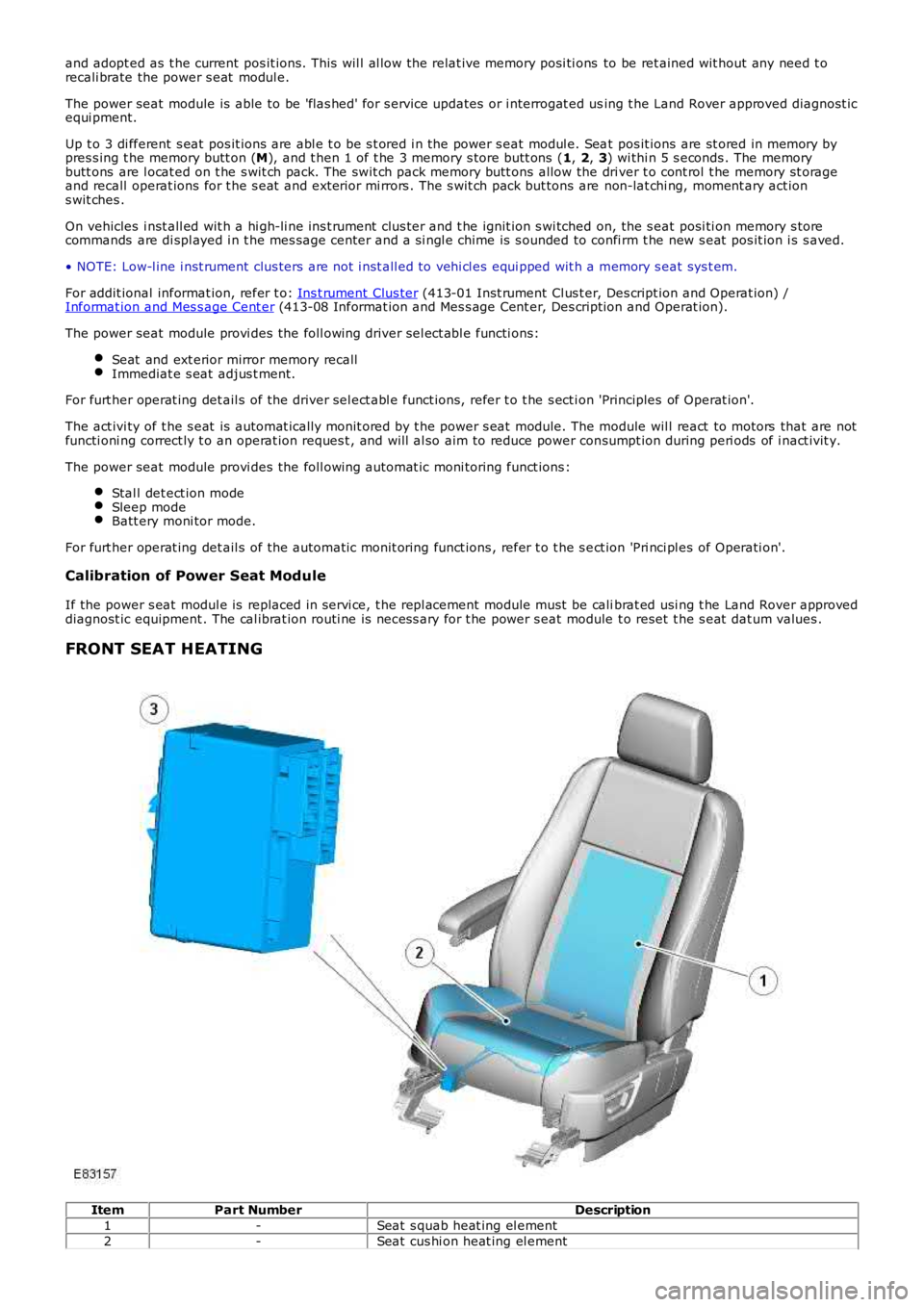
FRONT SEAT HEATING Item
Part Number Description
1 -Seat s quab heat ing el ement
2 -Seat cus hi on heat ing el ement
Page 2314 of 3229
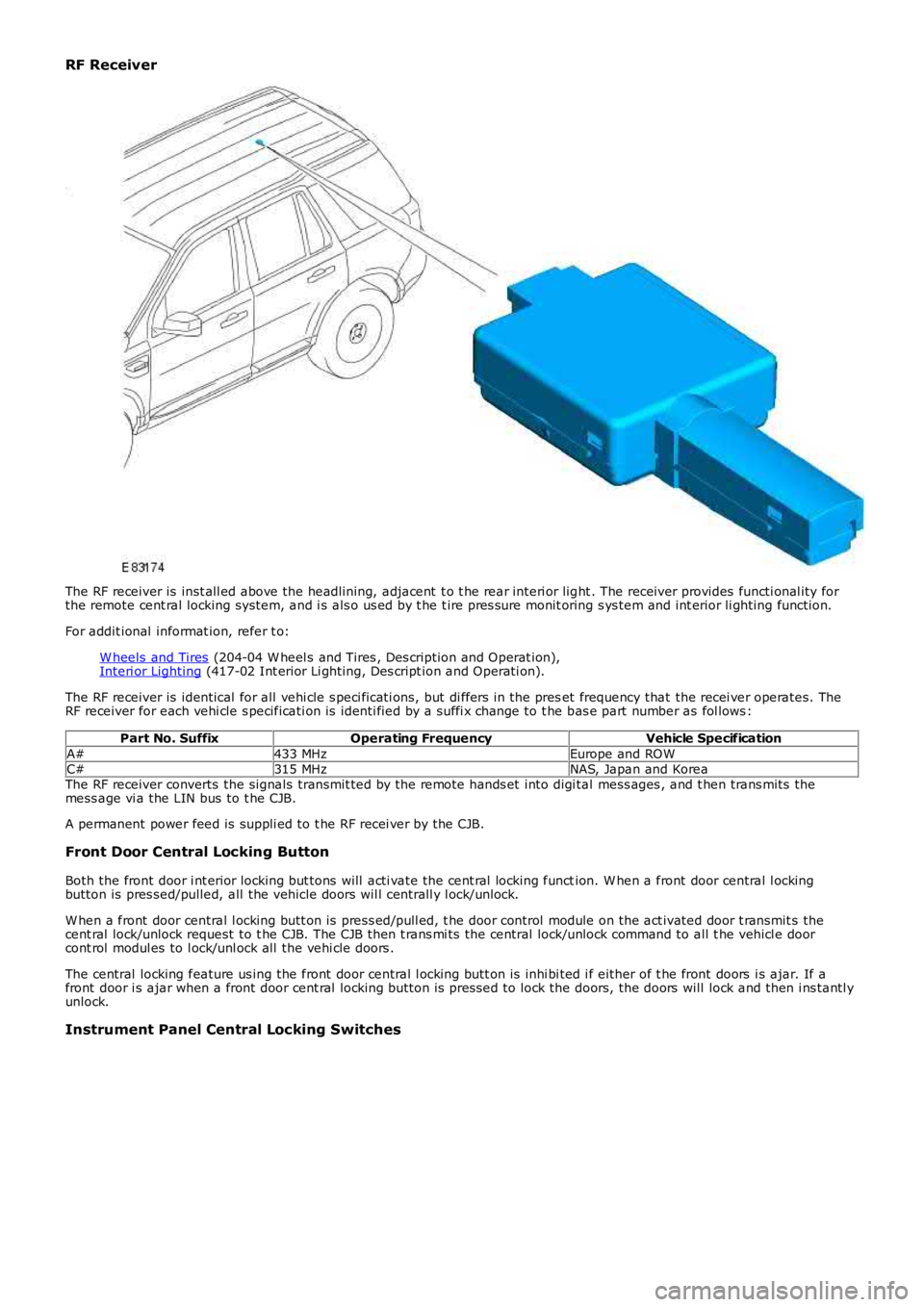
RF Receiver
The RF receiver is inst all ed above the headlining, adjacent t o t he rear interi or light . The receiver provides functi onal ity forthe remote cent ral locking system, and i s als o us ed by t he t ire pres sure monit oring s ys tem and int erior li ghting function.
For addit ional informat ion, refer t o:
W heels and Tires (204-04 W heel s and Tires , Des cription and Operat ion),Interi or Lighting (417-02 Int erior Li ghting, Des cript ion and Operati on).
The RF receiver is identical for all vehi cle s peci ficati ons, but di ffers in the preset frequency that the recei ver operates. TheRF receiver for each vehi cle s pecificati on is identi fied by a suffi x change to t he bas e part number as fol lows :
Part No. SuffixOperating FrequencyVehicle Specification
A#433 MHzEurope and ROWC#315 MHzNAS, Japan and KoreaThe RF receiver converts the signals transmit ted by the remote hands et into digi tal mess ages , and t hen trans mits themess age vi a the LIN bus to t he CJB.
A permanent power feed is suppli ed to t he RF recei ver by the CJB.
Front Door Central Locking Button
Both the front door i nt erior locking but tons will acti vate the cent ral locking function. W hen a front door central l ockingbutton is pres sed/pulled, all the vehicle doors wil l centrall y l ock/unlock.
W hen a front door central l ocking butt on is press ed/pull ed, t he door control module on the act ivated door t ransmit s thecent ral lock/unlock request to t he CJB. The CJB then t rans mi ts the central lock/unlock command to all t he vehicl e doorcont rol modul es to l ock/unl ock all the vehi cle doors .
The central locking feature us ing the front door central l ocking butt on is inhi bi ted i f either of t he front doors i s ajar. If afront door i s ajar when a front door cent ral locking button is pres sed to lock the doors, the doors will lock and then i ns tantl yunlock.
Instrument Panel Central Locking Switches
Page 2373 of 3229
1
1
1
1
1
1
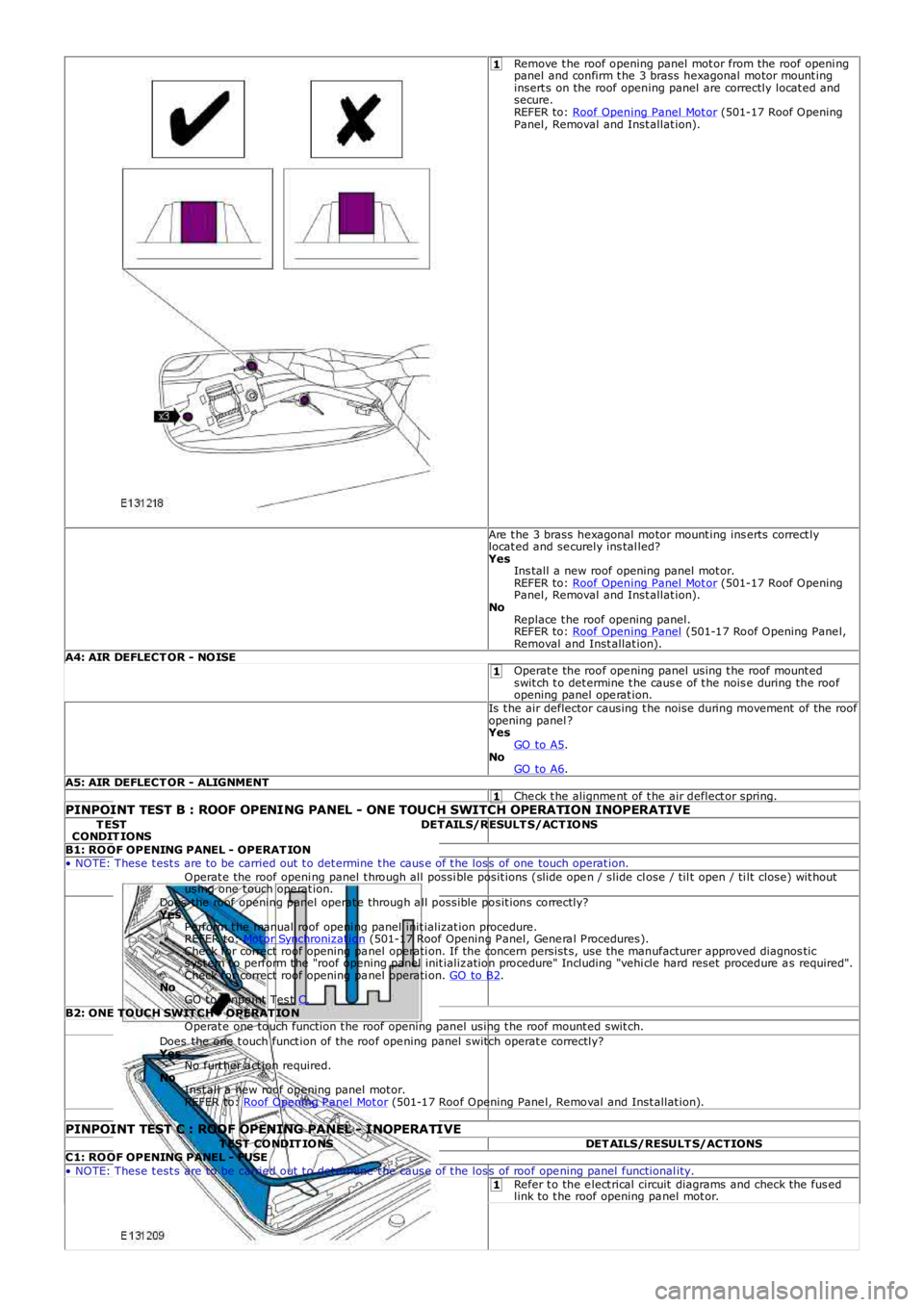
Remove t he roof opening panel mot or from the roof openi ngpanel and confirm t he 3 brass hexagonal motor mount inginsert s on the roof opening panel are correctly locat ed andsecure.REFER to: Roof Opening Panel Mot or (501-17 Roof OpeningPanel, Removal and Inst allat ion).
Are t he 3 brass hexagonal motor mount ing ins erts correct lylocat ed and se curely ins tal led?YesIns tall a new roof opening panel mot or.REFER to: Roof Opening Panel Mot or (501-17 Roof OpeningPanel, Removal and Inst allat ion).NoReplace t he roof opening panel.REFER to: Roof Opening Panel (501-17 Roof Opening Pane l,Removal and Inst allat ion).A4: AIR DEFLECT OR - NOISEOperat e the roof ope ning panel using t he roof mount edswit ch t o det ermine t he caus e of t he nois e during the roofopening panel ope rat ion.Is t he air deflector causing t he noise during movement of the roofopening panel ?YesGO to A5.NoGO to A6.A5: AIR DEFLECT OR - ALIGNMENTChe ck t he alignme nt of t he air deflect or spring.PINPOINT TEST B : ROOF OPENING PANEL - ONE TOUCH SWITCH OPERATION INOPERATIVET ESTCONDIT IONSDETAILS/RESULT S/ACT IONS
B1: ROOF OPENING PANEL - OPERAT ION• NOTE: These t est s are to be carried out t o det ermine t he caus e of t he los s of one touch operat ion.Operat e the roof openi ng panel t hrough all possi ble posit ions (slide ope n / slide close / til t open / ti lt close) wit houtus ing one t ouch ope rat ion.Does the roof opening panel operat e through a ll possible posit ions correctly?YesPe rform t he manual roof openi ng panel init ializat ion procedure.REFER to: Mot or Synchronizat ion (501-17 Roof Opening P anel, Gene ra l P rocedures).Check for correct roof opening pa nel operati on. If the concern persist s, use t he manufacturer approved diagnos tics yst em t o perform t he "roof opening panel init ializ ation procedure" Including "vehi cle hard reset procedure a s required".Check for correct roof opening pa nel operati on. GO to B2.NoGO t o Pinpoint Tes t C.B2: ONE TOUCH SWIT CH - OPERAT IONOperat e one touch function t he roof opening panel using t he roof mount ed swit ch.Does the one t ouch funct ion of the roof ope ning panel switch operat e correctly?YesNo furt her a ct ion required.NoInst all a new roof opening panel mot or.REFER to: Roof Opening P anel Mot or (501-17 Roof Opening Pane l, Removal and Inst allat ion).
PINPOINT TEST C : ROOF OPENING PANEL - INOPERATIVET EST CONDIT IONSDET AILS/RESULT S/ACTIONSC1: ROOF OPENING PANEL - FUSE• NOTE: These t est s are to be carried out t o det ermine t he caus e of t he los s of roof ope ning panel functional ity.Refer t o the e lect rical circuit diagrams and check the fus edlink to t he roof opening pa nel mot or.
Page 2375 of 3229
1
1
2
1
2
3
4
1
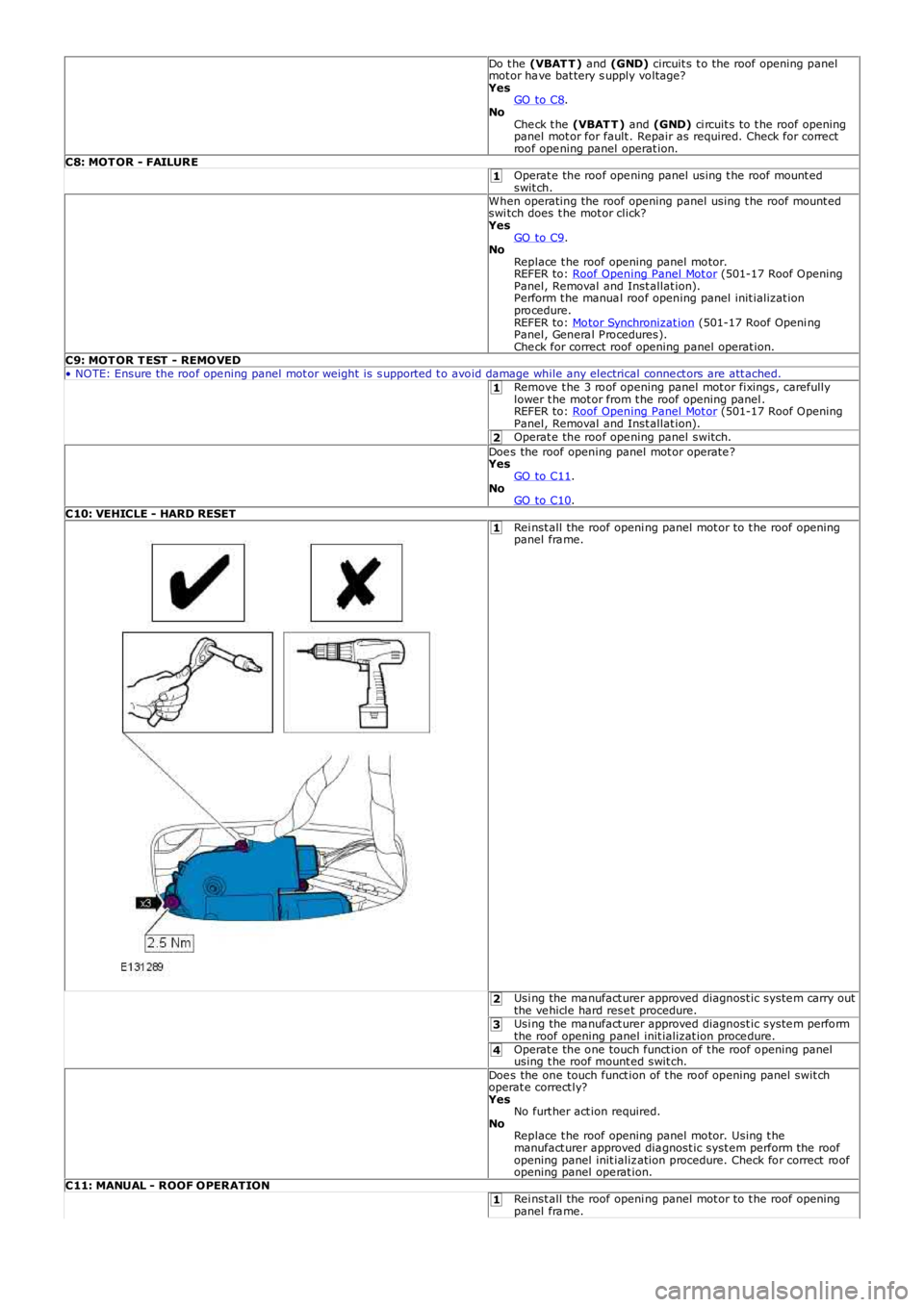
Do t he (VBAT T ) and (GND) circuit s t o the roof opening panelmot or ha ve bat tery s upply voltage?YesGO to C8.NoChe ck t he (VBAT T ) and (GND) ci rcuit s to t he roof openingpanel mot or for fault . Repair as required. Check for correctroof ope ning panel operat ion.C8: MOT OR - FAILUREOperat e the roof ope ning panel using t he roof mount edswit ch.When operating the roof opening panel using t he roof mount edswi tch does t he mot or click?YesGO to C9.NoReplace t he roof opening panel motor.REFER to: Roof Opening Panel Mot or (501-17 Roof OpeningPanel, Removal and Inst allat ion).Perform t he manua l roof opening panel init ializat ionprocedure.REFER to: Motor Synchronizat ion (501-17 Roof Openi ngPanel, Genera l P rocedures).Che ck for correct roof opening panel operat ion.C9: MOT OR T EST - REMOVED• NOTE: Ensure the roof ope ning panel mot or weight is s upported t o avoid damage while any electrical conne ct ors are att ached.Remove t he 3 roof opening panel mot or fixings , carefullylower t he mot or from t he roof opening panel .REFER to: Roof Opening Panel Mot or (501-17 Roof OpeningPanel, Removal and Inst allat ion).Operat e the roof ope ning panel switch.Doe s the roof opening panel mot or operate ?YesGO to C11.NoGO to C10.C10: VEHICLE - HARD RESETRei nst all the roof openi ng panel mot or to t he roof openingpanel fra me.
Usi ng the ma nufact urer approved diagnost ic syste m carry outthe ve hicle hard rese t procedure.Usi ng the ma nufact urer approved diagnost ic syste m performthe roof opening panel init ializat ion proce dure.Operat e the one touch funct ion of t he roof opening panelusing t he roof mount ed swit ch.Doe s the one touch funct ion of t he roof opening panel swit choperat e correct ly?YesNo furt her act ion required.NoReplace t he roof opening panel motor. Using t hemanufact urer approved dia gnost ic syst em perform the roofopening panel init ializ ation procedure. Check for correct roofopening panel ope rat ion.C11: MANUAL - ROOF OPERATIONRei nst all the roof openi ng panel mot or to t he roof openingpanel fra me.
Page 2725 of 3229

Contents
5
R
ENGINE COOLANT CHECK ............................ 163
BRAKE AND CLUTCH FLUID CHECK ............. 165
POWER STEERING FLUID CHECK ................ 166
WASHER FLUID CHECK ................................ 167
TECHNICAL SPECIFICATIONS ...................... 169
Vehicle battery
BATTERY WARNING SYMBOLS ................... 171
BATTERY CARE ............................................ 171
USING BOOSTER CABLES ............................ 173
CHARGING THE VE HICLE BATTERY ............. 174
CHANGING THE VE HICLE BATTERY ............. 174
Wheels and tyres
GENERAL INFORMATION ............................. 176
TYRE CARE ................................................... 177
USING WINTER TYRES................................. 183
CHANGING A ROAD WHEEL ......................... 183
TYRE REPAIR KIT ......................................... 187
USING SNOW CHAINS.................................. 192
TYRE GLOSSARY.......................................... 193
TECHNICAL SPECIFICATIONS ...................... 194
Fuses
FUSE BOX LOCATIONS ................................. 195
CHANGING A FUSE ....................................... 195
FUSE SPECIFICATION CHART....................... 196
Emergency equipment
HAZARD WARNING FLASHERS .................... 204
WARNING TRIANGLE ................................... 204
Status after a collision
DRIVING AFTER A COLLISION...................... 205
INSPECTING SAFETY SYSTEM COMPONENTS ...
206
Vehicle recovery
TOWING POINTS .......................................... 207
LASHING POINTS ......................................... 208
TRANSPORTING THE VEHICLE..................... 208
TOWING THE VEHICLE ON FOUR WHEELS .. 208
Vehicle identification
VEHICLE IDENTIFICATION PLATE................. 210
VEHICLE IDENTIFI CATION NUMBER (VIN) ... 210
VEHICLE BUILD DATE PLATE ....................... 210
Technical specifications
ENGINE SPECIFICATIONS ............................ 211
WEIGHTS...................................................... 212
DIMENSIONS................................................ 213
Type approval
Declarations of conformity ........................... 215
Audio introduction
RADIO RECEPTION....................................... 218
Audio unit overview
AUDIO UNIT OVERVIEW............................... 219
Audio unit operation
ON OR OFF CONTROL .................................. 223
VOLUME CONTROL ...................................... 223
AUDIO CONTROL ......................................... 223
WAVEBAND BUTTON ................................... 224
AUTOSTORE CONTROL ................................ 225
STATION PRESET BUTTONS ........................ 226
TRAFFIC INFORMATION CONTROL .............. 226
Audio unit menus
RADIO DATA SYSTEM (RDS) ....................... 228
REGIONAL MODE (REG) .............................. 228
ENHANCED OTHER NETWORK (RDS-EON).. 229
ALTERNATIVE FREQUENCIES ...................... 229
NEWS BROADCASTS ................................... 230
PRIORITY PROGRAMME TYPE (PTY) .......... 231
RESETTING THE AUDIO UNIT ...................... 233
Digital audio broadcasting
GENERAL INFORMATION ............................. 234
AUDIO CONTROLS ....................................... 235
DISPLAY OPTIONS ....................................... 236
CHANNEL AUTOMATIC TUNING................... 236
CHANNEL OPTIONS ..................................... 236
PRESET BUTTONS ....................................... 238
SETTINGS..................................................... 240
Compact disc player
LOADING COMPACT DISCS ......................... 245
EJECTING COMPACT DISCS ........................ 246
EJECTING MULTIPLE CO MPACT DISCS....... 246
COMPACT DISC SELECTION ........................ 246
COMPACT DISC PLAYBACK ......................... 246
Page 2730 of 3229
10
Quick start
L
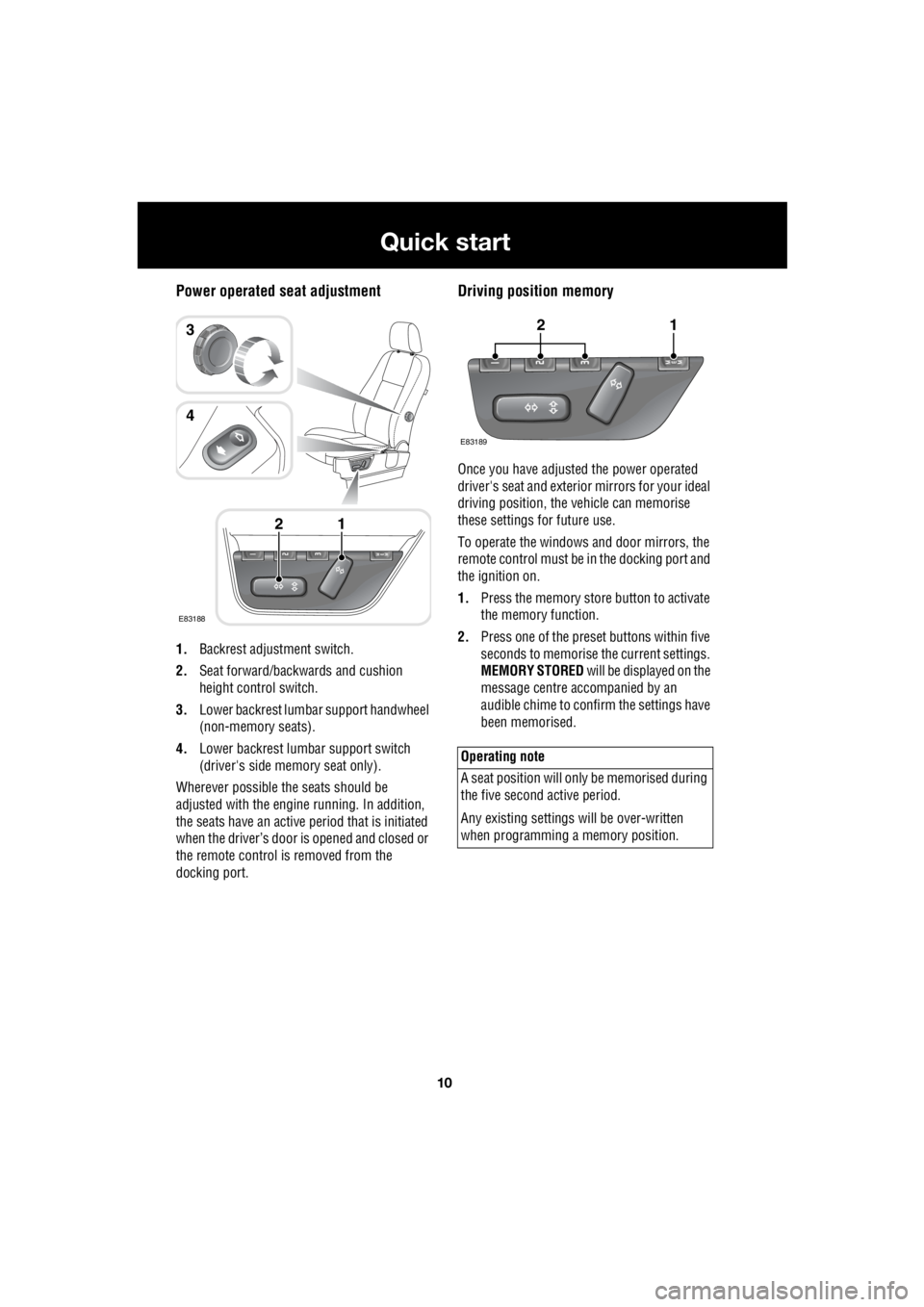
Power operated seat adjustment
1. Backrest adjustment switch.
2. Seat forward/backwards and cushion
height control switch.
3. Lower backrest lumbar support handwheel
(non-memory seats).
4. Lower backrest lumbar support switch
(driver's side memory seat only).
Wherever possible the seats should be
adjusted with the engine running. In addition,
the seats have an active period that is initiated
when the driver’s door is opened and closed or
the remote control is removed from the
docking port.
Driving position memory
Once you have adjusted the power operated
driver's seat and exterior mirrors for your ideal
driving position, the vehicle can memorise
these settings for future use.
To operate the windows and door mirrors, the
remote control must be in the docking port and
the ignition on.
1. Press the memory store button to activate
the memory function.
2. Press one of the preset buttons within five
seconds to memorise the current settings.
MEMORY STORED will be displayed on the
message centre accompanied by an
audible chime to confirm the settings have
been memorised.
E83188
12
3
4
Operating note
A seat position will onl y be memorised during
the five second active period.
Any existing settings w ill be over-written
when programming a memory position.
E83189
12
Page 2735 of 3229
15
Quick start
R
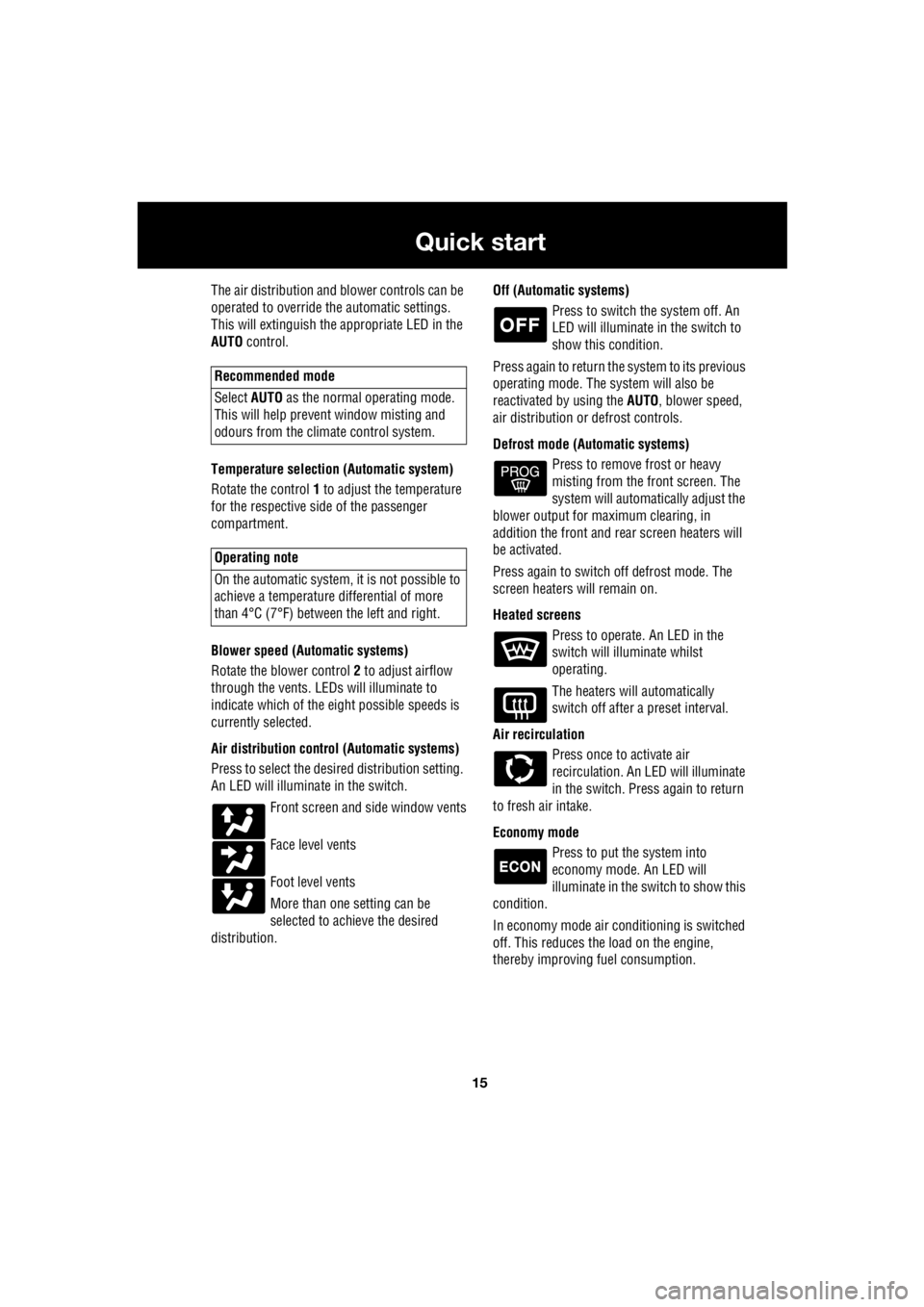
The air distribution and blower controls can be
operated to override the automatic settings.
This will extinguish the appropriate LED in the
AUTO control.
Temperature selection (Automatic system)
Rotate the control 1 to adjust the temperature
for the respective side of the passenger
compartment.
Blower speed (Automatic systems)
Rotate the blower control 2 to adjust airflow
through the vents. LEDs will illuminate to
indicate which of the ei ght possible speeds is
currently selected.
Air distribution contro l (Automatic systems)
Press to select the desi red distribution setting.
An LED will illumina te in the switch.
Front screen and side window vents
Face level vents
Foot level vents
More than one setting can be
selected to achieve the desired
distribution. Off (Automat
ic systems)
Press to switch the system off. An
LED will illuminate in the switch to
show this condition.
Press again to return the system to its previous
operating mode. The system will also be
reactivated by using the AUTO, blower speed,
air distribution or defrost controls.
Defrost mode (Automatic systems) Press to remove frost or heavy
misting from the front screen. The
system will automatically adjust the
blower output for maximum clearing, in
addition the front and rear screen heaters will
be activated.
Press again to switch off defrost mode. The
screen heaters will remain on.
Heated screens Press to operate. An LED in the
switch will illuminate whilst
operating.
The heaters will automatically
switch off after a preset interval.
Air recirculation Press once to activate air
recirculation. An LED will illuminate
in the switch. Press again to return
to fresh air intake.
Economy mode Press to put the system into
economy mode. An LED will
illuminate in the switch to show this
condition.
In economy mode air conditioning is switched
off. This reduces the load on the engine,
thereby improving fuel consumption.
Recommended mode
Select AUTO as the normal operating mode.
This will help prevent window misting and
odours from the climate control system.
Operating note
On the automatic system, it is not possible to
achieve a temperature differential of more
than 4°C (7°F) betwee n the left and right.