reset LAND ROVER FRELANDER 2 2006 Service Manual
[x] Cancel search | Manufacturer: LAND ROVER, Model Year: 2006, Model line: FRELANDER 2, Model: LAND ROVER FRELANDER 2 2006Pages: 3229, PDF Size: 78.5 MB
Page 2948 of 3229
Audio unit menus
228
L
Audio unit menusRADIO DATA SYSTEM (RDS)
Your audio system is equipped with RDS
(Radio Data System), which enables the audio
unit to receive extra information with the
normal radio signals.
On the FM waveband, RD S enables the audio to
receive traffic and news information
broadcasts. RDS also al lows the audio unit to
automatically retune to stations that are linked
to the same network.
Note: Not all FM radio stat ions broadcast RDS.
If a non-RDS station is selected, RDS features
will not be available.
Selecting RDS
On standard audio unit s, RDS can be enabled
or disabled, according to preference. The
following procedure explains how to switch
RDS on or off.
1. With FM1, FM2 or FMa selected, press the
MENU button to display the menu.
2. Using the rotary control, select RDS from
the menu. ON or OFF will be displayed,
dependent on status.
3. Press the rotary control to change status.
The RDS status will be displayed briefly on the
information screen.
REGIONAL MODE (REG)
As you drive into diffe rent radio reception
areas, the Radio Data System (RDS)
automatically retunes the radio to the strongest
signal. Regional mode is an RDS feature which
stops the system from tuning to another local
radio station with a stronger signal. With this
feature enabled, your selected local radio
station will re main tuned.
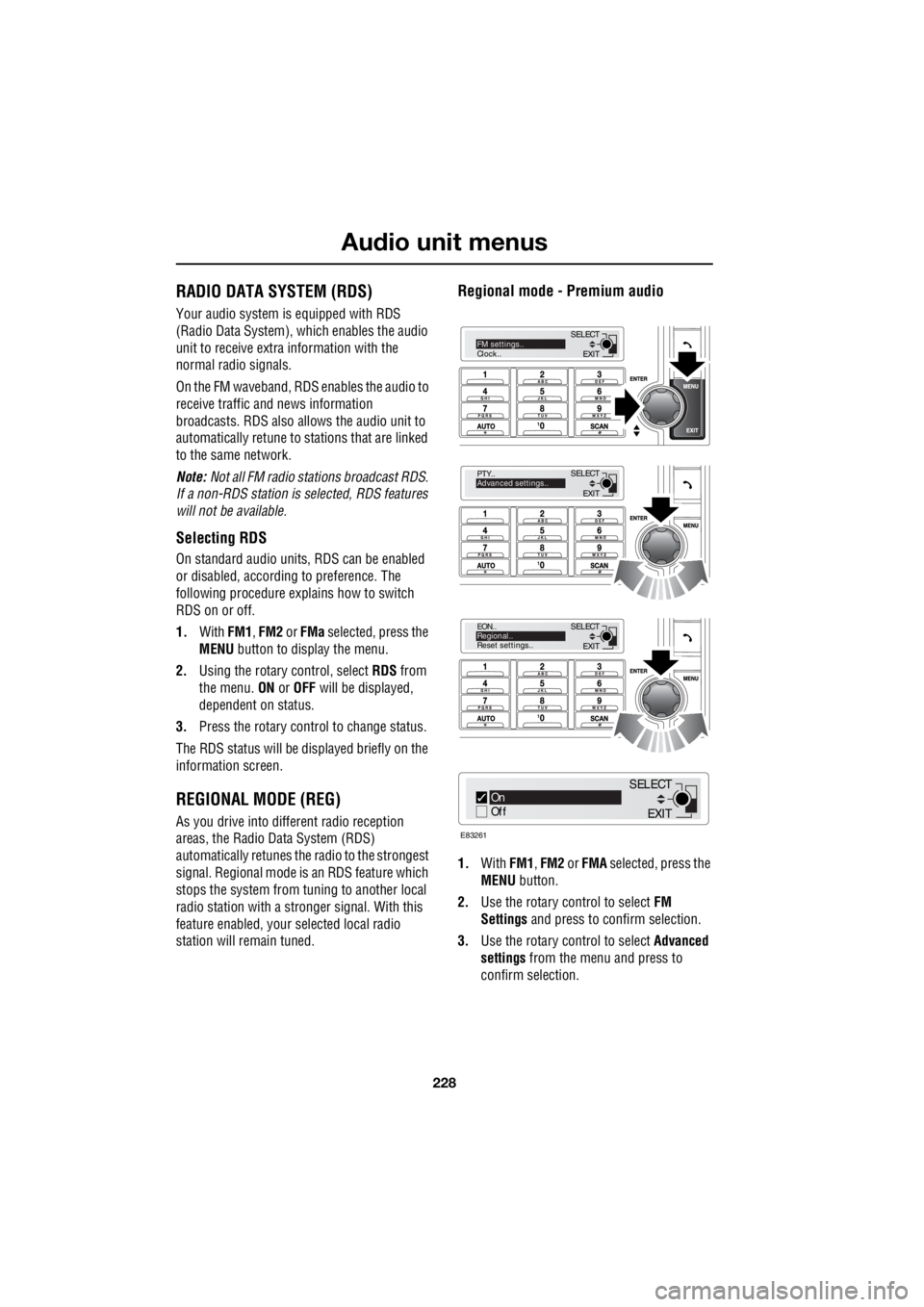
Regional mode - Premium audio
1.With FM1, FM2 or FMA selected, press the
MENU button.
2. Use the rotary control to select FM
Settings and press to c onfirm selection.
3. Use the rotary control to select Advanced
settings from the menu and press to
confirm selection.
EXIT
SELECT
PTY..
Advanced settings..
EXIT
SELECT
EON..
Regional..
Reset settings..
EXIT
SELECTFM settings..
Clock..
On
Off
E83261
EXIT
SELECT
Page 2953 of 3229
233
Audio unit menus
R
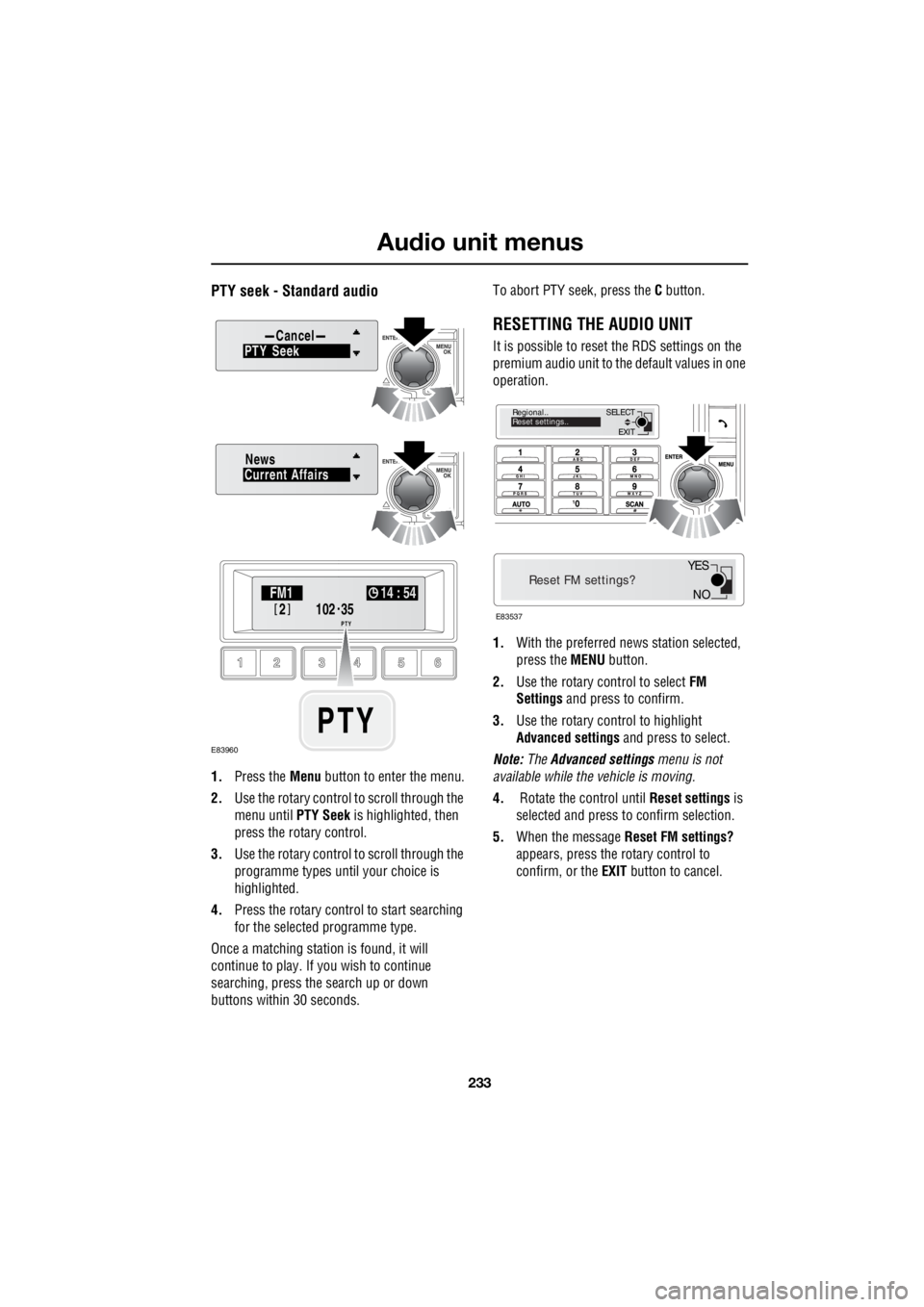
PTY seek - Standard audio
1. Press the Menu button to enter the menu.
2. Use the rotary control to scroll through the
menu until PTY Seek is highlighted, then
press the rotary control.
3. Use the rotary control to scroll through the
programme types until your choice is
highlighted.
4. Press the rotary control to start searching
for the selected programme type.
Once a matching station is found, it will
continue to play. If you wish to continue
searching, press the search up or down
buttons within 30 seconds. To abort PTY seek, press the
C button.
RESETTING THE AUDIO UNIT
It is possible to reset the RDS settings on the
premium audio unit to the default values in one
operation.
1. With the preferred news station selected,
press the MENU button.
2. Use the rotary control to select FM
Settings and press to confirm.
3. Use the rotary control to highlight
Advanced settings and press to select.
Note: The Advanced settings menu is not
available while the vehicle is moving.
4. Rotate the control until Reset settings is
selected and press to confirm selection.
5. When the message Reset FM settings?
appears, press the rotary control to
confirm, or the EXIT button to cancel.PTY CancelSeek
Current AffairsNews
102
.
2
FM1 14 : 54
PTY35
PTY
E83960
EXIT
SELECT
Regional..
Reset settings..
Reset FM settings?
E83537
NO
YES
Page 2955 of 3229
235
Digital audio broadcasting
R
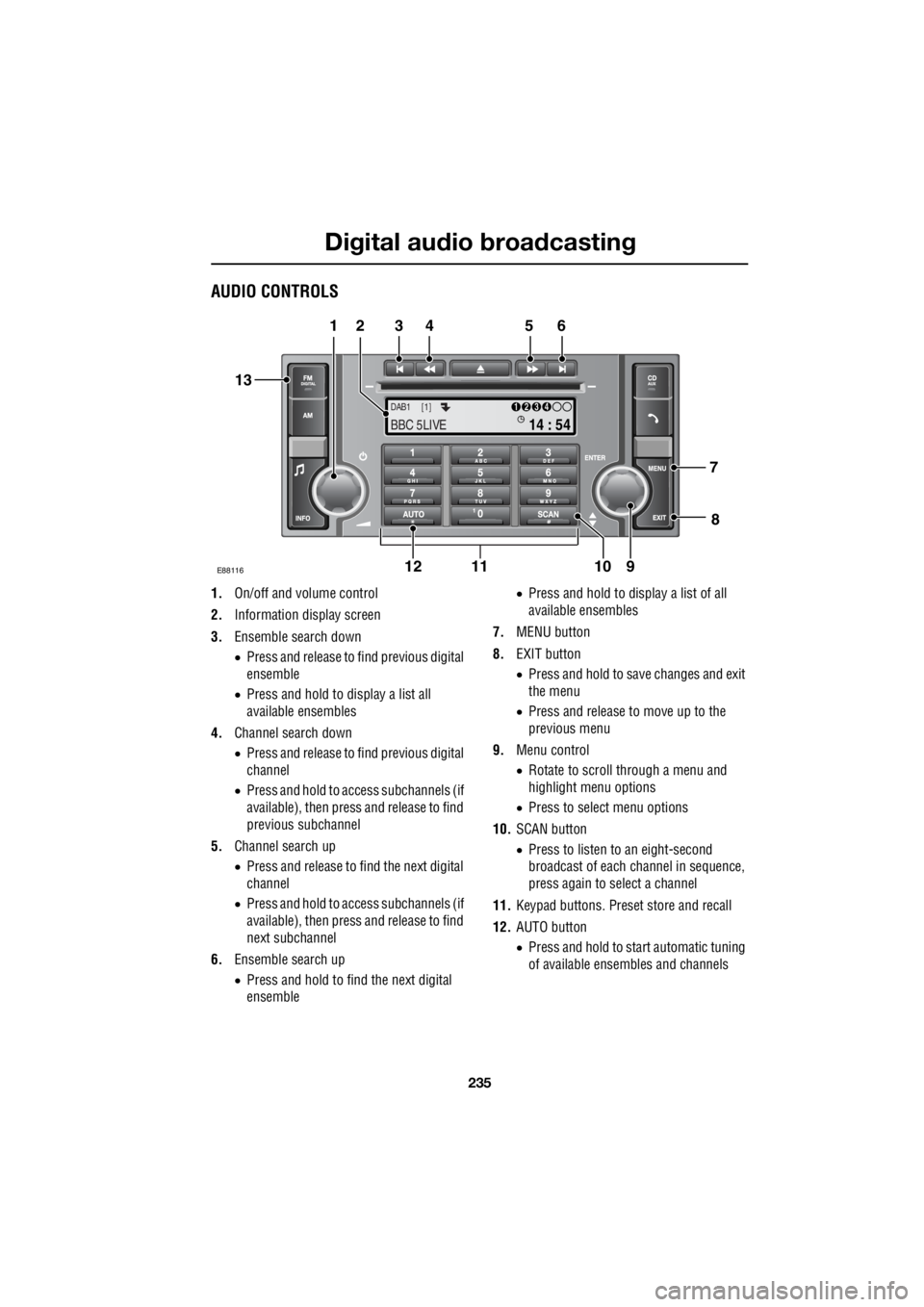
AUDIO CONTROLS
1. On/off and volume control
2. Information display screen
3. Ensemble search down
• Press and release to find previous digital
ensemble
• Press and hold to display a list all
available ensembles
4. Channel search down
• Press and release to find previous digital
channel
• Press and hold to access subchannels (if
available), then press and release to find
previous subchannel
5. Channel search up
• Press and release to find the next digital
channel
• Press and hold to access subchannels (if
available), then press and release to find
next subchannel
6. Ensemble search up
• Press and hold to fi nd the next digital
ensemble •
Press and hold to display a list of all
available ensembles
7. MENU button
8. EXIT button
• Press and hold to save changes and exit
the menu
• Press and release to move up to the
previous menu
9. Menu control
• Rotate to scroll through a menu and
highlight menu options
• Press to select menu options
10. SCAN button
• Press to listen to an eight-second
broadcast of each channel in sequence,
press again to select a channel
11. Keypad buttons. Preset store and recall
12. AUTO button
• Press and hold to start automatic tuning
of available ensembles and channels
TA
NEWSPTY
14 : 54
1234DAB1 [1]
BBC 5LIVE
E88116
12 3 4 5 6
13
11 10 9
12 8
7
Page 2956 of 3229
Digital audio broadcasting
236
L
13. FM/DIGITAL button
• Press and release to select the next
available radio source FM1, FM2, DAB1,
DAB2
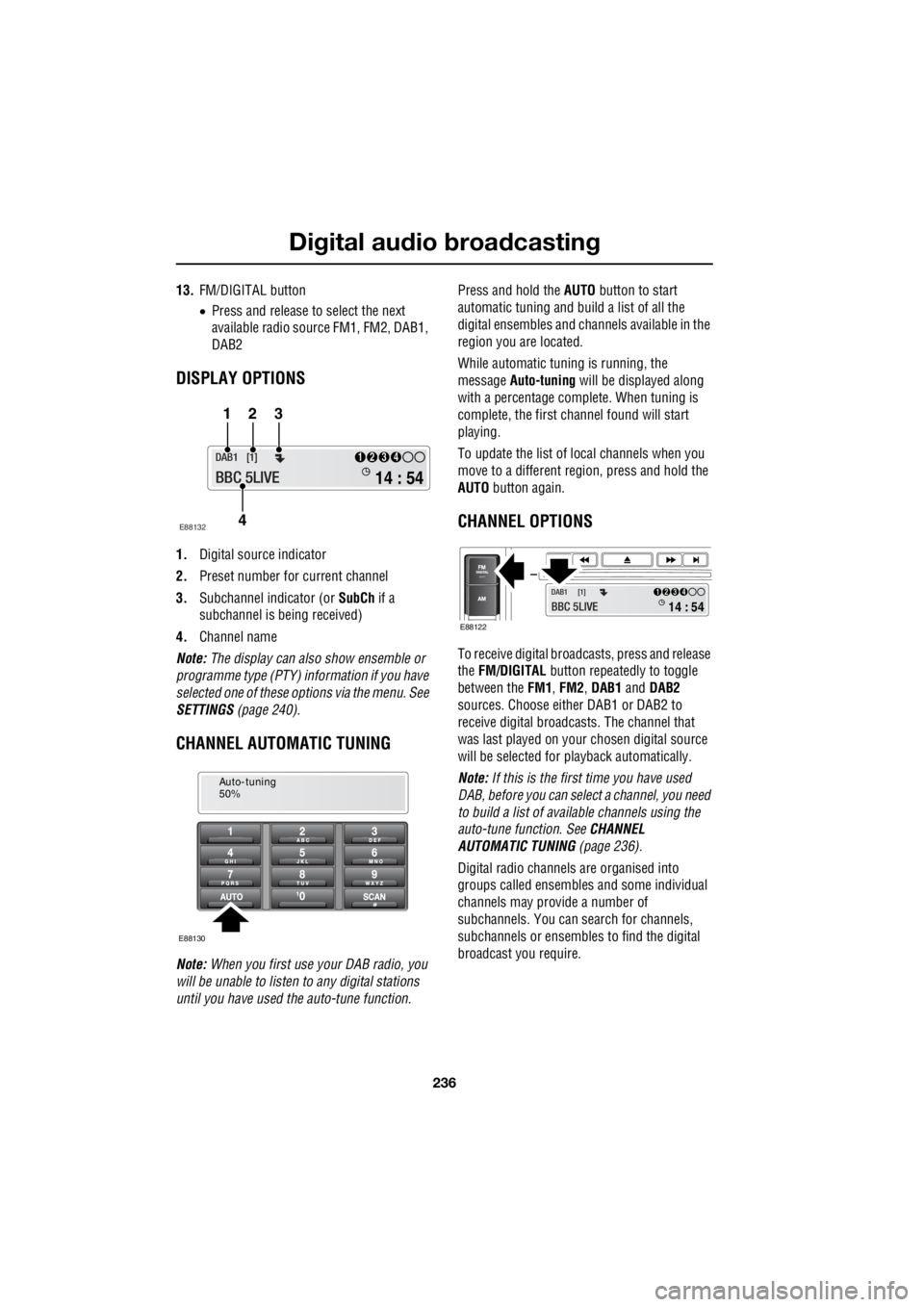
DISPLAY OPTIONS
1. Digital source indicator
2. Preset number for current channel
3. Subchannel indicator (or SubCh if a
subchannel is be ing received)
4. Channel name
Note: The display can also show ensemble or
programme type (PTY) in formation if you have
selected one of these options via the menu. See
SETTINGS (page 240).
CHANNEL AUTOMATIC TUNING
Note: When you first use your DAB radio, you
will be unable to listen to any digital stations
until you have used the auto-tune function. Press and hold the
AUTO button to start
automatic tuning and build a list of all the
digital ensembles and cha nnels available in the
region you are located.
While automatic tuning is running, the
message Auto-tuning will be displayed along
with a percentage complete. When tuning is
complete, the first ch annel found will start
playing.
To update the list of lo cal channels when you
move to a different region, press and hold the
AUTO button again.
CHANNEL OPTIONS
To receive digital broadc asts, press and release
the FM/DIGITAL button repeatedly to toggle
between the FM1, FM2 , DAB1 and DAB2
sources. Choose either DAB1 or DAB2 to
receive digital broadcas ts. The channel that
was last played on your chosen digital source
will be selected for playback automatically.
Note: If this is the first time you have used
DAB, before you can select a channel, you need
to build a list of availa ble channels using the
auto-tune function. See CHANNEL
AUTOMATIC TUNING (page 236).
Digital radio channels are organised into
groups called ensembles and some individual
channels may provide a number of
subchannels. You can search for channels,
subchannels or ensembles to find the digital
broadcast you require.
14 : 54
1234DAB1 [1]
BBC 5LIVE
123
4
E88132
Auto-tuning
50%
E88130
14 : 54
1234DAB1 [1]
BBC 5LIVE E88122
Page 2958 of 3229
Digital audio broadcasting
238
L
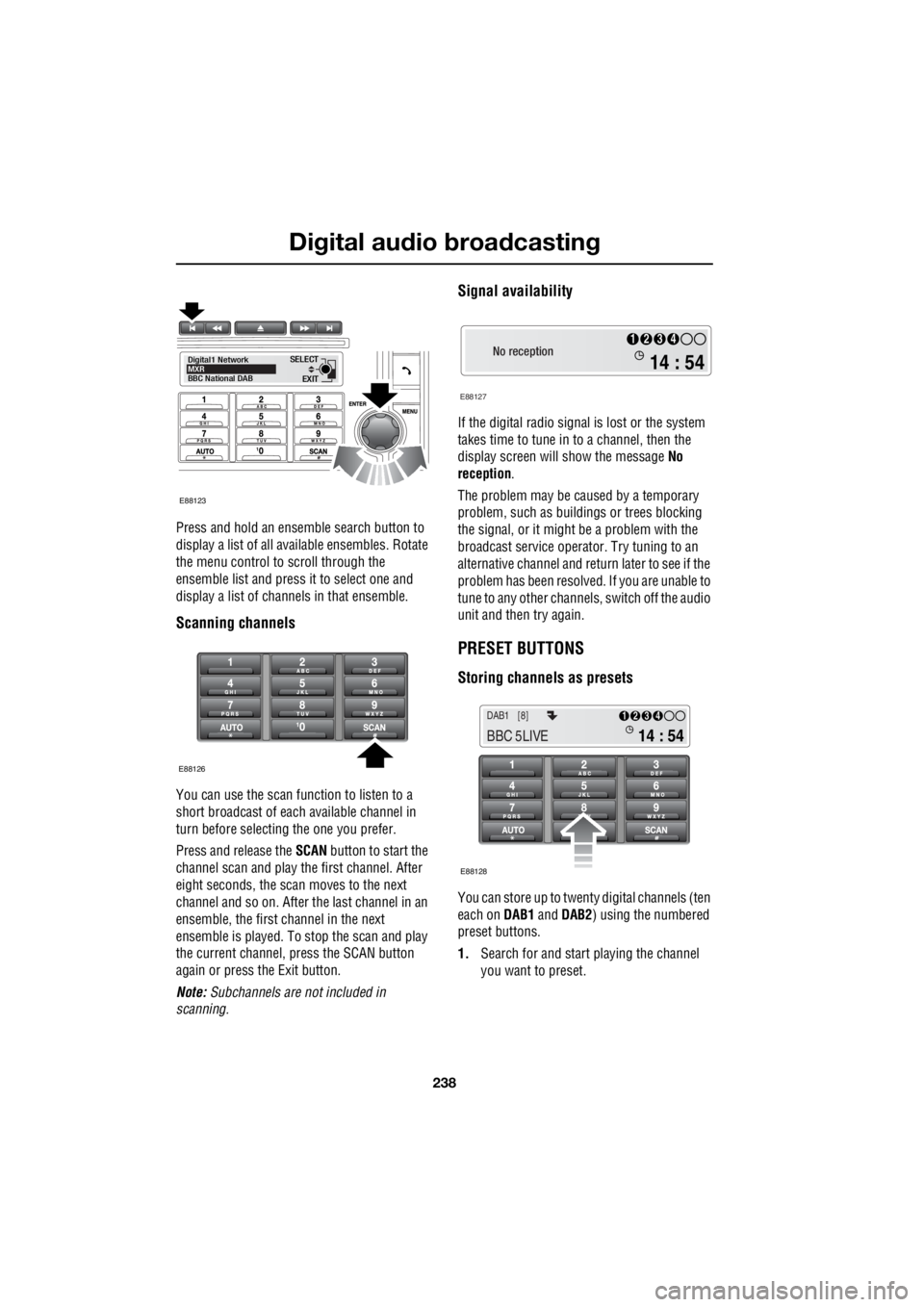
Press and hold an ensemble search button to
display a list of all available ensembles. Rotate
the menu control to scroll through the
ensemble list and press it to select one and
display a list of channels in that ensemble.
Scanning channels
You can use the scan function to listen to a
short broadcast of each available channel in
turn before selecting the one you prefer.
Press and release the SCAN button to start the
channel scan and play the first channel. After
eight seconds, the scan moves to the next
channel and so on. After the last channel in an
ensemble, the first channel in the next
ensemble is played. To stop the scan and play
the current channel, press the SCAN button
again or press the Exit button.
Note: Subchannels are not included in
scanning.
Signal availability
If the digital radio signal is lost or the system
takes time to tune in to a channel, then the
display screen will show the message No
reception .
The problem may be caused by a temporary
problem, such as buildings or trees blocking
the signal, or it might be a problem with the
broadcast service operator. Try tuning to an
alternative channel and return later to see if the
problem has been resolved. If you are unable to
tune to any other channe ls, switch off the audio
unit and then try again.
PRESET BUTTONS
Storing channels as presets
You can store up to twenty digital channels (ten
each on DAB1 and DAB2 ) using the numbered
preset buttons.
1. Search for and start playing the channel
you want to preset.
EXIT
SELECT
Digital1 Network
MXR
BBC National DAB
E88123
E88126
No reception
E88127
14 : 54
1234
14 : 54
1234DAB1 [8]
BBC 5LIVE
E88128
Page 2959 of 3229
239
Digital audio broadcasting
R
2. Press and hold the preset button (for about
two seconds) on which you want to store
the current channel. Audio output is muted
for a further two seconds while the channel
is stored and a confirmation message is
displayed.
3. Repeat steps 1 and 2 for each channel that
you want to store as a preset.
Note: You cannot store a subchannel as a
preset. If you try to stor e a subchannel, you will
store the channel to which the subchannel
belongs.
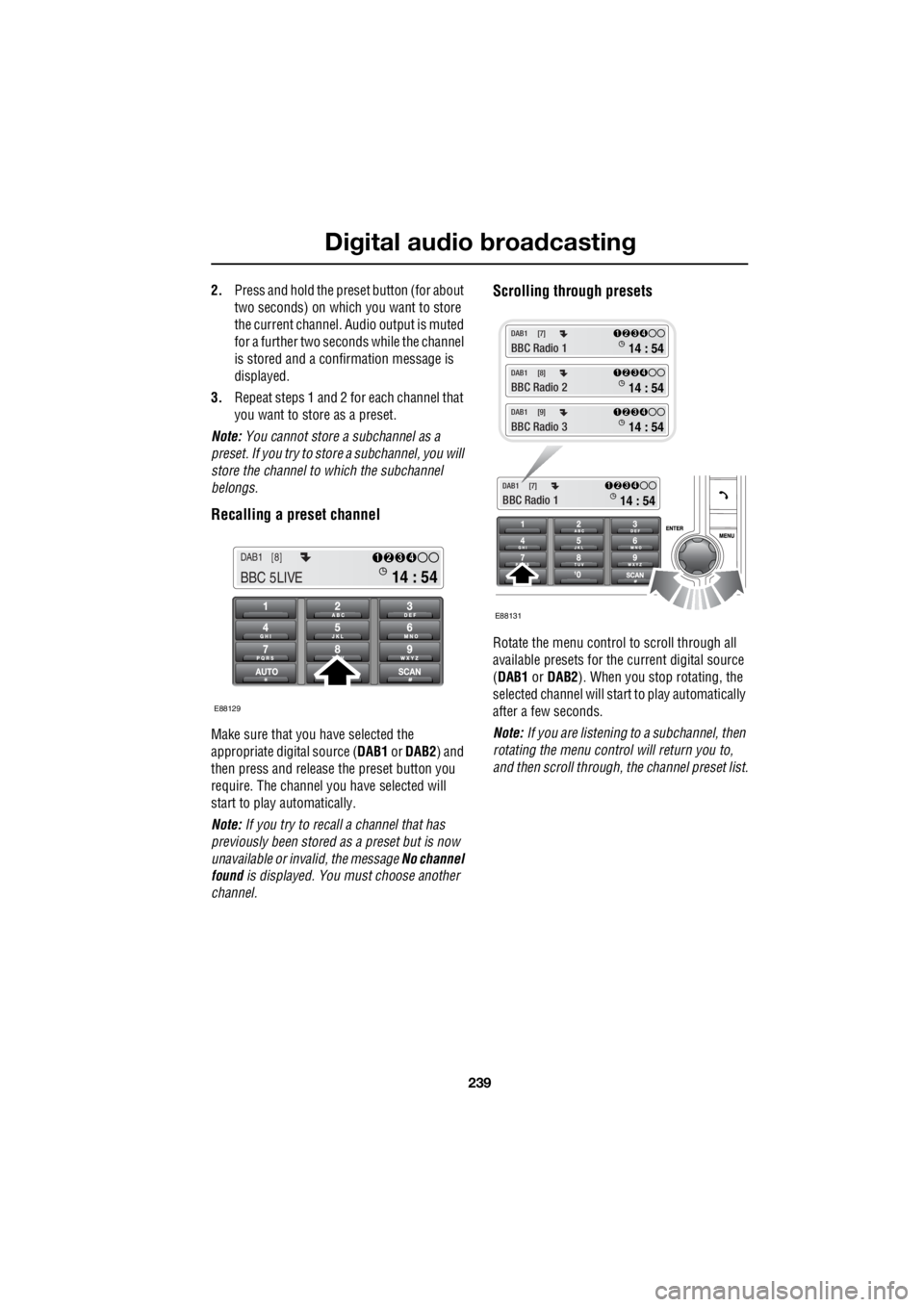
Recalling a preset channel
Make sure that you have selected the
appropriate digital source ( DAB1 or DAB2 ) and
then press and release the preset button you
require. The channel y ou have selected will
start to play automatically.
Note: If you try to recall a channel that has
previously been stored as a preset but is now
unavailable or invalid, the message No channel
found is displayed. You must choose another
channel.
Scrolling through presets
Rotate the menu control to scroll through all
available presets for the current digital source
( DAB1 or DAB2 ). When you stop rotating, the
selected channel will start to play automatically
after a few seconds.
Note: If you are listening to a subchannel, then
rotating the menu control will return you to,
and then scroll through, the channel preset list.
14 : 54
1234DAB1 [8]
BBC 5LIVE
E88129
E88131
14 : 54
1234DAB1 [7]
BBC Radio 1
14 : 54
1234DAB1 [7]
BBC Radio 1
14 : 54
1234DAB1 [8]
BBC Radio 2
14 : 54
1234DAB1 [9]
BBC Radio 3
Page 2964 of 3229
Digital audio broadcasting
244
L
Band selection
Different regions or count ries may use different
digital bands to broadcas t DAB channels. If you
know the band(s) required then you can
choose from the Band selection menu. The
available bands are:
• LBand
• BandIII
• LBand & BandIII
• LBandCanada
• LBandCan & BandIII
Reset DAB settings
If you want to reset the DAB settings to the
manufacturer's defaults, use the menu control
to choose the Reset DAB settings menu
option. Press the menu control again to
confirm the reset.
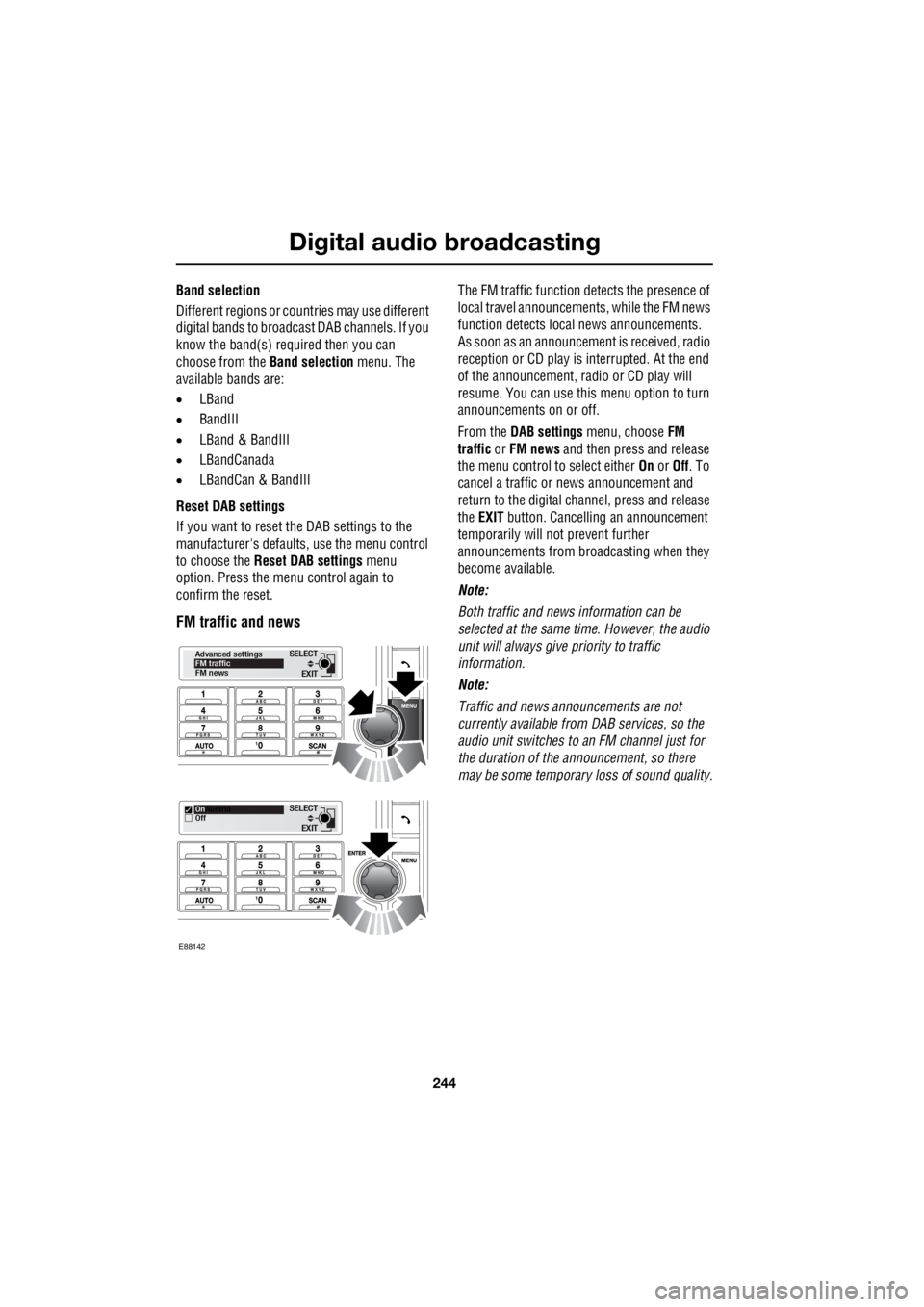
FM traffic and news
The FM traffic function detects the presence of
local travel announcemen ts, while the FM news
function detects local news announcements.
As soon as an announcem ent is received, radio
reception or CD play is interrupted. At the end
of the announcement, ra dio or CD play will
resume. You can use this menu option to turn
announcements on or off.
From the DAB settings menu, choose FM
traffic or FM news and then press and release
the menu control to select either On or Off. To
cancel a traffic or news announcement and
return to the digital channel, press and release
the EXIT button. Cancelling an announcement
temporarily will not prevent further
announcements from broadcasting when they
become available.
Note:
Both traffic and news information can be
selected at the same time. However, the audio
unit will always give priority to traffic
information.
Note:
Traffic and news announcements are not
currently available from DAB services, so the
audio unit switches to an FM channel just for
the duration of the announcement, so there
may be some temporary loss of sound quality.
EXIT
SELECT
Advanced settings
FM traffic
FM news
EXIT
SELECT
On
Austria
Off
E88142
Page 2991 of 3229

Index
271
R
A
ABS driving hints . . . . . . . . . . . . . . . . . . 123
Accessories . . . . . . . . . . . . . . . . . . . . . . . . 37
Adaptive front lighting system (AFS). . . . . 74
Adjusting the headlamps . . . . . . . . . . . . . . 73
Adjusting the steering wheel . . . . . . . . . . . 70
Adjusting the windscreen washer jets . . . . 89 Blocked jets . . . . . . . . . . . . . . . . . . . . . 90
Front . . . . . . . . . . . . . . . . . . . . . . . . . . . 89
Rear . . . . . . . . . . . . . . . . . . . . . . . . . . . 89
AFS . . . . . . . . . . . . . . . . . . . . . . . . . . . . . . 74
Air vents . . . . . . . . . . . . . . . . . . . . . . . . . 101
Airbag service information . . . . . . . . . . . . 63
Airbag warning lamp . . . . . . . . . . . . . . . . . 61
Alternative frequencies . . . . . . . . . . . . . . 229
Alternative Frequency (AF) - Premium audio 230
Alternative Frequency (A F) - Standard audio
230
Approach lamps . . . . . . . . . . . . . . . . . . . . 76
Arming the alarm . . . . . . . . . . . . . . . . . . . 45
Alarm indicator . . . . . . . . . . . . . . . . . . . 45
Full alarm . . . . . . . . . . . . . . . . . . . . . . . 45
Partial alarm . . . . . . . . . . . . . . . . . . . . . 45
Ashtray . . . . . . . . . . . . . . . . . . . . . . . . . . 109
Audio control. . . . . . . . . . . . . . . . . . . 70, 223 Audio control using the telephone buttons .
71
Balance adjustment. . . . . . . . . . . . . . . 224
Bass response adjustment . . . . . . . . . 223
Centre speaker settings . . . . . . . . . . . 224
Fader adjustment . . . . . . . . . . . . . . . . 224
Resetting tone values . . . . . . . . . . . . . 224
Subwoofer settings . . . . . . . . . . . . . . . 224
Surround sound settings . . . . . . . . . . 223
Treble response adjustment . . . . . . . . 223
Audio controls . . . . . . . . . . . . . . . . . . . . . 235
Audio unit overview. . . . . . . . . . . . . . . . . 219 Basic audio functions . . . . . . . . . . . . . 222
Premium audio overview . . . . . . . . . . 219
Standard audio overview . . . . . . . . . . 221
Automatic climate control . . . . . . . . . . . . 103
Controls . . . . . . . . . . . . . . . . . . . . . . . 103 Automatic transmission . . . . . . . . . . . . . . 118
Automatic mode. . . . . . . . . . . . . . . . . . 119
Electronic gear change strategies . . . . 120
Sport mode and CommandShift™ . . . . 120
Autostore control . . . . . . . . . . . . . . . . . . . 225 Autostoring radio stat ions - Premium audio
225
Autostoring radio stati ons - Standard audio
225
Auxiliary heater. . . . . . . . . . . . . . . . . . . . . 104
Auxiliary input (AUX IN) socket . . . . . . . . 250 Auxiliary mode . . . . . . . . . . . . . . . . . . . 251
Auxiliary power sockets . . . . . . . . . . . . . . 110
B
Battery care . . . . . . . . . . . . . . . . . . . . . . . 171
Battery charging . . . . . . . . . . . . . . . . . . . . 174
Battery warning symbols . . . . . . . . . . . . . 171
Bluetooth setup . . . . . . . . . . . . . . . . . . . . 256
Adding or changing a telephone. . . . . . 257
Loss of Bluetooth link . . . . . . . . . . . . . 257
Pairing a telephone to the system . . . . 256
Removing a telephone fr om the system. . .
257
Bonnet lock . . . . . . . . . . . . . . . . . . . . . . . 160
Booster cables . . . . . . . . . . . . . . . . . . . . . 173
Booster cushions . . . . . . . . . . . . . . . . . . . . 66
Brake and clutch fluid check . . . . . . . . . . . 165
Checking the fluid level . . . . . . . . . . . . 165
Topping up the fluid . . . . . . . . . . . . . . . 166
Brakes
Principle of operation . . . . . . . . . . . . . . 123
Bulb changing . . . . . . . . . . . . . . . . . . . . . . 77
Bulb specification chart . . . . . . . . . . . . . . . 86
C
Car wash . . . . . . . . . . . . . . . . . . . . . . . . . 154
Page 2993 of 3229

Index
273
R
Driving after a collision . . . . . . . . . . . . . . 205 Before starting or driving . . . . . . . . . . 205
Resetting the fuel cut-off . . . . . . . . . . 205
When driving . . . . . . . . . . . . . . . . . . . 205
E
Economical driving . . . . . . . . . . . . . . . . . 129
Driving tips for economy . . . . . . . . . . 129
Maintenance and fuel economy . . . . . 129
Ejecting compact discs . . . . . . . . . . . . . . 246
Ejecting multiple compact discs . . . . . . . 246
Electric exterior mirrors . . . . . . . . . . . . . . 95 Adjusting and folding . . . . . . . . . . . . . . 95
Mirror dip when reversing . . . . . . . . . . 96
Electric seats . . . . . . . . . . . . . . . . . . . . . . . 49 Driving position memory . . . . . . . . . . . 50
Electric sunroof . . . . . . . . . . . . . . . . . . . . 105 Anti-trap mechanism . . . . . . . . . . . . . 105
Calibration . . . . . . . . . . . . . . . . . . . . . 106
Operation . . . . . . . . . . . . . . . . . . . . . . 105
Sunroof blinds . . . . . . . . . . . . . . . . . . 106
Electric windows . . . . . . . . . . . . . . . . . . . . 93
One shot operation . . . . . . . . . . . . . . . . 93
Overriding anti-trap protec tion . . . . . . . 93
Window isolator . . . . . . . . . . . . . . . . . . 94
Window reset . . . . . . . . . . . . . . . . . . . . 94
Engine compartment overview . . . . . . . . 161 1. Engine oil filler caps (Black) . . . . . . 161
2. Engine oil dipsticks (Yellow) . . . . . . 161
3. Brake fluid reservoi r cap (Black) . . . 161
4. Coolant reservoir ca p (Black) . . . . . 161
5. Washer fluid reserv oir cap (Blue) . . 161
6. Power steering flui d reservoir cap (Black)
161
Engine coolant check . . . . . . . . . . . . . . . 163 Checking the coolant level . . . . . . . . . 163
Topping up the coolant . . . . . . . . . . . . 164
Engine oil check . . . . . . . . . . . . . . . . . . . 162 Checking the oil level . . . . . . . . . . . . . 162
Engine oil specification . . . . . . . . . . . . 163
Topping up the oil . . . . . . . . . . . . . . . . 163
Engine specifications. . . . . . . . . . . . . . . . 211
Enhanced other network (RDS-EON). . . . 229
Essential towing checks . . . . . . . . . . . . . 151
Event data recording . . . . . . . . . . . . . . . . . 37 Exterior mirrors . . . . . . . . . . . . . . . . . . . . . 94
Proximity mirror (Japan only) . . . . . . . . 94
F
Fast forward/reverse . . . . . . . . . . . . . . . . . 247
Fastening the seat belts . . . . . . . . . . . . . . . 56 Releasing the seat belts . . . . . . . . . . . . . 56
Filling station information . . . . . . . . . . . . . . 33 Engine coolant specification. . . . . . . . . . 34
Engine oil specification . . . . . . . . . . . . . 34
Fuel filler flap . . . . . . . . . . . . . . . . . . . . . 33
Tyre pressures . . . . . . . . . . . . . . . . . . . . 34
Front fog lamps . . . . . . . . . . . . . . . . . . . . . 72
Fuel and refuelling Technical specifications . . . . . . . . . . . . 146
Fuel burning heater. . . . . . . . . . . . . . . . . . 104
Fuel consumption . . . . . . . . . . . . . . . . . . . 146
Fuel cut-off . . . . . . . . . . . . . . . . . . . . . . . . 144 Resetting the fuel cut-off . . . . . . . . . . . 144
Fuel filler flap . . . . . . . . . . . . . . . . . . . . . . 144
Fuel quality . . . . . . . . . . . . . . . . . . . . . . . . 142 Alternative fuels for petrol engines. . . . 143
Diesel engined vehicles . . . . . . . . . . . . 143
Petrol engined vehicles . . . . . . . . . . . . 142
Fuse box locations . . . . . . . . . . . . . . . . . . 195
Fuse specification chart . . . . . . . . . . . . . . 196 Engine compartment fuse box . . . . . . . 196
Luggage compartment fuse box . . . . . 201
Passenger compartment fuse box . . . . 199
G
General driving points . . . . . . . . . . . . . . . 128 Battery charging - red . . . . . . . . . . . . . 128
Low oil pressure - red . . . . . . . . . . . . . 128
General information on ra dio frequencies. . 40
H
Handbrake . . . . . . . . . . . . . . . . . . . . . . . . 124
Hazard warning flashers . . . . . . . . . . . 74, 204
HDC . . . . . . . . . . . . . . . . . . . . . . . . . . . . . 137
Head restraints . . . . . . . . . . . . . . . . . . . . . . 51
Headlamp adjustment . . . . . . . . . . . . . . . . . 73
Headlamp levelling . . . . . . . . . . . . . . . . . . . 73 Halogen headlamps . . . . . . . . . . . . . . . . 73
Xenon headlamps . . . . . . . . . . . . . . . . . 73
Headlamp washers . . . . . . . . . . . . . . . . . . . 88
Headphones . . . . . . . . . . . . . . . . . . . . . . . 253
Page 2995 of 3229

Index
275
R
Preset buttons . . . . . . . . . . . . . . . . . . . . . 238 Recalling a preset channel . . . . . . . . . 239
Scrolling through presets . . . . . . . . . . 239
Storing channels as presets . . . . . . . . 238
Principle of operation Airbag deployment effects . . . . . . . . . . 61
Airbag operation . . . . . . . . . . . . . . . . . . 60
Airbags . . . . . . . . . . . . . . . . . . . . . . . . . 59
Before driving off-road . . . . . . . . . . . . 136
Brake pads . . . . . . . . . . . . . . . . . . . . . 123
Deployment and deflation . . . . . . . . . . . 60
Dynamic Stability Control (DSC) . . . . . 140
Gradient release control (GRC) . . . . . . 136
Introduction . . . . . . . . . . . . . . . . . . . . . 58
Roll stability control (RSC) . . . . . . . . . 140
Seat belt checks . . . . . . . . . . . . . . . . . . 55
Seat belt safety . . . . . . . . . . . . . . . . . . . 54
Seat belts . . . . . . . . . . . . . . . . . . . . . . . 54
Wet conditions . . . . . . . . . . . . . . . . . . 123
Priority programme type (PTY) . . . . . . . . 231 PTY search - Premium audio . . . . . . . 232
PTY seek - Standard audio . . . . . . . . . 233
PTY selection - Premium audio . . . . . 231Q
Quick start . . . . . . . . . . . . . . . . . . . . . . . . . . 7 Audio system . . . . . . . . . . . . . . . . . . . . . 27
Automatic transmission . . . . . . . . . . . . . 23
Bonnet . . . . . . . . . . . . . . . . . . . . . . . . . . . 9
CD autochanger . . . . . . . . . . . . . . . . . . . 30
CD OPERATION . . . . . . . . . . . . . . . . . . . 30
Clock setting . . . . . . . . . . . . . . . . . . . . . 31
Cruise control . . . . . . . . . . . . . . . . . . . . 24
DAB radio. . . . . . . . . . . . . . . . . . . . . . . . 29
Driving position memory . . . . . . . . . . . . 10
Engine starting . . . . . . . . . . . . . . . . . . . . . 8
Exterior lighting . . . . . . . . . . . . . . . . . . . 22
Facia. . . . . . . . . . . . . . . . . . . . . . . . . . . . 17
Gearshift interlocks . . . . . . . . . . . . . . . . 23
Heating and ventilation. . . . . . . . . . . . . . 14
Hill Descent Control (HDC) . . . . . . . . . . 25
Instrument pack . . . . . . . . . . . . . . . . . . . 19
Manual seat adjustment . . . . . . . . . . . . . 11
Master lock and unlock switches . . . . . . . 9
Overhead console . . . . . . . . . . . . . . . . . 12
Parking aid . . . . . . . . . . . . . . . . . . . . . . . 26
Passenger airbag deactivation . . . . . . . . 13
Power operated seat adjustment . . . . . . 10
Radio operation . . . . . . . . . . . . . . . . . . . 29
Remote control . . . . . . . . . . . . . . . . . . . . 7
Seat belts and Child restraints . . . . . . . . 13
Single CD player. . . . . . . . . . . . . . . . . . . 30
Steering column adjustment . . . . . . . . . 12
Steering column lock . . . . . . . . . . . . . . . 12
Tailgate . . . . . . . . . . . . . . . . . . . . . . . . . . 9
Telephone - Bluetooth system . . . . . . . . 31
Terrain Response system. . . . . . . . . . . . 25
Warning indicators (attention) . . . . . . . . 21
Warning indicators (information) . . . . . . 21
Windows and Door mirrors . . . . . . . . . . 11
Wipers and washers. . . . . . . . . . . . . . . . 22
R
Radio data system (RDS) . . . . . . . . . . . . . 228 Selecting RDS . . . . . . . . . . . . . . . . . . . 228
Radio reception . . . . . . . . . . . . . . . . . . . . 218
Rain sensor . . . . . . . . . . . . . . . . . . . . . . . . 87
Operation . . . . . . . . . . . . . . . . . . . . . . . . 88
Rear fog lamps . . . . . . . . . . . . . . . . . . . . . . 73