audio LAND ROVER FRELANDER 2 2006 Workshop Manual
[x] Cancel search | Manufacturer: LAND ROVER, Model Year: 2006, Model line: FRELANDER 2, Model: LAND ROVER FRELANDER 2 2006Pages: 3229, PDF Size: 78.5 MB
Page 1893 of 3229
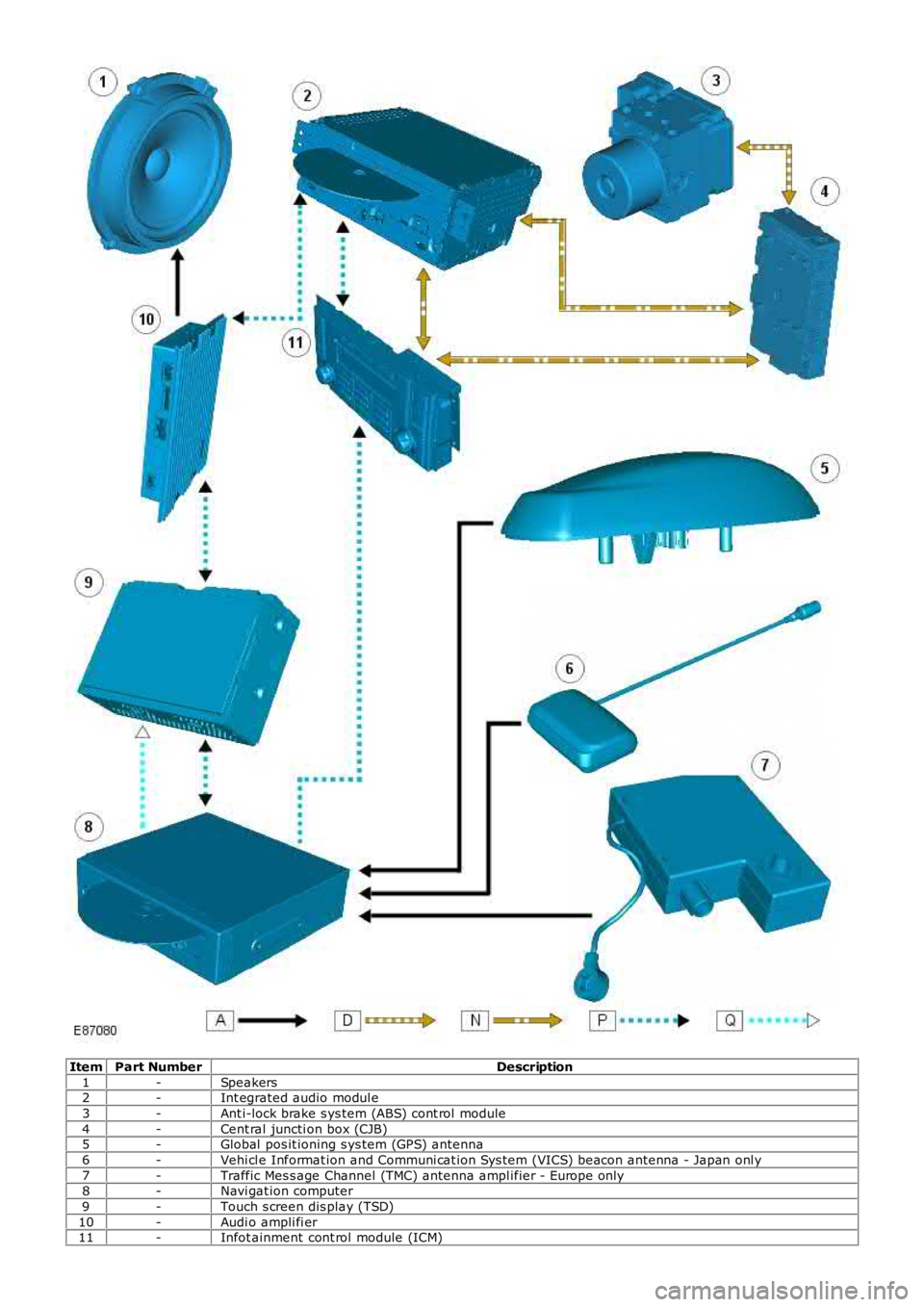
ItemPart NumberDescription
1-Speakers2-Int egrated audio modul e
3-Ant i-lock brake s ys tem (ABS) cont rol module
4-Cent ral juncti on box (CJB)5-Global pos it ioning s ys tem (GPS) antenna
6-Vehi cl e Informat ion and Communi cat ion Sys tem (VICS) beacon antenna - Japan onl y
7-Traffic Mes s age Channel (TMC) antenna ampl ifier - Europe only8-Navi gat ion computer
9-Touch s creen dis play (TSD)
10-Audi o ampli fi er11-Infot ainment cont rol module (ICM)
Page 1897 of 3229
Publi s hed: 11-May-2011
Information and Entertainment System - Audio Unit
Removal and Inst all ati on
Removal
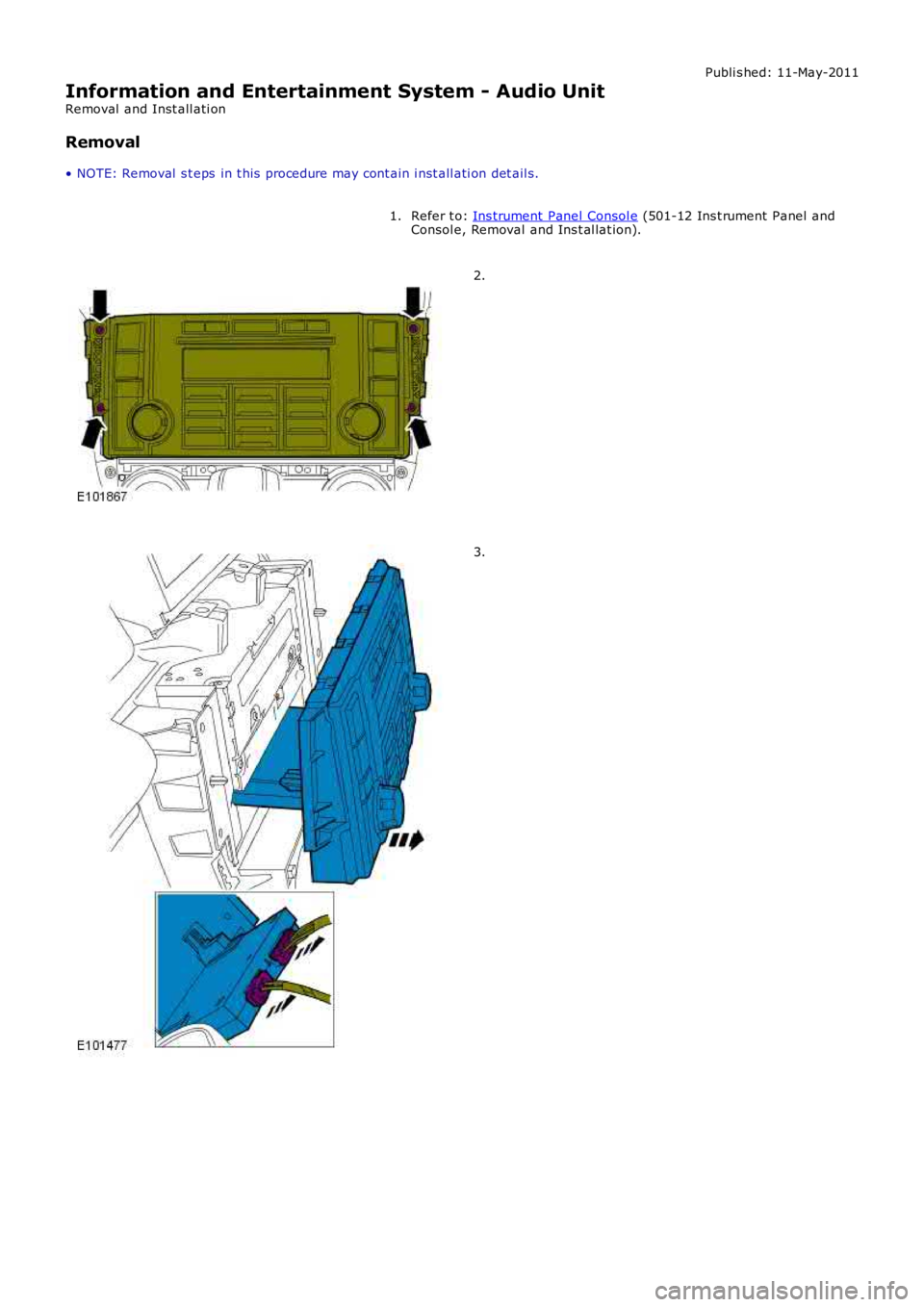
• NOTE: Removal s t eps in t his procedure may cont ain i nst all ati on det ail s.
Refer t o: Ins trument Panel Consol e (501-12 Ins t rument Panel andConsol e, Removal and Ins t al lat ion).1.
2.
3.
Page 1898 of 3229
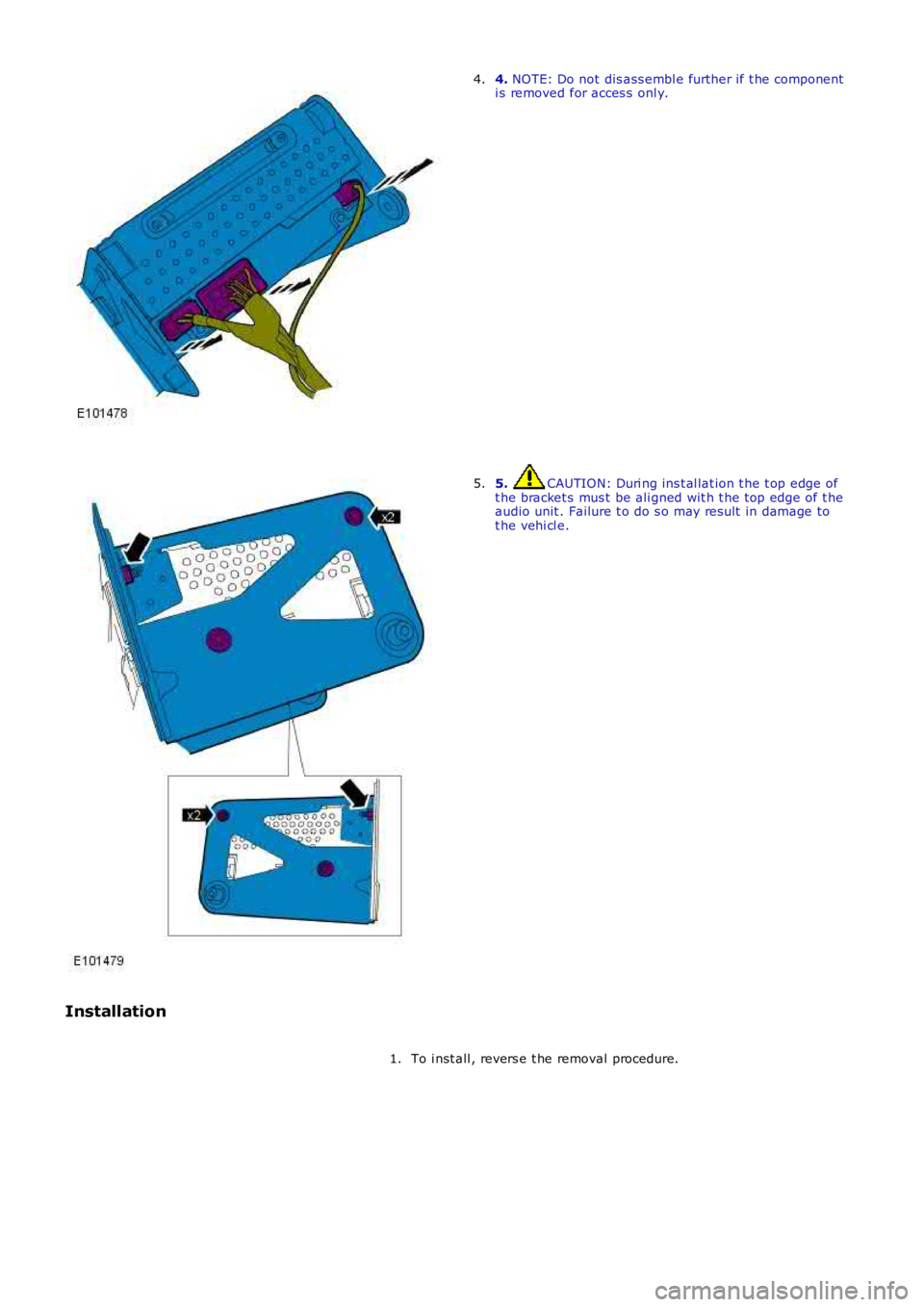
4. NOTE: Do not dis ass embl e further if t he componenti s removed for acces s onl y.4.
5. CAUTION: Duri ng ins t al lat ion t he t op edge oft he bracket s mus t be ali gned wit h t he top edge of t heaudio unit . Failure t o do s o may res ult in damage tot he vehi cl e.
5.
Installation
To i nst all , revers e t he removal procedure.1.
Page 1903 of 3229
Publi s hed: 11-May-2011
Information and Entertainment System - Audio Unit Antenna
Removal and Inst all ati on
Removal
• NOTE: Removal s t eps in t his procedure may cont ain i nst all ati on det ail s.
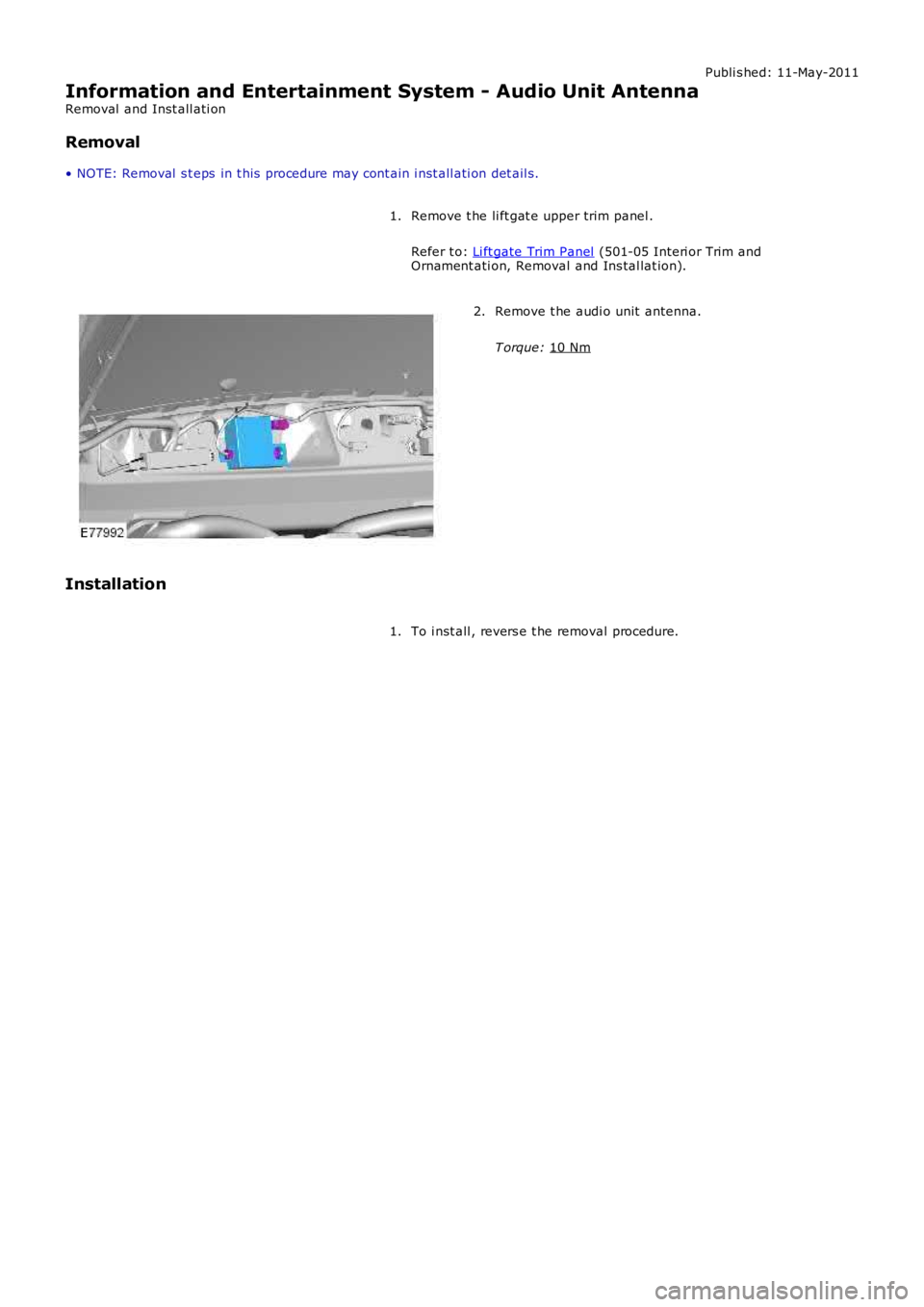
Remove t he li ft gat e upper trim panel .
Refer t o: Li ft gate Trim Panel (501-05 Interi or Trim and
Ornament ati on, Removal and Ins tal lat ion).
1. Remove t he audi o unit antenna.
T orque: 10 Nm 2.
Installation To i nst all , revers e t he removal procedure.
1.
Page 1907 of 3229
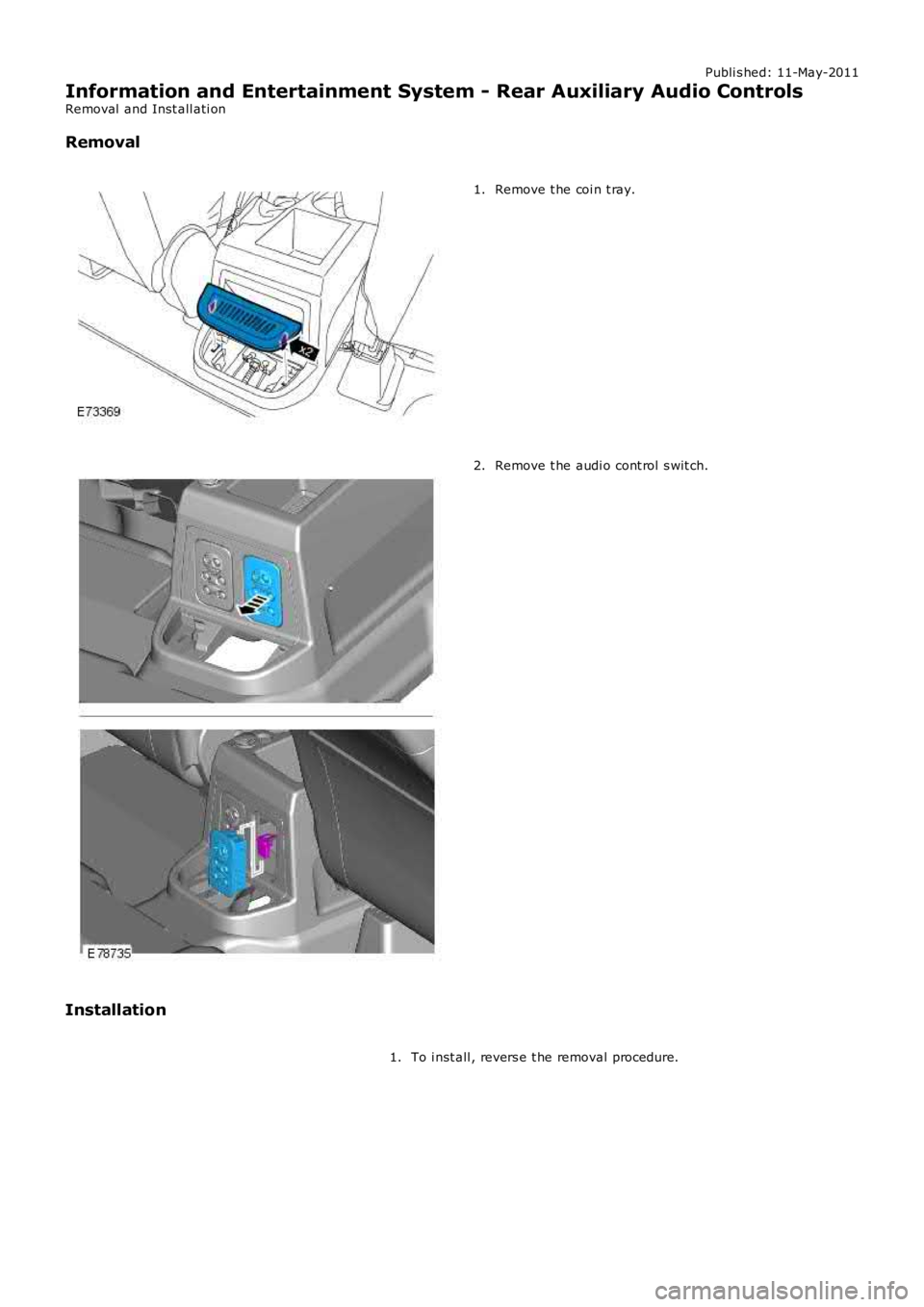
Publi s hed: 11-May-2011
Information and Entertainment System - Rear Auxiliary Audio Controls
Removal and Inst all ati on
Removal
Remove t he coi n t ray.1.
Remove t he audi o cont rol s wit ch.2.
Installation
To i nst all , revers e t he removal procedure.1.
Page 1910 of 3229

Publi s hed: 11-May-2011
Antenna -
Torque SpecificationsDescriptionNmlb-ft
Audio uni t ant enna107
Cell ular phone ant enna107
Page 1912 of 3229

Digi tal Audio Broadcast ing (DAB) s yst em ant enna (s ide screen or roof pod mount ed depending on sys t em)
The AM/FM antenna is et ched ont o t he RH s i de window gl as s . The antenna has an ampli fi er locat ed jus t above thewindow. This ampl ifier wil l vary upon the ent ert ainment and informat ion s yst em fi tt ed to the vehicle. Hi gh li ne s ys t emswil l have a larger ampl ifier for divers i ty t uning.
The rear wi ndow incorporat es 2 FM ant ennae and a VICS/TMC ant enna etched onto t he glas s . The 2 FM ant ennae are us edin the di vers it y tuning sys tem along wi th the res pecti ve antenna ampli fi ers .
The LH s ide window antenna i s used for DAB band III s i gnal recepti on.
• NOTE: The t el ephone control modul e incorporat es a Bl uet ooth ant enna. This i s int egral to the modul e and as s uch is nots erviceabl e.
CONTROL DIAGRAM
• NOTE: A = Hardwi red; P = MOST; T = CoAxial
Page 1913 of 3229
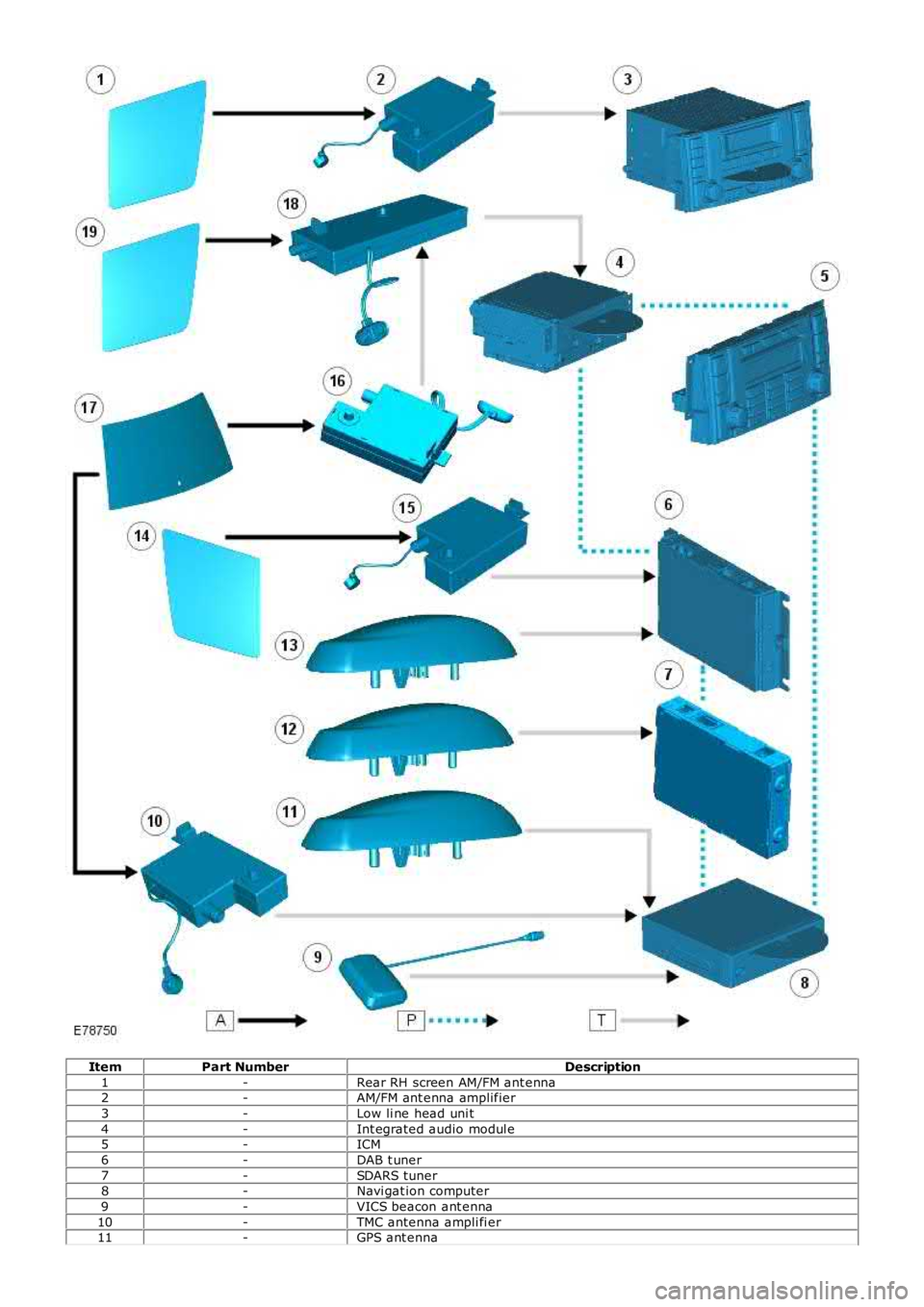
ItemPart NumberDescription
1-Rear RH screen AM/FM ant enna2-AM/FM ant enna amplifier
3-Low li ne head uni t
4-Int egrated audio modul e5-ICM
6-DAB t uner
7-SDARS tuner8-Navi gat ion computer
9-VICS beacon ant enna
10-TMC antenna ampli fi er11-GPS ant enna
Page 1962 of 3229
Publi s hed: 11-May-2011
Module Communications Network - Communications Network
Des cript ion and Operat ion
OVERVIEW
A number of different t ypes of communicati on network are incorporated into the vehicle wiring harnes s es for t het ransmis s ion of commands and informat ion between control modul es. The confi gurati on ins tal led on a parti cul ar vehicl edepends on t he model and equi pment level .
The communicati on net works avail abl e on t he vehi cl e are:
Local Int erconnect Network (LIN) busMedium speed Controll er Area Network (CAN) busHigh speed CAN busMedia O rient ated Sys tem Trans port (MO ST) ring
BusBaud Rate
LIN bus9.6 kbit s /s
Medium s peed CAN bus125 kbi ts /sHi gh Speed CAN bus500 kbi ts /s
MOST ring24 Mbit s/s
LOCAL INTERCONNECT NETWORK BUS
The Local Int erconnect Network (LIN) bus is a low s peed broadcas t net work that employs mas ter and s lave component s .The mas ter component t rans mit s a mess age along a si ngle wi re to the s lave component s i dent ifyi ng which s lave i s t ores pond. The mes s age has a header (s lave ident ifi er) and an empt y data fi eld. The identi fi ed s lave component fi ll s thedata fiel d wi th t he relevant i nformat ion and ret urns a mes s age to the mast er component along t he s ame wire.
CONTROLLER AREA NETWORK BUS
The Control ler Area Network (CAN) bus i s a high speed broadcast net work where cont rol modules aut omat icall y t rans mitinformat ion every few micros econds . Informati on is broadcas t down a pair of t wis t ed wires, known as 'CAN high' and 'CANlow'. Informat ion i s transmit ted on t he CAN bus as a vol tage di fference bet ween t he 2 wi res .
Two CAN bus net works are used on the vehicle; medi um s peed and high s peed, wi th the Cent ral Juncti on Box (CJB) acti ngas a gat eway bet ween t he 2 networks . The t abl e below shows t he wi re colors us ed on both net works .
Netw orkHighLow
Medium SpeedGrey and orangeViol et and orange
Hi gh SpeedW hit e and bl ueW hi te
MEDIA ORIENTATED SYSTEM TRANSPORT (MOST) RING
The Media O rient ated Sys tem Trans port (MO ST) ring us es fiber opt ic cables t o t rans port data and audio s ignal s around t heinformat ion and ent ertai nment sys tem. The fiber opti c cabl es are arranged in a ri ng, wit h each uni t on t he ri ng havi ng a'MOST in' and 'MOST out ' connect ion.
The MOST ring i s a s ynchronous net work. A t imi ng mas ter s uppl ies t he clock and all ot her component s on t he ri ngs ynchronize t heir operat ion t o t hi s clock. The t iming mas t er for the MOST ri ng is the i ntegrat ed cont rol module.
W hen handli ng MOST fiber opt ic cables t he fol lowi ng precaut ions s houl d be obs erved:
Aft er dis connect ion of any cables careful ly i nst all appropri ate dus t caps to protect the mati ng faces of theconnectors from damage and contami nat ion.Avoi d i nt roducing bends of les s t han 25 mm (0.98 inches ) radi us or ki nks int o the fiber opti c cabl e duri ng s ervice orrepair. Tight bends or kinks could i mpair operat ion, caus e immediate s ys t em failure, or future s ys t em fail ure.Avoi d exces s ive force, st rai n or s tress on the fibers or connect ors es peci ally permanent st res s after rei nst all at ion.
Ring Break Diag nostics
Incorporat ed i nt o t he Auxili ary Junct ion Box (AJB) is a Ri ng Break Di agnos ti cs (RBD) l ink. The RBD li nk hous es a copper linkwhich when removed init iat es the ri ng break diagnost ics mode. The ri ng break di agnosti cs mode allows the t echni ci an tolocate an opt ical fi ber break in t he MOST ring. To i nit iate the ring break diagnos t ics mode, carry out t he fol lowi ng proces s :
Connect t he Land Rover approved di agnos ti c s yst em.Ensure t he vehi cl e is in power mode 4 or great er.Remove the RBD li nk for t he length of ti me s peci fi ed by the Land Rover approved di agnos ti c s ys t em.Replace the RBD li nk.
Aft er approxi matel y 30 s econds a Di agnos t ic Trouble Code (DTC) wi ll be logged i n the Int egrated Cont rol Modul e,identi fyi ng the l ocat ion of t he faul t. The DTC can be read and int errogat ed usi ng t he Land Rover approved di agnos ti cs ys t em.
CONTROL DIAGRAM - LIN BUS (SHEET 1 OF 2)
• NOTE: O = LIN bus
Page 1966 of 3229
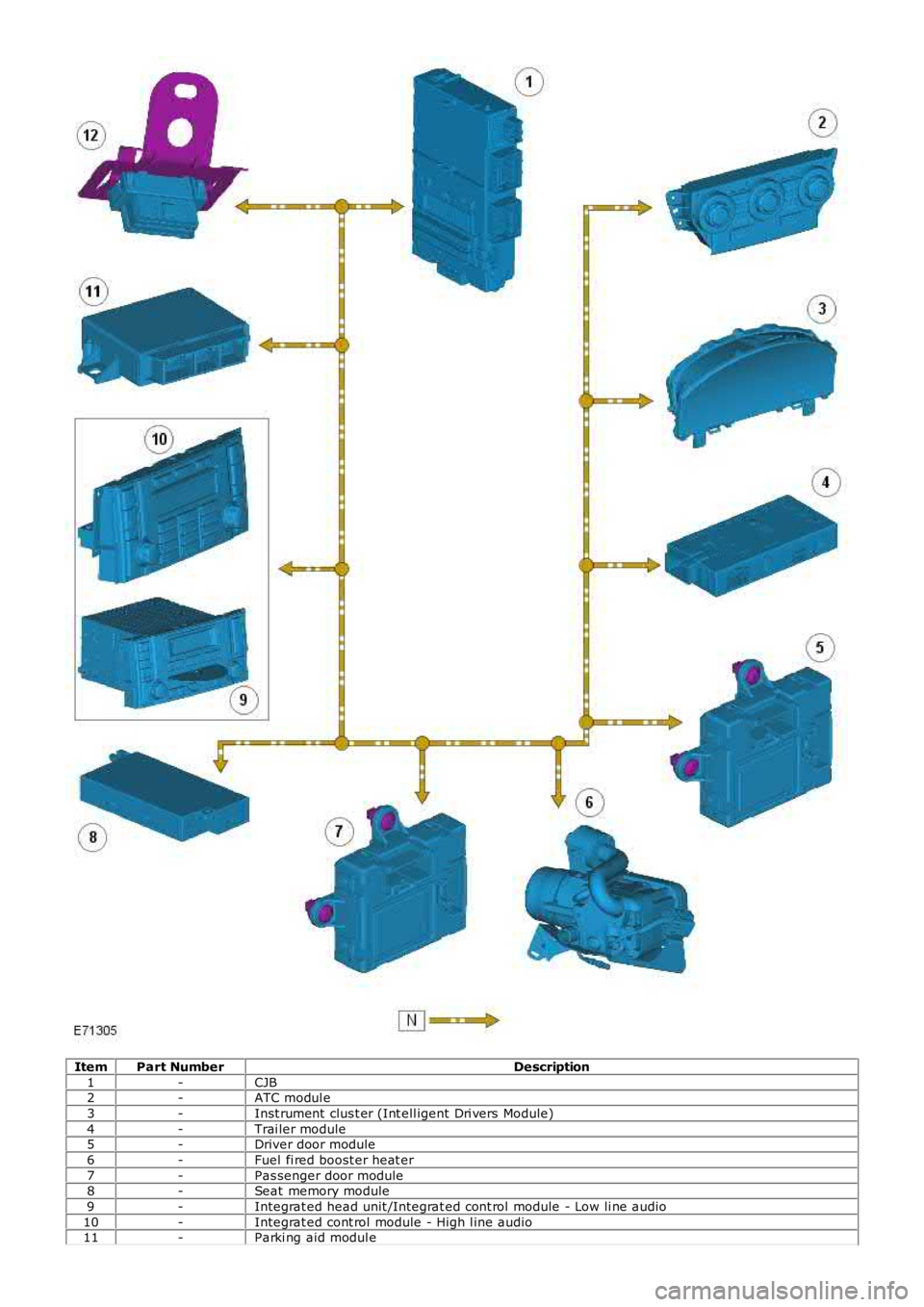
ItemPart NumberDescription
1-CJB2-ATC modul e
3-Inst rument clus t er (Int ell igent Dri vers Module)
4-Trai ler module5-Driver door module
6-Fuel fi red boost er heat er
7-Pas senger door module8-Seat memory module
9-Integrat ed head unit /Integrat ed cont rol module - Low li ne audi o
10-Integrat ed cont rol module - High l ine audio11-Parki ng aid modul e