display LAND ROVER FRELANDER 2 2006 Workshop Manual
[x] Cancel search | Manufacturer: LAND ROVER, Model Year: 2006, Model line: FRELANDER 2, Model: LAND ROVER FRELANDER 2 2006Pages: 3229, PDF Size: 78.5 MB
Page 2942 of 3229
Audio unit overview
222
L
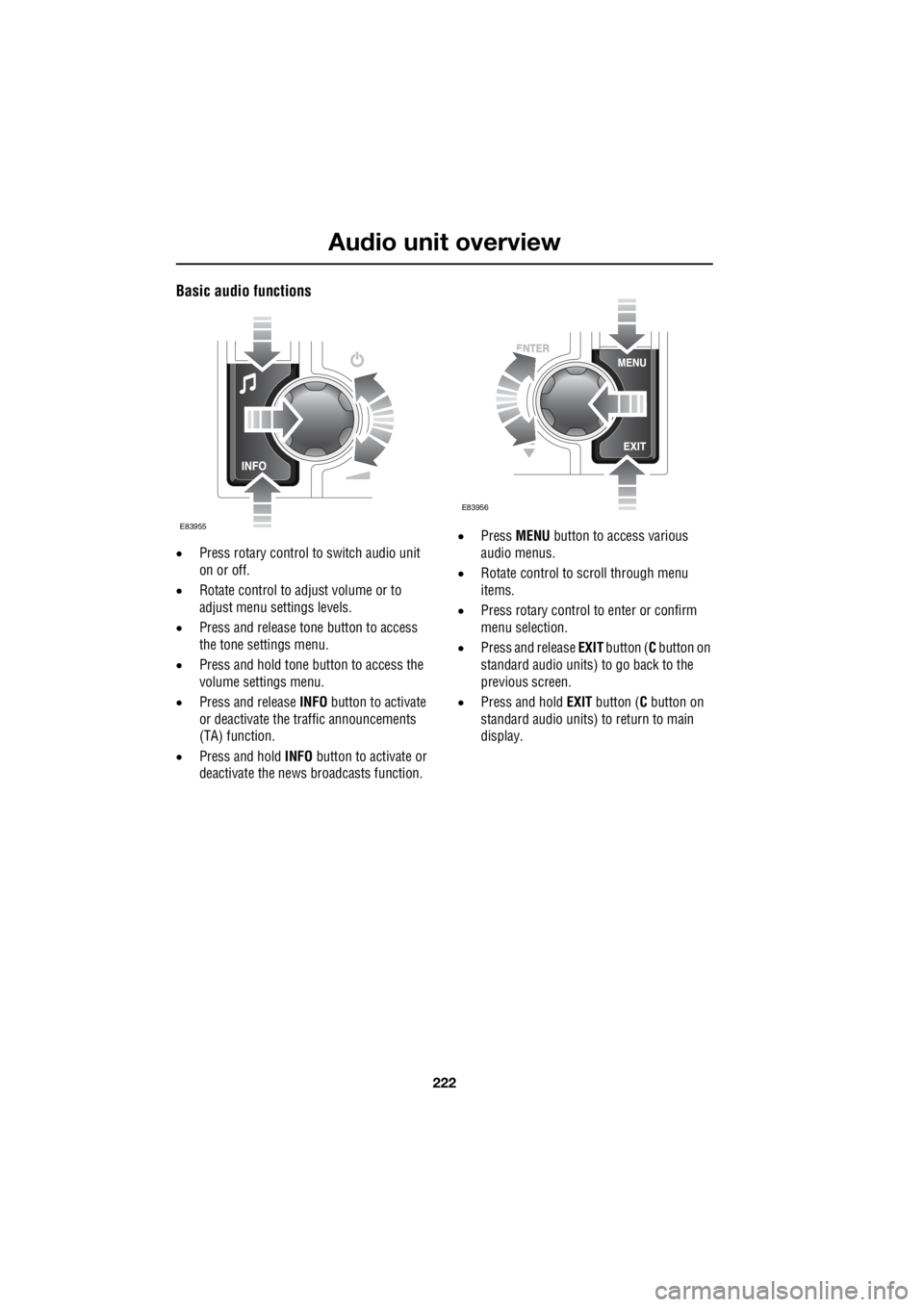
Basic audio functions
• Press rotary control to switch audio unit
on or off.
• Rotate control to adjust volume or to
adjust menu settings levels.
• Press and release tone button to access
the tone settings menu.
• Press and hold tone button to access the
volume settings menu.
• Press and release INFO button to activate
or deactivate the traffic announcements
(TA) function.
• Press and hold INFO button to activate or
deactivate the news broadcasts function. •
Press MENU button to access various
audio menus.
• Rotate control to scroll through menu
items.
• Press rotary control to enter or confirm
menu selection.
• Press and release EXIT button ( C button on
standard audio units) to go back to the
previous screen.
• Press and hold EXIT button ( C button on
standard audio units) to return to main
display.
E83955
E83956
Page 2943 of 3229

223
Audio unit operation
R
Audio unit operationON OR OFF CONTROL
Press the on or off control to switch the audio
unit on. Press again to switch off.
VOLUME CONTROL
Rotate the volume control to increase or
decrease the audio unit volume. The volume
can be set between 0 and 35.
When the audio unit is turned on, the
previously set volume level will be
implemented.
Note: The standard audio unit can be used with
the engine off, but the maximum volume level
will be restricted.
Automatic Volume Control (AVC)
The AVC feature adjusts the volume level to
compensate for the changes in road noise as
the vehicle speed increases or decreases.
Note: The AVC setting represents the volume
increase and not the volume level.
If the AVC level is set to Off, there will be no
volume increase. With a low level setting, the
volume increase at speed will be minimal. If a
high level setting is used, there will be a
noticeable increase of volume at speed.
The AVC setting required will depend upon the
expected speed and the expected road
conditions.
Use the following proce dure to set the AVC
level.
1. Press and hold the tone button to access
the volume settings menu.
2. Press the tone button repeatedly until AVC
Level is displayed.
3. Rotate the volume control to select the
required AVC setting.
Reset volume settings
The following procedure will reset all of the
volume settings to the original factory values.
1. Press and hold the tone button to access
the volume settings menu.
2. Repeatedly press the tone button to scroll
through the menu until the Reset volume
settings message is displayed.
3. Rotate the volume control to highlight YES
or NO as required.
4. On premium audio un its, press the tone
button to confirm your choice and exit the
menu. On standard audio units, your
choice is confirme d by pressing the MENU
button.
AUDIO CONTROL
Depending on the specification of the audio
system fitted to your vehicle, the following
audio control settings are available from the
tone menu.
Surround sound settings
1. Press and release th e tone button to
display the current surround sound
setting.
2. Rotate the volume control to highlight 3
Channel or Stereo as required.
Bass response adjustment
1.Press the tone button repeatedly until the
current Bass setting is displayed.
2. Rotate the volume control to increase or
decrease the level.
Treble response adjustment
1. Press the tone button repeatedly until the
current Treble setting is displayed.
2. Rotate the volume control to increase or
decrease the level.
Page 2944 of 3229

Audio unit operation
224
L
Balance adjustment
1. Press the tone button repeatedly until the
current Balance setting is displayed.
2. Rotate the volume control to adjust sound
level to the right or left.
Fader adjustment
1. Press the tone button repeatedly until the
current Fader setting is displayed.
2. Rotate the volume control to adjust the
sound level to the front or rear.
Subwoofer settings
1. Press the tone button repeatedly until the
current Subwoofer setting is displayed.
2. Rotate the volume control to increase or
decrease the setting.
Centre speaker settings
1. Press the tone button repeatedly until the
current Centre setting is displayed.
2. Rotate the volume control to increase or
decrease the setting.
Resetting tone values
Use the following procedur e to return the tone
settings to the factory defaults.
1. Press the tone button repeatedly until the
Reset tone settings message is displayed.
2. Rotate the volume control to highlight YES
or NO as required.
3. On premium audio units, press the tone
button to confirm your choice. On
standard audio units, use the MENU
button.
All settings will be reset to the neutral (central)
value.
WAVEBAND BUTTON
To select the FM waveband, press and release
the FM button. Repeated presses will scroll
between FM1 and FM2. On standard audio
units FMa is also available. The selection will
be shown in the top left-hand corner of the
information display.
To select the AM waveband, press and release
the AM button. The selection will be shown in
the top left-hand corner of the information
display. On standard audio units, repeated
presses of the AM button will scroll through
MW1 , MWa , LW1 and LWa.
Page 2945 of 3229
225
Audio unit operation
R
AUTOSTORE CONTROL
Autostoring radio stations - Premium
audio
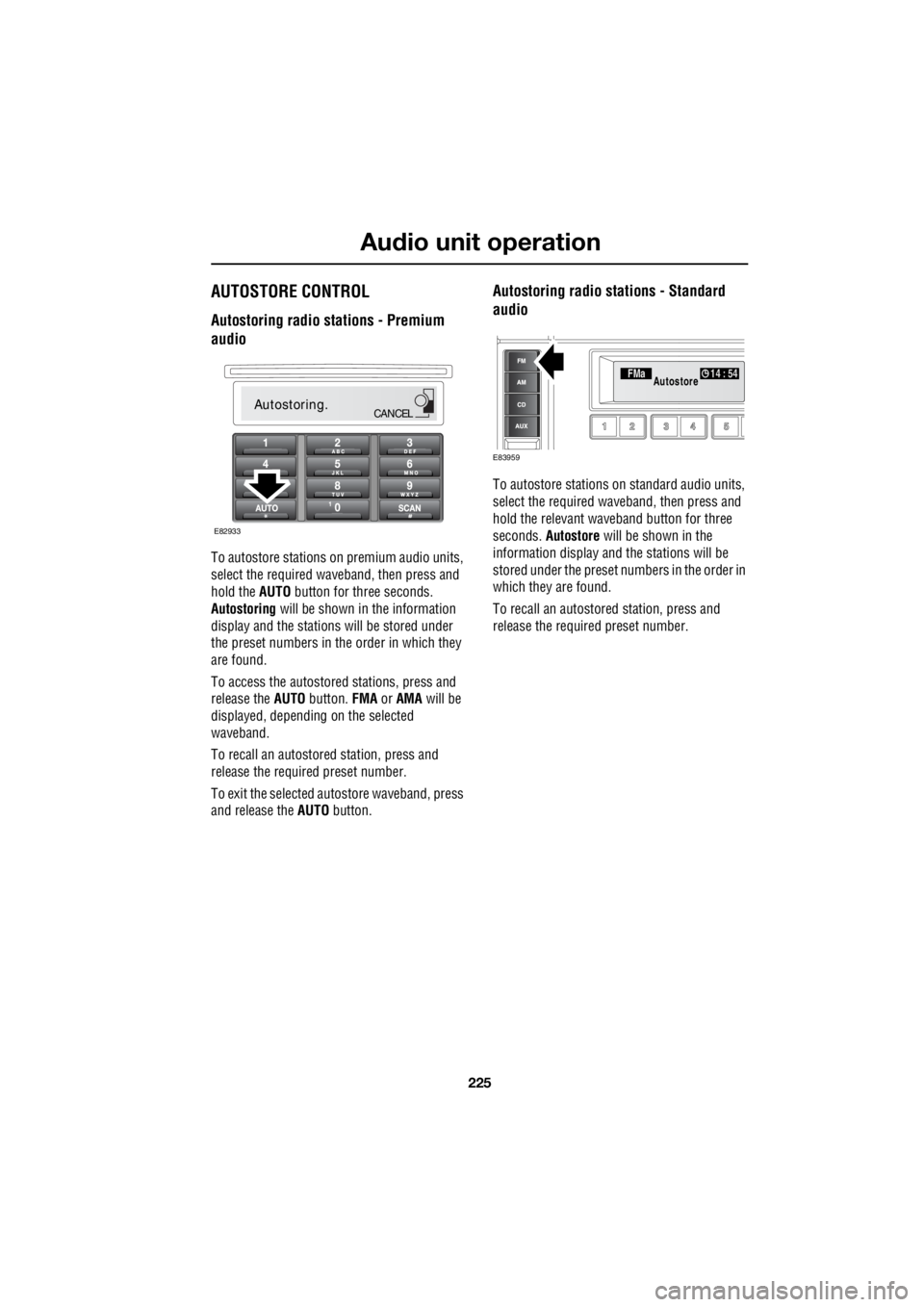
To autostore stations on premium audio units,
select the required wave band, then press and
hold the AUTO button for three seconds.
Autostoring will be shown in the information
display and the stations will be stored under
the preset numbers in the order in which they
are found.
To access the autostored stations, press and
release the AUTO button. FMA or AMA will be
displayed, depending on the selected
waveband.
To recall an autostored station, press and
release the required preset number.
To exit the selected autostore waveband, press
and release the AUTO button.
Autostoring radio stations - Standard
audio
To autostore stations on standard audio units,
select the required waveband, then press and
hold the relevant waveband button for three
seconds. Autostore will be shown in the
information display and the stations will be
stored under the preset num bers in the order in
which they are found.
To recall an autostored station, press and
release the required preset number.
Autostoring.CANCEL
E82933
FMa 14 : 54Autostore
E83959
Page 2947 of 3229
227
Audio unit operation
R
Traffic Programme (TP) preference
With the Traffic Announc ement (TA) feature
enabled, any announcem ent received by the
system will interrupt nor mal radio reception or
CD play. The TP preference feature on premium
audio units allows the system to receive only
traffic announcements from a particular
station.
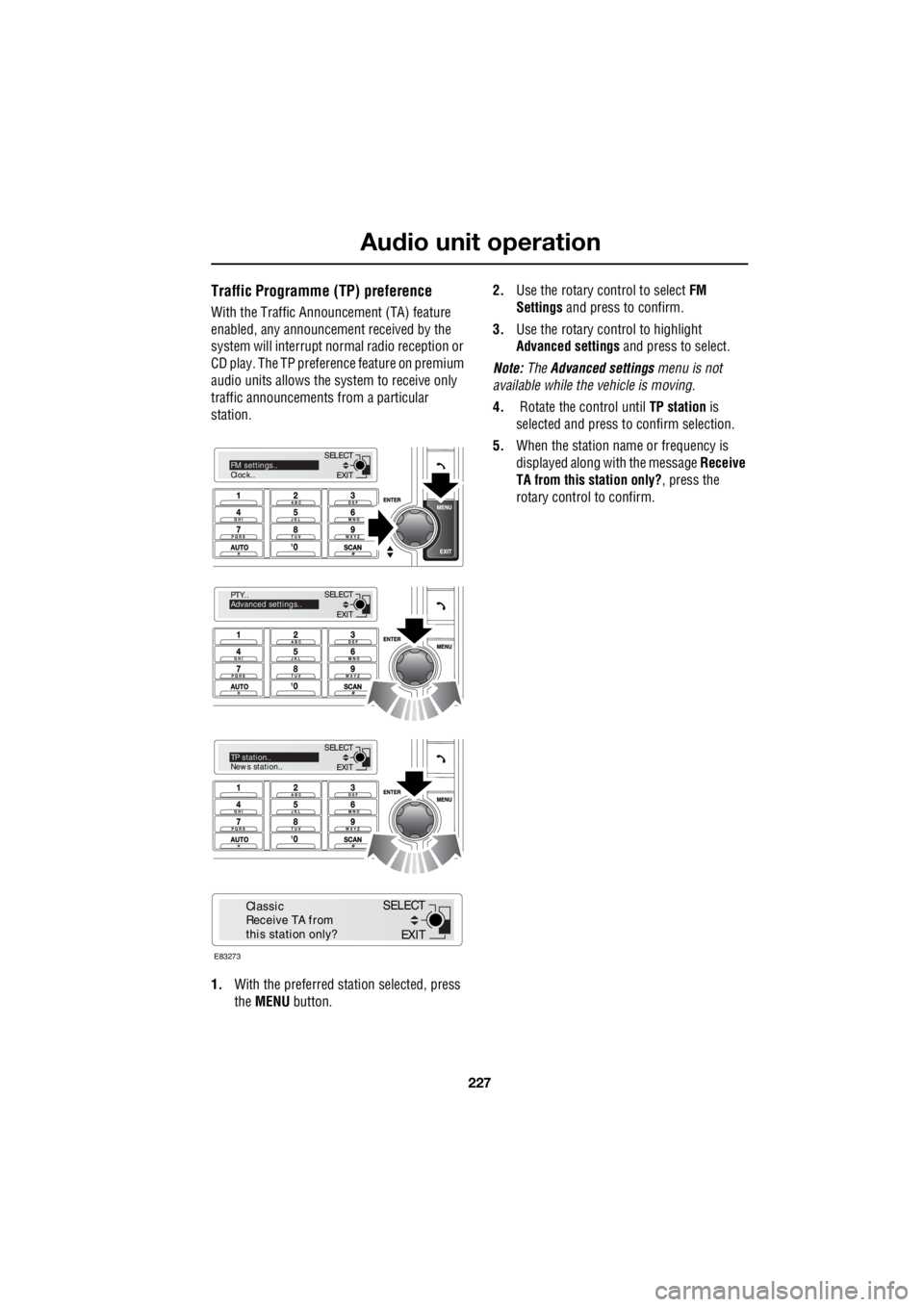
1. With the preferred station selected, press
the MENU button. 2.
Use the rotary control to select FM
Settings and press to confirm.
3. Use the rotary control to highlight
Advanced settings and press to select.
Note: The Advanced settings menu is not
available while the vehicle is moving.
4. Rotate the control until TP station is
selected and press to confirm selection.
5. When the station name or frequency is
displayed along with the message Receive
TA from this station only? , press the
rotary control to confirm.
EXIT
SELECT
PTY..
Advanced settings..
EXIT
SELECTTP station..
News station..
EXIT
SELECTFM settings..
Clock..
E83273
EXIT
SELECT
Classic
Receive TA from
this station only?
Page 2948 of 3229
Audio unit menus
228
L
Audio unit menusRADIO DATA SYSTEM (RDS)
Your audio system is equipped with RDS
(Radio Data System), which enables the audio
unit to receive extra information with the
normal radio signals.
On the FM waveband, RD S enables the audio to
receive traffic and news information
broadcasts. RDS also al lows the audio unit to
automatically retune to stations that are linked
to the same network.
Note: Not all FM radio stat ions broadcast RDS.
If a non-RDS station is selected, RDS features
will not be available.
Selecting RDS
On standard audio unit s, RDS can be enabled
or disabled, according to preference. The
following procedure explains how to switch
RDS on or off.
1. With FM1, FM2 or FMa selected, press the
MENU button to display the menu.
2. Using the rotary control, select RDS from
the menu. ON or OFF will be displayed,
dependent on status.
3. Press the rotary control to change status.
The RDS status will be displayed briefly on the
information screen.
REGIONAL MODE (REG)
As you drive into diffe rent radio reception
areas, the Radio Data System (RDS)
automatically retunes the radio to the strongest
signal. Regional mode is an RDS feature which
stops the system from tuning to another local
radio station with a stronger signal. With this
feature enabled, your selected local radio
station will re main tuned.
Regional mode - Premium audio
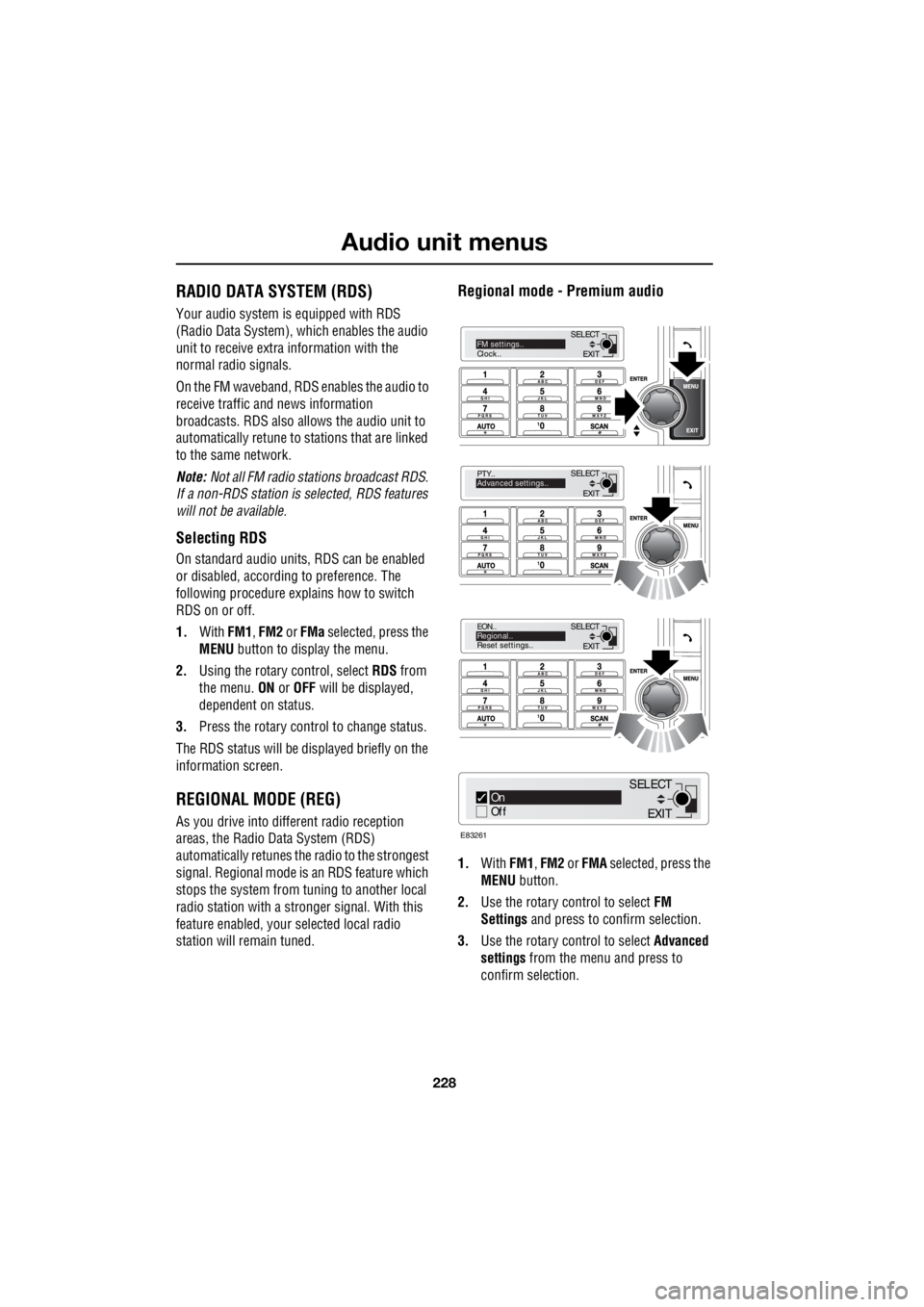
1.With FM1, FM2 or FMA selected, press the
MENU button.
2. Use the rotary control to select FM
Settings and press to c onfirm selection.
3. Use the rotary control to select Advanced
settings from the menu and press to
confirm selection.
EXIT
SELECT
PTY..
Advanced settings..
EXIT
SELECT
EON..
Regional..
Reset settings..
EXIT
SELECTFM settings..
Clock..
On
Off
E83261
EXIT
SELECT
Page 2949 of 3229
229
Audio unit menus
R
Note: The Advanced settings menu is not
available while the vehicle is moving.
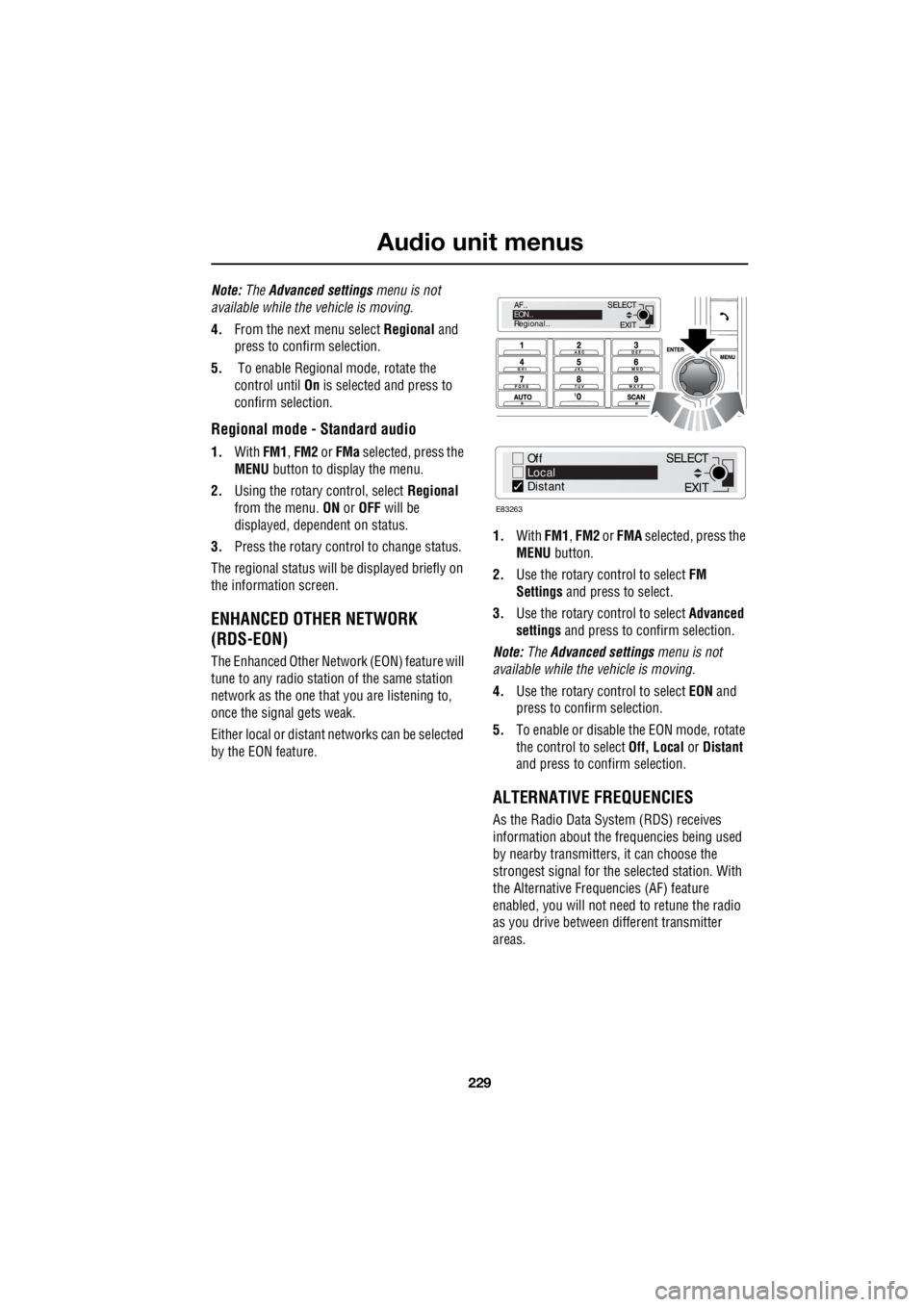
4. From the next menu select Regional and
press to confirm selection.
5. To enable Regional mode, rotate the
control until On is selected and press to
confirm selection.
Regional mode - Standard audio
1. With FM1, FM2 or FMa selected, press the
MENU button to display the menu.
2. Using the rotary control, select Regional
from the menu. ON or OFF will be
displayed, dependent on status.
3. Press the rotary control to change status.
The regional status will be displayed briefly on
the information screen.
ENHANCED OTHER NETWORK
(RDS-EON)
The Enhanced Other Network (EON) feature will
tune to any radio stati on of the same station
network as the one that you are listening to,
once the signal gets weak.
Either local or distant networks can be selected
by the EON feature. 1.
With FM1, FM2 or FMA selected, press the
MENU button.
2. Use the rotary control to select FM
Settings and press to select.
3. Use the rotary control to select Advanced
settings and press to confirm selection.
Note: The Advanced settings menu is not
available while the vehicle is moving.
4. Use the rotary control to select EON and
press to confirm selection.
5. To enable or disable the EON mode, rotate
the control to select Off, Local or Distant
and press to c onfirm selection.
ALTERNATIVE FREQUENCIES
As the Radio Data System (RDS) receives
information about the frequencies being used
by nearby transmitters, it can choose the
strongest signal for the se lected station. With
the Alternative Frequencies (AF) feature
enabled, you will not need to retune the radio
as you drive between different transmitter
areas.
EXIT
SELECT
AF..
EON..
Regional..
Off
Local
Distant
E83263
EXIT
SELECT
Page 2950 of 3229
Audio unit menus
230
L
Alternative Frequency (AF) - Premium
audio
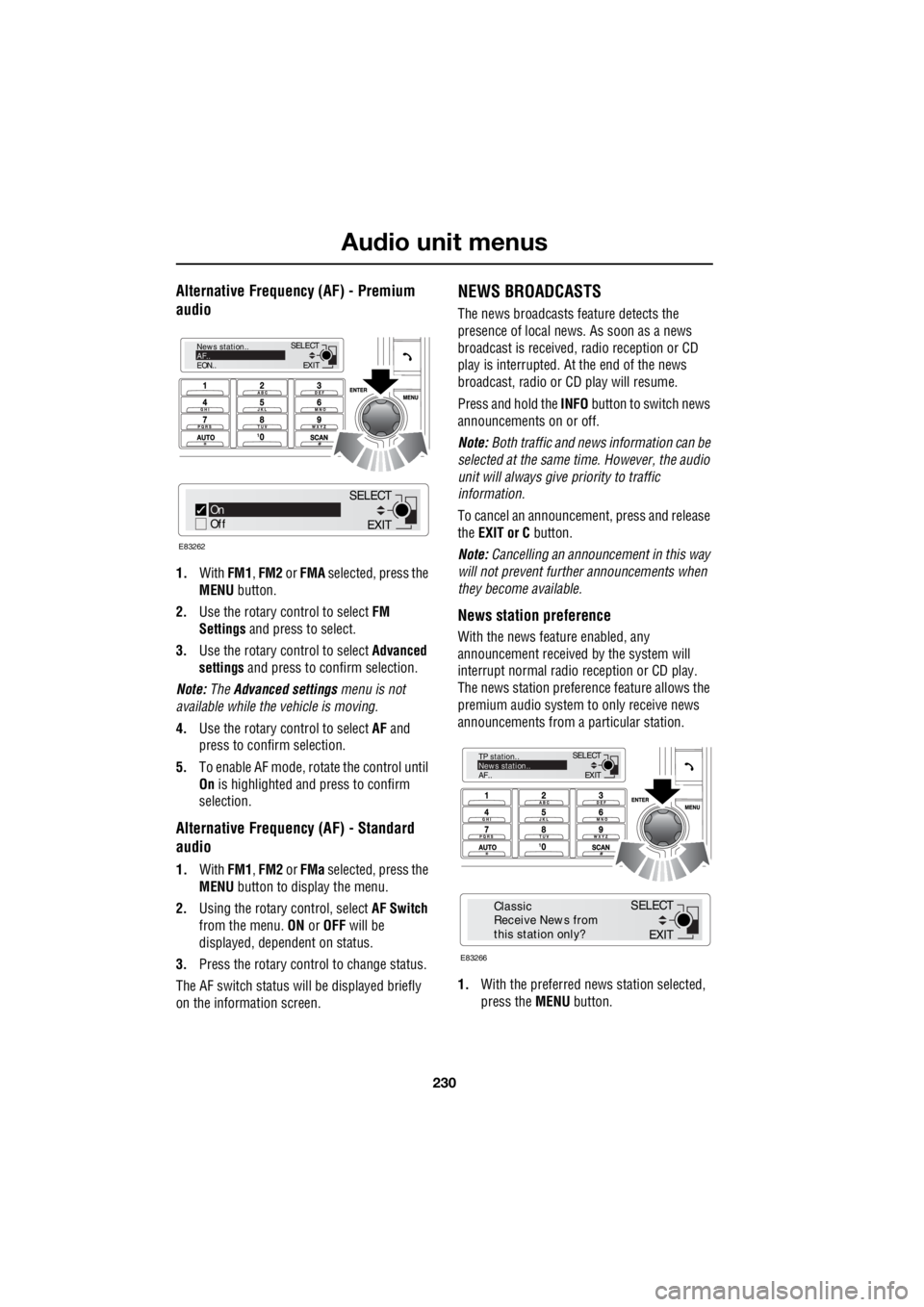
1. With FM1, FM2 or FMA selected, press the
MENU button.
2. Use the rotary c ontrol to select FM
Settings and press to select.
3. Use the rotary c ontrol to select Advanced
settings and press to c onfirm selection.
Note: The Advanced settings menu is not
available while the vehicle is moving.
4. Use the rotary c ontrol to select AF and
press to confirm selection.
5. To e nable AF mode , r o tate the control until
On is highlighted and press to confirm
selection.
Alternative Frequency (AF) - Standard
audio
1. With FM1, FM2 or FMa selected, press the
MENU button to display the menu.
2. Using the rotary control, select AF Switch
from the menu. ON or OFF will be
displayed, dependent on status.
3. Press the rotary control to change status.
The AF switch status w ill be displayed briefly
on the information screen.
NEWS BROADCASTS
The news broadcasts feature detects the
presence of local news. As soon as a news
broadcast is received, radio reception or CD
play is interrupted. At the end of the news
broadcast, radio or CD play will resume.
Press and hold the INFO button to switch news
announcements on or off.
Note: Both traffic and news information can be
selected at the same time. However, the audio
unit will always give priority to traffic
information.
To cancel an announcemen t, press and release
the EXIT or C button.
Note: Cancelling an announcement in this way
will not prevent further announcements when
they become available.
News station preference
With the news feature enabled, any
announcement received by the system will
interrupt normal radio reception or CD play.
The news station preferen ce feature allows the
premium audio system to only receive news
announcements from a particular station.
1. With the preferred news station selected,
press the MENU button.
EXIT
SELECT
News station..
AF..
EON..
On
Off
E83262
EXIT
SELECT
EXIT
SELECT
TP station..
News station..
AF..
E83266
EXIT
SELECT
Classic
Receive News from
this station only?
Page 2951 of 3229
231
Audio unit menus
R
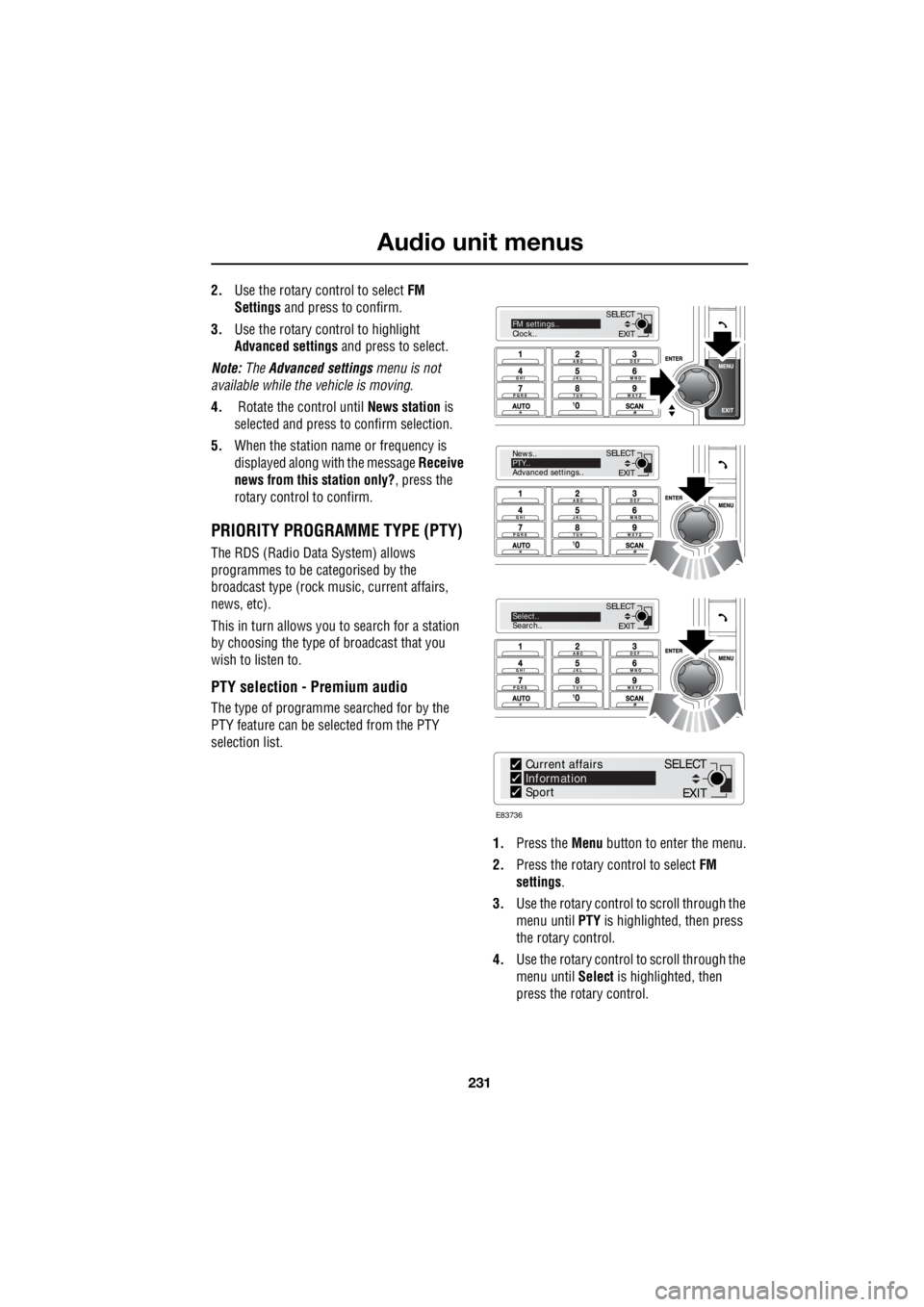
2. Use the rotary control to select FM
Settings and press to confirm.
3. Use the rotary control to highlight
Advanced settings and press to select.
Note: The Advanced settings menu is not
available while the vehicle is moving.
4. Rotate the control until News station is
selected and press to confirm selection.
5. When the station name or frequency is
displayed along with the message Receive
news from this station only? , press the
rotary control to confirm.
PRIORITY PROGRAMME TYPE (PTY)
The RDS (Radio Data System) allows
programmes to be categorised by the
broadcast type (rock mu sic, current affairs,
news, etc).
This in turn allows you to search for a station
by choosing the type of broadcast that you
wish to listen to.
PTY selection - Premium audio
The type of programme searched for by the
PTY feature can be selected from the PTY
selection list.
1. Press the Menu button to enter the menu.
2. Press the rotary control to select FM
settings .
3. Use the rotary control to scroll through the
menu until PTY is highlighted, then press
the rotary control.
4. Use the rotary control to scroll through the
menu until Select is highlighted, then
press the rotary control.
EXIT
SELECT
News..
PTY..
Advanced settings..
EXIT
SELECTSelect..
Search..
EXIT
SELECTFM settings..
Clock..
E83736
Current affairs
Information
Sport
EXIT
SELECT
Page 2952 of 3229
Audio unit menus
232
L
5. Having entered the PTY select menu, use
the rotary control to scroll through the
programme types until your choice is
highlighted.
6. Press the rotary control to select or
deselect the programme type(s) required.
7. Press the EXIT button to return to the PTY
menu.
PTY programme types
1. News
2. Current affairs
3. Information
4. Sport
5. Education
6. Drama
7. Culture
8. Science
9. Varied speech
10. Pop music
11. Rock music
12. Easy listening
13. Light classic
14. Serious classic
15. Other music
16. Weather
17. Finance
18. Childrens
19. Social affairs
20. Religion
21. Phone in
22. Travel and touring
23. Leisure and hobby
24. Jazz music
25. Country music
26. National music 27.
Oldies music
28. Folk music
29. Documentary
PTY search - Premium audio
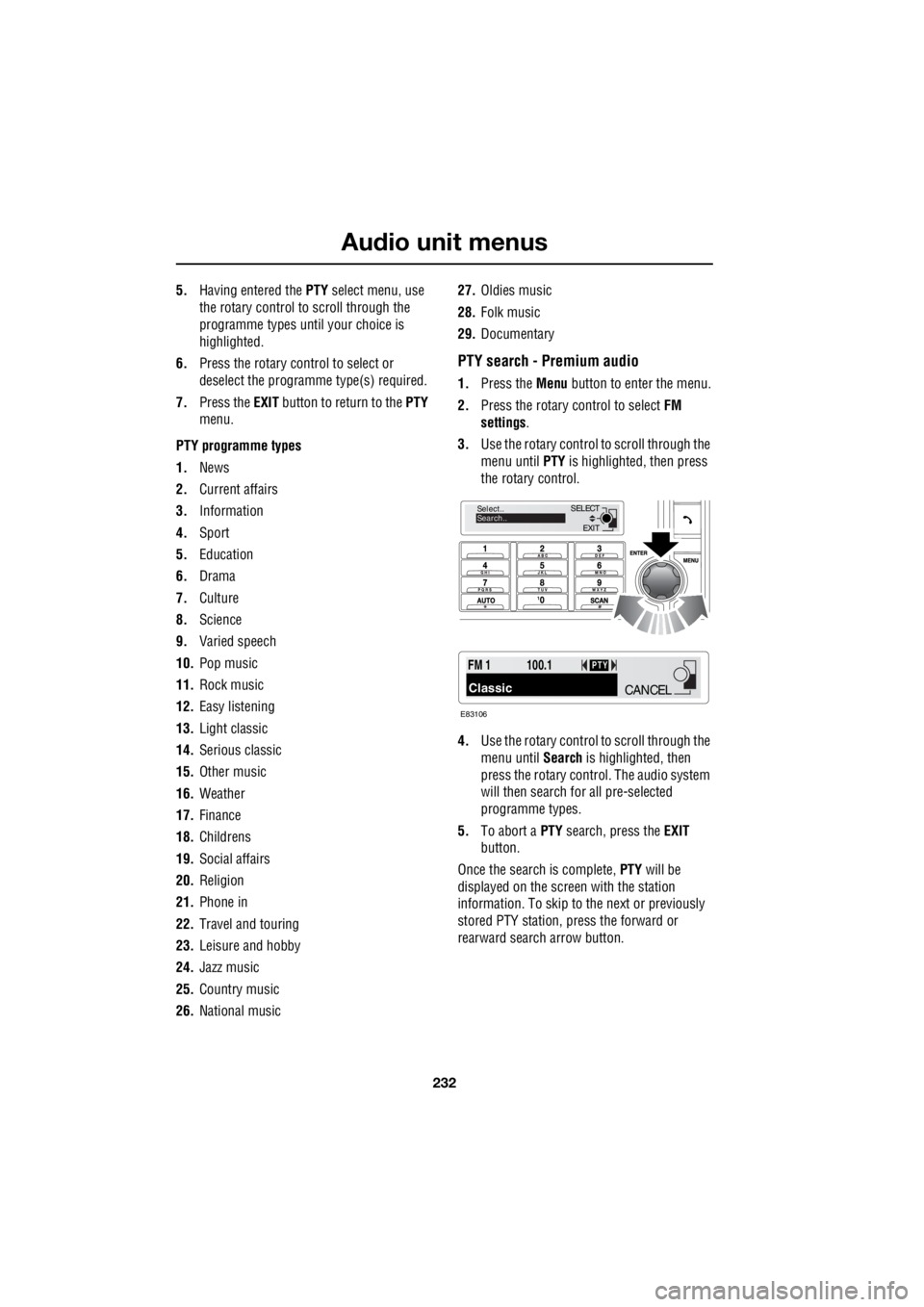
1.Press the Menu button to enter the menu.
2. Press the rotary control to select FM
settings .
3. Use the rotary control to scroll through the
menu until PTY is highlighted, then press
the rotary control.
4. Use the rotary control to scroll through the
menu until Search is highlighted, then
press the rotary contro l. The audio system
will then search for all pre-selected
programme types.
5. To abort a PTY search, press the EXIT
button.
Once the search is complete, PTY will be
displayed on the screen with the station
information. To skip to the next or previously
stored PTY station, press the forward or
rearward search arrow button.
EXIT
SELECT
Select..
Search..
FM 1
Classic
100.1PTY
E83106
CANCEL