display LAND ROVER FRELANDER 2 2006 Service Manual
[x] Cancel search | Manufacturer: LAND ROVER, Model Year: 2006, Model line: FRELANDER 2, Model: LAND ROVER FRELANDER 2 2006Pages: 3229, PDF Size: 78.5 MB
Page 2855 of 3229

135
Terrain response
R
Messages that require driver intervention are
shown in the following table.
Message Meaning What to do?
PROGRAM CHANGE IN PROGRESS Conditions exist which
temporarily prevent selection of a new program. If conditions change within 60
seconds, the chosen program will be activated. If the
message is prompted by
electronic coupling overheat
the delay will be longer. A
separate message will also be displayed.
SYSTEM FAULT SPECIAL
PROGRAMS NOT AVAILABLE A fault exists which renders the
Terrain Response programs unavailable. Use extreme caution if
travelling off road, and seek qualified assistance
immediately.
RECOMMEND COMMAND
SHIFT FOR DEEP SOFT SAND In extreme sand conditions, it
may be beneficial to select
Command Shift to improve driver control. Select Command Shift if
required.
Page 2858 of 3229

Hill descent control (HDC)
138
L
If the brake pedal is de pressed, HDC will be
overridden and the br akes will operate as
normal. When the brake pedal is released, HDC
will resume control of the descent.
If HDC is switched off during a descent, HDC
assistance will fade out gradually. This is to
prevent loss of control if HDC is switched off in
error. HDC will resume control when switched
back on if assistance is still required, but at the
speed the vehicle is travelling when the pedal is
released.
When driving off-road HDC can be permanently
selected, but it will only provide assistance
when the speed parameters are met.
Warning messages
Brake temperature
In extreme circumstances, the HDC system
may cause brake temperatures to exceed their
pre-set limits. If this occurs the warning
message HDC TEMPORARILY NOT
AVAILABLE SYSTEM COOLING will be
displayed in the message centre. HDC will then
fade out and become temporarily inactive.
If the vehicle is not fitted with a message
centre, then the amber HDC warning indicator
will flash.
HDC will remain unavaila ble until the brakes
reach an acceptable temperature. Once the
brakes have reached an acceptable
temperature, the message will disappear (or
the warning indicator wi ll extinguish) and HDC
will, if required, resume operation. System fault
If a fault is detected in the HDC system, HDC
FAULT SYSTEM NOT AVAILABLE will appear in
the message centre.
If the vehicle is not fitted with a message centre
the amber HDC warning indicator will
illuminate.
If the fault is detected whilst the system is
operating HDC assistance will fade out.
If a fault is detected, contact you Land Rover
Dealer/Authorised Repairer as soon as
possible.
WARNING
Do not attempt a steep descent if HDC
is inoperative, or wa rning messages are
displayed.
Page 2877 of 3229
157
Maintenance
R
MaintenanceGENERAL INFORMATION
Regular systematic maintenance is the key to
ensuring the continued re liability and efficiency
of your vehicle.
Maintenance is the owne r's responsibility and
you must ensure that owner maintenance
operations, oil services, inspections and brake
fluid and coolant changes are carried out when
required and according to the manufacturer's
recommendations.
The routine maintenance requirements for your
vehicle are shown in the Service Portfolio book.
Most of this necessar y workshop maintenance
requires specialised knowledge and
equipment, and should preferably be entrusted
to a Land Rover Dealer/Authorised Repairer.
Service intervals
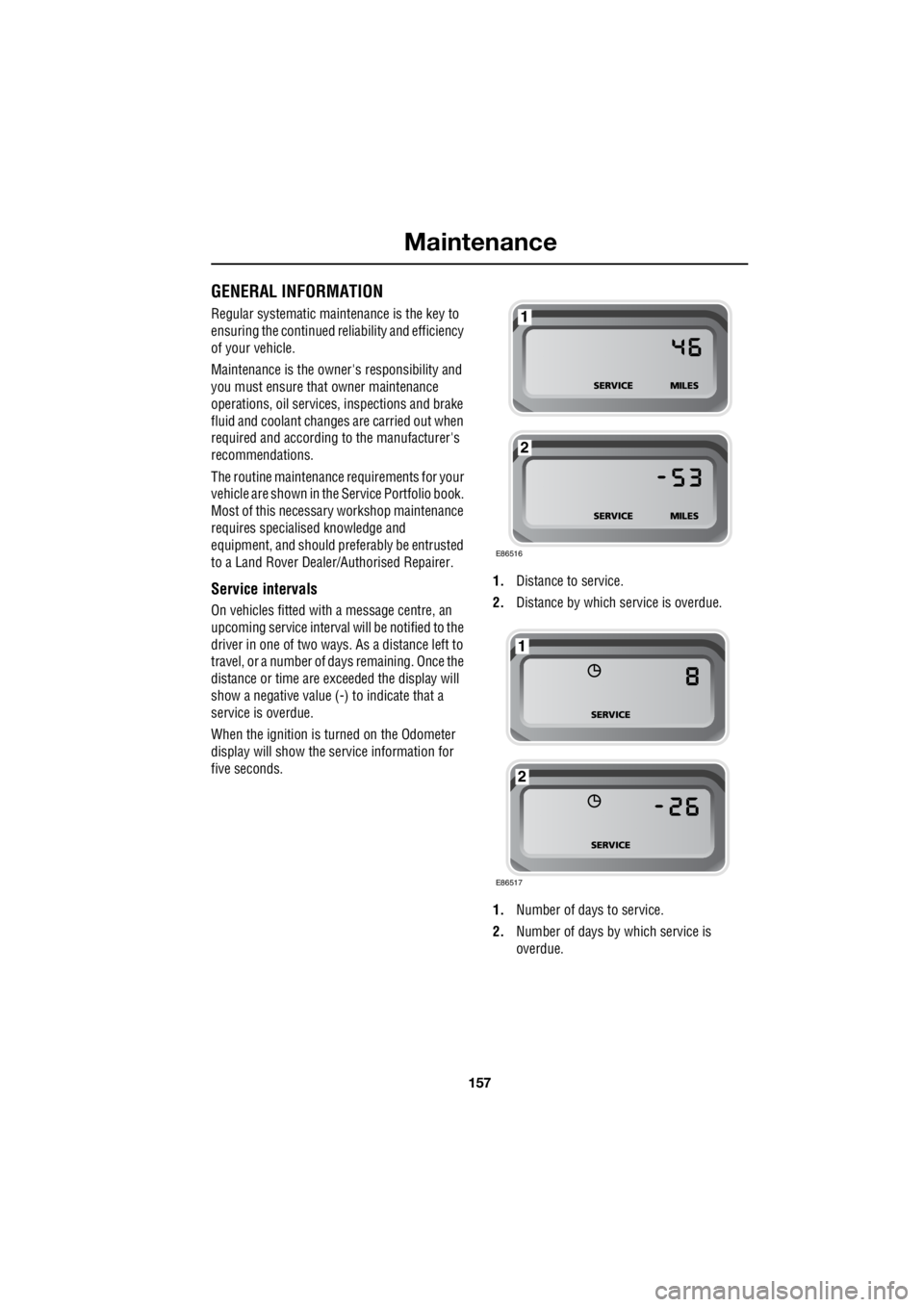
On vehicles fitted with a message centre, an
upcoming service interval will be notified to the
driver in one of two ways. As a distance left to
travel, or a number of da ys remaining. Once the
distance or time are ex ceeded the display will
show a negative value (-) to indicate that a
service is overdue.
When the ignition is turned on the Odometer
display will show the service information for
five seconds. 1.
Distance to service.
2. Distance by which service is overdue.
1. Number of days to service.
2. Number of days by which service is
overdue.
E86516
1
2
E86517
1
2
Page 2878 of 3229

Maintenance
158
L
One or both types of serv ice interval (distance
and time) may be displayed. For example, if an
engine oil service is du e based on mileage, and
a brake fluid change is due based on time, both
distance and time c ountdowns will display.
Service Portfolio
The Service Portfolio book includes a Service
Record section, which enables a record to be
kept of all the servicing and inspections that are
carried out on the vehicle. This section of the
book also has an area for brake fluid changes
to be recorded.
Ensure your service provider signs and stamps
the book after each se rvice and inspection.
Owner Maintenance
In addition to the routine maintenance, a
number of simple checks must be carried out
more frequently. Advice is given on the pages
that follow.
Daily checks
• Operation of lamps, horn, direction
indicators, wipers, washers and warning
indicators.
• Operation of seat belts and brakes.
• Look for fluid deposits underneath the
vehicle that might indicate a leak.
Weekly checks
• Engine oil level. See ENGINE OIL CHECK
(page 162).
• Engine coolant check. See ENGINE
COOLANT CHECK (page 163).
• Brake/clutch fluid level. See BRAKE AND
CLUTCH FLUID CHECK (page 165). •
Power steering fluid level. See POWER
STEERING FLUID CHECK (page 166).
• Screen washer fluid level. See WASHER
FLUID CHECK (page 167).
• Tyre pressure s and condition.
• Operate air conditioning.
Note: The engine oil leve l should be checked
more frequently if the vehicle is driven for
prolonged periods at high speeds.
Driving in arduous conditions
When a vehicle is operated in extremely
arduous conditions, more frequent attention
must be paid to servicing requirements.
For example, if your vehicle experiences deep
wading conditions, even daily servicing could
be necessary to ensure the continued safe and
reliable operation of the vehicle.
Arduous driving conditions include:
• Driving in dusty and/or sandy conditions.
• Driving on rough and/or muddy roads
and/or wading.
• Driving in extremely hot conditions.
• Towing a trailer or driving in mountainous
conditions.
Contact a Land Rover Dealer/Authorised
Repairer for advice.
Emission control
Your vehicle is fitted with various items of
emission and evaporative control equipment,
designed to meet sp ecific territorial
requirements. You should be aware that
unauthorised replacemen t, modification or
tampering with this equipment by an owner or
repair shop, may be unlawful and subject to
legal penalties.
CAUTION
Any significant or sudden drop in fluid
levels, or uneven tyre wear, should be
reported to a qualified technician without
delay.
Page 2883 of 3229
163
Maintenance
R
Topping up the oil
1. Unscrew the oil filler cap.
2. Add oil to maintain the level between the
MIN and MAX marks or notches on the
dipstick. Clean up any oil spilled during
topping-up.
3. Check the oil level again after 5 minutes.
It is essential to use the correct specification
oil, and to ensure it is suitable for the climatic
conditions in which the vehicle is to be
operated.
Note: The approximate quantity of oil required
to raise the level from MIN to MAX on the
dipstick is 0.8 litres (1.4 pints) - petrol models
or 1.5 litres (2.6 pi nts) - diesel models.
Engine oil specification
Land Rover recommends Castrol oils.
ENGINE COOLANT CHECK
If the quantity of fluid in the coolant
reservoir drops below the
recommended level, an amber
warning indicator in the instrument pack will
illuminate. Stop the vehicle and check the
coolant level.
On vehicles with a message centre, the
message LOW COOLANT LEVEL or COOLING
SYSTEM FAULT MONITOR GAUGE will be
displayed in place of the warning indicator.
Checking the coolant level
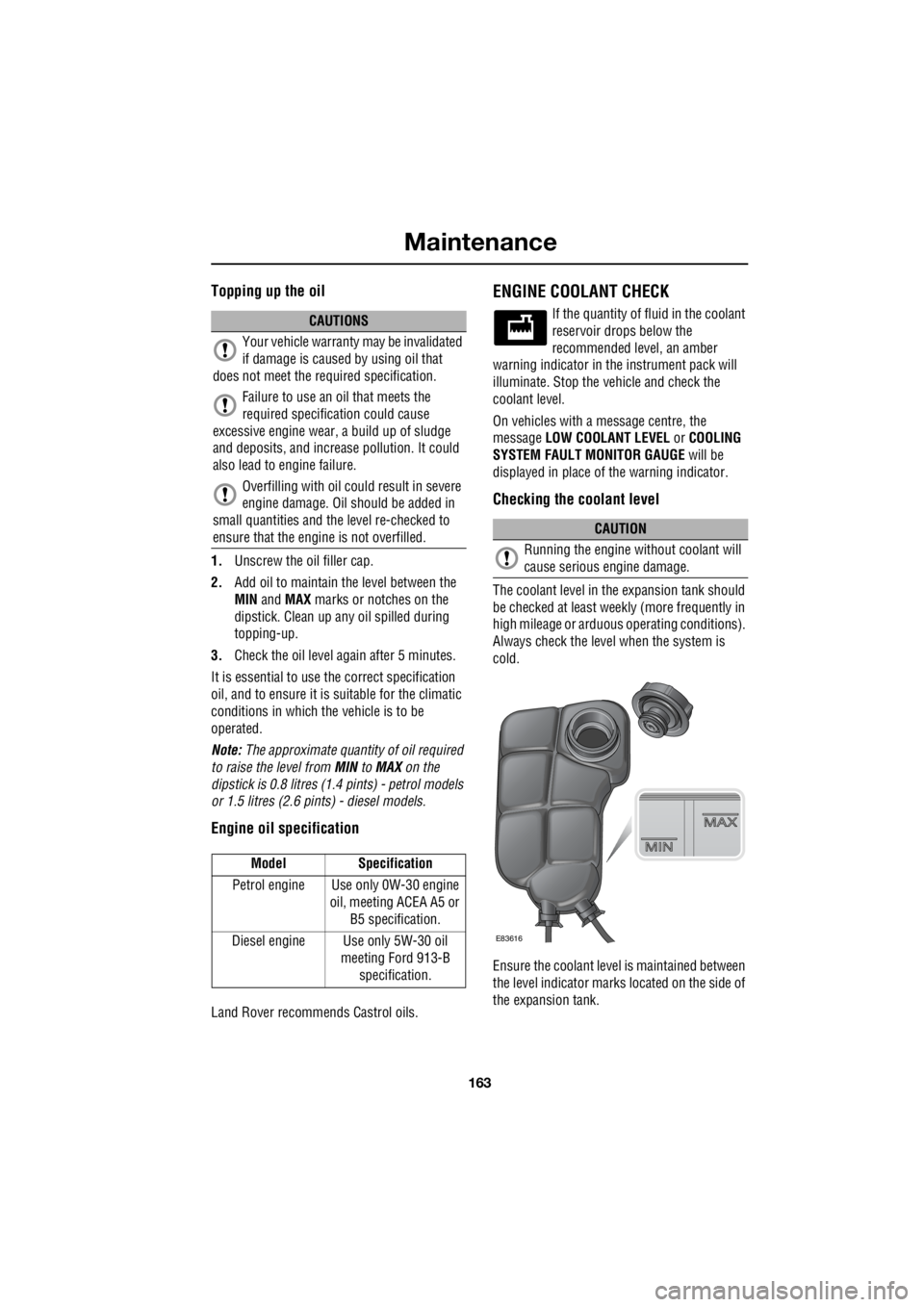
The coolant level in the expansion tank should
be checked at least week ly (more frequently in
high mileage or arduous operating conditions).
Always check the level when the system is
cold.
Ensure the coolant level is maintained between
the level indicator marks located on the side of
the expansion tank.
CAUTIONS
Your vehicle warranty may be invalidated
if damage is caused by using oil that
does not meet the required specification.
Failure to use an oil that meets the
required specification could cause
excessive engine wear, a build up of sludge
and deposits, and increase pollution. It could
also lead to engine failure.
Overfilling with oil could result in severe
engine damage. Oil should be added in
small quantities and the level re-checked to
ensure that the engine is not overfilled.
Model Specification
Petrol engine Use only 0W-30 engine oil, meeting ACEA A5 or
B5 specification.
Diesel engine Use only 5W-30 oil meeting Ford 913-B
specification.
CAUTION
Running the engine without coolant will
cause serious engine damage.
E83616
Page 2885 of 3229
165
Maintenance
R
BRAKE AND CLUTCH FLUID CHECK
If the quantity of fluid in the
brake/clutch rese rvoir drops below
the recommended level, a red
warning indicator in the instrument pack will
illuminate or the message CHECK BRAKE
FLUID will be displayed in the message centre.
Note: If the warning indicator illuminates, or
the message is displayed while the vehicle is
being driven, stop the vehi cle as soon as safety
permits by gently applying the brakes.
Check and top-up the flui d level if necessary.
Checking the fluid level
With the vehicle on level ground, check the
fluid level at least every week (more frequently
in high mileage or arduous operating
conditions).
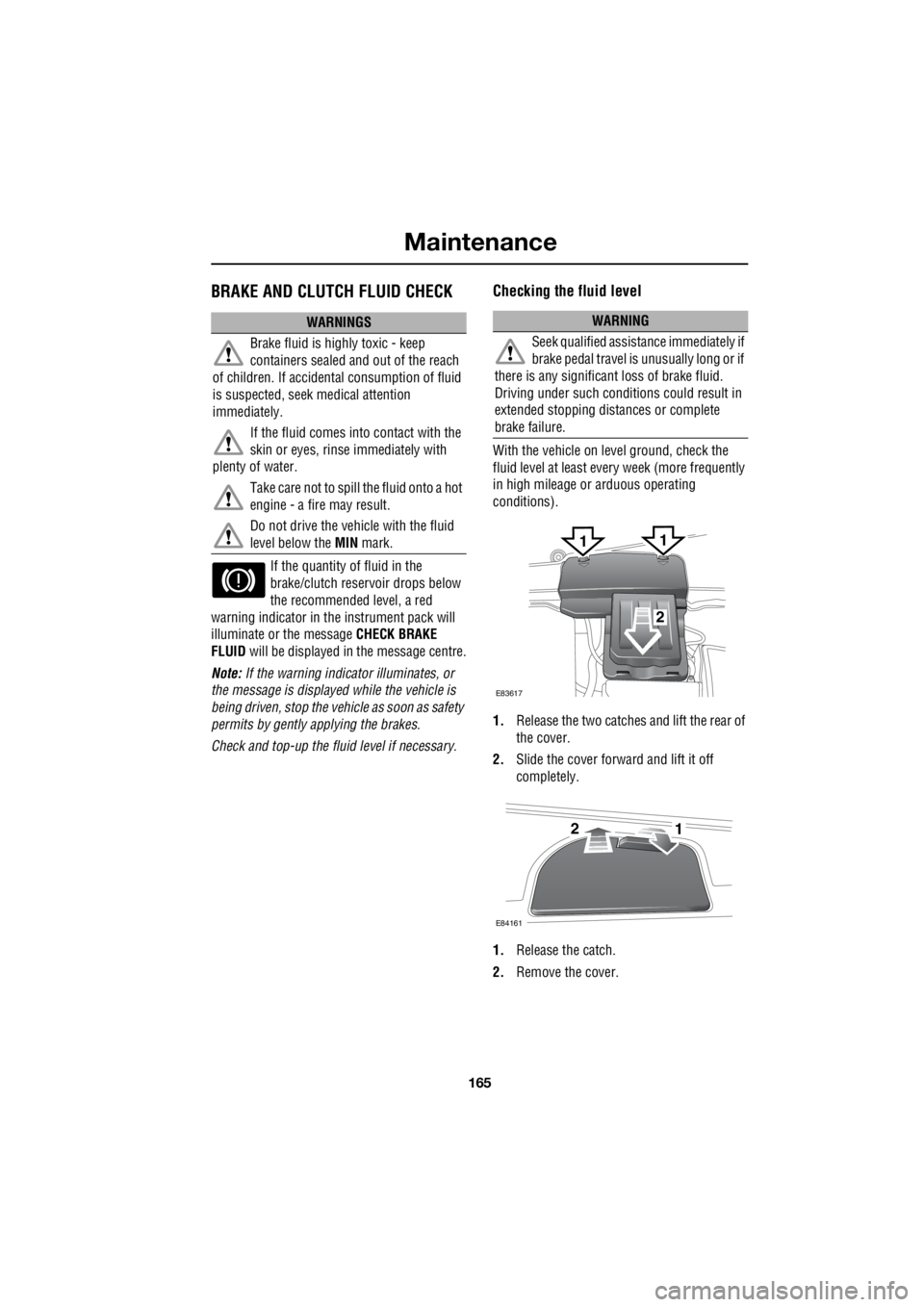
1. Release the two catches and lift the rear of
the cover.
2. Slide the cover forward and lift it off
completely.
1. Release the catch.
2. Remove the cover.
WARNINGS
Brake fluid is highly toxic - keep
containers sealed a nd out of the reach
of children. If accident al consumption of fluid
is suspected, seek medical attention
immediately.
If the fluid comes into contact with the
skin or eyes, rinse immediately with
plenty of water.
Take care not to spill the fluid onto a hot
engine - a fire may result.
Do not drive the vehicle with the fluid
level below the MIN mark.WARNING
Seek qualified assistance immediately if
brake pedal travel is unusually long or if
there is any significant loss of brake fluid.
Driving under such condi tions could result in
extended stopping distances or complete
brake failure.
E83617
2
11
E84161
21
Page 2887 of 3229
167
Maintenance
R
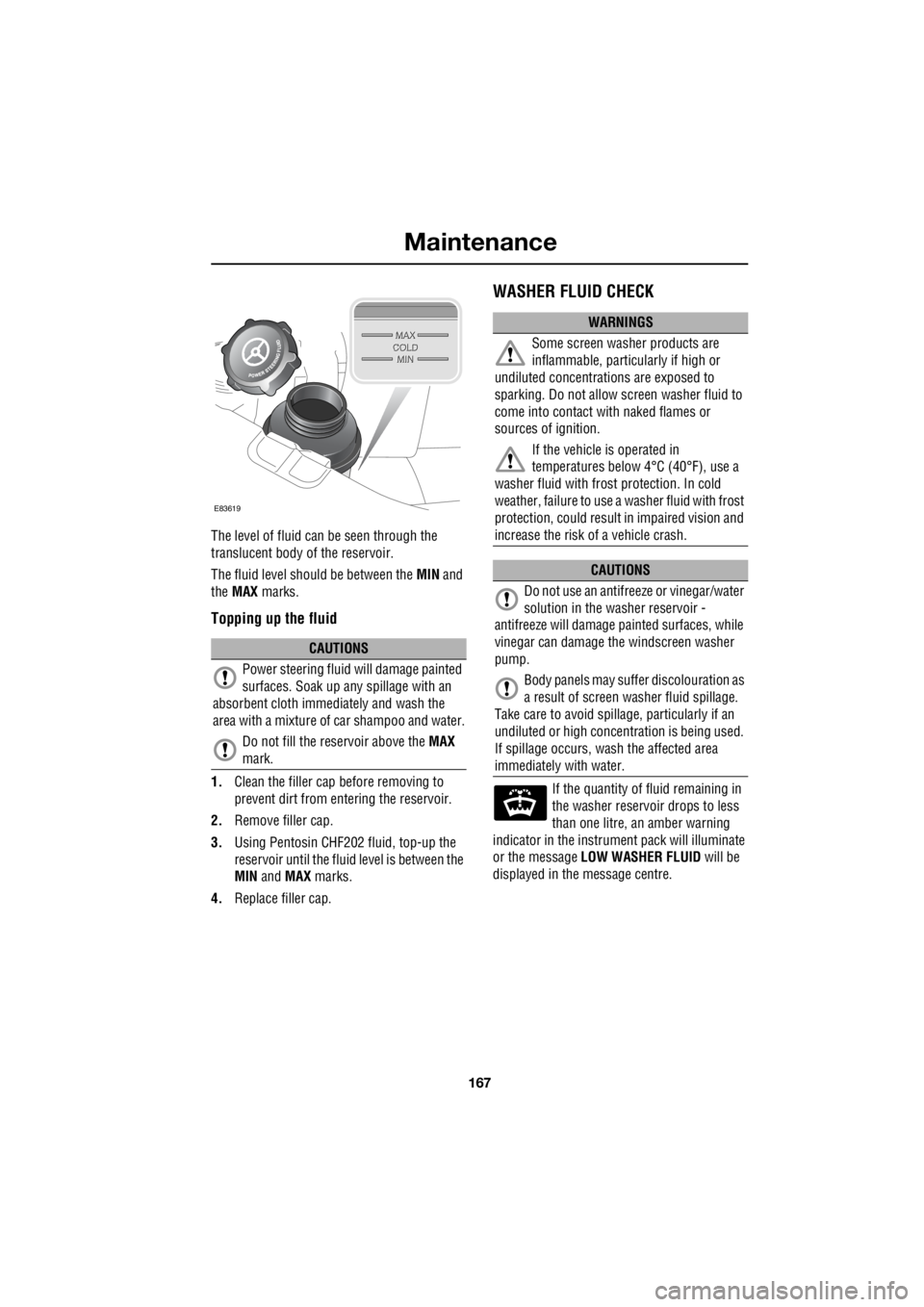
The level of fluid can be seen through the
translucent body of the reservoir.
The fluid level should be between the MIN and
the MAX marks.
Topping up the fluid
1.Clean the filler cap before removing to
prevent dirt from entering the reservoir.
2. Remove filler cap.
3. Using Pentosin CHF202 fluid, top-up the
reservoir until the flui d level is between the
MIN and MAX marks.
4. Replace filler cap.
WASHER FLUID CHECK
If the quantity of fluid remaining in
the washer reservoir drops to less
than one litre, an amber warning
indicator in the instrument pack will illuminate
or the message LOW WASHER FLUID will be
displayed in the message centre.
CAUTIONS
Power steering fluid will damage painted
surfaces. Soak up any spillage with an
absorbent cloth immediately and wash the
area with a mixture of car shampoo and water.
Do not fill the reservoir above the MAX
mark.
E83619
WARNINGS
Some screen washer products are
inflammable, particul arly if high or
undiluted concentrati ons are exposed to
sparking. Do not allow screen washer fluid to
come into contact with naked flames or
sources of ignition.
If the vehicle is operated in
temperatures below 4°C (40°F), use a
washer fluid with frost protection. In cold
weather, failure to use a washer fluid with frost
protection, could result in impaired vision and
increase the risk of a vehicle crash.
CAUTIONS
Do not use an antifree ze or vinegar/water
solution in the washer reservoir -
antifreeze will damage painted surfaces, while
vinegar can damage th e windscreen washer
pump.
Body panels may suff er discolouration as
a result of screen washer fluid spillage.
Take care to avoid spilla ge, particularly if an
undiluted or high concentr ation is being used.
If spillage occurs, wash the affected area
immediately with water.
Page 2925 of 3229
205
Status after a collision
R
Status after a collisionDRIVING AFTER A COLLISION
Before starting or driving
If the vehicle has been involved in an accident
it should be checke d thoroughly before
attempting to start the engine or drive the
vehicle.
Check for :-
• Fuel leaks.
• Fluid leaks.
• Battery damage.
• Damage to wiring.
• Damage to lights.
• Damage to steering, suspension, wheels
or tyres.
• Sharp or protruding bodywork.
• Operation of doors and locks.
• Condition and operation of seat belts and
SRS components.
• Condition of chil d seats and their
mounting/attach ment points.
Note: This list is not exhaustive.
Resetting the fuel cut-off
The fuel system cut-off forms part of the Safety
and Restraint System (SRS) fitted to your
vehicle. Following an im pact, and depending on
the severity, the fuel pump may be switched
off.
1. Switch the ignition off, and wait for one
minute.
2. Turn the ignition on for 30 seconds.
3. Check the vehicle thoroughly for fuel leaks.
If a leak is detected switch the ignition off
immediately.
• The vehicle must not be started if a leak
is present. Seek qualified advice, and
have the vehicle recovered.
4. If no leaks are detected, start the vehicle.
When driving
When driving a vehicle which has been
involved in a collision use caution and pay extra
attention to the operation of the vehicle. If any
changes in vehicle operati on after the collision
are noted when compared to it's operation
before the collision, do not continue to drive
the vehicle. Stop the vehicle as soon as it is
safe to do so, and have the vehicle recovered.
Pay particular attent ion to changes in :-
• Steering.
• Braking.
• Unusual noises.
• Warning lights or messages displayed.
• Problems with electrical systems.
WARNING
If the vehicle is involved in a collision it
should be checked by a Land Rover
Dealer/Authorised repairer, or suitably
qualified persons before starting or driving.
WARNING
The fuel cut-off s hould never be reset
if you can smell fuel , or a leak can be
seen. Doing so can lead to a fire which
may cause personal injury or death.
Page 2939 of 3229
219
Audio unit overview
R
Audio unit overviewAUDIO UNIT OVERVIEW
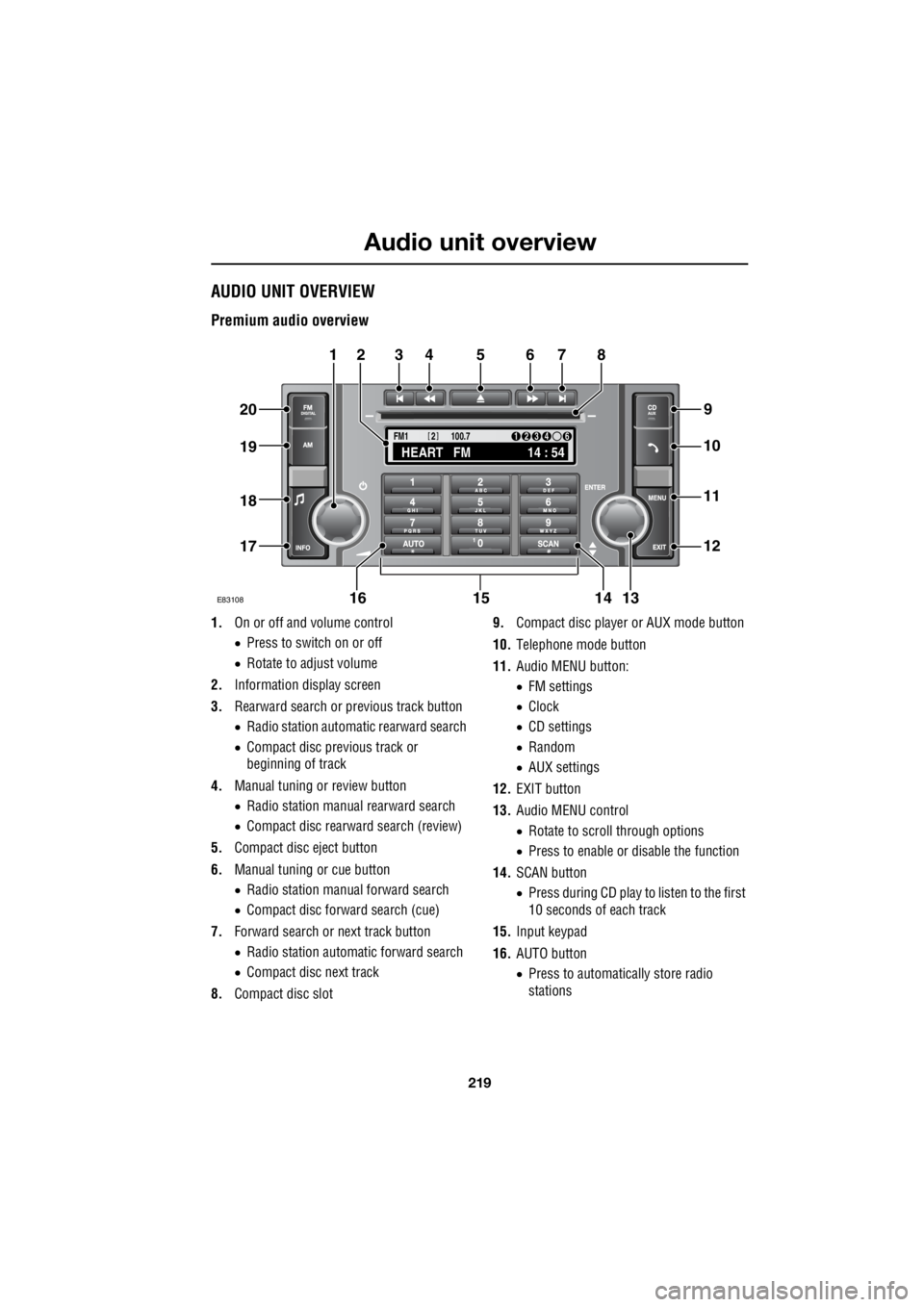
Premium audio overview
1. On or off and volume control
• Press to switch on or off
• Rotate to adjust volume
2. Information display screen
3. Rearward search or previous track button
• Radio station automatic rearward search
• Compact disc previous track or
beginning of track
4. Manual tuning or review button
• Radio station manual rearward search
• Compact disc rearward search (review)
5. Compact disc eject button
6. Manual tuning or cue button
• Radio station manual forward search
• Compact disc forward search (cue)
7. Forward search or next track button
• Radio station automatic forward search
• Compact disc next track
8. Compact disc slot 9.
Compact disc player or AUX mode button
10. Telephone mode button
11. Audio MENU button:
• FM settings
• Clock
• CD settings
• Random
• AUX settings
12. EXIT button
13. Audio MENU control
• Rotate to scroll through options
• Press to enable or disable the function
14. SCAN button
• Press during CD play to listen to the first
10 seconds of each track
15. Input keypad
16. AUTO button
• Press to automatically store radio
stations
TA
NEWSPTY100.7
FM1
14 : 54
HEART FM
1234 6
2
E83108
34567
9
21
11
12
10
13141516
17
18
19
20
8
Page 2941 of 3229
221
Audio unit overview
R
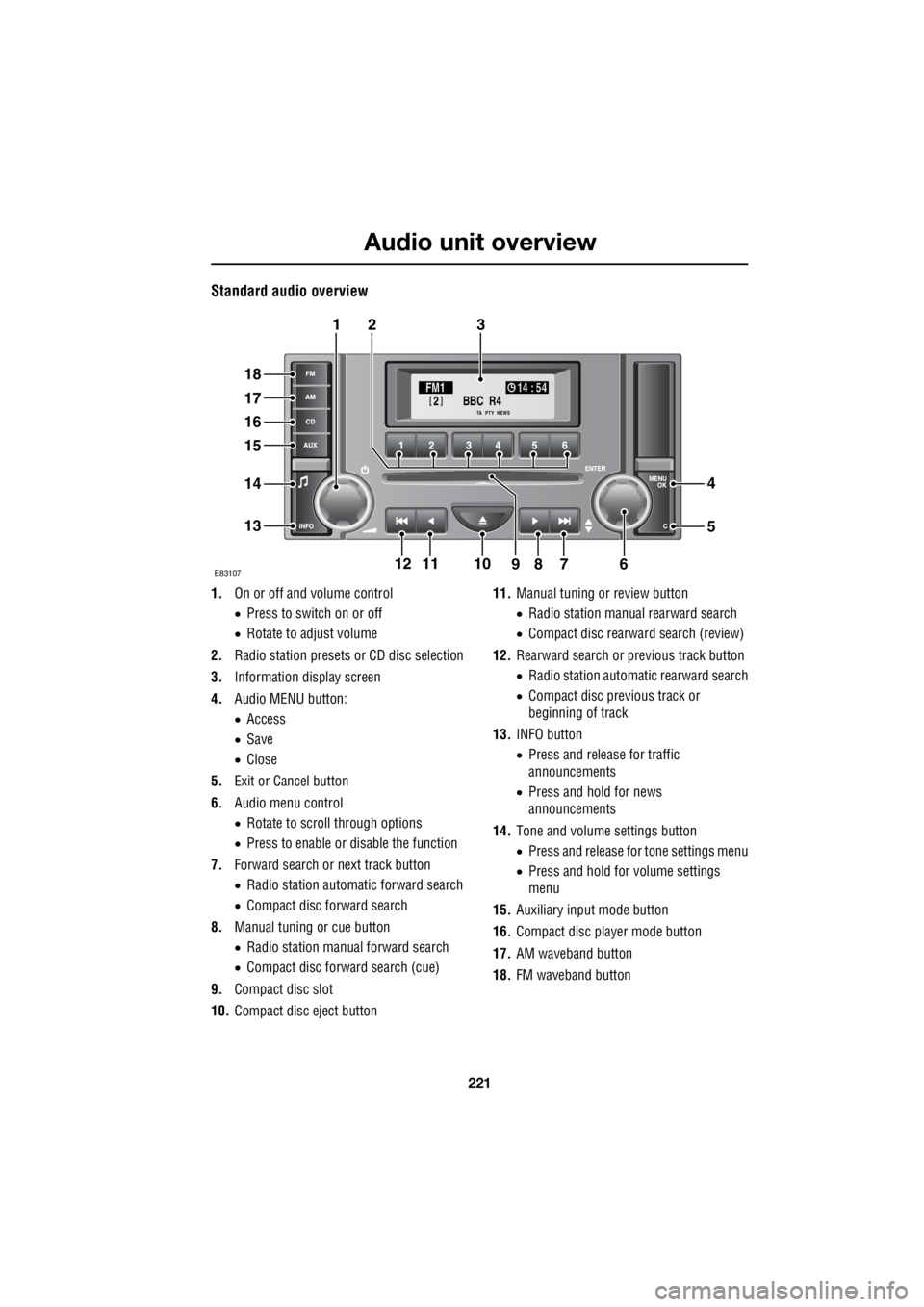
Standard audio overview
1. On or off and volume control
• Press to switch on or off
• Rotate to adjust volume
2. Radio station presets or CD disc selection
3. Information display screen
4. Audio MENU button:
• Access
• Save
• Close
5. Exit or Cancel button
6. Audio menu control
• Rotate to scroll through options
• Press to enable or disable the function
7. Forward search or next track button
• Radio station automatic forward search
• Compact disc forward search
8. Manual tuning or cue button
• Radio station manual forward search
• Compact disc forward search (cue)
9. Compact disc slot
10. Compact disc eject button 11.
Manual tuning or review button
• Radio station manua l rearward search
• Compact disc rearward search (review)
12. Rearward search or previous track button
• Radio station automatic rearward search
• Compact disc previous track or
beginning of track
13. INFO button
• Press and release for traffic
announcements
• Press and hold for news
announcements
14. Tone and volume settings button
• Press and release for tone settings menu
• Press and hold for volume settings
menu
15. Auxiliary input mode button
16. Compact disc player mode button
17. AM waveband button
18. FM waveband button
BBC R4
2FM1 14 : 54
TA NEWSPTY
E8310711
321
18
17
16
15
14
13
4
5
67891210