display LAND ROVER FRELANDER 2 2006 Owner's Guide
[x] Cancel search | Manufacturer: LAND ROVER, Model Year: 2006, Model line: FRELANDER 2, Model: LAND ROVER FRELANDER 2 2006Pages: 3229, PDF Size: 78.5 MB
Page 2817 of 3229
97
Instruments
R
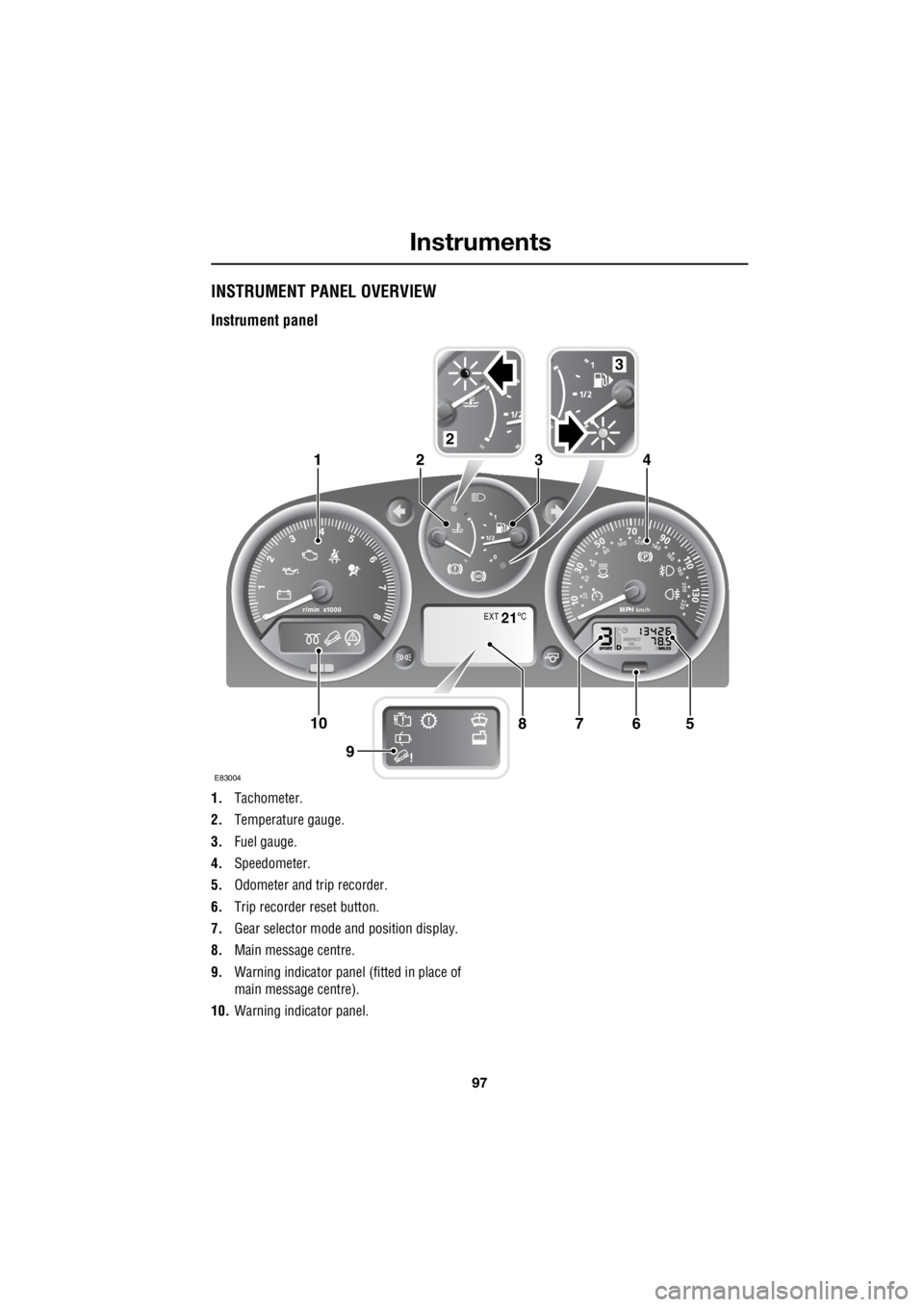
InstrumentsINSTRUMENT PANEL OVERVIEW
Instrument panel
1. Tachometer.
2. Temperature gauge.
3. Fuel gauge.
4. Speedometer.
5. Odometer and trip recorder.
6. Trip recorder reset button.
7. Gear selector mode and position display.
8. Main message centre.
9. Warning indicator panel (fitted in place of
main message centre).
10. Warning indicator panel.
EXT C21
E83004
567108
9
1423
2
3
Page 2818 of 3229

Instruments
98
L
Tachometer
Indicates engine spee d in revolutions per
minute (RPM) x 1000.
Temperature gauge
If the pointer moves onto the red line and the
red warning indicator illu minates severe engine
damage can occur.
If the engine overheats, stop the vehicle as
soon as safety pe rmits. Switch the engine off
and allow it to cool down. If the problem
reoccurs, seek qualified assistance before
continuing.
Note: If engine temperatur e rises to the point
where overheating may occur, there may be a
noticeable reduction in engine power, and the
air conditioning may cease operation. This is a
normal operating strate gy to reduce load on
the engine and assist with cooling.
Fuel gauge
Once the fuel level has dropped to the point
where the range is approximately 80 km (50
miles) the low fuel warning indicator will
illuminate.
As a reminder for the location of the fuel filler,
there is an arrow next to the fuel pump symbol
which points to the releva nt side of the vehicle.
Speedometer
Indicates road speed. Odometer
Indicates the total distance which the vehicle
has travelled.
Trip recorder
Indicates the distance travelled since the last
reset, and can be used to measure the distance
of individual journeys.
Trip recorder reset button
Resets the distance shown on the trip recorder
to zero.
Note: Once the trip recorder has been reset to
zero, the previously recorded distance will be
lost.
Gear selector mode and positiondisplay
Displays the currently selected gear on
vehicle's fitted with automatic transmission.
Main message centre
Displays warning, and information messages.
See INFORMATION MESSAGES (page 99).
Warning indicator panel (fitted in place of
main message centre)
If a main message centre is not fitted, the
warning indicator pane l will provide system
status information.
Warning indicator panel
The warning indicator panel will provide
system status information.
CAUTION
Serious engine damage can occur if the
vehicle is driven whilst the engine is
overheating.
CAUTION
Never allow the vehicle to run out of
fuel. The resulting mis-fire may cause
serious damage to the catalytic
convertor.
Page 2819 of 3229
99
Information displays
R
Information displaysTRIP COMPUTER
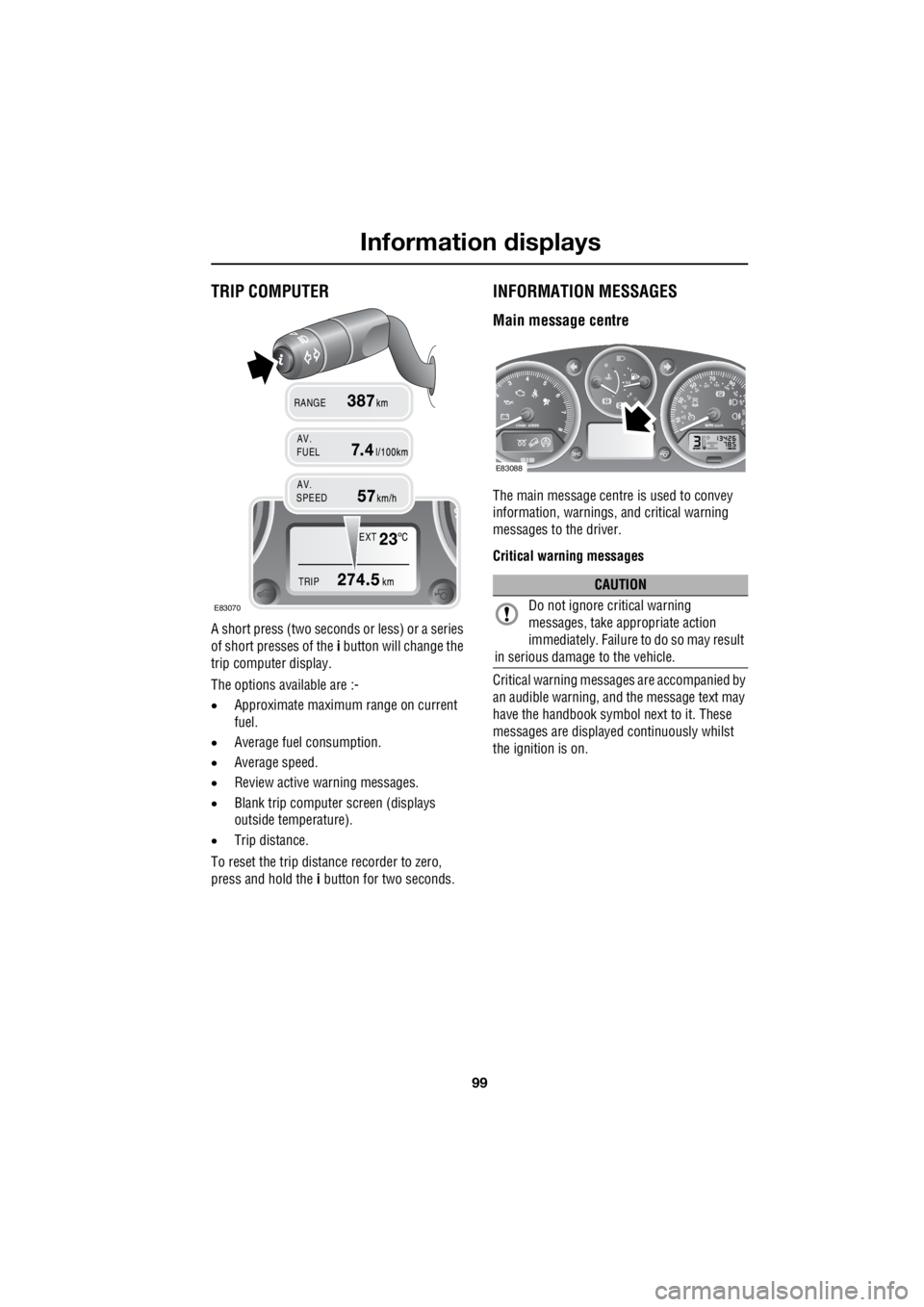
A short press (two seconds or less) or a series
of short presses of the i button will change the
trip computer display.
The options available are :-
• Approximate maximu m range on current
fuel.
• Average fuel consumption.
• Average speed.
• Review active warning messages.
• Blank trip computer screen (displays
outside temperature).
• Trip distance.
To reset the trip distance recorder to zero,
press and hold the i button for two seconds.
INFORMATION MESSAGES
Main message centre
The main message centre is used to convey
information, warnings, and critical warning
messages to the driver.
Critical warning messages
Critical warning messages are accompanied by
an audible warning, and the message text may
have the handbook symbol next to it. These
messages are displaye d continuously whilst
the ignition is on.
EXT
TRIP
AV.
RANGE
FUEL
AV.
SPEED
E83070
CAUTION
Do not ignore critical warning
messages, take a ppropriate action
immediately. Failure to do so may result
in serious damage to the vehicle.
E83088
Page 2820 of 3229

Information displays
100
L
Warnings and information messages
When displayed, warning messages are
accompanied by an a udible warning. These
messages are displayed for approximately
twenty seconds. The warning messages will be
displayed when applicable, and also when the
ignition is turned on, and off.
If the i symbol is displayed, there are current
warning messages waiti ng to be reviewed. To
review the warning messages press the i
button repeatedly until the list of messages is
displayed. The message centre will then cycle
through the messages until the i button is
pressed again.
Note: Messages are displayed in order of
importance, with critic al warning messages
being the highest priority.
Messages
For information regarding the individual
messages, their meanings, and any action
required, please refer to the relevant section
within this handbook.
CAUTION
Do not ignore warning messages, take
appropriate action as soon as possible.
Failure to do so may result in serious
damage to the vehicle.
Page 2828 of 3229
Convenience features
108
L
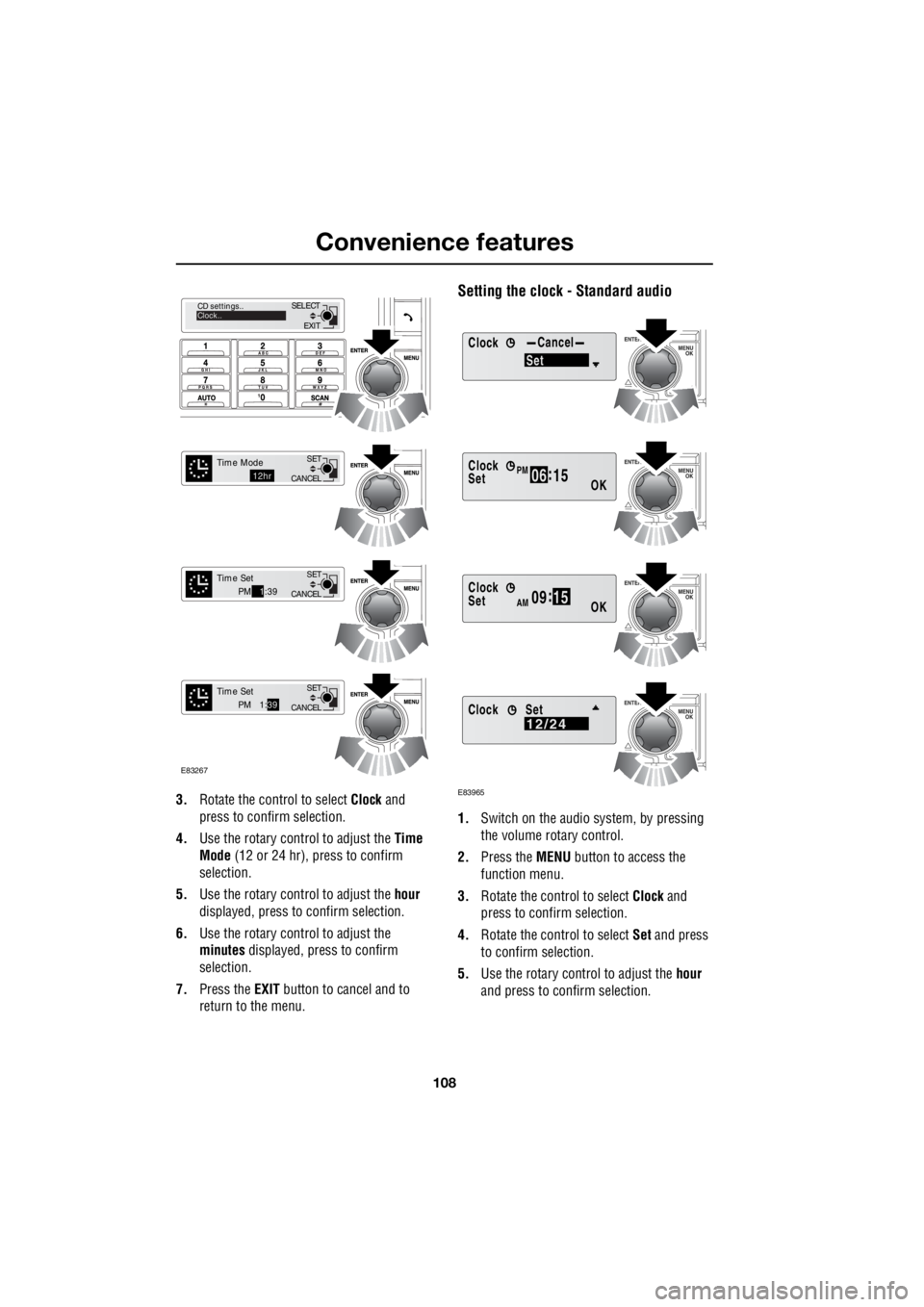
3. Rotate the control to select Clock and
press to confirm selection.
4. Use the rotary control to adjust the Time
Mode (12 or 24 hr), press to confirm
selection.
5. Use the rotary control to adjust the hour
displayed, press to confirm selection.
6. Use the rotary control to adjust the
minutes displayed, press to confirm
selection.
7. Press the EXIT button to cancel and to
return to the menu.
Setting the clock - Standard audio
1. Switch on the audio system, by pressing
the volume rotary control.
2. Press the MENU button to access the
function menu.
3. Rotate the control to select Clock and
press to confirm selection.
4. Rotate the control to select Set and press
to confirm selection.
5. Use the rotary control to adjust the hour
and press to c onfirm selection.
EXIT
SELECT
CD settings..
Clock..
CANCEL SET
Time Mode12hr
CANCELSET
Time SetPM
1:39
CANCEL SET
Time SetPM 1:
39
E83267
ClockCancel
Set
Clock
OK06 :
15SetPM
Clock
OK09 :
15SetAM
E83965
Clock12/24Set
Page 2829 of 3229
109
Convenience features
R
6. Use the rotary control to adjust the
minutes and press to confirm selection.
7. Once the time has been set, OK will be
highlighted. Press the rotary control to
accept the settings.
Set 12/24 hour display
1. With the audio unit switched on, press the
MENU button to access the function menu.
2. Rotate the control to select Clock and
press to confirm selection.
3. Rotate the control to select 12/24 and
press to confirm selection.
4. Use the rotary control to select 12hr or
24hr and press to confirm selection.
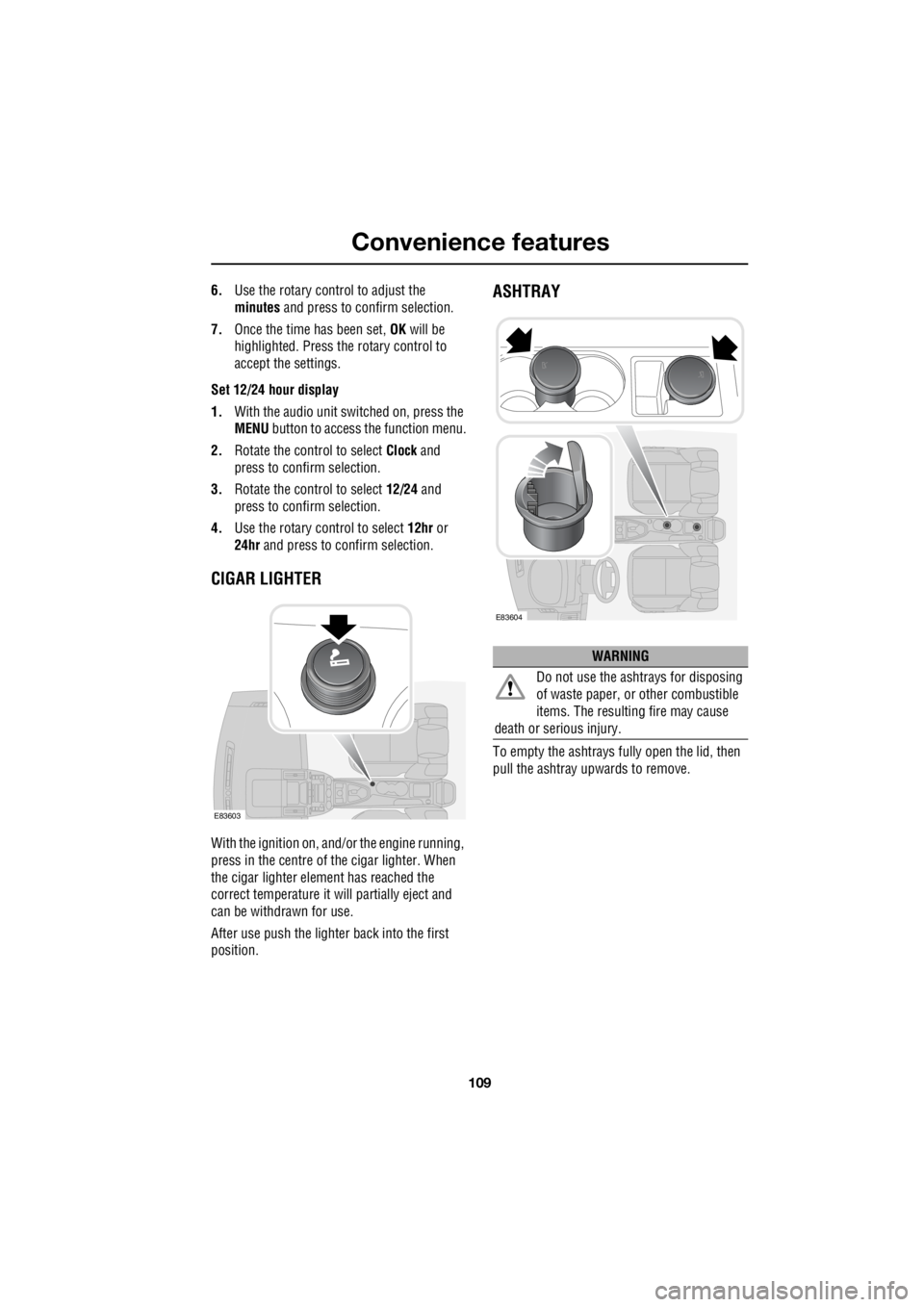
CIGAR LIGHTER
With the ignition on, and/ or the engine running,
press in the centre of the cigar lighter. When
the cigar lighter element has reached the
correct temperature it w ill partially eject and
can be withdrawn for use.
After use push the lighter back into the first
position.
ASHTRAY
To empty the ashtrays fu lly open the lid, then
pull the ashtray upwards to remove.
E83603
WARNING
Do not use the ashtrays for disposing
of waste paper, or other combustible
items. The resulting fire may cause
death or serious injury.
E83604
Page 2840 of 3229
Transmission
120
L
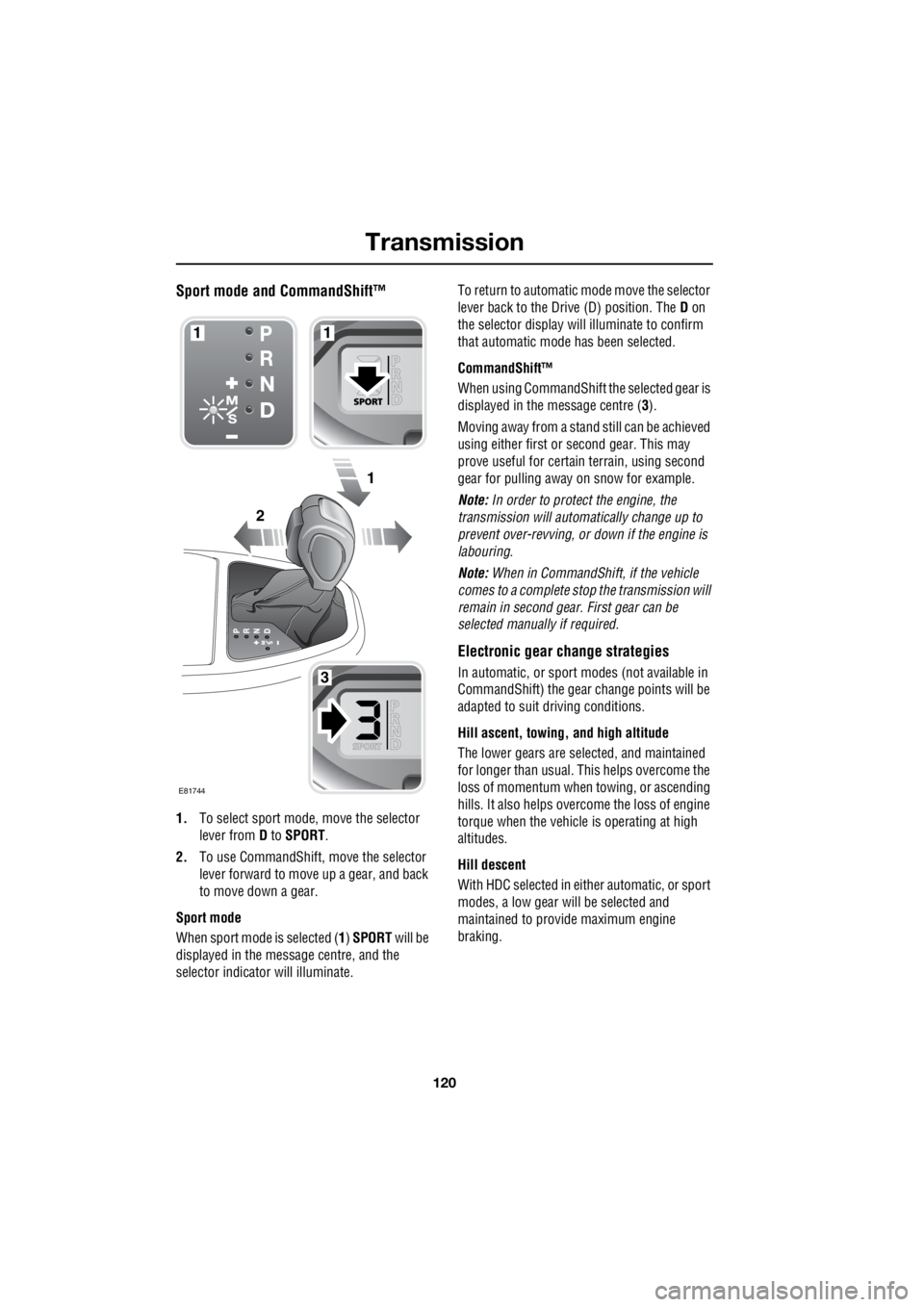
Sport mode and CommandShift™
1. To select sport mode, move the selector
lever from D to SPORT .
2. To use CommandShift, move the selector
lever forward to move up a gear, and back
to move down a gear.
Sport mode
When sport mode is selected ( 1) SPORT will be
displayed in the message centre, and the
selector indicator will illuminate. To return to automatic m
ode move the selector
lever back to the Drive (D) position. The D on
the selector display will illuminate to confirm
that automatic mode has been selected.
CommandShift™
When using CommandShift th e selected gear is
displayed in the message centre ( 3).
Moving away from a stand still can be achieved
using either first or second gear. This may
prove useful for certai n terrain, using second
gear for pulling away on snow for example.
Note: In order to protect the engine, the
transmission will automatically change up to
prevent over-revving, or down if the engine is
labouring.
Note: When in CommandShift, if the vehicle
comes to a complete stop the transmission will
remain in second gear. First gear can be
selected manually if required.
Electronic gear change strategies
In automatic, or sport modes (not available in
CommandShift) the gear change points will be
adapted to suit driving conditions.
Hill ascent, towing, and high altitude
The lower gears are selected, and maintained
for longer than usual. This helps overcome the
loss of momentum when towing, or ascending
hills. It also helps over come the loss of engine
torque when the vehicle is operating at high
altitudes.
Hill descent
With HDC selected in either automatic, or sport
modes, a low gear will be selected and
maintained to provide maximum engine
braking.
2
1
1
3
1
E81744
Page 2841 of 3229

121
Transmission
R
High temperatures
In circumstances where engine and
transmission temperatures are raised to very
high levels, the gear change strategy will alter
to provide maximum cooling efficiency.
Transmission fault
In the unlikely event that a fault develops within
the transmission system, F will be displayed in
the gear position display and a warning
message will appear in the message centre. A
limited range of gears will be available, and you
should seek qualified as sistance immediately.
Page 2853 of 3229
133
Terrain response
R
The HDC status will be displayed on the
message centre whether it is engaged or
disengaged by the system, or the driver. Use of
HDC in special programs may prompt
additional driving advice , and warnings to be
displayed on the message centre.
Although Dynamic Stab ility Control is
automatically engaged when a special program
is selected, it can be tu rned off if required See
USING TRACTION CONTROL (page 139).
Automatic gear selection can be overridden by
using the CommandS hift function.
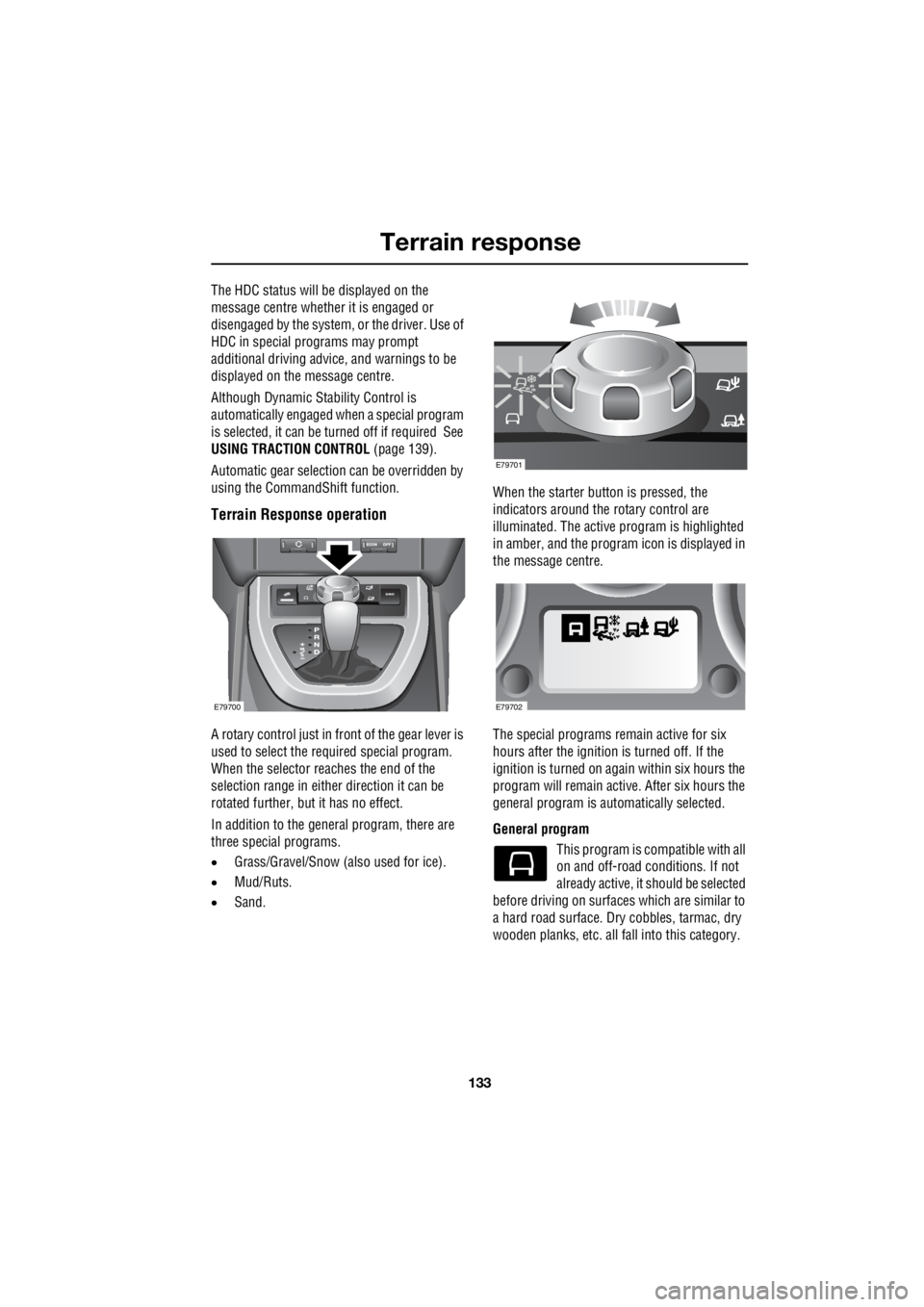
Terrain Response operation
A rotary control just in fr ont of the gear lever is
used to select the required special program.
When the selector reaches the end of the
selection range in either direction it can be
rotated further, but it has no effect.
In addition to the general program, there are
three special programs.
• Grass/Gravel/Snow (also used for ice).
• Mud/Ruts.
• Sand. When the starter button is pressed, the
indicators around the rotary control are
illuminated. The active program is highlighted
in amber, and the program icon is displayed in
the message centre.
The special programs remain active for six
hours after the ignition is turned off. If the
ignition is turned on again within six hours the
program will remain ac tive. After six hours the
general program is automatically selected.
General program This program is co mpatible with all
on and off-road conditions. If not
already active, it should be selected
before driving on surfaces which are similar to
a hard road surface. Dry cobbles, tarmac, dry
wooden planks, etc. all fa ll into this category.
E79700
E79701
E79702
Page 2854 of 3229

Terrain response
134
L
This program should be selected once the need
for a special program has passed. Once the
special program has been deselected, all of the
vehicle systems will retu rn to their normal
settings except HDC. HD C will remain active if
it was selected manually.
Grass-Gravel-Snow This program should be used
where a firm surface is covered
with loose, or s lippery material.
Surfaces covered in water, ice, slime, grass,
gravel, shale, pebbles, or a thin coating of sand
for example.
Note: For deep gravel it is recommended that
the Sand program is selected.
In slippery condi tions, it may be beneficial to
pull away in a higher gear than usual.
For information on the fitment and use of snow
chains. See USING SNOW CHAINS
(page 192).
For information on the fitment and use of
winter tyres. See USING WINTER TYRES
(page 183).
Note: If the vehicle is unable to gain traction in
deep snow, switching DSC off may help. DSC
should be switched on again as soon as the
difficulty is overcome. See USING TRACTION
CONTROL (page 139).
Mud-Ruts This program should be used for
crossing terrain that is muddy,
rutted, soft, or uneven.
Sand This program should be used for
terrain which is pr edominantly soft
dry sand, or deep gravel. Note:
If the vehicle is unable to gain traction in
extremely soft, dry sand, switching DSC off
may help. DSC should be switched on again as
soon as the difficulty is overcome. See USING
TRACTION CONTROL (page 139).
If the sand to be crossed is damp/wet, and
sufficiently deep to cause the wheels to sink
into the surface, the Mud-Ruts program should
be used.
System difficulties
Note: Selection of an in appropriate special
program will not endanger th e driver, nor will it
immediately damage the vehicle. However, if
continued, use of an incorrect program will
impair the vehicle's re sponse to the terrain,
and can reduce the durability of the drive
systems.
If the system becomes pa rtially inoperable for
any reason, it may not be possible to select
special programs. A wa rning will be given
when selection of a special program is
attempted. If the Te rrain response system
becomes totally inoperabl e, all of the program
indicators will be switched off, and the
message centre will display the relevant
message.
If a participating vehicle system becomes
temporarily inoperable, the General program
will be automatically selected. Once the system
returns to normal operation, the previously
active program will be re-activated unless the
ignition has been turned off in the mean time.
Terrain response messages
Messages relating to the terrain response
system are displayed on the message centre.
See INFORMATION MESSAGES (page 99).
Most of the messages th at appear will be for
information only, and require no driver
intervention, SAND PROGRAM SELECTED for
example.