lock Lexus CT200h 2017 (in English) Workshop Manual
[x] Cancel search | Manufacturer: LEXUS, Model Year: 2017, Model line: CT200h, Model: Lexus CT200h 2017Pages: 640, PDF Size: 17.94 MB
Page 133 of 640

1333-4. Adjusting the steering wheel and mirrors
3
Operation of each component
CT200h_OM_OM76215U_(U)
WA R N I N G
■While driving
Do not adjust the steering wheel while driving.
Doing so may cause the driver to mishandle the vehicle and cause an accident, result-
ing in death or serious injury.
■After adjusting the steering wheel
Make sure that the steering wheel is securely locked.
Otherwise, the steering wheel may move suddenly, possibly causing an accident, and
resulting in death or serious injury.
Page 139 of 640

139
CT200h_OM_OM76215U_(U)3-5. Opening, closing the windows and moon roof
3
Operation of each component
Power windows
The power windows can be opened and closed using the switches.
Operating the switch moves the windows as follows:
Closing
One-touch closing
*
Opening
One-touch opening
*
*
: To stop the window partway, operate the switch in the opposite direction.
Press the switch down to lock the pas-
senger window.
Use this switch to prevent children from
accidentally opening or closing a pas-
senger window.
Opening and closing procedures
1
2
3
4
Window lock switch
Page 140 of 640

140
CT200h_OM_OM76215U_(U)3-5. Opening, closing the windows and moon roof
■The power windows can be operated when
The power switch is in ON mode.
■Operating the power windows after turning the hybrid system off
The power windows can be operated for approximately 45 seconds even after the
power switch is turned to ACCESSORY mode or turned off. They cannot, however, be
operated once either front door is opened.
■Jam protection function
If an object becomes jammed between the wi
ndow and the window frame while the win-
dow is closing, window movement is stop ped and the window is opened slightly.
■Catch protection function
If an object becomes caught between the door and window while the window is opening,
window movement is stopped.
■When the window cannot be opened or closed
When the jam protection function or catch protection function operates unusually and
the door window cannot be open ed or closed, perform the following operations with the
power window switch of that door.
●Stop the vehicle. With the power switch in ON mode, within 4 seconds of the jam pro-
tection function or catch protection func tion activating, continuously operate the
power window switch in the one-touch closing direction or one-touch opening direc-
tion so that the door window can be opened and closed.
●If the door window cannot be opened and closed even when performing the above
operations, perform the following proc edure for function initialization.
Turn the power switch to ON mode.
Pull and hold the power window switch in the one-touch closing direction and com-
pletely close the door window.
Release the power window switch for a moment, resume pulling the switch in the one-
touch closing direction, and hold it th ere for approximately 6 seconds or more.
Press and hold the power window switch in the one-touch opening direction. After the
door window is completely op ened, continue holding the swit ch for an additional 1 sec-
ond or more.
Release the power window switch for a mo ment, resume pushing the switch in the
one-touch opening direction, and hold it there for approximately 4 seconds or more.
Pull and hold the power window switch in the one-touch closing direction again. After
the door window is completely closed, continue holding the switch for a further 1 sec-
ond or more.
If you release the switch while the window is moving, start again from the beginning.
If the window reverses and cannot be fully cl osed or opened, have the vehicle inspected
by your Lexus dealer.
■Door lock linked window operation
●The power windows can be opened an d closed using the mechanical key.* ( P. 5 6 6 )
●The power windows can be opened us ing the wireless remote control.* (P. 1 0 7 )
*: These settings must be customized at your Lexus dealer.
■Customization
Setting (e.g. linked door lock operation) can be changed.
(Customizable features:
P. 5 9 8 )
1
2
3
4
5
6
Page 141 of 640

CT200h_OM_OM76215U_(U)
1413-5. Opening, closing the windows and moon roof
3
Operation of each component
WA R N I N G
Observe the following precautions.
Failing to do so may result in death or serious injury.
■Closing the windows
●The driver is responsible for all the power window operations, including the operation
for the passengers. In order to prevent accidental operation, especially by a child, do
not let a child operate the power windows. It is possible for children and other passen-
gers to have body parts caught in the power window. Also, when riding with a child, it
is recommended to use the window lock switch. ( P. 1 3 9 )
●Check to make sure that all passengers do not have any part of their body in a posi-
tion where it could be caught when a window is being operated.
●When using the wireless remote control or mechanical key and operating the power
windows, operate the power window after checking to make sure that there is no pos-
sibility of any passenger having any of their body parts caught in the window. Also do
not let a child operate window by the wireless remote control or mechanical key. It is
possible for children and other passengers to get caught in the power window.
●When exiting the vehicle, turn the power switch off, and take the key with you. Do not
leave children unattended in the vehicle. There may be accidental operation, due to
mischief, etc., that may possibly lead to an accident.
■Jam protection function
●Never use any part of your body to intentio nally activate the jam protection function.
●The jam protection function may not work if something gets jammed just before the
window is fully closed. Be careful not to get any part of your body jammed in the win-
dow.
■Catch protection function
●Never use any part of your body or clothing to intentionally activate the catch protec-
tion function.
●The catch protection function may not work if something gets caught just before the
window is fully opened. Be careful not to ge t any part of your body or clothing caught
in the window.
Page 146 of 640

146
CT200h_OM_OM76215U_(U)4-1. Before driving
Driving the vehicle
P. 1 5 9
With the brake pedal depressed, shift the shift position to D. ( P. 1 6 5 )
Check that the shift position indicator shows D.
Release the parking brake. ( P. 1 7 1 )
Gradually release the brake pedal and gently depress the accelerator pedal
to accelerate the vehicle.
With the shift position in D, depress the brake pedal.
If necessary, set the parking brake.
If the vehicle is to be stopped for an extended period of time, shift the shift position to
P. (P. 166)
Stop the vehicle completely.
Set the parking brake. ( P. 171)
Shift the shift position to P. ( P. 1 6 6 )
Check that the shift position indicator shows P.
Press the power switch to stop the hybrid system.
Slowly release the brake pedal.
Lock the door, making sure that you have the electronic key on your person.
If parking on a hill, bloc k the wheels as needed.
Firmly set the parking brake with the brake pedal depressed, and then shift the
shift position to D.
Release the brake pedal and gently depress the accelerator pedal.
Release the parking brake.
The following procedures should be observed to ensure safe driving:
Starting the hybrid system
Driving
Stopping
Parking the vehicle
Starting off on a uphill
1
2
3
1
2
1
2
3
4
5
6
1
2
3
Page 150 of 640

150
CT200h_OM_OM76215U_(U)4-1. Before driving
WA R N I N G
Observe the following precautions.
Failure to do so may result in death or serious injury.
■When the vehicle is parked
●Do not leave glasses, cigarette lighters, sp
ray cans, or soft drink cans in the vehicle
when it is in the sun.
Doing so may result in the following:
• Gas may leak from a cigarette lighter or spray can, and may lead to a fire.
• The temperature inside the vehicle may cause the plastic lenses and plastic mate- rial of glasses to deform or crack.
• Soft drink cans may fracture, causing the contents to spray over the interior of the vehicle, and may also cause a short circuit in the vehicle’s electrical components.
●Do not leave cigarette lighters in the vehicle. If a cigarette lighter is in a place such as
the glove box or on the floor, it may be lit accidentally when luggage is loaded or the
seat is adjusted, causing a fire.
●Do not attach adhesive discs to the windsh ield or windows. Do not place containers
such as air fresheners on the instrument panel or dashboard. Adhesive discs or con-
tainers may act as lenses, causing a fire in the vehicle.
●Do not leave a door or window open if the curved glass is coated with a metallized
film such as a silver-colored one. Reflected sunlight may cause the glass to act as a
lens, causing a fire.
●Always apply the parking brake, shift the shift position to P, stop the hybrid system and
lock the vehicle.
Do not leave the vehicle unattended while the “READY” indicator is illuminated.
If the vehicle is parked with the shift position in P but the parking brake is not set, the
vehicle may start to move, possibly leading to an accident.
●Do not touch the exhaust pipe while the “R EADY” indicator is illuminated or immedi-
ately after turning the hybrid system off.
Doing so may cause burns.
■When taking a nap in the vehicle
Always turn the hybrid system off. Otherwise, if you accidentally move the shift lever or
depress the accelerator pedal, this could caus e an accident or fire due to hybrid system
overheating. Additionally, if the vehicle is parked in a poorly ventilated area, exhaust
gases may collect and enter the vehicle, lead ing to death or a serious health hazard.
Page 152 of 640
152
CT200h_OM_OM76215U_(U)4-1. Before driving
NOTICE
■If you get a flat tire while driving
A flat or damaged tire may cause the follo
wing situations. Hold the steering wheel
firmly and gradually depress the brak e pedal to slow down the vehicle.
●It may be difficult to control your vehicle.
●The vehicle will make abnormal sounds or vibrations.
●The vehicle will lean abnormally.
Information on what to do in case of a flat tire ( P. 555)
■When encountering flooded roads
Do not drive on a road that has flooded after heavy rain etc. Doing so may cause the
following serious damage to the vehicle:
●Engine stalling
●Short in electrical components
●Engine damage caused by water immersion
In the event that you drive on a flooded road and the vehicle is flooded, be sure to have
your Lexus dealer check the following:
●Brake function
●Changes in quantity and quality of oil and fluid used for the engine, transmission, etc.
●Lubricant condition for the bearings and susp ension joints (where possible), and the
function of all joints, bearings, etc.
If the shift control system is damaged by floodin g, it may not be possible to shift the shift
position to P, or from P to other position s. When the shift position cannot be changed
from P to any other position, the front wheels will lock, and you will be unable to tow the
vehicle with the front wheels on the ground, as the front wheels may be locked. In this
case, transport the vehicle with both fr ont wheels or all four wheels lifted.
Page 155 of 640
CT200h_OM_OM76215U_(U)
1554-1. Before driving
4
Driving
WA R N I N G
■Things that must not be carried in the luggage compartment
The following things may cause a fire if loaded in the luggage compartment:
●Receptacles containing gasoline
●Aerosol cans
■Storage precautions
Observe the following precautions.
Failure to do so may prevent the pedals from being depressed properly, may block the
driver’s vision, or may result in items hittin g the driver or passengers, possibly causing
an accident.
●Stow cargo and luggage in the luggage compartment whenever possible.
●Do not stack cargo and luggage in the luggage compartment higher than the seat-
backs.
●When you fold down the rear seats, long items should not be placed directly behind
the front seats.
●Never allow anyone to ride in the luggage compartment. It is not designed for pas-
sengers. They should ride in their seats with their seat belts properly fastened.
●Do not place cargo or luggage in or on the following locations.
• At the feet of the driver
• On the front passenger or re ar seats (when stacking items)
•On the luggage cover
• On the instrument panel
•On the dashboard
●Secure all items in th e occupant compartment.
■Capacity and distribution
●Do not exceed the maximum axle weight ra ting or the total vehicle weight rating.
●Even if the total load of occupant’s weight and the cargo load is less than the total load
capacity, do not apply the load unevenly. Improper loading may cause deterioration
of steering or braking control which may cause death or serious injury.
Page 174 of 640
174
CT200h_OM_OM76215U_(U)4-3. Operating the lights and wipers
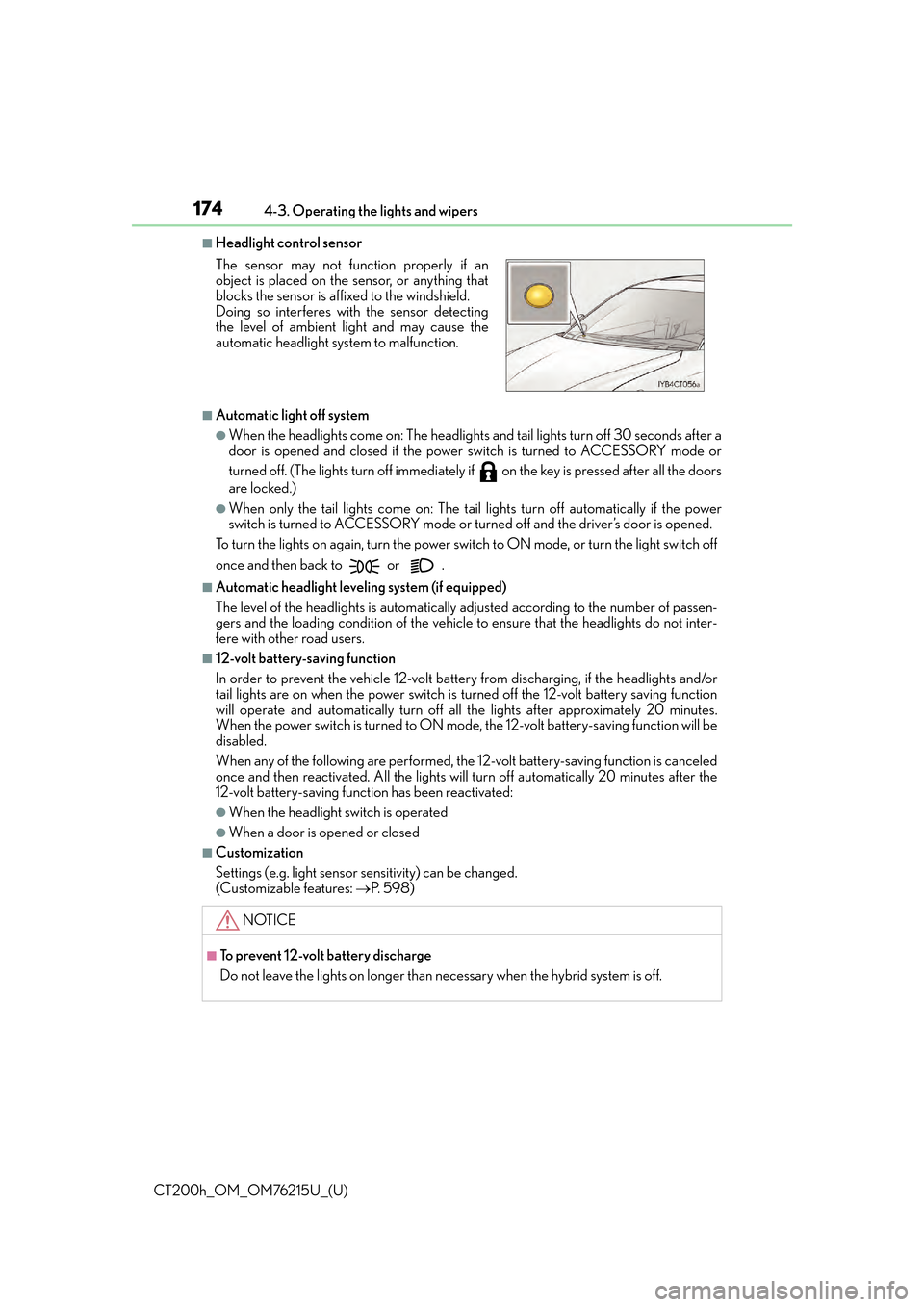
■Headlight control sensor
■Automatic light off system
●When the headlights come on: The headlights and tail lights turn off 30 seconds after a
door is opened and closed if the power
switch is turned to ACCESSORY mode or
turned off. (The lights turn off immediately if on the key is pressed after all the doors
are locked.)
●When only the tail lights come on: The tail lights turn off automatically if the power
switch is turned to ACCESSORY mode or turned off and the driver’s door is opened.
To turn the lights on again, turn the power switch to ON mode, or turn the light switch off
once and then back to or .
■Automatic headlight leveling system (if equipped)
The level of the headlights is automatically ad justed according to the number of passen-
gers and the loading condition of the vehicle to ensure that the headlights do not inter-
fere with other road users.
■12-volt battery-saving function
In order to prevent the vehicle 12-volt battery from discharging, if the headlights and/or
tail lights are on when the power switch is turned off the 12-volt battery saving function
will operate and automatically turn off all the lights after approximately 20 minutes.
When the power switch is turned to ON mode, the 12-volt battery-saving function will be
disabled.
When any of the following are performed, the 12-volt battery-saving function is canceled
once and then reactivated. All the lights w ill turn off automatically 20 minutes after the
12-volt battery-saving function has been reactivated:
●When the headlight switch is operated
●When a door is opened or closed
■Customization
Settings (e.g. light sensor se nsitivity) can be changed.
(Customizable features: P. 5 9 8 )
The sensor may not function properly if an
object is placed on the sensor, or anything that
blocks the sensor is affixed to the windshield.
Doing so interferes with the sensor detecting
the level of ambient light and may cause the
automatic headlight system to malfunction.
NOTICE
■To prevent 12-volt battery discharge
Do not leave the lights on longer than necessary when the hybrid system is off.
Page 181 of 640
CT200h_OM_OM76215U_(U)
1814-3. Operating the lights and wipers
4
Driving
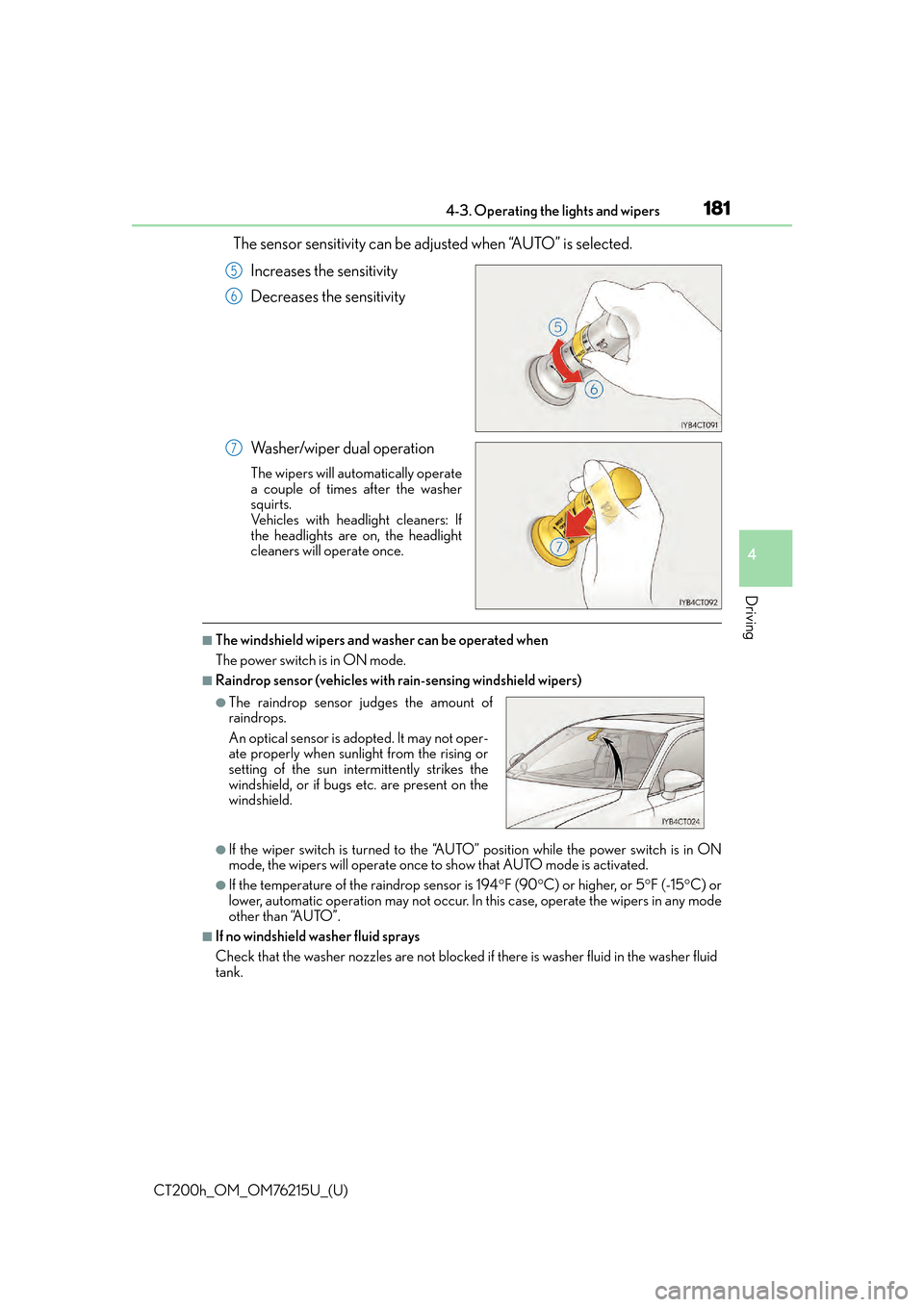
The sensor sensitivity can be adjusted when “AUTO” is selected.
Increases the sensitivity
Decreases the sensitivity
Washer/wiper dual operation
The wipers will automatically operate
a couple of times after the washer
squirts.
Vehicles with headlight cleaners: If
the headlights are on, the headlight
cleaners will operate once.
■The windshield wipers and washer can be operated when
The power switch is in ON mode.
■Raindrop sensor (vehicles with rain-sensing windshield wipers)
●If the wiper switch is turned to the “AUTO” position while the power switch is in ON
mode, the wipers will operate once to show that AUTO mode is activated.
●If the temperature of the raindrop sensor is 194 F (90 C) or higher, or 5 F (-15 C) or
lower, automatic operation may not occur. In this case, operate the wipers in any mode
other than “AUTO”.
■If no windshield washer fluid sprays
Check that the washer nozzles are not blocked if there is washer fluid in the washer fluid
tank.
5
6
7
●The raindrop sensor judges the amount of
raindrops.
An optical sensor is ad opted. It may not oper-
ate properly when sunlight from the rising or
setting of the sun intermittently strikes the
windshield, or if bugs etc. are present on the
windshield.