cruise control Lexus CT200h 2017 Owner's Manual (in English)
[x] Cancel search | Manufacturer: LEXUS, Model Year: 2017, Model line: CT200h, Model: Lexus CT200h 2017Pages: 640, PDF Size: 17.94 MB
Page 3 of 640
3
1
9 8
7
6 4 3
2
CT200h_OM_OM76215U_(U)
10
5
3-4. Adjusting the steering wheel and mirrors
Steering wheel ..............................132
Inside rear view mirror.............. 134
Outside rear view mirrors........ 137
3-5. Opening, closing the windows and moon roof
Power windows .............................139
Moon roof ....................................... 142
4-1. Before driving Driving the vehicle ......................146
Cargo and luggage.....................153
Vehicle load limits ........................156
Trailer towing ................................. 157
Dinghy towing .............................. 158
4-2. Driving procedures Power (ignition) switch ..............159
EV drive mode ..............................163
Hybrid transmission ....................165
Turn signal lever ............................ 170
Parking brake ................................. 171 4-3. Operating the lights
and wipers
Headlight switch .......................... 172
Fog light switch ............................. 175
Windshield wipers and washer ........................................... 177
Rear window wiper and washer .......................................... 183
Headlight cleaner switch......... 185
4-4. Refueling Opening the fuel tank cap ...... 186
4-5. Using the driving support systems
Cruise control .............................. 189
Dynamic radar cruise control ...........................................192
Intuitive parking assist .............. 205
Rear view monitor system ........ 212
Lexus parking assist monitor........................................ 222
Driving mode select switch ............................................237
Driving assist systems .............. 238
PCS (Pre-Collision System) ........................................242
4-6. Driving tips Hybrid vehicle driving tips .................................................. 247
Winter driving tips ......................249
4Driving
Page 11 of 640
CT200h_OM_OM76215U_(U)
11
A wide variety of non-genuine spare parts and accessories for Lexus vehicles are cur-
rently available in the market. You should know that Toyota does not warrant these prod-
ucts and is not responsible for their performance, repair, or replacement, or for any
damage they may cause to, or adverse effect they may have on, your Lexus vehicle.
This vehicle should not be modified with non-genuine Lexus products. Modification with
non-genuine Lexus products could affect its performance, safety or durability, and may
even violate governmental regulations. In addition, damage or performance problems
resulting from the modification may not be covered under warranty.
The installation of a mobile two-way radio sy stem in your vehicle could affect electronic
systems such as:
●Multiport fuel injection system/sequential multiport fuel injection system
●Dynamic radar cruise control system
●Cruise control system
●Anti-lock brake system
●SRS airbag system
●Seat belt pretensioner system
Be sure to check with your Lexus dealer fo r precautionary measures or special instruc-
tions regarding insta llation of a mobile two-way radio system.
High voltage parts and cables on the hybrid vehicles emit approximately the same
amount of electromagnetic waves as the conventional gasoline powered vehicles or
home electronic appliances despite of their electromagnetic shielding.
Unwanted noise may occur in the rece ption of the mobile two-way radio.
Accessories, spare parts and modification of your Lexus
Installation of a mobile two-way radio system
Page 24 of 640

24Pictorial index
CT200h_OM_OM76215U_(U)
Audio remote control switches*1 . . . . . . . . . . . . . . . . . . . . . . . . . . . . . P. 258, 329
“DISP” switch . . . . . . . . . . . . . . . . . . . . . . . . . . . . . . . . . . . . . . . . . . . . . . . . . . . . . . . . . P. 9 0
Cruise control switch
Cruise control*2 . . . . . . . . . . . . . . . . . . . . . . . . . . . . . . . . . . . . . . . . . . . . . . . . . . . . . . . P. 189
Dynamic radar cruise control
*2 . . . . . . . . . . . . . . . . . . . . . . . . . . . . . . . . . . . . . . . . P. 192
Vehicle-to-vehicle distance button*2. . . . . . . . . . . . . . . . . . . . . . . . . . . . . . . .P. 192
Ta l k s w i t c h
*1 . . . . . . . . . . . . . . . . . . . . . . . . . . . . . . . . . . . . . . . . . . . . . P. 295, 384, 404
Telephone switches
*1. . . . . . . . . . . . . . . . . . . . . . . . . . . . . . . . . . . . . . . . . . P. 295, 384
1
2
3
4
5
6
Page 84 of 640
84
CT200h_OM_OM76215U_(U)2. Instrument cluster
*1: These lights turn on when the power switch is turned to ON mode to indicate that a
system check is being performed. They will turn off after the hybrid system is on, or
after a few seconds. There may be a malfunction in a system if the lights do not turn on,
or turn off. Have the vehicle inspected by your Lexus dealer.
*2: The light flashes to indicate a malfunction.
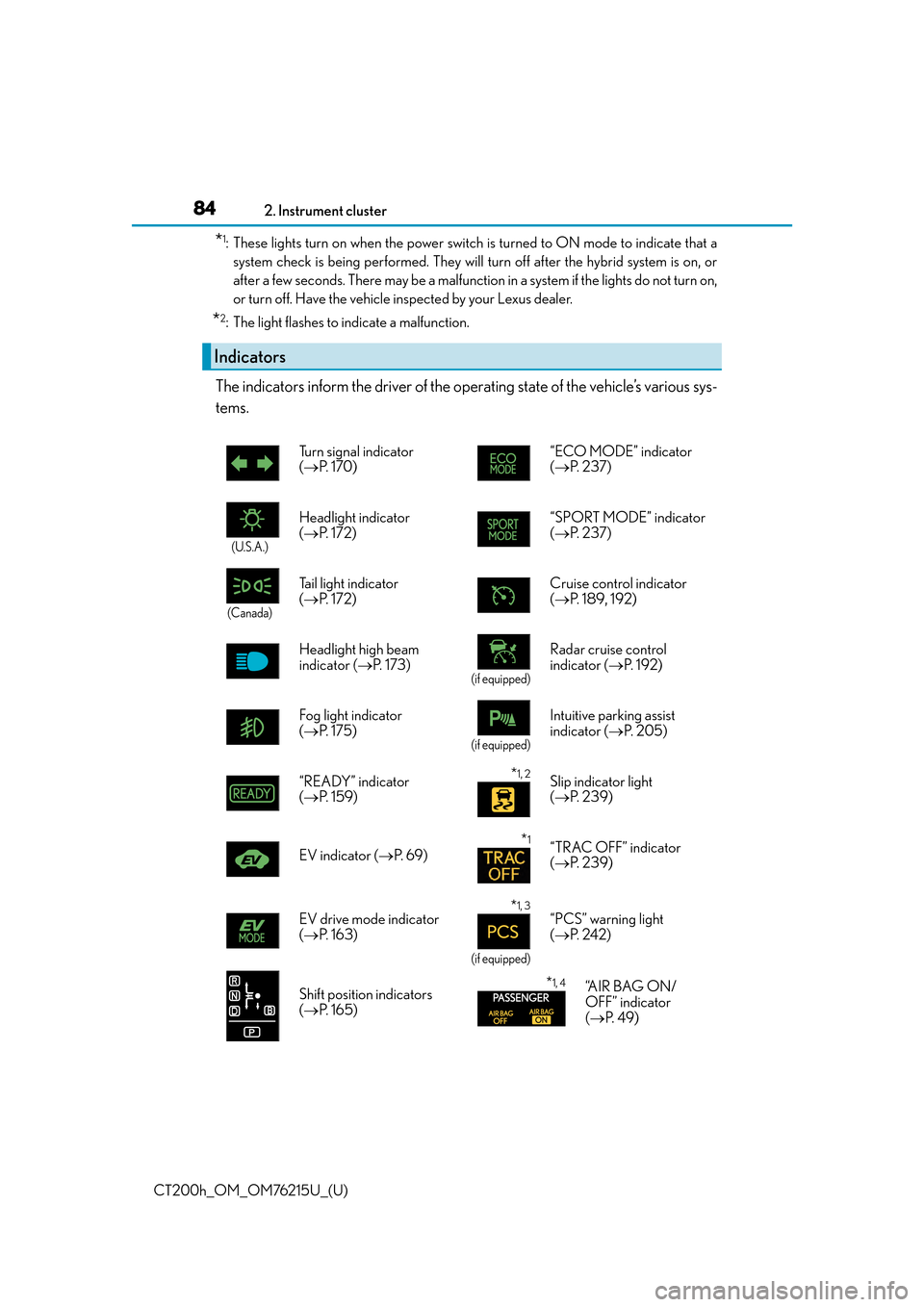
The indicators inform the driver of the operating state of the vehicle’s various sys-
tems.
Indicators
Turn signal indicator
( P. 1 7 0 ) “ECO MODE” indicator
(
P. 2 3 7 )
(U.S.A.)
Headlight indicator
( P. 1 7 2 ) “SPORT MODE” indicator
(
P. 2 3 7 )
(Canada)
Tail light indicator
( P. 1 7 2 ) Cruise control indicator
(
P. 1 8 9 , 1 9 2 )
Headlight high beam
indicator ( P. 1 7 3 )
(if equipped)
Radar cruise control
indicator ( P. 1 9 2 )
Fog light indicator
( P. 1 7 5 )
(if equipped)
Intuitive parking assist
indicator ( P. 2 0 5 )
“READY” indicator
( P. 1 5 9 )
*1, 2Slip indicator light
( P. 2 3 9 )
EV indicator ( P. 6 9 )
*1“TRAC OFF” indicator
( P. 2 3 9 )
EV drive mode indicator
( P. 1 6 3 )
*1, 3
(if equipped)
“PCS” warning light
( P. 2 4 2 )
Shift position indicators
( P. 1 6 5 )
*1, 4“A I R B A G O N /
OFF” indicator
( P. 4 9 )
Page 90 of 640

90
CT200h_OM_OM76215U_(U)2. Instrument cluster
Multi-information display
The multi-information display presents the driver with a variety of vehicle data.
●Energy monitor
Displays the status of
the hybrid system.
( P. 9 3 )
●Drive information
Displays driving range, fuel consump-
tion and other cruising related informa-
tion. ( P. 9 0 )
●Setting
Changes instrument cluster display set-
tings ( P. 5 9 8 )
●Intuitive parking assist display (if equipped)
Automatically displayed when the system is used (P. 2 0 5 )
●Dynamic radar cruise control display (if equipped)
Automatically displayed when the system is used (P. 1 9 2 )
●Wa r n i n g m e s s a g e s
Automatically displayed when a malfunction occurs in one of the vehicle’s systems ( P. 5 4 2 )
Items displayed can be switched by
pressing the “DISP” switch.
■Energy monitor
P. 9 3
■Current fuel consumption/Average fuel consumption after refueling
Displays the instant fuel consumptio n and average fuel consumption after
refueling.
Use the displayed average fuel consumption as a reference.
Display contents
Drive information
Page 145 of 640
145
CT200h_OM_OM76215U_(U)
4Driving
4-1. Before drivingDriving the vehicle ...................... 146
Cargo and luggage .................... 153
Vehicle load limits ....................... 156
Trailer towing ................................. 157
Dinghy towing...............................158
4-2. Driving procedures Power (ignition) switch.............. 159
EV drive mode ............................. 163
Hybrid transmission ................... 165
Turn signal lever ........................... 170
Parking brake .................................. 171 4-3. Operating the lights
and wipers
Headlight switch........................... 172
Fog light switch .............................175
Windshield wipers and washer ........................................... 177
Rear window wiper and washer .......................................... 183
Headlight cleaner switch ......... 185
4-4. Refueling Opening the fuel tank cap ...... 186
4-5. Using the driving support systems
Cruise control .............................. 189
Dynamic radar cruise control .......................................... 192
Intuitive parking assist ..............205
Rear view monitor system ........212
Lexus parking assist monitor ........................................ 222
Driving mode select switch ........................................... 237
Driving assist systems...............238
PCS (Pre-Collision System)........................................ 242
4-6. Driving tips Hybrid vehicle driving tips ..................................................247
Winter driving tips ..................... 249
Page 168 of 640
168
CT200h_OM_OM76215U_(U)4-2. Driving procedures
■About engine braking
When shift position B is selected, releasing the accelerator
pedal will apply engine brak-
ing.
• When the vehicle is driven at high speeds, compared to ordinary gasoline-fueled vehi-
cles, the engine braking deceleration is felt less than that of other vehicles.
• The vehicle can be accelerated even when shift position B is selected.
If the vehicle is driven continuously in the B position, fuel efficiency will become low. Usu-
ally, select the D position.
■When driving with cruise control or dynamic radar cruise control activated
Even if switching the driving mo de to sport mode with the intent of enabling engine brak-
ing, engine braking will not activate because cruise control or dynamic radar cruise con-
trol will not be canceled.
■Automatically P position selection function
When the shift position is in a position other than P, pressing the power switch with the
vehicle stopped completely will cause the shift position to change to P automatically, and
then the power switch will turn off.
■If the shift position cannot be shifted from P
There is a possibility that the 12-volt battery is discharged. Check the 12-volt battery in
this situation. ( P. 5 6 8 )
■After recharging/reconnecting the 12-volt battery
P. 4 9 3
■Customization
Settings (e.g. Reverse warning buzzer) can be changed.
(Customizable features: P. 5 9 8 )
WA R N I N G
■When driving on slippery road surfaces
Do not accelerate or shift the shift position suddenly.
Sudden changes in engine braking may cause th e vehicle to spin or skid, resulting in an
accident.
■For the shift lever
Do not remove the shift lever knob or use anything but a genuine Lexus shift lever
knob. Also, do not hang anything on the shift lever.
Doing so could prevent the shift lever from returning to position, causing unexpected
accidents to occur when the vehicle is in motion.
■P position switch
Do not press the P position switch while the vehicle is moving.
If the P position switch is pressed when driving at very low speeds (for example, directly
before stopping the vehicle), the vehicle may stop suddenly when the shift position
switches to P, which could lead to an accident.
Page 189 of 640

189
CT200h_OM_OM76215U_(U)4-5. Using the driving support systems
4
Driving
Cruise control
Use the cruise control to maintain a set speed without depressing the accelera-
tor pedal.
Indicator
Display
Cruise control switch
Press the “ON-OFF” button to acti-
vate the cruise control.
Cruise control indicator will come on.
Press the button again to deactivate the
cruise control.
Accelerate or decelerate the vehicle
to the desired speed, and push the
lever down to set the speed.
“SET” will be displayed.
The vehicle speed at the moment the
lever is released be comes the set speed.
: If equipped
Summary of functions
1
2
3
Setting the vehicle speed
1
2
Page 191 of 640

CT200h_OM_OM76215U_(U)
1914-5. Using the driving support systems
4
Driving
■Cruise control can be set when
●The shift position is in D.
●Vehicle speed is above approximately 25 mph (40 km/h).
■Accelerating after setting the vehicle speed
●The vehicle can be accelerated normally. After acceleration, the set speed resumes.
●Even without canceling the cruise control, the set speed can be increased by first accel-
erating the vehicle to the desired speed and then pushing the lever down to set the new
speed.
■Automatic cruise control cancelation
Cruise control will stop maintaining the vehicl e speed in any of the following situations.
●Actual vehicle speed falls more than approximately 10 mph (16 km/h) below the preset
vehicle speed.
At this time, the memorized set speed is not retained.
●Actual vehicle speed is below approximately 25 mph (40km/h).
●Enhanced VSC is activated.
■If the warning message for the cruise contro l is shown on the multi-information display
Press the “ON-OFF” button once to deactivate the system, and then press the button
again to reactivate the system.
If the cruise control speed cannot be set or if the cruise control cancels immediately after
being activated, there may be a malfunction in the cruise control system. Have the vehi-
cle inspected by your Lexus dealer.
WA R N I N G
■To avoid operating the cruise control by mistake
Switch the cruise control off using th e “ON-OFF” button when not in use.
■Situations unsuitable for cruise control
Do not use cruise control in any of the following situations.
Doing so may result in loss of control and could cause an accident resulting in death or
serious injury.
●In heavy traffic
●On roads with sharp bends
●On winding roads
●On slippery roads, such as thos e covered with rain, ice or snow
●On steep hills
Vehicle speed may exceed the set speed when driving down a steep hill.
●During emergency towing
Page 192 of 640

192
CT200h_OM_OM76215U_(U)4-5. Using the driving support systems
Dynamic radar cruise control
Dynamic radar cruise control supplement
s conventional cruise control with a
vehicle-to-vehicle distance control. In vehicle-to-vehicle distance control mode,
the vehicle automatically accelerates or de celerates in order to maintain a set
following distance from vehicles ahead.
Indicators
Display
Set speed
Vehicle-to-vehicle distance button
Cruise control switch
Press the “ON-OFF” button to acti-
vate the Dynamic radar cruise con-
trol.
Radar cruise control indicator will come
on.
Press the button again to deactivate the
cruise control.
: If equipped
Summary of functions
1
2
3
4
5
Setting the vehicle speed (vehicle-to-vehicle distance control mode)
1