set Lexus ES350 2016 Quick Guide /
[x] Cancel search | Manufacturer: LEXUS, Model Year: 2016, Model line: ES350, Model: Lexus ES350 2016Pages: 112, PDF Size: 2.11 MB
Page 5 of 112
5
ES350_QG_OM33B82U_(U)
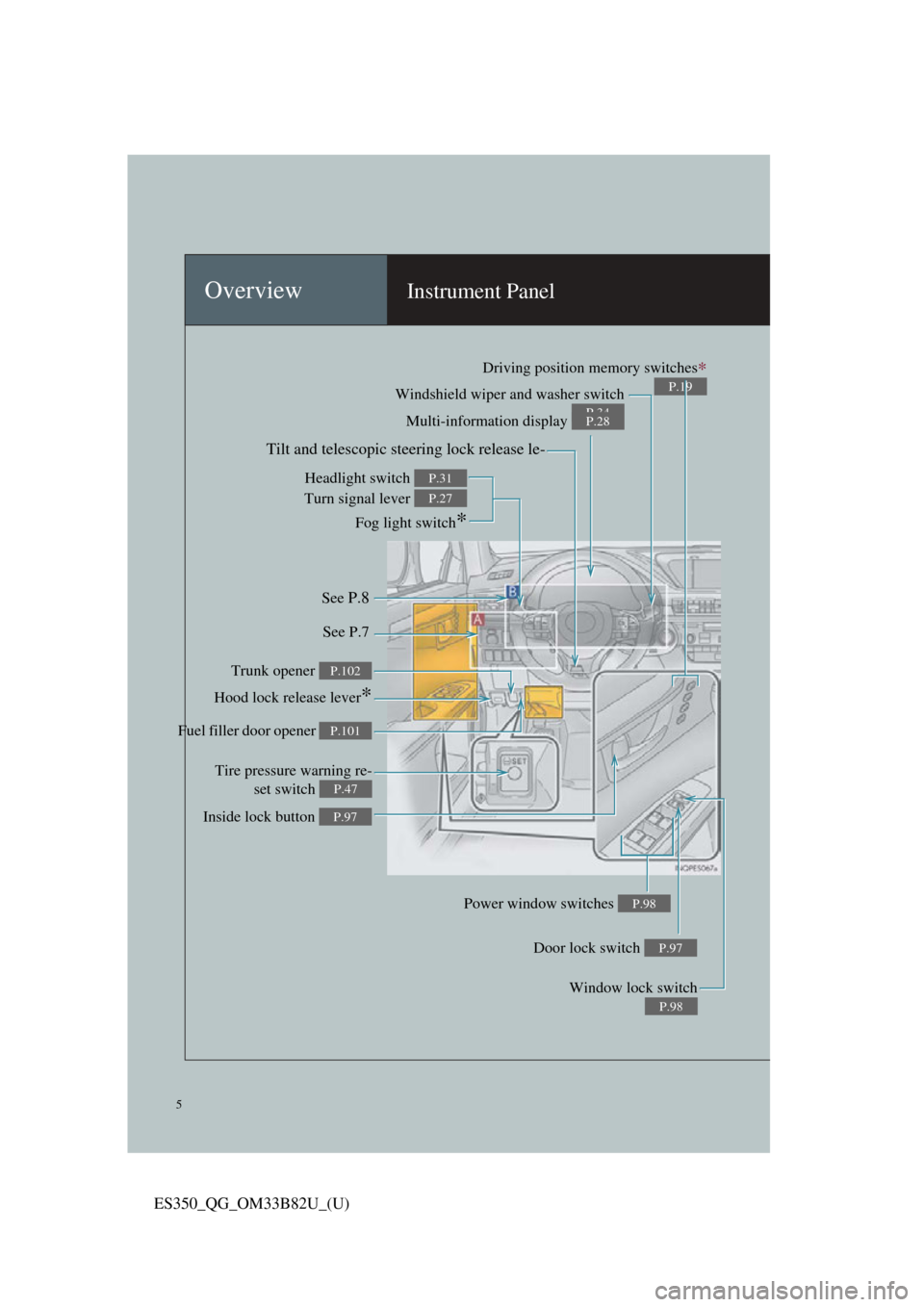
OverviewInstrument Panel
Windshield wiper and washer switch
P.34Multi-information display P.28
Headlight switch
Turn signal lever
Fog light switch
*
P.31
P.27
Inside lock button P.97
Trunk opener P.102
Hood lock release lever*
Driving position memory switches∗
P.19
See P.8
See P.7
Window lock switch
P.98
Power window switches P.98
Door lock switch P.97
Tire pressure warning re-set switch
P.47
Fuel filler door opener P.101
Tilt and telescopic steering lock release le-
Page 7 of 112
7
ES350_QG_OM33B82U_(U)
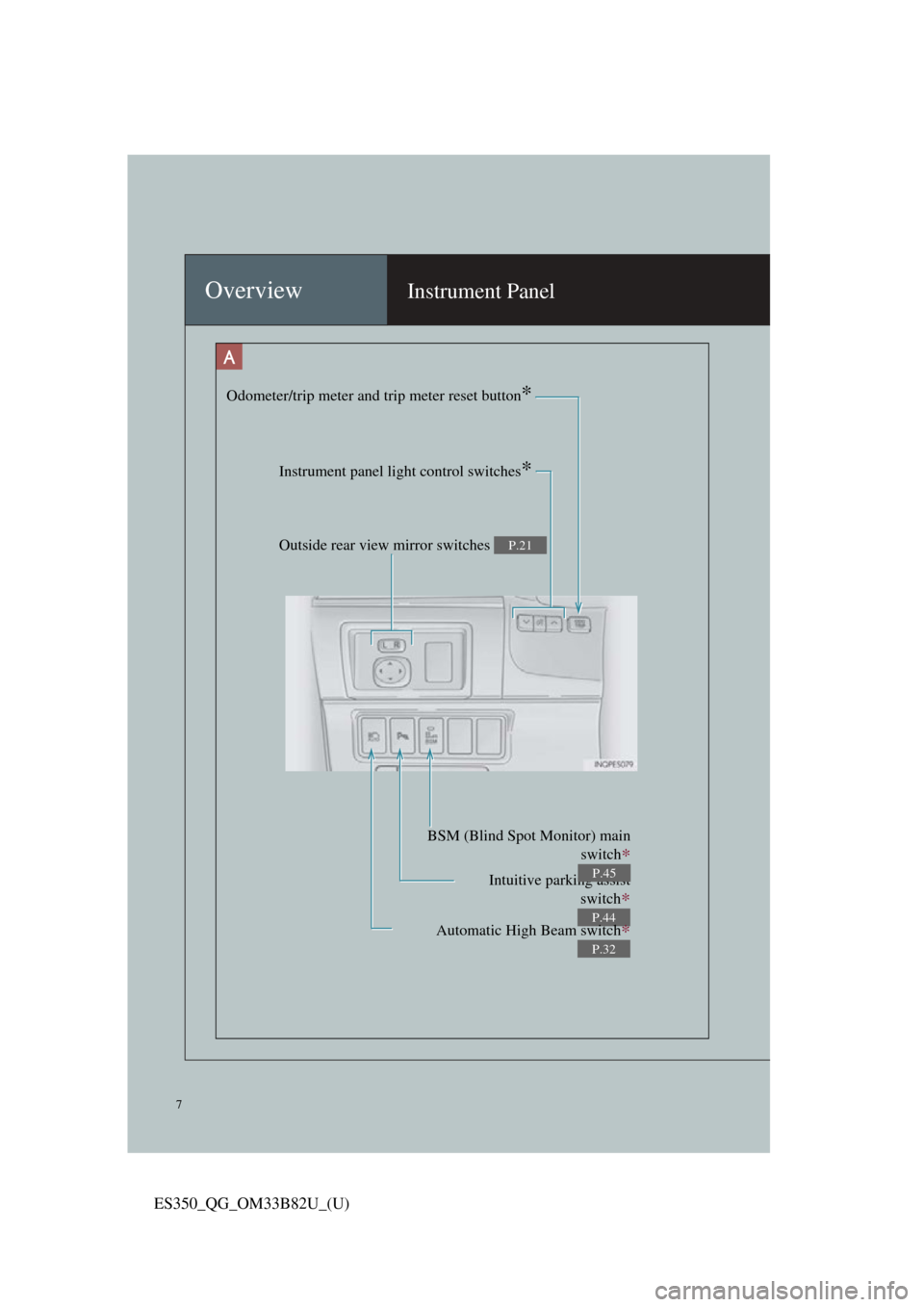
OverviewInstrument Panel
Odometer/trip meter and trip meter reset button*
Instrument panel light control switches*
Outside rear view mirror switches P.21
Intuitive parking assistswitch
∗
P.44
BSM (Blind Spot Monitor) main switch
∗
P.45
Automatic High Beam switch∗
P.32
Page 12 of 112
12
ES350_QG_OM33B82U_(U)
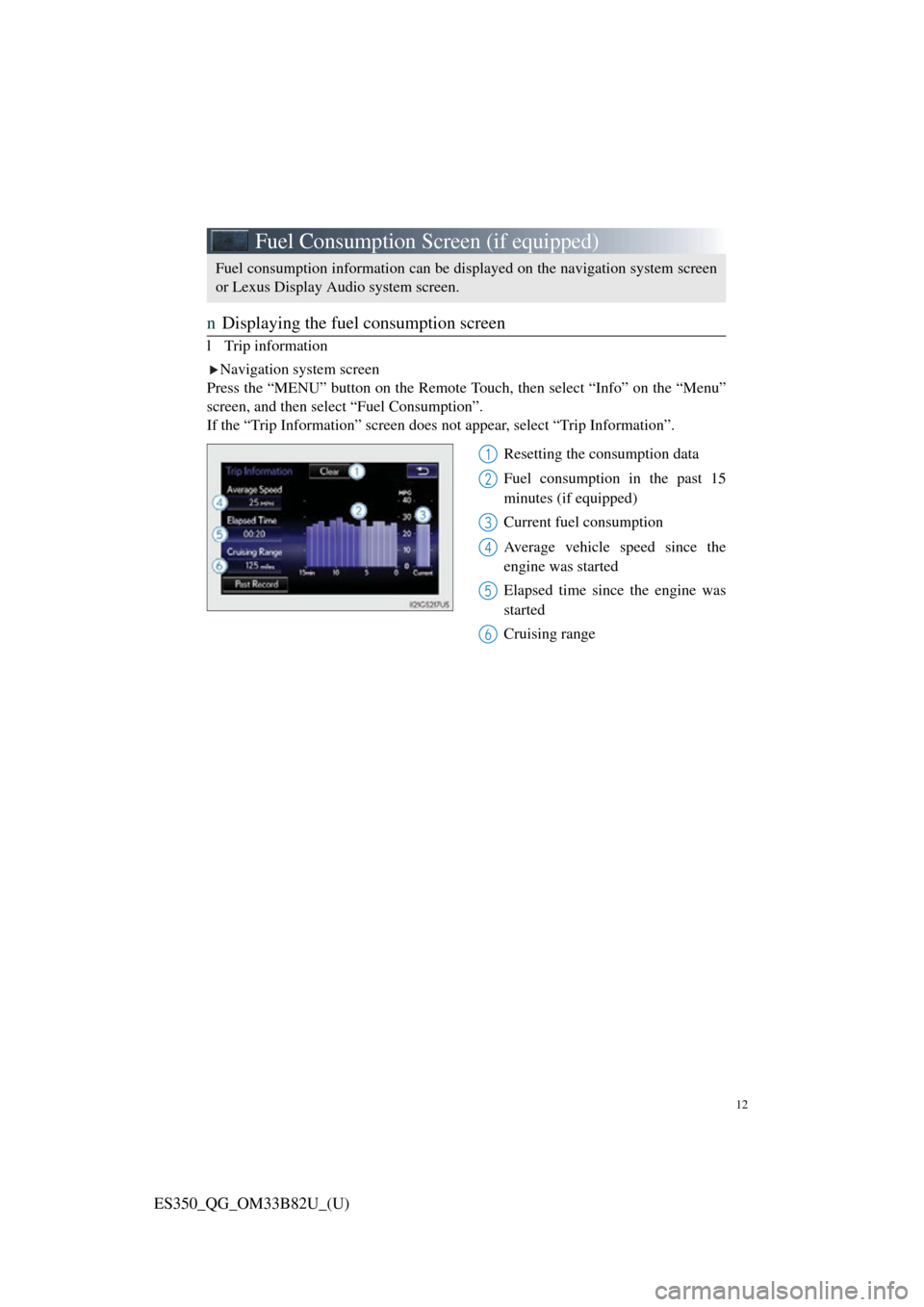
Fuel Consumption Screen (if equipped)
nDisplaying the fuel consumption screen
l Trip information
Navigation system screen
Press the “MENU” button on the Remote T ouch, then select “Info” on the “Menu”
screen, and then select “Fuel Consumption”.
If the “Trip Information” screen does not appear, select “Trip Information”.
Resetting the consumption data
Fuel consumption in the past 15
minutes (if equipped)
Current fuel consumption
Average vehicle speed since the
engine was started
Elapsed time since the engine was
started
Cruising range
Fuel consumption information can be displayed on the navigation system screen
or Lexus Display A udio system screen.
1
2
3
4
5
6
Page 14 of 112
14
ES350_QG_OM33B82U_(U)
Keys
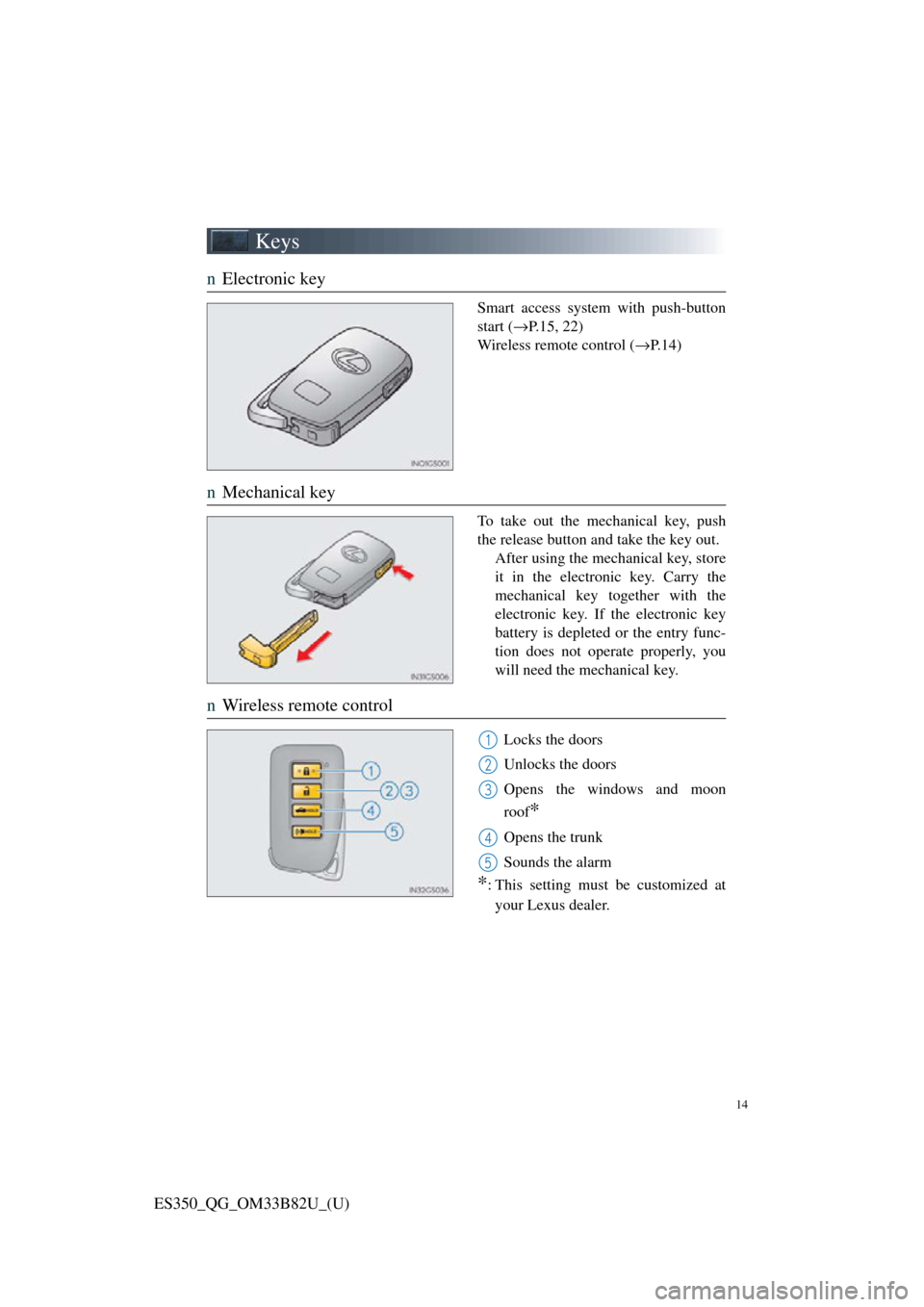
nElectronic key
Smart access system with push-button
start ( →P.15, 22)
Wireless remote control ( →P.14)
nMechanical key
To take out the mechanical key, push
the release button and take the key out.
After using the mechanical key, store
it in the electronic key. Carry the
mechanical key together with the
electronic key. If the electronic key
battery is depleted or the entry func-
tion does not operate properly, you
will need the mechanical key.
nWireless remote control
Locks the doors
Unlocks the doors
Opens the windows and moon
roof
*
Opens the trunk
Sounds the alarm
*: This setting must be customized at
your Lexus dealer.
1
2
3
4
5
Page 15 of 112
15
ES350_QG_OM33B82U_(U)
Smart Access System with Push-button Start
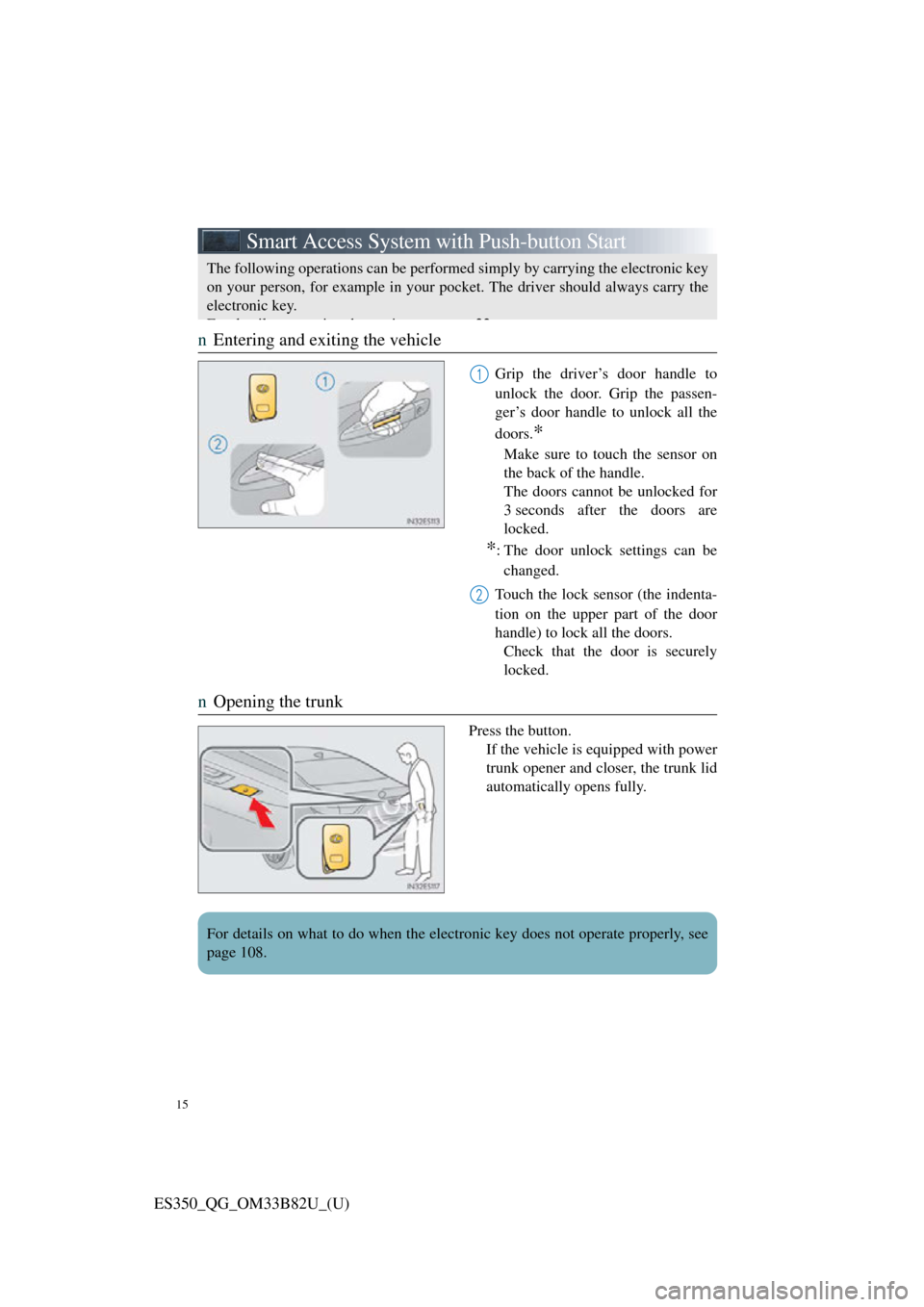
nEntering and exiting the vehicle
Grip the driver’s door handle to
unlock the door. Grip the passen-
ger’s door handle to unlock all the
doors.
*
Make sure to touch the sensor on
the back of the handle.
The doors cannot be unlocked for
3 seconds after the doors are
locked.
*: The door unlock settings can be
changed.
Touch the lock sensor (the indenta-
tion on the upper part of the door
handle) to lock all the doors. Check that the door is securely
locked.
n Opening the trunk
Press the button.
If the vehicle is equipped with power
trunk opener and closer, the trunk lid
automatically opens fully.
The following operations can be performed simply by carrying the electronic key
on your person, for example in your pocke t. The driver should always carry the
electronic key.
Fd il i h i 22
1
2
For details on what to do when the electronic key does not operate properly, see
page 108.
Page 16 of 112
16
ES350_QG_OM33B82U_(U)
Theft Deterrent System
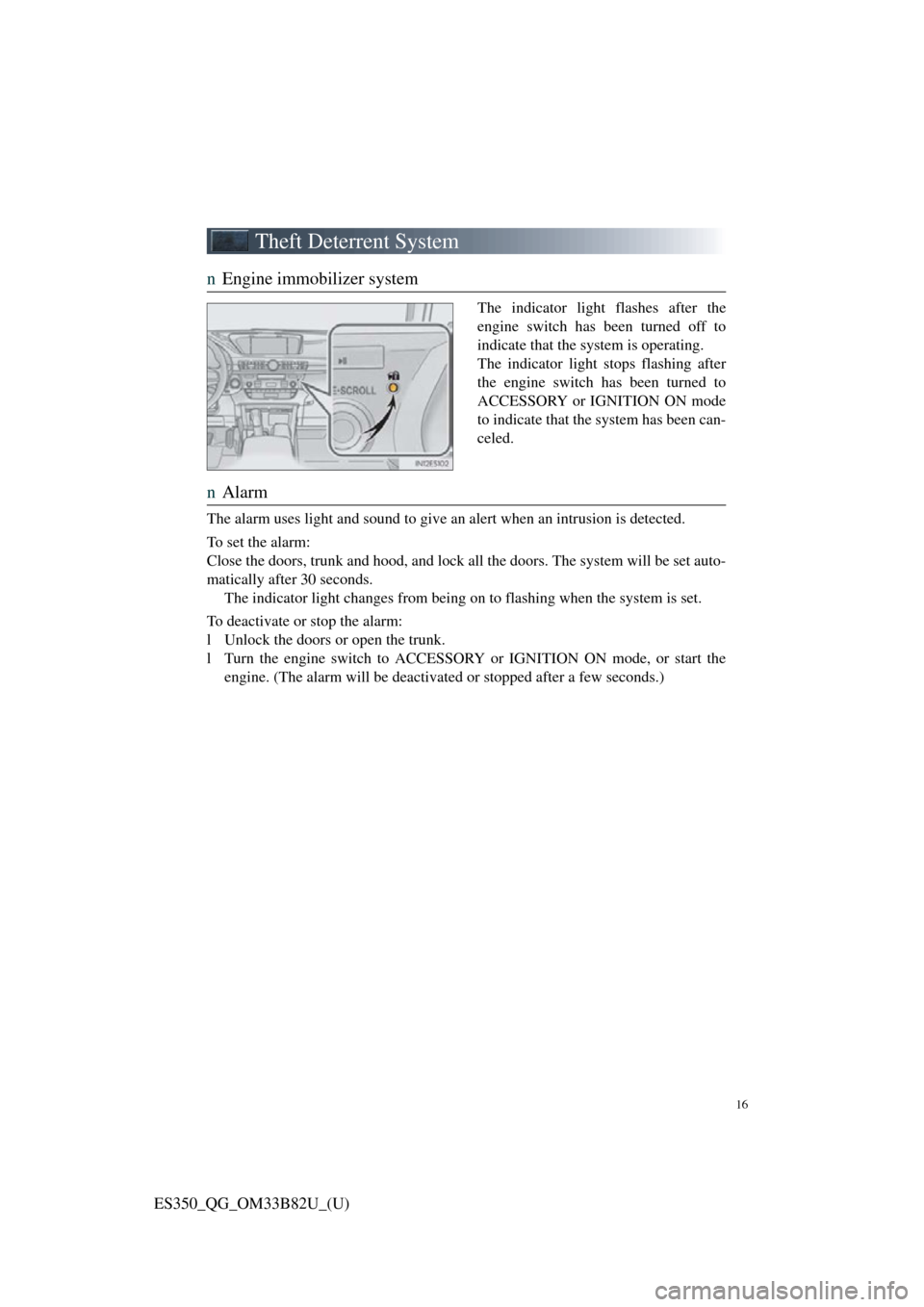
nEngine immobilizer system
The indicator light flashes after the
engine switch has been turned off to
indicate that the system is operating.
The indicator light st ops flashing after
the engine switch has been turned to
ACCESSORY or IGNITION ON mode
to indicate that the system has been can-
celed.
n Alarm
The alarm uses light and sound to give an alert when an intrusion is detected.
To set the alarm:
Close the doors, trunk and hood, and lock all the doors. The system will be set auto-
matically after 30 seconds. The indicator light changes from being on to flashing when the system is set.
To deactivate or stop the alarm:
l Unlock the doors or open the trunk.
l Turn the engine switch to ACCESSORY or IGNITION ON mode, or start the engine. (The alarm will be deactivated or stopped after a few seconds.)
Page 19 of 112
19
ES350_QG_OM33B82U_(U)
Driving Position Memory (if equipped)
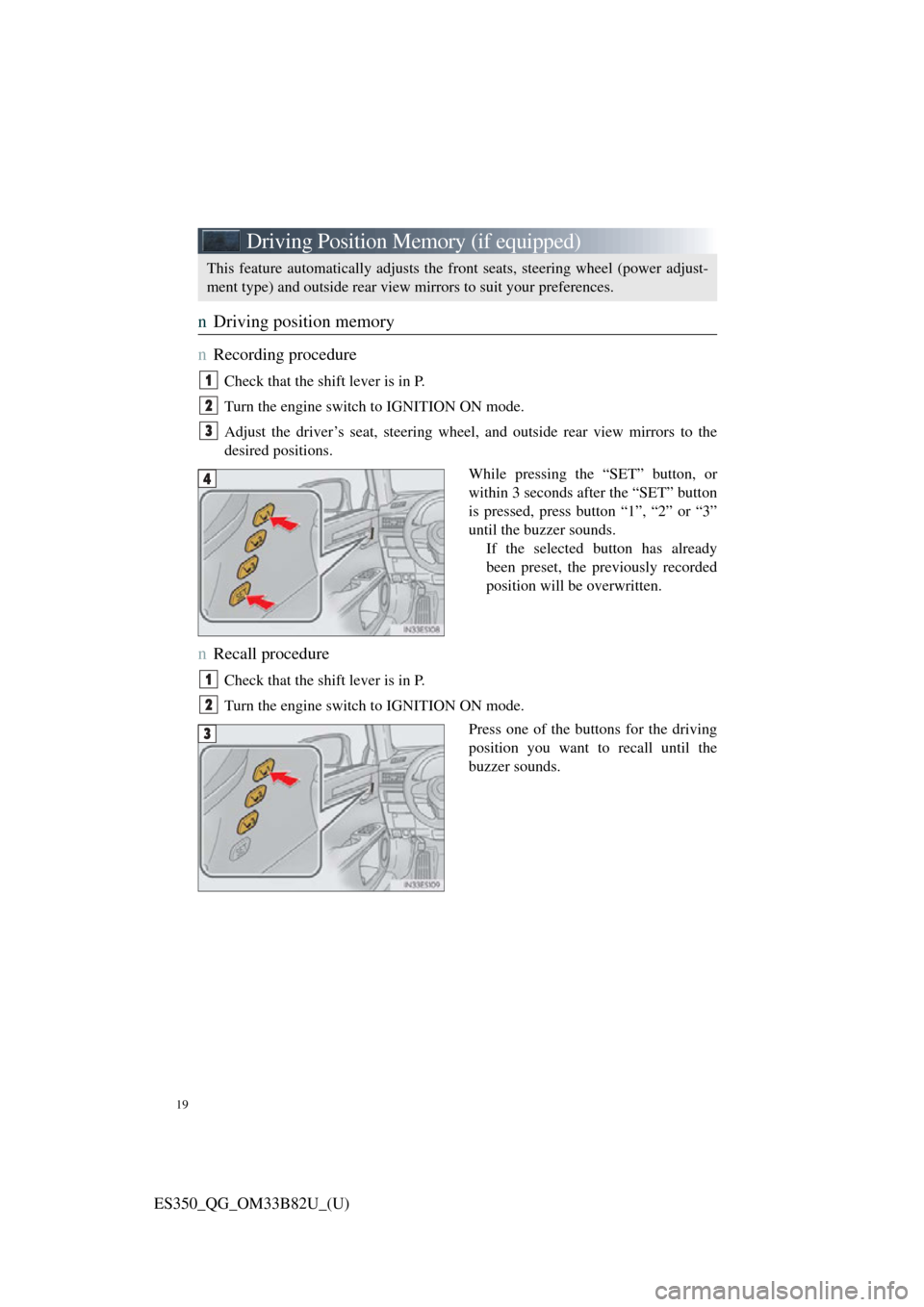
nDriving position memory
n
Recording procedure
Check that the shift lever is in P.
Turn the engine switch to IGNITION ON mode.
Adjust the driver’s seat, steering wheel, and outside rear view mirrors to the
desired positions.
While pressing the “SET” button, or
within 3 seconds af ter the “SET” button
is pressed, press button “1”, “2” or “3”
until the buzzer sounds. If the selected button has already
been preset, the previously recorded
position will be overwritten.
nRecall procedure
Check that the shift lever is in P.
Turn the engine switch to IGNITION ON mode.
Press one of the buttons for the driving
position you want to recall until the
buzzer sounds.
This feature automatically adjusts the front seats, steering wheel (power adjust-
ment type) and outside rear view mirrors to suit your preferences.
1
2
3
4
1
2
3
Page 22 of 112
22
ES350_QG_OM33B82U_(U)
Engine (Ignition) Switch
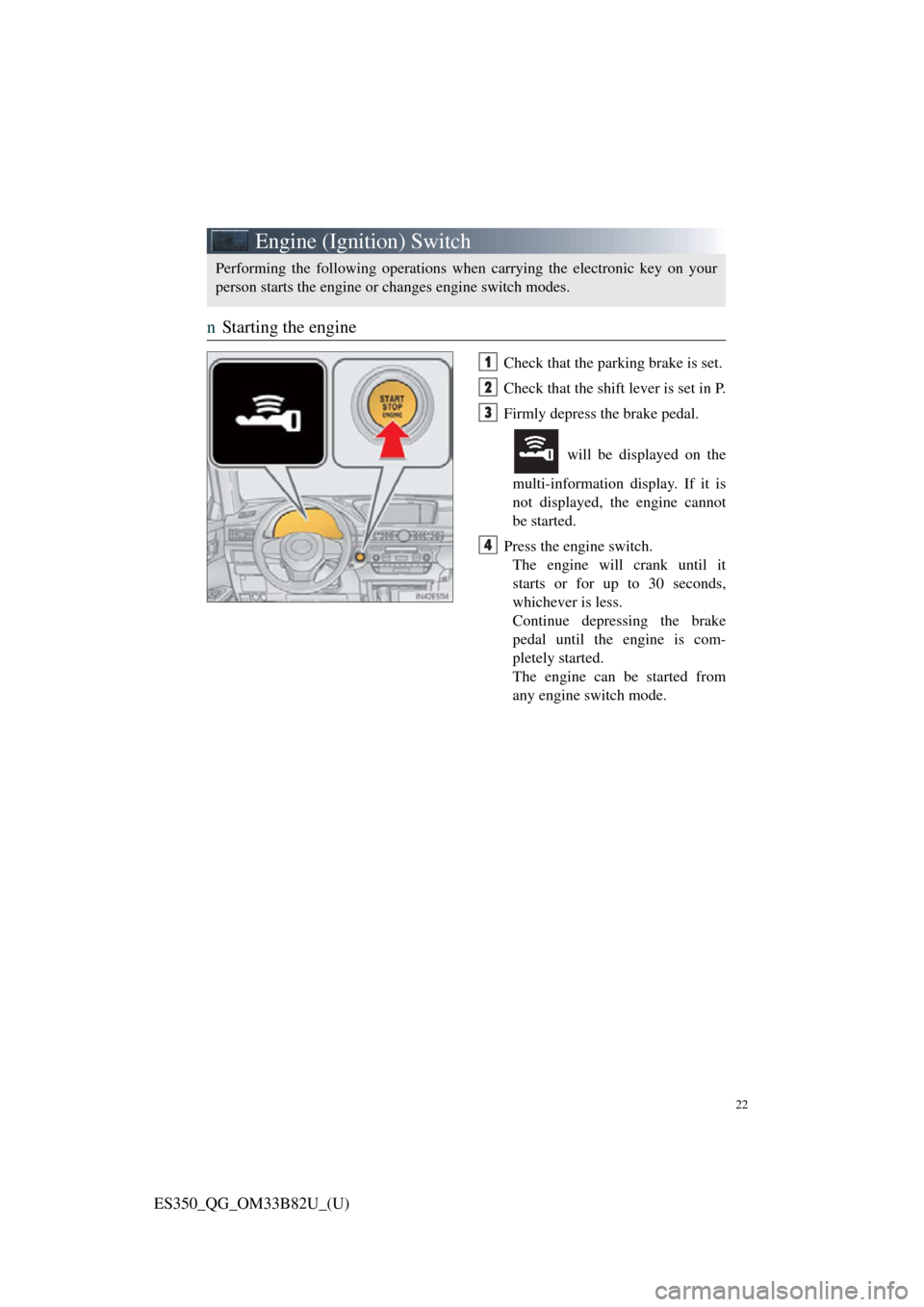
nStarting the engine
Check that the parking brake is set.
Check that the shift lever is set in P.
Firmly depress the brake pedal.
will be displayed on the
multi-information display. If it is
not displayed, the engine cannot
be started.
Press the engine switch. The engine will crank until it
starts or for up to 30 seconds,
whichever is less.
Continue depressing the brake
pedal until the engine is com-
pletely started.
The engine can be started from
any engine switch mode.
Performing the following operations wh en carrying the electronic key on your
person starts the engine or changes engine switch modes.
1
2
3
4
Page 23 of 112
23
ES350_QG_OM33B82U_(U)
nStopping the engine
Stop the vehicle.
Shift the shift lever to P.
Set the parking brake.
Press the engine switch.
Release the brake pedal and check that “POWER ON” on the multi-information
display is off.
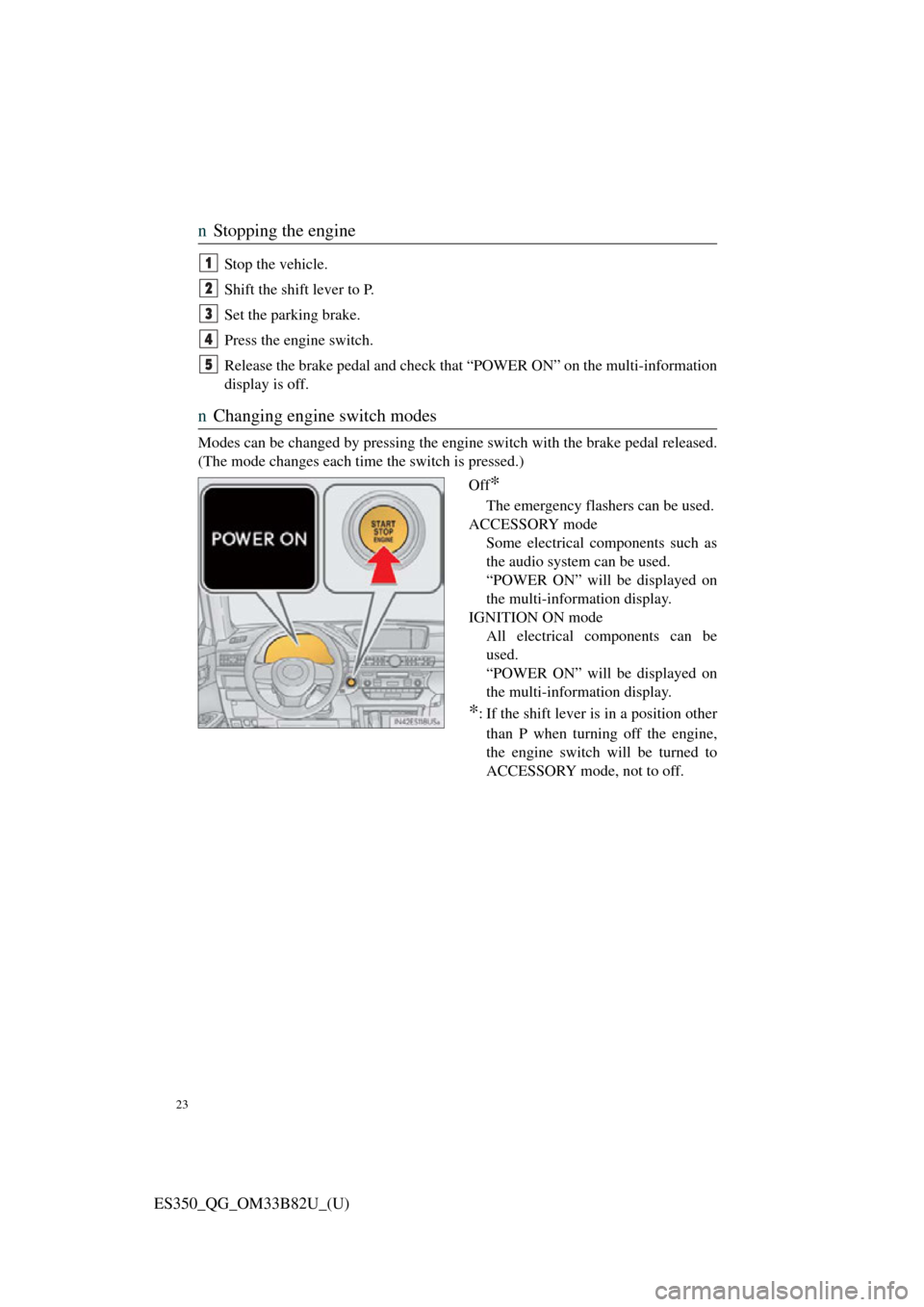
n Changing engine switch modes
Modes can be changed by pressing the engi ne switch with the brake pedal released.
(The mode changes each time the switch is pressed.)
Off
*
The emergency flashers can be used.
ACCESSORY mode Some electrical components such as
the audio system can be used.
“POWER ON” will be displayed on
the multi-information display.
IGNITION ON mode All electrical components can be
used.
“POWER ON” will be displayed on
the multi-information display.
*: If the shift lever is in a position other
than P when turning off the engine,
the engine switch will be turned to
ACCESSORY mode, not to off.
1
2
3
4
5
Page 25 of 112
25
ES350_QG_OM33B82U_(U)
Automatic Transmission
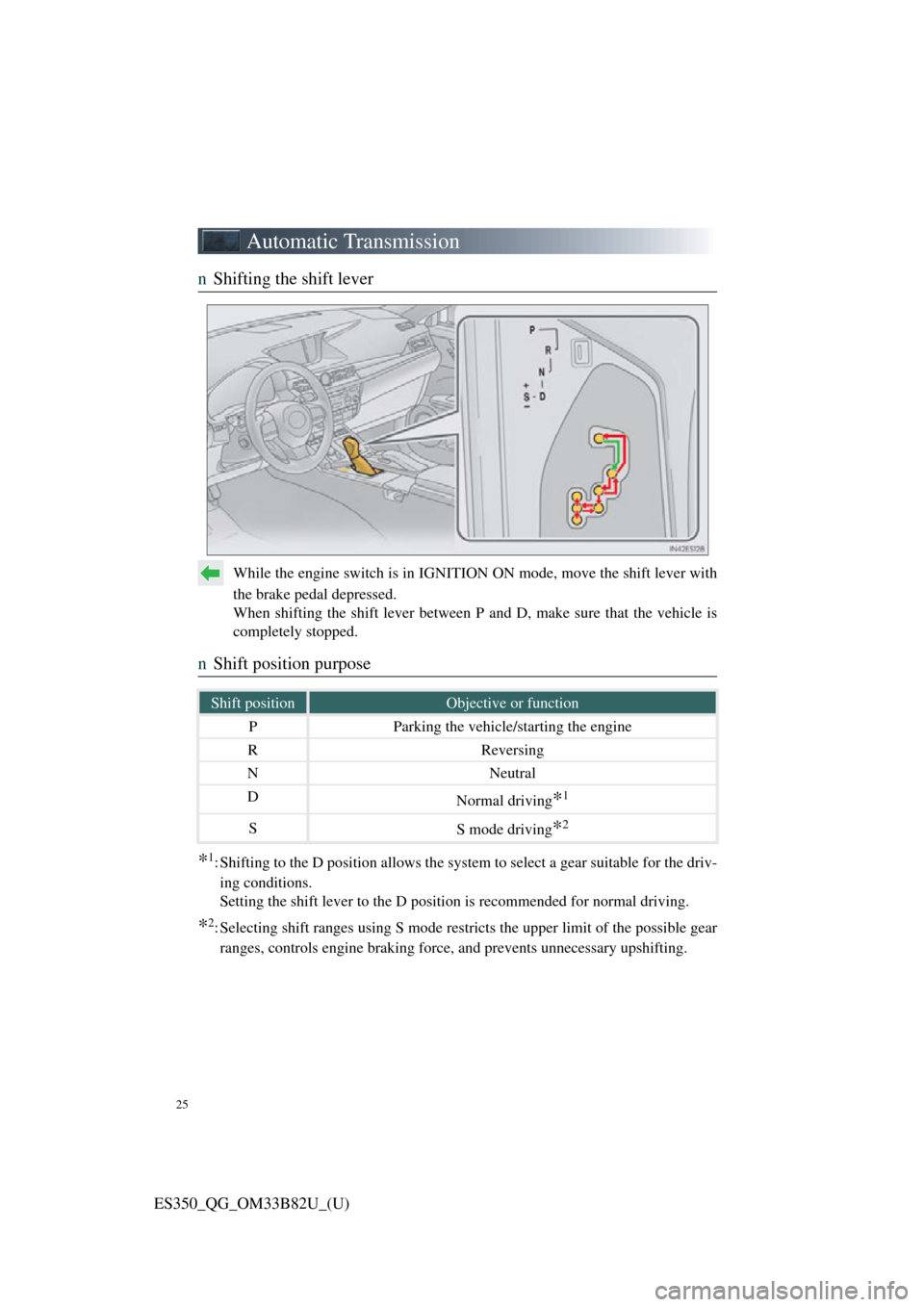
nShifting the shift lever
While the engine switch is in IGNITI ON ON mode, move the shift lever with
the brake pedal depressed.
When shifting the shift lever between P and D, make sure that the vehicle is
completely stopped.
n Shift position purpose
*1: Shifting to the D position allows the system to select a gear suitable for the driv-
ing conditions.
Setting the shift lever to the D position is recommended for normal driving.
*2: Selecting shift ranges using S mode restricts the upper limit of the possible gear ranges, controls engine braking for ce, and prevents unnecessary upshifting.
Shift positionObjective or function
PParking the vehicle/starting the engine
RReversing
NNeutral
DNormal driving*1
SS mode driving*2