Trunk Lexus GS250 2012 Workshop Manual
[x] Cancel search | Manufacturer: LEXUS, Model Year: 2012, Model line: GS250, Model: Lexus GS250 2012Pages: 914, PDF Size: 53.04 MB
Page 279 of 914
2724-5. Using the driving support
GS350/250_EE (OM30C36E)
CAUTION
When the sensor may not be correctly detecting the vehicle ahead
Apply the brakes as necessary when any of the following types of vehicles
are in front of you.
As the sensor may not be able to correctly detect these types of vehicles, the
approach warning (P. 264) will not be activated, and a fatal or serious
accident may result.
Vehicles that cut in suddenly
Vehicles traveling at low speeds
Vehicles that are not moving
Vehicles with small rear ends (trailers with no load on board etc.)
Motorcycles traveling in the same lane
Conditions under which the vehicle-to-vehicle distance control may not
function correctly
Apply the brakes as necessary in the following conditions as the radar sen-
sor may not be able to correctly detect vehicles ahead, and a fatal or serious
accident may result:
When water or snow thrown up by the surrounding vehicles hinders the
functioning of the sensor
When your vehicle is pointing upwards (caused by a heavy load in the
trunk etc.)
When the road curves or when the lanes are narrow
When steering wheel operation or your position in the lane is unstable
When the vehicle ahead of you decelerates suddenly
Page 319 of 914
3124-5. Using the driving support
GS350/250_EE (OM30C36E)Leaving the vehicle stopped, turn the steering wheel all the
way to the left.
Be sure to turn the steering wheel only when the vehicle is stopped.
When the screen changes, keep the steering wheel in its cur-
rent position and back up.
When backing up, be careful not to hit any obstacles with the right front
corner of your vehicle. Back the vehicle up slowly.
When the vehicle is parallel with the road or the shoulder,
straighten the steering wheel.
Check your surroundings visually and with the mirrors, then
back up using the distance guide lines as a reference, and stop.
When the vehicle is approximately in the desired parking location, the
parallel parking assist is complete.
Parallel parking assist mode information
• There is a possibility that parallel parking guidance may not be
given when backing up at a very slow speed.
• If the trunk is opened, the parallel parking assist will be inter-
rupted by a message being displayed on the screen. Stop the
vehicle, shift the shift lever out of the R position, and restart
the operation from the step .
Canceling parallel parking assist
Select .
Vehicles with Lexus parking assist-sensor
If Lexus parking assist-sensor detects an object while you
attempt to park in a parking space on the left, the black and yel-
low vertical pole could be obscured by Lexus parking assist-sen-
sor display. In this event, turn Lexus parking assist-sensor switch
off (P. 285), and operate the vehicle while checking the safety
of the surrounding area direct visually and with mirror. After the
operation, turn the switch on.
8
9
10
1
Page 330 of 914

3234-5. Using the driving support
4
Driving
GS350/250_EE (OM30C36E)
Guide lines are not dis-
playedThe trunk lid is open.
Close the trunk lid.
If this does not resolve
the symptom, have the
vehicle inspected by
any authorized Lexus
dealer or repairer, or
another duly qualified
and equipped profes-
sional.
“System is initializ-
ing.” is displayed
• The battery has been
reinstalled.
• The steering wheel
has been moved
while the battery was
being reinstalled.
• Battery power is low.
• The steering sensor
has been reinstalled.
• There is a malfunc-
tion in the signals
being output by the
steering sensor.
Stop the vehicle, and
turn the steering wheel
as far as it will go to
the left and right.
If this does not resolve
the symptom, have the
vehicle inspected by
any authorized Lexus
dealer or repairer, or
another duly qualified
and equipped profes-
sional.
• On the system initial-
ization screen, select
the “?” button to dis-
play the operating
procedure.
SymptomLikely causeSolution
Page 331 of 914
3244-5. Using the driving support
GS350/250_EE (OM30C36E)
CAUTION
When using the Lexus parking assist monitor system
When backing up, be sure to check visually behind and all around the vehi-
cle before proceeding.
Observe the following precautions to avoid an accident that could result in
death or serious injuries.
The parking assist monitor is a supplemental device intended to assist the
driver when backing up. Never depend on the parking assist monitor
entirely when backing up. Always make sure your intended path is clear.
Use caution, just as you would when backing up any vehicle.
Never back up while looking only at the screen.
The image shown on the screen may differ from the actual state, and you
could collide with another vehicle or obstacles if backing up looking only
at the screen, possibly causing an accident. When backing up, be sure to
check in front of and behind the vehicle, both directly and with mirrors.
Be sure to back up slowly, depressing the brake pedal to control vehicle
speed.
If you seem likely to hit nearby vehicles, obstacles, people or mount the
shoulder, depress the brake pedal to stop the vehicle, then disable the
assist system by select on the screen to cancel the system.
The instructions given are only guidelines.
When and how much to turn the steering wheel will vary according to
traffic conditions, road surface conditions, vehicle condition, etc. when
parking. It is necessary to be fully aware of this before using the parking
assist system.
When parking, be sure to check that the parking space will accommodate
your vehicle before maneuvering into it.
Do not use system in the following cases:
• On icy or slick road surfaces, or in snow
• When using tire chains or emergency tires
• When the trunk lid is not closed completely
• On roads that are not flat or straight, such as curves or slopes.
Page 377 of 914
367
5Interior features
GS350/250_EE (OM30C36E)
5-4. Using the hands-free phone
system (for cellular phone)
Hands-free system
(for cellular phone) ......... 542
Using a Bluetooth
®
phone............................... 556
Setting the hands-free system
(for cellular phone) ......... 575
Setting the Bluetooth
®...... 598
5-5. Using the interior lights
Interior lights list ............... 611
• Interior light .................. 612
• Personal lights............... 6125-6. Using the storage features
List of storage features ..... 614
• Glove box ..................... 616
• Console box .................. 617
• Cup holders .................. 618
• Auxiliary boxes ............ 620
Trunk features ................... 621
5-7. Other interior features
Sun visors and
vanity mirrors ................. 624
Clock................................. 625
Ashtrays ............................ 626
Power outlets .................... 627
Heated steering wheel....... 629
Seat heaters/
seat ventilators ................ 631
Armrest ............................. 635
Rear sunshade/
rear door sunshades ........ 636
Trunk storage extension.... 639
Coat hooks ........................ 640
Assist grip ......................... 641
Utility hook ....................... 642
For vehicles sold outside Europe, some of the functions can-
not be operated while driving.
Page 634 of 914
6165-6. Using the storage features
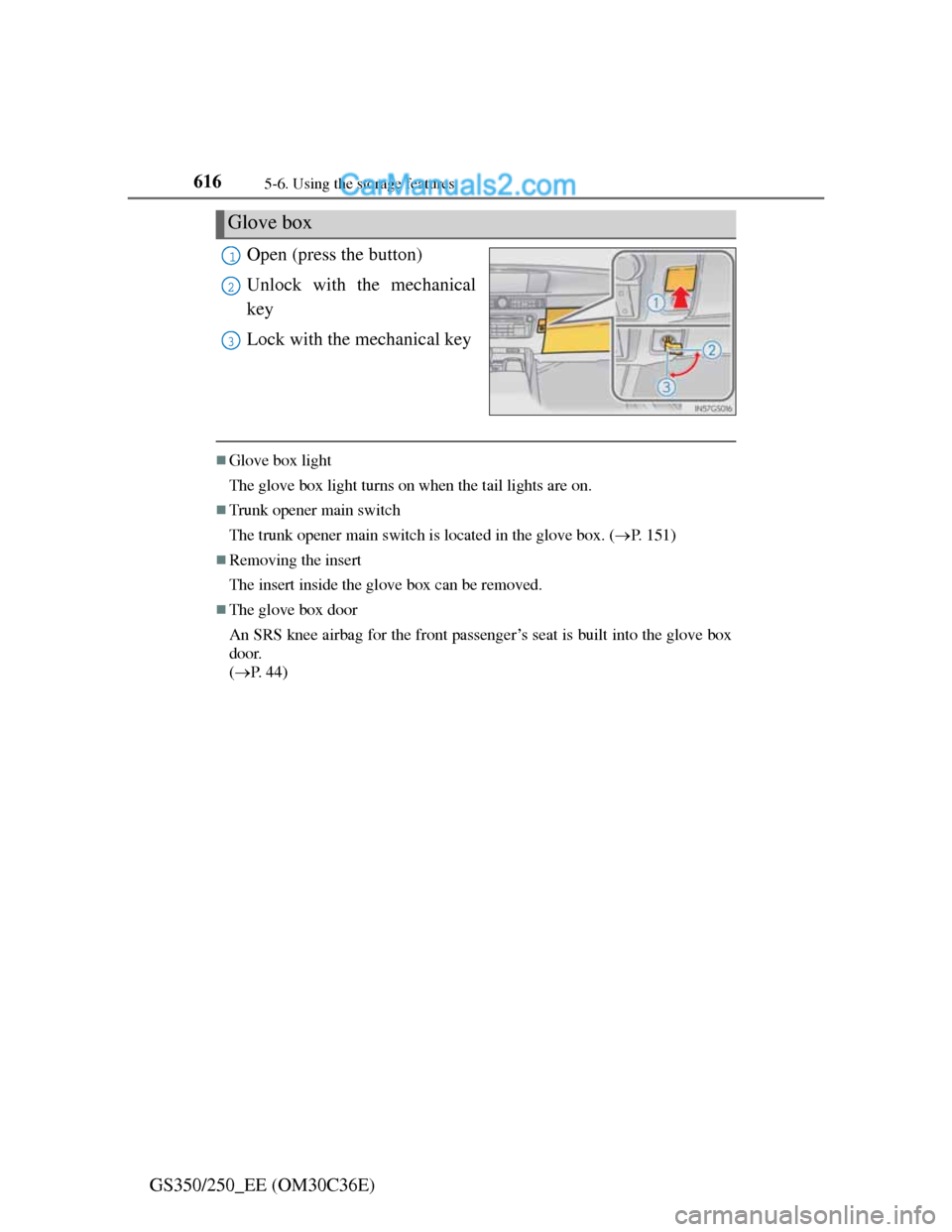
GS350/250_EE (OM30C36E)Open (press the button)
Unlock with the mechanical
key
Lock with the mechanical key
Glove box light
The glove box light turns on when the tail lights are on.
Trunk opener main switch
The trunk opener main switch is located in the glove box. (P. 151)
Removing the insert
The insert inside the glove box can be removed.
The glove box door
An SRS knee airbag for the front passenger’s seat is built into the glove box
door.
(P. 44)
Glove box
1
2
3
Page 639 of 914
621
5 5-6. Using the storage features
Interior features
GS350/250_EE (OM30C36E)
Trunk features
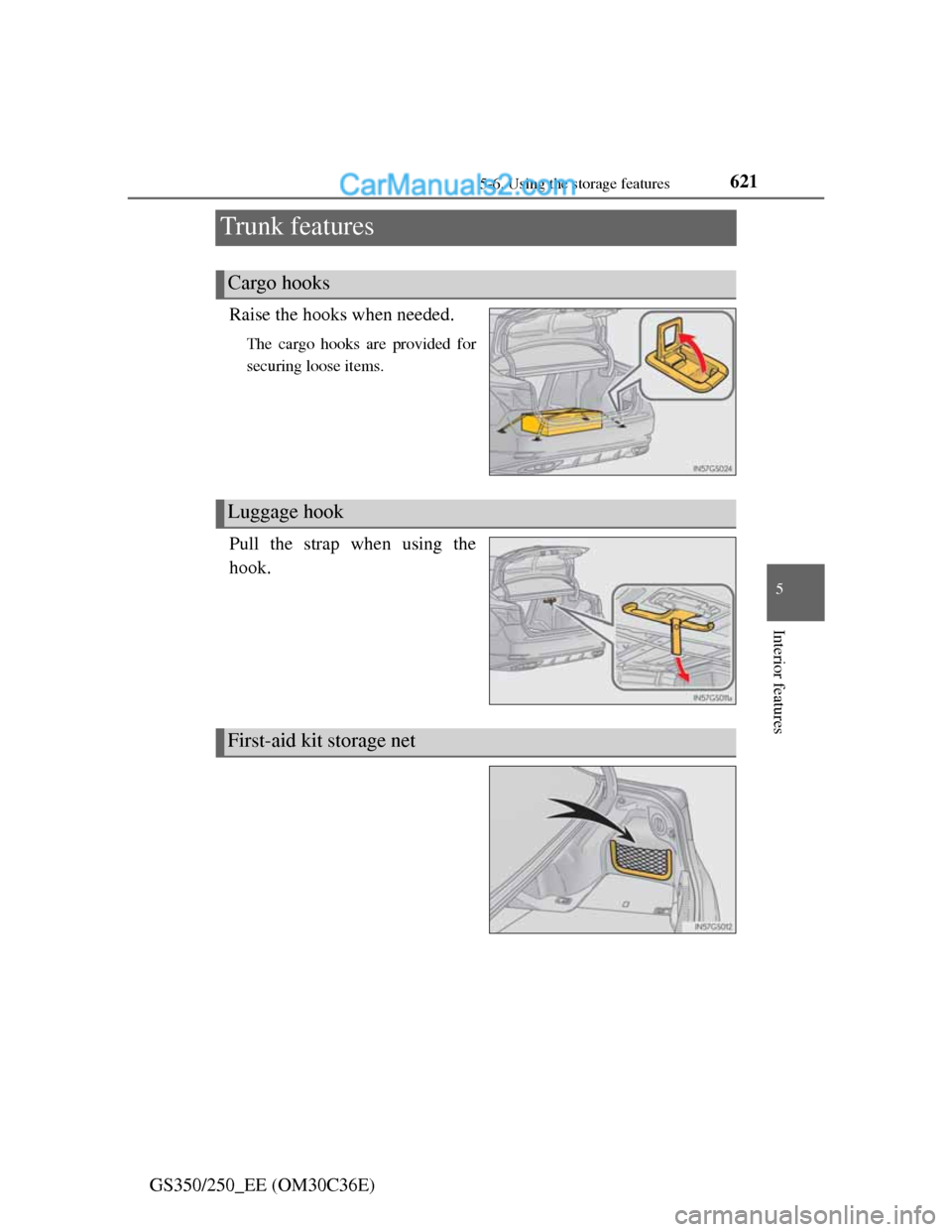
Raise the hooks when needed.
The cargo hooks are provided for
securing loose items.
Pull the strap when using the
hook.
Cargo hooks
Luggage hook
First-aid kit storage net
Page 657 of 914
639
5 5-7. Other interior features
Interior features
GS350/250_EE (OM30C36E)
Trunk storage extension
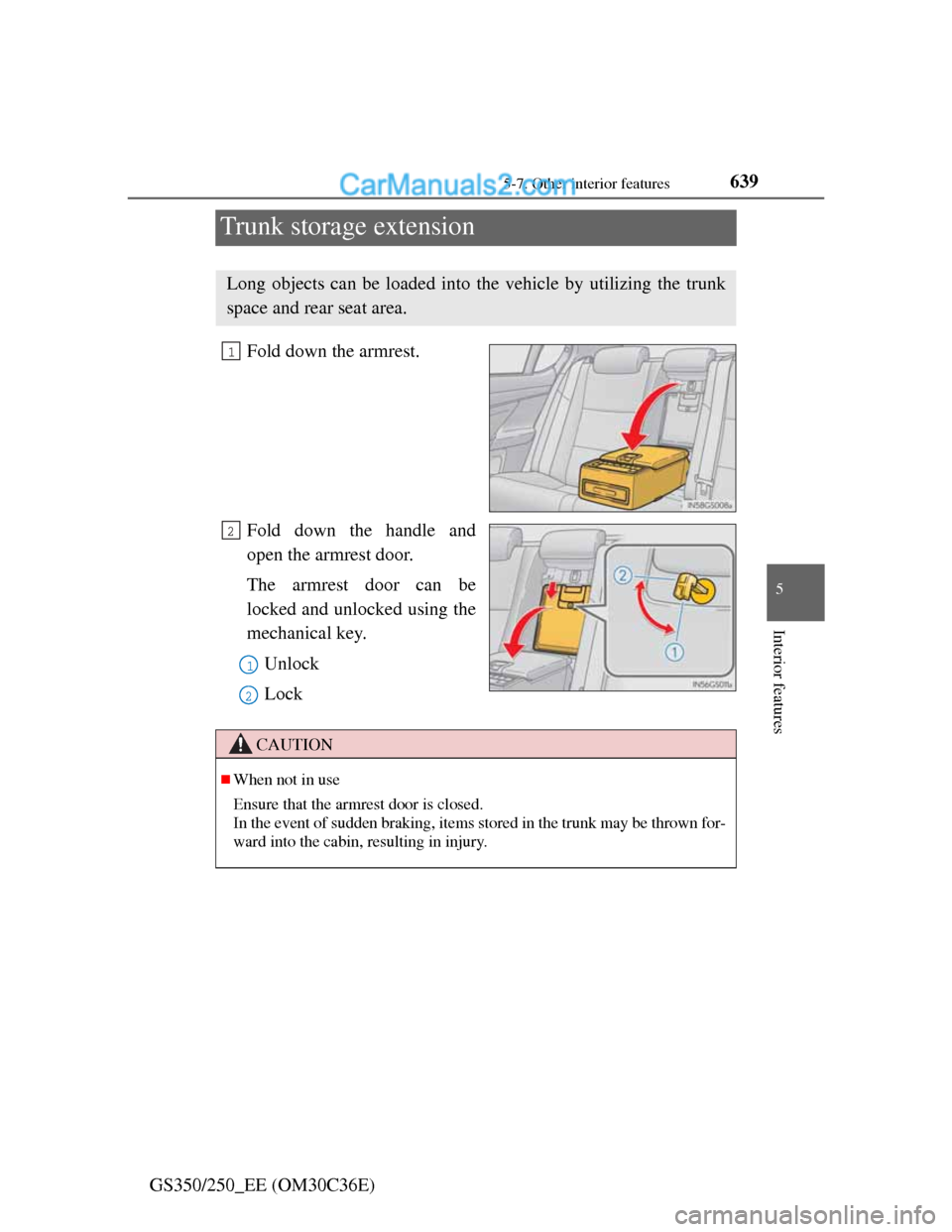
Fold down the armrest.
Fold down the handle and
open the armrest door.
The armrest door can be
locked and unlocked using the
mechanical key.
Unlock
Lock
Long objects can be loaded into the vehicle by utilizing the trunk
space and rear seat area.
1
2
1
2
CAUTION
When not in use
Ensure that the armrest door is closed.
In the event of sudden braking, items stored in the trunk may be thrown for-
ward into the cabin, resulting in injury.
Page 696 of 914
6786-3. Do-it-yourself maintenance
GS350/250_EE (OM30C36E)
Low profile tires (except 225/50R17 tires)
Generally, low profile tires will wear more rapidly and tire grip performance
will be reduced on snowy and/or icy roads when compared to standard tires.
Be sure to use snow tires or tire chains
* on snowy and/or icy roads and drive
carefully at a speed appropriate for road and weather conditions.
*: Tire chains cannot be mounted on the 19-inch tires. Snow tires should be
used instead.
If the tread on snow tires wears down below 4 mm (0.16 in.)
The effectiveness of the tires as snow tires is lost.
Situations in which the tire pressure warning system may not operate properly
(vehicles with the tire pressure warning system)
In the following cases, the tire pressure warning system may not operate
properly.
• If non-genuine Lexus wheels are used.
• A tire has been replaced with a tire that is not an OE (Original Equip-
ment) tire.
• A tire has been replaced with a tire that is not of the specified size.
• Tire chains etc. are equipped.
• Lock nuts are equipped.
• An auxiliary-supported run-flat tire is equipped.
• If a window tint that affects the radio wave signals is installed.
• If there is a lot of snow or ice on the vehicle, particularly around the
wheels or wheel housings.
• If the tire inflation pressure is extremely higher than the specified level.
• If the spare tire is in a location subject to poor radio wave signal recep-
tion.
*
• If a large metallic object which can interfere with signal reception is put
in the trunk.
*
*
: Vehicles with a full-size spare tire only
Performance may be affected in the following situations.
• Near a TV tower, electric power plant, gas station, radio station, large
display, airport or other facility that generates strong radio waves or elec-
trical noise
• When carrying a portable radio, cellular phone, cordless phone or other
wireless communication device
Vehicles with the tire inflation pressure display function: If tire position
information is not correctly displayed due to the radio wave conditions, the
display may be corrected by driving and changing the radio wave condi-
tions.
Page 721 of 914
703 6-3. Do-it-yourself maintenance
6
Maintenance and care
GS350/250_EE (OM30C36E)
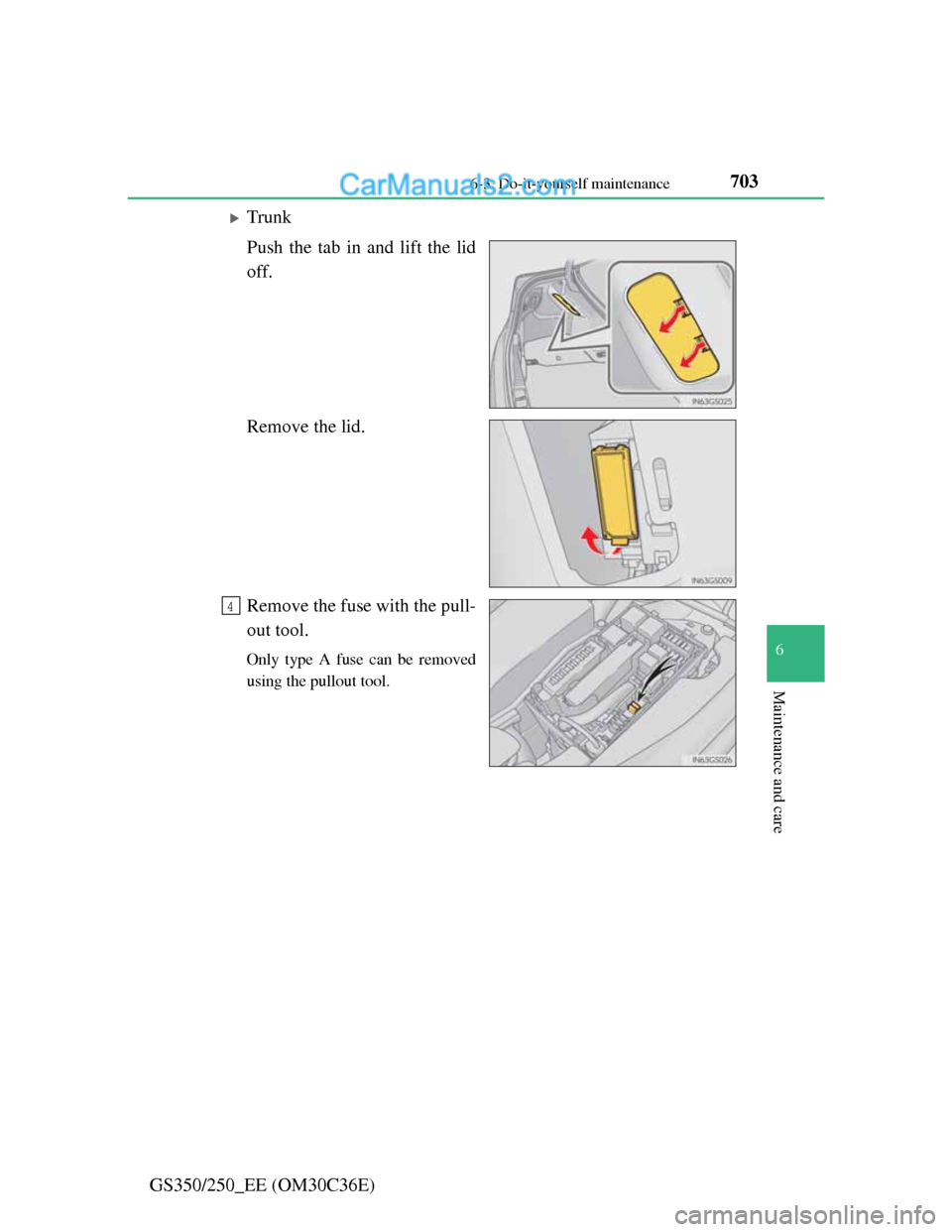
Trunk
Push the tab in and lift the lid
off.
Remove the lid.
Remove the fuse with the pull-
out tool.
Only type A fuse can be removed
using the pullout tool.
4