settings Lexus GS300h 2016 Navigation manual
[x] Cancel search | Manufacturer: LEXUS, Model Year: 2016, Model line: GS300h, Model: Lexus GS300h 2016Pages: 383, PDF Size: 46.51 MB
Page 49 of 383

49
2. NETWORK SETTINGS
BASIC FUNCTION
GS_Navi+MM_OM30F13E_(EE)
15.09.01 14:54
2
PROFILES
This system supports the following services.
Bluetooth®
deviceSpec.FunctionRequire- mentsRecom-
menda- tions
Bluetooth®
Phone/
Bluetooth®
Audio
PlayerBluetooth® Specification
Registering a
Bluetooth®
deviceVe r. 2 . 0Ve r. 3 . 0 +EDR
Bluetooth®
deviceProfileFunctionRequire- mentsRecom-menda- tions
Bluetooth®
Phone
HFP (Hands-Free Profile)Hands-free
systemVe r. 1 . 0Ve r. 1 . 6
OPP (Object Push Profile)Transferring the
contactsVe r. 1 .1Ve r. 1 . 2
PBAP (Phone Book Access
Profile)Ve r. 1 . 0Ve r. 1 .1
MAP (Message Access Profile)Bluetooth®
phone messageVe r. 1 .0
DUN (Dial-up Networking
Profile)
Connected
serviceVe r. 1 . 2
PAN (Personal Area
Networking)Ve r. 1 .0
Bluetooth®
Audio
Player
A2DP (Advanced Audio
Distribution Profile)
Bluetooth®
audio systemVe r. 1 . 0Ve r. 1 . 3
AVRCP (Audio/Video Remote
Control Profile)Ve r. 1 . 0Ve r. 1 . 5
Page 50 of 383

50
2. NETWORK SETTINGS
GS_Navi+MM_OM30F13E_(EE)
15.09.01 14:54
The Bluetooth® word mark and logos are registered trademarks owned by Bluetooth SIG,
Inc. and any use of such marks by PIONEER CORPORATION is under license. Other
trademarks and trade names are those of their respective owners.
INFORMATION
●
If your cellular phone does not support HFP, registering the Bluetooth® phone or using
OPP, PBAP, MAP, DUN or PAN profiles individually will not be possible.
●If the connected Bluetooth® device version is older than recommended or incompatible,
the Bluetooth® device function may not work properly.
Page 51 of 383

51
2. NETWORK SETTINGS
GS_Navi+MM_OM30F13E_(EE)
15.09.01 14:54
BASIC FUNCTION
2
2. SETTING Bluetooth® DETAILS
1Press the “MENU” button on the
Remote Touch.
2Select “Setup” .
3Select “Bluetooth*” .
4Select the desired item to be set. *: The Bluetooth
® word mark and logos are
registered trademarks owned by
Bluetooth SIG, Inc.
“Bluetooth* setup” SCREEN
FunctionPage
Registering a Bluetooth® device52
Deleting a Bluetooth® device54
Connecting a Bluetooth® device54
Editing the Bluetooth® device in-
formation56
Bluetooth® system settings58
Page 52 of 383

52
2. NETWORK SETTINGS
GS_Navi+MM_OM30F13E_(EE)
15.09.01 14:54
1Press the “MENU” button on the
Remote Touch.
2Select “Setup” .
3Select “Telephone” .
4Select “Connect telephone” .
1Display the “Bluetooth* setup” screen.
(→ P.51)
2Select “A d d ”.
X When another Bluetooth
® device is con-
nected
z To disconnect the Bluetooth® device,
select “Yes”.
XWhen 5 Bluetooth® devices have al-
ready been registered
z A registered device needs to be replaced.
Select “Yes”, and select the device to be
replaced.
*: The Bluetooth® word mark and logos are
registered trademarks owned by
Bluetooth SIG, Inc.
DISPLAYING THE “Bluetooth*
setup” SCREEN IN A
DIFFERENT WAYREGISTERING A Bluetooth®
DEVICE
Up to 5 Bluetooth® devices can be reg-
istered.
Bluetooth
® compatible telephones
(HFP) and audio players (AVP) can be
registered simultaneously.
This operation cannot be performed
while driving.
Page 53 of 383
53
2. NETWORK SETTINGS
BASIC FUNCTION
GS_Navi+MM_OM30F13E_(EE)
15.09.01 14:54
2
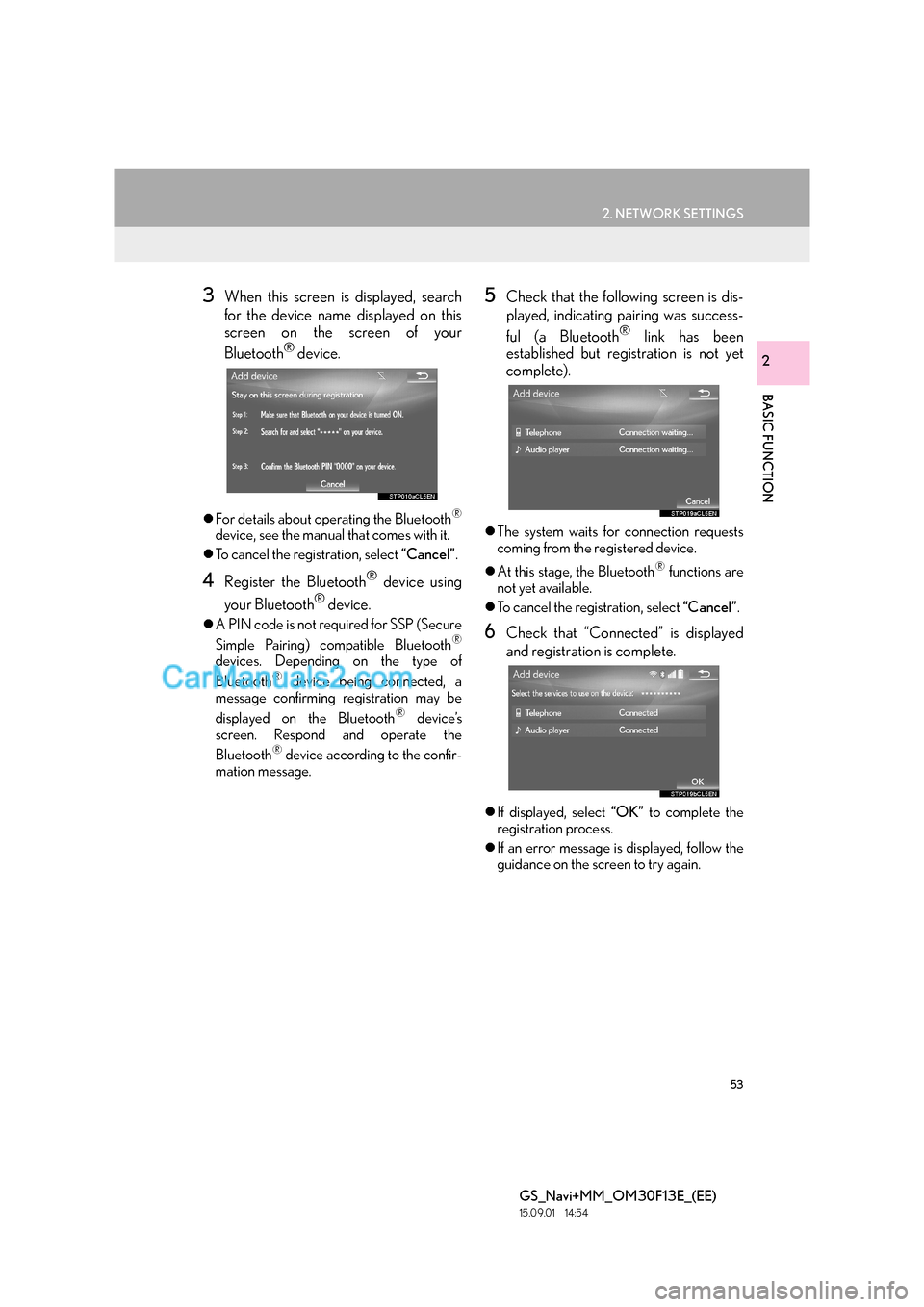
3When this screen is displayed, search
for the device name displayed on this
screen on the screen of your
Bluetooth
® device.
zFor details about operating the Bluetooth®
device, see the manual that comes with it.
z To cancel the registration, select “Cancel”.
4Register the Bluetooth® device using
your Bluetooth
® device.
z A PIN code is not required for SSP (Secure
Simple Pairing) compatible Bluetooth®
devices. Depending on the type of
Bluetooth® device being connected, a
message confirming registration may be
displayed on the Bluetooth
® device’s
screen. Respond and operate the
Bluetooth
® device according to the confir-
mation message.
5Check that the following screen is dis-
played, indicating pairing was success-
ful (a Bluetooth
® link has been
established but registration is not yet
complete).
z The system waits for connection requests
coming from the registered device.
z At this stage, the Bluetooth
® functions are
not yet available.
z To cancel the registration, select “Cancel”.
6Check that “Connected” is displayed
and registration is complete.
zIf displayed, select “OK” to complete the
registration process.
z If an error message is displayed, follow the
guidance on the screen to try again.
Page 54 of 383

54
2. NETWORK SETTINGS
GS_Navi+MM_OM30F13E_(EE)
15.09.01 14:54
1Display the “Bluetooth* setup” screen.
(→ P. 5 1 )
2Select “Remove” .
3Select the desired device.
4Select “Yes” when the confirmation
screen appears.
5Check that a confirmation screen is dis-
played when the operation is complete.
1Display the “Bluetooth* setup” screen.
( → P. 5 1 )
2Select the device to be connected.
zSupported profile icons will be displayed.
: Telephone
: Audio player
zThe profile icon for a currently connected
device will be displayed in colour.
z Selecting a profile icon which is not cur-
rently connected will switch the connection
to the function.
*: The Bluetooth® word mark and logos are
registered trademarks owned by
Bluetooth SIG, Inc.
DELETING A Bluetooth®
DEVICE
INFORMATION
●
When deleting a Bluetooth® phone, the
contact data will be deleted at the same
time.
CONNECTING A Bluetooth®
DEVICE
Up to 5 Bluetooth® devices (Tele-
phones (HFP) and audio players (AVP))
can be registered.
If more than 1 Bluetooth
® device has
been registered, select which device to
connect to.
z If the desired Bluetooth® device is not on
the list, select “A d d ” to register the
device. ( →P. 5 2 )
Page 55 of 383

55
2. NETWORK SETTINGS
BASIC FUNCTION
GS_Navi+MM_OM30F13E_(EE)
15.09.01 14:54
2
3Select the desired connection.
4Check that a confirmation screen is dis-
played when the connection is complete.
z If an error message is displayed, follow the
guidance on the screen to try again.
■ AUTO CONNECTION MODE
zWhen the engine
ACCESSORY or IGNITION ON
mode, the system searches for a nearby
registered device.
z The system will connect with the registered
device that was last connected, if it is
nearby. When automatic connection prior-
ity is set to on and there is more than one
registered
Bluetooth® phone available,
the system will automatically connect to the
Bluetooth® phone with the highest prior-
ity. ( →P. 5 9 )
*: The Bluetooth® word mark and logos are
registered trademarks owned by
Bluetooth SIG, Inc.
INFORMATION
●
It may take time if the device connection
is carried out during Bluetooth® audio
playback.
●Depending on the type of Bluetooth®
device being connected, it may be neces-
sary to perform additional steps on the
device.
To turn auto connection mode on, set
“Bluetooth* power” to on. ( →P.59)
Leave the Bluetooth
® device in a loca-
tion where the connection can be estab-
lished.
Page 56 of 383

56
2. NETWORK SETTINGS
GS_Navi+MM_OM30F13E_(EE)
15.09.01 14:54
■CONNECTING MANUALLY
1Press the “MENU” button on the
Remote Touch.
2Select “Setup” .
3Select “Bluetooth*” .
4Follow the steps in “CONNECTING A
Bluetooth
® DEVICE” from “STEP 2”.
( → P.54)
■RECONNECTING THE Bluetooth®
PHONE
1Display the “Bluetooth* setup” screen.
(→ P.51)
2Select the desired device to be edited.
3Select “Device info” .
*: The Bluetooth
® word mark and logos are
registered trademarks owned by
Bluetooth SIG, Inc.
When the auto connection has failed or
“Bluetooth* power” is turned off, it is
necessary to connect Bluetooth
® man-
ually.
If a Bluetooth
® phone is disconnected
due to poor reception from the
Bluetooth
® network when the engine
IGNITION ON
tem automatically reconnects the
Bluetooth
® phone.
EDITING THE Bluetooth®
DEVICE INFORMATION
The Bluetooth® device’s information
can be displayed on the screen. The dis-
played information can be edited.
Page 57 of 383

57
2. NETWORK SETTINGS
BASIC FUNCTION
GS_Navi+MM_OM30F13E_(EE)
15.09.01 14:54
2
4Confirm and change the Bluetooth®
device information.
■CHANGING A DEVICE NAME
1Select “Device name” .
2Enter the name and select “OK”.
No.Information
The name of the Bluetooth® device.
Can be changed to a desired name.
( → P.57)
Device address is unique to the de-
vice and cannot be changed.
Telephone number of the Bluetooth®
phone.
Compatibility profile of the
Bluetooth® device.
Select to set the Bluetooth® audio
player connection method. ( →P.58)
Select to reset all setup items.
INFORMATION
●
If 2 Bluetooth® devices have been regis-
tered with the same device name, the
devices can be distinguished referring to
the device’s address.
●Depending on the type of telephone,
some information may not be displayed.
INFORMATION
●
Even if the device name is changed, the
name registered in your Bluetooth®
device does not change.
Page 58 of 383

58
2. NETWORK SETTINGS
GS_Navi+MM_OM30F13E_(EE)
15.09.01 14:54
1Select “Connect audio player from” .
2Select the desired connection method.
“Vehicle” : Select to connect the audio sys-
tem to the audio player.
“Device” : Select to connect the audio play-
er to the audio system.
z Depending on the audio player, the “Vehi-
cle” or “Device” connection method may
be best. As such, refer to the manual that
comes with the audio player.
1Display the “Bluetooth* Setup” screen.
(→ P.51)
2Select “System settings” .
3Select the desired item to be set.
*: The Bluetooth
® word mark and logos are
registered trademarks owned by
Bluetooth SIG, Inc.
SETTING AUDIO PLAYER
CONNECTION METHOD“Detailed Bluetooth* settings”
SCREEN
The Bluetooth® settings can be con-
firmed and changed.
No.FunctionPage
Select to set Bluetooth®
connection on/off.59
Select to change the auto-
matic connection priority of
the registered Bluetooth
®
devices.
59
Select to edit the system in-
formation.61
Select to reset all setup
items.