Lexus GS350 2008 Workshop Manual
GS350 2008
Lexus
Lexus
https://www.carmanualsonline.info/img/36/14337/w960_14337-0.png
Lexus GS350 2008 Workshop Manual
Page 300 of 598
299
3-4. Using the hands-free system (for cellular phone)
3
Interior features
GS_G_U
June 19, 2008 12:54 pm
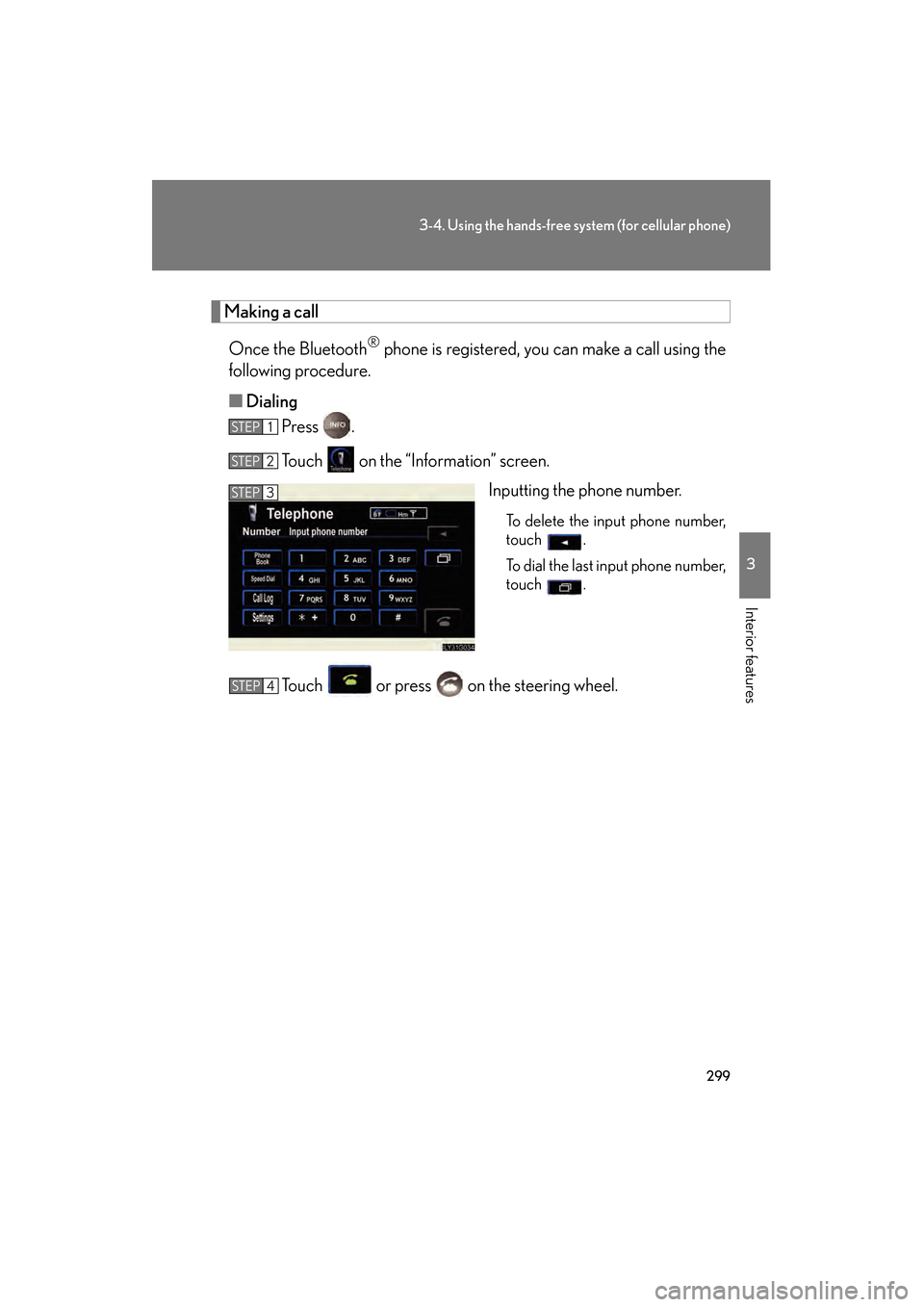
Making a callOnce the Bluetooth
® phone is registered, you can make a call using the
following procedure.
■ Dialing
Press .
Touch on the “Information” screen.
Inputting the phone number.
To delete the input phone number,
touch .
To dial the last input phone number,
touch .
Touch or press on the steering wheel.
STEP1
STEP2
STEP3
STEP4
GS_U_G.book Page 299 Thursday, June 19, 2008 12:54 PM
Page 301 of 598
300
3-4. Using the hands-free system (for cellular phone)
GS_G_U
June 19, 2008 12:54 pm
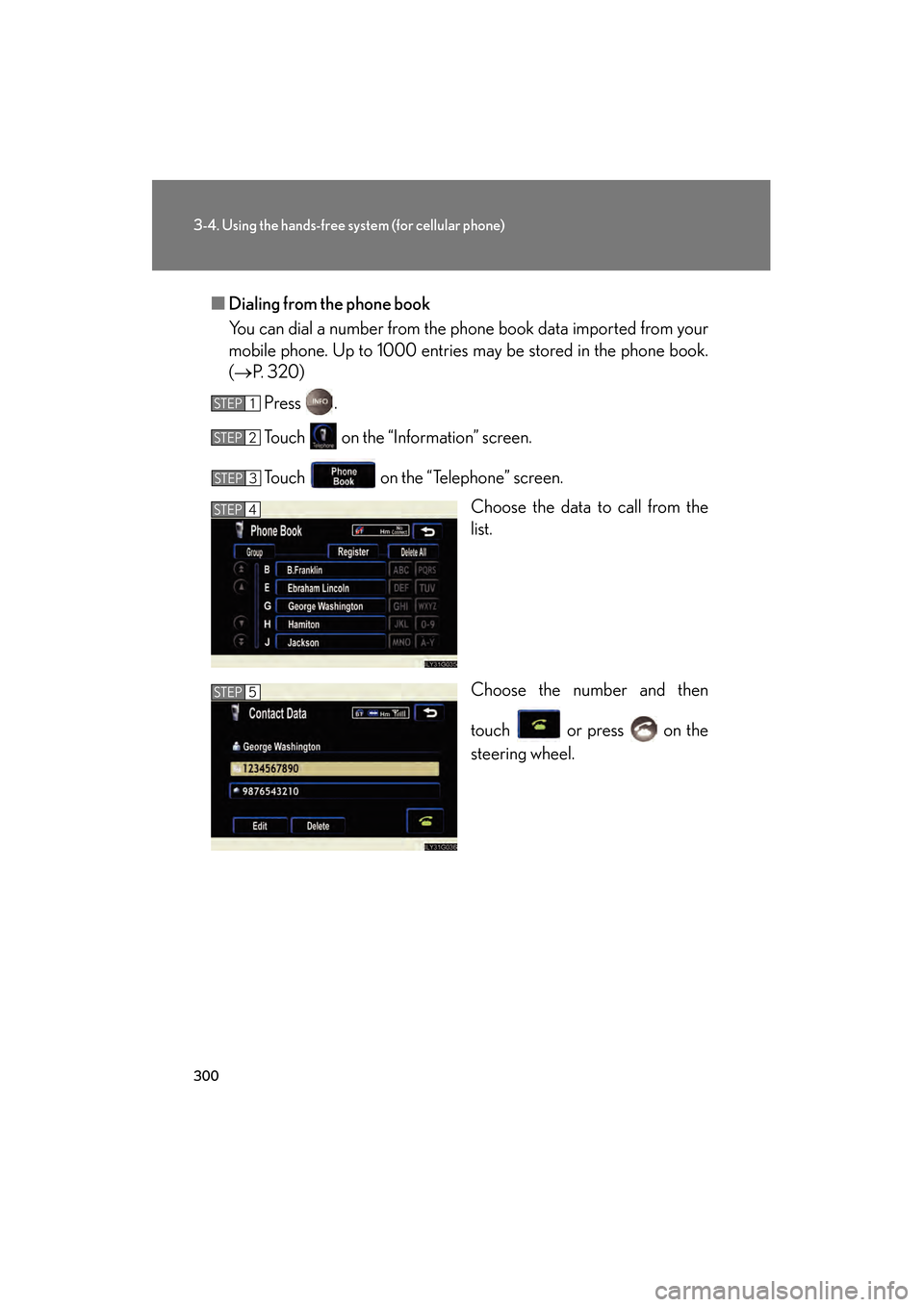
■Dialing from the phone book
You can dial a number from the phone book data imported from your
mobile phone. Up to 1000 entries may be stored in the phone book.
(→ P. 320)
Press .
Touch on the “Information” screen.
Touch on the “Telephone” screen. Choose the data to call from the
list.
Choose the number and then
touch or press on the
steering wheel.
STEP1
STEP2
STEP3
STEP4
STEP5
GS_U_G.book Page 300 Thursday, June 19, 2008 12:54 PM
Page 302 of 598
301
3-4. Using the hands-free system (for cellular phone)
3
Interior features
GS_G_U
June 19, 2008 12:54 pm
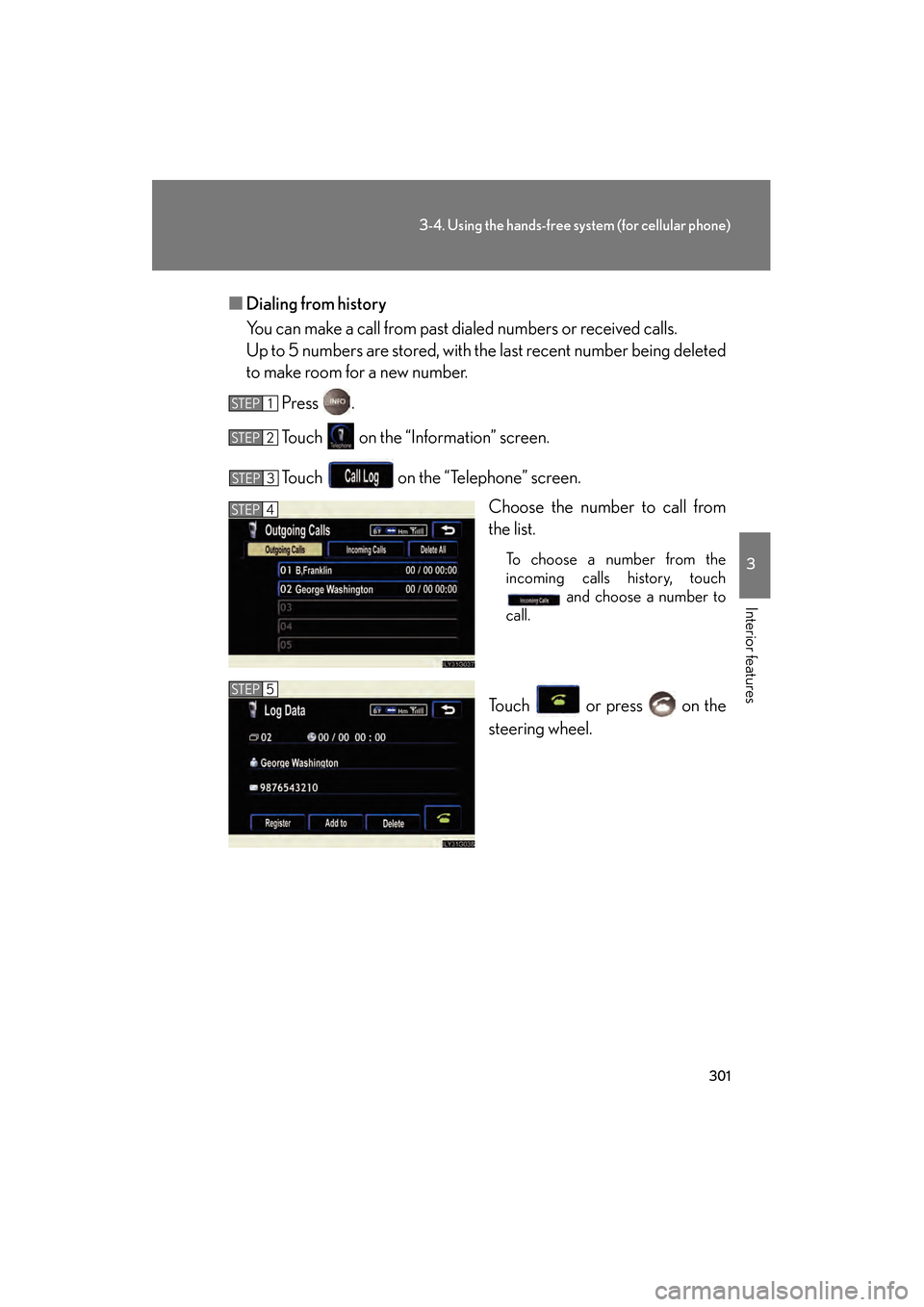
■Dialing from history
You can make a call from past dialed numbers or received calls.
Up to 5 numbers are stored, with the last recent number being deleted
to make room for a new number.
Press .
Touch on the “Information” screen.
Touch on the “Telephone” screen. Choose the number to call from
the list.
To choose a number from the
incoming calls history, touch and choose a number to
call.
Touch or press on the
steering wheel.
STEP1
STEP2
STEP3
STEP4
STEP5
GS_U_G.book Page 301 Thursday, June 19, 2008 12:54 PM
Page 303 of 598
302
3-4. Using the hands-free system (for cellular phone)
GS_G_U
June 19, 2008 12:54 pm
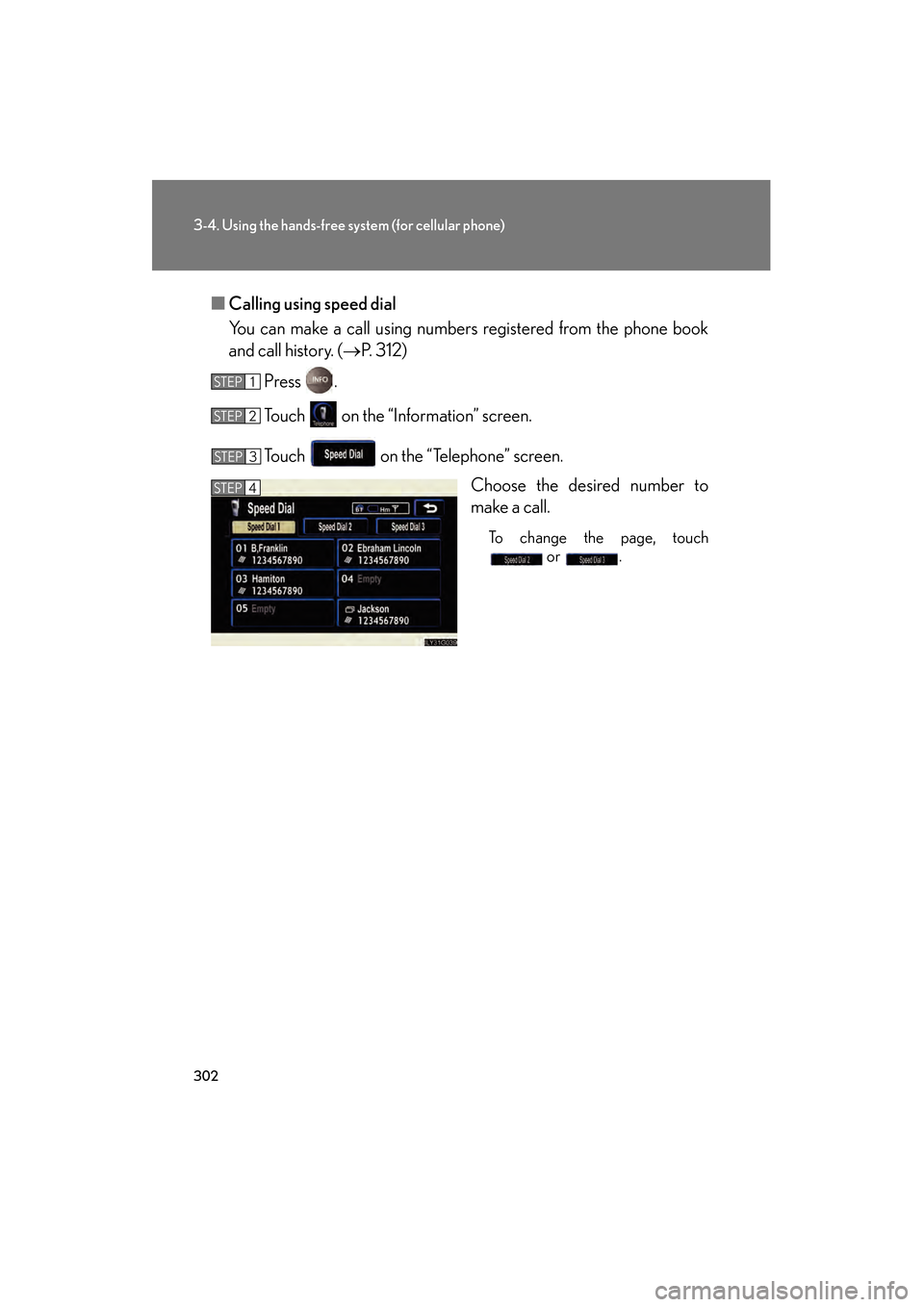
■Calling using speed dial
You can make a call using numbers registered from the phone book
and call history. ( →P. 312)
Press .
Touch on the “Information” screen.
Touch on the “Telephone” screen. Choose the desired number to
make a call.
To change the page, touch or .
STEP1
STEP2
STEP3
STEP4
GS_U_G.book Page 302 Thursday, June 19, 2008 12:54 PM
Page 304 of 598
303
3-4. Using the hands-free system (for cellular phone)
3
Interior features
GS_G_U
June 19, 2008 12:54 pm
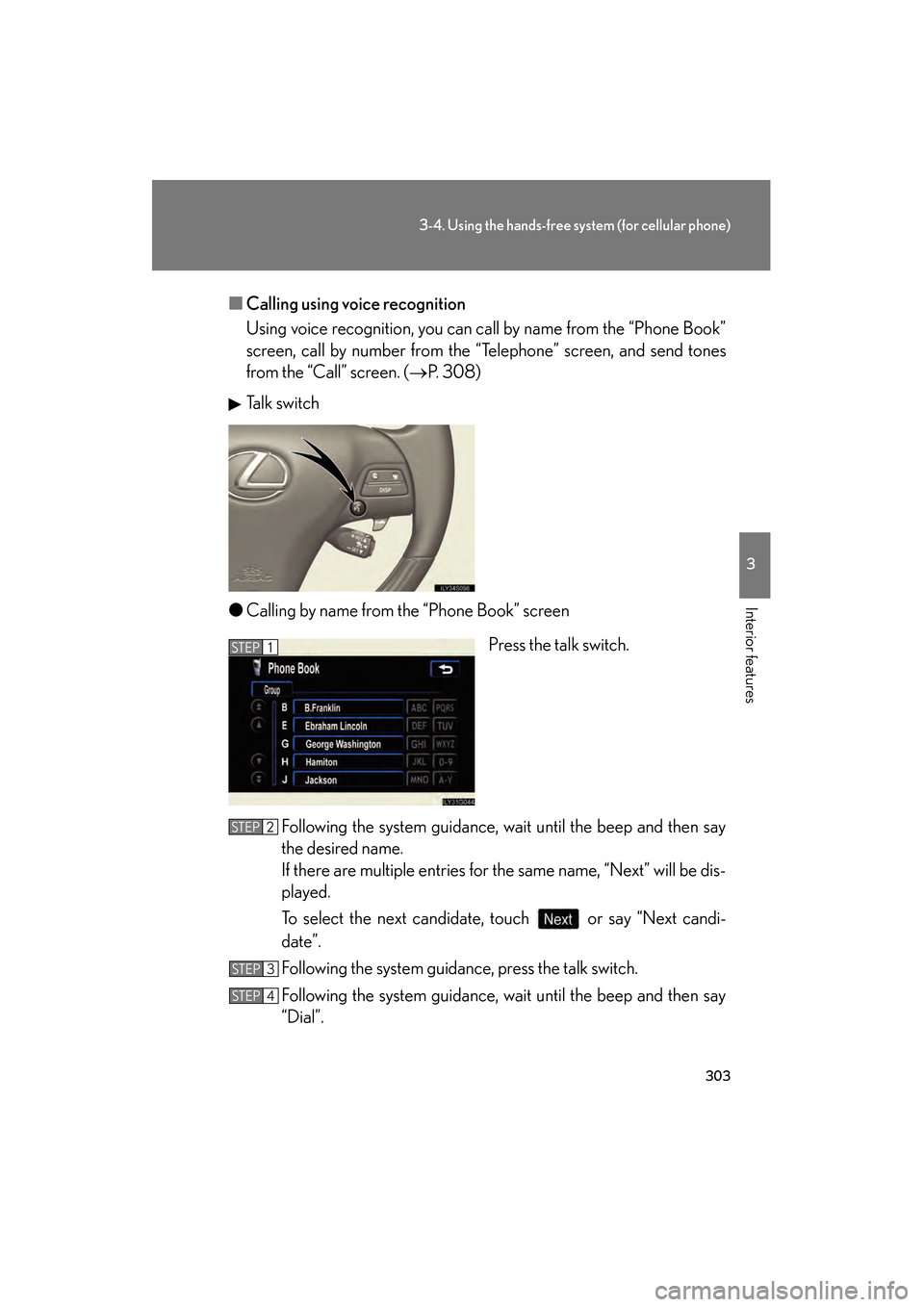
■Calling using voice recognition
Using voice recognition, you can call by name from the “Phone Book”
screen, call by number from the “Telephone” screen, and send tones
from the “Call” screen. ( →P. 308)
Talk switch
● Calling by name from the “Phone Book” screen
Press the talk switch.
Following the system guidance, wait until the beep and then say
the desired name.
If there are multiple entries for the same name, “Next” will be dis-
played.
To select the next candidate, touch or say “Next candi-
date”.
Following the system guidance, press the talk switch.
Following the system guidance, wait until the beep and then say
“Dial”.
STEP1
STEP2
STEP3
STEP4
GS_U_G.book Page 303 Thursday, June 19, 2008 12:54 PM
Page 308 of 598
307
3-4. Using the hands-free system (for cellular phone)
3
Interior features
GS_G_U
June 19, 2008 12:54 pm
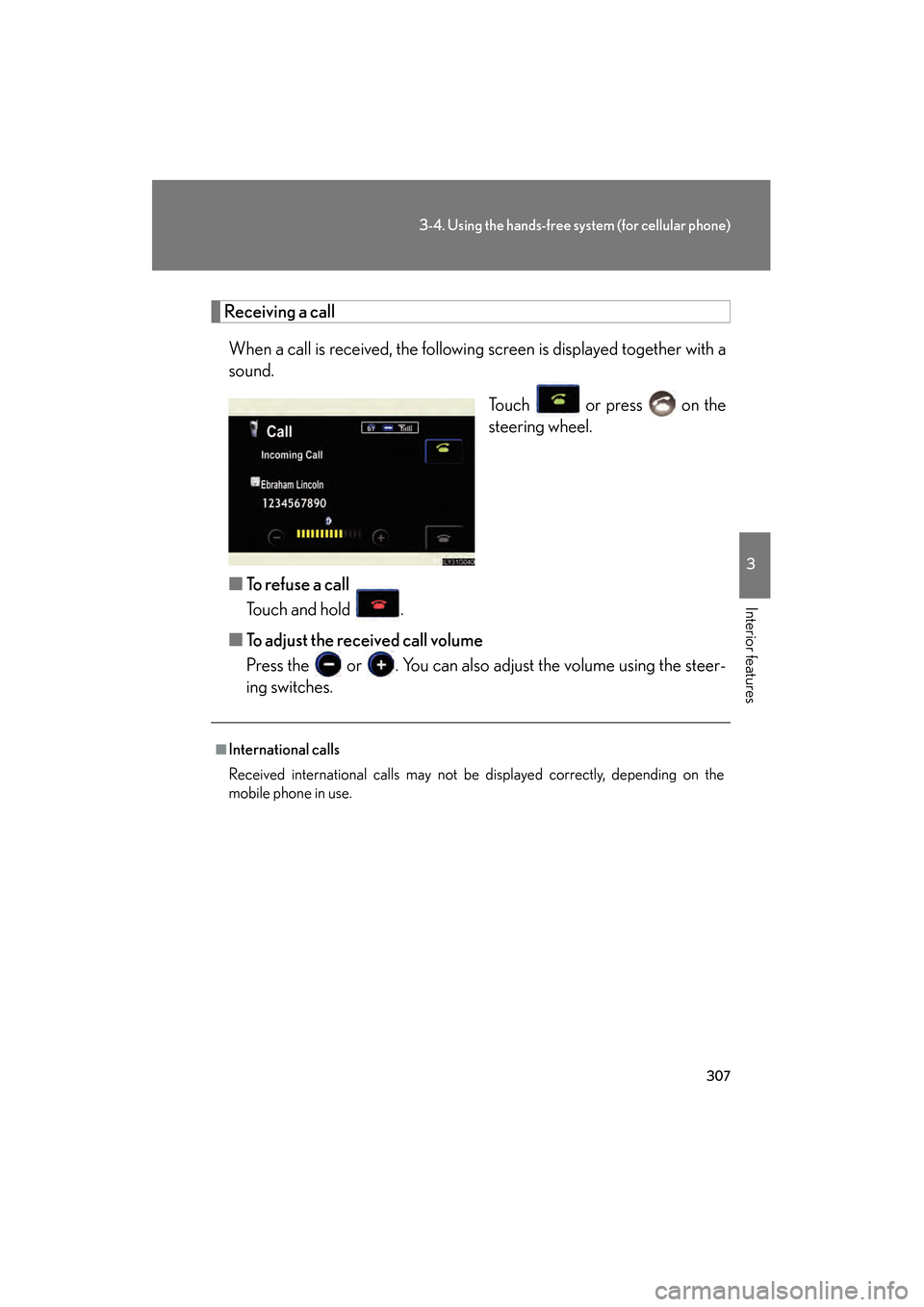
Receiving a callWhen a call is received, the following screen is displayed together with a
sound. Touch or press on the
steering wheel.
■ To refuse a call
Touch and hold .
■ To adjust the received call volume
Press the or . You can also adjust the volume using the steer-
ing switches.
■International calls
Received international calls may not be displayed correctly, depending on the
mobile phone in use.
GS_U_G.book Page 307 Thursday, June 19, 2008 12:54 PM
Page 309 of 598
308
3-4. Using the hands-free system (for cellular phone)
GS_G_U
June 19, 2008 12:54 pm
Speaking on the phone
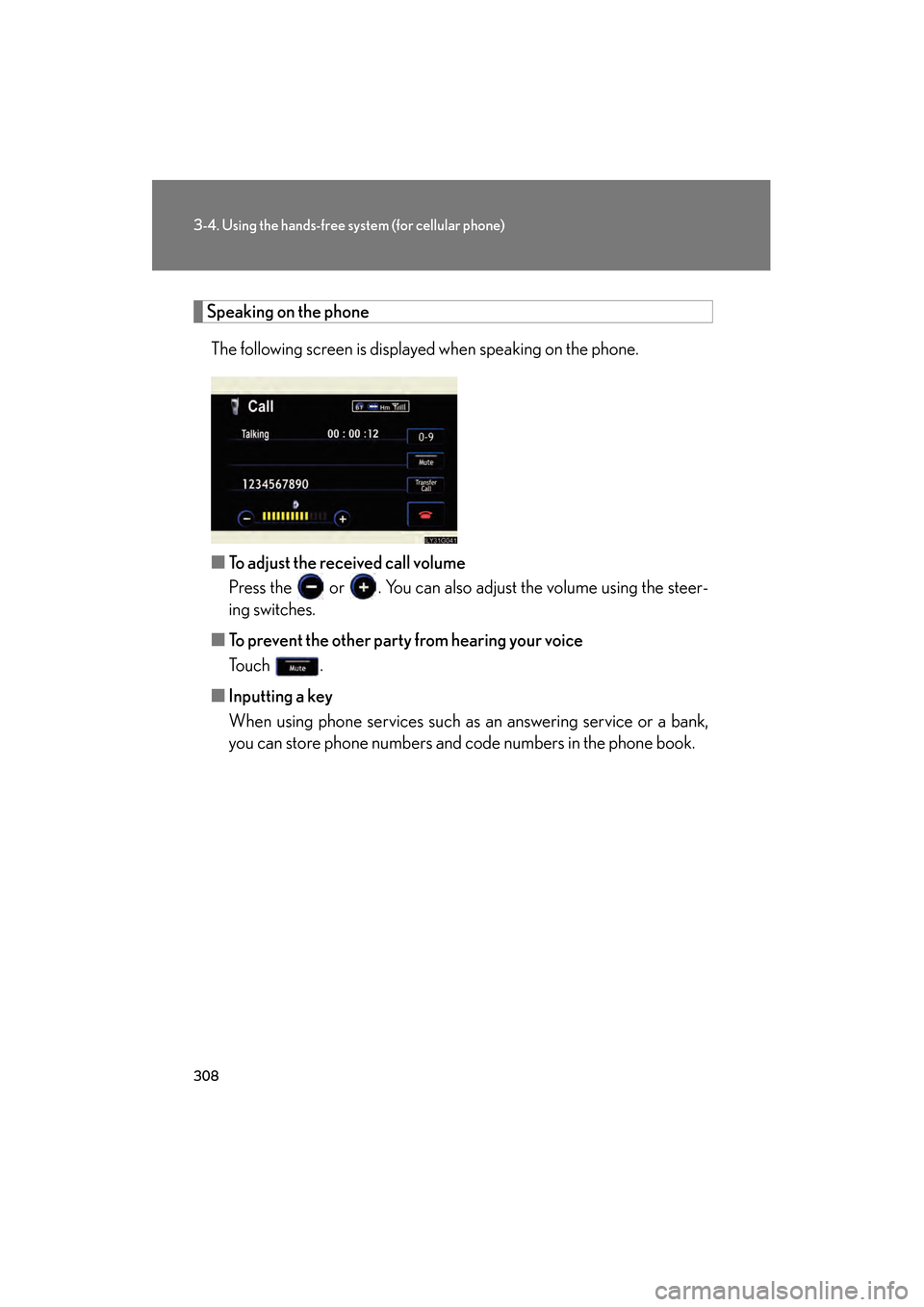
The following screen is displayed when speaking on the phone.
■ To adjust the received call volume
Press the or . You can also adjust the volume using the steer-
ing switches.
■ To prevent the other party from hearing your voice
Touch .
■ Inputting a key
When using phone services such as an answering service or a bank,
you can store phone numbers and code numbers in the phone book.
GS_U_G.book Page 308 Thursday, June 19, 2008 12:54 PM
Page 310 of 598
309
3-4. Using the hands-free system (for cellular phone)
3
Interior features
GS_G_U
June 19, 2008 12:54 pm
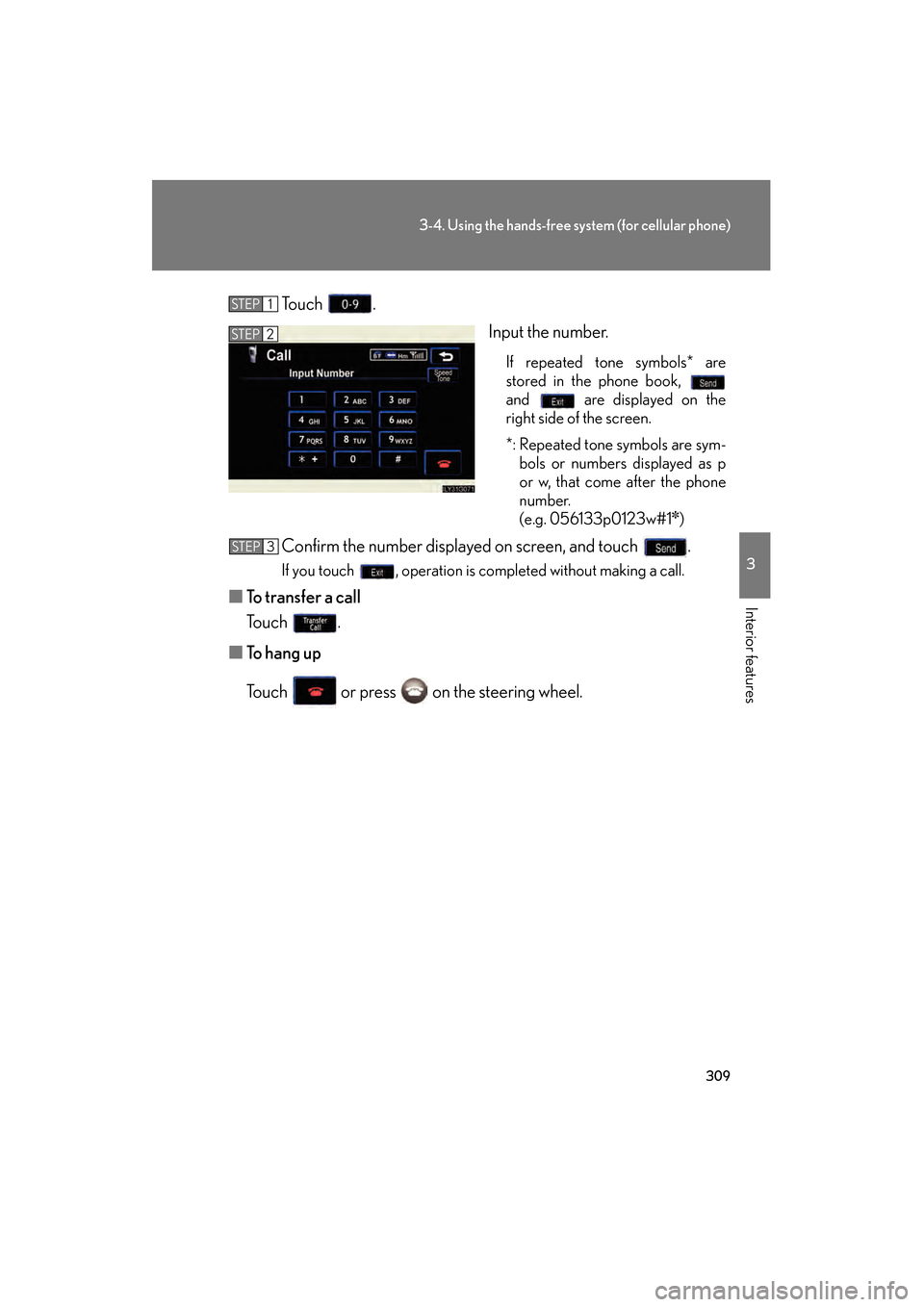
To u c h .Input the number.
If repeated tone symbols* are
stored in the phone book,
and are displayed on the
right side of the screen.
*: Repeated tone symbols are sym-bols or numbers displayed as p
or w, that come after the phone
number.
(e.g. 056133p0123w#1
✽)
Confirm the number displayed on screen, and touch .
If you touch , operation is completed without making a call.
■ To transfer a call
To u c h .
■ To h a n g u p
Touch or press on the steering wheel.
STEP1
STEP2
STEP3
GS_U_G.book Page 309 Thursday, June 19, 2008 12:54 PM
Page 311 of 598
310
3-4. Using the hands-free system (for cellular phone)
GS_G_U
June 19, 2008 12:54 pm
■Transferring calls
●It is not possible to transfer from hands-free to the mobile phone while driving.
●If you transfer from the mobile phone to hands-free, the hands-free screen will
be displayed, and you can operate the system using the screen.
●Transfer method and operation may vary according to the mobile phone used.
●For operation of the mobile phone in use, see the phone’s manual.
■To send a tone by speed tone
Touch then touch . Choose the desired number from the speed tone
list displayed.
■While driving
Key input is unavailable.
GS_U_G.book Page 310 Thursday, June 19, 2008 12:54 PM
Page 312 of 598
311
3-4. Using the hands-free system (for cellular phone)
3
Interior features
GS_G_U
June 19, 2008 12:54 pm
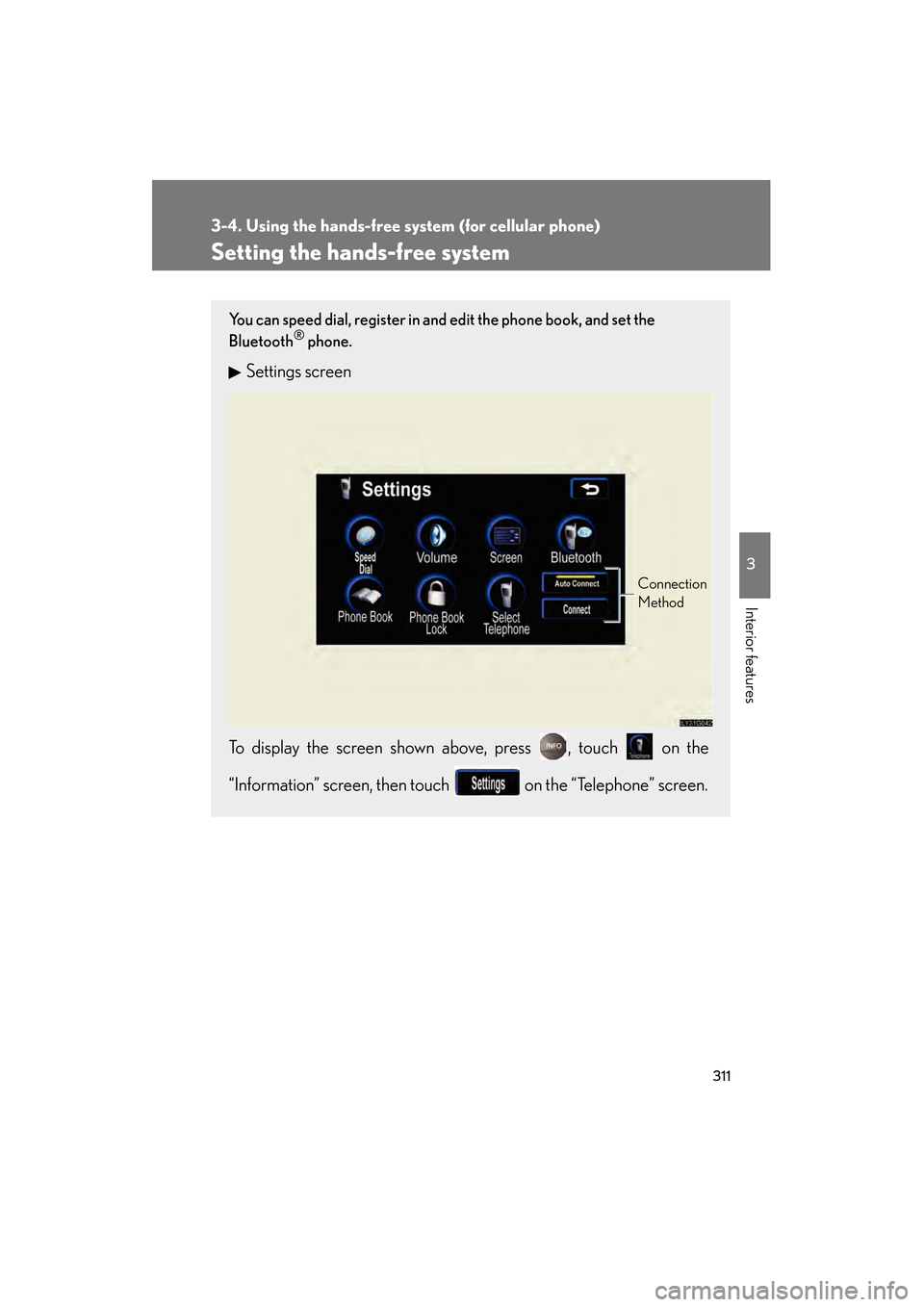
Setting the hands-free system
You can speed dial, register in and edit the phone book, and set the
Bluetooth® phone.
Settings screen
To display the screen shown above, press , touch on the
“Information” screen, then touch on the “Telephone” screen.
Connection
Method
GS_U_G.book Page 311 Thursday, June 19, 2008 12:54 PM