fuel Lexus GS350 2017 Owner's Guide
[x] Cancel search | Manufacturer: LEXUS, Model Year: 2017, Model line: GS350, Model: Lexus GS350 2017Pages: 676, PDF Size: 67.73 MB
Page 251 of 676
251
4-2. Driving procedures
4
Driving
GS350_200t_GS F_OM_OM30F83E_(EE)
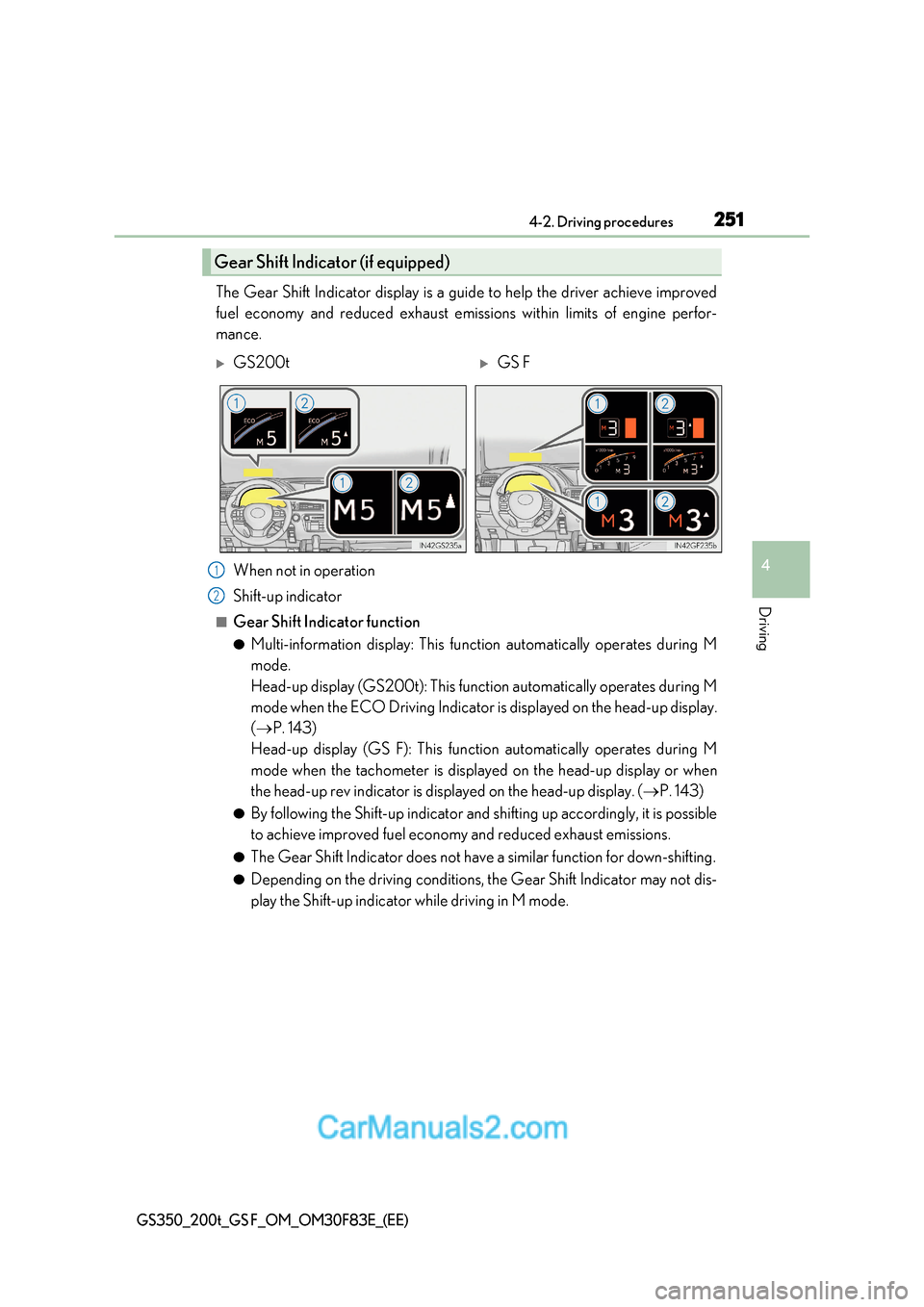
The Gear Shift Indicator display is a guide to help the driver achieve improv ed
fuel economy and reduced exhaust emissions within limits of engine perfor-
mance.
When not in operation
Shift-up indicator
■Gear Shift Indicator function ●Multi-information display: This function automatically operates during M
mode.
Head-up display (GS200t): This function automatically operates during M
mode when the ECO Driving Indicator is displayed on the head-up display. ( P. 143)
Head-up display (GS F): This function automatically operates during M
mode when the tachometer is displayed on the head-up display or when
the head-up rev indicator is displayed on the head-up display. ( P. 143)
● By following the Shift-up indicator and shifting up accordingly, it is possible
to achieve improved fuel economy and reduced exhaust emissions.
● The Gear Shift Indicator does not have a similar function for down-shifting.
● Depending on the driving conditions, the Gear Shift Indicator may not dis-
play the Shift-up indicator while driving in M mode.
Gear Shift Indicator (if equipped)
GS200tGS F
1
2
Page 282 of 676
2824-4. Refueling
GS350_200t_GS F_OM_OM30F83E_(EE)
Opening the fuel tank cap
●Turn the engine switch off and ensure that all the doors and windows are
closed.
● Confirm the type of fuel.
■Fuel types P. 632
■Fuel tank opening for unleaded gasoline
To help prevent incorrect fueling, your vehicle has a fuel tank opening that only accom-
modates the special nozzle on unleaded fuel pumps.
Perform the following steps to open the fuel tank cap:
Before refueling the vehicle
WARNING
■When refueling the vehicle
Observe the following precautions while refueling the vehicle. Failure to do so may
result in death or serious injury.
●After exiting the vehicle and before opening the fuel door, touch an unpainted metal
surface to discharge any static electricity. It is important to discharge static electricity
before refueling because sparks resulting fr om static electricity can cause fuel vapors
to ignite while refueling.
●Always hold the grips on the fuel tank cap and turn it slowly to remove it.
A whooshing sound may be heard when the fuel tank cap is loosened. Wait until the
sound cannot be heard before fully removing the cap. In hot weather, pressurized fuel
may spray out the filler neck and cause injury.
●Do not allow anyone that has not discharged static electricity from their body to come
close to an open fuel tank.
●Do not inhale vaporized fuel.
Fuel contains substances that are harmful if inhaled.
●Do not smoke while refueling the vehicle.
Doing so may cause the fuel to ignite and cause a fire.
●Do not return to the vehicle or touch any person or object that is statically charged.
This may cause static electricity to build up, resulting in a possible ignition hazard.
■When refueling
Observe the following precautions to prevent fuel overflowing from the fuel tank:
●Securely insert the fuel nozzle into the fuel filler neck.
●Stop filling the tank after the fuel nozzle automatically clicks off.
●Do not top off the fuel tank.
Page 283 of 676
283
4-4. Refueling
4
Driving
GS350_200t_GS F_OM_OM30F83E_(EE)
NOTICE
■Refueling
Do not spill fuel during refueling.
Doing so may damage the vehicle, such as causing the emission control system to
operate abnormally or damaging fuel system components or the vehicle’s painted sur-
face.
Page 284 of 676
2844-4. Refueling
GS350_200t_GS F_OM_OM30F83E_(EE)
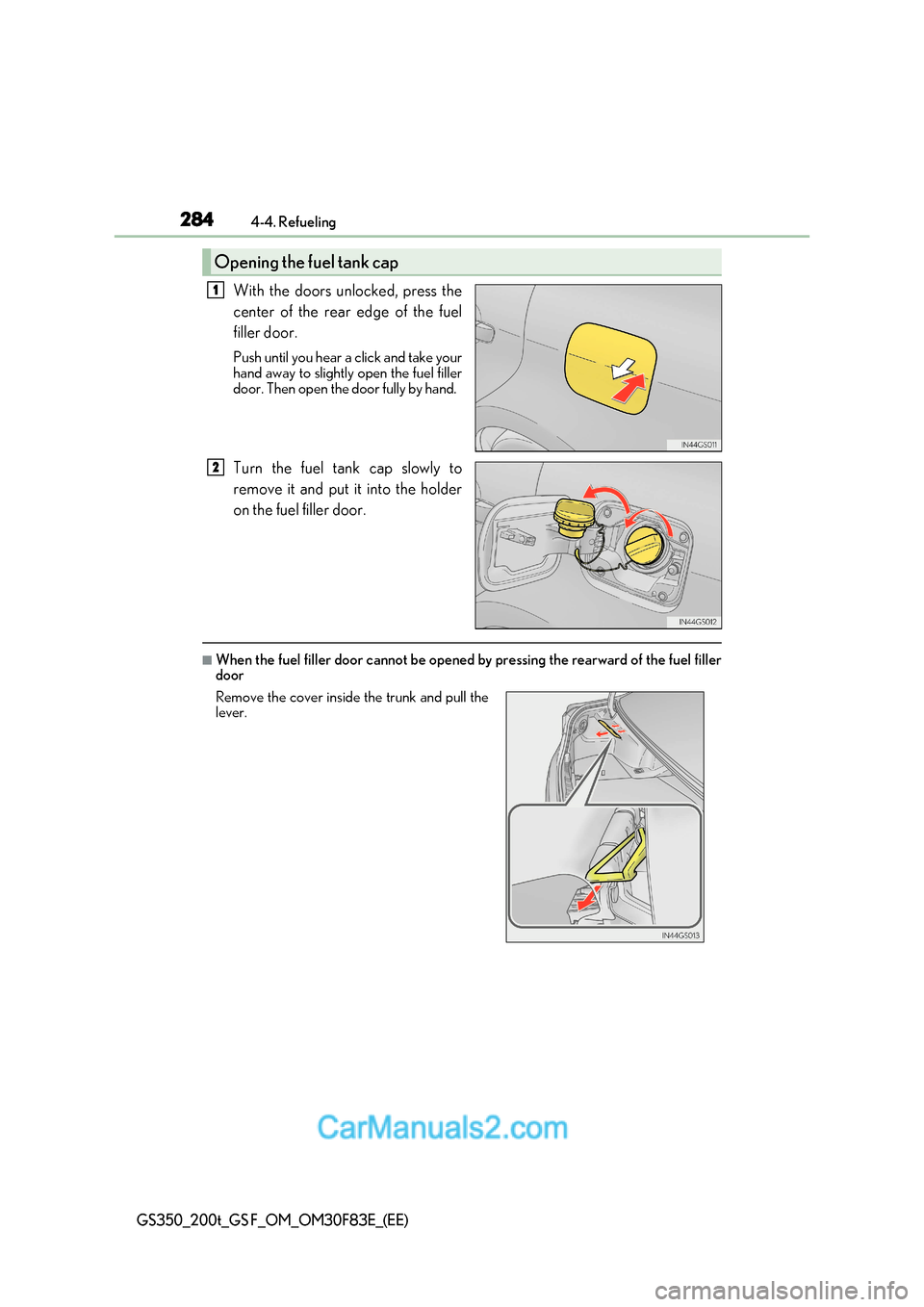
With the doors unlocked, press the
center of the rear edge of the fuel
filler door.
Push until you hear a click and take your
hand away to slightly open the fuel filler
door. Then open the door fully by hand.
Turn the fuel tank cap slowly to
remove it and put it into the holder
on the fuel filler door.
■When the fuel filler door cannot be opened by pressing the rearward of the fuel filler
door
Opening the fuel tank cap
1
2
Remove the cover inside the trunk and pull the lever.
Page 285 of 676
285
4-4. Refueling
4
Driving
GS350_200t_GS F_OM_OM30F83E_(EE)
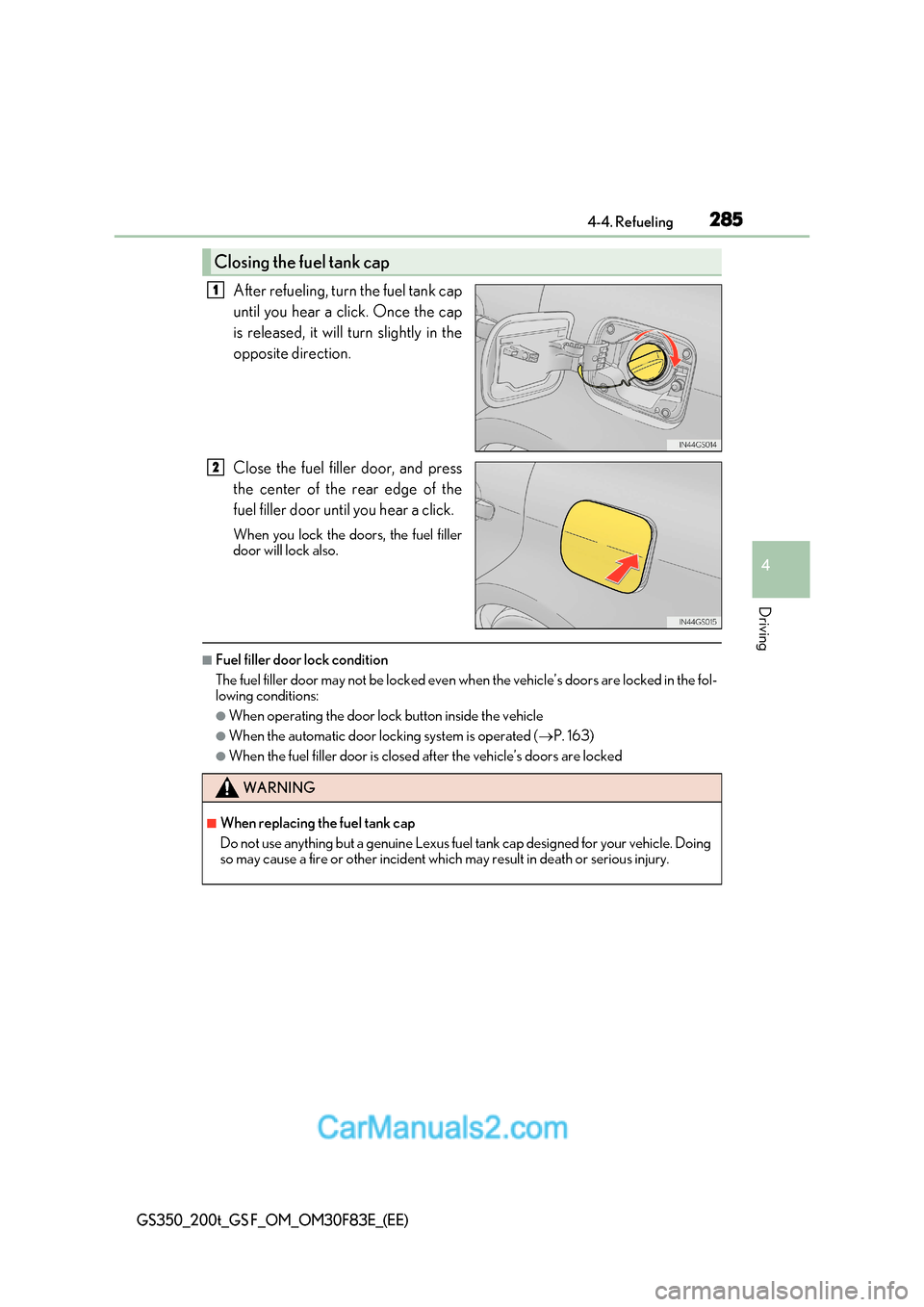
After refueling, turn the fuel tank cap
until you hear a click. Once the cap
is released, it will turn slightly in the
opposite direction.
Close the fuel filler door, and press
the center of the rear edge of the
fuel filler door until you hear a click.
When you lock the doors, the fuel filler
door will lock also.
■Fuel filler door lock condition
The fuel filler door may not be locked even wh en the vehicle’s doors are locked in the fol-
lowing conditions:
●When operating the door lock button inside the vehicle
●When the automatic door locking system is operated ( P. 163)
●When the fuel filler door is closed after the vehicle’s doors are locked
Closing the fuel tank cap
1
2
WARNING
■When replacing the fuel tank cap
Do not use anything but a genuine Lexus fuel tank cap designed for your vehicle. Doing
so may cause a fire or other incident whic h may result in death or serious injury.
Page 358 of 676
3584-5. Using the driving support systems
GS350_200t_GS F_OM_OM30F83E_(EE)
Driving mode select switch
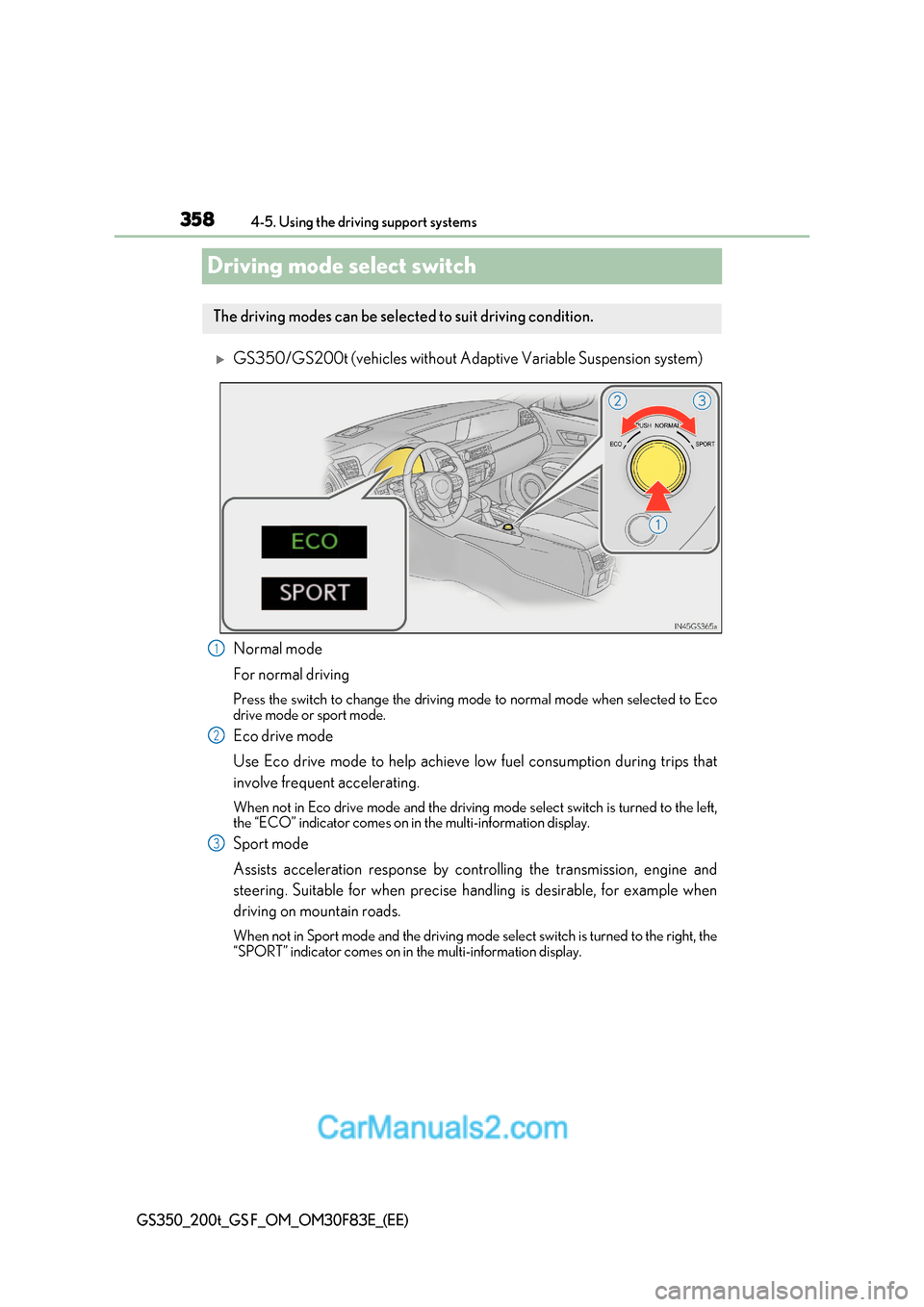
GS350/GS200t (vehicles without Adaptive Variable Suspension system)
Normal mode
For normal driving
Press the switch to change the driving mode to normal mode when selected to Eco
drive mode or sport mode.
Eco drive mode
Use Eco drive mode to help achieve low fuel consumption during trips that
involve frequent accelerating.
When not in Eco drive mode and the driving mode select switch is turned to the left,
the “ECO” indicator comes on in the multi-information display.
Sport mode
Assists acceleration response by controlling the transmission, engine and
steering. Suitable for when precise handling is desirable, for exampl e when
driving on mountain roads.
When not in Sport mode and the driving mode select switch is turned to the right, the
“SPORT” indicator comes on in the multi-information display.
The driving modes can be select ed to suit driving condition.
1
2
3
Page 393 of 676
393
5-1. Remote Touch screen
5
Interior features
GS350_200t_GS F_OM_OM30F83E_(EE)
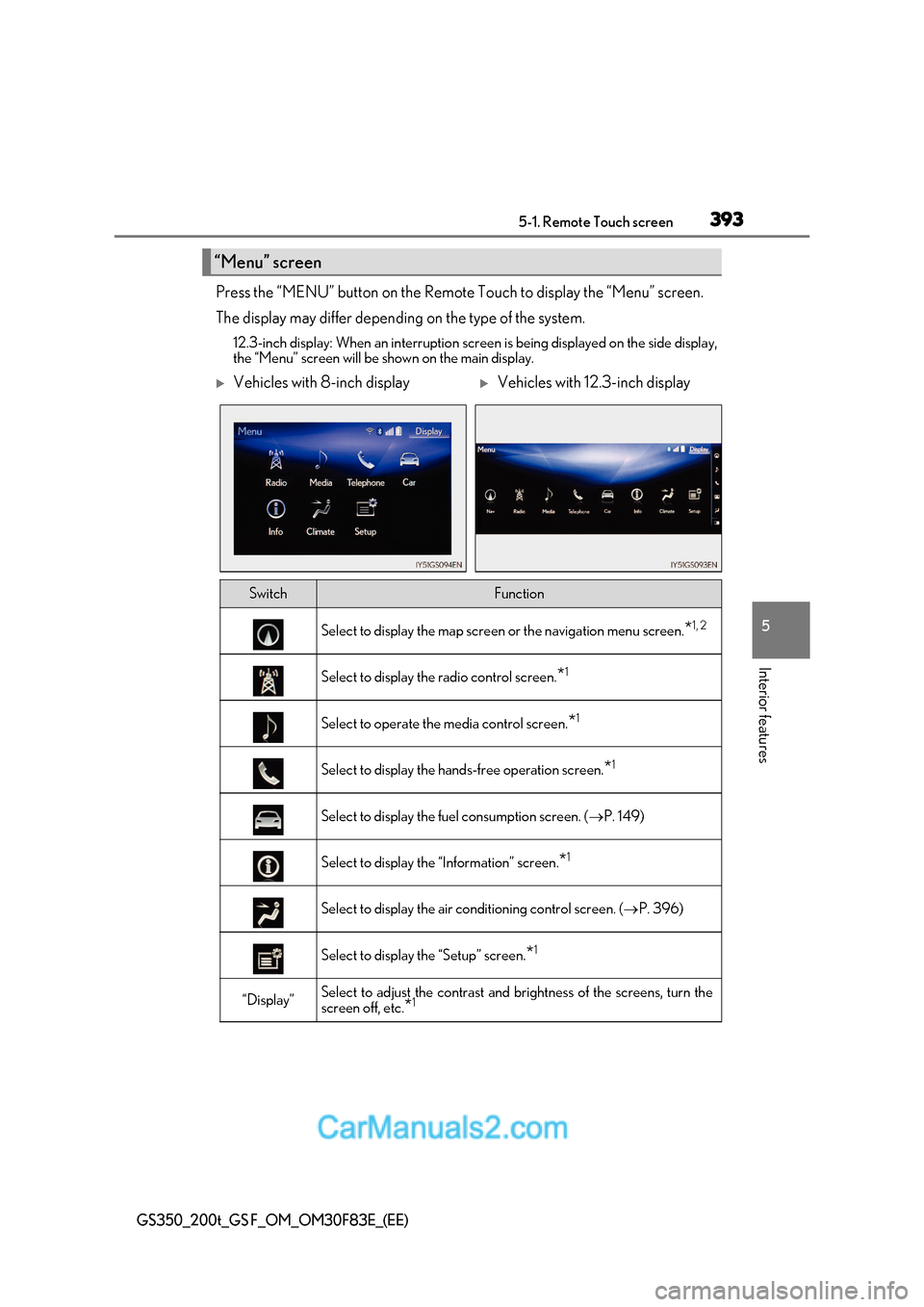
Press the “MENU” button on the Remote Touch to display the “Menu” screen.
The display may differ depending on the type of the system.
12.3-inch display: When an interruption scr een is being displayed on the side display,
the “Menu” screen will be shown on the main display.
“Menu” screen
Vehicles with 8-inch displayVehicles with 12.3-inch display
SwitchFunction
Select to display the map screen or the navigation menu screen.*1, 2
Select to display the radio control screen.
*1
Select to operate the media control screen.
*1
Select to display the hand
s-free operation screen.*1
Select to display the fuel consumption screen. (
P. 149)
Select to display the “Information” screen. *1
Select to display the air conditioning control screen. (
P. 396)
Select to display the “Setup” screen. *1
“Display”Select to adjust the contrast and
brightness of the screens, turn the
screen off, etc. *1
Page 394 of 676
3945-1. Remote Touch screen
GS350_200t_GS F_OM_OM30F83E_(EE)
*1
: Refer to the “NAVIGATION AND MULTIMEDIA SYSTEM OWNER’S MANUAL”.
* 2
: If equipped
■Full screen display
The following functions can be displayed full screen:
*: Refer to the “NAVIGATION AND MULTIMEDIA SYSTEM OWNER’S
MANUAL”.
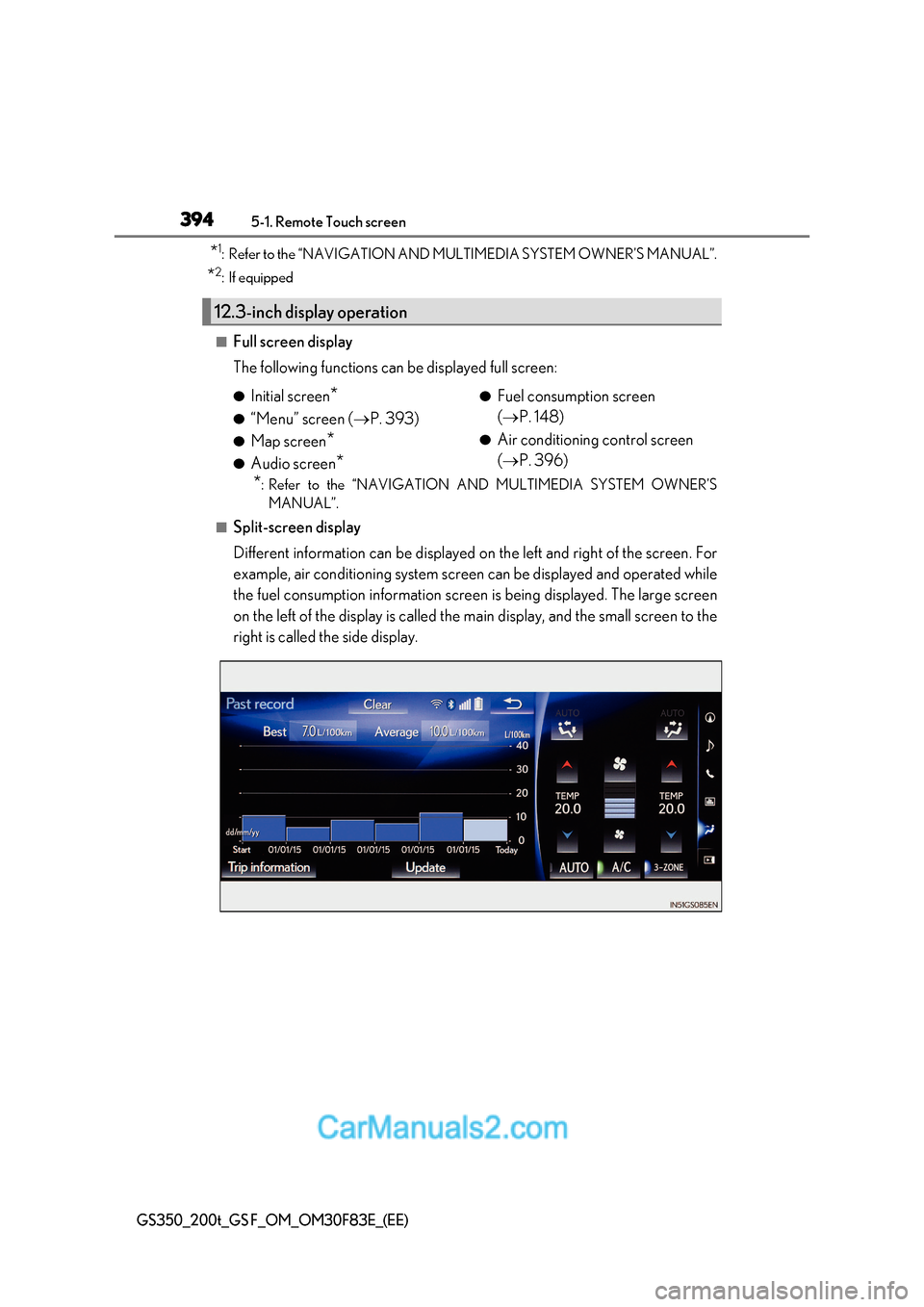
■Split-screen display
Different information can be displayed on the left and right of the screen. For
example, air conditioning system screen can be displayed and operated while
the fuel consumption information screen is being displayed. The large screen
on the left of the display is called the main display, and the small screen to the
right is called the side display.
12.3-inch display operation
● Initial screen *
● “Menu” screen ( P. 393)
● Map screen *
● Audio screen * ●
Fuel consumption screen ( P. 148)
● Air conditioning control screen ( P. 396)
Page 405 of 676
405
5-2. Using the air conditioning system and defogger
5
Interior features
GS350_200t_GS F_OM_OM30F83E_(EE)
■Outside/recirculated air mode
●When driving on dusty roads su ch as tunnels or in heavy traffic, set the outside/recircu-
lated air mode button to the recirculated air mode. This is effective in preventing out-
side air from entering the vehicle interior. During cooling operation, setting the
recirculated air mode will also cool the vehicle interior effectively.
●Outside/recirculated air mode may automatically switch depending on the tempera-
ture setting or the inside temperature.
■Automatic mode for air intake control
In automatic mode, the system detects exhaust gas and other pollutants and automati-
cally switches between outside air and recirculated air modes.
When the dehumidification function is off, and the fan is operating, turning automatic
mode on will activate the dehumidification function.
■Operation of the air conditioning system in Eco drive mode
In the Eco drive mode, the air conditioning system is controlled as follows to prioritize
fuel efficiency:
●Engine speed and compressor operation controlled to restrict heating/cooling capac- ity
●Fan speed restricted when automatic mode is selected
To improve air conditioning performanc e, perform the following operations:
●Adjust the fan speed
●Turn off Eco drive mode (P. 358)
■When the S-FLOW mode operates
If air flows to the driver’s seat only, the temperature setting for the front passenger’s seat
is not displayed.
■When the outside temperature is low
The dehumidification function may not operate even when “A/C” on the option control
screen is selected.
■Ventilation and air conditioning odors
●To let fresh air in, set the air conditioning system to the outside air mode.
●During use, various odors from inside and outside the vehicle may enter into and accu-
mulate in the air conditioning system. This may then cause odor to be emitted from the
vents.
●To reduce potential odors from occurring:
Page 441 of 676
441
6-1. Maintenance and care
6
Maintenance and care
GS350_200t_GS F_OM_OM30F83E_(EE)
■Automatic car washes
●Fold the mirrors before washing the vehicle. Start washing from the front of the vehicle.
Make sure to extend th e mirrors before driving.
●Brushes used in automatic car washes may scratch the vehicle surface and harm your
vehicle’s paint.
●Rear spoiler (if equipped) may not be wash able in some automatic car washes. There
may also be an increased risk of damage to vehicle.
■High-pressure car washes
●Do not allow the nozzles of the car wash to come within close proximity of the windows.
●Before using the car wash, check that the fuel filler door on your vehicle is closed prop- erly.
■Notes for a smart entry & start system
If the door handle becomes wet while the electronic key is within the effective range, the
door may lock and unlock repeatedly. In that case, follow the following correction proce-
dures to wash the vehicle:
●Place the key in a position 2 m (6 ft.) or more separate from the vehicle while the vehi-
cle is being washed. (Take care to ensure that the key is not stolen.)
●Set the electronic key to battery-saving mode to disable the smart entry & start system. ( P. 175)
■Aluminum wheels
●Remove any dirt immediately by using a neutral detergent. Do not use hard brushes or
abrasive cleaners. Do not use strong or harsh chemical cleaners.
Use the same mild detergent and wax as used on the paint.
●Do not use detergent on the wheels when they are hot, for example after driving for
long distance in the hot weather.
●Wash detergent from the wheels immediately after use.
■Brake caliper coating (GS200t with orange brake calipers for F SPORT models, and
GS F)
●When using detergent, use neutral detergent.
Do not use hard brushes or abrasive clea ners, as they will damage the coating.
●Do not use detergent on the brake calipers when they are hot.
●Wash detergent off immediately after use.
■Bumpers
Do not scrub with abrasive cleaners.
■Front side windows water-repellent coating
●The following precautions can extend the effectiveness of the water-repellent coating.