Button Lexus IS300h 2013 User Guide
[x] Cancel search | Manufacturer: LEXUS, Model Year: 2013, Model line: IS300h, Model: Lexus IS300h 2013Pages: 628, PDF Size: 20.23 MB
Page 113 of 628
1122. Instrument cluster
IS300h_EE(OM53B95E)
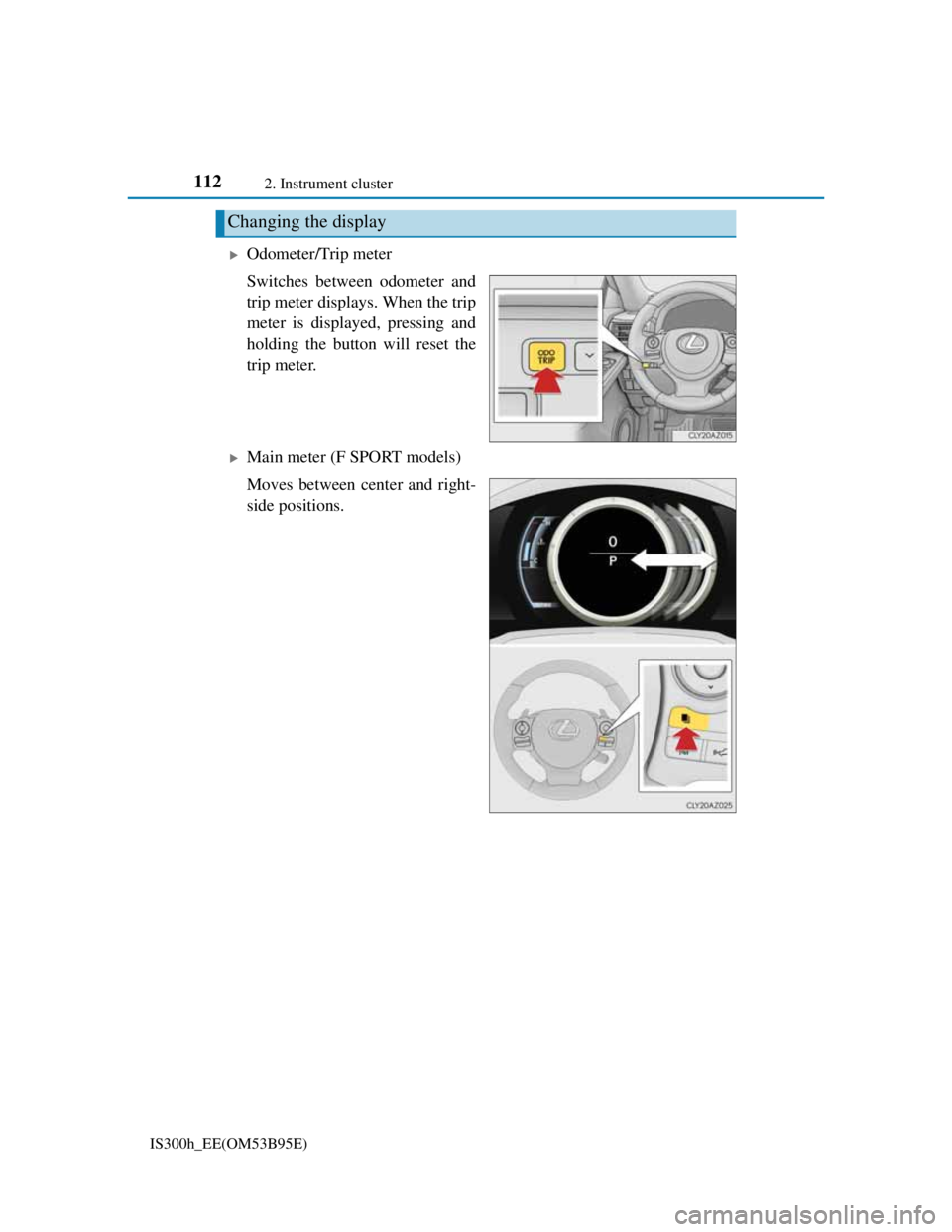
Odometer/Trip meter
Switches between odometer and
trip meter displays. When the trip
meter is displayed, pressing and
holding the button will reset the
trip meter.
Main meter (F SPORT models)
Moves between center and right-
side positions.
Changing the display
Page 123 of 628
1222. Instrument cluster
IS300h_EE(OM53B95E)
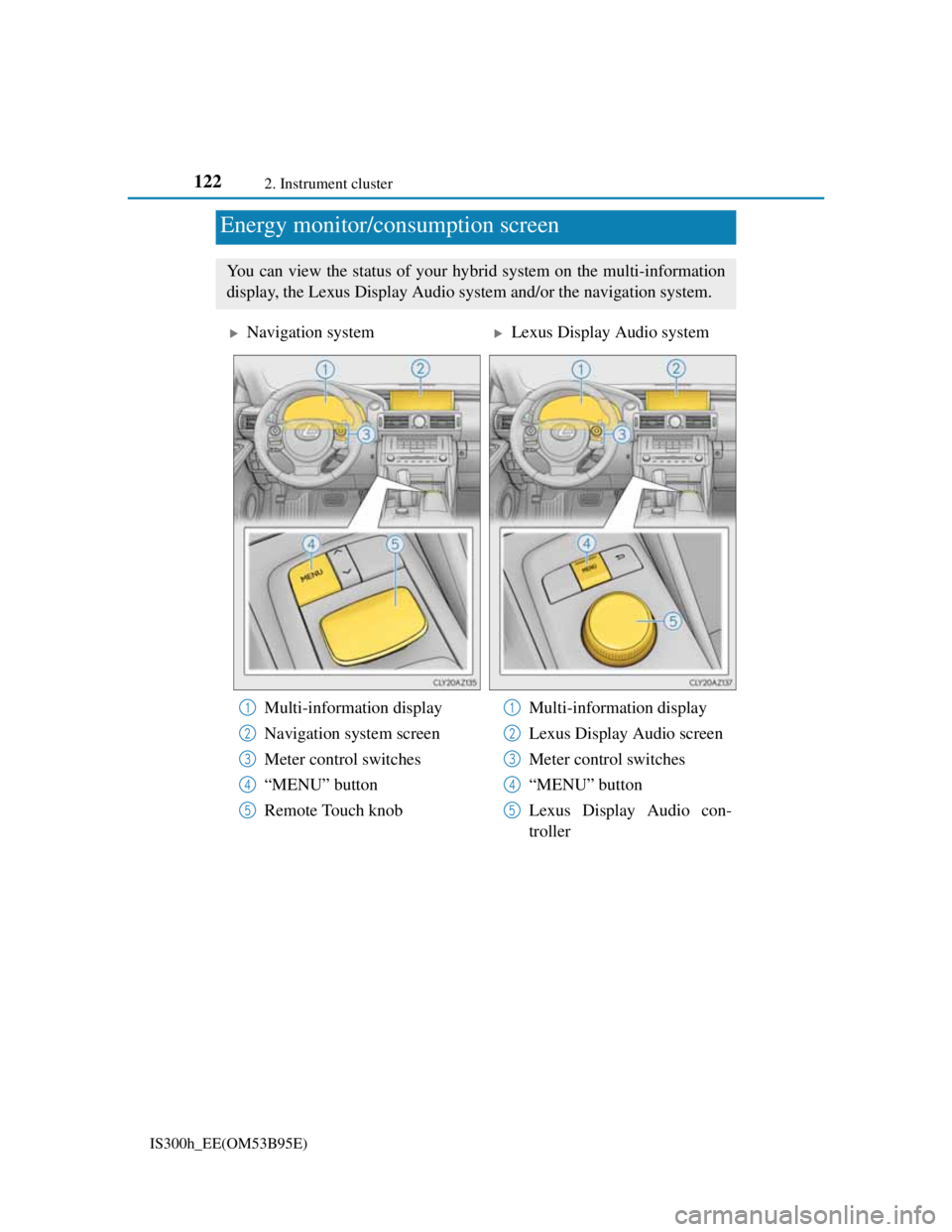
Energy monitor/consumption screen
You can view the status of your hybrid system on the multi-information
display, the Lexus Display Audio system and/or the navigation system.
Navigation systemLexus Display Audio system
Multi-information display
Navigation system screen
Meter control switches
“MENU” button
Remote Touch knobMulti-information display
Lexus Display Audio screen
Meter control switches
“MENU” button
Lexus Display Audio con-
troller
1
2
3
4
5
1
2
3
4
5
Page 124 of 628
1232. Instrument cluster
2
Instrument cluster
IS300h_EE(OM53B95E)
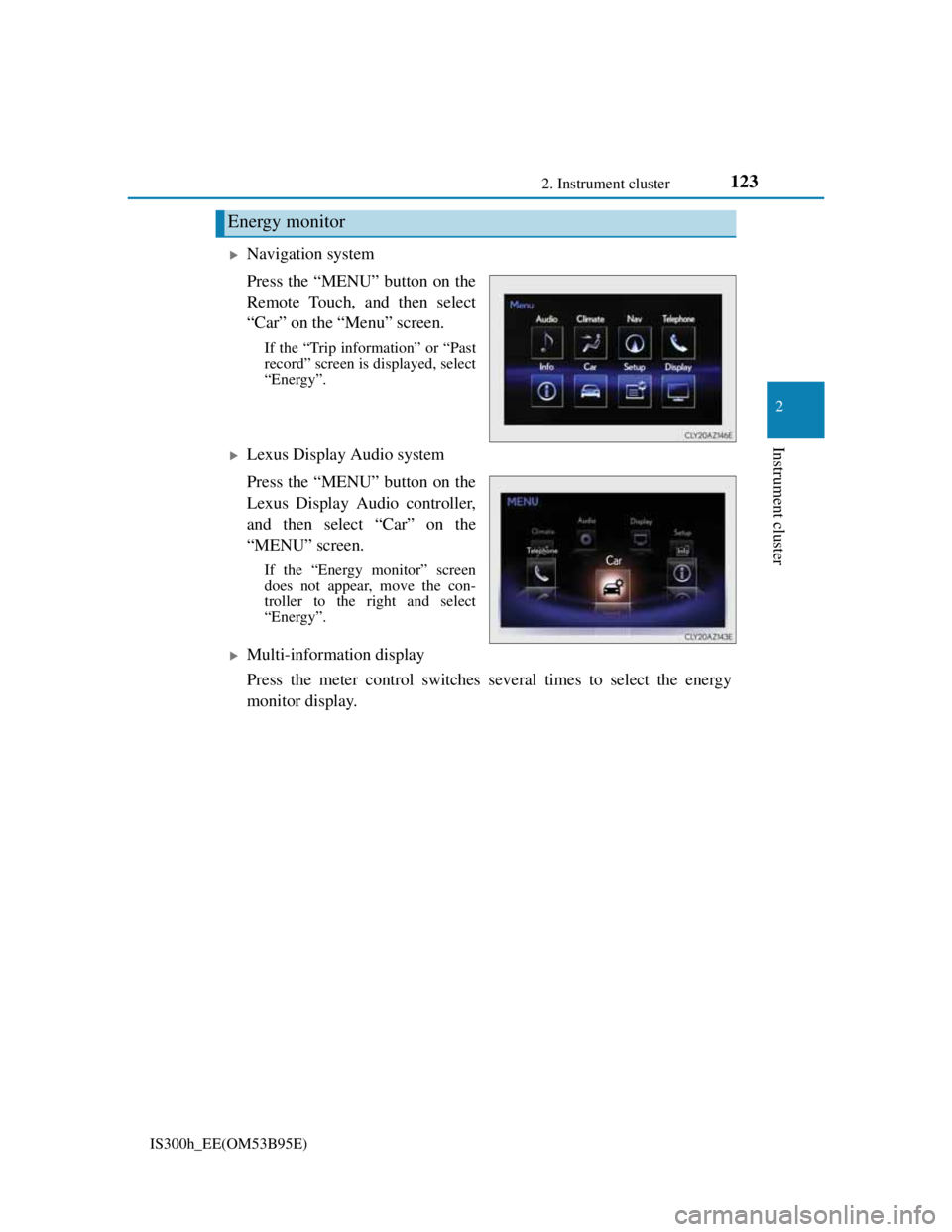
Navigation system
Press the “MENU” button on the
Remote Touch, and then select
“Car” on the “Menu” screen.
If the “Trip information” or “Past
record” screen is displayed, select
“Energy”.
Lexus Display Audio system
Press the “MENU” button on the
Lexus Display Audio controller,
and then select “Car” on the
“MENU” screen.
If the “Energy monitor” screen
does not appear, move the con-
troller to the right and select
“Energy”.
Multi-information display
Press the meter control switches several times to select the energy
monitor display.
Energy monitor
Page 126 of 628
1252. Instrument cluster
2
Instrument cluster
IS300h_EE(OM53B95E)These images are examples only.
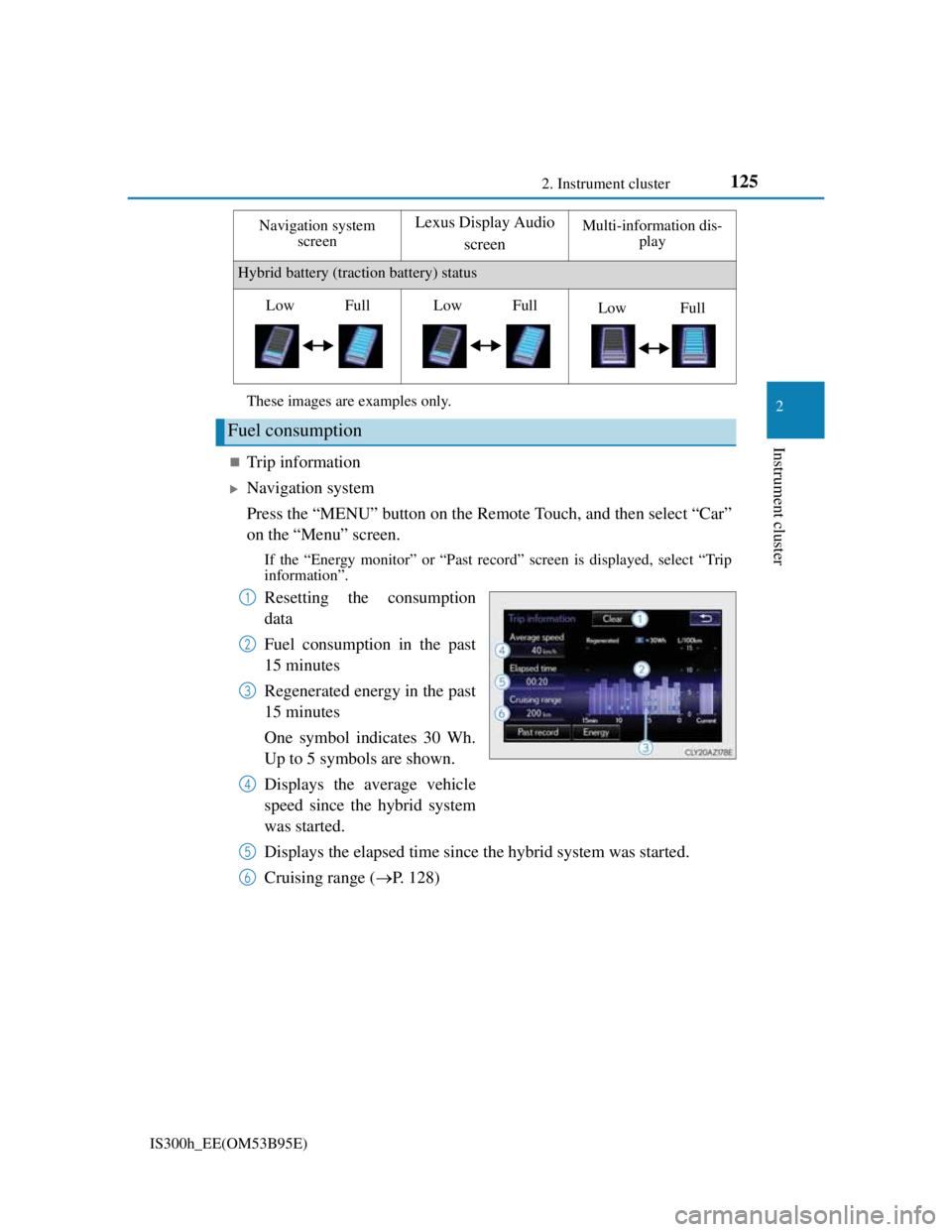
Trip information
Navigation system
Press the “MENU” button on the Remote Touch, and then select “Car”
on the “Menu” screen.
If the “Energy monitor” or “Past record” screen is displayed, select “Trip
information”.
Resetting the consumption
data
Fuel consumption in the past
15 minutes
Regenerated energy in the past
15 minutes
One symbol indicates 30 Wh.
Up to 5 symbols are shown.
Displays the average vehicle
speed since the hybrid system
was started.
Displays the elapsed time since the hybrid system was started.
Cruising range (P. 128)
Hybrid battery (traction battery) status
Fuel consumption
Navigation system
screenLexus Display Audio
screenMulti-information dis-
play
LowFullLowFullLowFull
1
2
3
4
5
6
Page 127 of 628
1262. Instrument cluster
IS300h_EE(OM53B95E)
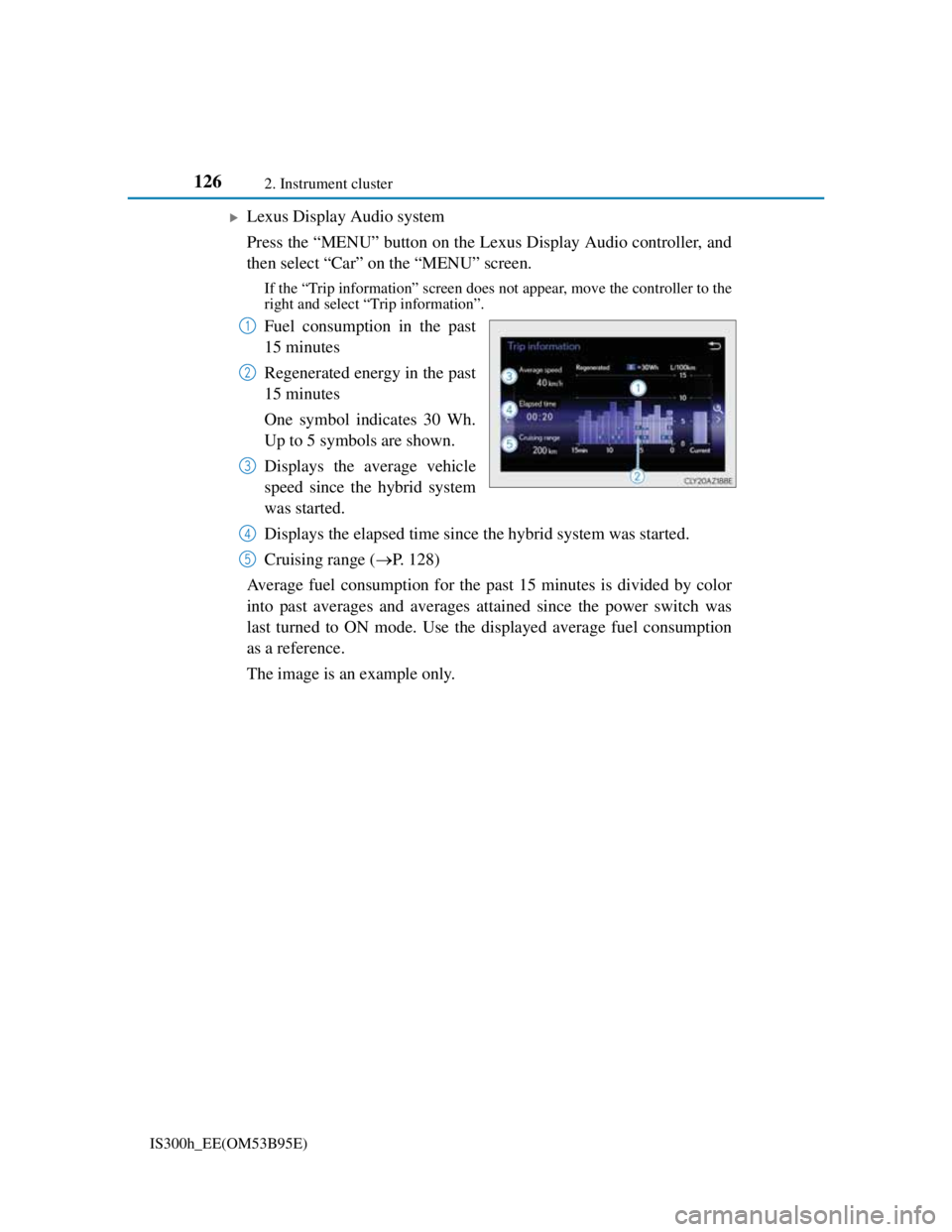
Lexus Display Audio system
Press the “MENU” button on the Lexus Display Audio controller, and
then select “Car” on the “MENU” screen.
If the “Trip information” screen does not appear, move the controller to the
right and select “Trip information”.
Fuel consumption in the past
15 minutes
Regenerated energy in the past
15 minutes
One symbol indicates 30 Wh.
Up to 5 symbols are shown.
Displays the average vehicle
speed since the hybrid system
was started.
Displays the elapsed time since the hybrid system was started.
Cruising range (P. 128)
Average fuel consumption for the past 15 minutes is divided by color
into past averages and averages attained since the power switch was
last turned to ON mode. Use the displayed average fuel consumption
as a reference.
The image is an example only.1
2
3
4
5
Page 128 of 628
1272. Instrument cluster
2
Instrument cluster
IS300h_EE(OM53B95E)
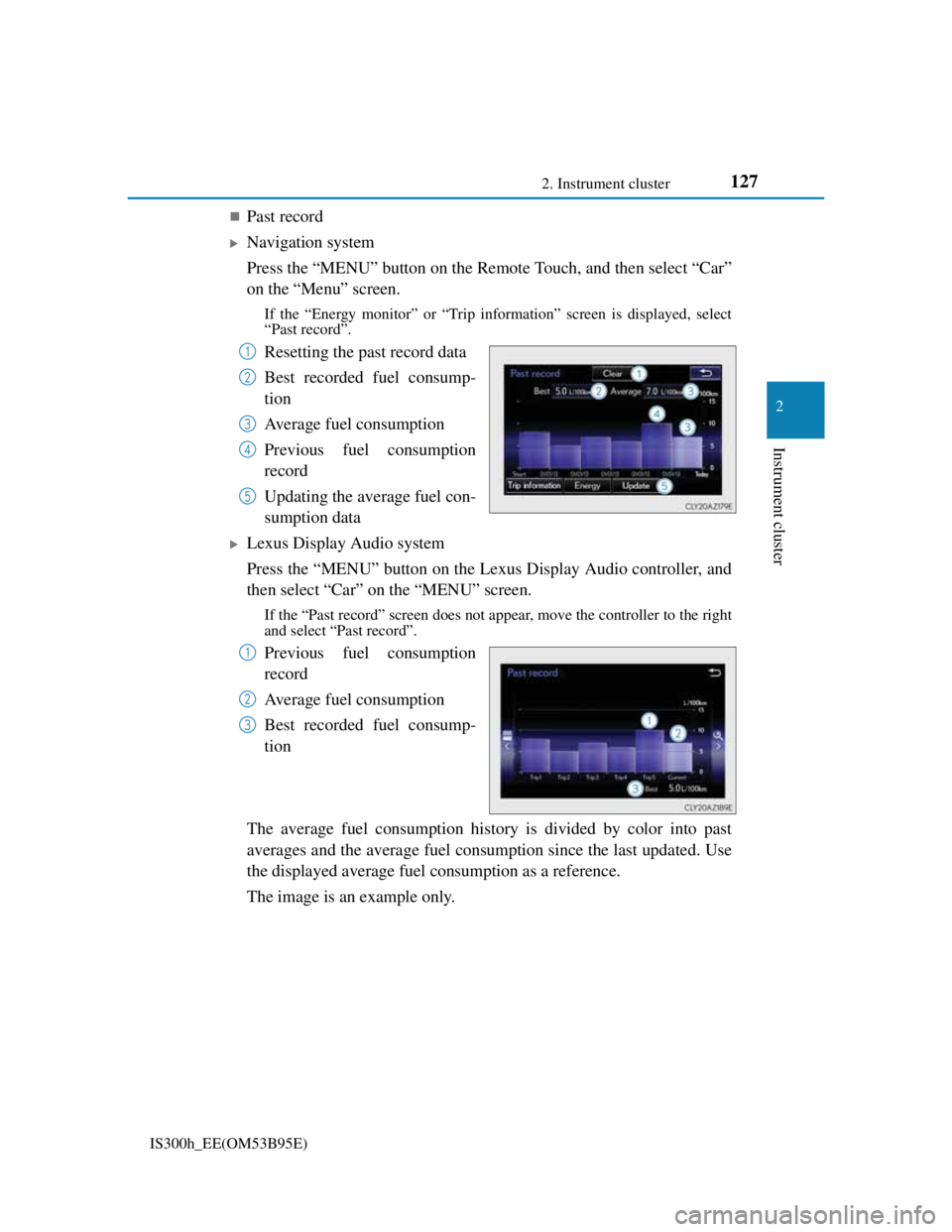
Past record
Navigation system
Press the “MENU” button on the Remote Touch, and then select “Car”
on the “Menu” screen.
If the “Energy monitor” or “Trip information” screen is displayed, select
“Past record”.
Resetting the past record data
Best recorded fuel consump-
tion
Average fuel consumption
Previous fuel consumption
record
Updating the average fuel con-
sumption data
Lexus Display Audio system
Press the “MENU” button on the Lexus Display Audio controller, and
then select “Car” on the “MENU” screen.
If the “Past record” screen does not appear, move the controller to the right
and select “Past record”.
Previous fuel consumption
record
Average fuel consumption
Best recorded fuel consump-
tion
The average fuel consumption history is divided by color into past
averages and the average fuel consumption since the last updated. Use
the displayed average fuel consumption as a reference.
The image is an example only.
1
2
3
4
5
1
2
3
Page 133 of 628
1313-1. Key information
3
Operation of each component
IS300h_EE(OM53B95E)
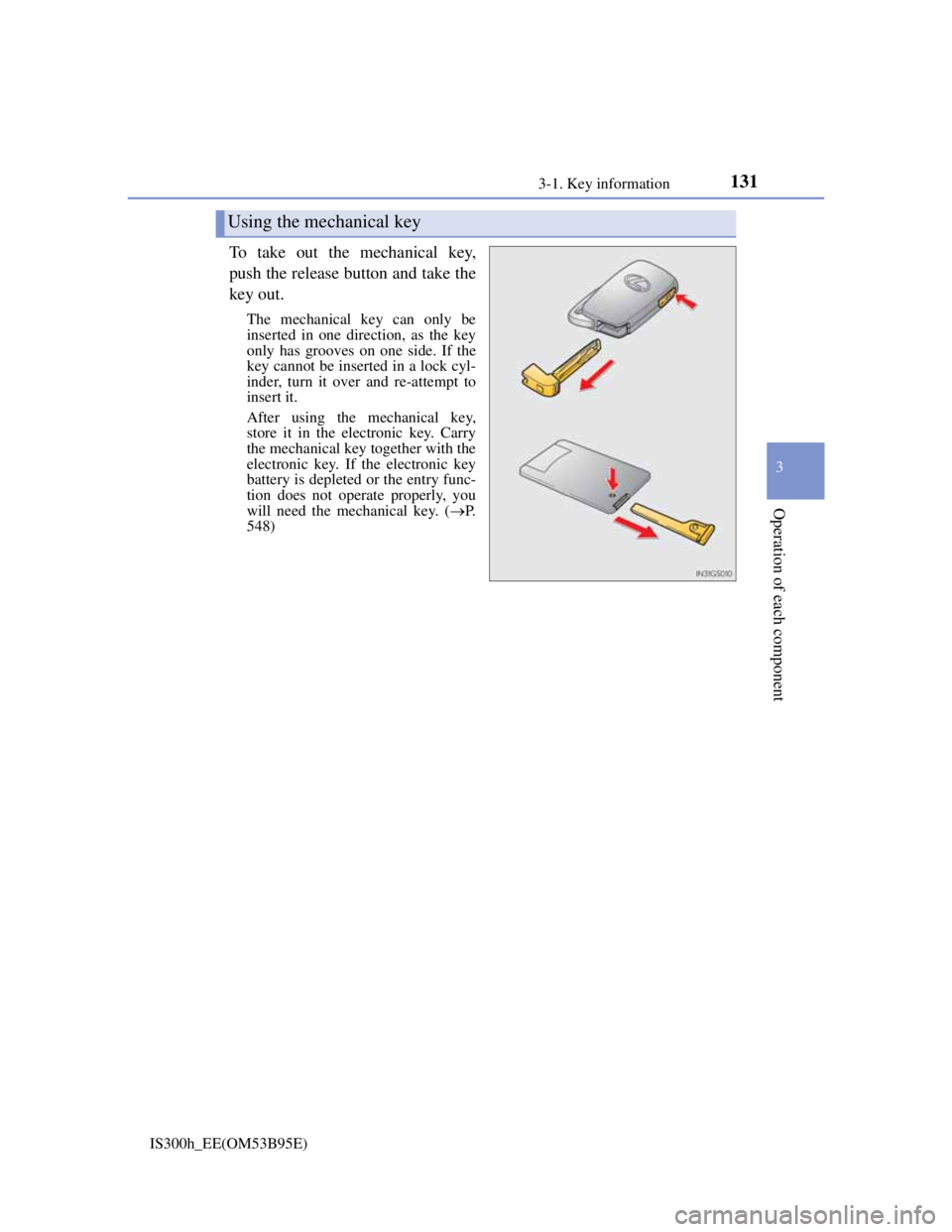
To take out the mechanical key,
push the release button and take the
key out.
The mechanical key can only be
inserted in one direction, as the key
only has grooves on one side. If the
key cannot be inserted in a lock cyl-
inder, turn it over and re-attempt to
insert it.
After using the mechanical key,
store it in the electronic key. Carry
the mechanical key together with the
electronic key. If the electronic key
battery is depleted or the entry func-
tion does not operate properly, you
will need the mechanical key. (P.
548)
Using the mechanical key
Page 134 of 628
1323-1. Key information
IS300h_EE(OM53B95E)
Card key (if equipped)
The card key is not waterproof.
The mechanical key that is stored inside the card key should be used only if a
problem arises, such as when the card key does not operate properly.
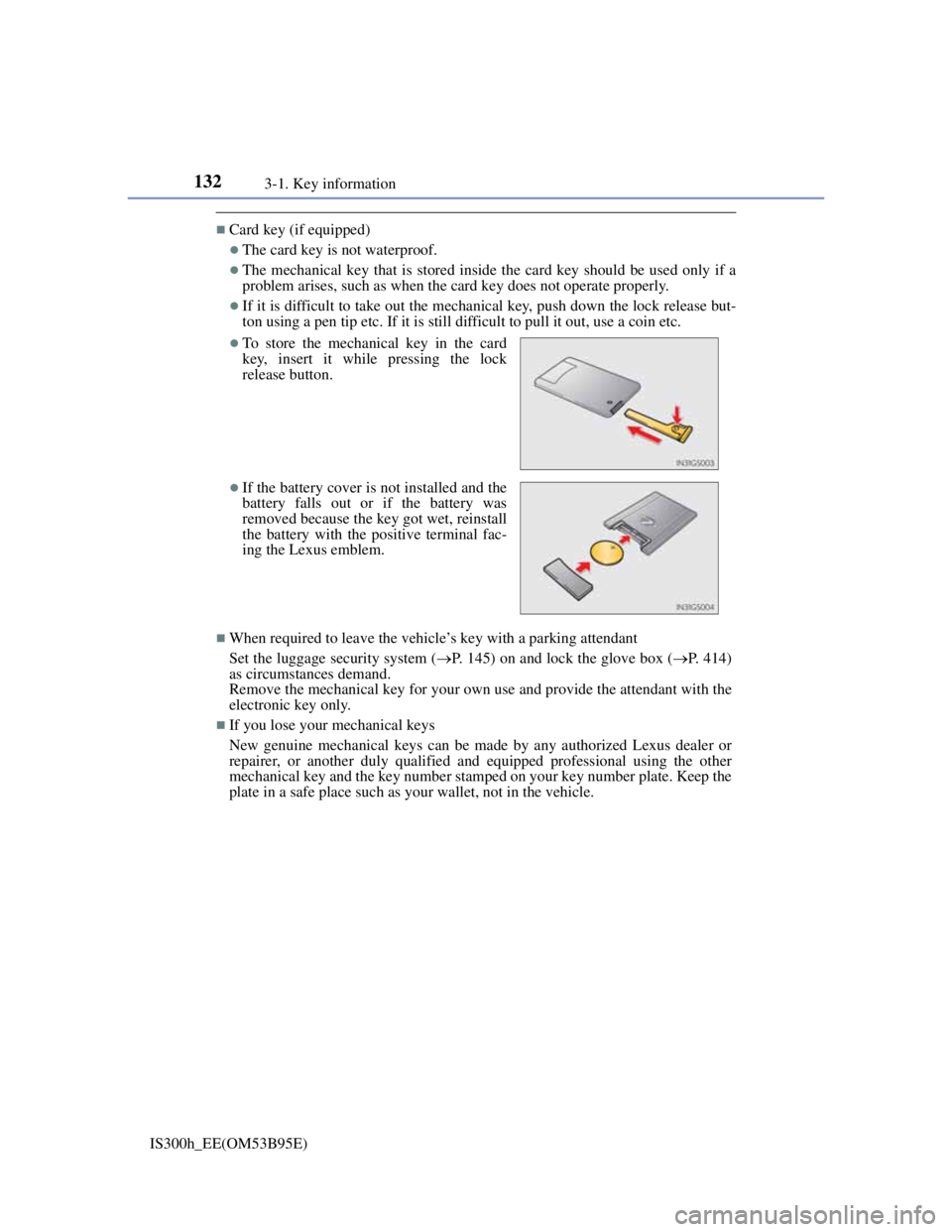
If it is difficult to take out the mechanical key, push down the lock release but-
ton using a pen tip etc. If it is still difficult to pull it out, use a coin etc.
When required to leave the vehicle’s key with a parking attendant
Set the luggage security system (P. 145) on and lock the glove box (P. 414)
as circumstances demand.
Remove the mechanical key for your own use and provide the attendant with the
electronic key only.
If you lose your mechanical keys
New genuine mechanical keys can be made by any authorized Lexus dealer or
repairer, or another duly qualified and equipped professional using the other
mechanical key and the key number stamped on your key number plate. Keep the
plate in a safe place such as your wallet, not in the vehicle.
To store the mechanical key in the card
key, insert it while pressing the lock
release button.
If the battery cover is not installed and the
battery falls out or if the battery was
removed because the key got wet, reinstall
the battery with the positive terminal fac-
ing the Lexus emblem.
Page 135 of 628

1333-1. Key information
3
Operation of each component
IS300h_EE(OM53B95E)
When riding in an aircraft
When bringing an electronic key onto an aircraft, make sure you do not press any
buttons on the electronic key while inside the aircraft cabin. If you are carrying
an electronic key in your bag etc., ensure that the buttons are not likely to be
pressed accidentally. Pressing a button may cause the electronic key to emit radio
waves that could interfere with the operation of the aircraft.
Electronic key battery depletion
The standard battery life is 1 to 2 years. (The card key battery life is about a
year and a half.)
If the battery becomes low, an alarm will sound in the cabin when the hybrid
system is stopped. (P. 527)
As the electronic key always receives radio waves, the battery will become
depleted even if the electronic key is not used. The following symptoms indi-
cate that the electronic key battery may be depleted. Replace the battery when
necessary. (P. 472)
• The smart entry & start system or the wireless remote control does not oper-
ate.
• The detection area becomes smaller.
• The LED indicator on the key surface does not turn on.
To avoid serious deterioration, do not leave the electronic key within 1 m (3 ft.)
of the following electrical appliances that produce a magnetic field:
•TVs
• Personal computers
• Cellular phones, cordless phones and battery chargers
• Recharging cellular phones or cordless phones
• Table lamps
• Induction cookers
Replacing the battery
P. 472
Confirmation of the registered key number
The number of keys already registered to the vehicle can be confirmed. Ask any
authorized Lexus dealer or repairer, or another duly qualified and equipped pro-
fessional for details.
If a wrong key is used
The key cylinder rotates freely to isolate inside mechanism.
Page 141 of 628
1393-2. Opening, closing and locking the doors and trunk
3
Operation of each component
IS300h_EE(OM53B95E)
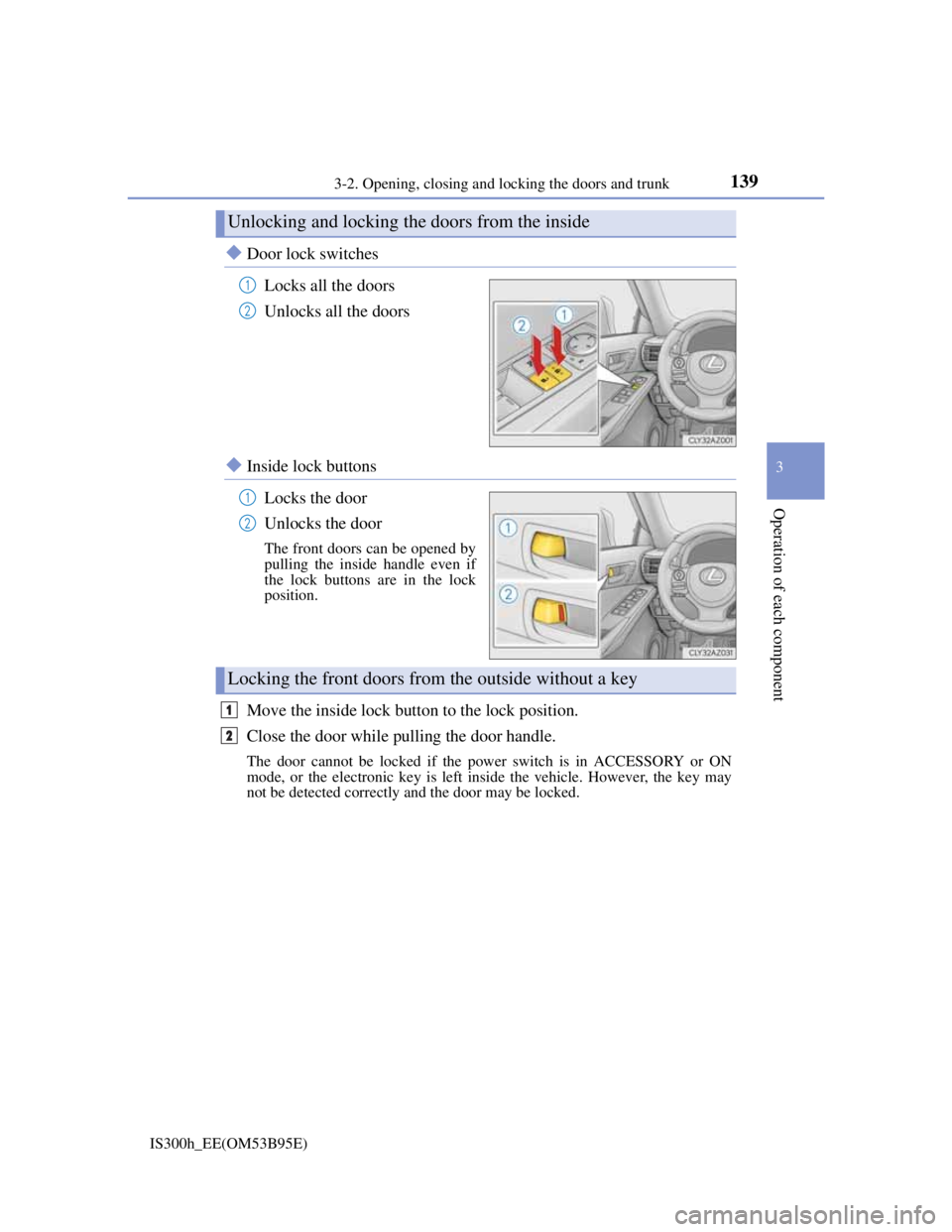
Door lock switches
Locks all the doors
Unlocks all the doors
Inside lock buttons
Locks the door
Unlocks the door
The front doors can be opened by
pulling the inside handle even if
the lock buttons are in the lock
position.
Move the inside lock button to the lock position.
Close the door while pulling the door handle.
The door cannot be locked if the power switch is in ACCESSORY or ON
mode, or the electronic key is left inside the vehicle. However, the key may
not be detected correctly and the door may be locked.
Unlocking and locking the doors from the inside
1
2
1
2
Locking the front doors from the outside without a key
1
2