Button Lexus IS300h 2013 Owner's Guide
[x] Cancel search | Manufacturer: LEXUS, Model Year: 2013, Model line: IS300h, Model: Lexus IS300h 2013Pages: 628, PDF Size: 20.23 MB
Page 143 of 628
1413-2. Opening, closing and locking the doors and trunk
3
Operation of each component
IS300h_EE(OM53B95E)
Switching the door unlock function (vehicles with entry function)
It is possible to set which doors the entry function unlocks using the wireless
remote control.
Turn the power switch off.
Cancel the intrusion sensor and tilt sensor of the alarm system to prevent unin-
tended triggering of the alarm while changing the settings. (if equipped) (P.
99)
When the indicator light on the key surface is not on, press and hold ,
or for approximately 5 seconds while pressing and holding .
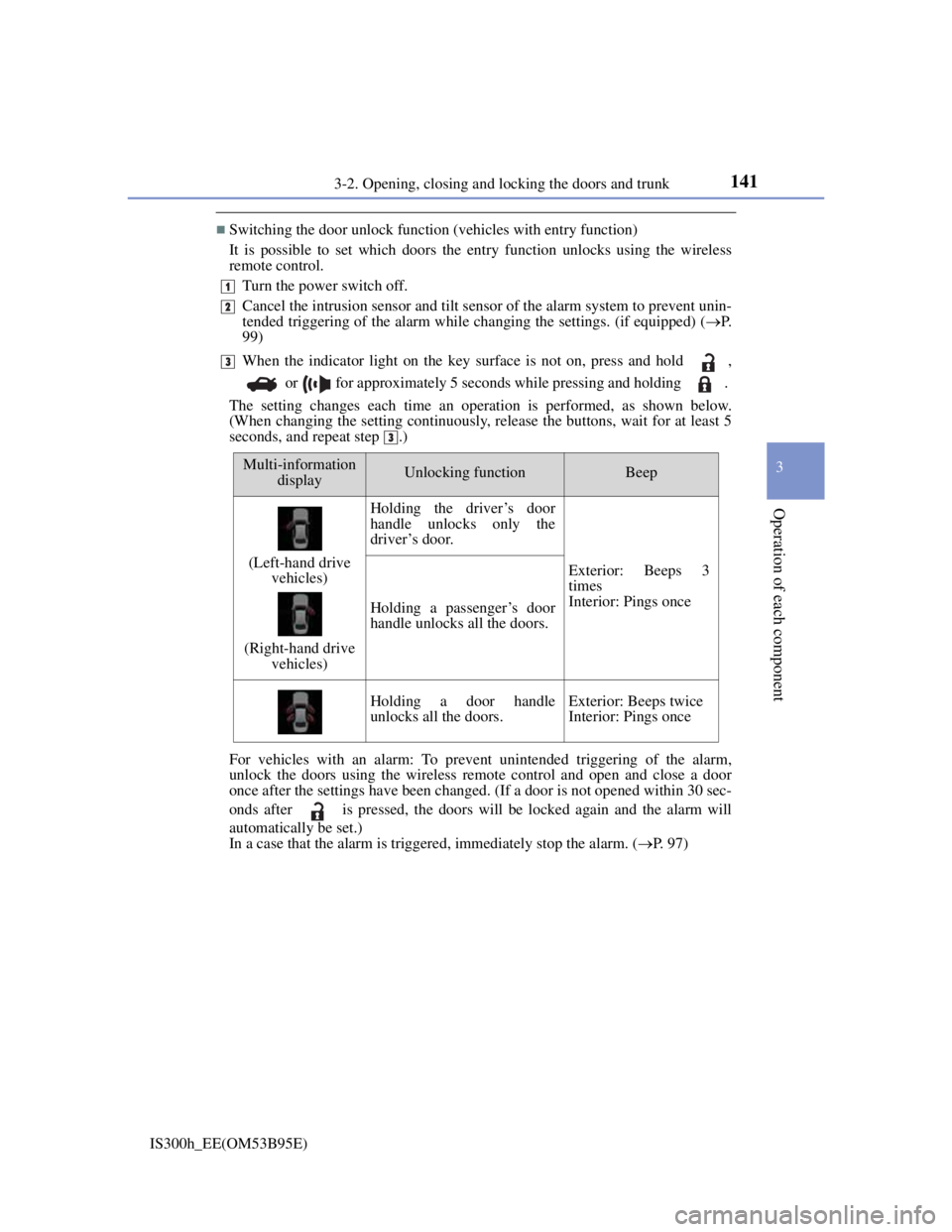
The setting changes each time an operation is performed, as shown below.
(When changing the setting continuously, release the buttons, wait for at least 5
seconds, and repeat step .)
For vehicles with an alarm: To prevent unintended triggering of the alarm,
unlock the doors using the wireless remote control and open and close a door
once after the settings have been changed. (If a door is not opened within 30 sec-
onds after is pressed, the doors will be locked again and the alarm will
automatically be set.)
In a case that the alarm is triggered, immediately stop the alarm. (P. 97)
1
2
3
3
Multi-information
displayUnlocking functionBeep
(Left-hand drive
vehicles)
(Right-hand drive
vehicles)
Holding the driver’s door
handle unlocks only the
driver’s door.
Exterior: Beeps 3
times
Interior: Pings once
Holding a passenger’s door
handle unlocks all the doors.
Holding a door handle
unlocks all the doors.Exterior: Beeps twice
Interior: Pings once
Page 144 of 628
1423-2. Opening, closing and locking the doors and trunk
IS300h_EE(OM53B95E)
Impact detection door lock release system
In the event that the vehicle is subject to a strong impact, all the doors are
unlocked. Depending on the force of the impact or the type of accident, however,
the system may not operate.
Using the mechanical key
The doors can also be locked and unlocked with the mechanical key. (P. 548)
Conditions affecting the operation of the smart entry & start system or wireless
remote control
P. 151
Customization
Settings (e.g. unlocking function using a key) can be changed.
(Customizable features: P. 575)
CAUTION
To prevent an accident
Observe the following precautions while driving the vehicle.
Failure to do so may result in a door opening and an occupant being thrown out
of the vehicle, resulting in death or serious injury.
Ensure that all doors are properly closed.
Do not pull the inside handle of the doors while driving.
Be especially careful with the front doors, as the doors may be opened even if
the inside lock buttons are in locked position.
Set the rear door child-protector locks when children are seated in the rear
seats.
Page 145 of 628
1433-2. Opening, closing and locking the doors and trunk
3
Operation of each component
IS300h_EE(OM53B95E)
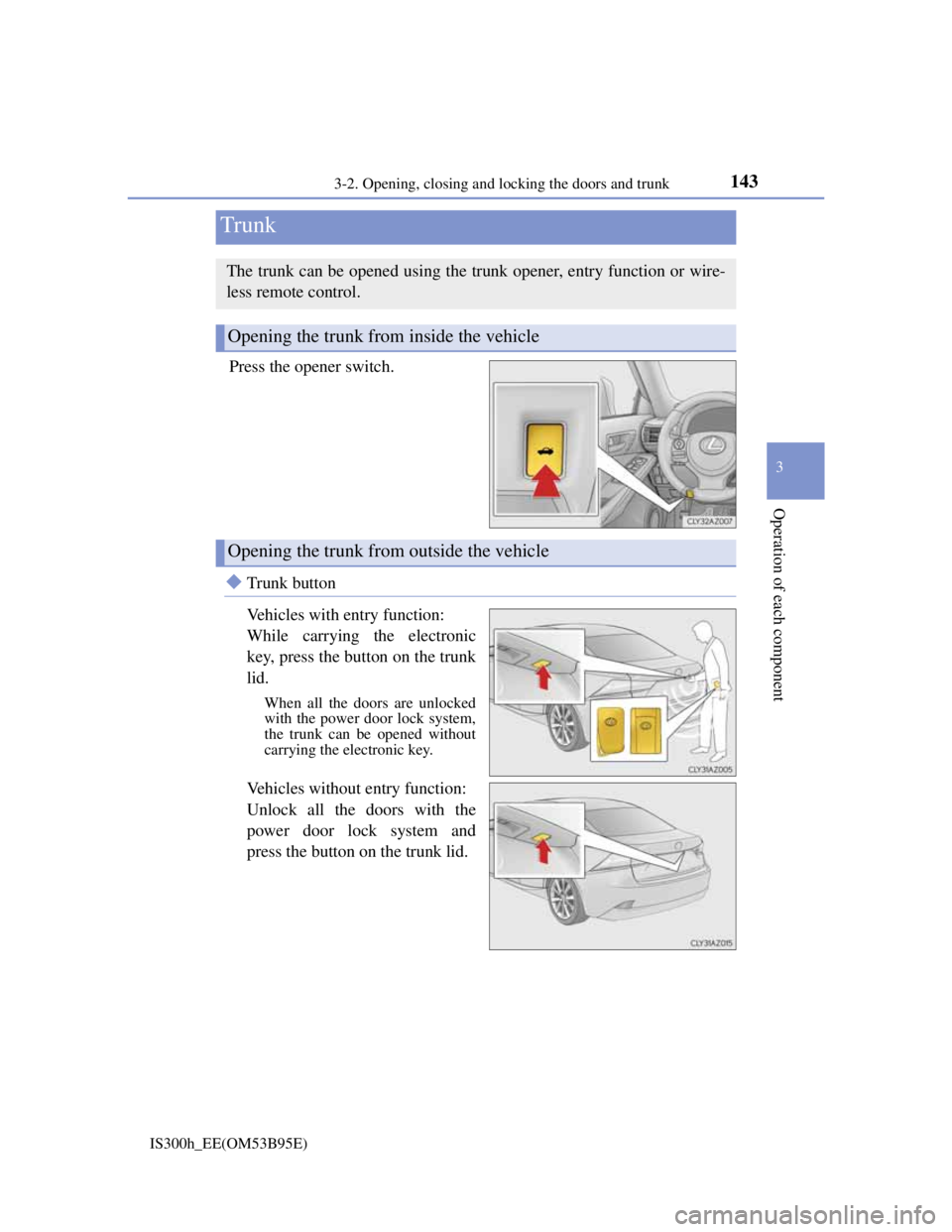
Press the opener switch.
Trunk button
Vehicles with entry function:
While carrying the electronic
key, press the button on the trunk
lid.
When all the doors are unlocked
with the power door lock system,
the trunk can be opened without
carrying the electronic key.
Vehicles without entry function:
Unlock all the doors with the
power door lock system and
press the button on the trunk lid.
Trunk
The trunk can be opened using the trunk opener, entry function or wire-
less remote control.
Opening the trunk from inside the vehicle
Opening the trunk from outside the vehicle
Page 148 of 628

1463-2. Opening, closing and locking the doors and trunk
IS300h_EE(OM53B95E)
Trunk light (if equipped)
The trunk light turns on when the trunk is opened.
Function to prevent the trunk being locked with the electronic key inside
When all doors are locked, closing the trunk lid with the electronic key left
inside the trunk will sound an alarm.
In this case, the trunk lid can be opened pressing the trunk release button on the
trunk lid.
If the spare electronic key is put in the trunk with all the doors locked, the key
confinement prevention function is activated so the trunk can be opened. In
order to prevent theft, take all electronic keys with you when leaving the vehi-
cle.
If the electronic key is put in the trunk with all the doors locked, the key may
not be detected depending on the location of the key and the surrounding radio
wave conditions. In this case, the key confinement prevention function cannot
be activated, causing the doors to lock when the trunk is closed. Make sure to
check where the key is before closing the trunk.
The key confinement prevention function cannot be activated if any one of the
doors is unlocked. In this case, open the trunk using the trunk opener.
Using the mechanical key
The trunk can be also opened using the mechanical key. (P. 548)
If the smart entry & start system or the wireless remote control does not operate
properly
Use the mechanical key to unlock the trunk. (P. 548)
Replace the key battery with a new one if it is depleted. (P. 472)
When leaving a key to the vehicle with a parking attendant
P. 132
Customization
The trunk unlocking operation can be changed. (Customizable features: P.
575)
Page 151 of 628
1493-2. Opening, closing and locking the doors and trunk
3
Operation of each component
IS300h_EE(OM53B95E)
Locks and unlocks the doors (vehicles with entry function) (P. 136)
Opens the trunk (vehicles with entry function) (P. 143)
Starts the hybrid system (P. 209)
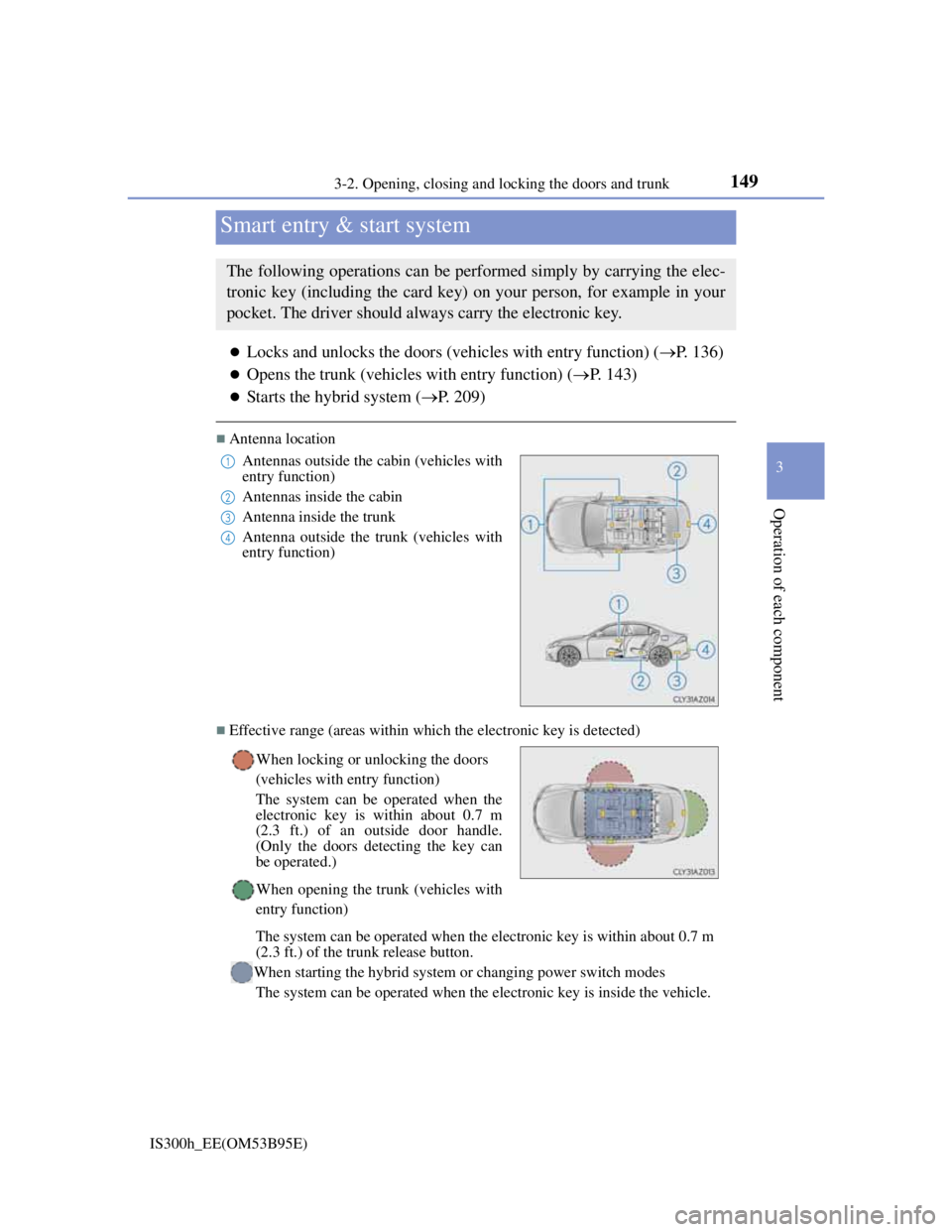
Antenna location
Effective range (areas within which the electronic key is detected)
Smart entry & start system
The following operations can be performed simply by carrying the elec-
tronic key (including the card key) on your person, for example in your
pocket. The driver should always carry the electronic key.
Antennas outside the cabin (vehicles with
entry function)
Antennas inside the cabin
Antenna inside the trunk
Antenna outside the trunk (vehicles with
entry function)
When locking or unlocking the doors
(vehicles with entry function)
The system can be operated when the
electronic key is within about 0.7 m
(2.3 ft.) of an outside door handle.
(Only the doors detecting the key can
be operated.)
When opening the trunk (vehicles with
entry function)
The system can be operated when the electronic key is within about 0.7 m
(2.3 ft.) of the trunk release button.
When starting the hybrid system or changing power switch modes
The system can be operated when the electronic key is inside the vehicle.1
2
3
4
Page 152 of 628
1503-2. Opening, closing and locking the doors and trunk
IS300h_EE(OM53B95E)
Battery-saving function (vehicles with entry function)
The battery-saving function will be activated in order to prevent the electronic
key battery and the 12-volt battery from being discharged while the vehicle is not
in operation for a long time.
In the following situations, the smart entry & start system may take some time
to unlock the doors.
• The electronic key has been left within approximately 2 m (6 ft.) of the out-
side of the vehicle for 10 minutes or longer.
• The smart entry & start system has not been used for 5 days or longer.
If the smart entry & start system has not been used for 14 days or longer, the
doors cannot be unlocked at any door except the driver’s door. In this case, hold
the driver’s door handle, or use the wireless remote control or mechanical key,
to unlock the doors.
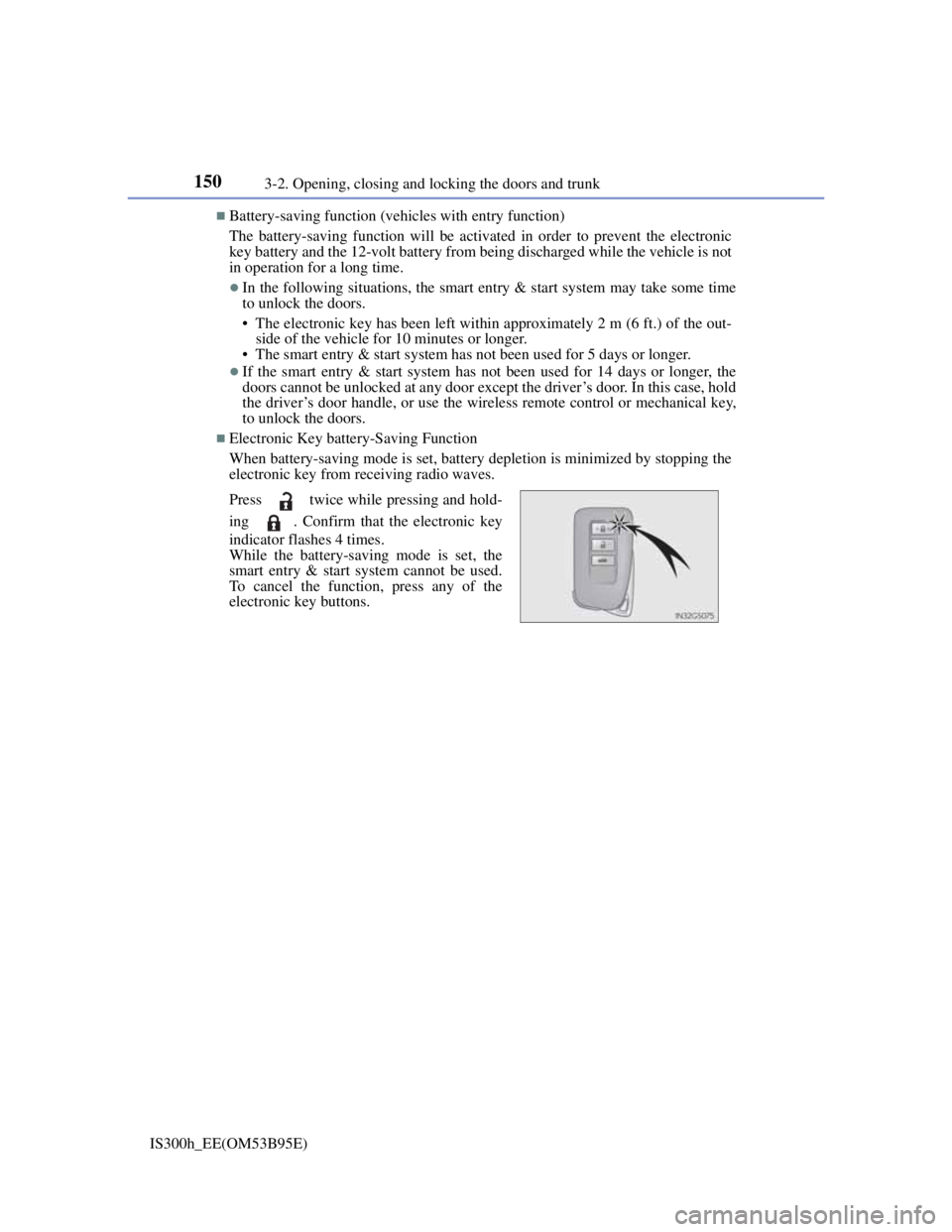
Electronic Key battery-Saving Function
When battery-saving mode is set, battery depletion is minimized by stopping the
electronic key from receiving radio waves.
Press twice while pressing and hold-
ing . Confirm that the electronic key
indicator flashes 4 times.
While the battery-saving mode is set, the
smart entry & start system cannot be used.
To cancel the function, press any of the
electronic key buttons.
Page 170 of 628
1683-3. Adjusting the seats
IS300h_EE(OM53B95E)
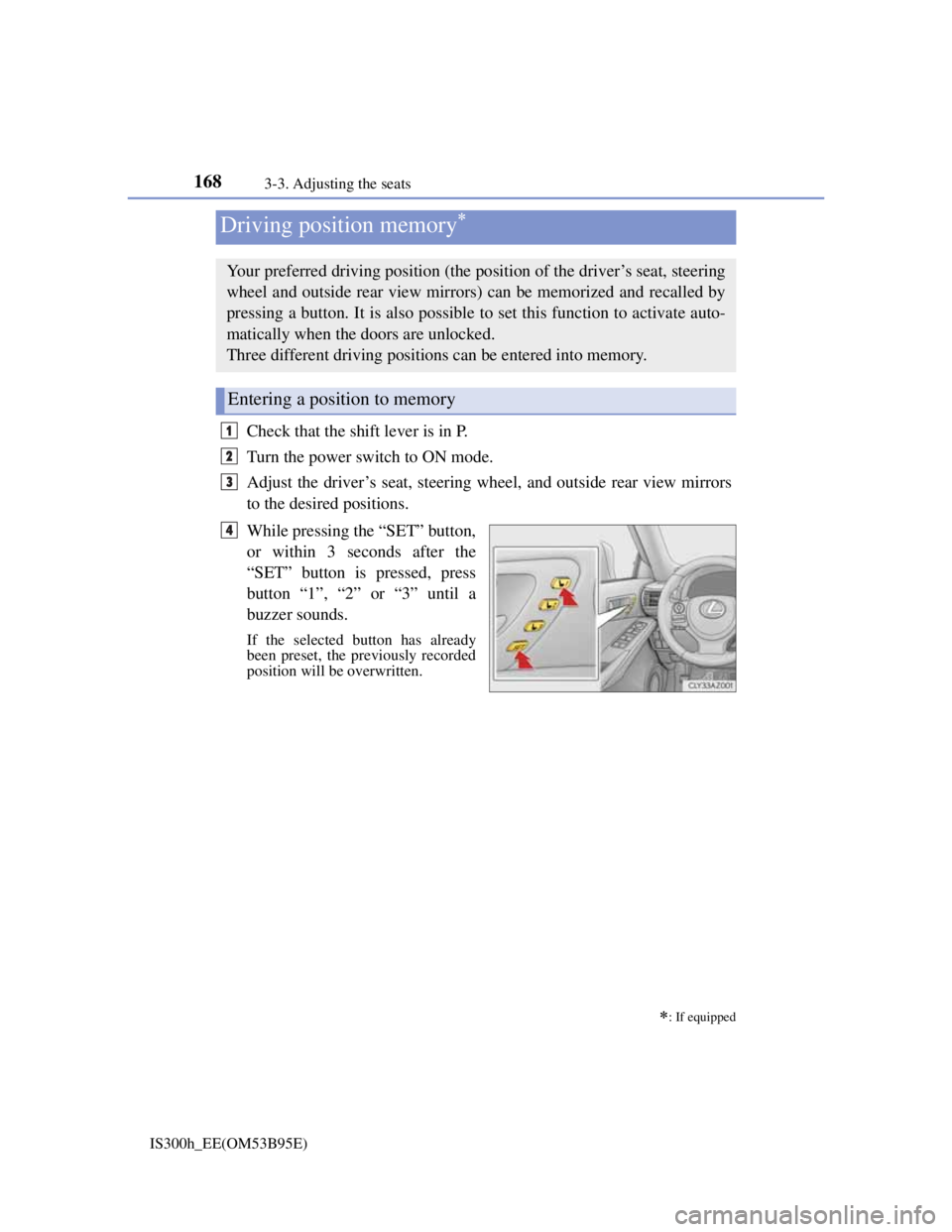
Check that the shift lever is in P.
Turn the power switch to ON mode.
Adjust the driver’s seat, steering wheel, and outside rear view mirrors
to the desired positions.
While pressing the “SET” button,
or within 3 seconds after the
“SET” button is pressed, press
button “1”, “2” or “3” until a
buzzer sounds.
If the selected button has already
been preset, the previously recorded
position will be overwritten.
Driving position memory
: If equipped
Your preferred driving position (the position of the driver’s seat, steering
wheel and outside rear view mirrors) can be memorized and recalled by
pressing a button. It is also possible to set this function to activate auto-
matically when the doors are unlocked.
Three different driving positions can be entered into memory.
Entering a position to memory
1
2
3
4
Page 171 of 628
1693-3. Adjusting the seats
3
Operation of each component
IS300h_EE(OM53B95E)
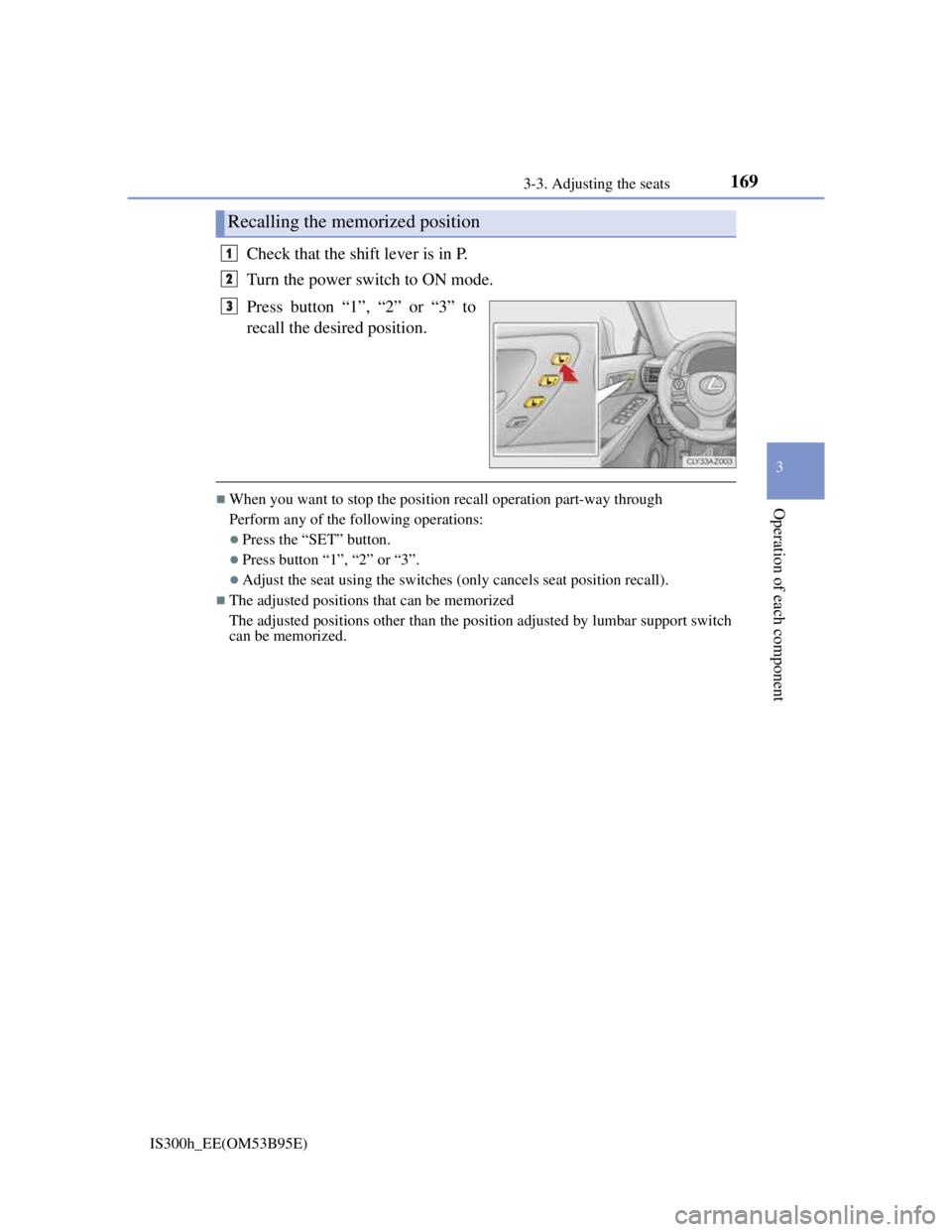
Check that the shift lever is in P.
Turn the power switch to ON mode.
Press button “1”, “2” or “3” to
recall the desired position.
When you want to stop the position recall operation part-way through
Perform any of the following operations:
Press the “SET” button.
Press button “1”, “2” or “3”.
Adjust the seat using the switches (only cancels seat position recall).
The adjusted positions that can be memorized
The adjusted positions other than the position adjusted by lumbar support switch
can be memorized.
Recalling the memorized position
1
2
3
Page 173 of 628
1713-3. Adjusting the seats
3
Operation of each component
IS300h_EE(OM53B95E)
A desired driving position can be recalled linked with the unlocking of
the door.
Setting procedure
Record your driving position to button “1”, “2” or “3” before perform-
ing the following:
Carrying only the key (including the card key) to which you want to
link the driving position, shift the shift lever to P and then close the
driver’s door.
If 2 or more keys are in the vehicle, the driving position cannot be
linked properly.
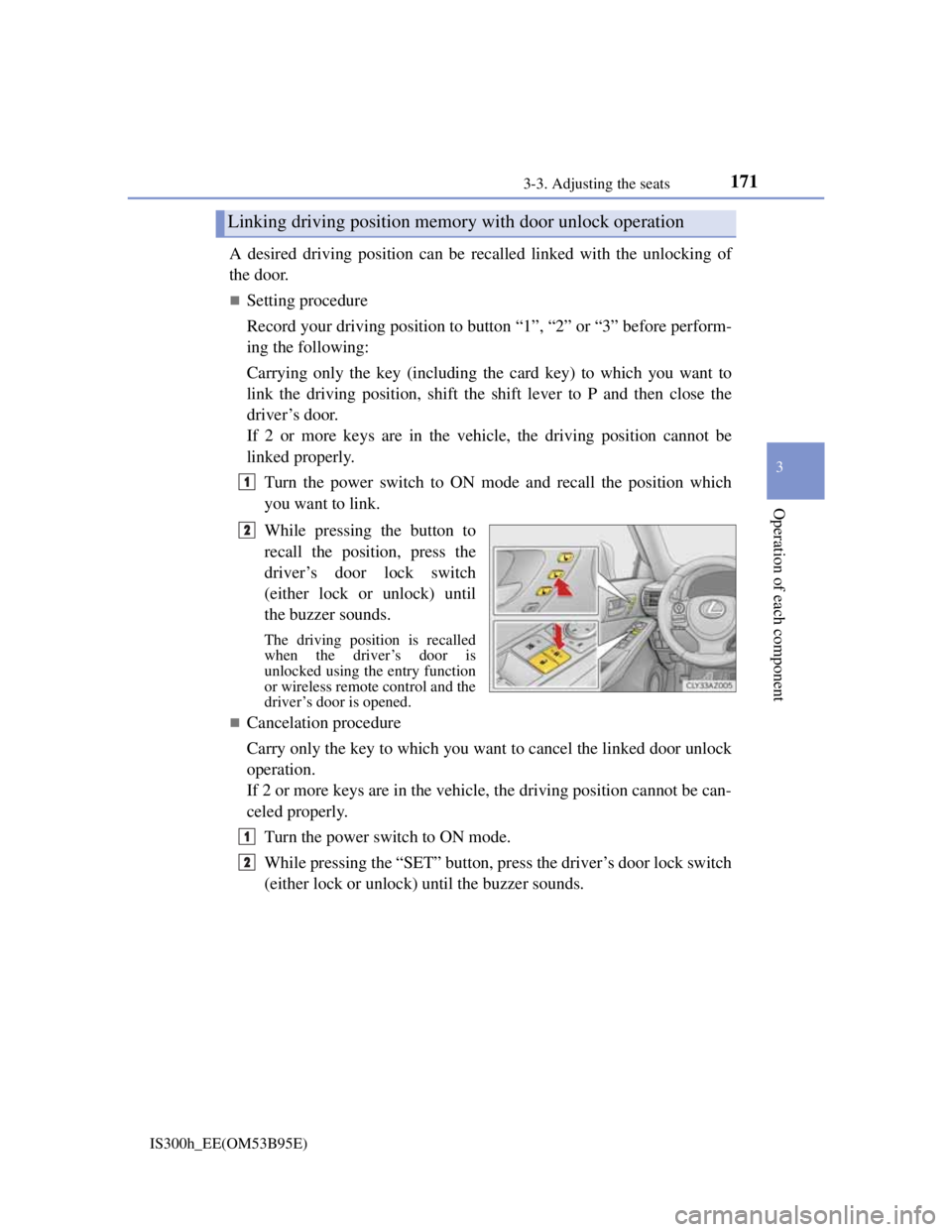
Turn the power switch to ON mode and recall the position which
you want to link.
While pressing the button to
recall the position, press the
driver’s door lock switch
(either lock or unlock) until
the buzzer sounds.
The driving position is recalled
when the driver’s door is
unlocked using the entry function
or wireless remote control and the
driver’s door is opened.
Cancelation procedure
Carry only the key to which you want to cancel the linked door unlock
operation.
If 2 or more keys are in the vehicle, the driving position cannot be can-
celed properly.
Turn the power switch to ON mode.
While pressing the “SET” button, press the driver’s door lock switch
(either lock or unlock) until the buzzer sounds.
Linking driving position memory with door unlock operation
1
2
1
2
Page 174 of 628

1723-3. Adjusting the seats
IS300h_EE(OM53B95E)
When driving position memory is linked with door unlock operation
If the driver’s door is opened, the driver’s seat will move toward the memorized
position but stop slightly beforehand to allow easy access to the vehicle.
Turning the power switch to ACCESSORY or ON mode, or fastening the
driver’s seat belt moves the seat fully into the memorized position.
Operating the driving position memory after turning the power switch off
Memorized seat positions can be activated up to 180 seconds after the driver’s
door is opened and another 60 seconds after it is closed again. Memorized steer-
ing wheel position can be activated by pressing the power switch.
Correct seat position
When the seat is in the most forward or most backward position, and the seat is
being moved in those directions, the system may not correctly recognize the cur-
rent position and the memorized position will not be correctly recalled.
The auto away function for exiting
If the seat is already close to the rearmost position, the auto away function may
not operate when the driver exits the vehicle.
When the driving position is recalled by a memory linked door unlock operation
Since each memorized driving position is registered to a specific electronic key,
the driving position recalled may be different depending on the carried key.
When only doors other than the driver’s door are unlocked by the smart entry &
start system, the driving position will not be recalled. In this case, press a driv-
ing position memory button to recall the desired driving position.
Customization
The distance that the driver’s seat moves backward during the auto away func-
tion can be changed. (Customizable features: P. 575)
CAUTION
Seat adjustment caution
Take care during seat adjustment so that the seat does not strike the rear passen-
ger or squeeze your body against the steering wheel.