Button Lexus IS300h 2013 Owner's Guide
[x] Cancel search | Manufacturer: LEXUS, Model Year: 2013, Model line: IS300h, Model: Lexus IS300h 2013Pages: 628, PDF Size: 20.23 MB
Page 175 of 628
1733-3. Adjusting the seats
3
Operation of each component
IS300h_EE(OM53B95E)
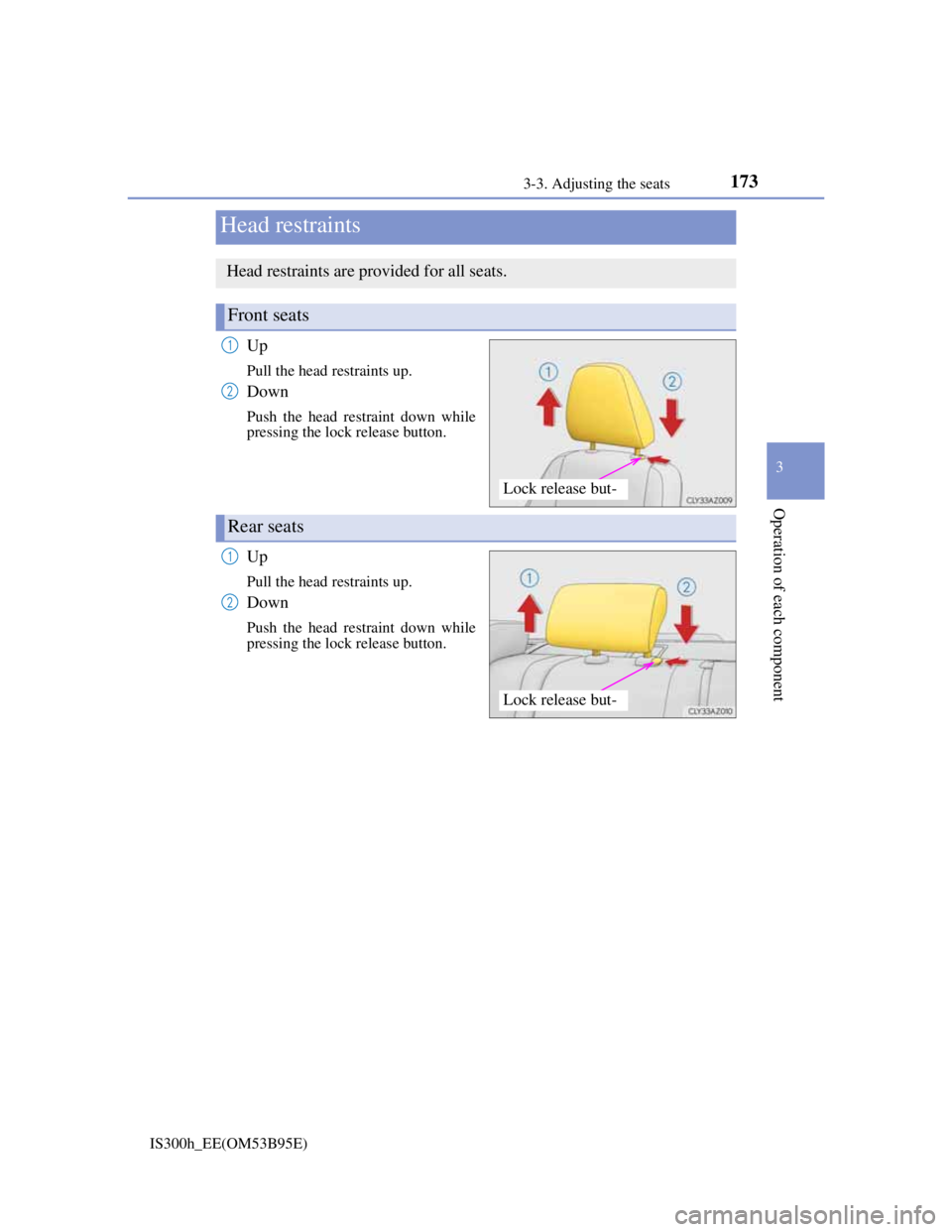
Up
Pull the head restraints up.
Down
Push the head restraint down while
pressing the lock release button.
Up
Pull the head restraints up.
Down
Push the head restraint down while
pressing the lock release button.
Head restraints
Head restraints are provided for all seats.
Front seats
Lock release but-
1
2
Rear seats
Lock release but-
1
2
Page 176 of 628
1743-3. Adjusting the seats
IS300h_EE(OM53B95E)
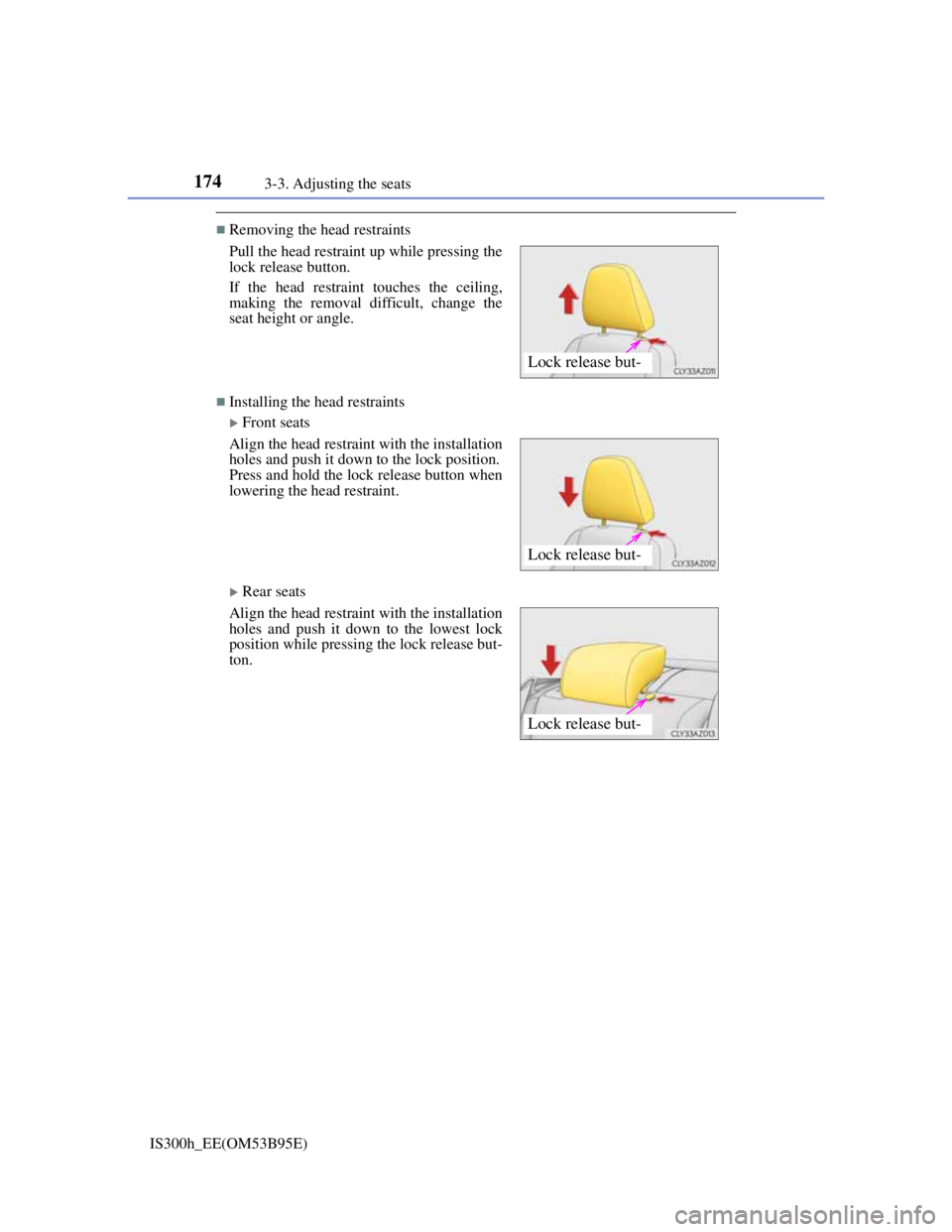
Removing the head restraints
Installing the head restraints
Front seats
Rear seats Pull the head restraint up while pressing the
lock release button.
If the head restraint touches the ceiling,
making the removal difficult, change the
seat height or angle.
Align the head restraint with the installation
holes and push it down to the lock position.
Press and hold the lock release button when
lowering the head restraint.
Align the head restraint with the installation
holes and push it down to the lowest lock
position while pressing the lock release but-
ton.
Lock release but-
Lock release but-
Lock release but-
Page 181 of 628
1793-4. Adjusting the steering wheel and mirrors
3
Operation of each component
IS300h_EE(OM53B95E)
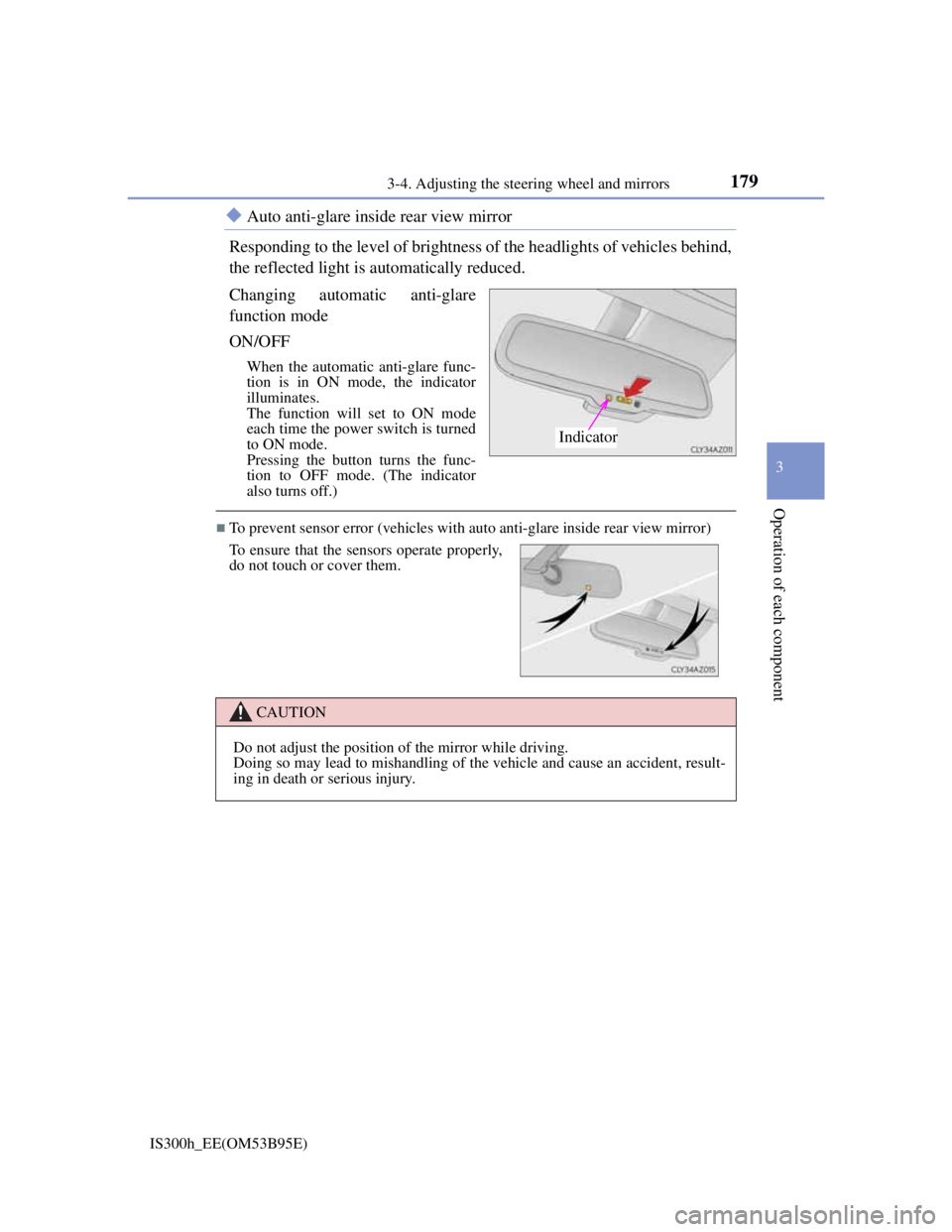
Auto anti-glare inside rear view mirror
Responding to the level of brightness of the headlights of vehicles behind,
the reflected light is automatically reduced.
Changing automatic anti-glare
function mode
ON/OFF
When the automatic anti-glare func-
tion is in ON mode, the indicator
illuminates.
The function will set to ON mode
each time the power switch is turned
to ON mode.
Pressing the button turns the func-
tion to OFF mode. (The indicator
also turns off.)
To prevent sensor error (vehicles with auto anti-glare inside rear view mirror)
Indicator
To ensure that the sensors operate properly,
do not touch or cover them.
CAUTION
Do not adjust the position of the mirror while driving.
Doing so may lead to mishandling of the vehicle and cause an accident, result-
ing in death or serious injury.
Page 246 of 628
2444-4. Refueling
IS300h_EE(OM53B95E)
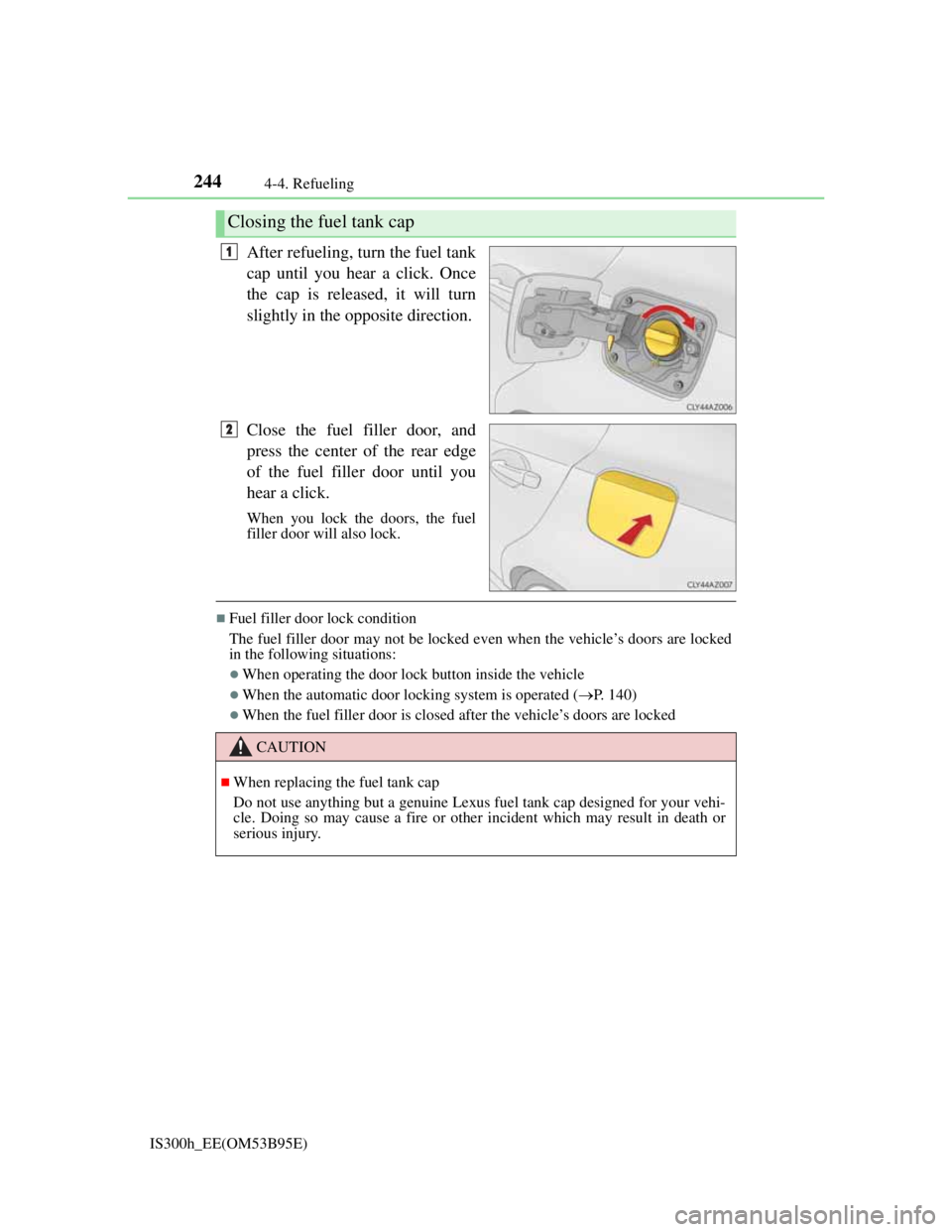
After refueling, turn the fuel tank
cap until you hear a click. Once
the cap is released, it will turn
slightly in the opposite direction.
Close the fuel filler door, and
press the center of the rear edge
of the fuel filler door until you
hear a click.
When you lock the doors, the fuel
filler door will also lock.
Fuel filler door lock condition
The fuel filler door may not be locked even when the vehicle’s doors are locked
in the following situations:
When operating the door lock button inside the vehicle
When the automatic door locking system is operated (P. 140)
When the fuel filler door is closed after the vehicle’s doors are locked
Closing the fuel tank cap
1
2
CAUTION
When replacing the fuel tank cap
Do not use anything but a genuine Lexus fuel tank cap designed for your vehi-
cle. Doing so may cause a fire or other incident which may result in death or
serious injury.
Page 247 of 628
245
4
Driving
IS300h_EE(OM53B95E)4-5. Using the driving support systems
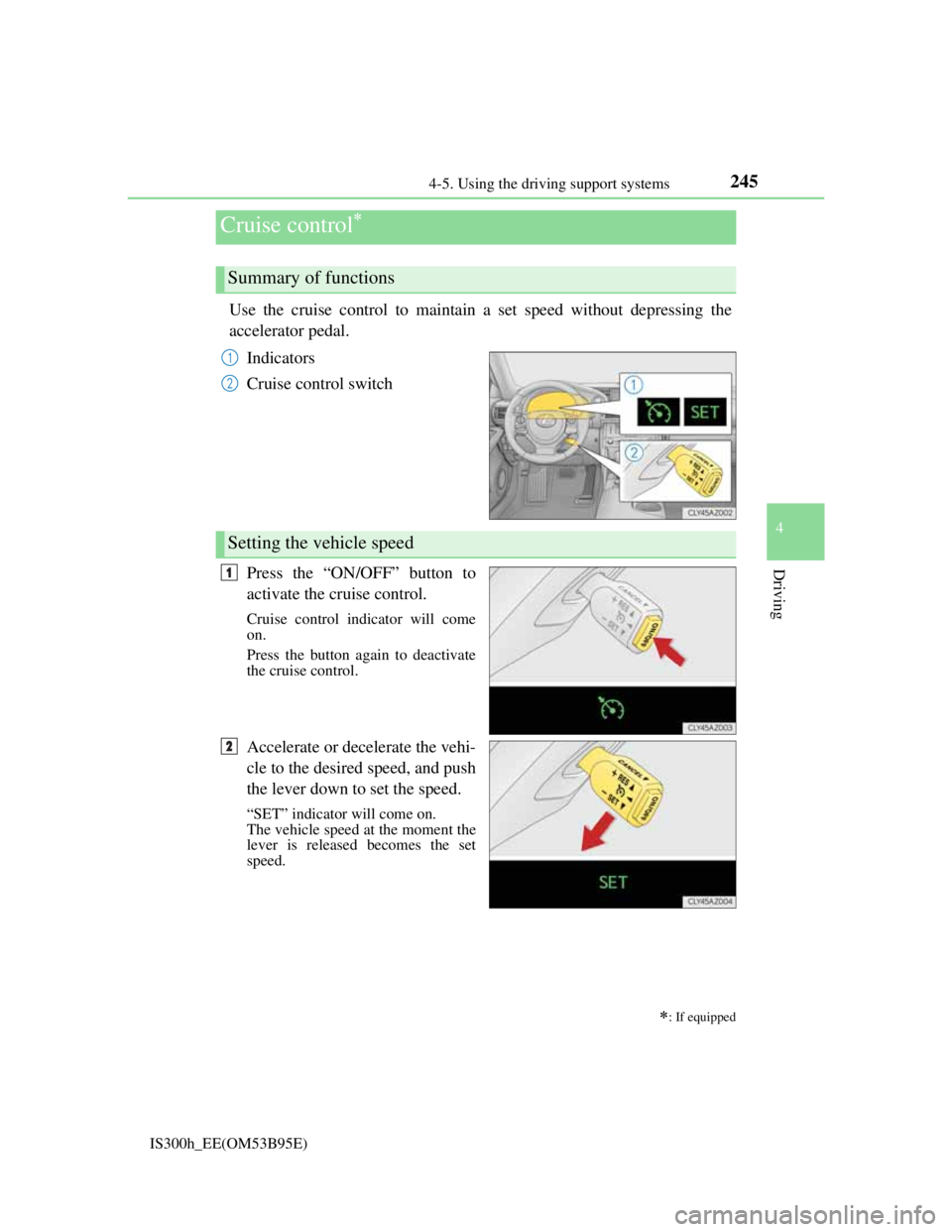
Use the cruise control to maintain a set speed without depressing the
accelerator pedal.
Indicators
Cruise control switch
Press the “ON/OFF” button to
activate the cruise control.
Cruise control indicator will come
on.
Press the button again to deactivate
the cruise control.
Accelerate or decelerate the vehi-
cle to the desired speed, and push
the lever down to set the speed.
“SET” indicator will come on.
The vehicle speed at the moment the
lever is released becomes the set
speed.
Cruise control
: If equipped
Summary of functions
1
2
Setting the vehicle speed
1
2
Page 249 of 628
2474-5. Using the driving support systems
4
Driving
IS300h_EE(OM53B95E)
Cruise control can be set when
The shift lever is in D or range 4 or higher of S has been selected.
Range 4 or higher of D has been selected by using the paddle shift.
Vehicle speed is above approximately 40 km/h (25 mph).
Accelerating after setting the vehicle speed
The vehicle can be accelerated normally. After acceleration, the set speed
resumes.
Even without canceling the cruise control, the set speed can be increased by
first accelerating the vehicle to the desired speed and then pushing the lever
down to set the new speed.
Automatic cruise control cancelation
Cruise control will stop maintaining the vehicle speed in any of the following sit-
uations.
Actual vehicle speed falls more than approximately 16 km/h (10 mph) below
the preset vehicle speed.
At this time, the memorized set speed is not retained.
Actual vehicle speed is below approximately 40 km/h (25 mph).
VSC is activated.
TRC is activated for a period of time.
When the VSC or TRC system is turned off by pressing the VSC OFF switch.
If the warning message for the cruise control is shown on the multi-information
display
Press the “ON/OFF” button once to deactivate the system, and then press the but-
ton again to reactivate the system.
If the cruise control speed cannot be set or if the cruise control cancels immedi-
ately after being activated, there may be a malfunction in the cruise control sys-
tem. Have the vehicle inspected by any authorized Lexus dealer or repairer, or
another duly qualified and equipped professional.
Page 250 of 628
2484-5. Using the driving support systems
IS300h_EE(OM53B95E)
CAUTION
To avoid operating the cruise control by mistake
Switch the cruise control off using the “ON/OFF” button when not in use.
Situations unsuitable for cruise control
Do not use cruise control in any of the following situations.
Doing so may result in loss of control and could cause an accident resulting in
death or serious injury.
In heavy traffic
On roads with sharp bends
On winding roads
On slippery roads, such as those covered with rain, ice or snow
On steep hills
Vehicle speed may exceed the set speed when driving down a steep hill.
When your vehicle is towing a trailer or during emergency towing
Page 252 of 628
2504-5. Using the driving support systems
IS300h_EE(OM53B95E)
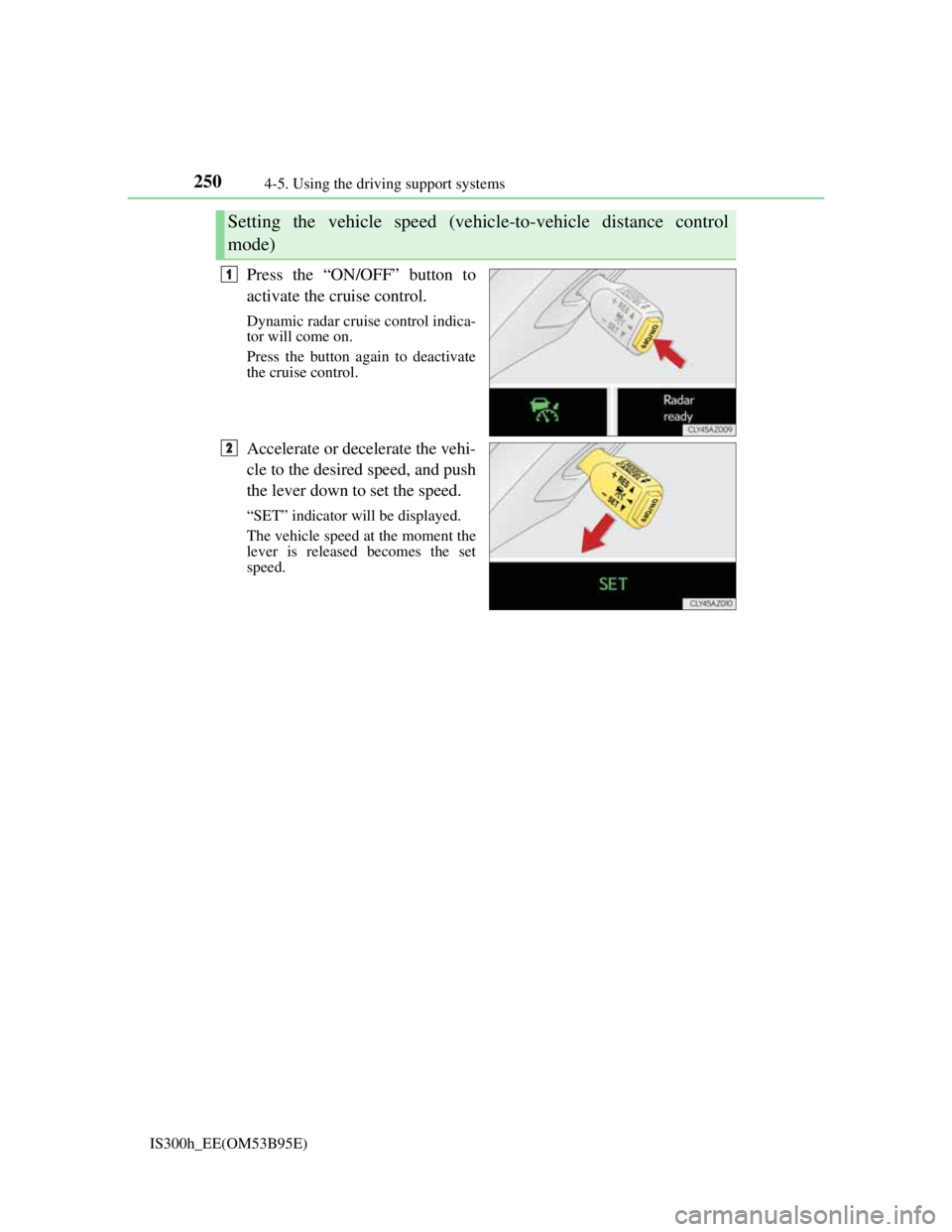
Press the “ON/OFF” button to
activate the cruise control.
Dynamic radar cruise control indica-
tor will come on.
Press the button again to deactivate
the cruise control.
Accelerate or decelerate the vehi-
cle to the desired speed, and push
the lever down to set the speed.
“SET” indicator will be displayed.
The vehicle speed at the moment the
lever is released becomes the set
speed.
Setting the vehicle speed (vehicle-to-vehicle distance control
mode)
1
2
Page 254 of 628
2524-5. Using the driving support systems
IS300h_EE(OM53B95E)
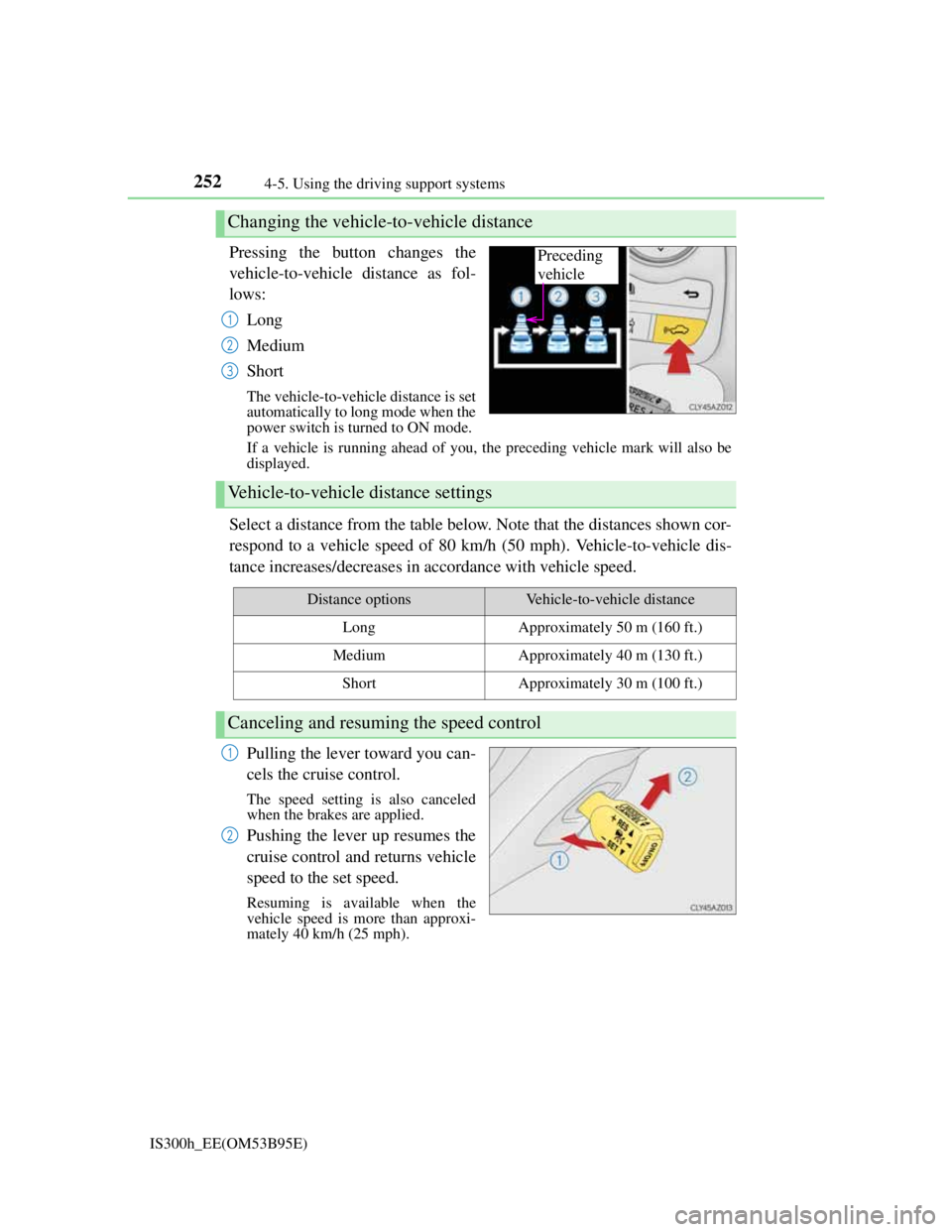
Pressing the button changes the
vehicle-to-vehicle distance as fol-
lows:
Long
Medium
Short
The vehicle-to-vehicle distance is set
automatically to long mode when the
power switch is turned to ON mode.
If a vehicle is running ahead of you, the preceding vehicle mark will also be
displayed.
Select a distance from the table below. Note that the distances shown cor-
respond to a vehicle speed of 80 km/h (50 mph). Vehicle-to-vehicle dis-
tance increases/decreases in accordance with vehicle speed.
Pulling the lever toward you can-
cels the cruise control.
The speed setting is also canceled
when the brakes are applied.
Pushing the lever up resumes the
cruise control and returns vehicle
speed to the set speed.
Resuming is available when the
vehicle speed is more than approxi-
mately 40 km/h (25 mph).
Changing the vehicle-to-vehicle distance
Preceding
vehicle
1
2
3
Vehicle-to-vehicle distance settings
Distance optionsVehicle-to-vehicle distance
LongApproximately 50 m (160 ft.)
MediumApproximately 40 m (130 ft.)
ShortApproximately 30 m (100 ft.)
Canceling and resuming the speed control
1
2
Page 256 of 628
2544-5. Using the driving support systems
IS300h_EE(OM53B95E)The system accelerates until the set speed is reached. The system then returns
to constant speed cruising.
When your vehicle is too close to a vehicle ahead, and sufficient auto-
matic deceleration via the cruise control is not possible, the display will
flash and the buzzer will sound to alert the driver. An example of this
would be if another driver cuts in front of you while you are following a
vehicle. Apply the brakes to ensure an appropriate vehicle-to-vehicle dis-
tance.
Warnings may not occur when
In the following instances, there is a possibility that the warnings will
not occur:
When the speed of the vehicle ahead matches or exceeds your vehi-
cle speed
When the vehicle ahead is traveling at an extremely slow speed
Immediately after the cruise control speed was set
At the instant the accelerator is applied
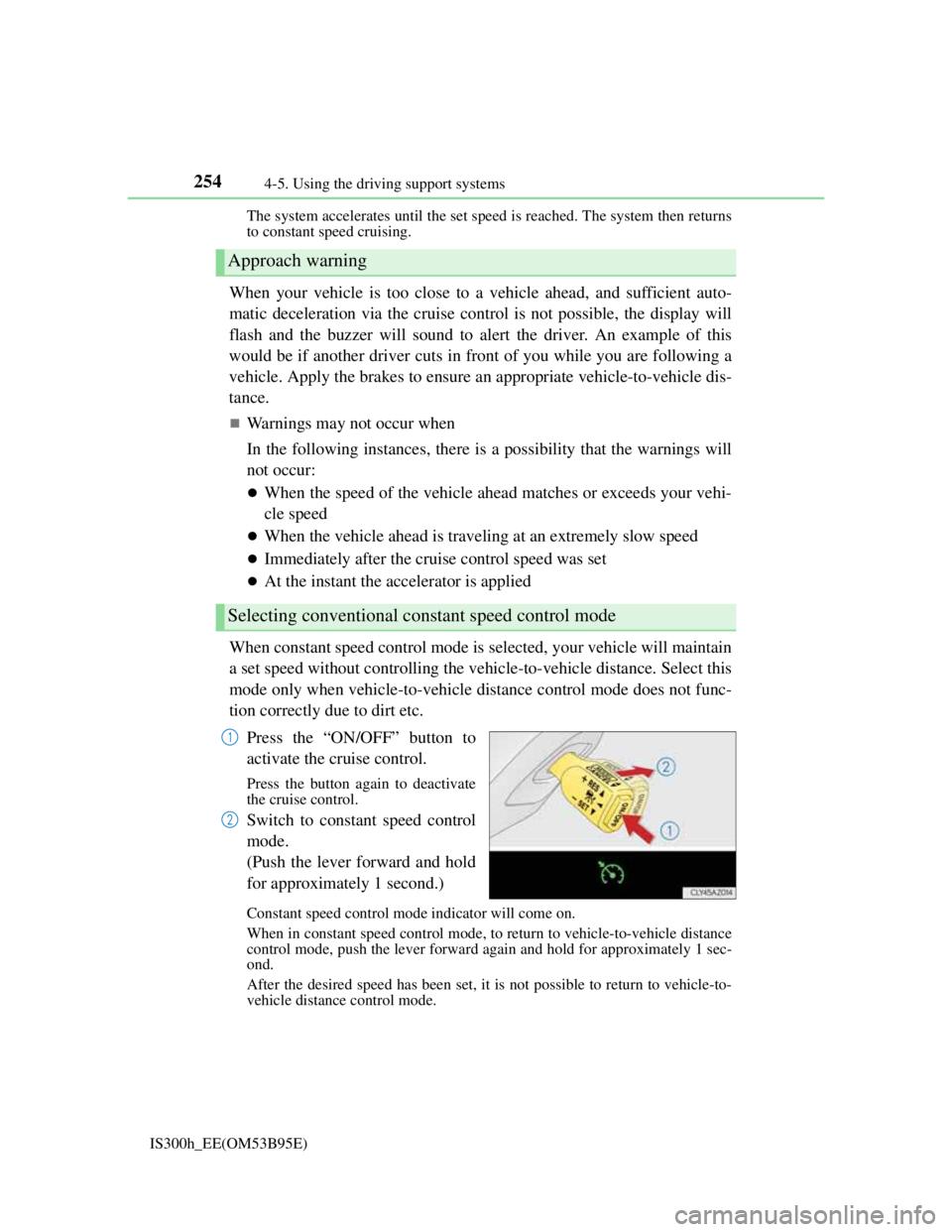
When constant speed control mode is selected, your vehicle will maintain
a set speed without controlling the vehicle-to-vehicle distance. Select this
mode only when vehicle-to-vehicle distance control mode does not func-
tion correctly due to dirt etc.
Press the “ON/OFF” button to
activate the cruise control.
Press the button again to deactivate
the cruise control.
Switch to constant speed control
mode.
(Push the lever forward and hold
for approximately 1 second.)
Constant speed control mode indicator will come on.
When in constant speed control mode, to return to vehicle-to-vehicle distance
control mode, push the lever forward again and hold for approximately 1 sec-
ond.
After the desired speed has been set, it is not possible to return to vehicle-to-
vehicle distance control mode.
Approach warning
Selecting conventional constant speed control mode
1
2