Button Lexus IS300h 2013 Repair Manual
[x] Cancel search | Manufacturer: LEXUS, Model Year: 2013, Model line: IS300h, Model: Lexus IS300h 2013Pages: 628, PDF Size: 20.23 MB
Page 415 of 628
4016-1. Using the air conditioning system
6
Interior features
IS300h_EE(OM53B95E)
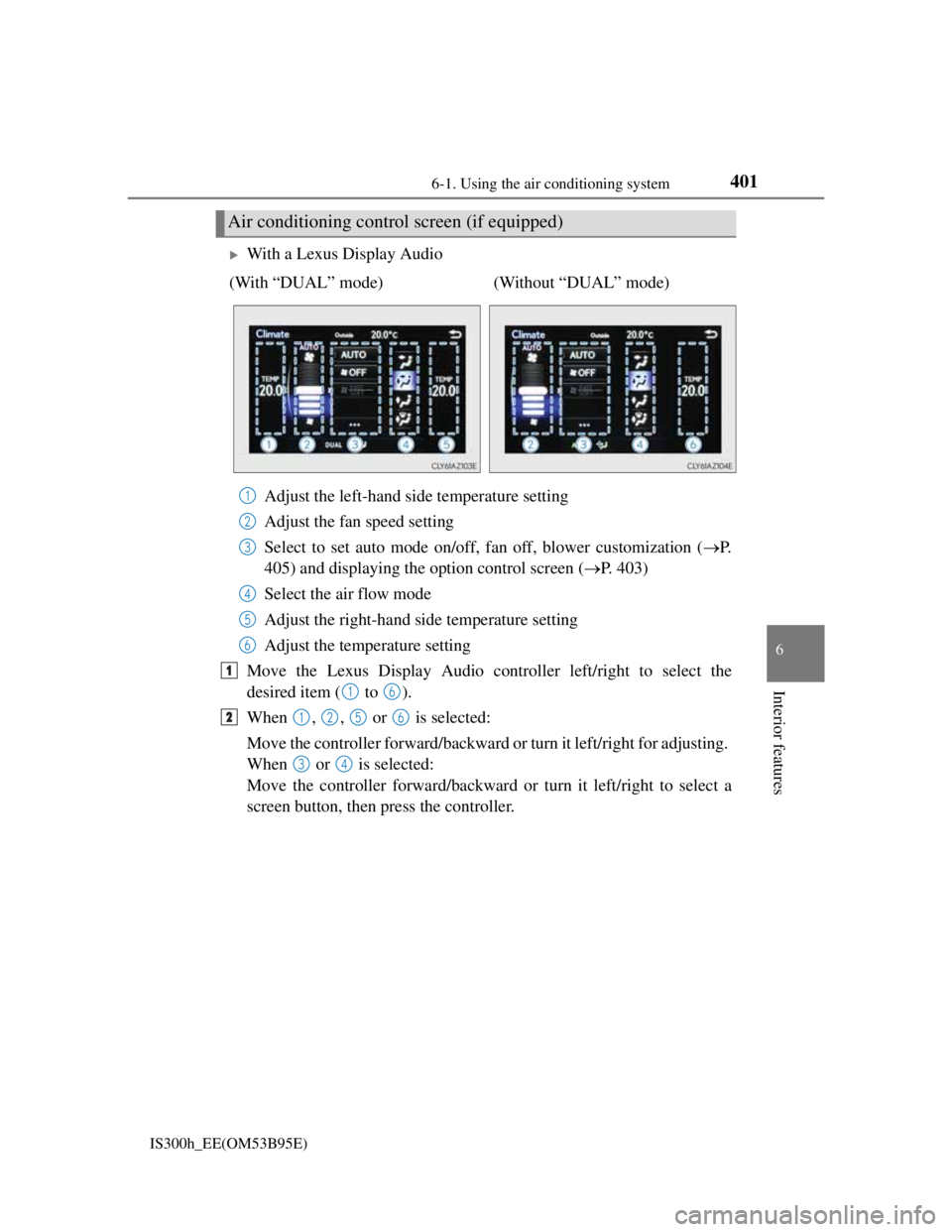
With a Lexus Display Audio
Adjust the left-hand side temperature setting
Adjust the fan speed setting
Select to set auto mode on/off, fan off, blower customization (P.
405) and displaying the option control screen (P. 403)
Select the air flow mode
Adjust the right-hand side temperature setting
Adjust the temperature setting
Move the Lexus Display Audio controller left/right to select the
desired item ( to ).
When , , or is selected:
Move the controller forward/backward or turn it left/right for adjusting.
When or is selected:
Move the controller forward/backward or turn it left/right to select a
screen button, then press the controller.
Air conditioning control screen (if equipped)
(With “DUAL” mode) (Without “DUAL” mode)
1
2
3
4
5
6
1
16
21256
34
Page 416 of 628
4026-1. Using the air conditioning system
IS300h_EE(OM53B95E)
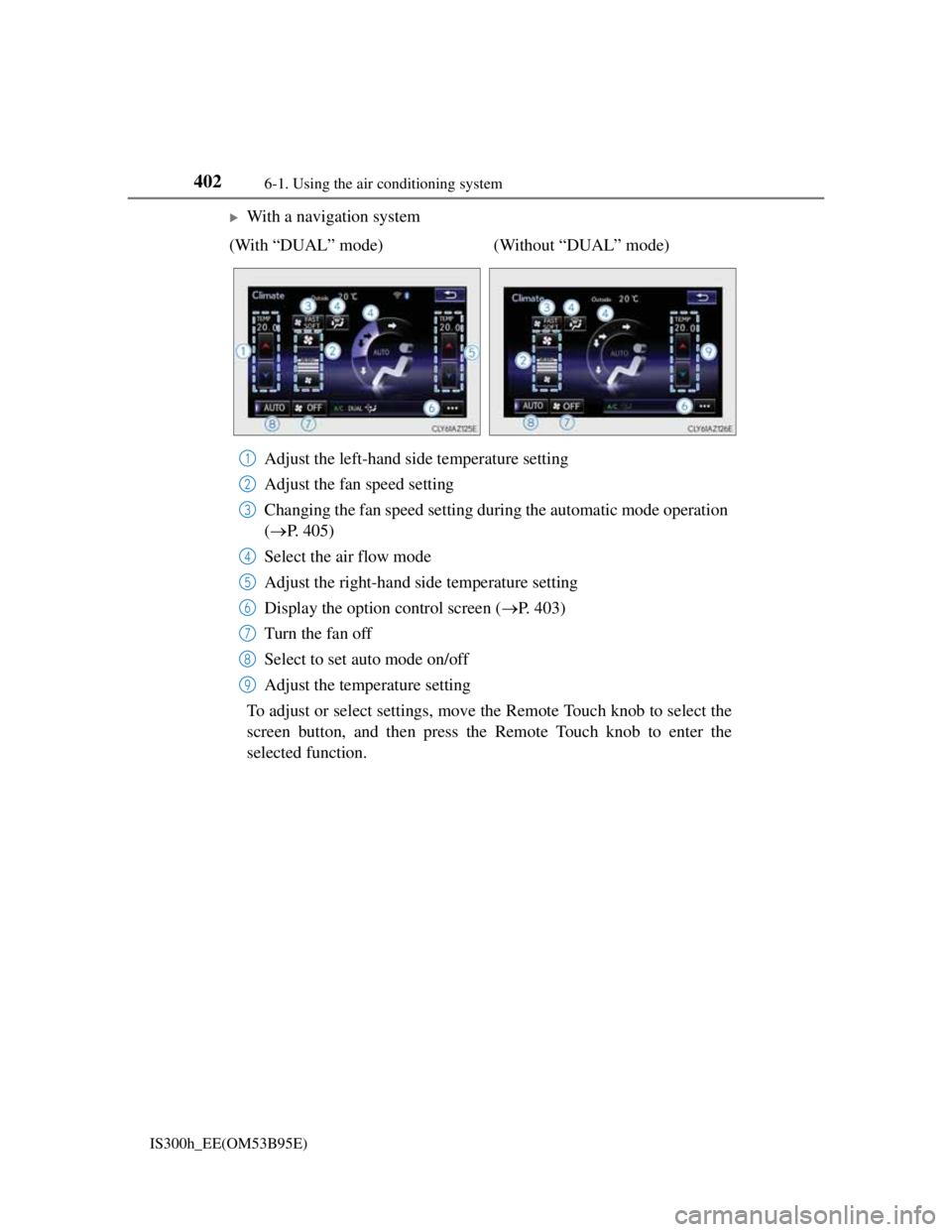
With a navigation system
Adjust the left-hand side temperature setting
Adjust the fan speed setting
Changing the fan speed setting during the automatic mode operation
(P. 405)
Select the air flow mode
Adjust the right-hand side temperature setting
Display the option control screen (P. 403)
Turn the fan off
Select to set auto mode on/off
Adjust the temperature setting
To adjust or select settings, move the Remote Touch knob to select the
screen button, and then press the Remote Touch knob to enter the
selected function. (With “DUAL” mode) (Without “DUAL” mode)
1
2
3
4
5
6
7
8
9
Page 418 of 628
4046-1. Using the air conditioning system
IS300h_EE(OM53B95E)
Switching between outside air and recirculated air modes
Press to change to recirculated air mode.
Press to change to outside air mode.
The indicator above the selected button comes on.
Pollen removal mode (if equipped)
Pollen is removed from the air and the air flows to the upper part of the
body.
Select
on the option control screen.
When the pollen removal mode is on, is displayed on the air condi-
tioning control screen.
In order to prevent the windshield from fogging up when the outside air is
cold, the dehumidification function may operate.
The pollens are filtered out even if the pollen removal mode is turned off.
Defogging the windshield
Defoggers are used to defog the windshield and front side windows.
Press .
Set the outside/recirculated air mode button to outside air mode if the recir-
culated air mode is used. (It may switch automatically.)
To defog the windshield and the side windows early, turn the air flow and
temperature up.
To return to the previous mode, press again when the windshield is
defogged.
Defogging the rear window and outside rear view mirrors
Defoggers are used to defog the rear window, and to remove raindrops,
dew and frost from the outside rear view mirrors.
Press .
The defoggers will automatically turn off after a period of time.
Other functions
Page 421 of 628

4076-1. Using the air conditioning system
6
Interior features
IS300h_EE(OM53B95E)
Registering air conditioning settings to electronic keys (vehicles with driving
position memory)
Unlocking the vehicle using an electronic key and turning the power switch to
ON mode will recall that key’s registered air conditioning settings.
When the power switch is turned off, the current air conditioning settings will
automatically be registered to the electronic key that was used to unlock the
vehicle.
The system may not operate correctly if more than one electronic key is in the
vicinity or if the smart entry & start system is used to unlock a passenger door.
The doors that can recall the air conditioning setting when unlocked using the
smart entry & start system can be changed.* For details, contact any authorized
Lexus dealer or repairer, or another duly qualified and equipped professional.
*: The doors that can recall the driving position memory are changed at the same
time.
Using automatic mode
Fan speed is adjusted automatically according to the temperature setting and the
ambient conditions.
Therefore, the fan may stop for a while until warm or cool air is ready to flow
immediately after is pressed or “AUTO” is selected.
Fogging up of the windows
The windows will easily fog up when the humidity in the vehicle is high. Turning
(“A/C”) on will dehumidify the air from the outlets and defog the wind-
shield effectively.
If you turn (“A/C”) off, the windows may fog up more easily.
The windows may fog up if the recirculated air mode is used.
Outside/recirculated air mode
When driving on dusty roads such as tunnels or in heavy traffic, set the outside/
recirculated air mode button to the recirculated air mode. This is effective in
preventing outside air from entering the vehicle interior. During cooling opera-
tion, setting the recirculated air mode will also cool the vehicle interior effec-
tively.
Outside/recirculated air mode may automatically switch depending on the tem-
perature setting or the inside temperature.
Operation of the air conditioning system in Eco drive mode
In Eco drive mode, the air conditioning system is controlled as follows to priori-
tize fuel efficiency:
Engine speed and compressor operation controlled to restrict heating/cooling
capacity
Fan speed restricted when automatic mode is selected
To improve air conditioning performance, perform the following operations:
Adjust the fan speed
Turn off Eco drive mode
Page 428 of 628
4146-3. Using the storage features
IS300h_EE(OM53B95E)
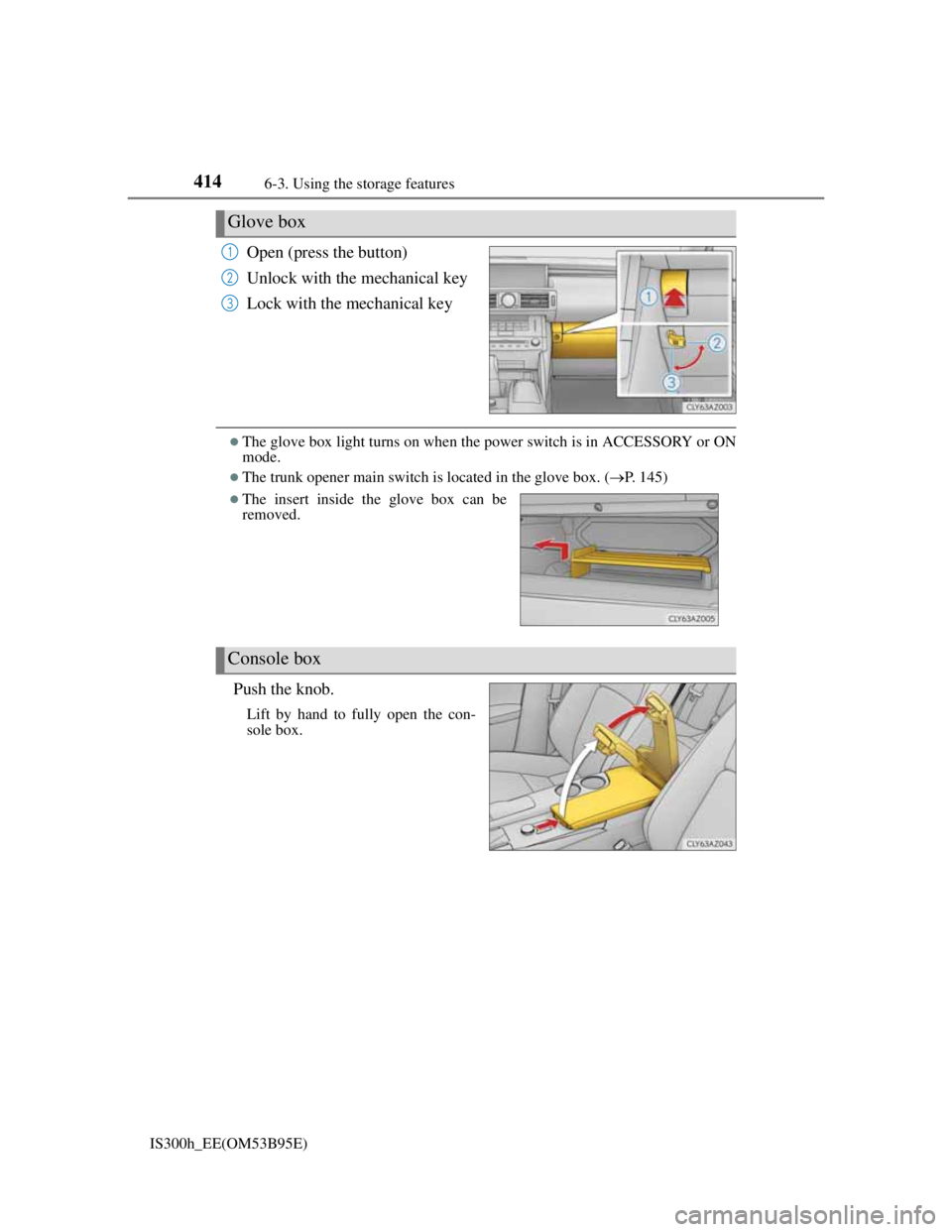
Open (press the button)
Unlock with the mechanical key
Lock with the mechanical key
The glove box light turns on when the power switch is in ACCESSORY or ON
mode.
The trunk opener main switch is located in the glove box. (P. 145)
Push the knob.
Lift by hand to fully open the con-
sole box.
Glove box
1
2
3
The insert inside the glove box can be
removed.
Console box
Page 429 of 628
4156-3. Using the storage features
6
Interior features
IS300h_EE(OM53B95E)
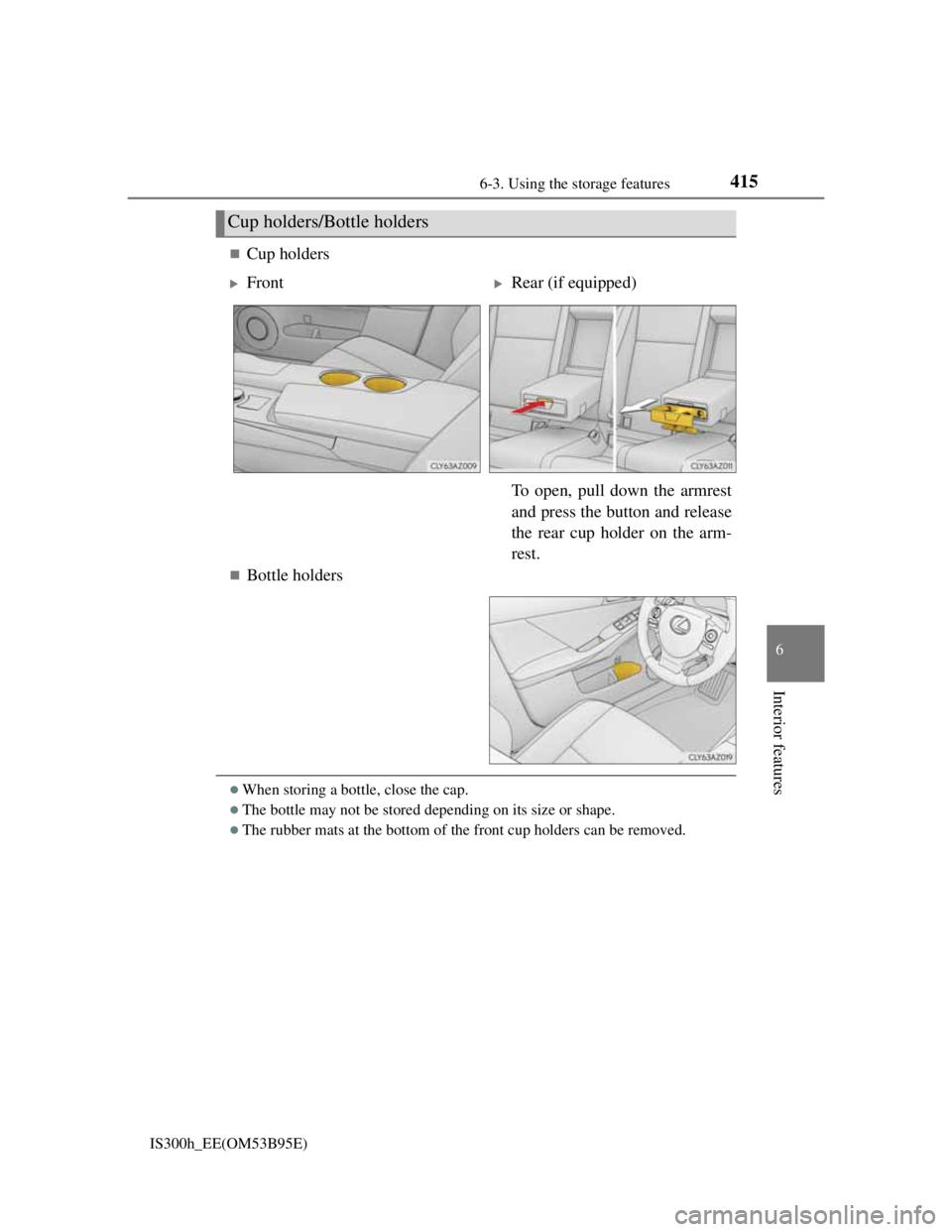
Cup holders
Bottle holders
When storing a bottle, close the cap.
The bottle may not be stored depending on its size or shape.
The rubber mats at the bottom of the front cup holders can be removed.
Cup holders/Bottle holders
FrontRear (if equipped)
To open, pull down the armrest
and press the button and release
the rear cup holder on the arm-
rest.
Page 437 of 628
4236-4. Using the other interior features
6
Interior features
IS300h_EE(OM53B95E)
The rear sunshade can be used when the power switch is in ON mode.
The rear sunshade can be operated for approximately 1 minute even after the
power switch is turned to ACCESSORY mode or turned off.
Reverse operation feature: To ensure adequate rear visibility, the rear sunshade
automatically lowers when the shift lever is shifted to R.
However, the rear sunshade is raised again if any of the following occurs:
• The button is pressed again.
*
• The shift lever is shifted into P.
• The shift lever is shifted out of R, and the vehicle reaches a speed of 15 km/
h (9 mph).
If the hybrid system is off when the rear sunshade has been lowered due to the
reverse operation feature, it will not be raised even when the hybrid system is
turned on again and the vehicle reaches a speed of 15 km/h (9 mph). To raise
the sunshade again, press the button.
*: Occasionally, the reverse function may not be carried out after the switch has
been pressed. Repeat the above operation to operate the function.
CAUTION
When the rear sunshade is being operated, do not place fingers or other objects
in the fastener section or in the opening. They may get caught, causing injury.
NOTICE
To prevent 12-volt battery discharge, do not operate the rear sunshade when
the hybrid system is off.
Observe the following precautions to ensure normal operation of the rear sun-
shade.
• Do not place excessive load on the motor or other components of the rear
sunshade.
• Do not place objects where they may hinder opening and closing opera-
tions.
• Do not attach items to the rear sunshade.
• Keep the opening clean and clear of obstructions.
• Do not operate the rear sunshade continuously for long periods of time.
Page 533 of 628
5198-2. Steps to take in an emergency
8
When trouble arises
IS300h_EE(OM53B95E)
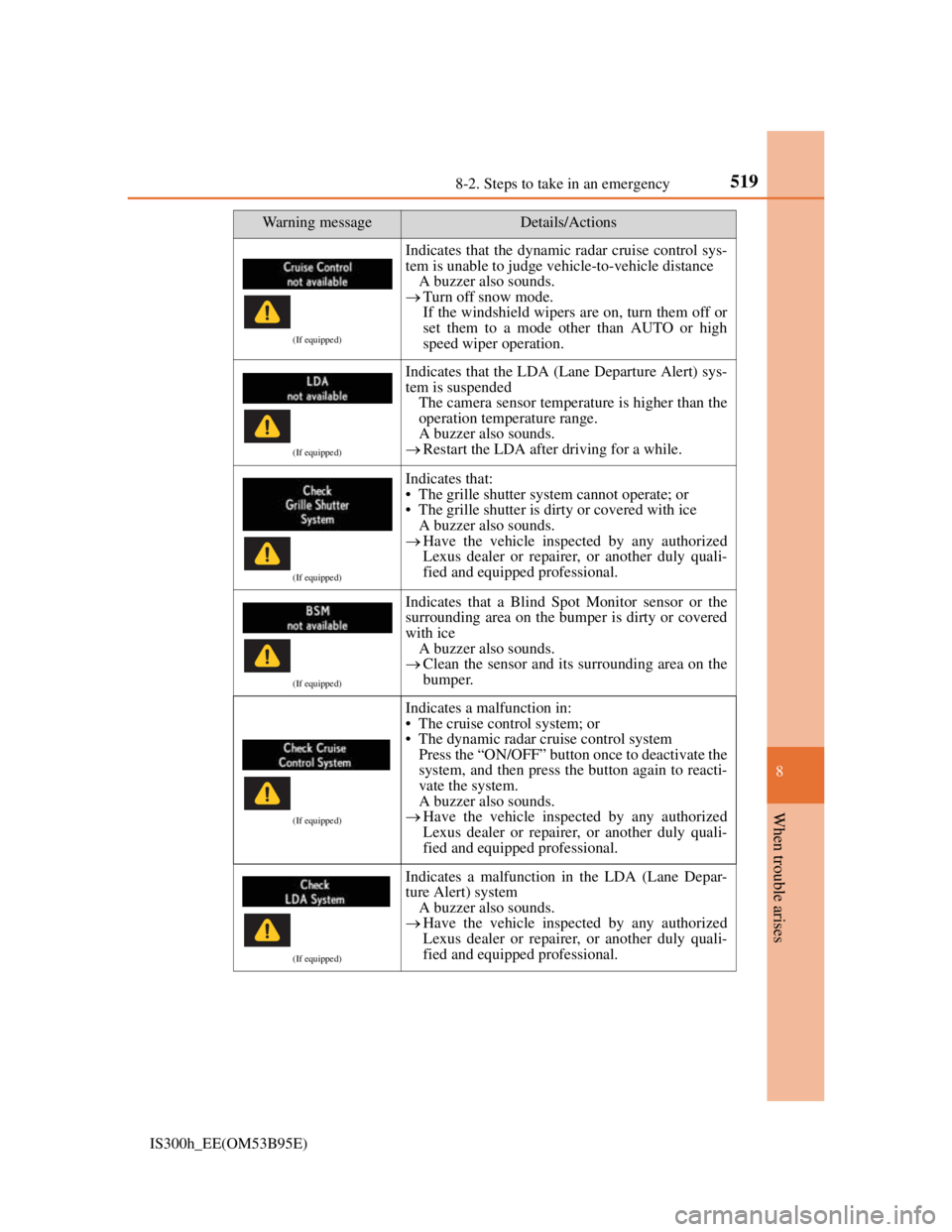
(If equipped)
Indicates that the dynamic radar cruise control sys-
tem is unable to judge vehicle-to-vehicle distance
A buzzer also sounds.
Turn off snow mode.
If the windshield wipers are on, turn them off or
set them to a mode other than AUTO or high
speed wiper operation.
(If equipped)
Indicates that the LDA (Lane Departure Alert) sys-
tem is suspended
The camera sensor temperature is higher than the
operation temperature range.
A buzzer also sounds.
Restart the LDA after driving for a while.
(If equipped)
Indicates that:
• The grille shutter system cannot operate; or
• The grille shutter is dirty or covered with ice
A buzzer also sounds.
Have the vehicle inspected by any authorized
Lexus dealer or repairer, or another duly quali-
fied and equipped professional.
(If equipped)
Indicates that a Blind Spot Monitor sensor or the
surrounding area on the bumper is dirty or covered
with ice
A buzzer also sounds.
Clean the sensor and its surrounding area on the
bumper.
(If equipped)
Indicates a malfunction in:
• The cruise control system; or
• The dynamic radar cruise control system
Press the “ON/OFF” button once to deactivate the
system, and then press the button again to reacti-
vate the system.
A buzzer also sounds.
Have the vehicle inspected by any authorized
Lexus dealer or repairer, or another duly quali-
fied and equipped professional.
(If equipped)
Indicates a malfunction in the LDA (Lane Depar-
ture Alert) system
A buzzer also sounds.
Have the vehicle inspected by any authorized
Lexus dealer or repairer, or another duly quali-
fied and equipped professional.
Warning messageDetails/Actions
Page 541 of 628
5278-2. Steps to take in an emergency
8
When trouble arises
IS300h_EE(OM53B95E)
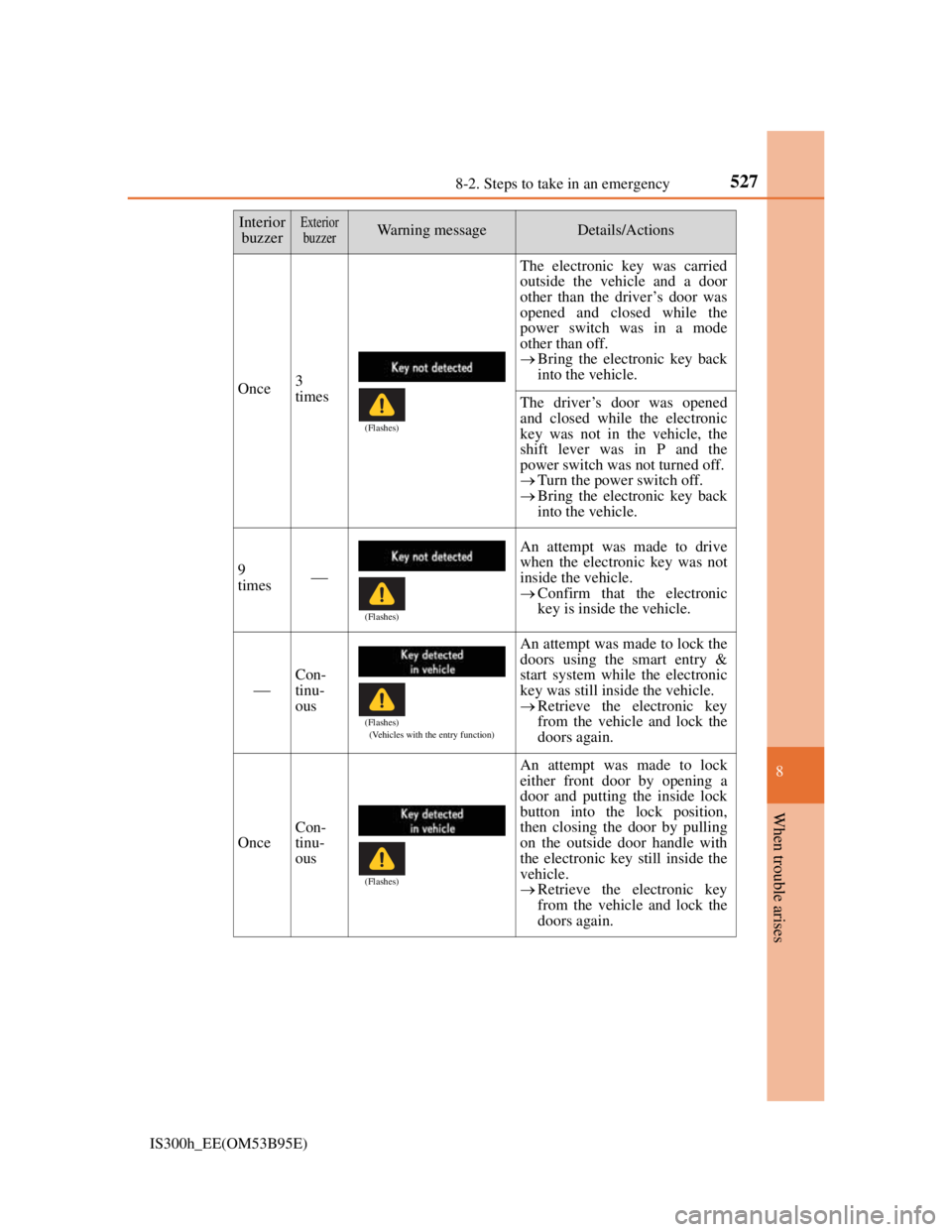
Once3
times
The electronic key was carried
outside the vehicle and a door
other than the driver’s door was
opened and closed while the
power switch was in a mode
other than off.
Bring the electronic key back
into the vehicle.
The driver’s door was opened
and closed while the electronic
key was not in the vehicle, the
shift lever was in P and the
power switch was not turned off.
Turn the power switch off.
Bring the electronic key back
into the vehicle.
9
times
An attempt was made to drive
when the electronic key was not
inside the vehicle.
Confirm that the electronic
key is inside the vehicle.
Con-
tinu-
ous
An attempt was made to lock the
doors using the smart entry &
start system while the electronic
key was still inside the vehicle.
Retrieve the electronic key
from the vehicle and lock the
doors again.
Once
Con-
tinu-
ous
An attempt was made to lock
either front door by opening a
door and putting the inside lock
button into the lock position,
then closing the door by pulling
on the outside door handle with
the electronic key still inside the
vehicle.
Retrieve the electronic key
from the vehicle and lock the
doors again.
Interior
buzzerExterior
buzzerWarning messageDetails/Actions
(Flashes)
(Flashes)
(Flashes)
(Vehicles with the entry function)
(Flashes)
Page 562 of 628
5488-2. Steps to take in an emergency
IS300h_EE(OM53B95E)
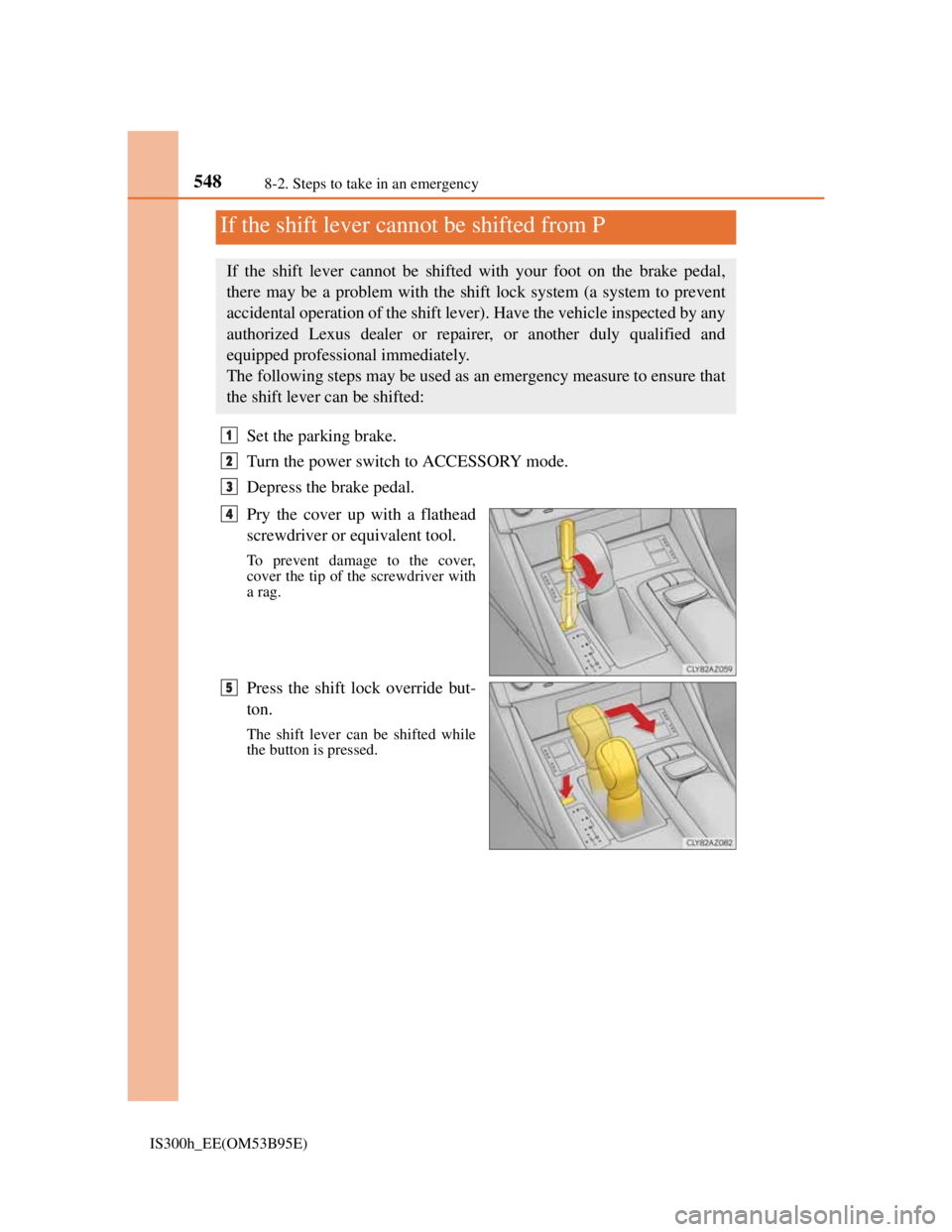
Set the parking brake.
Turn the power switch to ACCESSORY mode.
Depress the brake pedal.
Pry the cover up with a flathead
screwdriver or equivalent tool.
To prevent damage to the cover,
cover the tip of the screwdriver with
a rag.
Press the shift lock override but-
ton.
The shift lever can be shifted while
the button is pressed.
If the shift lever cannot be shifted from P
If the shift lever cannot be shifted with your foot on the brake pedal,
there may be a problem with the shift lock system (a system to prevent
accidental operation of the shift lever). Have the vehicle inspected by any
authorized Lexus dealer or repairer, or another duly qualified and
equipped professional immediately.
The following steps may be used as an emergency measure to ensure that
the shift lever can be shifted:
1
2
3
4
5