dlc3 LEXUS LS430 2003 Factory Manual Online
[x] Cancel search | Manufacturer: LEXUS, Model Year: 2003, Model line: LS430, Model: LEXUS LS430 2003Pages: 4500, PDF Size: 87.45 MB
Page 588 of 4500
NG: REPAIR OR REPLACE AIR TUBE
OK:Go to next step
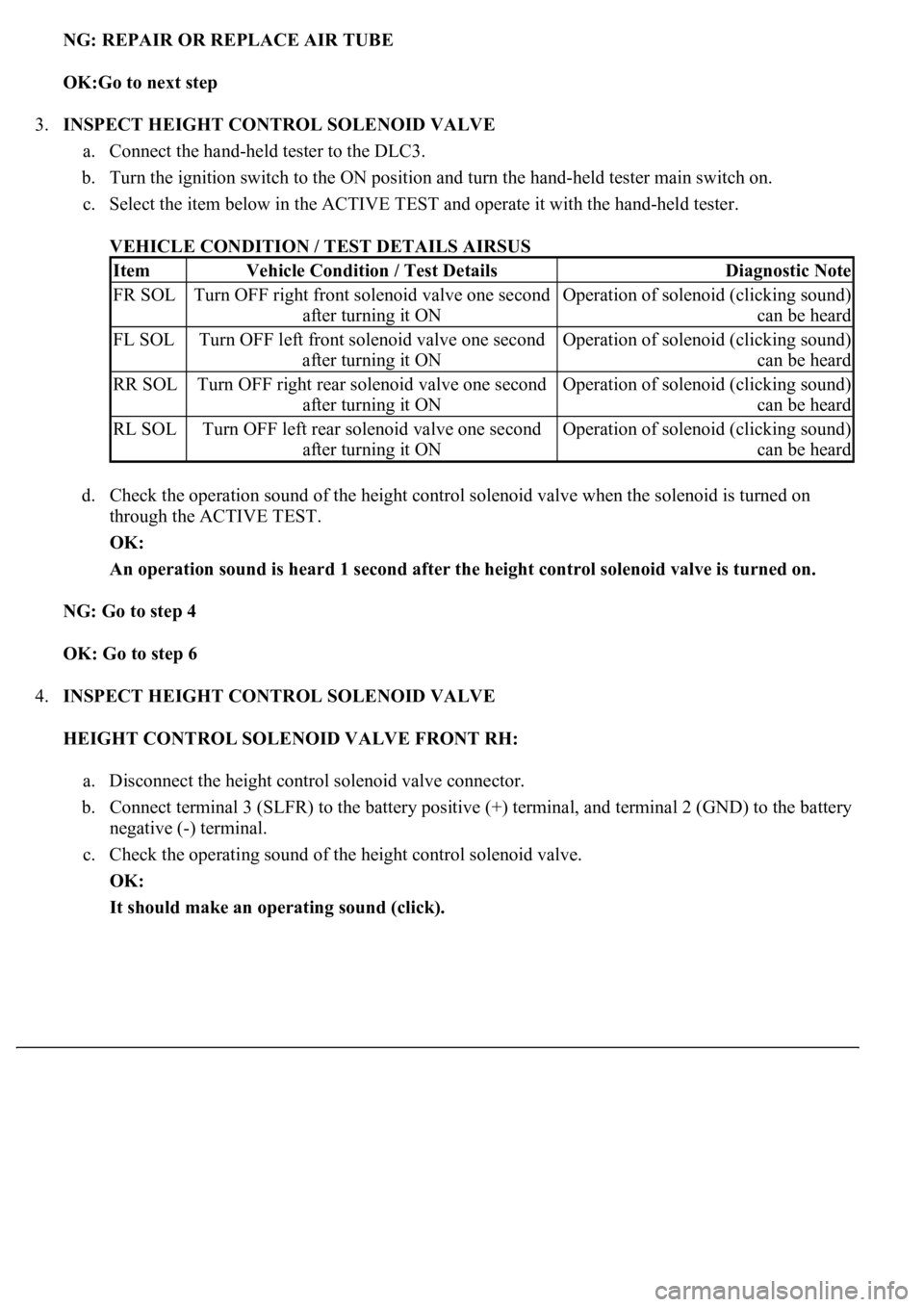
3.INSPECT HEIGHT CONTROL SOLENOID VALVE
a. Connect the hand-held tester to the DLC3.
b. Turn the ignition switch to the ON position and turn the hand-held tester main switch on.
c. Select the item below in the ACTIVE TEST and operate it with the hand-held tester.
VEHICLE CONDITION / TEST DETAILS AIRSUS
d. Check the operation sound of the height control solenoid valve when the solenoid is turned on
through the ACTIVE TEST.
OK:
An operation sound is heard 1 second after the height control solenoid valve is turned on.
NG: Go to step 4
OK: Go to step 6
4.INSPECT HEIGHT CONTROL SOLENOID VALVE
HEIGHT CONTROL SOLENOID VALVE FRONT RH:
a. Disconnect the height control solenoid valve connector.
b. Connect terminal 3 (SLFR) to the battery positive (+) terminal, and terminal 2 (GND) to the battery
negative (-) terminal.
c. Check the operating sound of the height control solenoid valve.
OK:
It should make an operating sound (click).
ItemVehicle Condition / Test DetailsDiagnostic Note
FR SOLTurn OFF right front solenoid valve one second
after turning it ONOperation of solenoid (clicking sound)
can be heard
FL SOLTurn OFF left front solenoid valve one second
after turning it ONOperation of solenoid (clicking sound)
can be heard
RR SOLTurn OFF right rear solenoid valve one second
after turning it ONOperation of solenoid (clicking sound)
can be heard
RL SOLTurn OFF left rear solenoid valve one second
after turning it ONOperation of solenoid (clicking sound)
can be heard
Page 599 of 4500
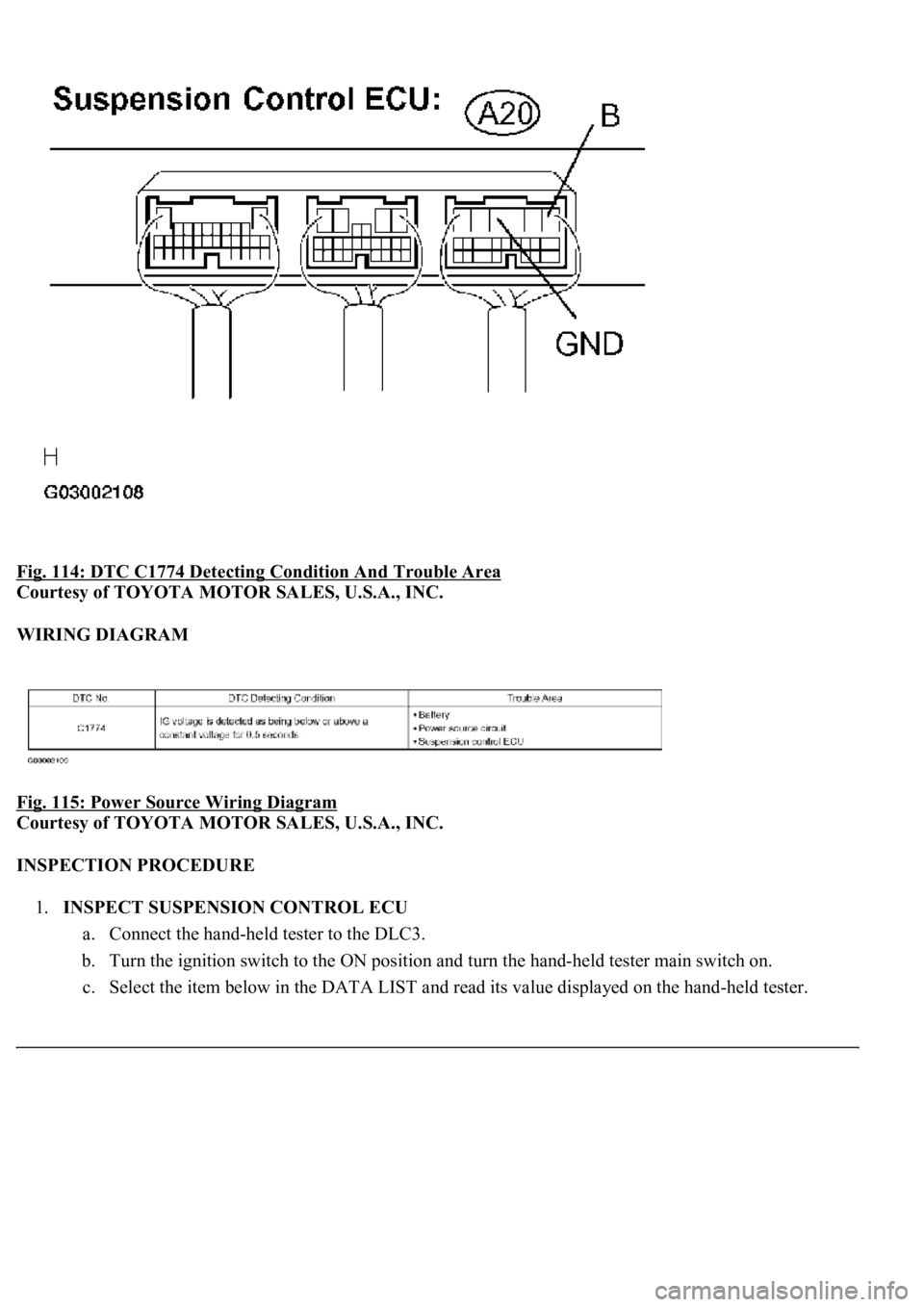
Fig. 114: DTC C1774 Detecting Condition And Trouble Area
Courtesy of TOYOTA MOTOR SALES, U.S.A., INC.
WIRING DIAGRAM
Fig. 115: Power Source Wiring Diagram
Courtesy of TOYOTA MOTOR SALES, U.S.A., INC.
INSPECTION PROCEDURE
1.INSPECT SUSPENSION CONTROL ECU
a. Connect the hand-held tester to the DLC3.
b. Turn the ignition switch to the ON position and turn the hand-held tester main switch on.
c. Select the item below in the DATA LIST and read its value displa
yed on the hand-held tester.
Page 606 of 4500
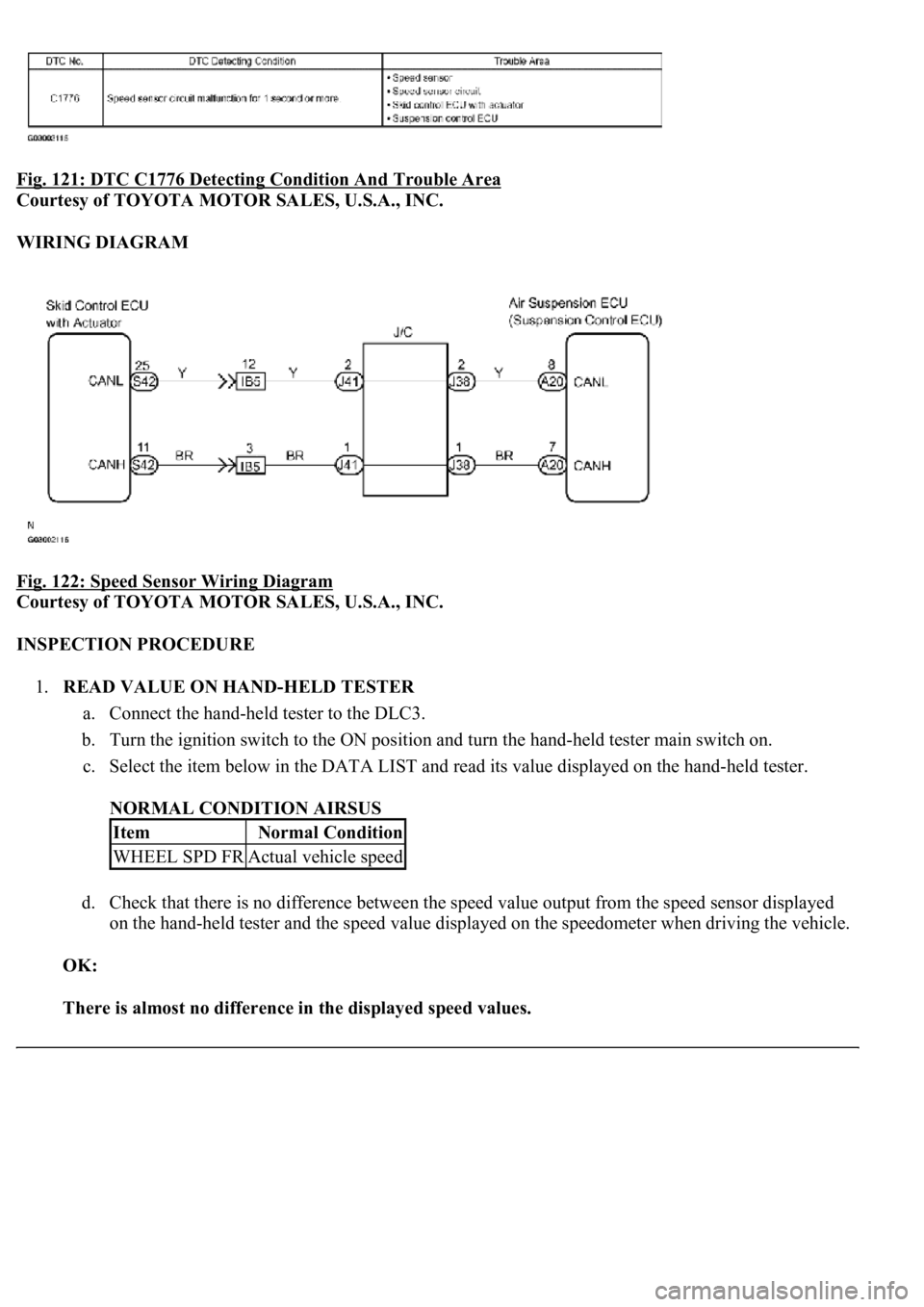
Fig. 121: DTC C1776 Detecting Condition And Trouble Area
Courtesy of TOYOTA MOTOR SALES, U.S.A., INC.
WIRING DIAGRAM
Fig. 122: Speed Sensor Wiring Diagram
Courtesy of TOYOTA MOTOR SALES, U.S.A., INC.
INSPECTION PROCEDURE
1.READ VALUE ON HAND-HELD TESTER
a. Connect the hand-held tester to the DLC3.
b. Turn the ignition switch to the ON position and turn the hand-held tester main switch on.
c. Select the item below in the DATA LIST and read its value displayed on the hand-held tester.
NORMAL CONDITION AIRSUS
d. Check that there is no difference between the speed value output from the speed sensor displayed
on the hand-held tester and the speed value displayed on the speedometer when driving the vehicle.
OK:
There is almost no difference in the displayed speed values.
ItemNormal Condition
WHEEL SPD FRActual vehicle speed
Page 608 of 4500
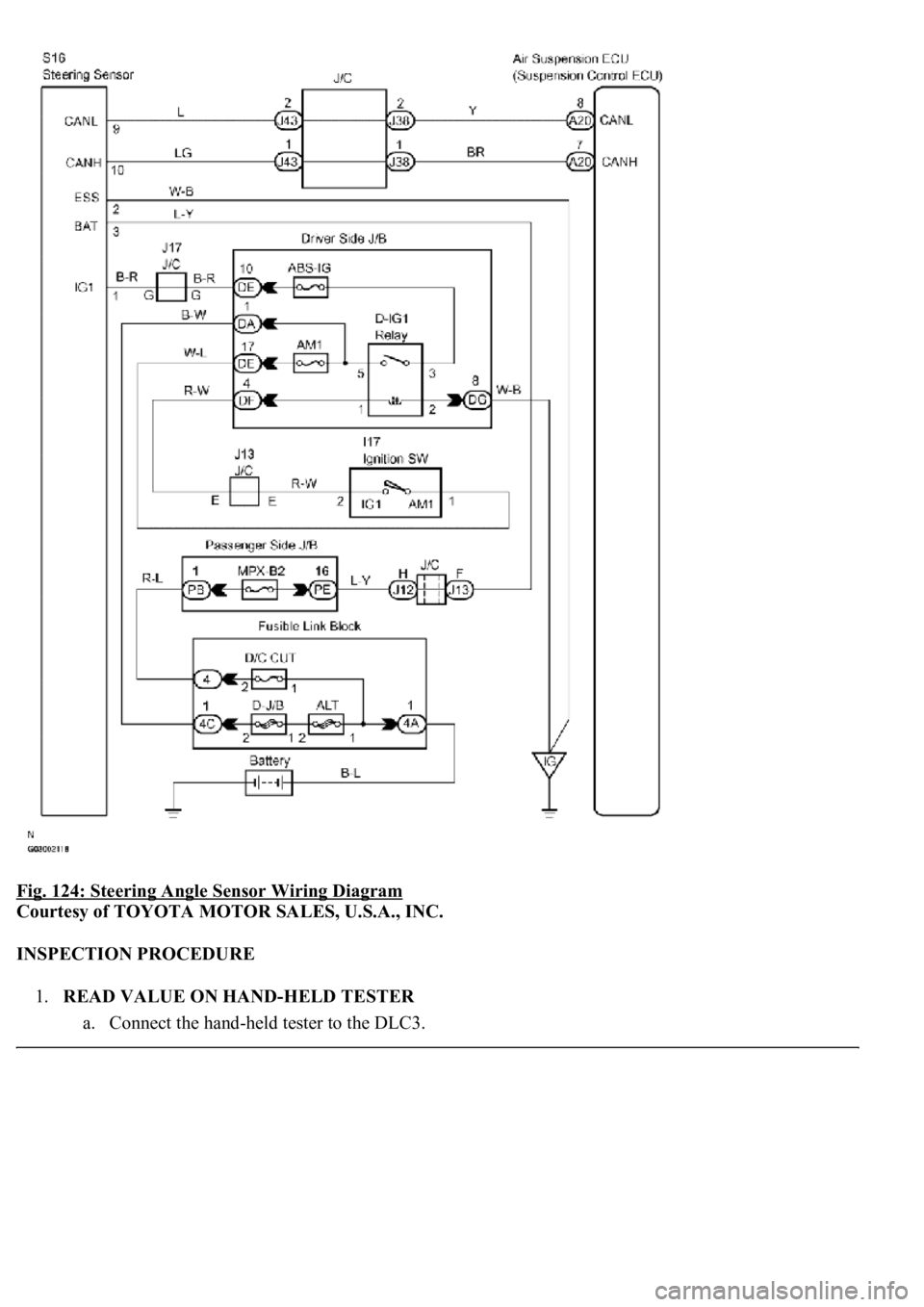
Fig. 124: Steering Angle Sensor Wiring Diagram
Courtesy of TOYOTA MOTOR SALES, U.S.A., INC.
INSPECTION PROCEDURE
1.READ VALUE ON HAND-HELD TESTER
a. Connect the han
d-held tester to the DLC3.
Page 611 of 4500
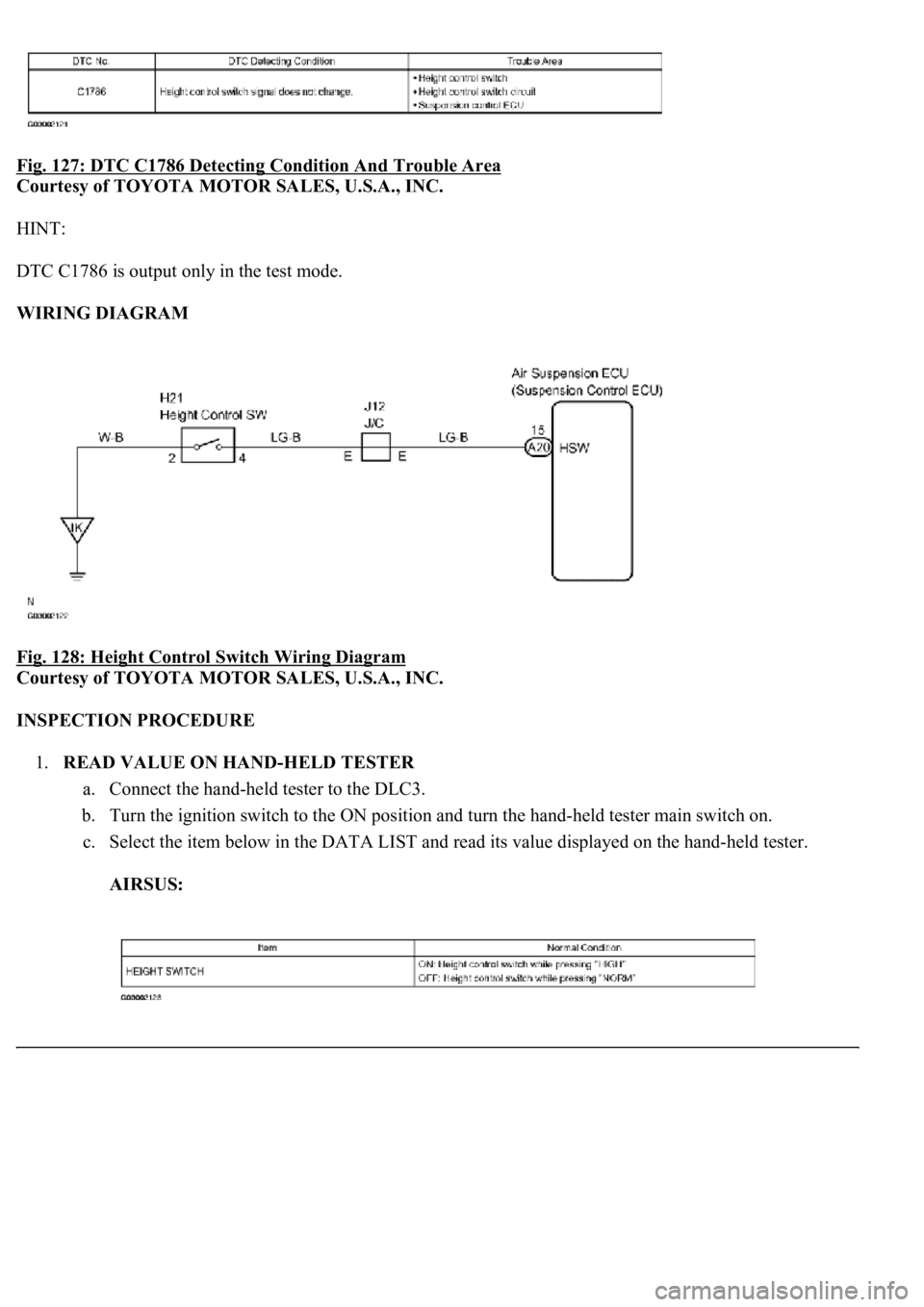
Fig. 127: DTC C1786 Detecting Condition And Trouble Area
Courtesy of TOYOTA MOTOR SALES, U.S.A., INC.
HINT:
DTC C1786 is output only in the test mode.
WIRING DIAGRAM
Fig. 128: Height Control Switch Wiring Diagram
Courtesy of TOYOTA MOTOR SALES, U.S.A., INC.
INSPECTION PROCEDURE
1.READ VALUE ON HAND-HELD TESTER
a. Connect the hand-held tester to the DLC3.
b. Turn the ignition switch to the ON position and turn the hand-held tester main switch on.
c. Select the item below in the DATA LIST and read its value displayed on the hand-held tester.
AIRSUS:
Page 629 of 4500
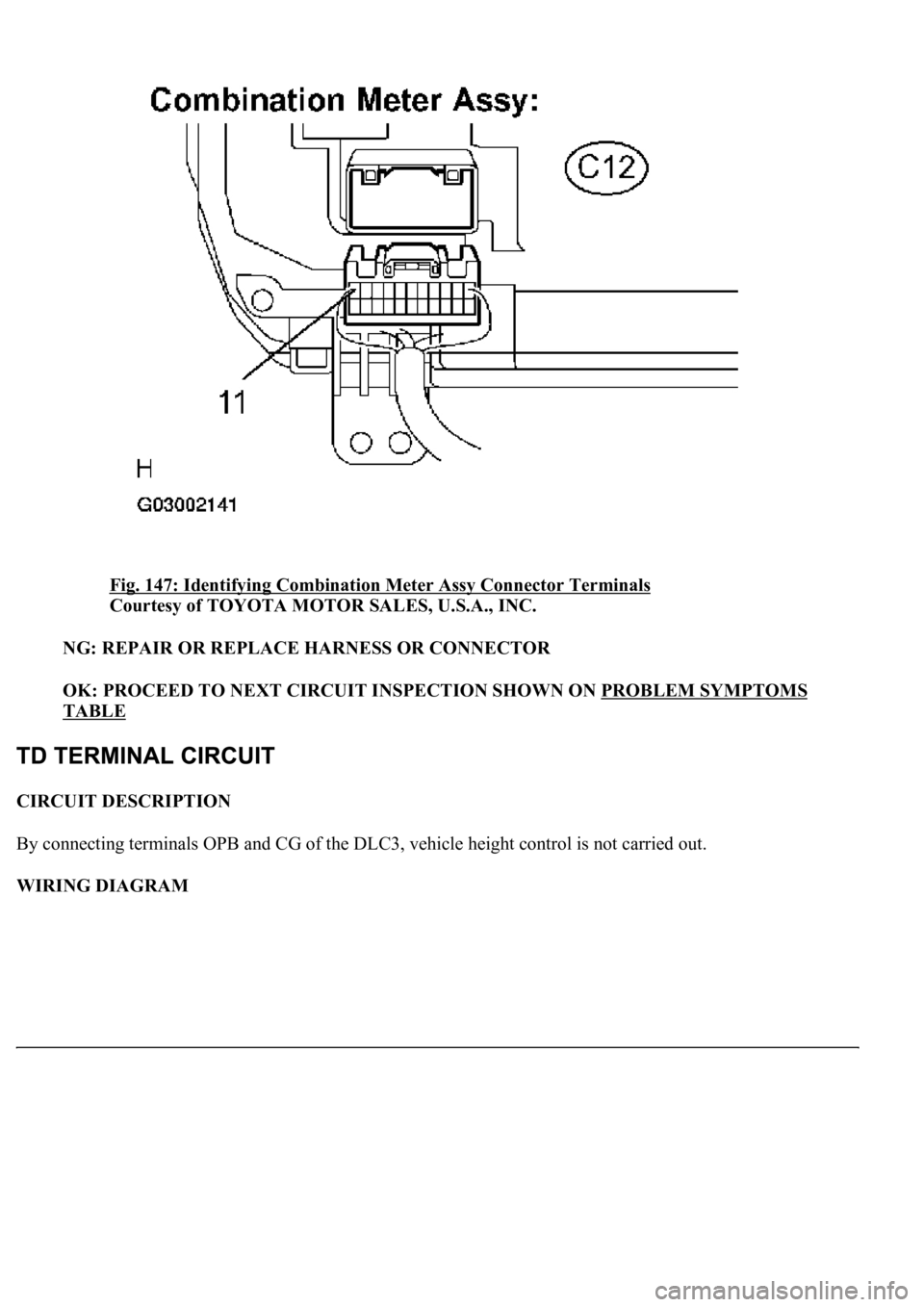
Fig. 147: Identifying Combination Meter Assy Connector Terminals
Courtesy of TOYOTA MOTOR SALES, U.S.A., INC.
NG: REPAIR OR REPLACE HARNESS OR CONNECTOR
OK: PROCEED TO NEXT CIRCUIT INSPECTION SHOWN ON PROBLEM SYMPTOMS
TABLE
CIRCUIT DESCRIPTION
By connecting terminals OPB and CG of the DLC3, vehicle height control is not carried out.
WIRING DIAGRAM
Page 630 of 4500
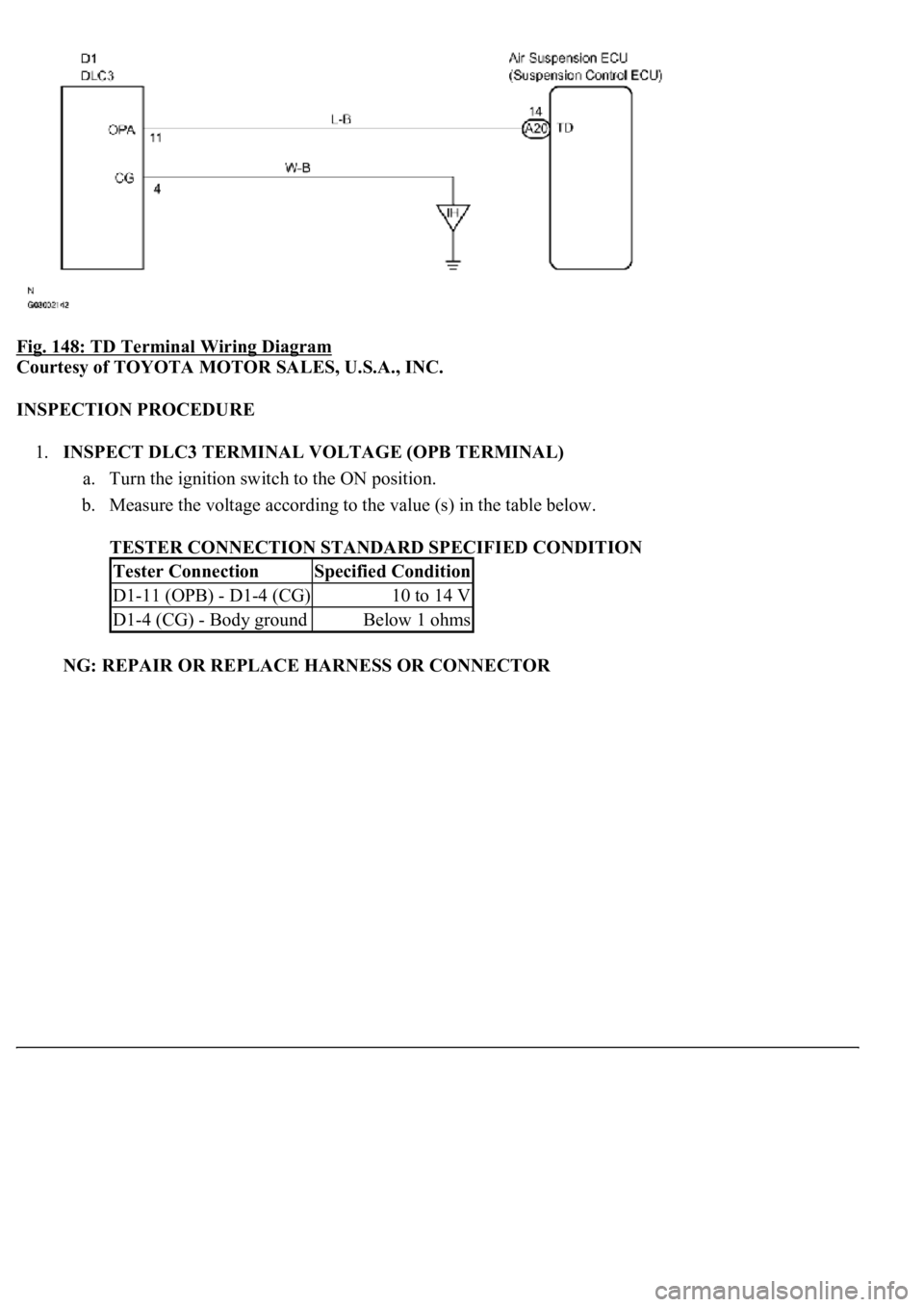
Fig. 148: TD Terminal Wiring Diagram
Courtesy of TOYOTA MOTOR SALES, U.S.A., INC.
INSPECTION PROCEDURE
1.INSPECT DLC3 TERMINAL VOLTAGE (OPB TERMINAL)
a. Turn the ignition switch to the ON position.
b. Measure the voltage according to the value (s) in the table below.
TESTER CONNECTION STANDARD SPECIFIED CONDITION
NG: REPAIR OR REPLACE HARNESS OR CONNECTOR
Tester ConnectionSpecified Condition
D1-11 (OPB) - D1-4 (CG)10 to 14 V
D1-4 (CG) - Body groundBelow 1 ohms
Page 631 of 4500
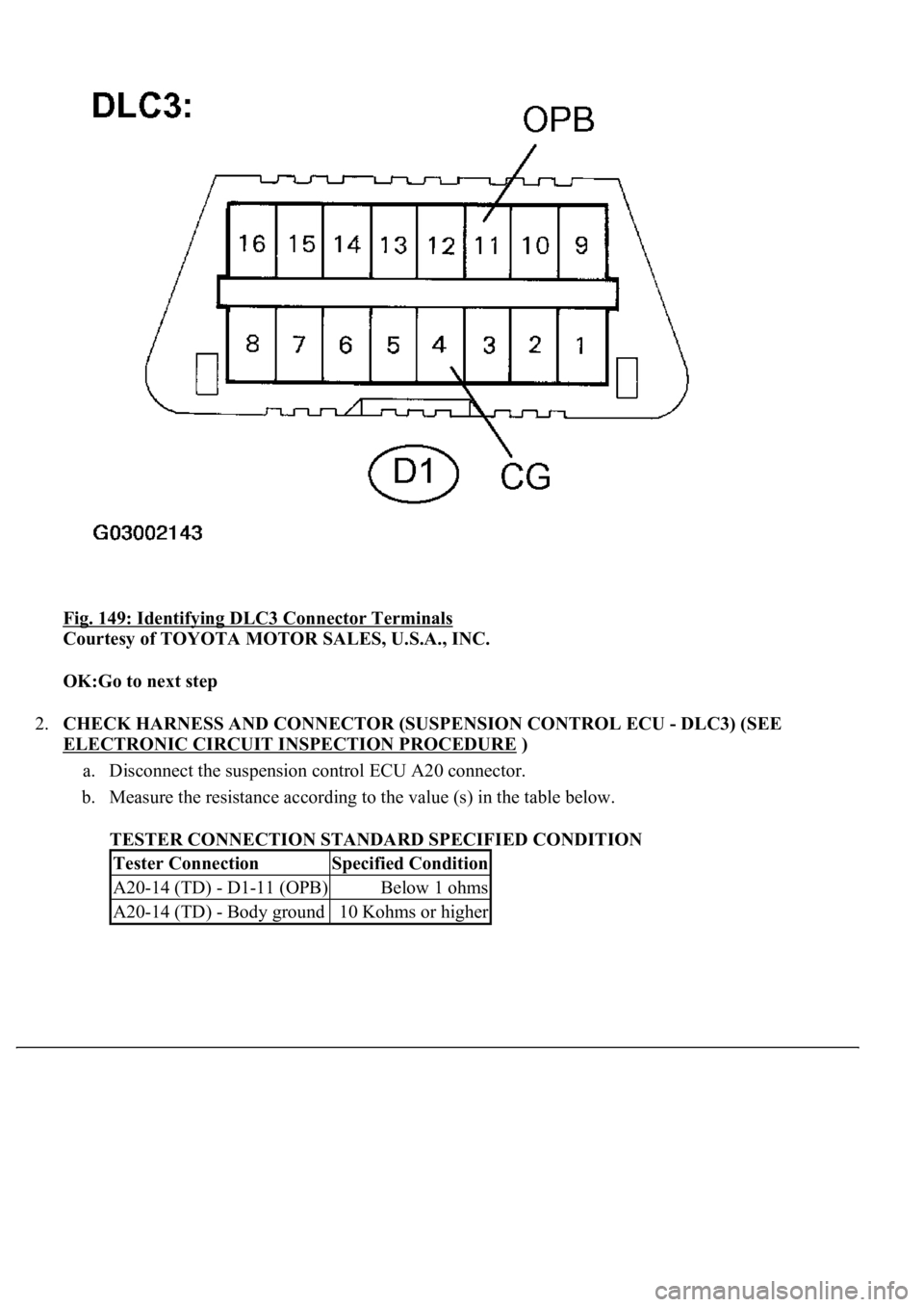
Fig. 149: Identifying DLC3 Connector Terminals
Courtesy of TOYOTA MOTOR SALES, U.S.A., INC.
OK:Go to next step
2.CHECK HARNESS AND CONNECTOR (SUSPENSION CONTROL ECU - DLC3) (SEE
ELECTRONIC CIRCUIT INSPECTION PROCEDURE
)
a. Disconnect the suspension control ECU A20 connector.
b. Measure the resistance according to the value (s) in the table below.
TESTER CONNECTION STANDARD SPECIFIED CONDITION
Tester ConnectionSpecified Condition
A20-14 (TD) - D1-11 (OPB)Below 1 ohms
A20-14 (TD) - Body ground10 Kohms or higher
Page 633 of 4500
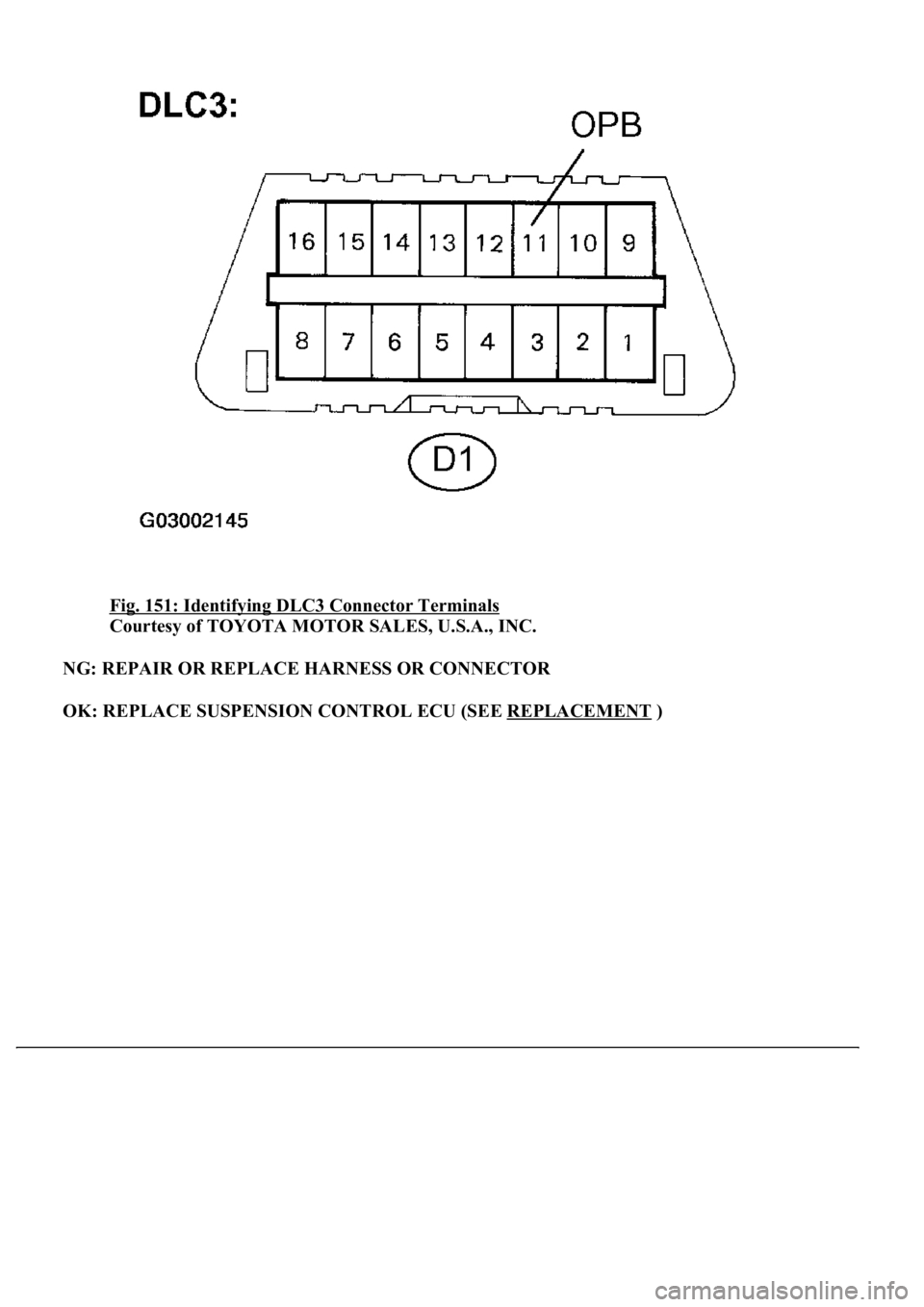
Fig. 151: Identifying DLC3 Connector Terminals
Courtesy of TOYOTA MOTOR SALES, U.S.A., INC.
NG: REPAIR OR REPLACE HARNESS OR CONNECTOR
OK: REPLACE SUSPENSION CONTROL ECU (SEE REPLACEMENT
)
Page 729 of 4500
1.DATA LIST
HINT:
By the DATA LIST displayed on the hand-held tester, you can read the value of the switch, sensor,
actuator and so on without removing any parts. Reading the DATA LIST as the first step in
troubleshooting is one of the methods to shorten labor time.
a. Connect the hand-held tester to the DLC3.
b. Turn the ignition switch to the ON position.
c. According to the display on the tester, read the "DATA LIST".
SPAD:
Fig. 24: Spad Item Chart
Courtesy of TOYOTA MOTOR SALES, U.S.A., INC.
DIAGNOSTIC TROUBLE CODE CHART
HINT:
Titles for each unit are stated in the followin
g order: parts name (physical address) [Name indicated by DTC]
TermsDescription
Physical address3-digit, hexadecimal code assigned to all components connected to the AVC-LAN.
Individual symbols are specified based on function. Units whose names are unknown or
relevant units are displayed with physical addresses.
Logical address2-digit, hexadecimal code assigned to all the functions in the AVC-LAN system.