brake LEXUS NX300h 2015 Owner's Guide
[x] Cancel search | Manufacturer: LEXUS, Model Year: 2015, Model line: NX300h, Model: LEXUS NX300h 2015Pages: 681, PDF Size: 9.14 MB
Page 196 of 681

196 4-1. Before driving
NX300h_U_OM78007U ■
Break-in schedule
If your vehicle is new or equipped with any new power train components (such as an
engine, transmission, differential or wheel bearing), Lexus recommends that you do not
tow a trailer until the vehicle has been driven for over 500 miles (800 km).
After the vehicle has been driven for over 500 miles (800 km), you can start towing.
However, for the next 500 miles (800 km), drive the vehicle at a speed of less than
50 mph (80 km/h) when towing a trailer, and avoid full throttle acceleration.■
Maintenance ●
If you tow a trailer, your vehicle will requir e more frequent maintenance due to the addi-
tional load. (See “Warranty and Services Guide”, “Owner’s Manual Supplement” or
“Scheduled Maintenance”.) ●
Retighten the fixing bolts of the towing ba ll and bracket after approximately 600 miles
(1000 km) of trailer towing. ■
If trailer sway occurs
One or more factors (crosswinds, passing vehicles, rough roads, etc.) can adversely
affect handling of your vehicle and trailer, causing instability.●
If trailer swaying occurs:
• Firmly grip the steering wheel. Steer straight ahead.
Do not try to control trailer sway ing by turning the steering wheel.
• Begin releasing the accelerator pedal i mmediately but very gradually to reduce
speed.
Do not increase speed. Do not apply vehicle brakes.
If you make no extreme correction with the steering or brakes, your vehicle and trailer
should stabilize. ●
After the trailer sw aying has stopped:
• Stop in a safe place. Get all occupants out of the vehicle.
• Check the tires of the vehicle and the trailer.
• Check the load in the trailer.
Make sure the load has not shifted.
Make sure the tongue weight is appropriate, if possible.
• Check the load in the vehicle.
Make sure the vehicle is not overloaded after occupants get in.
If you cannot find any problems, the speed at which trailer swaying occurred is beyond
the limit of your particular vehicle-trailer combination. Drive at a lower speed to pre-
vent instability. Remember that swaying of the towing vehicle-trailer increases as
speed increases.
Page 197 of 681

1974-1. Before driving
4
Driving
NX300h_U_OM78007U WA R N I N G ■
Trailer towing precautions
To tow a trailer safely, use extreme care and drive the vehicle in accordance with the
trailer’s characteristics and op erating conditions. Failure to do so could cause an acci-
dent resulting in death or serious injury. Vehicle stability and braking performance are
affected by trailer stability, brake setting and performance, and the hitch. Your vehicle
will handle differently when towing a trailer. ■
To avoid accident or injury ●
Do not exceed the TWR, unbrak ed TWR, GCWR, GVWR or GAWR.●
Adjust the tongue weight within the approp riate range. Place heavier loads as close
to the trailer axle as possible. ●
Do not exceed 65 mph (104 km/h), the posted towing speed limit or the speed limit
for your trailer as set forth in your trailer owner’s manual, whichever is lowest. Slow
down sufficiently before making a turn, in cr oss winds, on wet or slippery surface, etc.
to help avoid an accident. If you experience a vehicle-trailer instability from reducing
a certain speed, slow down and make sure you keep your vehicle speed under the
speed of which you expe rience the instability.●
Do not make jerky, abrupt or sharp turns. ●
Do not apply the brakes suddenly as you ma y skid, resulting in ja ckknifing and loss of
vehicle control. This is especially true on wet or slippery surfaces. ●
Do not exceed the trailer hitch assembly weight, gross vehicle weight, gross axle
weight and trailer tongue weight capacities. ●
Do not use the following systems when trailer towing.
• Cruise control (if equipped)
• Dynamic radar cruise control (if equipped)
• Dynamic cruise control with full-speed range (if equipped)●
Slow down and downshift before descending steep or long downhill grades. Do not
make sudden downshifts while descen ding steep or long downhill grades.●
Vehicle-trailer instability is more likely on steep long downhills. Before descending
steep or long downhill grades, slow down and downshift. Do not make sudden down-
shifts when descending stee p or long downhill grades. Avoid holding the brake pedal
down too long or applying the brakes too frequently. This could cause the brakes to
overheat and result in reduced braking efficiency. ●
Vehicles with a compact spare tire: Do no t tow a trailer when the compact spare tire
is installed on your vehicle. ■
Hitch
Trailer hitch assemblies have different weight capacities established by the hitch manu-
facturer. Even though the vehicle may be physically capable of towing a higher weight,
the operator must determine the maximum weig ht rating of the particular hitch assem-
bly and never exceed the maximum weight rating specified for the trailer-hitch.
Exceeding the maximum weight rating set by the trailer-hitch manufacturer can cause
an accident resulting in death or serious personal injuries.
Page 198 of 681

198 4-1. Before driving
NX300h_U_OM78007U WA R N I N G ■
When towing a trailer
Lexus recommends trailers with brakes that conform to any applicable federal and
state/provincial regulations. ●
If the gross trailer weight exceeds unbraked TWR, trailer brakes are required. Lexus
recommends trailers with brakes that conform to all applicable federal and state/pro-
vincial regulations. ●
Never tap into your vehicle’s hydraulic system, as this will lower the vehicle’s braking
effectiveness. ●
Never tow a trailer without using a safety ch ain securely attached to both the trailer
and the vehicle. If damage occurs to the coupling unit or hitch ball, there is danger of
the trailer wandering into another lane.
NOTICE ■
When installing a trailer hitch
Use only the position recommended by your Lexus dealer. Do not install the trailer
hitch on the bumper; this may cause body damage. ■
Do not directly splice trailer lights
Do not directly splice trailer lights. Dire ctly splicing trailer lights may damage your
vehicle’s electrical system and cause a malfunction.
Page 201 of 681
2014-2. Driving procedures
4
Driving
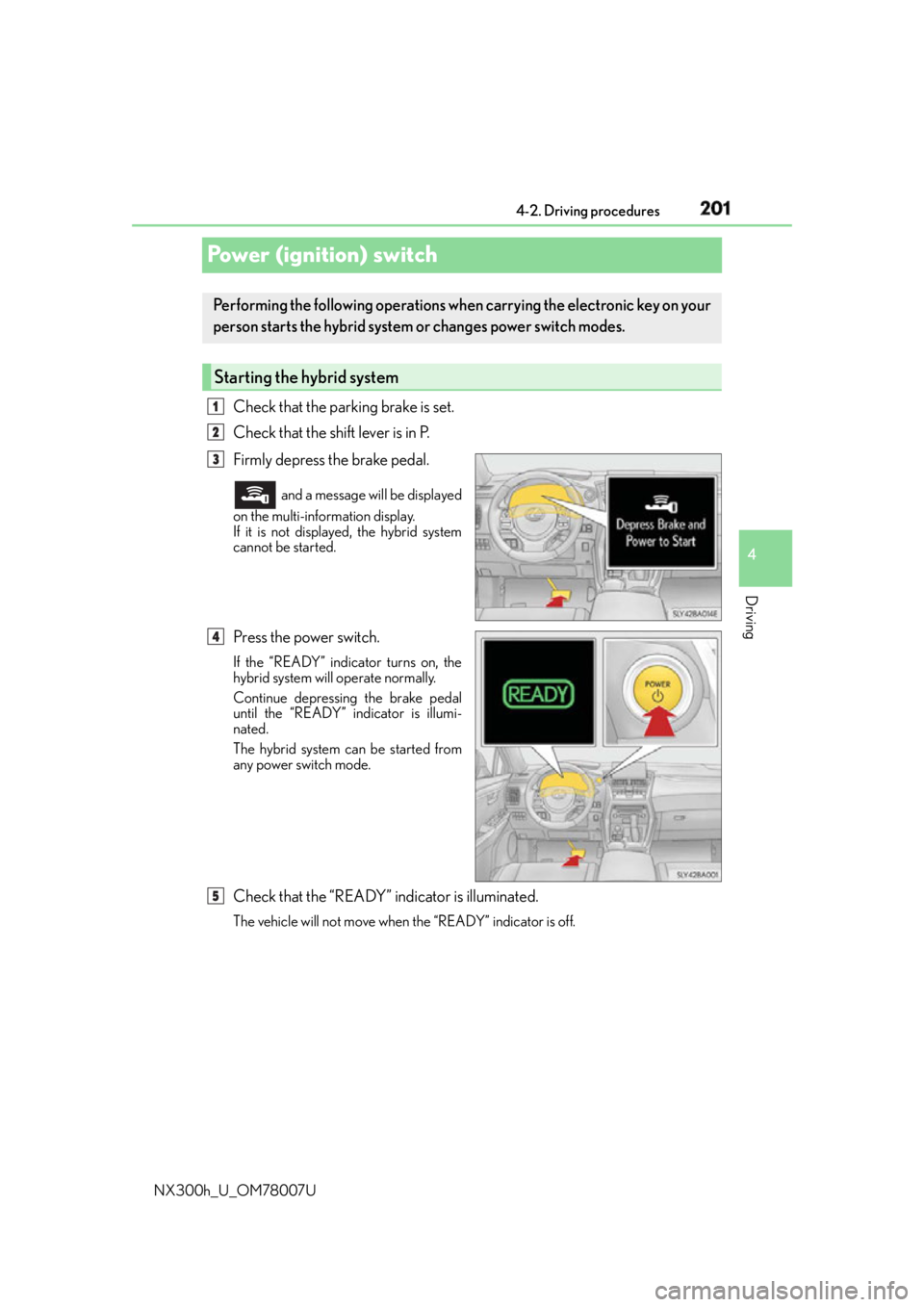
NX300h_U_OM78007UPower (ignition) switch Check that the parking brake is set.
Check that the shift lever is in P.
Firmly depress the brake pedal. and a message will be displayed
on the multi-information display.
If it is not displaye d, the hybrid system
cannot be started.
Press the power switch. If the “READY” indicator turns on, the
hybrid system will operate normally.
Continue depressing the brake pedal
until the “READY” indicator is illumi-
nated.
The hybrid system can be started from
any power switch mode.
Check that the “READY” indicator is illuminated. The vehicle will not move when the “READY” indicator is off.Performing the following op erations when carrying the electronic key on your
person starts the hybrid system or changes power switch modes.
Starting the hybrid system 1
2
3
4
5
Page 202 of 681
202 4-2. Driving procedures
NX300h_U_OM78007U Stop the vehicle completely.
Shift the shift lever to P. ( P. 2 0 8 )
Set the parking brake. ( P. 2 1 4 )If the parking brake is in automatic mode, the parking brake is set automatically when
shifting the shift lever to P. (
P. 2 1 3 )
Press the power switch.
Release the brake pedal and check that th e display on the instrument cluster is
off.
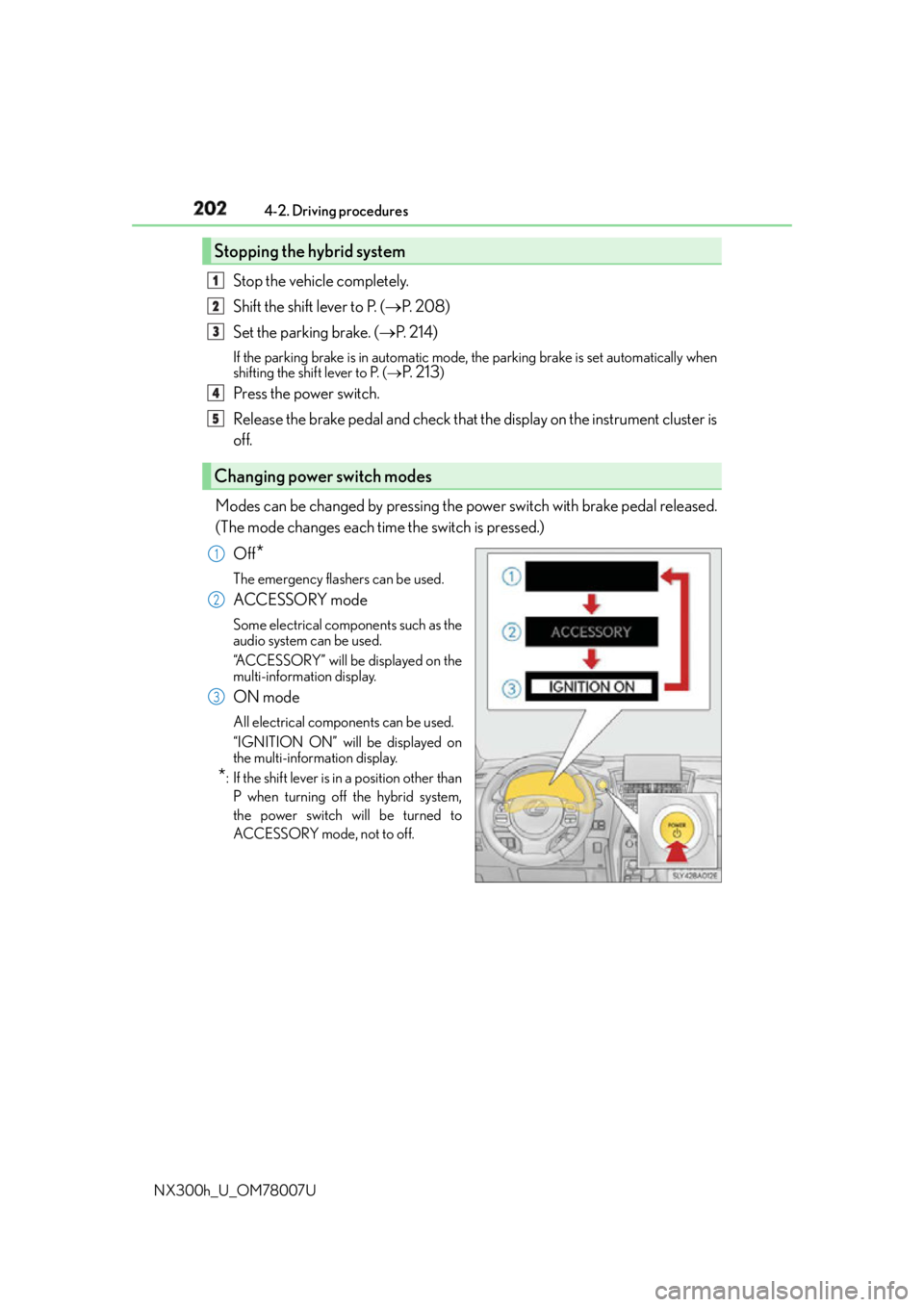
Modes can be changed by pressing the po wer switch with brake pedal released.
(The mode changes each time the switch is pressed.)
Off
* The emergency flashers can be used.
ACCESSORY mode Some electrical components such as the
audio system can be used.
“ACCESSORY” will be displayed on the
multi-information display.
ON mode All electrical components can be used.
“IGNITION ON” will be displayed on
the multi-information display.
* : If the shift lever is in a position other than
P when turning off the hybrid system,
the power switch will be turned to
ACCESSORY mode, not to off.Stopping the hybrid system
Changing power switch modes 1
2
3
4
5
1
2
3
Page 203 of 681
2034-2. Driving procedures
4
Driving
NX300h_U_OM78007U If the hybrid system is stopped with the shift lever in a position other than P, the
power switch will not be turned off but instead be turned to ACCESSORY
mode. Perform the following procedure to turn the switch off:
Check that the parking brake is set.
Shift the shift lever to P.
Check that “Turn Off Vehicle” is displayed on the multi-information display
and then press the power switch once.
Check that “Turn Off Vehicle” on the multi-information display is off. ■
Auto power off function
If the vehicle is left in ACCESSORY mode for more than 20 minutes or ON mode (the
hybrid system is not operating) for more than an hour with the shift lever in P, the power
switch will automatically turn off. However, this function cannot entirely prevent 12-volt
battery discharge. Do not leave the vehicle with the power switch in ACCESSORY or
ON mode for long periods of time when the hybrid system is not operating.■
Sounds and vibrations spec ific to a hybrid vehicle
P. 8 0 ■
Electronic key battery depletion
P. 1 2 1 ■
When the ambient temperature is low, such as during winter driving conditions
When starting the hybrid system, the flas hing time of the “READY” indicator may be
long. Leave the vehicle as it is until the “REA DY” indicator is steady on, as steady means
the vehicle is able to move. ■
Conditions affe cting operation
P. 1 4 2 ■
Note for the entry function
P. 1 4 3 ■
If the hybrid system does not start ●
The immobilizer system may no t have been deactivated. ( P. 8 6 )
Contact your Lexus dealer. ●
Check that the shift lever is se curely set in P. The hybrid sy stem may not start if the shift
lever is displaced out of P. “To Start Vehicle, Put Shift Lever into P” will be displayed on
the multi-information display. ■
Steering lock
After turning the power switch off and opening and closing the doors, the steering wheel
will be locked due to the stee ring lock function. Operating the power switch again auto-
matically cancels the steering lock.When stopping the hybrid system with the shift lever in a position other
than P 1
2
3
4
Page 208 of 681
208 4-2. Driving procedures
NX300h_U_OM78007UHybrid transmission
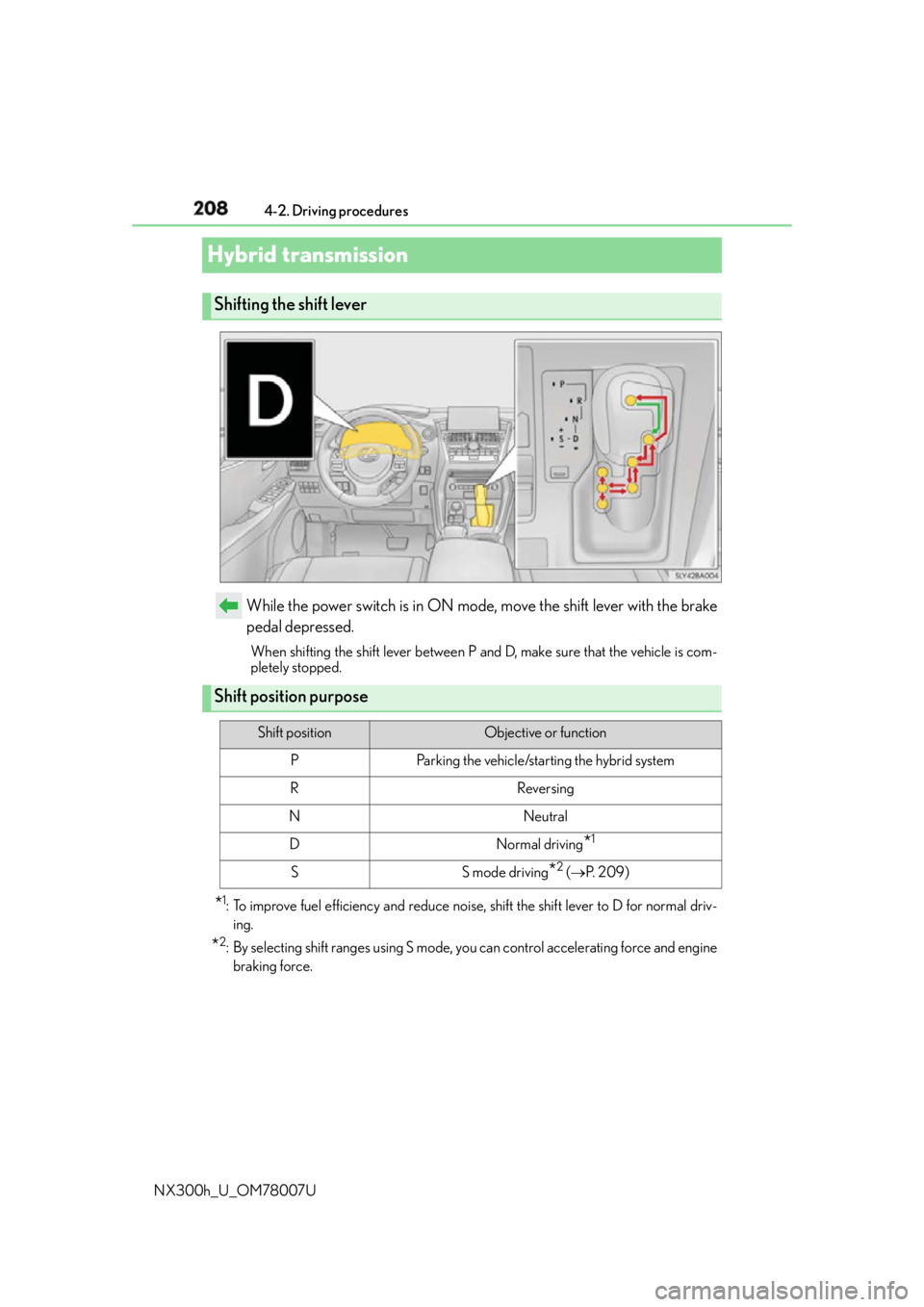
While the power switch is in ON mode, move the shift lever with the brake
pedal depressed. When shifting the shift lever between P and D, make sure that the vehicle is com-
pletely stopped.
* 1
: To improve fuel efficiency and reduce noise, shift the shift lever to D for normal driv-
ing.
* 2
: By selecting shift ranges using S mode, yo u can control accelerating force and engine
braking force.Shifting the shift lever
Shift position purpose Shift position Objective or function
P Parking the vehicle/starting the hybrid system
R Reversing
N Neutral
D Normal driving
* 1
S S mode driving
* 2
( P. 2 0 9 )
Page 213 of 681
2134-2. Driving procedures
4
Driving
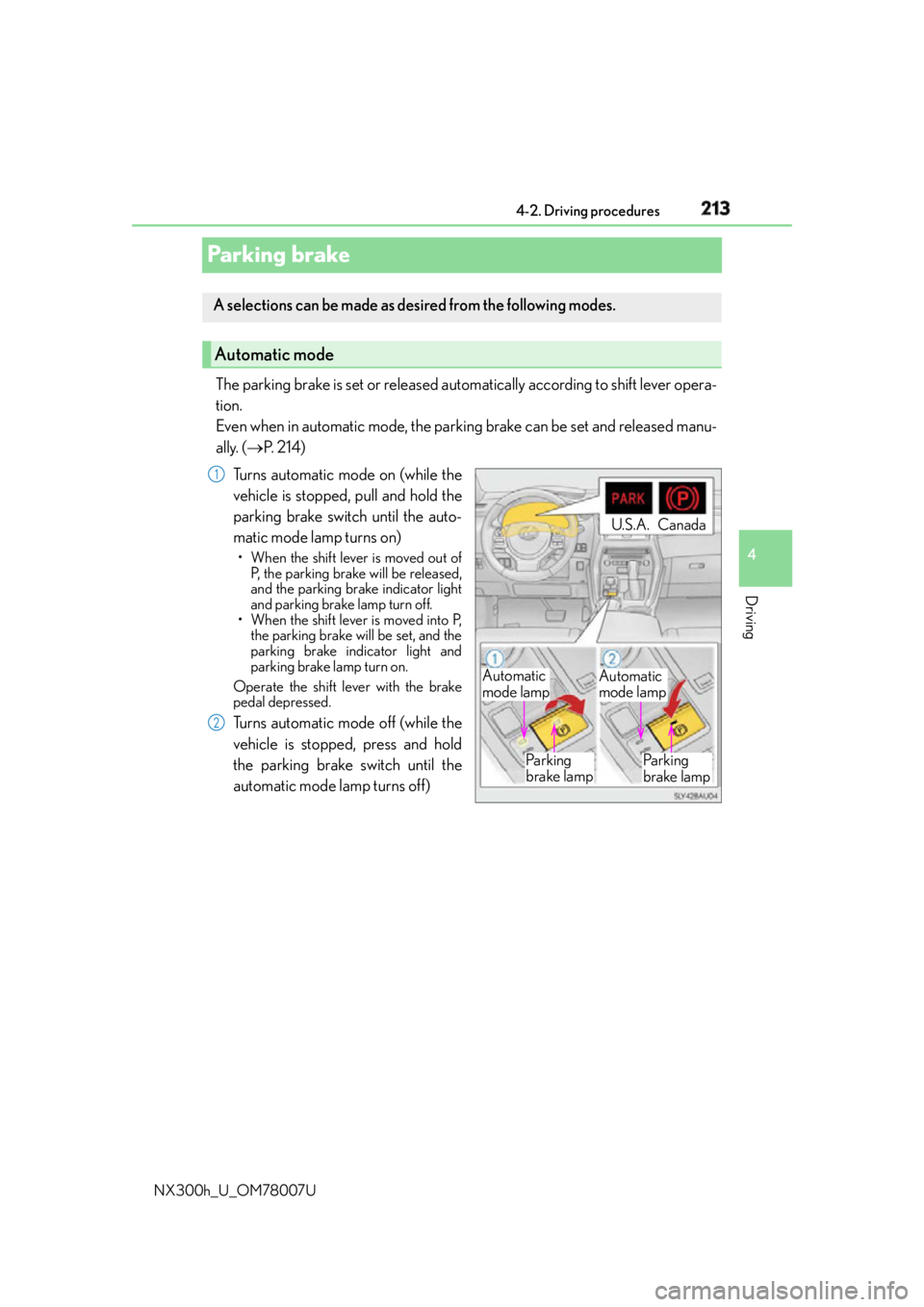
NX300h_U_OM78007UParking brake The parking brake is set or released automatically according to shift lever opera-
tion.
Even when in automatic mode, the parkin g brake can be set and released manu-
ally. ( P. 2 1 4 )
Turns automatic mode on (while the
vehicle is stopped, pull and hold the
parking brake switch until the auto-
matic mode lamp turns on) • When the shift lever is moved out of
P, the parking brake will be released,
and the parking brake indicator light
and parking brake lamp turn off.
• When the shift lever is moved into P,
the parking brake will be set, and the
parking brake indicator light and
parking brake lamp turn on.
Operate the shift lever with the brake
pedal depressed.
Turns automatic mode off (while the
vehicle is stopped, press and hold
the parking brake switch until the
automatic mode lamp turns off)A selections can be made as de sired from the following modes.
Automatic mode
Automatic
mode lamp Automatic
mode lamp
Pa r k i n g
brake lamp Pa r k i n g
brake lampU.S.A. Canada1
2
Page 214 of 681
214 4-2. Driving procedures
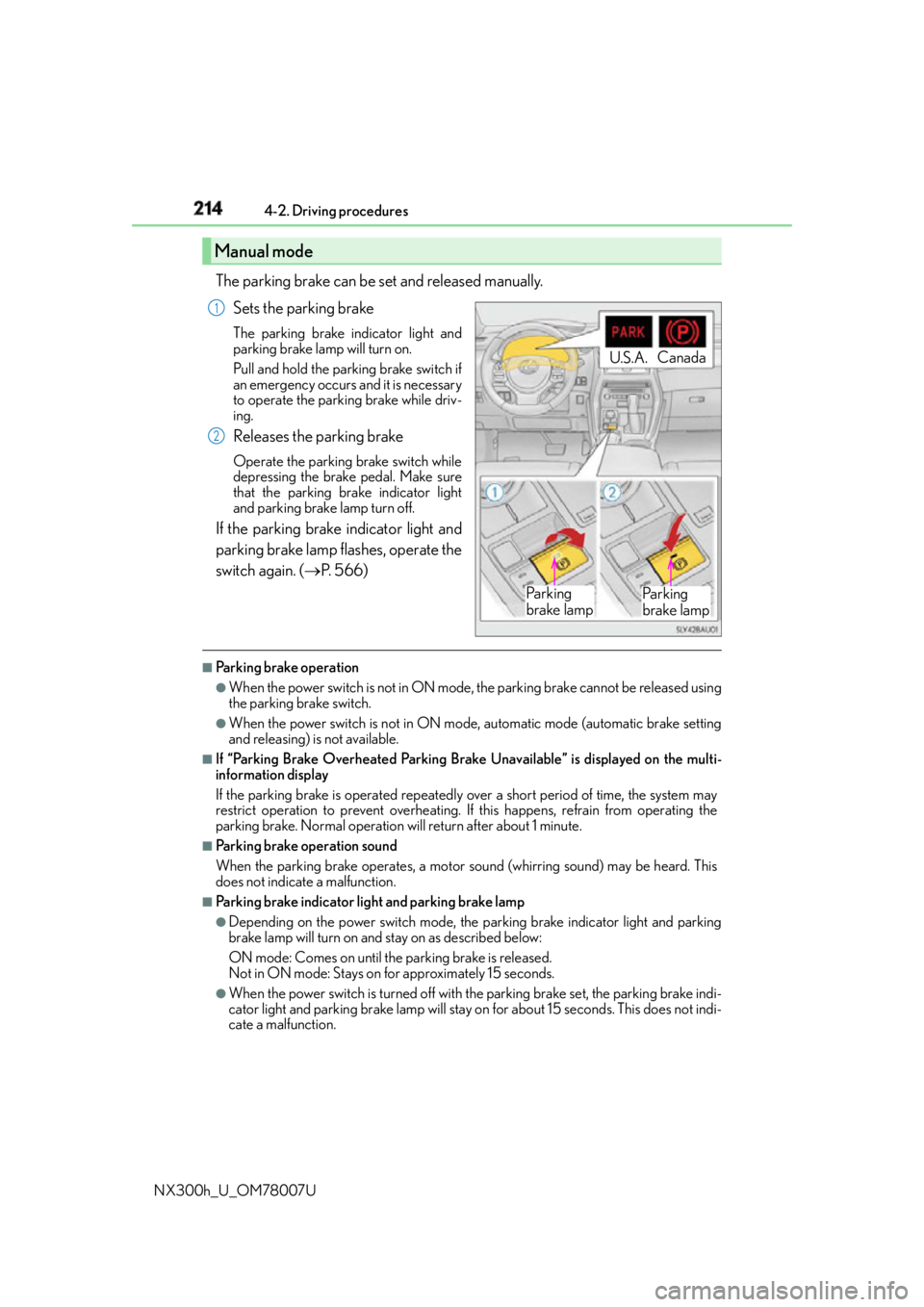
NX300h_U_OM78007U The parking brake can be set and released manually.
Sets the parking brake The parking brake indicator light and
parking brake lamp will turn on.
Pull and hold the parking brake switch if
an emergency occurs and it is necessary
to operate the parking brake while driv-
ing.
Releases the parking brake Operate the parking brake switch while
depressing the brake pedal. Make sure
that the parking brake indicator light
and parking brake lamp turn off.
If the parking brake indicator light and
parking brake lamp flashes, operate the
switch again. ( P. 5 6 6 )■
Parking brake operation ●
When the power switch is not in ON mode, the parking brake cannot be released using
the parking brake switch. ●
When the power switch is not in ON mode, automatic mode (automatic brake setting
and releasing) is not available. ■
If “Parking Brake Overheated Parking Brake Unavailable” is displayed on the multi-
information display
If the parking brake is operated repeatedly over a short period of time, the system may
restrict operation to prevent overheating. If this happens, refrain from operating the
parking brake. Normal operation will return after about 1 minute. ■
Parking brake operation sound
When the parking brake operates, a motor sound (whirring sound) may be heard. This
does not indicate a malfunction. ■
Parking brake indicator light and parking brake lamp ●
Depending on the power switch mode, the parking brake indicator light and parking
brake lamp will turn on and stay on as described below:
ON mode: Comes on until the parking brake is released.
Not in ON mode: Stays on for approximately 15 seconds. ●
When the power switch is turned off with th e parking brake set, the parking brake indi-
cator light and parking brake lamp will stay on for about 15 seconds. This does not indi-
cate a malfunction.Manual mode U.S.A. Canada
Pa r k i n g
brake lamp Pa r k i n g
brake lamp1
2
Page 215 of 681

2154-2. Driving procedures
4
Driving
NX300h_U_OM78007U ■
Changing the mode
When changing the automatic mode on/off , the message will be shown on the multi-
information display and the buzzer sounds. ■
Parking brake engaged warning buzzer
A buzzer will sound if the vehicle is driven with the parking brake engaged. “Release
Parking Brake” is displayed on the multi-information display. ■
Warning messages and buzzers
Warning messages and buzzers are used to indicate a system malfunction or to inform
the driver of the need for caution. If a warn ing message is shown on the multi-information
display, read the message and follow the instructions.■
If the brake system warning light comes on
P. 5 6 5 ■
Usage in winter time
P. 3 2 7
WA R N I N G ■
When parking the vehicle
Do not leave a child in the vehicle alone. The parking brake may be released uninten-
tionally and there is the danger of the vehicle moving that may lead to an accident
resulting in death or serious injury.
NOTICE ■
When parking the vehicle
Before you leave the vehicle, shift the shif t lever to P, set the parking brake and make
sure that the vehicle does not move. ■
When the system malfunctions
Stop the vehicle in a safe place and check the warning messages. ■
When the parking brake cannot be released due to a malfunction
Driving the vehicle with the parking brake set will lead to brake components overheat-
ing, which may affect braking performance and increase brake wear. Have the vehicle
inspected by contact your Lexus de aler immediately if this occurs.