ECO LEXUS NX300H 2016 Manual Online
[x] Cancel search | Manufacturer: LEXUS, Model Year: 2016, Model line: NX300H, Model: LEXUS NX300H 2016Pages: 680, PDF Size: 10.23 MB
Page 256 of 680
2564-5. Using the driving support systems
NX300h_OM_USA_OM78082U
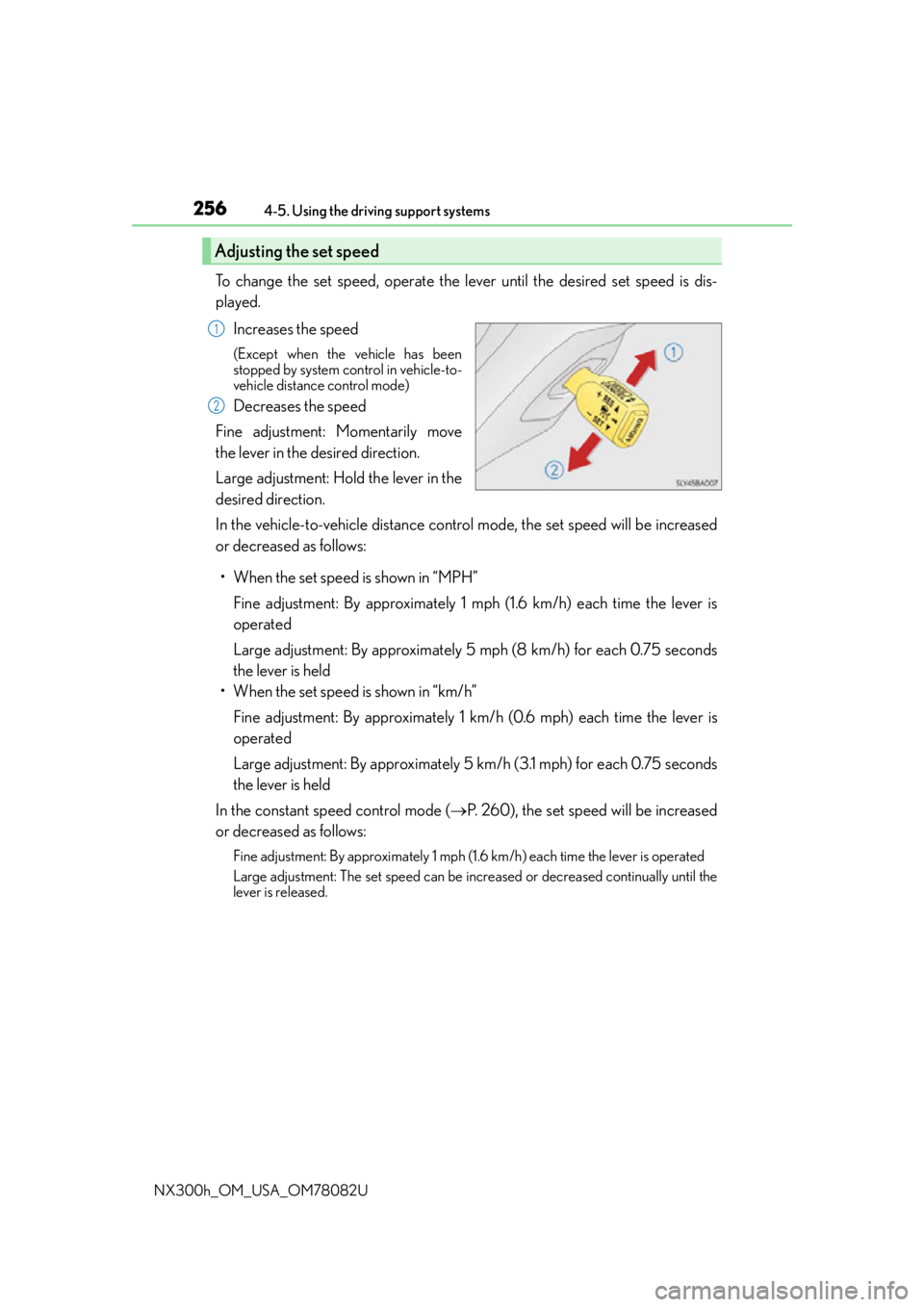
To change the set speed, operate the lever until the desired set speed is dis-
played. Increases the speed
(Except when the vehicle has been
stopped by system control in vehicle-to-
vehicle distance control mode)
Decreases the speed
Fine adjustment: Momentarily move
the lever in the desired direction.
Large adjustment: Hold the lever in the
desired direction.
In the vehicle-to-vehicle distance control mode, the set speed will be increased
or decreased as follows:
• When the set speed is shown in “MPH” Fine adjustment: By approximately 1 mph (1.6 km/h) each time the lever is
operated
Large adjustment: By approximately 5 mph (8 km/h) for each 0.75 seconds
the lever is held
• When the set speed is shown in “km/h”
Fine adjustment: By approximately 1 km /h (0.6 mph) each time the lever is
operated
Large adjustment: By approximately 5 km /h (3.1 mph) for each 0.75 seconds
the lever is held
In the constant speed control mode ( P. 260), the set speed will be increased
or decreased as follows:
Fine adjustment: By approximately 1 mph (1.6 km/h) each time the lever is operated
Large adjustment: The set speed can be incr eased or decreased continually until the
lever is released.
Adjusting the set speed
1
2
Page 260 of 680
2604-5. Using the driving support systems
NX300h_OM_USA_OM78082U
When constant speed control mode is sele cted, your vehicle will maintain a set
speed without controlling the vehicle-to-vehicle distance. Select this mode only
when vehicle-to-vehicle distance contro l mode does not function correctly due
to dirt, etc.
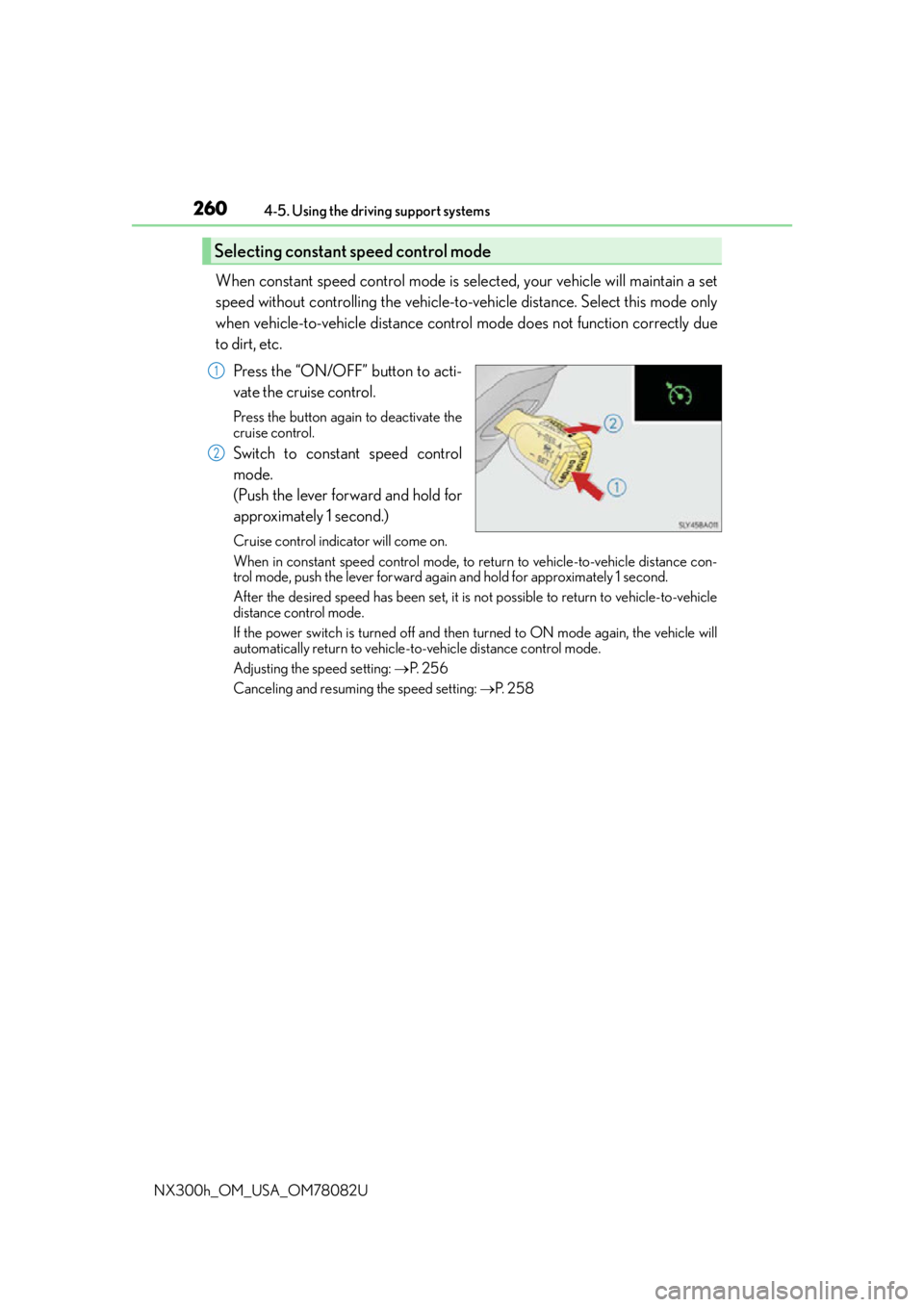
Press the “ON/OFF” button to acti-
vate the cruise control.
Press the button again to deactivate the
cruise control.
Switch to constant speed control
mode.
(Push the lever forward and hold for
approximately 1 second.)
Cruise control indicator will come on.
When in constant speed control mode, to return to vehicle-to-vehicle distance con-
trol mode, push the lever forward agai n and hold for approximately 1 second.
After the desired speed has been set, it is not possible to return to vehicle-to-vehicle
distance control mode.
If the power switch is turned off and then turned to ON mode again, the vehicle will
automatically return to vehicle-to-vehicle distance control mode.
Adjusting the speed setting: P. 2 5 6
Canceling and resuming the speed setting: P. 2 5 8
Selecting constant speed control mode
1
2
Page 270 of 680
2704-5. Using the driving support systems
NX300h_OM_USA_OM78082U
LDA (Lane Departure Alert with steering control)
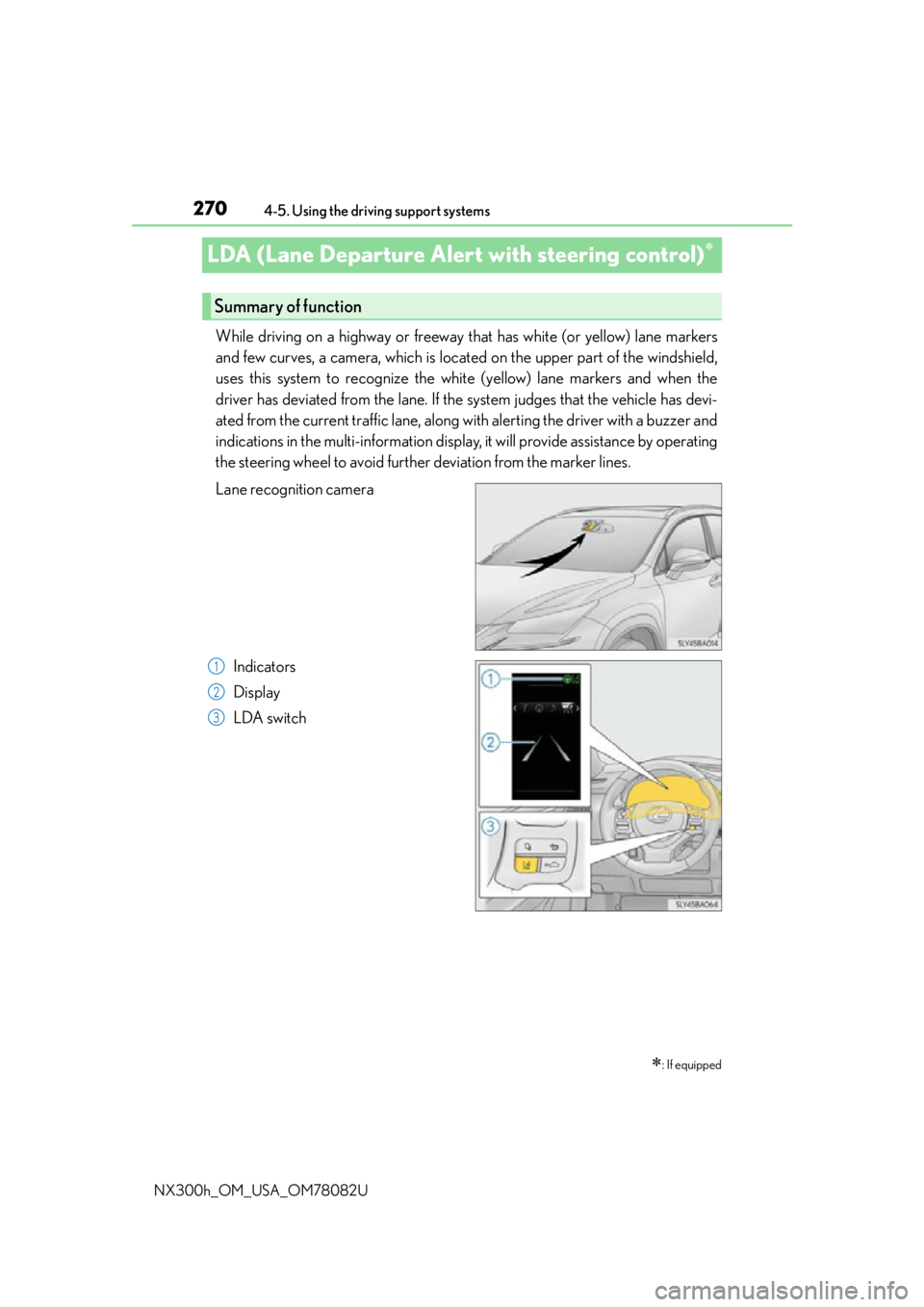
While driving on a highway or freeway that has white (or yellow) lane markers
and few curves, a camera, which is located on the upper part of the windshield,
uses this system to recognize the white (yellow) lane markers and when the
driver has deviated from the lane. If the system judges that the vehicle has devi-
ated from the current traffic lane, along with alerting the driver with a buzzer and
indications in the multi-information display, it will provide assistance by operating
the steering wheel to avoid further deviation from the marker lines.
Lane recognition camera
Indicators
Display
LDA switch
: If equipped
Summary of function
1
2
3
Page 272 of 680
2724-5. Using the driving support systems
NX300h_OM_USA_OM78082U
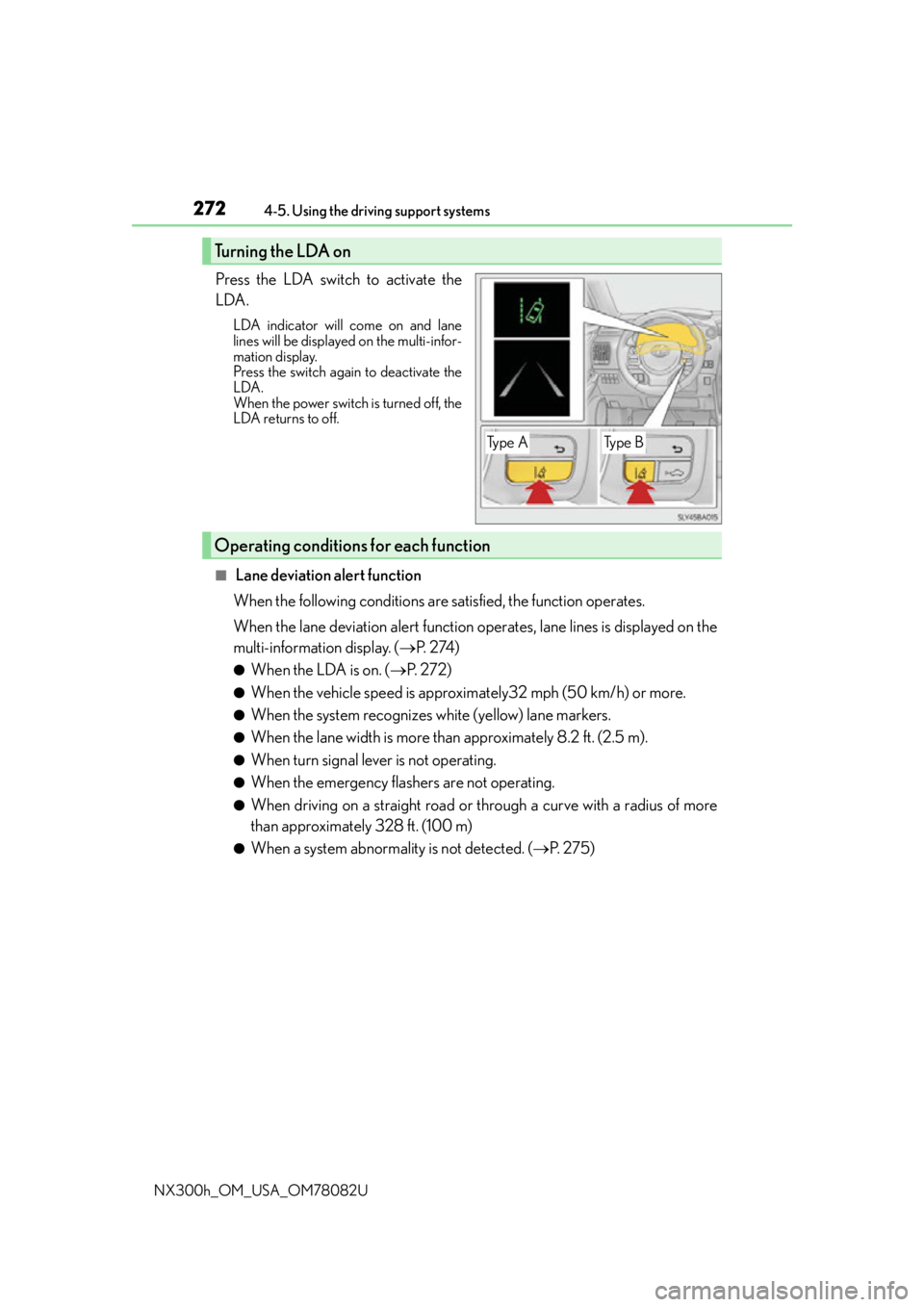
Press the LDA switch to activate the
LDA.
LDA indicator will come on and lane
lines will be displayed on the multi-infor-
mation display.
Press the switch again to deactivate the
LDA.
When the power switch is turned off, the
LDA returns to off.
■ Lane deviation alert function
When the following conditions are satisfied, the function operates.
When the lane deviation alert function operates, lane lines is displayed on the
multi-information display. ( P. 2 74 )
●When the LDA is on. ( P. 2 7 2 )
●When the vehicle speed is approximately32 mph (50 km/h) or more.
●When the system recognizes white (yellow) lane markers.
●When the lane width is more than approximately 8.2 ft. (2.5 m).
●When turn signal lever is not operating.
●When the emergency flashers are not operating.
●When driving on a straight road or through a curve with a radius of more
than approximately 328 ft. (100 m)
●When a system abnormality is not detected. ( P. 2 7 5 )
Turning the LDA on
Ty p e ATy p e B
Operating conditions for each function
Page 273 of 680
2734-5. Using the driving support systems
4
Driving
NX300h_OM_USA_OM78082U
■Steering control function
In addition to the operation conditions for the lane deviation alert function,
when all of the following conditions are fulfilled, it operates.
●When settings for the “Steering Assist” in the “Settings display” of the multi-
information display is set to “On” ( P. 2 76 )
●When the vehicle has not slowed down more than a defined setting.
●When the steering wheel is operated wi th a steering force level that is not
equivalent to changing lanes.
●When the ABS, VSC, TRAC, or PCS (if equipped) is not operating.
●When intentional accelerator peda l operations are not performed.
■Lane deviation alert function
In any of the following cases, the lane deviation alert function will be tempo-
rarily canceled. When the conditions, in which the cancelation occurred
improves, the function will resume operations.
●The vehicle speed deviates from the operating ranges of the function
●The turn signal lever is operated
●When the emergency flashers are operated
●When the lane markers cannot be recognized while driving
●When the system malfunctions
●Immediately after the lane deviation alert operates
The lane deviation alert function will not operate again for a several sec-
onds after it has been activated, even if the vehicle leaves the lane again.
●When more than half of the vehicle body straddles the lane
■Steering control function
In addition to the temporary cancelation conditions of the lane deviation alert
function, in any of the following cases the steering control function is tempo-
rarily canceled. When the conditions for which the cancelation occurred
improves, the function will restart operations.
●When the vehicle has slowed down more than a defined setting.
●When the steering wheel is operated with a steering force level that is
equivalent to changing lanes.
●When the ABS, VSC, TRAC, or PCS (if equipped) is operating.
●When intentional accelerator pedal operations are performed.
●Operations of the VSC and TRAC have been turned off ( P. 3 0 7 )
Temporary cancelation of the functions
Page 274 of 680
2744-5. Using the driving support systems
NX300h_OM_USA_OM78082U
When it is judged that there is a malfun ction in the system relating to steering
control function, the steering control function is canceled and “LDA Steering
Assist Deactivated Warnings Available” is displayed on the multi-information dis-
play. However, it is possible that the lane deviation alert function operates.
When the steering control function is canc eled, it will not return unless “Steering
Assist” is turned “On” again from the “S ettings display” of the multi-information
display ( P. 276) or the LDA switch is turned on again.
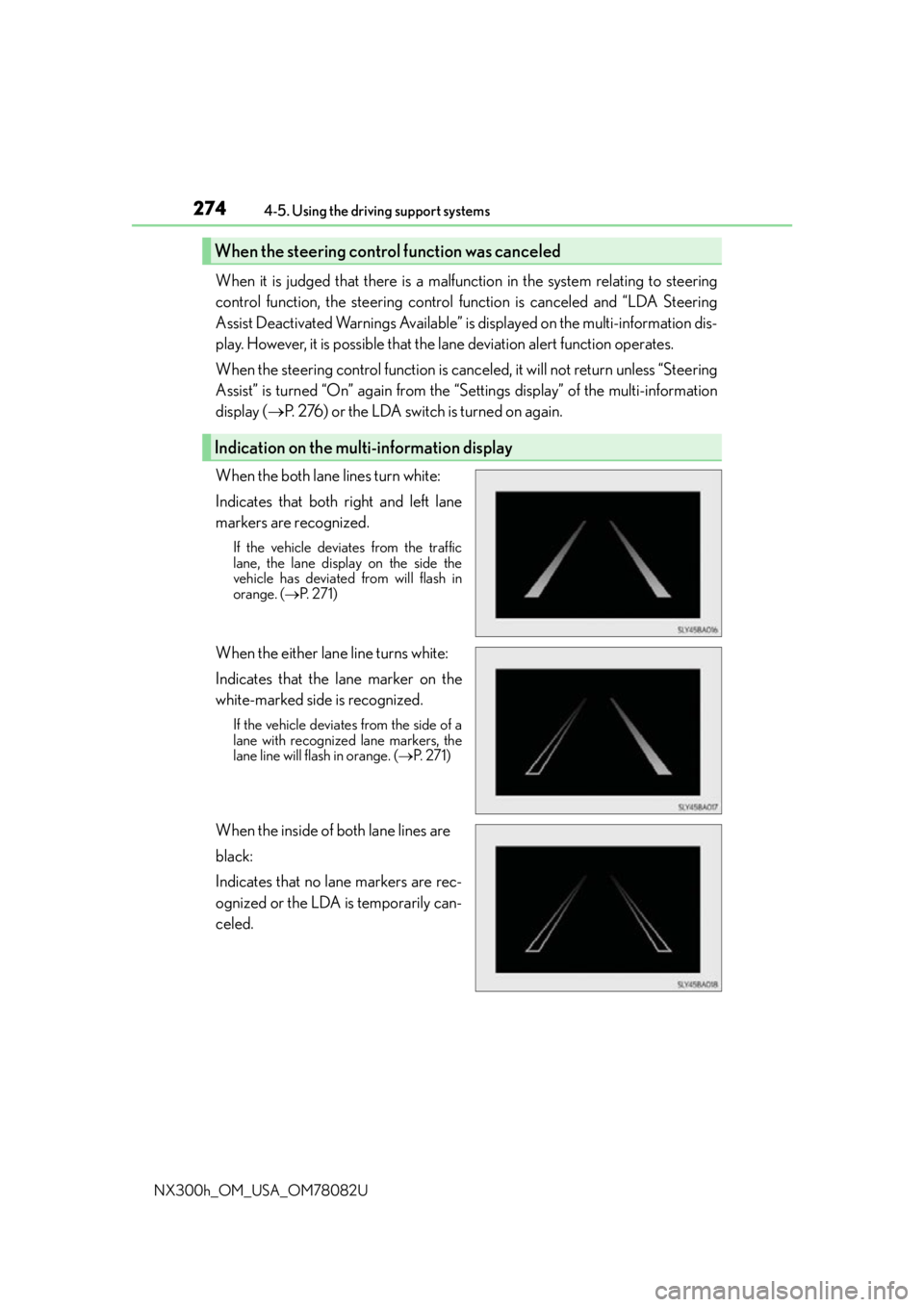
When the both lane lines turn white:
Indicates that both right and left lane
markers are recognized.
If the vehicle deviates from the traffic
lane, the lane displa y on the side the
vehicle has deviated from will flash in
orange. ( P. 2 7 1 )
When the either lane line turns white:
Indicates that the lane marker on the
white-marked side is recognized.
If the vehicle deviates from the side of a
lane with recognized lane markers, the
lane line will flash in orange. ( P. 2 7 1 )
When the inside of both lane lines are
black:
Indicates that no lane markers are rec-
ognized or the LDA is temporarily can-
celed.
When the steering cont rol function was canceled
Indication on the multi-information display
Page 275 of 680
2754-5. Using the driving support systems
4
Driving
NX300h_OM_USA_OM78082U
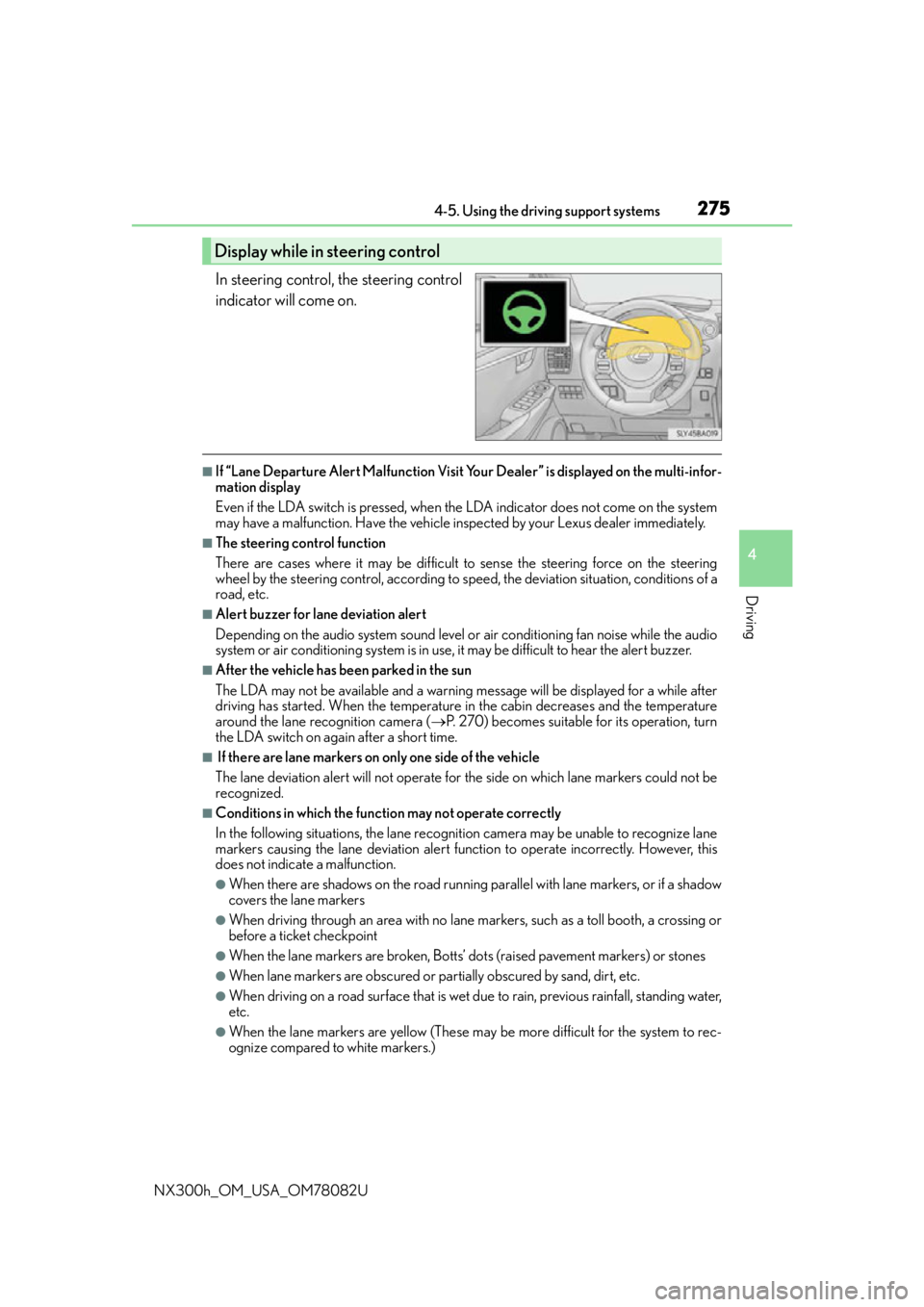
In steering control, the steering control
indicator will come on.
■If “Lane Departure Alert Malfunction Visit Your Dealer” is displayed on the multi-infor-
mation display
Even if the LDA switch is pressed, when th e LDA indicator does not come on the system
may have a malfunction. Have the vehicle in spected by your Lexus dealer immediately.
■The steering control function
There are cases where it may be difficult to sense the steering force on the steering
wheel by the steering control, according to speed, the deviatio n situation, conditions of a
road, etc.
■Alert buzzer for lane deviation alert
Depending on the audio system sound level or air conditioning fan noise while the audio
system or air conditioning system is in use, it may be difficult to hear the alert buzzer.
■After the vehicle has been parked in the sun
The LDA may not be available and a warning message will be displayed for a while after
driving has started. When the temperature in the cabin decreases and the temperature
around the lane recognition camera ( P. 270) becomes suitable for its operation, turn
the LDA switch on again after a short time.
■ If there are lane markers on only one side of the vehicle
The lane deviation alert will not operate for the side on which lane markers could not be
recognized.
■Conditions in which the functi on may not operate correctly
In the following situations, the lane recognition camera may be unable to recognize lane
markers causing the lane deviation alert function to operate incorrectly. However, this
does not indicate a malfunction.
●When there are shadows on the road running parallel with lane markers, or if a shadow
covers the lane markers
●When driving through an area with no lane markers, such as a toll booth, a crossing or
before a ticket checkpoint
●When the lane markers are broken, Botts’ dots (raised pavement markers) or stones
●When lane markers are obscured or partially obscured by sand, dirt, etc.
●When driving on a road surface that is wet du e to rain, previous rainfall, standing water,
etc.
●When the lane markers are yellow (These may be more difficult for the system to rec-
ognize compared to white markers.)
Display while in steering control
Page 278 of 680
2784-5. Using the driving support systems
NX300h_OM_USA_OM78082U
NOTICE
■To prevent damage to or incorrect operation of the LDA
Observe the following to ensure that the LDA system functions correctly
●Do not modify the headlights or attach stickers to the surface of the lights.
●Do not modify the suspension or replace it with non-genuine parts.
●Do not install or place anything on the hood or the grille. Also, do not install a grille
guard (bull bars, kangaroo bar, etc.).
●If your windshield needs repairs, contact your Lexus dealer.
●Do not overload with luggage
■ Lane recognition camera
Observe the following to ensure that the LDA system functions correctly
●Keep the windshield clean at all times.
Performance could be affected if the windshie ld is dirty, or if raindrops, condensation
or ice are adhering to the windshield.
●Do not spill liquids onto the lane recognition camera.
●Do not attach window tinting to the windshield.
●Do not install an antenna in fron t of the lane recognition camera.
●If the windshield area in front of the lane recognition camera is fogged up, use the
windshield defogger to remove the fog from that area. ( P. 4 3 5 )
When it is cold, using the he ater with air blowing to the feet may allow the upper part
of the windshield to fog up. This will have a negative effect on the images.
●Do not scratch the camera lens, or let it get dirty.
When cleaning the inside of the windshield , be careful not to get any glass cleaner,
etc., on the lens. Also, do not touch the lens.
For lens repair, contact your Lexus dealer.
●Do not change the installation position or direction of the lane recognition camera or
remove it.
The direction of the lane recognit ion camera is precisely adjusted.
●Do not subject the lane recognition camera to strong impact or force, and do not dis-
assemble the lane recognition camera.
●Do not replace windshield with non-genuine windshield.
Contact your Lexus dealer.
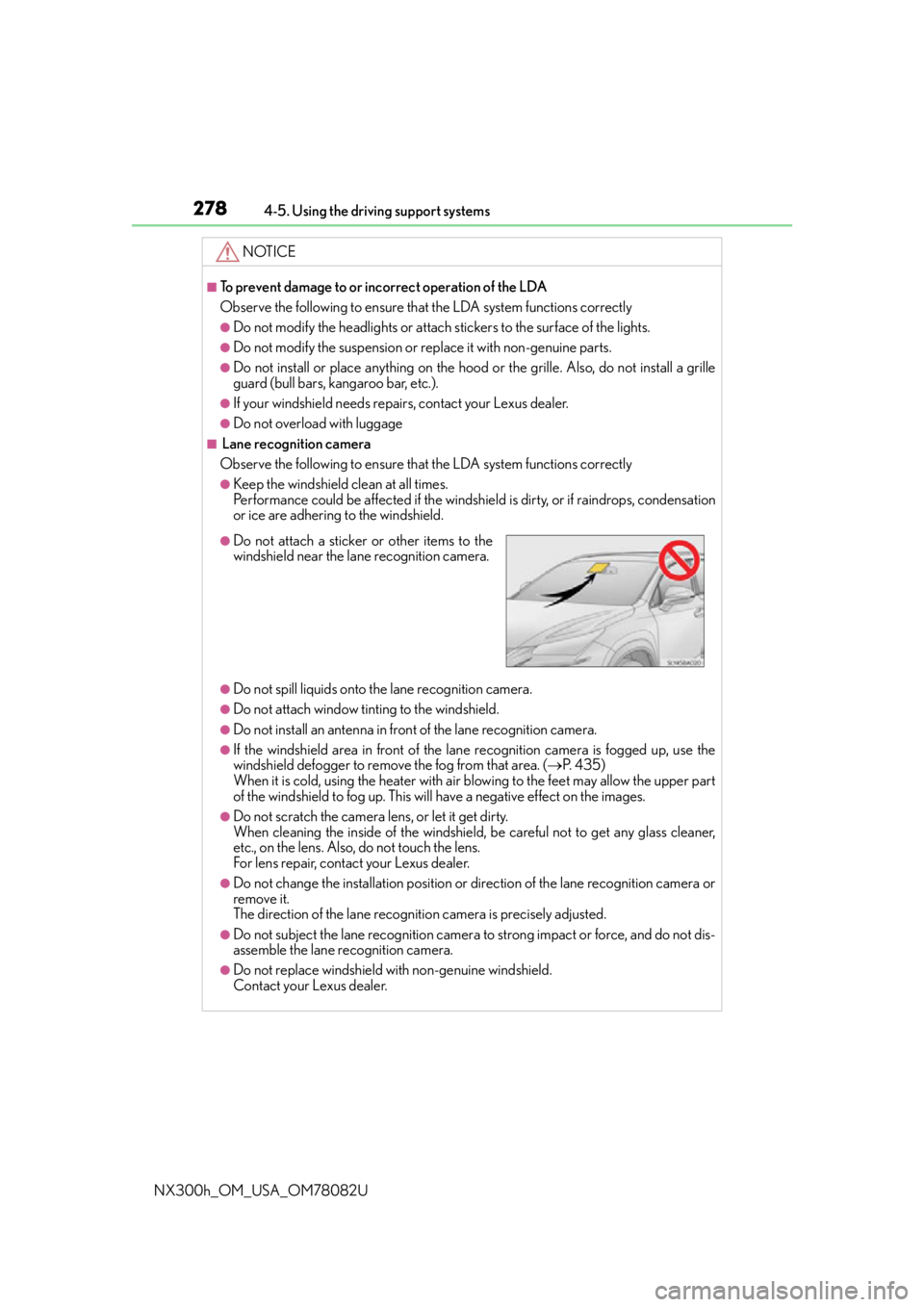
●Do not attach a sticker or other items to the
windshield near the lane recognition camera.
Page 301 of 680
3014-5. Using the driving support systems
4
Driving
NX300h_OM_USA_OM78082U
WA R N I N G
■When using the Lexus parking assist monitor system
The parking assist monitor is a supplemental device intended to assist the driver when
backing up. When backing up, be sure to chec k visually behind and all around the vehi-
cle before proceeding.
Observe the following precautions to avoid an accident that could result in death or
serious injuries.
●Never depend on the parking assist monitor entirely when backing up. The image
and the position of the guide lines displaye d on the screen may differ from the actual
state.
Use caution, just as you would when backing up any vehicle.
●Be sure to back up slowly, depressing the brake pedal to control vehicle speed.
●If you seem likely to hit nearby vehicles, obstacles, people or mount the shoulder,
depress the brake pedal to stop the vehicle.
●The instructions given are only guidelines.
When and how much to turn the steering wheel will vary according to traffic condi-
tions, road surface conditions, vehicle condit ion, etc. when parking. It is necessary to
be fully aware of this before using the parking assist system.
●When parking, be sure to check that the par king space will accommodate your vehi-
cle before maneuvering into it.
●Do not use the parking assist monitor in the following cases:
• On icy or slick road surfaces, or in snow
• When using tire chains or emergency tires
• When the back door is not closed completely
• On roads that are not flat or straight, such as curves or slopes.
●In low temperatures, the screen may darken or the image may become faint. The
image could distort when the vehicle is moving, or you may become unable to see the
image on the screen. Be sure to check dire ct visually and with the mirrors all around
the vehicle before proceeding.
●If the tire sizes are changed, the position of the guide lines displayed on the screen
may change.
●The camera uses a special lens. The dist ances between objects and pedestrians that
appear in the image displayed on the screen will differ from the actual distances.
( P. 2 9 5 )
●Estimated course line display mode: If the st eering wheel is straight and the vehicle
width guide lines and the estimated course li nes are not in alignment, have the vehicle
inspected by your Lexus dealer.
Page 303 of 680
3034-5. Using the driving support systems
4
Driving
NX300h_OM_USA_OM78082U
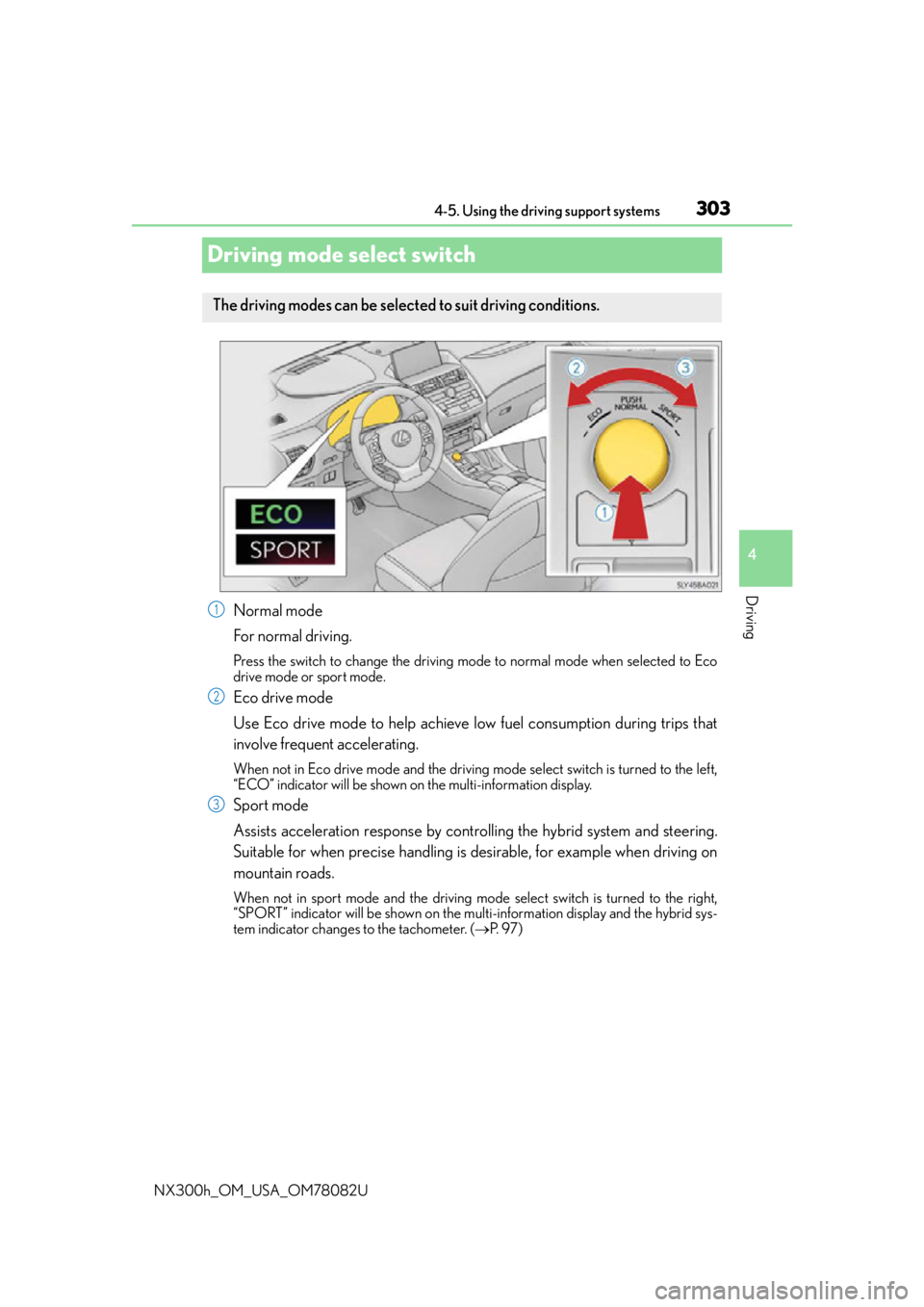
Driving mode select switch
Normal mode
For normal driving.
Press the switch to change the driving mode to normal mode when selected to Eco
drive mode or sport mode.
Eco drive mode
Use Eco drive mode to help achieve low fuel consumption during trips that
involve frequent accelerating.
When not in Eco drive mode and the driving mode select switch is turned to the left,
“ECO” indicator will be shown on the multi-information display.
Sport mode
Assists acceleration response by cont rolling the hybrid system and steering.
Suitable for when precise handling is desirable, for example when driving on
mountain roads.
When not in sport mode and the driving mode select switch is turned to the right,
“SPORT” indicator will be shown on the mult i-information display and the hybrid sys-
tem indicator changes to the tachometer. ( P. 9 7 )
The driving modes can be selected to suit driving conditions.
1
2
3