ECO LEXUS RX200T 2017 Owners Manual
[x] Cancel search | Manufacturer: LEXUS, Model Year: 2017, Model line: RX200T, Model: LEXUS RX200T 2017Pages: 776, PDF Size: 44.51 MB
Page 302 of 776
3024-5. Using the driving support systems
RX350/RX200t_EE_OM48F32E
WARNING
■Limitations of the pre-crash safety system
●The driver is solely responsible for safe driving. Always drive safely, taking care to observe your surroundings.
Do not use the pre-crash safety system instead of normal braking operations under any circumstances. This system will not pr event collisions or lessen collision damage or injury in every situation. Do not overly rely on this system. Failure to do so may lead
to an accident, resulting in death or serious injury.
●Although this system is designed to help avoid a collision or help reduce the impact of the collision, its effectiveness may change according to various conditions, therefore
the system may not always be able to achieve the same level of performance. Read the following conditions carefully. Do not overly rely on this system and always drive carefully.
• Conditions under which the system may oper ate even if there is no possibility of a collision: P. 307 • Conditions under which the system may not operate properly: P. 310
●Do not attempt to test the operation of the pre-crash safety system yourself, as the system may not operate properly, possibly leading to an accident.
■Pre-crash braking*3
●When the pre-crash braking function is operating, a large amount of braking forcewill be applied.
●If the vehicle is stopped by the operation of the pre-crash braking function, the pre- crash braking function operation will be canceled after approximately 2 seconds. Depress the brake pedal as necessary.
●The pre-crash braking function may not operate if certain operations are performedby the driver. If the accelerator pedal is being depressed strongly or the steering wheel is being turned, the system may determine that the driver is taking evasive
action and possibly prevent the pre-crash braking function from operating.
●In some situations, while the pre-crash brakin g function is operating, operation of the function may be canceled if the accelerator pedal is depressed strongly or the steer-
ing wheel is turned and the system determines that the driver is taking evasive action.
●If the brake pedal is being depressed, the system may determine that the driver is tak- ing evasive action and possibly delay the operation timing of the pre-crash braking
function.
*3: Depending on the region in which the vehicle was sold, the pre-crash braking func-
tion may not be available.
Page 305 of 776
3054-5. Using the driving support systems
4
Driving
RX350/RX200t_EE_OM48F32E
■Operational conditions
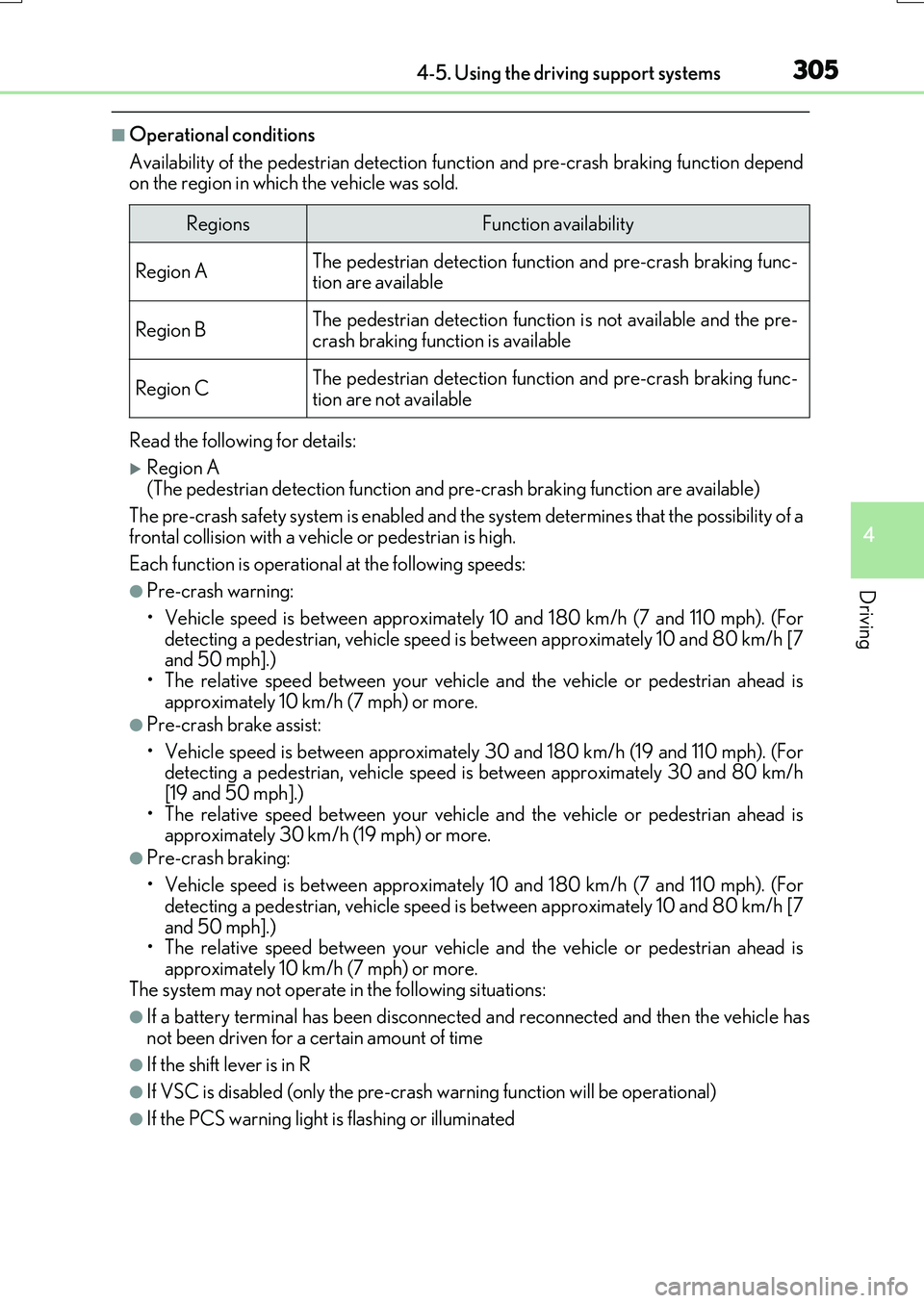
Availability of the pedestrian detection func tion and pre-crash braking function depend on the region in which the vehicle was sold.
Read the following for details:
Region A (The pedestrian detection function and pre-crash braking function are available)
The pre-crash safety system is enabled and th e system determines that the possibility of a
frontal collision with a vehicle or pedestrian is high.
Each function is operational at the following speeds:
●Pre-crash warning:
• Vehicle speed is between approximately 10 and 180 km/h (7 and 110 mph). (For detecting a pedestrian, vehicle speed is between approximately 10 and 80 km/h [7and 50 mph].)
• The relative speed between your vehicle and the vehicle or pedestrian ahead is approximately 10 km/h (7 mph) or more.
●Pre-crash brake assist:
• Vehicle speed is between approximately 30 and 180 km/h (19 and 110 mph). (For detecting a pedestrian, vehicle speed is between approximately 30 and 80 km/h
[19 and 50 mph].) • The relative speed between your vehicle and the vehicle or pedestrian ahead isapproximately 30 km/h (19 mph) or more.
●Pre-crash braking:
• Vehicle speed is between approximately 10 and 180 km/h (7 and 110 mph). (For
detecting a pedestrian, vehicle speed is between approximately 10 and 80 km/h [7 and 50 mph].)• The relative speed between your vehicle and the vehicle or pedestrian ahead is
approximately 10 km/h (7 mph) or more. The system may not operate in the following situations:
●If a battery terminal has been disconnected and reconnected and then the vehicle has
not been driven for a certain amount of time
●If the shift lever is in R
●If VSC is disabled (only the pre-cras h warning function will be operational)
●If the PCS warning light is flashing or illuminated
RegionsFunction availability
Region AThe pedestrian detection function and pre-crash braking func- tion are available
Region BThe pedestrian detection function is not available and the pre-crash braking function is available
Region CThe pedestrian detection function and pre-crash braking func-
tion are not available
Page 306 of 776
3064-5. Using the driving support systems
RX350/RX200t_EE_OM48F32E
Region B (The pedestrian detection function is not available and the pre-crash braking functionis available)
The pre-crash safety system is enabled and th e system determines that the possibility of a frontal collision with a vehicle is high.
Each function is operational at the following speeds:
●Pre-crash warning:
• Vehicle speed is between approximately 15 and 180 km/h (10 and 110 mph). • The relative speed between your vehicle and the vehicle ahead is approximately 10
km/h (7 mph) or more.
●Pre-crash brake assist:
• Vehicle speed is between approximately 30 and 180 km/h (19 and 110 mph). • The relative speed between your vehicle and the vehicle ahead is approximately 30km/h (19 mph) or more.
●Pre-crash braking:
• Vehicle speed is between approximately 15 and 180 km/h (10 and 110 mph).
• The relative speed between your vehicle and the vehicle ahead is approximately 10 km/h (7 mph) or more.The system may not operate in the following situations:
●If a battery terminal has been disconnected and reconnected and then the vehicle hasnot been driven for a certain amount of time
●If the shift lever is in R
●If VSC is disabled (only the pre-cras h warning function will be operational)
●If the PCS warning light is flashing or illuminated
Region C
(The pedestrian detection function and pre-crash braking function are not available)
The pre-crash safety system is enabled and th e system determines that the possibility of a
frontal collision with a vehicle is high.
Each function is operational at the following speeds:
●Pre-crash warning:
• Vehicle speed is between approximately 15 and 180 km/h (10 and 110 mph). • The relative speed between your vehicle and the vehicle ahead is approximately 10km/h (7 mph) or more.
●Pre-crash brake assist:
• Vehicle speed is between approximately 30 and 180 km/h (19 and 110 mph).
• The relative speed between your vehicle and the vehicle ahead is approximately 30 km/h (19 mph) or more.The system may not operate in the following situations:
●If a battery terminal has been disconnected and reconnected and then the vehicle hasnot been driven for a certain amount of time
●If the shift lever is in R
●If VSC is disabled (only the pre-cras h warning function will be operational)
●If the PCS warning light is flashing or illuminated
Page 311 of 776
3114-5. Using the driving support systems
4
Driving
RX350/RX200t_EE_OM48F32E
• After the engine has started the vehicle has not been driven for a certain amount of time• While making a left/right turn and for a few seconds after making a left/right turn
• While driving on a curve and for a few seconds after driving on a curve • If your vehicle is skidding
• If the wheels are misaligned • If a wiper blade is blocking the camera sensor
• The vehicle is wobbling. • The vehicle is being driven at extremely high speeds.• When driving on a hill
• If the radar sensor or camera sensor is misaligned
●In some situations such as the following, sufficient braking force may not be obtained,
preventing the system from performing properly:
• If the braking functions cannot operate to their full extent, such as when the brake parts are extremely cold, extremely hot, or wet
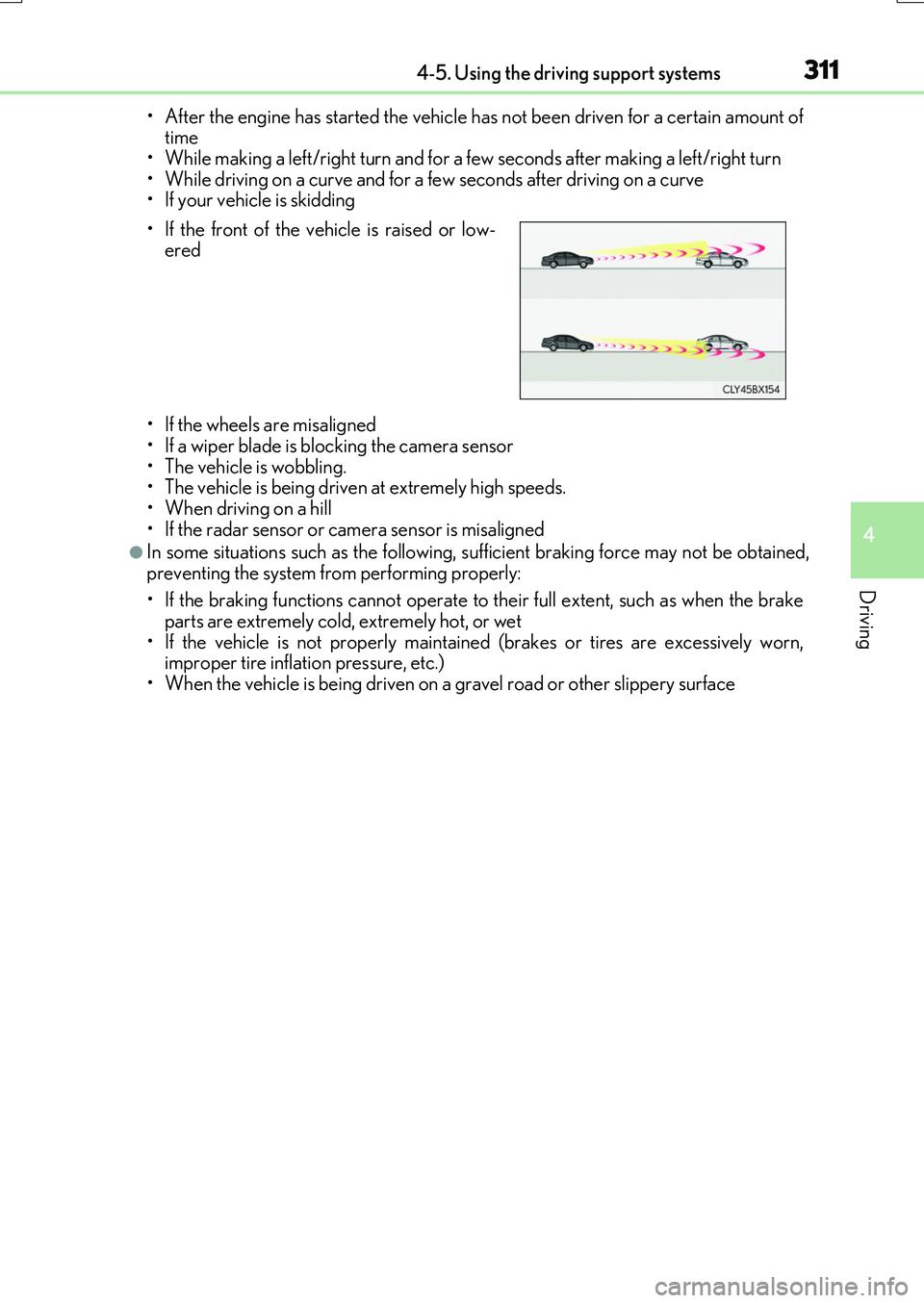
• If the vehicle is not properly maintained (brakes or tires are excessively worn, improper tire inflation pressure, etc.)• When the vehicle is being driven on a gravel road or other slippery surface
• If the front of the vehicle is raised or low- ered
Page 312 of 776
3124-5. Using the driving support systems
RX350/RX200t_EE_OM48F32E
●Some pedestrians such as the following may not be detected by the radar sensor and
camera sensor, preventing the system from operating properly*4:
• Pedestrians shorter than approximately 1 m (3 .2 ft.) or taller than approximately 2 m (6.5 ft.)
• Pedestrians wearing oversized clothing (a rain coat, long skirt, etc.), making their sil- houette obscure• Pedestrians who are carrying large baggage, holding an umbrella, etc., hiding part
of their body • Pedestrians who are bending forward or squatting• Pedestrians who are pushing a stroller , wheelchair, bicycle or other vehicle
• Groups of pedestrians which are close together • Pedestrians who are wearing white and look extremely bright• Pedestrians in the dark, such as at night or while in a tunnel
• Pedestrians whose clothing appears to be nearly the same color or brightness as their surroundings• Pedestrians near walls, fences, guardrails, or large objects
• Pedestrians who are on a metal object (manhole cover, steel plate, etc.) on the road • Pedestrians who are walking fast• Pedestrians who are changing speed abruptly
• Pedestrians running out from behi nd a vehicle or a large object • Pedestrians who are extremely close to the side of the vehicle (outside rear viewmirror, etc.)
*4: Depending on the region in which the vehicle was sold, the pedestrian detection
function may not be available.
■If the PCS warning light flashes and a warning message is displayed on the multi-infor- mation display
The pre-crash safety system may be temporar ily unavailable or there may be a malfunc-
tion in the system.
●In the following situations, the warning light will turn off, the message will disappear and the system will become operational when normal operating conditions return:
• When the radar sensor or camera sensor or the area around either sensor is hot, such as in the sun• When the radar sensor or camera sensor or the area around either sensor is cold,
such as in an extremely cold environment • When the radar sensor or front grille embl em is dirty or covered with snow, etc. • When the part of the windshield in front of the camera sensor is fogged up or cov-
ered with condensation or ice (Defogging the windshield: P. 542) • If the camera sensor is obstructed, such as when the hood is open or a sticker isattached to the windshield near the camera sensor
●If the PCS warning light continues to flash or the warning message does not disappear,the system may be malfunctioning. Have the vehicle inspected by any authorized Lexus
dealer or repairer, or another duly qua lified and equipped professional immediately.
■If VSC is disabled
●If VSC is disabled (P. 425), the pre-crash brake assist and pre-crash braking func-
tions are also disabled.
●The PCS warning light will tu rn on and “VSC Turned Off Pre-Crash Brake System Unavailable” will be displayed on the multi-information display.
Page 313 of 776
3134-5. Using the driving support systems
4
Driving
RX350/RX200t_EE_OM48F32E
When driving on highways and freeways with white or yellow lines, this function
alerts the driver when the vehicle might depart from its lane and provides assis-
tance by operating the steering wheel to keep the vehicle in its lane. Further-
more, the system also provides steering assistance when dynamic radar cruise
control with full-speed range is operating to keep the vehicle in its lane.
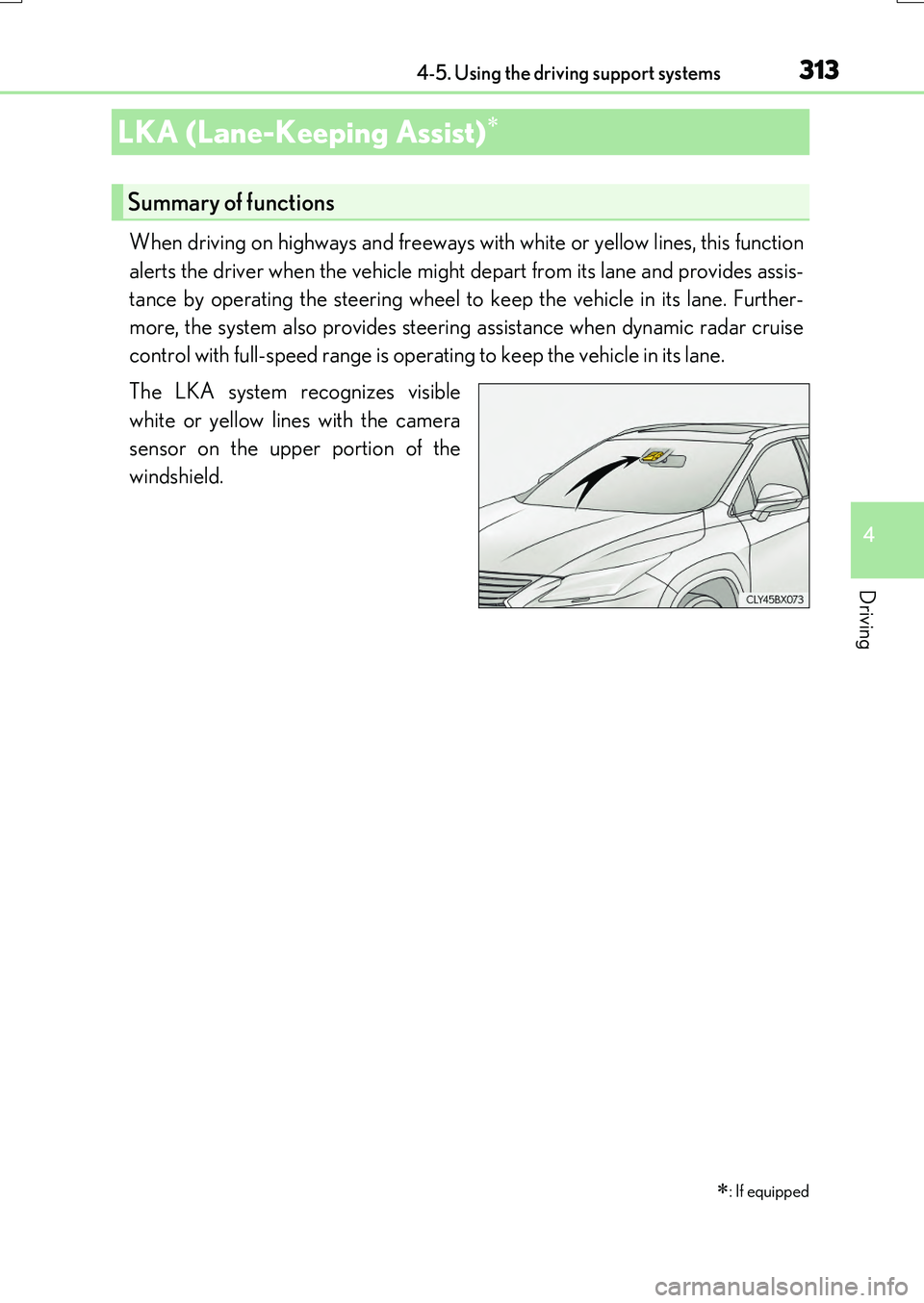
The LKA system recognizes visible
white or yellow lines with the camera
sensor on the upper portion of the
windshield.
LKA (Lane-Keeping Assist)
: If equipped
Summary of functions
Page 319 of 776
3194-5. Using the driving support systems
4
Driving
RX350/RX200t_EE_OM48F32E
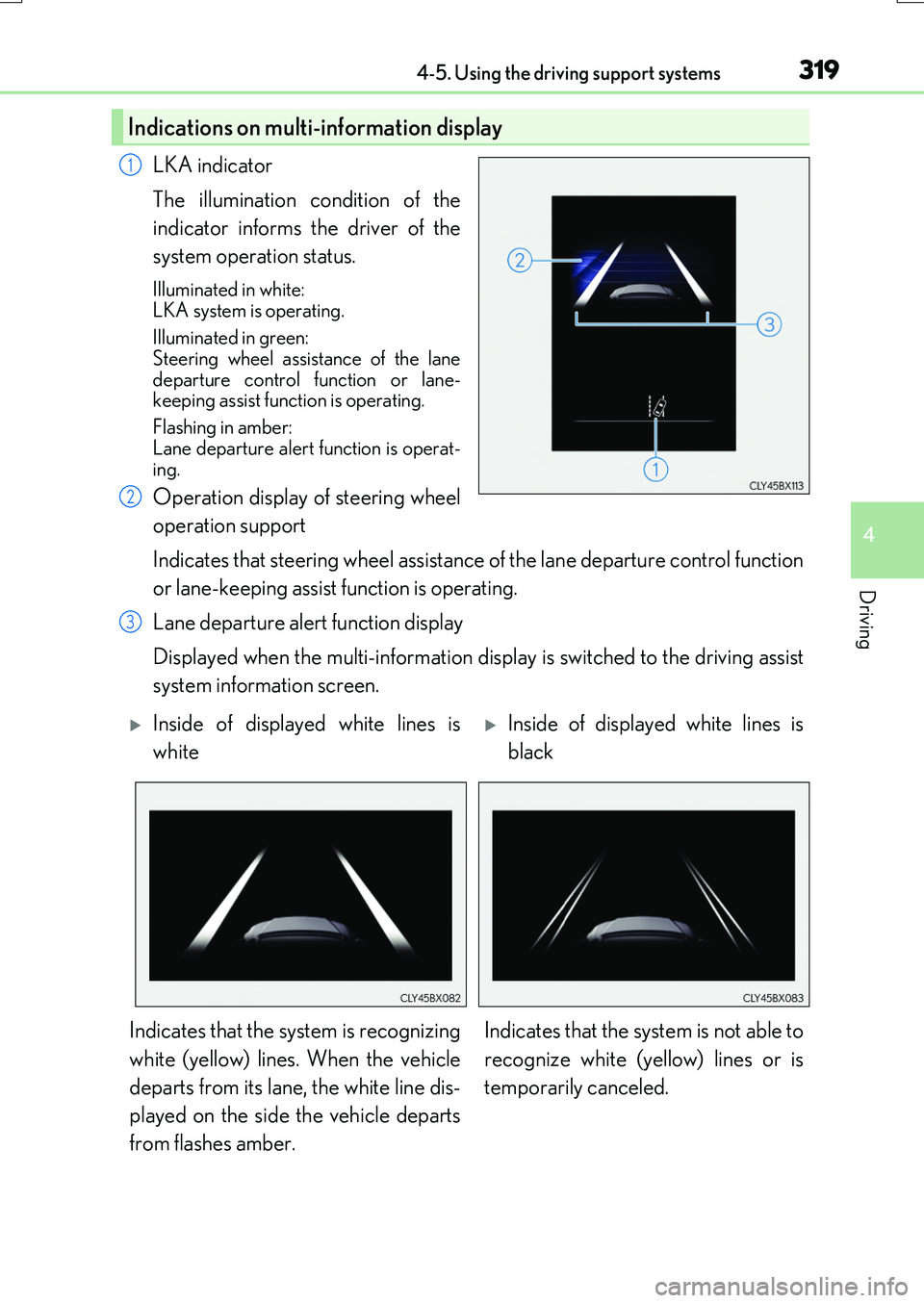
LKA indicator
The illumination condition of the
indicator informs the driver of the
system operation status.
Illuminated in white:
LKA system is operating.
Illuminated in green: Steering wheel assistance of the lane
departure control function or lane- keeping assist function is operating.
Flashing in amber:
Lane departure alert function is operat- ing.
Operation display of steering wheel
operation support
Indicates that steering wheel assistance of the lane departure control function
or lane-keeping assist function is operating.
Lane departure alert function display
Displayed when the multi-information display is switched to the driving assist
system information screen.
Indications on multi-information display
1
2
3
Inside of displayed white lines is
white
Inside of displayed white lines is
black
Indicates that the system is recognizing
white (yellow) lines. When the vehicle
departs from its lane, the white line dis-
played on the side the vehicle departs
from flashes amber.
Indicates that the system is not able to
recognize white (yellow) lines or is
temporarily canceled.
Page 320 of 776
3204-5. Using the driving support systems
RX350/RX200t_EE_OM48F32E
■Operation conditions of each function
●Lane departure alert function
This function operates when all of the following conditions are met.
• LKA is turned on.
• Vehicle speed is approximately 50 km/h (32 mph) or more.
• System recognizes white (yellow) lines.
• Width of traffic lane is approximately 3 m (9.8 ft.) or more.
• Turn signal lever is not operated.
• Vehicle is driven on a straight road or around a gentle curve with a radius of more than approximately 150 m (492 ft.).
• No system malfunctions are detected. ( P. 666)
●Lane departure control function
This function operates when all of the follo wing conditions are met in addition to the
operation conditions for the la ne departure alert function.
• Setting for “Steering Assist” in of the multi-information display is set to “On”.
( P. 110)
• Vehicle is not accelerated or decelerated by a fixed amount or more.
• Steering wheel is not operated with a steering force level suitable for changing
lanes.
• ABS, VSC, TRC and PCS are not operating.
• TRC or VSC is not turned off.
• Except for Israel: Hands off steerin g wheel alert is not displayed. (P. 321)
●Vehicle sway warning
This function operates when all of the following conditions are met.
• Setting for “Sway Warning” in of the multi-information display is set to “On”.
( P. 110)
• Vehicle speed is approximately 50 km/h (32 mph) or more.
• Width of traffic lane is approximately 3 m (9.8 ft.) or more.
• No system malfunctions are detected. ( P. 666)
●Lane-keeping assist function
This function operates when all of the following conditions are met.
• LKA is turned on.
• Setting for “Lane Center” in of the mu lti-information display are set to “On”.
( P. 110)
• System recognizes white (yellow) lines.
• Dynamic radar cruise control with full-speed range is operating.
• Width of traffic lane is approximately 2.5 to 4.1 m (8.2 to 13.5 ft.).
• Turn signal lever is not operated.
• Vehicle is driven on a straight road or around a gentle curve with a radius of more
than approximately 200 m (656 ft.).
• No system malfunctions are detected. ( P. 666)
• Vehicle does not accelerate or de celerate by a fixed amount or more.
• Steering wheel is not operated with a steering force level suitable for changing
lanes.
• ABS, VSC, TRC and PCS are not operating.
• TRC or VSC is not turned off.
• Except for Israel: Hands off steering wheel alert ( P. 321) is not displayed.
• Lane departure control function is not operating.
Page 321 of 776
3214-5. Using the driving support systems
4
Driving
RX350/RX200t_EE_OM48F32E
■Temporary cancellation of functions
When operation conditions are no longer met, a function may be temporarily canceled. However, when the operation conditions are met again, operation of the function is auto-
matically restored. ( P. 320)
■Lane departure control function/lane-keeping assist function
Depending on the vehicle speed, lane departure situation, road conditions, etc., the
operation of the functions may not be reco gnized or the functions may not operate.
■Lane departure alert function
The warning buzzer may be difficult to hear due to external noise, audio playback, etc.
Also, it may be difficult to feel steering wh eel vibrations due to the road conditions, etc.
■Hands off steering wheel alert
Except for Israel: When the system determines that the driver has removed their hands
from the steering wheel while the lane departure control function or lane-keeping assist function is operating, a warning message is displayed on the multi-information display. If the driver continues to keep their hands off of the steering wheel, the buzzer sounds, a
warning message is displayed and the function is temporarily canceled. This alert also operates in the same way when the vehicle is driven with the steering wheel lightlygripped. However, depending on the road conditions, etc., the function may not cancel.
For Israel: When the system determines that the driver has removed their hands from the steering wheel while the lane departure contro l function or lane-keeping assist function is operating, a warning message is displaye d on the multi-information display and the
buzzer sounds.
■White (yellow) lines are only on one side of road
The LKA system will not operate for the side on which white (yellow) lines could not be
recognized.
Page 322 of 776
3224-5. Using the driving support systems
RX350/RX200t_EE_OM48F32E
■Conditions in which functions may not operate properly
In the following situations, the camera sensor may not detect white (yellow) lines and var- ious functions may not operate normally.
●There are shadows on the road that run paralle l with, or cover, the white (yellow) lines.
●The vehicle is driven in an area without white (yellow) lines, such as in front of a tollgate or checkpoint, or at an intersection, etc.
●The white (yellow) lines are cracked, “Raised pavement marker” or stones are present.
●The white (yellow) lines cannot be seen or are difficult to see due to sand, etc.
●The vehicle is driven on a road surface that is wet due to rain, puddles, etc.
●The traffic lines are yellow (which may be more difficult to recognize than lines that are white).
●The white (yellow) lines cross over a curb, etc.
●The vehicle is driven on a bright surface, such as concrete.
●The vehicle is driven on a surface that is bright due to reflected light, etc.
●The vehicle is driven in an area where the brightness changes suddenly, such as at the
entrances and exits of tunnels, etc.
●Light from the headlights of an oncoming ve hicle, the sun, etc., enters the camera.
●The vehicle is driven where the road diverges, merges, etc.
●The vehicle is driven on a slope.
●The vehicle is driven on a road which tilts left or right, or a winding road.
●The vehicle is driven on an unpaved or rough road.
●The vehicle is driven around a sharp curve.
●The traffic lane is excessively narrow or wide.
●The vehicle is extremely tilted due to carrying heavy luggage or having improper tire pressure.
●The distance to the preceding vehicle is extremely short.
●The vehicle is moving up and down a large a mount due to road conditions during driv- ing (poor roads or road seams).
●The headlight lenses are dirty and emit a faint amount of light at night, or the beam axis
has deviated.
●The vehicle is struck by a crosswind.
●The vehicle has just changed lanes or crossed an intersection.
●Snow tires, etc., are equipped.