ECO LEXUS RX200T 2017 Owners Manual
[x] Cancel search | Manufacturer: LEXUS, Model Year: 2017, Model line: RX200T, Model: LEXUS RX200T 2017Pages: 776, PDF Size: 44.51 MB
Page 324 of 776
3244-5. Using the driving support systems
RX350/RX200t_EE_OM48F32E
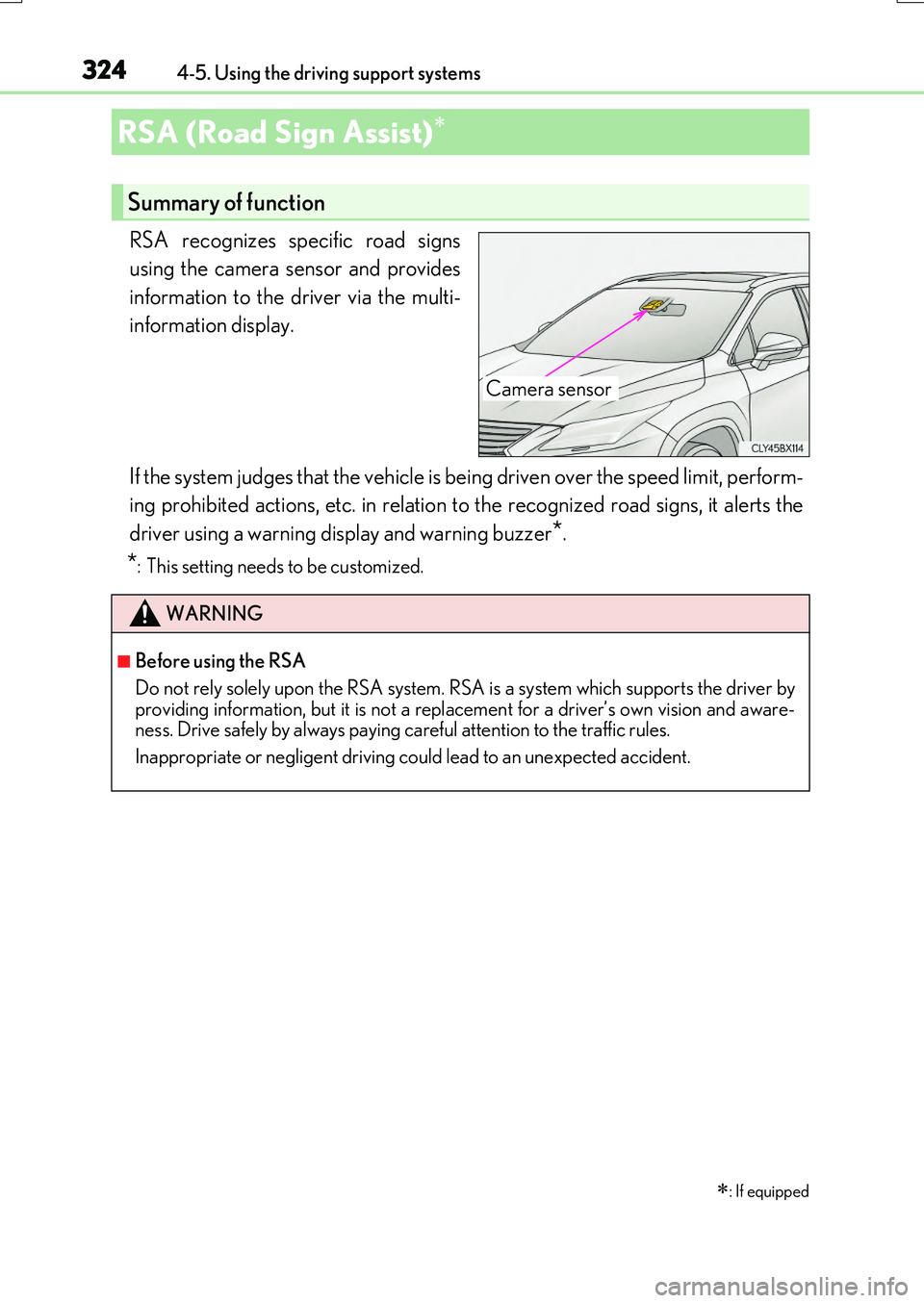
RSA recognizes specific road signs
using the camera sensor and provides
information to the driver via the multi-
information display.
If the system judges that the vehicle is being driven over the speed limit, perform-
ing prohibited actions, etc. in relation to the recognized road signs, it alerts the
driver using a warning display and warning buzzer*.
*: This setting needs to be customized.
RSA (Road Sign Assist)
: If equipped
Summary of function
Camera sensor
WARNING
■Before using the RSA
Do not rely solely upon the RSA system. RS A is a system which supports the driver by
providing information, but it is not a replacement for a driver’s own vision and aware- ness. Drive safely by always paying careful attention to the traffic rules.
Inappropriate or negligent driving could lead to an unexpected accident.
Page 325 of 776
3254-5. Using the driving support systems
4
Driving
RX350/RX200t_EE_OM48F32E
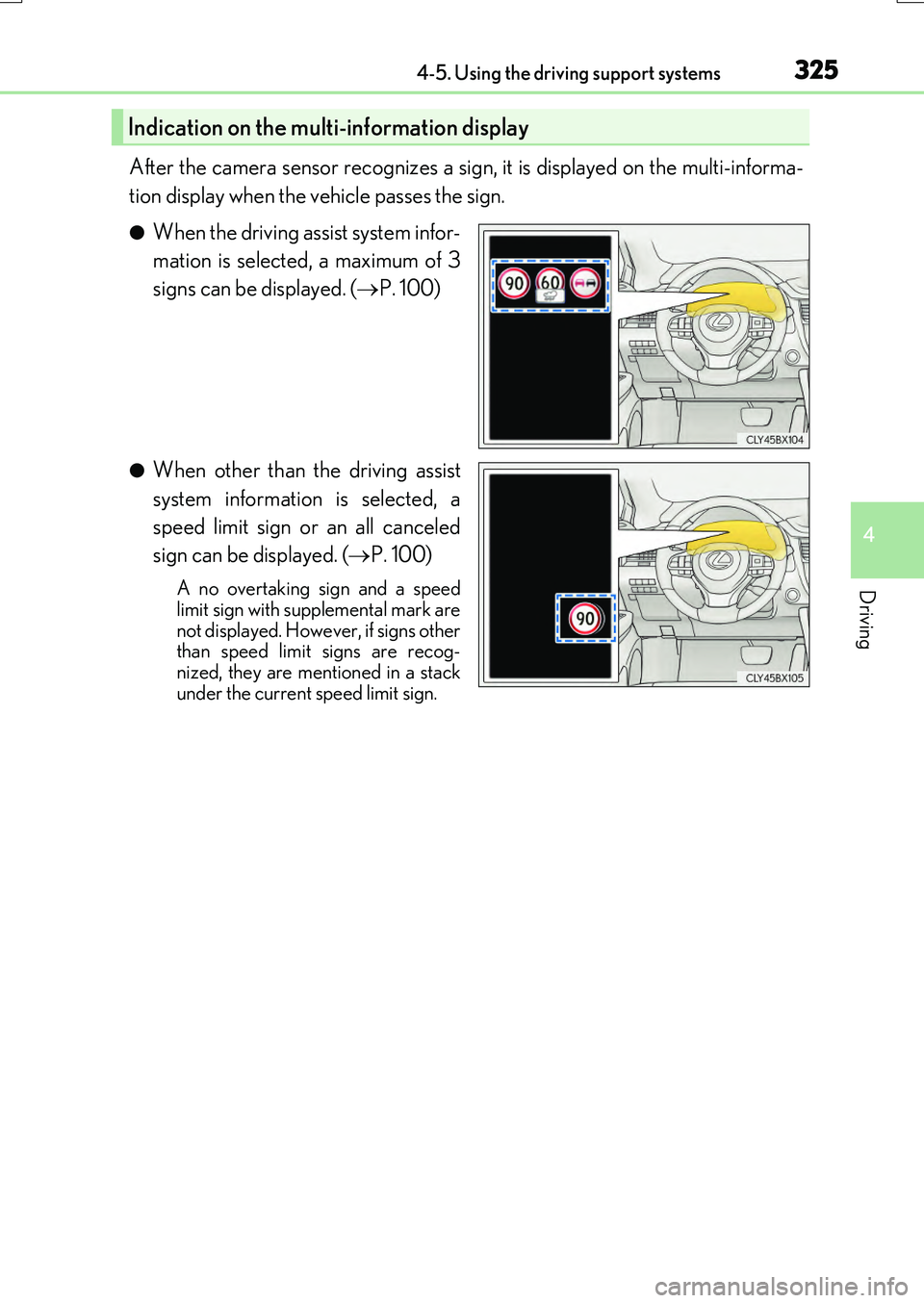
After the camera sensor recognizes a sign, it is displayed on the multi-informa-
tion display when the vehicle passes the sign.
●When the driving assist system infor-
mation is selected, a maximum of 3
signs can be displayed. ( P. 100)
●When other than the driving assist
system information is selected, a
speed limit sign or an all canceled
sign can be displayed. ( P. 100)
A no overtaking sign and a speed limit sign with supplemental mark are
not displayed. However, if signs other than speed limit signs are recog-nized, they are mentioned in a stack
under the current speed limit sign.
Indication on the multi-information display
Page 326 of 776
3264-5. Using the driving support systems
RX350/RX200t_EE_OM48F32E
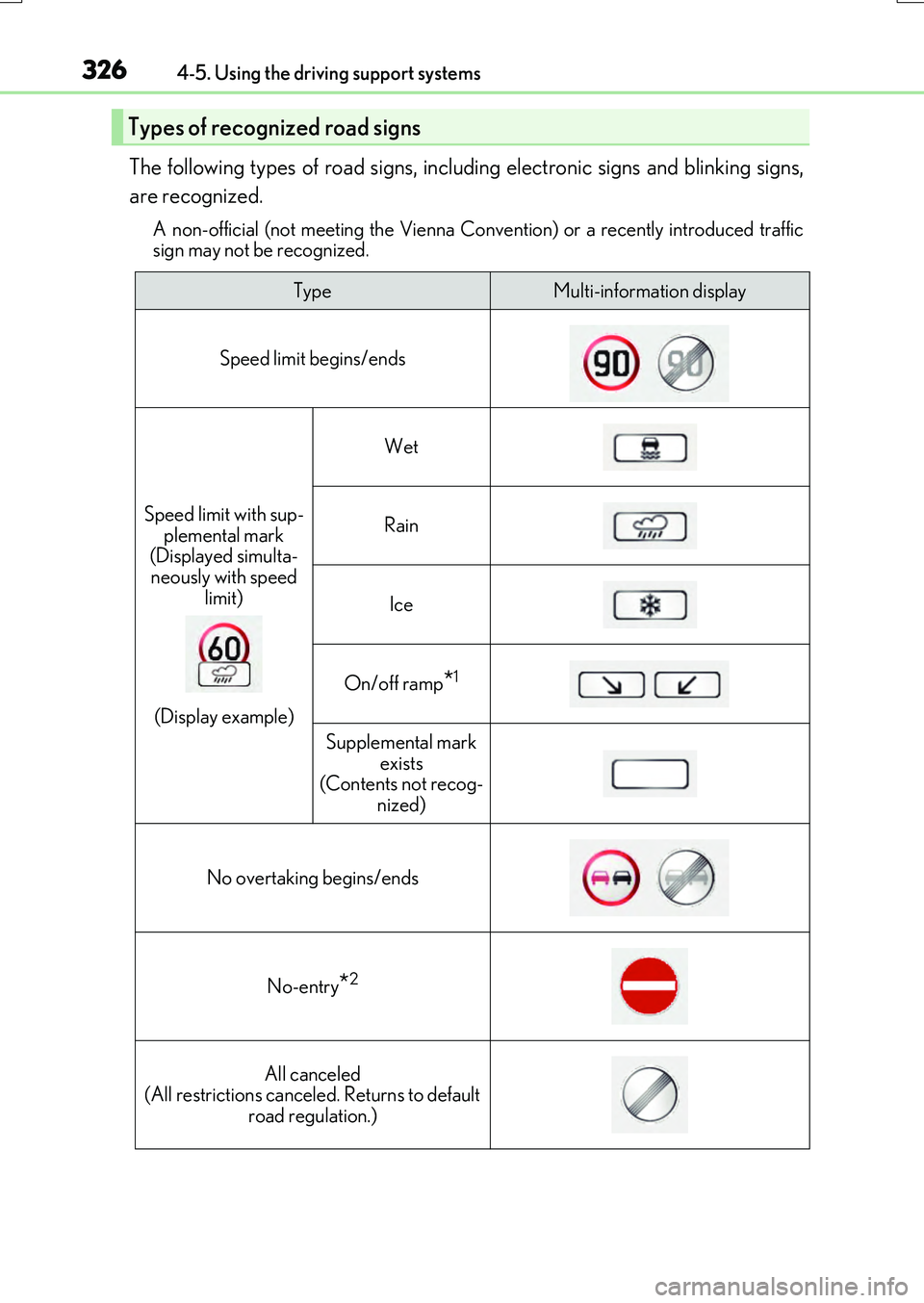
The following types of road signs, including electronic signs and blinking signs,
are recognized.
A non-official (not meeting the Vienna Conv ention) or a recently introduced traffic sign may not be recognized.
Types of recognized road signs
TypeMulti-information display
Speed limit begins/ends
Speed limit with sup-plemental mark (Displayed simulta-
neously with speed limit)
(Display example)
Wet
Rain
Ice
On/off ramp*1
Supplemental mark exists (Contents not recog-
nized)
No overtaking begins/ends
No-entry*2
All canceled (All restrictions canceled. Returns to default road regulation.)
Page 327 of 776
3274-5. Using the driving support systems
4
Driving
RX350/RX200t_EE_OM48F32E
*1: If the turn signal indicator is not operated when changing lanes, the mark does not dis-
play.
*2: Vehicles with a navigation system
In the following situations, the RSA system alerts the driver using a warning dis-
play.
●When the vehicle speed exceeds the speed warning threshold applied to the
speed limit of the sign displayed on the multi-information display, the sign
color becomes inverted.
●If it is detected that your vehicle is overtaking when a no overtaking sign is dis-
played on the multi-information display, the sign flashes.
●Vehicles with a navigation system: When the RSA system recognizes a no-
entry sign and detects that the vehicle has entered a no-entry area based on
the map information of the navigation system, the no-entry sign flashes.
Depending on the situation, traffic environment (traffic direction, speed, unit)
may be detected incorrectly and a warning display may not operate properly.
■Automatic turn-off of RSA sign display
One or more signs automatically turn off in the following situations.
●A new sign is not recognized for a certain distance.
●The road changes due to a left or right turn, etc.
■Conditions in which the function may not operate or detect correctly
In the following situations, RSA does not op erate normally and may not recognize signs,
display the incorrect sign, etc. However, this does not indicate a malfunction.
●The camera sensor is misaligned due to a strong impact being applied to the sensor, etc.
●Dirt, snow, stickers, etc. are on the windshield near the camera sensor.
●In inclement weather such as heavy rain, fog, snow or sand storms
●Light from an oncoming vehicle, the sun, etc. enters the camera sensor.
●The sign is dirty, faded, tilted or bent, and if an electronic sign, the contrast is poor.
●All or part of the sign is hidden by the leaves of a tree, a pole, etc.
●The sign is only visible to the camera sensor for a short amount of time.
●The driving scene (turning, lane change, etc.) is judged incorrectly.
●Even if it is a sign not appropriate for the currently traveled lane, such a sign exists
directly after a freeway branches, or in an adjacent lane just before merging.
●Stickers are attached to the rear of the preceding vehicle.
●A sign resembling a system comp atible sign is recognized.
●The vehicle is driven in a country with a different direction of traffic.
Warning display
Page 328 of 776
3284-5. Using the driving support systems
RX350/RX200t_EE_OM48F32E
●Side road speed signs may be detected and displayed (if positioned in sight of the cam- era sensor) while the vehicle is traveling on the main road.
●Roundabout exit road speed signs may be detected and displayed (if positioned in sight
of the camera sensor) while traveling on a roundabout.
■When driving vehicle in country with different speed unit
Since RSA recognizes signs based on the set un it of the meter, it is necessary to change
the set unit of the meter. Adjust the set unit of the meter to the speed unit of signs in the current location. ( P. 740)
■Speed limit sign display
If the engine switch was last turned off while a speed limit sign was displayed on the multi- information display, the same sign displays again when the engine switch is turned to IGNITION ON mode.
■When “Check RSA system” is displaye d on the multi-information display
The system may be malfunctioning. Have the vehicle inspected by any authorized Lexus dealer or repairer, or another duly qua lified and equipped professional immediately.
■Customization
Some functions can be customized. ( P. 110)
Page 333 of 776
3334-5. Using the driving support systems
4
Driving
RX350/RX200t_EE_OM48F32E
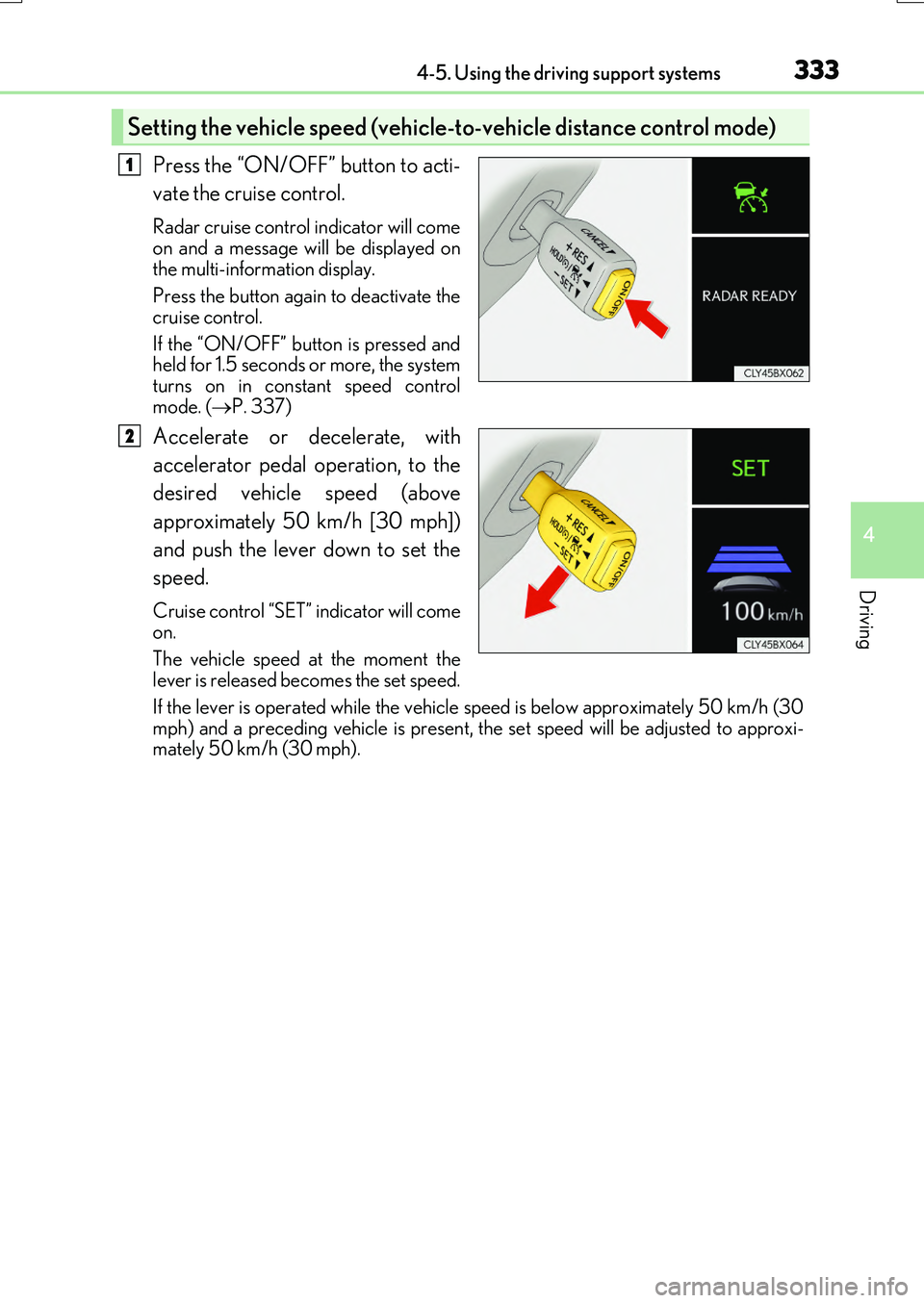
Press the “ON/OFF” button to acti-
vate the cruise control.
Radar cruise control indicator will come
on and a message will be displayed on the multi-information display.
Press the button again to deactivate the
cruise control.
If the “ON/OFF” button is pressed and held for 1.5 seconds or more, the system
turns on in constant speed control mode. ( P. 337)
Accelerate or decelerate, with
accelerator pedal operation, to the
desired vehicle speed (above
approximately 50 km/h [30 mph])
and push the lever down to set the
speed.
Cruise control “SET” indicator will come on.
The vehicle speed at the moment the
lever is released be comes the set speed.
If the lever is operated while the vehicle speed is below approximately 50 km/h (30
mph) and a preceding vehicle is present, the set speed will be adjusted to approxi- mately 50 km/h (30 mph).
Setting the vehicle speed (vehicle -to-vehicle distance control mode)
1
2
Page 337 of 776
3374-5. Using the driving support systems
4
Driving
RX350/RX200t_EE_OM48F32E
When constant speed control mode is selected, your vehicle will maintain a set
speed without controlling the vehicle-to-vehicle distance. Select this mode only
when vehicle-to-vehicle distance control mode does not function correctly due
to a dirty radar sensor, etc.
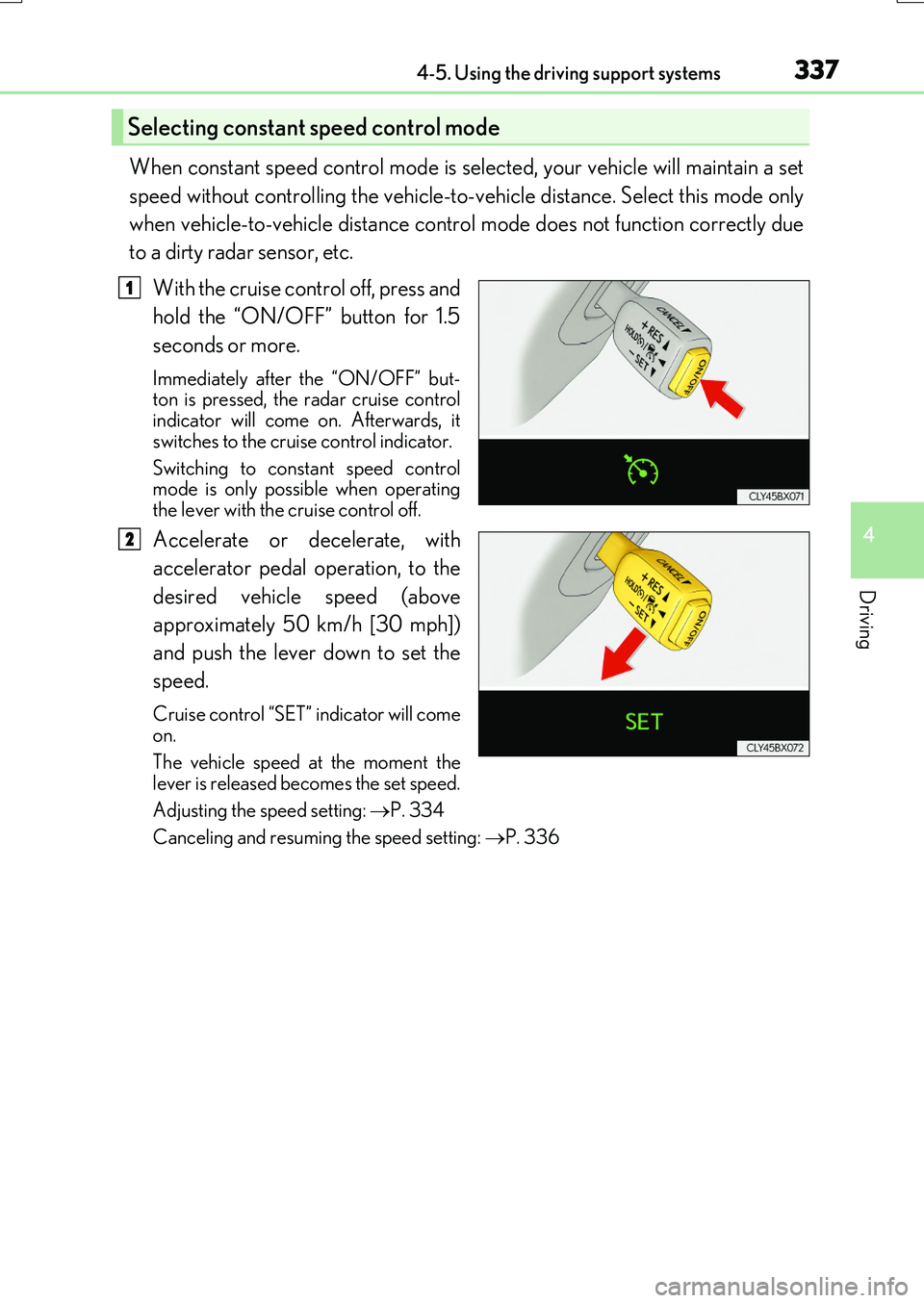
With the cruise control off, press and
hold the “ON/OFF” button for 1.5
seconds or more.
Immediately after the “ON/OFF” but- ton is pressed, the radar cruise controlindicator will come on. Afterwards, it
switches to the cruise control indicator.
Switching to constant speed control mode is only possible when operating
the lever with the cruise control off.
Accelerate or decelerate, with
accelerator pedal operation, to the
desired vehicle speed (above
approximately 50 km/h [30 mph])
and push the lever down to set the
speed.
Cruise control “SET” indicator will come
on.
The vehicle speed at the moment the lever is released be comes the set speed.
Adjusting the speed setting: P. 334
Canceling and resuming the speed setting: P. 336
Selecting constant speed control mode
1
2
Page 341 of 776
3414-5. Using the driving support systems
4
Driving
RX350/RX200t_EE_OM48F32E
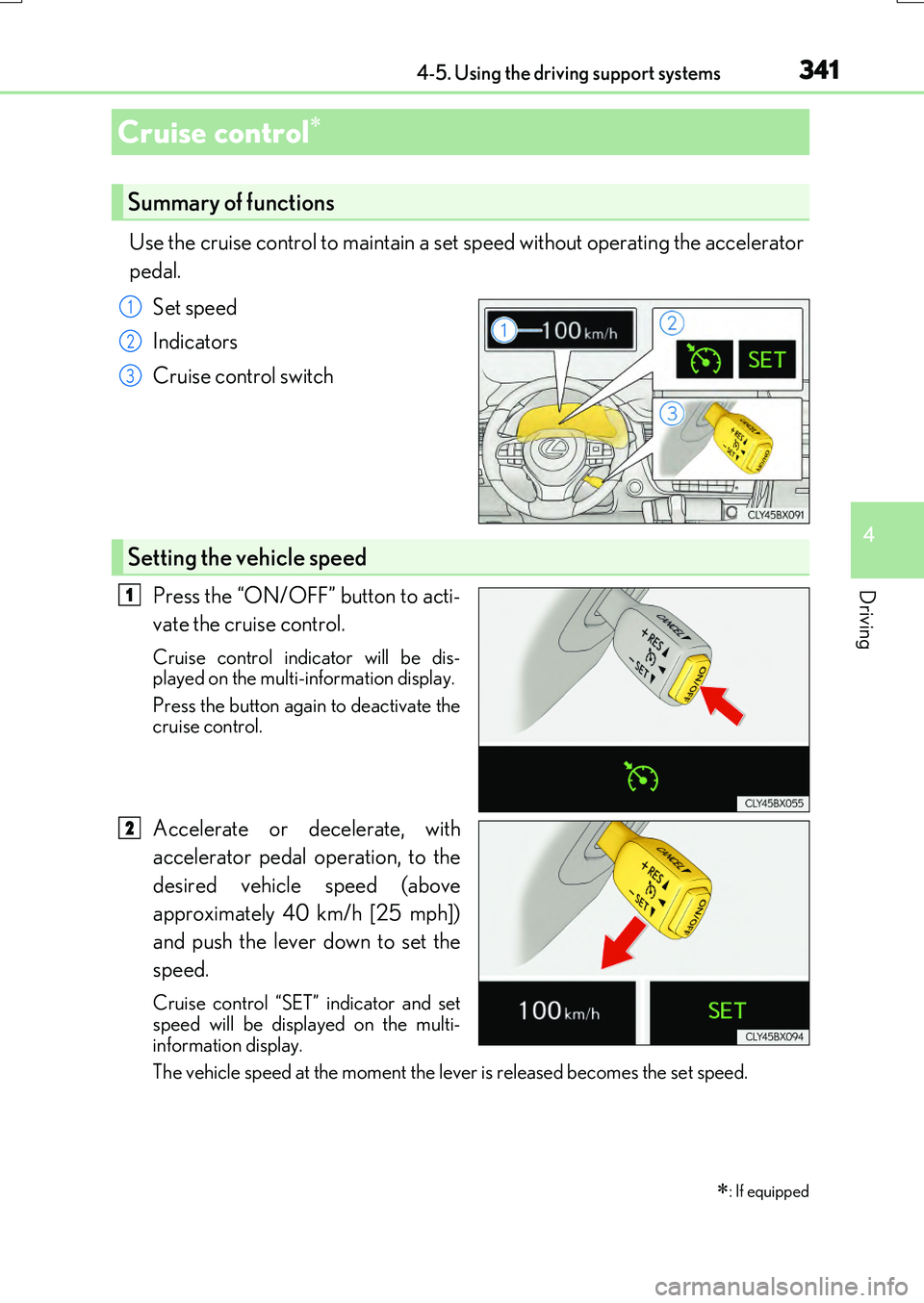
Use the cruise control to maintain a set speed without operating the accelerator
pedal.
Set speed
Indicators
Cruise control switch
Press the “ON/OFF” button to acti-
vate the cruise control.
Cruise control indicator will be dis- played on the multi-information display.
Press the button again to deactivate the cruise control.
Accelerate or decelerate, with
accelerator pedal operation, to the
desired vehicle speed (above
approximately 40 km/h [25 mph])
and push the lever down to set the
speed.
Cruise control “SET” indicator and set speed will be displayed on the multi-
information display.
The vehicle speed at the moment the leve r is released becomes the set speed.
Cruise control
: If equipped
Summary of functions
1
2
3
Setting the vehicle speed
1
2
Page 349 of 776
3494-5. Using the driving support systems
4
Driving
RX350/RX200t_EE_OM48F32E
■Operating conditions
●The Stop & Start system is operational when all of the following conditions are met:
• The brake pedal is being depressed firmly. (Except when the vehicle comes to a controlled stop while driving with the dyna mic radar cruise control with full-speed
range in vehicle-to-vehicle distance control mode [if equipped])
• The shift lever is in D or M.
• is off.
• The driver's seat belt is fastened.
• The engine is adequately warmed up.
• The driver's door is closed.
• The accelerator pedal is not being depressed.
• The outside temperature is -5°C (23°F) or higher.
• The hood is closed.
●In the following situations the engine may not be stopped by the Stop & Start system.
This is not a malfunction of the Stop & Start system.
• The air conditioning system is being used when the ambient temperature is high or
low.
• The battery is not sufficiently charged, such as if the vehicle has been parked for a long time and the battery charge has decreased, the electric load is large, the bat-
tery temperature is excessively low or the battery has deteriorated, or is undergoing
a periodic recharge.
• The brake booster vacuum is low.
• The vehicle is stoppe d on a steep incline.
• The steering wheel is being operated.
• Due to traffic or other circumstances the vehicle is being stopped repeatedly.
• The vehicle is being driven in a high altitude area.
• Engine coolant temperature or transmissi on fluid temperature is extremely low or
high.
• The battery fluid temperature is extremely low or high.
• For a while after the battery terminals have been disconnected and reconnected.
• For a while after the battery replacement.
●In the following situations, the engine will re start automatically if the engine is stopped
by the Stop & Start system. (To enable stoppi ng of the engine by the Stop & Start sys-
tem, drive the vehicle.)
• The air conditioning system is turned on.
• is turned on.
• The steering wheel is operated.
• The shift lever is shifted to a position other than D or M.
• The driver's seat belt is unfastened.
• The driver's door is opened.
• The accelerator pedal is depressed.
• The Stop & Start cancel switch is pressed.
• The vehicle starts to roll on an incline.
Page 350 of 776
3504-5. Using the driving support systems
RX350/RX200t_EE_OM48F32E
●In the following situations, the engine may restart automatically if the engine is stopped
by the Stop & Start system. (To enable stoppi ng of the engine by the Stop & Start sys-
tem, drive the vehicle.)
• The brake pedal is pumped or strongly depressed.
• The air conditioning system is being used.
• The battery is not sufficiently charged.
■Hood
●If the hood is opened while the engine is stopped by the Stop & Start system, the engine
will stall and will not be able to be restarte d by the automatic engine start function. In
this case, restart the engine using the normal engine starting procedure. (P. 246)
●If the hood is closed after the engine is st arted with the hood open, the Stop & Start sys-
tem will not operate. Close the hood, turn the engine switch off, wait 30 seconds or
more, and then start the engine.
■When to use the Stop & Start system
●When the system cannot operate, is cancele d, or is malfunctioning, warning messages
and a warning buzzer are used to inform the driver. ( P. 352)
●If the engine switch is pressed when the en gine is stopped by the Stop & Start system,
the engine will stall and will not be able to be restarted by the automatic engine start
function. In this case, restart the engine using the normal engine starting procedure.
( P. 246)
●When the engine is restarted by the Stop & Start system, the power outlets may be
temporarily unusable, but this is not a malfunction.
●Installation and remova l of electrical components and wireless devices may affect the
Stop & Start system. Contact any authorized Lexus dealer or repairer, or another duly
qualified and equipped professional for details.
■If the windshield is fogged up while the engine is stopped by the Stop & Start system
Turn on. ( P. 542)
If the windshield fogs up frequently, press the Stop & Start cancel switch to disable the
system.
■If an odor comes from the air conditioning system while the engine is stopped by the
Stop & Start system
Press the Stop & Start cancel switch to deactivate the Stop & Start system.