ECO LEXUS RX200T 2017 Owners Manual
[x] Cancel search | Manufacturer: LEXUS, Model Year: 2017, Model line: RX200T, Model: LEXUS RX200T 2017Pages: 776, PDF Size: 44.51 MB
Page 351 of 776
3514-5. Using the driving support systems
4
Driving
RX350/RX200t_EE_OM48F32E
■Air conditioning system while the engine is stopped by the Stop & Start system
●If the air conditioning system is being used in automatic mode, the fan speed may be reduced or the fan may be stopped while the engine is stopped by the Stop & Start sys-
tem in order to reduce changes in the cabin temperature.
●To ensure air conditioning system performanc e when the vehicle is stopped, disable the Stop & Start system by pressing the Stop & Start cancel switch.
■Changing the idling stop time with the air conditioning system on
The length of time the Stop & Start system will operate when the air conditioning system
is on can be changed on the ( P. 109) or (P. 110). (The length of time the Stop
& Start system will operate when the air condit ioning system is off cannot be changed.)
■The Stop & Start system protection function
●When an excessively loud sound is being projected by the audio system, the audio sys- tem may be automatically cut off in order to reduce battery consumption. If this occurs,
turn the engine switch off, wait for 3 seconds or longer and then turn it to ACCES- SORY mode or IGNITION ON mode to re-enable the audio system.
●The audio system may not be activated when the battery terminals are disconnected
and then reconnected. If this occurs, turn the engine switch off and then repeat the fol- lowing operation twice to activate the audio system normally.
• Turn the engine switch to IGNITION ON mode and then to OFF.
■Replacing the battery
P. 717
■Displaying the Stop & Start system status
P. 109
Page 352 of 776
3524-5. Using the driving support systems
RX350/RX200t_EE_OM48F32E
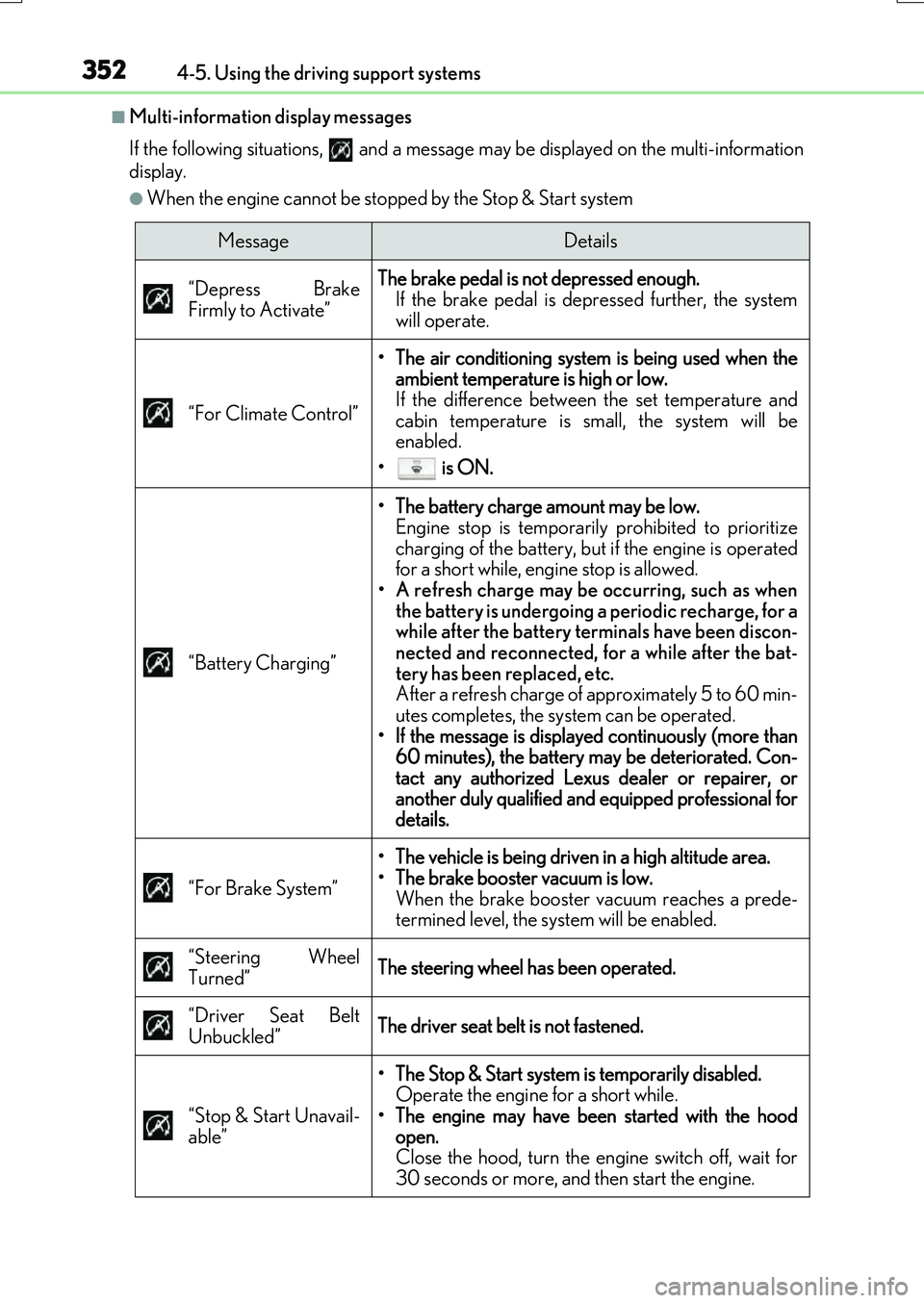
■Multi-information display messages
If the following situations, and a message may be displayed on the multi-information
display.
●When the engine cannot be stopped by the Stop & Start system
MessageDetails
“Depress Brake
Firmly to Activate”
The brake pedal is not depressed enough.
If the brake pedal is depressed further, the system
will operate.
“For Climate Control”
• The air conditioning system is being used when the ambient temperature is high or low.
If the difference between the set temperature and
cabin temperature is small, the system will be
enabled.
• is ON.
“Battery Charging”
• The battery charge amount may be low. Engine stop is temporarily prohibited to prioritize
charging of the battery, but if the engine is operated
for a short while, engine stop is allowed.
• A refresh charge may be occurring, such as when the battery is undergoing a periodic recharge, for a
while after the battery terminals have been discon-
nected and reconnected, for a while after the bat-
tery has been replaced, etc.
After a refresh charge of approximately 5 to 60 min-
utes completes, the system can be operated.
• If the message is displayed continuously (more than 60 minutes), the battery may be deteriorated. Con-
tact any authorized Lexus dealer or repairer, or
another duly qualified and equipped professional for
details.
“For Brake System”
• The vehicle is being driven in a high altitude area.
• The brake booster vacuum is low. When the brake booster vacuum reaches a prede-
termined level, the system will be enabled.
“Steering Wheel
Turned”
The steering wheel has been operated.
“Driver Seat Belt
Unbuckled”
The driver seat belt is not fastened.
“Stop & Start Unavail-
able”
• The Stop & Start system is temporarily disabled. Operate the engine for a short while.
• The engine may have been started with the hood open.
Close the hood, turn the engine switch off, wait for
30 seconds or more, and then start the engine.
Page 353 of 776
3534-5. Using the driving support systems
4
Driving
RX350/RX200t_EE_OM48F32E
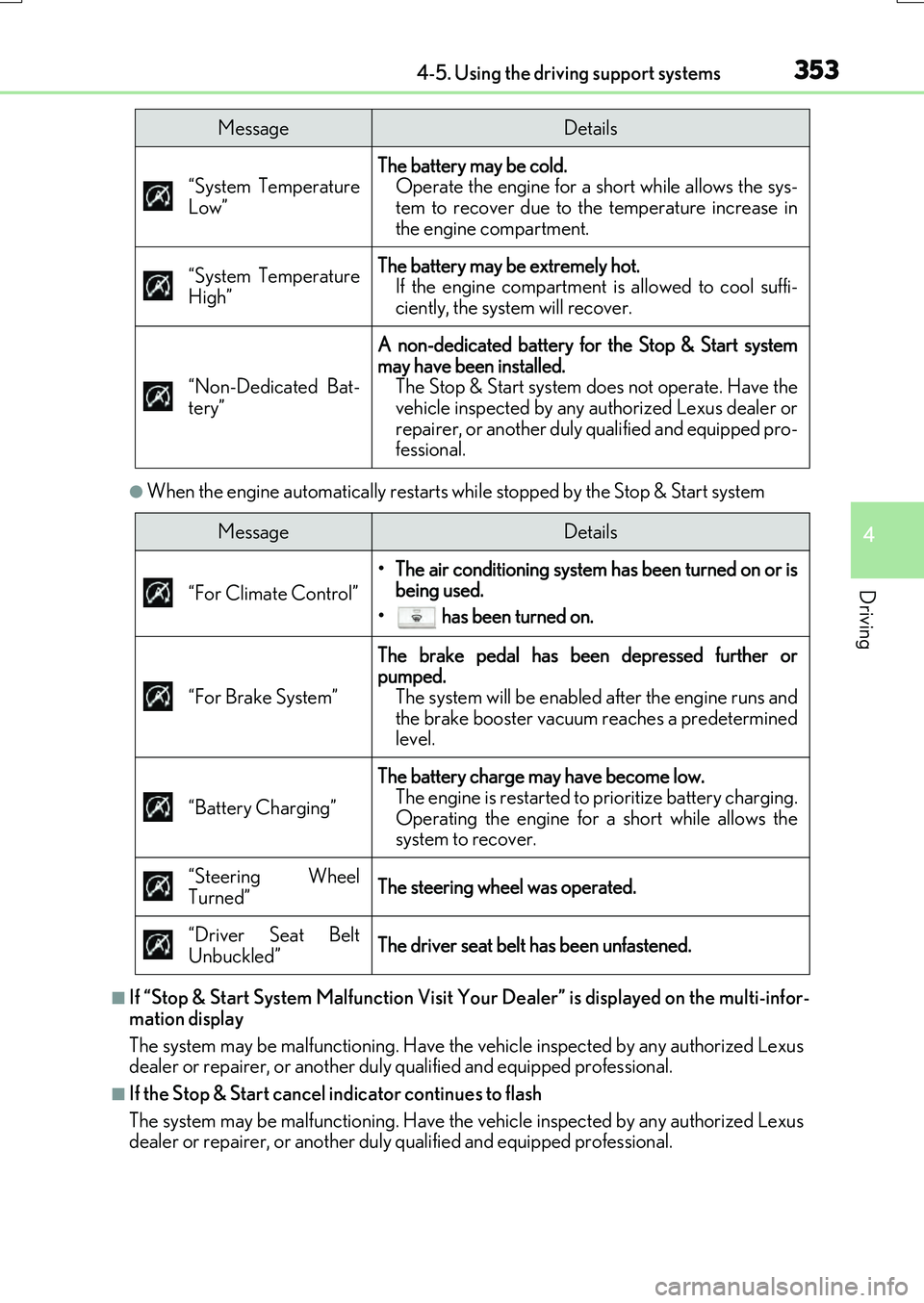
●When the engine automatically restarts while stopped by the Stop & Start system
■If “Stop & Start System Malfunction Visit Your Dealer” is displayed on the multi-infor-
mation display
The system may be malfunctioning. Have the vehicle inspected by any authorized Lexus
dealer or repairer, or another duly qualified and equipped professional.
■If the Stop & Start cancel indicator continues to flash
The system may be malfunctioning. Have the vehicle inspected by any authorized Lexus
dealer or repairer, or another duly qualified and equipped professional.
“System Temperature
Low”
The battery may be cold. Operate the engine for a short while allows the sys-
tem to recover due to the temperature increase in
the engine compartment.
“System Temperature
High”
The battery may be extremely hot. If the engine compartment is allowed to cool suffi-
ciently, the system will recover.
“Non-Dedicated Bat-
tery”
A non-dedicated battery for the Stop & Start system
may have been installed. The Stop & Start system does not operate. Have the
vehicle inspected by any authorized Lexus dealer or
repairer, or another duly qualified and equipped pro-
fessional.
MessageDetails
MessageDetails
“For Climate Control”
• The air conditioning system has been turned on or is being used.
• has been turned on.
“For Brake System”
The brake pedal has been depressed further or
pumped. The system will be enabled after the engine runs and
the brake booster vacuum reaches a predetermined
level.
“Battery Charging”
The battery charge may have become low. The engine is restarted to prioritize battery charging.
Operating the engine for a short while allows the
system to recover.
“Steering Wheel
Turned”
The steering wheel was operated.
“Driver Seat Belt
Unbuckled”
The driver seat belt has been unfastened.
Page 356 of 776
3564-5. Using the driving support systems
RX350/RX200t_EE_OM48F32E
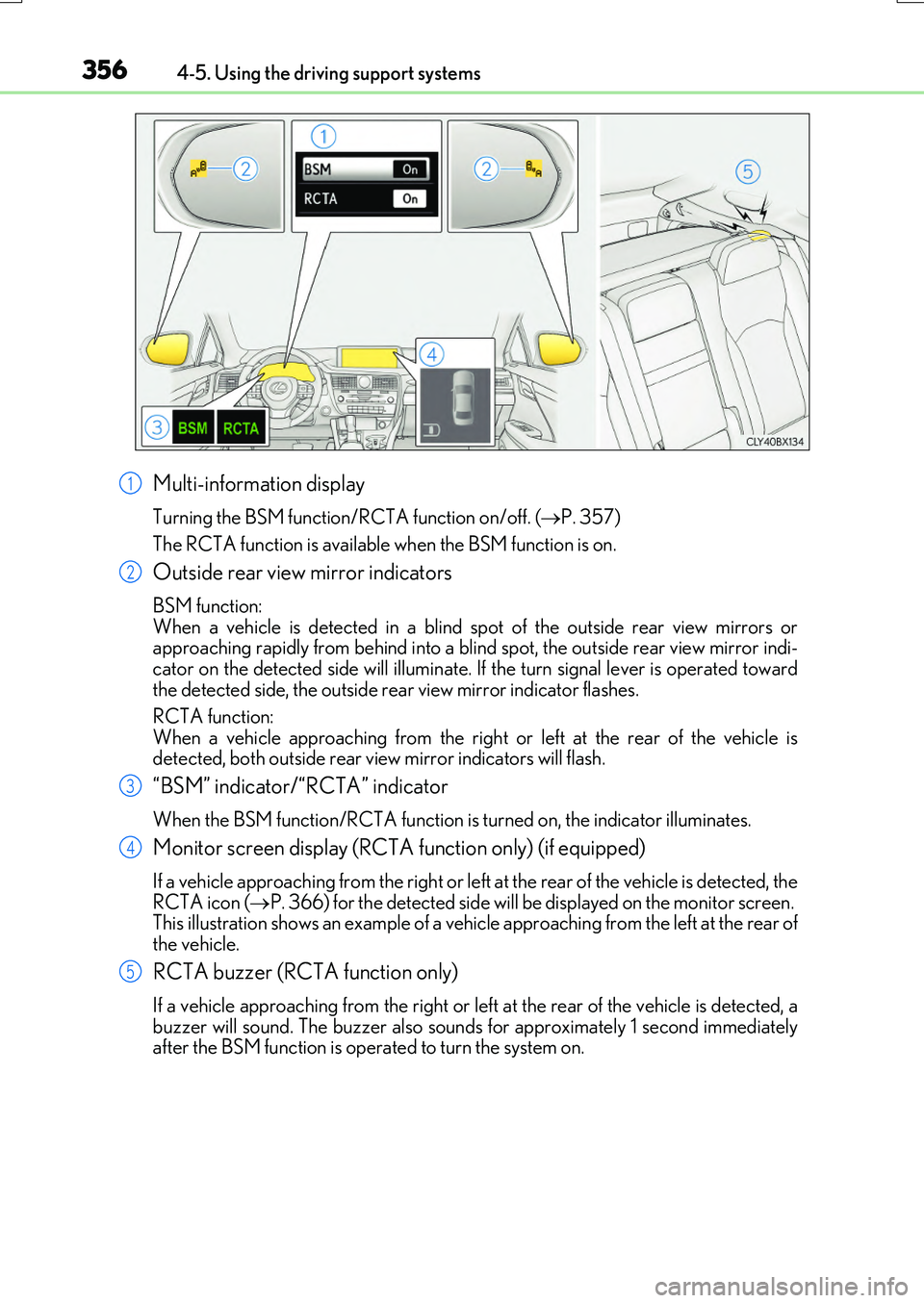
Multi-information display
Turning the BSM function/RCTA function on/off. (P. 357)
The RCTA function is available when the BSM function is on.
Outside rear view mirror indicators
BSM function: When a vehicle is detected in a blind sp ot of the outside rear view mirrors or approaching rapidly from behind into a blin d spot, the outside rear view mirror indi-
cator on the detected side will illuminate. If the turn signal lever is operated toward the detected side, the outside rear view mirror indicator flashes.
RCTA function:
When a vehicle approaching from the right or left at the rear of the vehicle is detected, both outside rear vi ew mirror indicators will flash.
“BSM” indicator/“RCTA” indicator
When the BSM function/RCTA function is turned on, the indicator illuminates.
Monitor screen display (RCTA function only) (if equipped)
If a vehicle approaching from the right or left at the rear of the vehicle is detected, the RCTA icon ( P. 366) for the detected side will be displayed on the monitor screen. This illustration shows an example of a vehicl e approaching from the left at the rear of
the vehicle.
RCTA buzzer (RCTA function only)
If a vehicle approaching from the right or left at the rear of the vehicle is detected, a buzzer will sound. The buzzer also sounds for approximately 1 second immediatelyafter the BSM function is operated to turn the system on.
1
2
3
4
5
Page 360 of 776
3604-5. Using the driving support systems
RX350/RX200t_EE_OM48F32E
WARNING
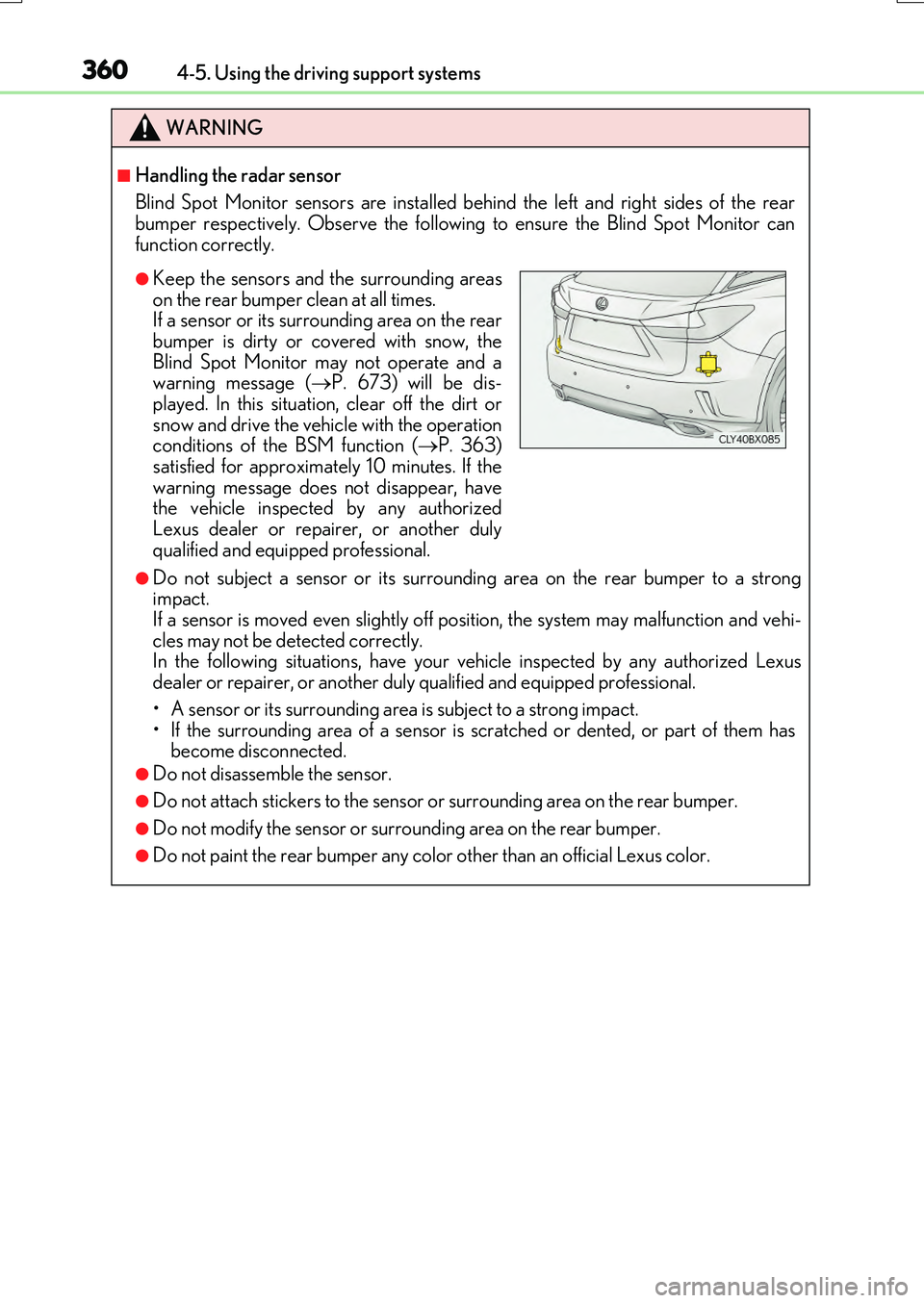
■Handling the radar sensor
Blind Spot Monitor sensors are installed be hind the left and right sides of the rear bumper respectively. Observe the following to ensure the Blind Spot Monitor can
function correctly.
●Do not subject a sensor or its surrounding area on the rear bumper to a strong impact. If a sensor is moved even slightly off po sition, the system may malfunction and vehi-
cles may not be detected correctly. In the following situations, have your ve hicle inspected by any authorized Lexus dealer or repairer, or another duly qualified and equipped professional.
• A sensor or its surrounding area is subject to a strong impact. • If the surrounding area of a sensor is scratched or dented, or part of them hasbecome disconnected.
●Do not disassemble the sensor.
●Do not attach stickers to the sensor or surrounding area on the rear bumper.
●Do not modify the sensor or surrounding area on the rear bumper.
●Do not paint the rear bumper any color other than an official Lexus color.
●Keep the sensors and the surrounding areas
on the rear bumper clean at all times. If a sensor or its surrounding area on the rearbumper is dirty or covered with snow, the
Blind Spot Monitor may not operate and a warning message ( P. 673) will be dis- played. In this situation, clear off the dirt or
snow and drive the vehicle with the operation conditions of the BSM function ( P. 363) satisfied for approximately 10 minutes. If the
warning message does not disappear, have the vehicle inspected by any authorizedLexus dealer or repairer, or another duly
qualified and equipped professional.
Page 387 of 776
3874-5. Using the driving support systems
4
Driving
RX350/RX200t_EE_OM48F32E
■The Intelligent Clearance Sonar function will operate when
The function will operate when the ICS OFF indicator is not illuminated or flashing ( P. 383, 391) and all of the following conditions are met:
●Engine output restriction control
• The Intelligent Clearance Sonar system is enabled. • The vehicle speed is 15 km/h (10 mph) or less.• There is an object in the traveling directio n of the vehicle and 2 to 4 m (6 to 13 ft.)
away. • The system determines that a stronger-than-normal brake operation is necessary toavoid a collision.
●Brake control
• Engine output restriction control is operating.
• The system determines that an emergency brake operation is necessary to avoid a collision.
■The Intelligent Clearance Sonar function will stop operating when
The function will stop operating if an y of the following conditions are met:
●Engine output restriction control
• The Intelligent Clearance Sonar system is disabled.
• The collision becomes avoidable with normal brake operation. • The object is no longer 2 to 4 m (6 to 13 ft.) away in the traveling direction of thevehicle.
●Brake control
• The Intelligent Clearance Sonar system is disabled.
• Approximately 2 seconds elapse after the vehicle is stopped by brake control. • The brake pedal is depressed after the vehicle is stopped by brake control.• The object is no longer 2 to 4 m (6 to 13 ft.) away in the traveling direction of the
vehicle.
■Detection range of the Intelligent Clearance Sonar function
The detection range of the Intelligent Clearance Sonar function differs from the detec-
tion range of the Lexus parking assist-sensor ( P. 375).
Therefore, even if the Lexus parking assist-s ensor detects an object and provides a warn- ing, the Intelligent Clearance Sonar function may not start operating.
■If the Intelligent Clearance Sonar function has operated
If the vehicle is stopped due to operation of the Intelligent Clearance Sonar function, the Intelligent Clearance Sonar system will be disa bled and the ICS OFF indicator will illumi-
nate.
Page 388 of 776
3884-5. Using the driving support systems
RX350/RX200t_EE_OM48F32E
■Re-enabling the Intelligent Clearance Sonar system
To re-enable the Intelligent Clearance Sonar system when it is disabled due to operation of the Intelligent Clearance Sonar function, either enable the system again (P. 383),
or turn the engine switch off and then back to IGNITION ON mode.
Additionally, if the object becomes no longer in the traveling direction of the vehicle or if the traveling direction of the vehicle chan ges (such as changing from moving forward to
backing up, or from backing up to moving fo rward), the system will be re-enabled auto- matically.
■Objects that the Intelligent Clearance Sonar function may not detect
The sensors may not be able to detect certain objects, such as the following.
●Cotton cloth, snow, and other materials that are poor reflectors of ultrasonic waves.
(People may also not be detected depending on the type of clothing they are wearing.)
●Objects which are not perpendicular to the ground, are not perpendicular to the traveling direction of the vehicle, are uneven or are waving.
●Low objects
●Thin objects such as wires, fences, ropes and signposts
●Objects that are extremely close to the bumper
■Lexus parking assist-sensor buzzer
Regardless of whether the Lexus parking as sist-sensor system is enabled or not (P. 375), if the Intelligent Clearance Sonar system is enabled ( P. 383), the front or rear sensors detect an object and brake control is performed, the Lexus parking assist-sensor
buzzer will sound to notify the driver of the approximate distance to the object.
Page 391 of 776
3914-5. Using the driving support systems
4
Driving
RX350/RX200t_EE_OM48F32E
■If a battery terminal has been disconnected and reconnected
The system needs to be initialized.
To initialize the system, drive the vehicle stra ight ahead for 5 seconds or more at a speed
of approximately 35 km/h (22 mph) or more.
■If “ICS Unavailable” is displayed on the mu lti-information display and the ICS OFF indi- cator is flashing
●A sensor may be covered with ice, snow, dirt , etc. Remove the ice, snow, dirt, etc., from the sensor to return the system to normal.
Also, due to ice forming on a sensor at low temperatures, a warning message may be
displayed or the sensor may not be able to detect an object. Once the ice melts, the system will return to normal.
●If this message continues to be displayed even after cleaning the sensor, or is displayed
even though the sensor is clean, have the vehicle inspected by any authorized Lexus dealer or repairer, or another duly qualified and equipped professional.
●Initialization may not have been performed after a battery terminal was disconnected
and reconnected. Initialize the system. ( P. 391)
■If “ICS Malfunction Visit Your Dealer” is displayed on the multi-information display and the ICS OFF indicator is flashing
The system may be malfunctioning. Have the vehicle inspected by any authorized Lexus dealer or repairer, or another duly qualified and equipped professional.
Page 392 of 776
3924-5. Using the driving support systems
RX350/RX200t_EE_OM48F32E
WARNING
■Limitations of the Intelligent Clearance Sonar system
Do not overly rely on the system, as doing so may lead to an accident.
●The driver is solely responsible for safe dr iving. Always drive carefully, taking care to
observe your surroundings. The Intelligent Clearance Sonar system is designed to provide support to lessen the severity of collisions. However, it may not operate in some situations.
●The Intelligent Clearance Sonar system is not designed to stop the vehicle com- pletely. Additionally, even if the system has stopped the vehicle, it is necessary todepress the brake pedal immediately as brak e control will be canceled after approxi-
mately 2 seconds.
■To ensure the Intelligent Clearance Sonar system can operate properly
Observe the following precautions regarding the sensors ( P. 383). Failure to do so
may cause a sensor to not operate properly, and may cause an accident.
●Do not modify, disassemble or paint the sensors.
●Do not replace a sensor with a part other than a genuine part.
●Do not subject a sensor or its surrounding area to a strong impact.
●Do not damage the sensors, and always keep them clean.
Observe the following precautions regarding the radar sensors ( P. 360). Failure to
do so may cause a radar sensor to not operate properly, and may cause an accident.
●Do not modify, disassemble or paint the sensors.
●Do not replace a radar sensor with a part other than a genuine part.
●Do not subject a radar sensor or its surrounding area to a strong impact.
●Do not damage the radar sensors, and alwa ys keep the radar sensors and their sur- rounding area on the bumper clean.
■Handling the suspension
Do not modify the suspension, as changes to the height or inclination of the vehicle may prevent the sensors from detecting objects correctly or cause the system to not oper-
ate or operate unnecessarily.
Page 396 of 776
3964-5. Using the driving support systems
RX350/RX200t_EE_OM48F32E
■The Rear Crossing Traffic Auto Brake function will operate when
The function will operate when the ICS OFF indicator is not illuminated or flashing ( P. 383, 391) and all of the following conditions are met:
●Engine output restriction control
• The Intelligent Clearance Sonar with Rear Crossing Traffic Auto Brake is enabled. • The vehicle speed is 15 km/h (10 mph) or less.• The shift lever is in R.
• The system determines that a stronger than normal brake operation is necessary to avoid a collision with an approaching vehicle.
●Brake control
• Engine output restriction control is operating. • The system determines that an emergency brake operation is necessary to avoid a
collision with an approaching vehicle.
■The Rear Crossing Traffic Auto Brake function will stop operating when
The function will stop operating if an y of the following conditions are met:
●Engine output restriction control
• The Intelligent Clearance Sonar with Rear Crossing Traffic Auto Brake is disabled. • The collision becomes avoidable with normal brake operation.
• A vehicle is no longer approaching from the right or left at the rear of the vehicle.
●Brake control
• The Intelligent Clearance Sonar with Rear Crossing Traffic Auto Brake is disabled. • Approximately 2 seconds elapse after the vehicle is stopped by brake control.• The brake pedal is depressed after the vehicle is stopped by brake control.
• A vehicle is no longer approaching from the right or left at the rear of the vehicle.
■Detection area of the Rear Cro ssing Traffic Auto Brake function
The detection area of the Rear Crossing Tr affic Auto Brake function differs from the
detection area of the RCTA function ( P. 367).
Therefore, even if the RCTA function detects a vehicle and provides an alert, the Rear Crossing Traffic Auto Brake function may not start operating.
■If the Rear Crossing Traffic Auto Brake function has operated
If the vehicle is stopped due to operation of the Rear Crossing Traffic Auto Brake func- tion, the Rear Crossing Traffic Auto Brake fu nction will be disabled and the ICS OFF indi-
cator will illuminate.