ECO LEXUS RX200T 2017 Repair Manual
[x] Cancel search | Manufacturer: LEXUS, Model Year: 2017, Model line: RX200T, Model: LEXUS RX200T 2017Pages: 776, PDF Size: 44.51 MB
Page 185 of 776
185
3
Operation of each component
RX350/RX200t_EE_OM48F32E
3-3. Adjusting the seats
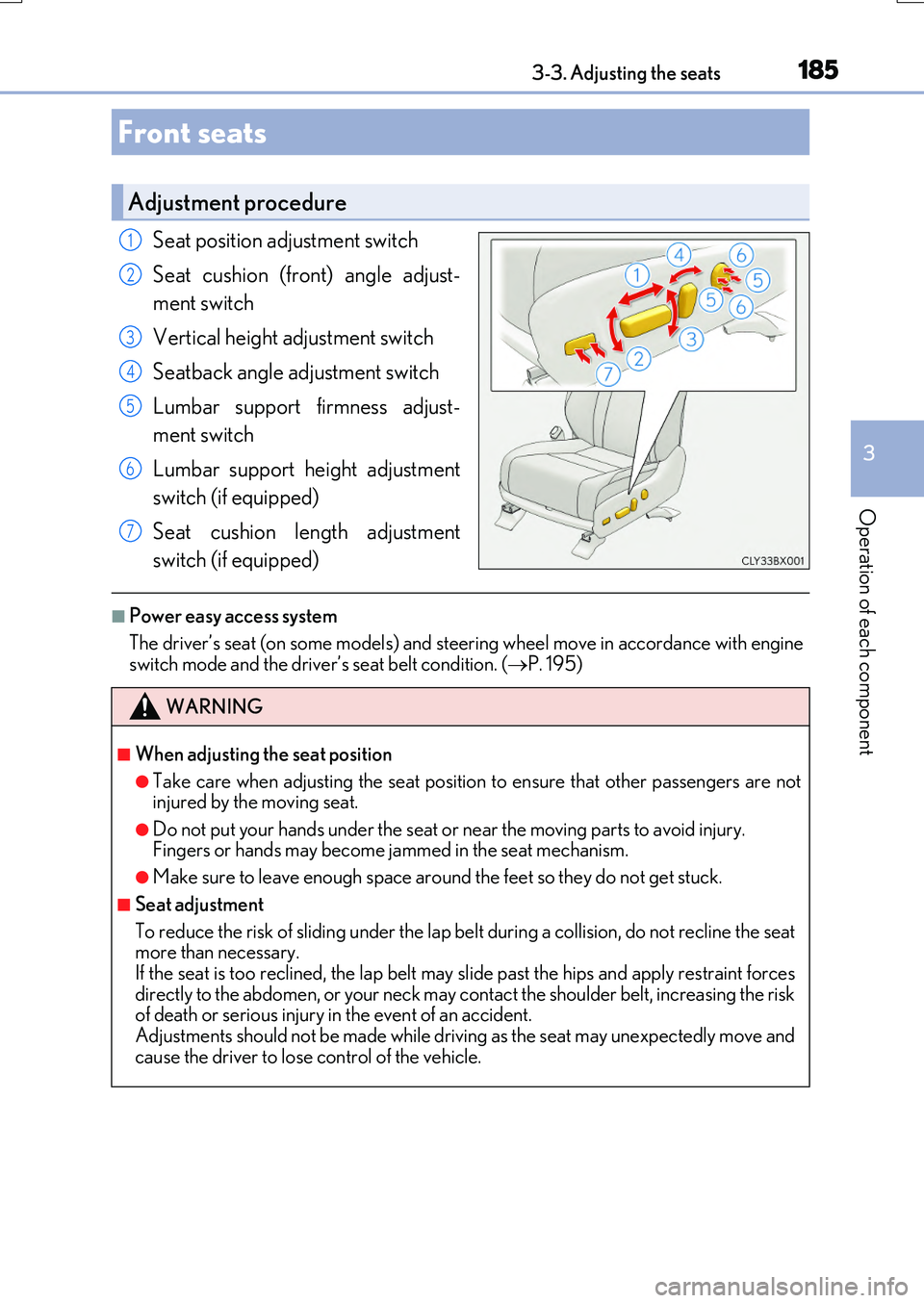
Seat position adjustment switch
Seat cushion (front) angle adjust-
ment switch
Vertical height adjustment switch
Seatback angle adjustment switch
Lumbar support firmness adjust-
ment switch
Lumbar support height adjustment
switch (if equipped)
Seat cushion length adjustment
switch (if equipped)
■Power easy access system
The driver’s seat (on some models) and steering wheel move in accordance with engine switch mode and the driver’s seat belt condition. ( P. 195)
Front seats
Adjustment procedure
1
2
3
4
5
6
7
WARNING
■When adjusting the seat position
●Take care when adjusting the seat position to ensure that other passengers are not injured by the moving seat.
●Do not put your hands under the seat or near the moving parts to avoid injury. Fingers or hands may become jammed in the seat mechanism.
●Make sure to leave enough space around the feet so they do not get stuck.
■Seat adjustment
To reduce the risk of sliding under the lap be lt during a collision, do not recline the seat more than necessary.
If the seat is too reclined, th e lap belt may slide past the hips and apply restraint forces directly to the abdomen, or your neck may contact the shoulder belt, increasing the riskof death or serious injury in the event of an accident.
Adjustments should not be made while driving as the seat may unexpectedly move and cause the driver to lose control of the vehicle.
Page 196 of 776
1963-3. Adjusting the seats
RX350/RX200t_EE_OM48F32E
Your preferred driving position (the position of the driver’s seat, steering wheel
and outside rear view mirrors) can be recorded and recalled by pressing a but-
ton.
Three different driving positions can be recorded into memory.
■Recording procedure
Check that the shift lever is in P.
Turn the engine switch to IGNITION ON mode.
Adjust the driver’s seat, steering wheel, and outside rear view mirrors to the
desired positions.
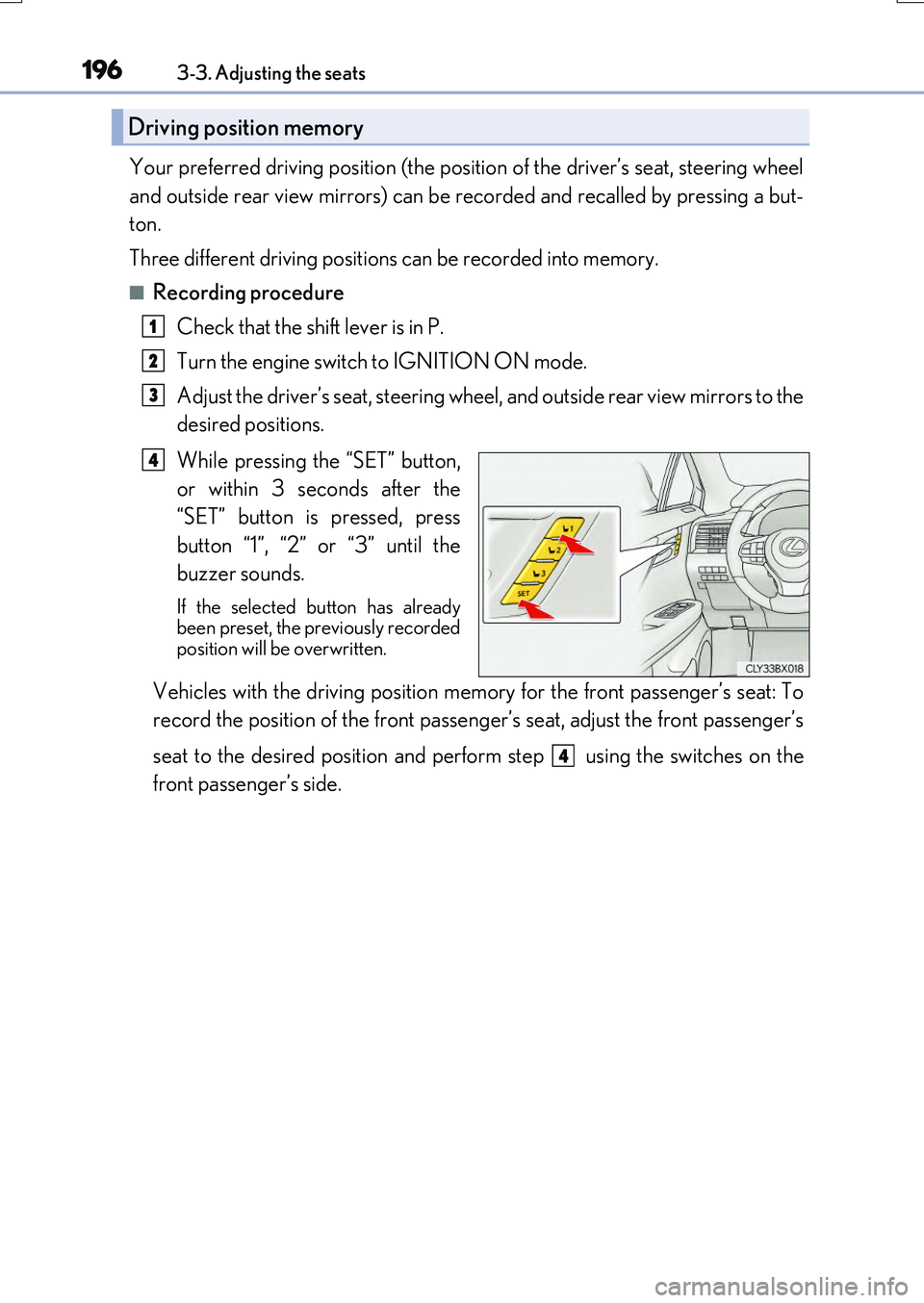
While pressing the “SET” button,
or within 3 seconds after the
“SET” button is pressed, press
button “1”, “2” or “3” until the
buzzer sounds.
If the selected button has already been preset, the previously recorded
position will be overwritten.
Vehicles with the driving position memory for the front passenger’s seat: To
record the position of the front passeng er’s seat, adjust the front passenger’s
seat to the desired position and perform step using the switches on the
front passenger’s side.
Driving position memory
1
2
3
4
4
Page 197 of 776
1973-3. Adjusting the seats
3
Operation of each component
RX350/RX200t_EE_OM48F32E
■Recall procedure
Check that the shift lever is in P.
Turn the engine switch to IGNITION ON mode.
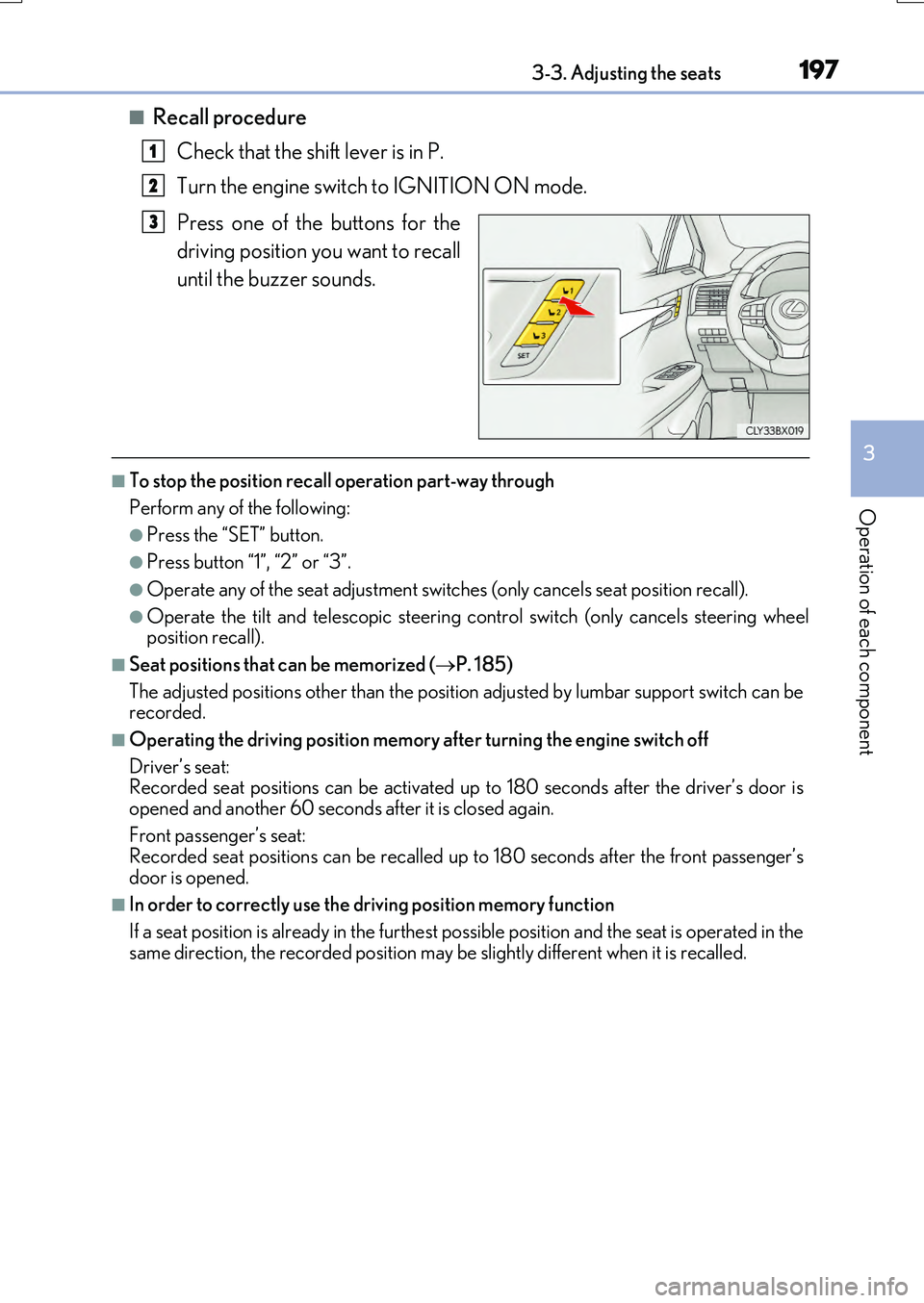
Press one of the buttons for the
driving position you want to recall
until the buzzer sounds.
■To stop the position recall operation part-way through
Perform any of the following:
●Press the “SET” button.
●Press button “1”, “2” or “3”.
●Operate any of the seat adjustment switches (only cancels seat position recall).
●Operate the tilt and telescopic steering control switch (only cancels steering wheel position recall).
■Seat positions that can be memorized ( P. 185)
The adjusted positions other than the position adjusted by lumbar support switch can be recorded.
■Operating the driving position memory after turning the engine switch off
Driver’s seat: Recorded seat positions can be activated up to 180 seconds after the driver’s door is
opened and another 60 seconds after it is closed again.
Front passenger’s seat: Recorded seat positions can be recalled up to 180 seconds after the front passenger’s
door is opened.
■In order to correctly use the driving position memory function
If a seat position is already in the furthest possible position and the seat is operated in the
same direction, the recorded position may be slightly different when it is recalled.
1
2
3
Page 198 of 776
1983-3. Adjusting the seats
RX350/RX200t_EE_OM48F32E
Each electronic key (including a card key) can be registered to recall your pre-
ferred driving position.
■Registering procedure
Record your driving position to button “1”, “2” or “3” before performing the
following:
Carry only the key you want to register, and then close the driver’s door.
If 2 or more keys are in the vehicle, the driving position cannot be recorded
properly.
Check that the shift lever is in P.
Turn the engine switch to IGNITION ON mode.
Recall the driving position that you want to record.
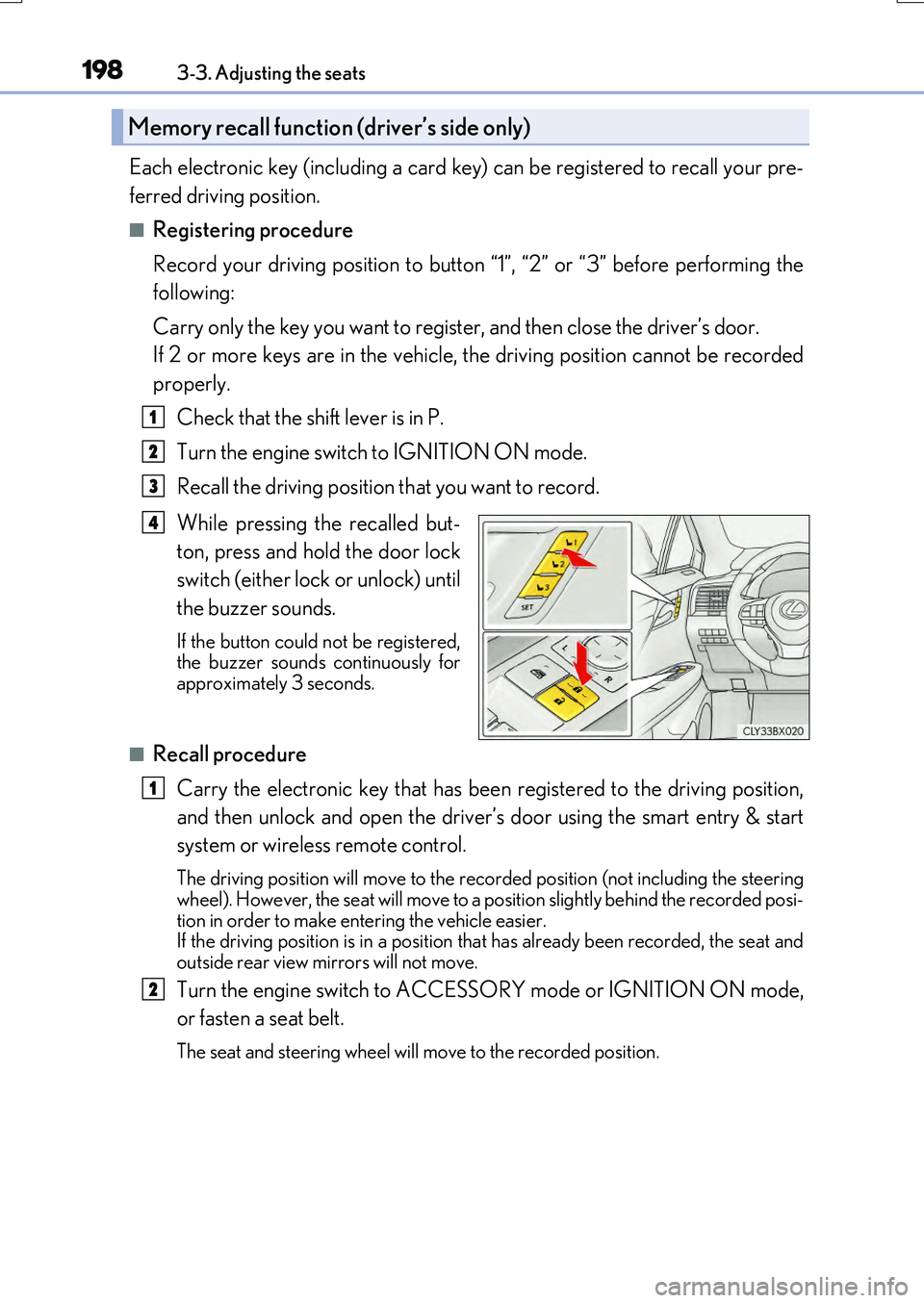
While pressing the recalled but-
ton, press and hold the door lock
switch (either lock or unlock) until
the buzzer sounds.
If the button could not be registered, the buzzer sounds continuously for approximately 3 seconds.
■Recall procedure
Carry the electronic key that has been registered to the driving position,
and then unlock and open the driver’s door using the smart entry & start
system or wireless remote control.
The driving position will move to the recorded position (not including the steering
wheel). However, the seat will move to a posi tion slightly behind the recorded posi- tion in order to make entering the vehicle easier. If the driving position is in a position that has already been recorded, the seat and
outside rear view mirrors will not move.
Turn the engine switch to ACCESSORY mode or IGNITION ON mode,
or fasten a seat belt.
The seat and steering wheel will move to the recorded position.
Memory recall function (driver’s side only)
1
2
3
4
1
2
Page 199 of 776

1993-3. Adjusting the seats
3
Operation of each component
RX350/RX200t_EE_OM48F32E
■Cancelation procedure
Carry only the key you want to cancel and then close the driver’s door.
If 2 or more keys are in the vehicle, the driving position cannot be canceled
properly.
Turn the engine switch to IGNITION ON mode.
While pressing the “SET” button, press and hold the door lock switch
(either lock or unlock) until the buzzer sounds twice.
If it button could not be canceled, the buzzer sounds continuously for approxi-
mately 3 seconds.
■Recalling the driving position us ing the memory recall function
●Different driving positions can be registered for each electronic key. Therefore, the driving position that is recalled may be different depending on the key being carried.
●If a door other than the driver’s door is unlocked with the smart entry & start system, the
driving position cannot be reca lled. In this case, press the driving position button which has been set.
■Customization
Some functions can be customized. ( P. 740)
WARNING
■Seat adjustment caution
Take care during seat adjustment so that the seat does not strike the rear passenger or squeeze your body against the steering wheel.
1
2
Page 208 of 776
2083-4. Adjusting the steering wheel and mirrors
RX350/RX200t_EE_OM48F32E
When the mirror select switch is in the “L” or “R” position, the outside rear view
mirrors will automatically angle downwa rds when the vehicle is reversing in
order to give a better view of the ground.
To disable this function, select neither “L” nor “R” of the mirror select switch.
■Adjusting the mirror angle when the vehicle is reversing
With the shift lever in R, adjust the mirror angle at a desired position.
The adjusted angle will be memorized and the mirror will automatically tilt to
the memorized angle whenever the shift lever is shifted to R from next time.
The memorized downward tilt position of the mirror is linked to the normal position (angle adjusted with the shif t lever in other than R). Therefore, if the normal posi- tion is changed after adjustment, th e tilt position will also change.
When the normal position is changed, readjust the angle in reversing.
■Mirror angle can be adjusted when
The engine switch is in ACCESSORY or IGNITION ON mode.
■When disconnecting and reconnecting battery terminals
The automatic folding/extending mirror function will return to off as default. To turn the
function on, press the switch again to select on.
■When the mirrors are fogged up
The outside rear view mirrors can be clea red using the mirror defoggers. Turn on the
rear window defogger to turn on the outside rear view mirror defoggers. ( P. 542)
■Automatic adjustment of the mirror angle (if equipped)
A desired mirror face angle can be entered to memory and recalled automatically by the
driving position memory. ( P. 195)
■Auto anti-glare function (if equipped)
When the anti-glare inside rear view mirror is set to automatic mode, the outside rear
view mirrors will activate in co njunction with the anti-glare inside rear view mirror to reduce reflected light. ( P. 204)
■Using automatic mode in cold weather
When automatic mode is used in cold weat her, the door mirror could freeze up and automatic stowing and return may not be possible. In this case, remove any ice and snowfrom the door mirror, then either operate the mirror using manual mode or move the mir-
ror by hand.
■Customization
Some functions can be customized. ( P. 740)
Linked mirror function when reversing
Page 209 of 776
2093-4. Adjusting the steering wheel and mirrors
3
Operation of each component
RX350/RX200t_EE_OM48F32E
WARNING
■Important points while driving
Observe the following precautions while driving. Failing to do so may result in loss of control of the vehicle and cause an accident, result-
ing in death or serious injury.
●Do not adjust the mirrors while driving.
●Do not drive with the mirrors folded.
●Both the driver and passenger side mirrors must be extended and properly adjusted before driving.
■When a mirror is moving
To avoid personal injury and mirror malfunction, be careful not to get your hand caught by the moving mirror.
■When the mirror defoggers are operating
Do not touch the rear view mirror surfaces, as they can become very hot and burn you.
Page 211 of 776
2113-5. Opening, closing the windows and moon roof
3
Operation of each component
RX350/RX200t_EE_OM48F32E
■The power windows can be operated when
The engine switch is in IGNITION ON mode.
■Operating the power windows after turning the engine off
The power windows can be operated for approximately 45 seconds even after the
engine switch is turned to ACCESSORY mode or turned off. They cannot, however, be operated once either front door is opened.
■Jam protection function
If an object becomes jammed between the window and the window frame while the win- dow is closing, window movement is stop ped and the window is opened slightly.
■Catch protection function
If an object becomes caught between the door and window while the window is opening, window movement is stopped.
■When the window cannot be opened or closed
When the jam protection function or catch protection function operates unusually and the door window cannot be opened or closed , perform the following operations with the power window switch of that door.
●Stop the vehicle. With the engine switch in IGNITION ON mode, within 4 seconds ofthe jam protection function or catch protecti on function activating, continuously oper- ate the power window switch in the one-to uch closing direction or one-touch opening
direction so that the door window can be opened and closed.
●If the door window cannot be opened and closed even when performing the above operations, perform the following pr ocedure for function initialization.
Turn the engine switch to IGNITION ON mode.
Pull and hold the power window switch in the one-touch closing direction and com- pletely close the door window.
Release the power window switch for a moment, resume pulling the switch in the one-touch closing direction, and hold it there for approximately 6 seconds or more.
Press and hold the power window switch in the one-touch opening direction. After
the door window is completely opened, cont inue holding the switch for an additional 1 second or more.
Release the power window switch for a moment, resume pressing the switch in the
one-touch opening direction, and hold it there for approximately 4 seconds or more.
Pull and hold the power window switch in the one-touch closing direction again.
After the door window is completely clos ed, continue holding the switch for a fur- ther 1 second or more.
If you release the switch while the window is moving, start again from the beginning. If the window reverses and cannot be fully closed or opened, have the vehicle inspectedby any authorized Lexus dealer or repairer , or another duly qualified and equipped pro-
fessional.
1
2
3
4
5
6
Page 212 of 776
2123-5. Opening, closing the windows and moon roof
RX350/RX200t_EE_OM48F32E
■Door lock linked window operation
●The power windows can be opened and closed using the mechanical key.* (P. 711)
●The power windows can be opened and closed using the wireless remote control.*
(P. 140)
*: These settings must be customized at any authorized Lexus dealer or repairer, or
another duly qualified and equipped professional.
■Alarm (if equipped)
The alarm may be triggered if the alarm is set and a power window is closed using the
door lock linked power window operation function. ( P. 84)
■When the battery is disconnected
The window lock switch is disabled. If nece ssary, press the window lock switch after
reconnecting the battery.
■Power windows open warning buzzer
The buzzer sounds and a message is shown on the multi-information display in the instru-
ment cluster when the engine switch is turned off and the driver’s door is opened with the power windows open.
■Customization
Some functions can be customized. ( P. 740)
Page 213 of 776
2133-5. Opening, closing the windows and moon roof
3
Operation of each component
RX350/RX200t_EE_OM48F32E
WARNING
Observe the following precautions. Failing to do so may result in death or serious injury.
■Opening and closing the windows
●The driver is responsible for all the power window operations, including the operation for the passengers. In order to prevent acci dental operation, especially by a child, do not let a child operate the power windows. It is possible for children and other passen-
gers to have body parts caught in the power window. Also, when riding with a child, it is recommended to use the window lock switch. ( P. 210)
●When using the wireless remote control or mechanical key and operating the power
windows, operate the power window after checking to make sure that there is no pos- sibility of any passenger having any of thei r body parts caught in the window. Also do not let a child operate power window by the wireless remote control or mechanical
key. It is possible for children and other passengers to get caught in the power win- dow.
●When exiting the vehicle, turn the engine switch off, carry the key and exit the vehicle
along with the child. There may be accidental operation, due to mischief, etc., that may possibly lead to an accident.
■Jam protection function
●Never use any part of your body to intent ionally activate the jam protection function.
●The jam protection function may not work if something gets jammed just before the window is fully closed. Be careful not to ge t any part of your body jammed in the win-
dow.
■Catch protection function
●Never use any part of your body or clothing to intentionally activate the catch protec-
tion function.
●The catch protection function may not work if something gets caught just before the window is fully opened. Be careful not to get any part of your body or clothing caught
in the window.
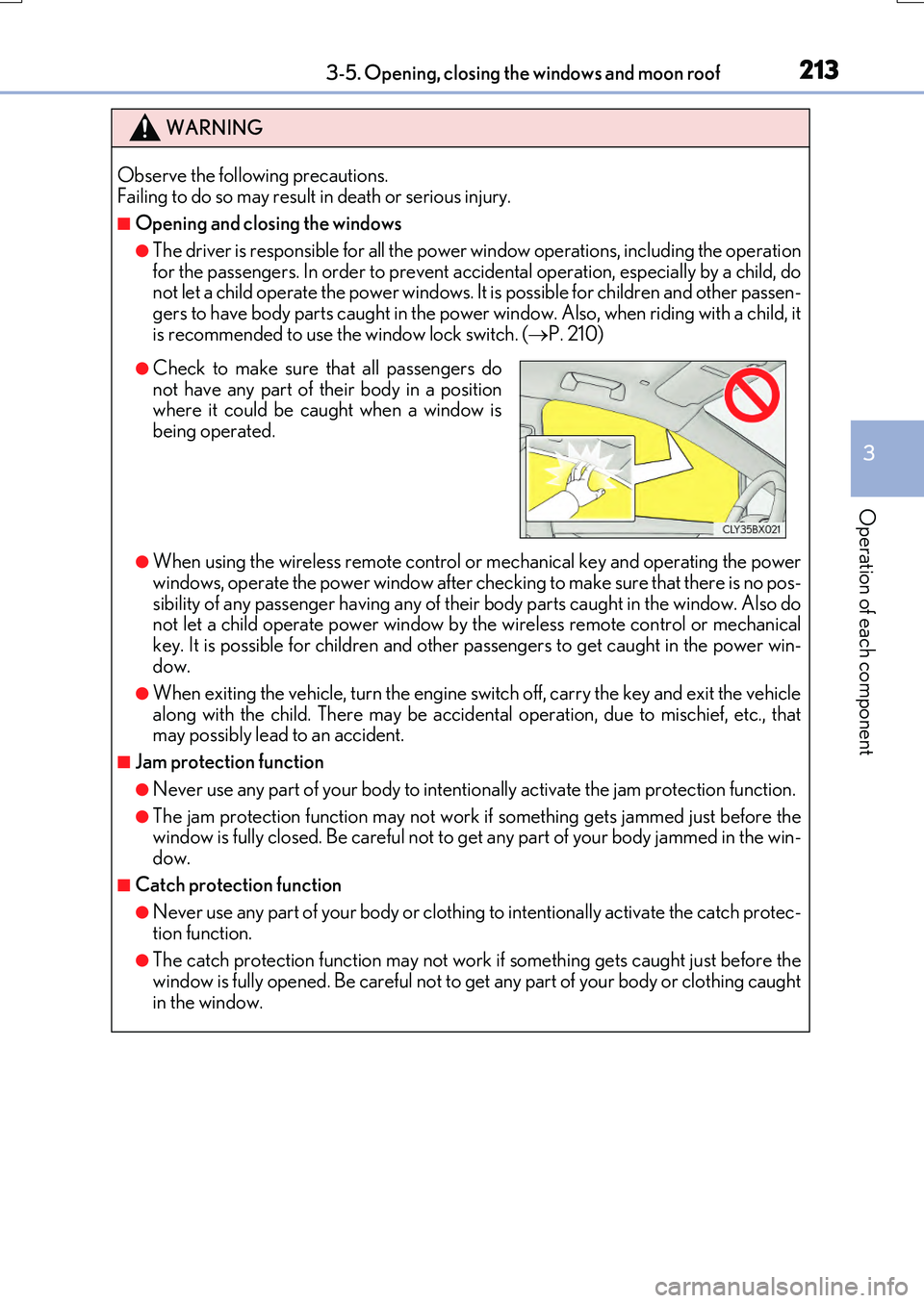
●Check to make sure that all passengers do not have any part of their body in a positionwhere it could be caught when a window is
being operated.