ECO LEXUS RX200T 2017 Owners Manual
[x] Cancel search | Manufacturer: LEXUS, Model Year: 2017, Model line: RX200T, Model: LEXUS RX200T 2017Pages: 776, PDF Size: 44.51 MB
Page 531 of 776
5316-1. Basic operation of the Remote Touch screen
6
Interior features
RX350/RX200t_EE_OM48F32E
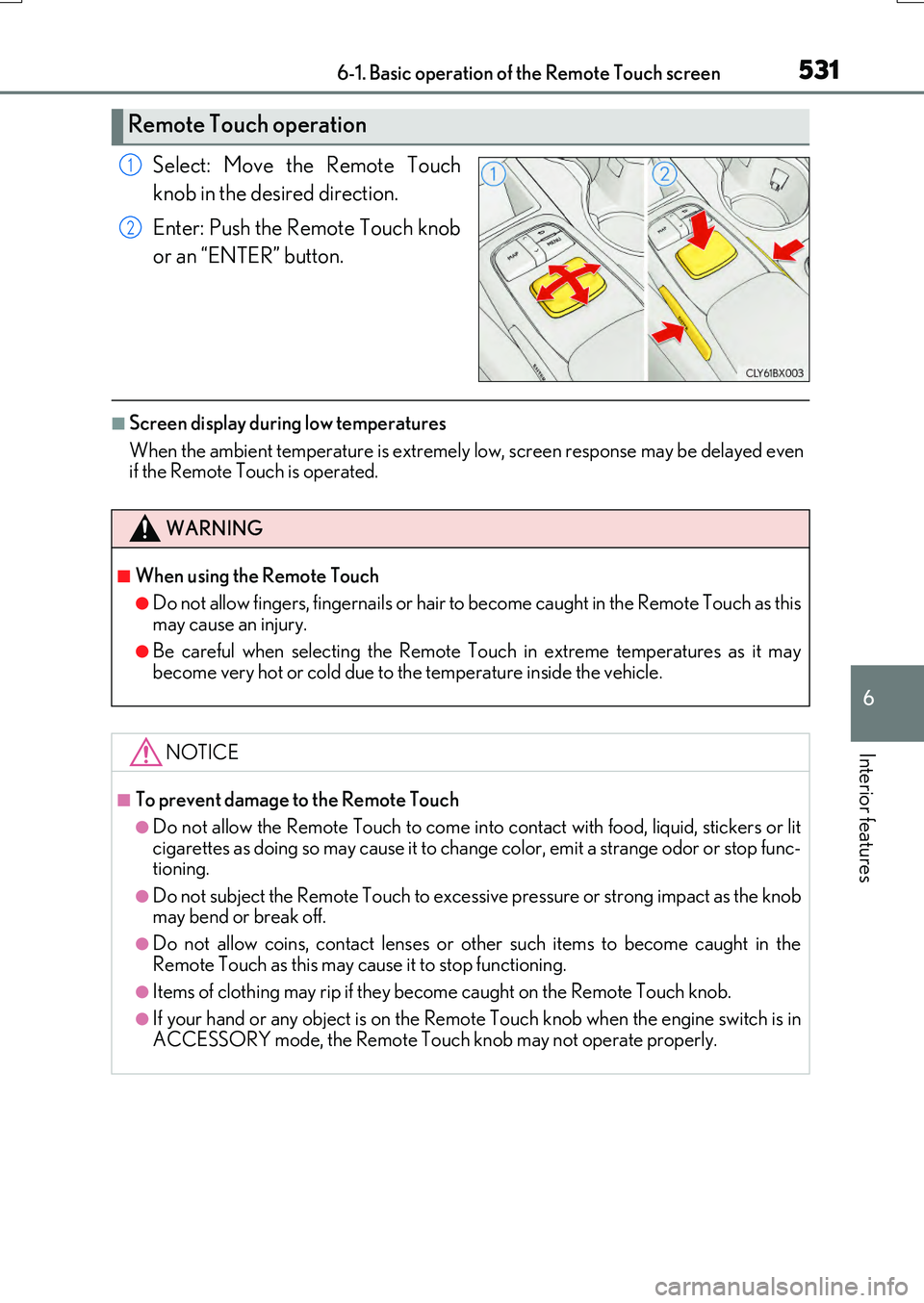
Select: Move the Remote Touch
knob in the desired direction.
Enter: Push the Remote Touch knob
or an “ENTER” button.
■Screen display during low temperatures
When the ambient temperature is extremely low, screen response may be delayed even if the Remote Touch is operated.
Remote Touch operation
1
2
WARNING
■When using the Remote Touch
●Do not allow fingers, fingernails or hair to become caught in the Remote Touch as this
may cause an injury.
●Be careful when selecting the Remote Touch in extreme temperatures as it may become very hot or cold due to the temperature inside the vehicle.
NOTICE
■To prevent damage to the Remote Touch
●Do not allow the Remote Touch to come into contact with food, liquid, stickers or lit
cigarettes as doing so may cause it to change color, emit a strange odor or stop func- tioning.
●Do not subject the Remote Touch to excessiv e pressure or strong impact as the knob may bend or break off.
●Do not allow coins, contact lenses or other such items to become caught in the
Remote Touch as this may cause it to stop functioning.
●Items of clothing may rip if they be come caught on the Remote Touch knob.
●If your hand or any object is on the Remote Touch knob when the engine switch is in
ACCESSORY mode, the Remote Touch knob may not operate properly.
Page 543 of 776
5436-2. Using the air conditioning system and defogger
6
Interior features
RX350/RX200t_EE_OM48F32E
■Windshield wiper de-icer (if equipped)
This feature is used to prevent ice from building up on the windshield and
wiper blades.
Select on the option control screen.
When the windshield wiper de-icer is on , is displayed on the air condition-
ing control screen.
The windshield wiper de-icer will automatically turn off after a period of time.
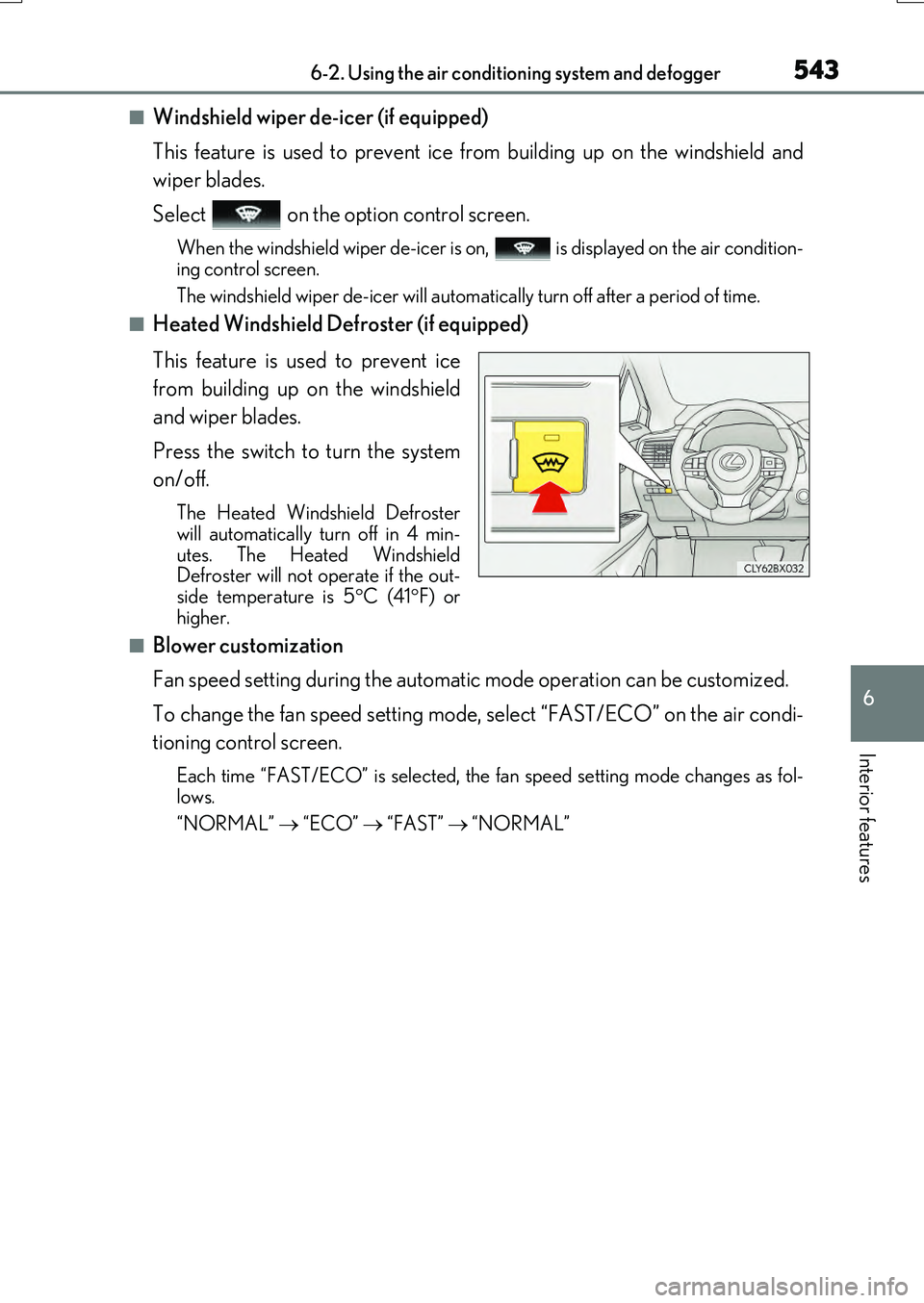
■Heated Windshield Defroster (if equipped)
This feature is used to prevent ice
from building up on the windshield
and wiper blades.
Press the switch to turn the system
on/off.
The Heated Windshield Defroster
will automatically turn off in 4 min-
utes. The Heated Windshield
Defroster will not operate if the out-
side temperature is 5 C (41 F) or
higher.
■Blower customization
Fan speed setting during the automatic mode operation can be customized.
To change the fan speed setting mode, select “FAST/ECO” on the air condi-
tioning control screen.
Each time “FAST/ECO” is selected, the fan speed setting mode changes as fol-
lows.
“NORMAL” “ECO” “FAST” “NORMAL”
Page 546 of 776
5466-2. Using the air conditioning system and defogger
RX350/RX200t_EE_OM48F32E
■Outside/recirculated air mode
●When driving on dusty roads such as tunnels or in heavy traffic, set the outside/recircu- lated air mode button to the recirculated air mode. This is effective in preventing out-
side air from entering the vehicle interior . During cooling operation, setting the recirculated air mode will also cool the vehicle interior effectively.
●Outside/recirculated air mode may automatically switch depending on the tempera-
ture setting or the inside temperature.
■When the outside temperature is low
The dehumidification function may not operate even when “A/C” is selected.
■Operation of the air conditioning system in Eco drive mode
●In the Eco drive mode, the air conditioning system is controlled as follows to prioritize fuel efficiency
• Engine speed and compressor operation co ntrolled to restrict heating/cooling capacity• Fan speed restricted when automatic mode is selected
●To improve air conditioning performance, perform the following operations
• Adjust the fan speed
• Turn off Eco drive mode
■Ventilation and air conditioning odors
●To let fresh air in, set the air conditioning system to the outside air mode.
●During use, various odors from inside and outside the vehicle may enter into and accu- mulate in the air conditioning system. This may then cause odor to be emitted from the vents.
●To reduce potential odors from occurring:
• It is recommended that the air conditioning system be set to outside air mode prior
to turning the vehicle off. • The start timing of the blower may be dela yed for a short period of time immediately after the air conditioning system is started in automatic mode.
■When the Heated Windshield Defroster is operating (if equipped)
When the Heated Windshield Defroster is op erating, operation of the heated steering wheel, front passenger seat heater and rear seat heaters will be suspended.
Page 556 of 776
556
RX350/RX200t_EE_OM48F32E
6-4. Using the storage features
List of storage features
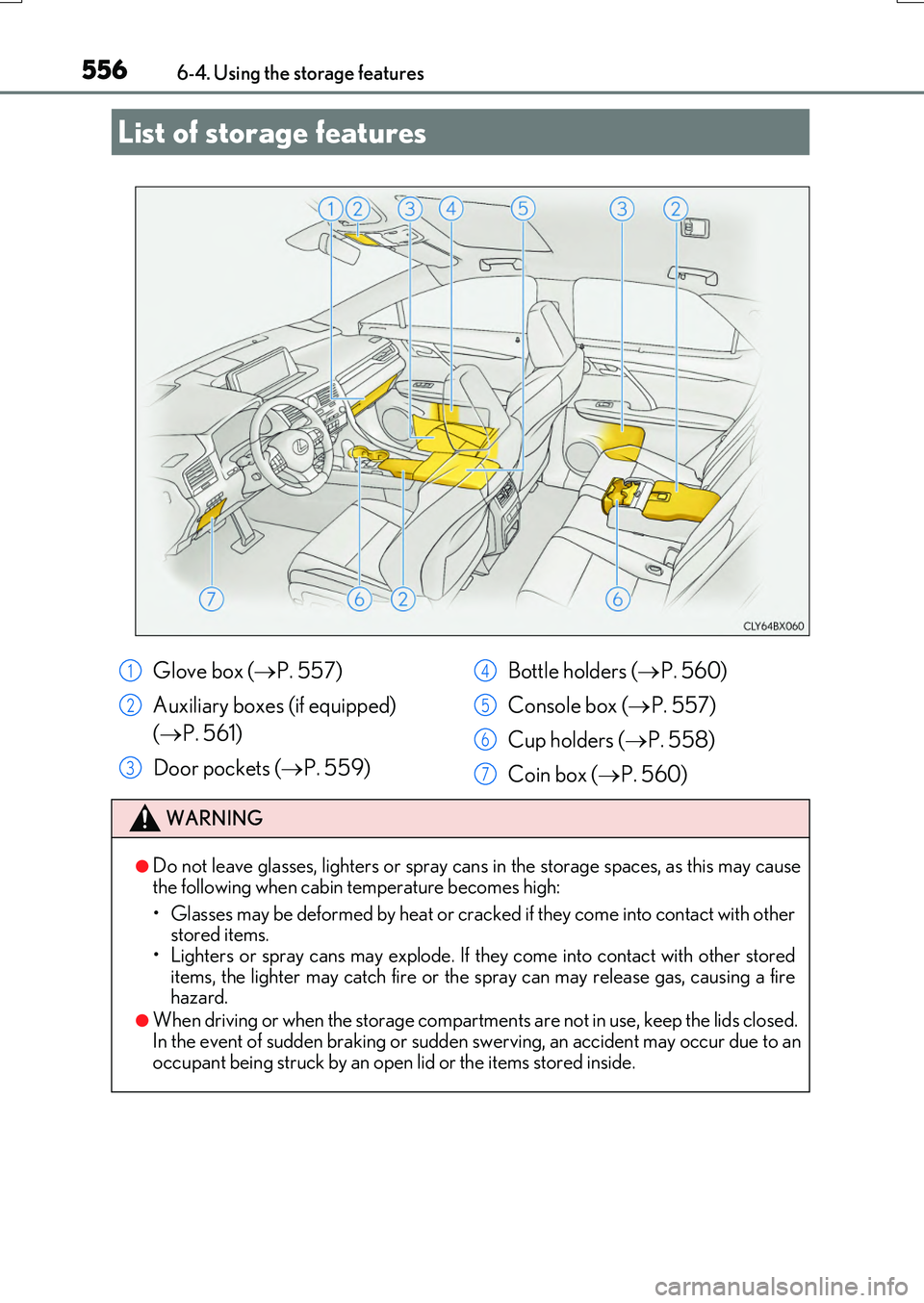
Glove box ( P. 557)
Auxiliary boxes (if equipped)
( P. 561)
Door pockets ( P. 559)
Bottle holders ( P. 560)
Console box ( P. 557)
Cup holders ( P. 558)
Coin box ( P. 560)
WARNING
●Do not leave glasses, lighters or spray cans in the storage spaces, as this may cause
the following when cabin temperature becomes high:
• Glasses may be deformed by heat or cracked if they come into contact with other stored items.
• Lighters or spray cans may explode. If they come into contact with other stored items, the lighter may catch fire or the spray can may release gas, causing a firehazard.
●When driving or when the storage compartmen ts are not in use, keep the lids closed. In the event of sudden braking or sudden swerving, an accident may occur due to an
occupant being struck by an open lid or the items stored inside.
1
2
3
4
5
6
7
Page 570 of 776
5706-5. Using the other interior features
RX350/RX200t_EE_OM48F32E
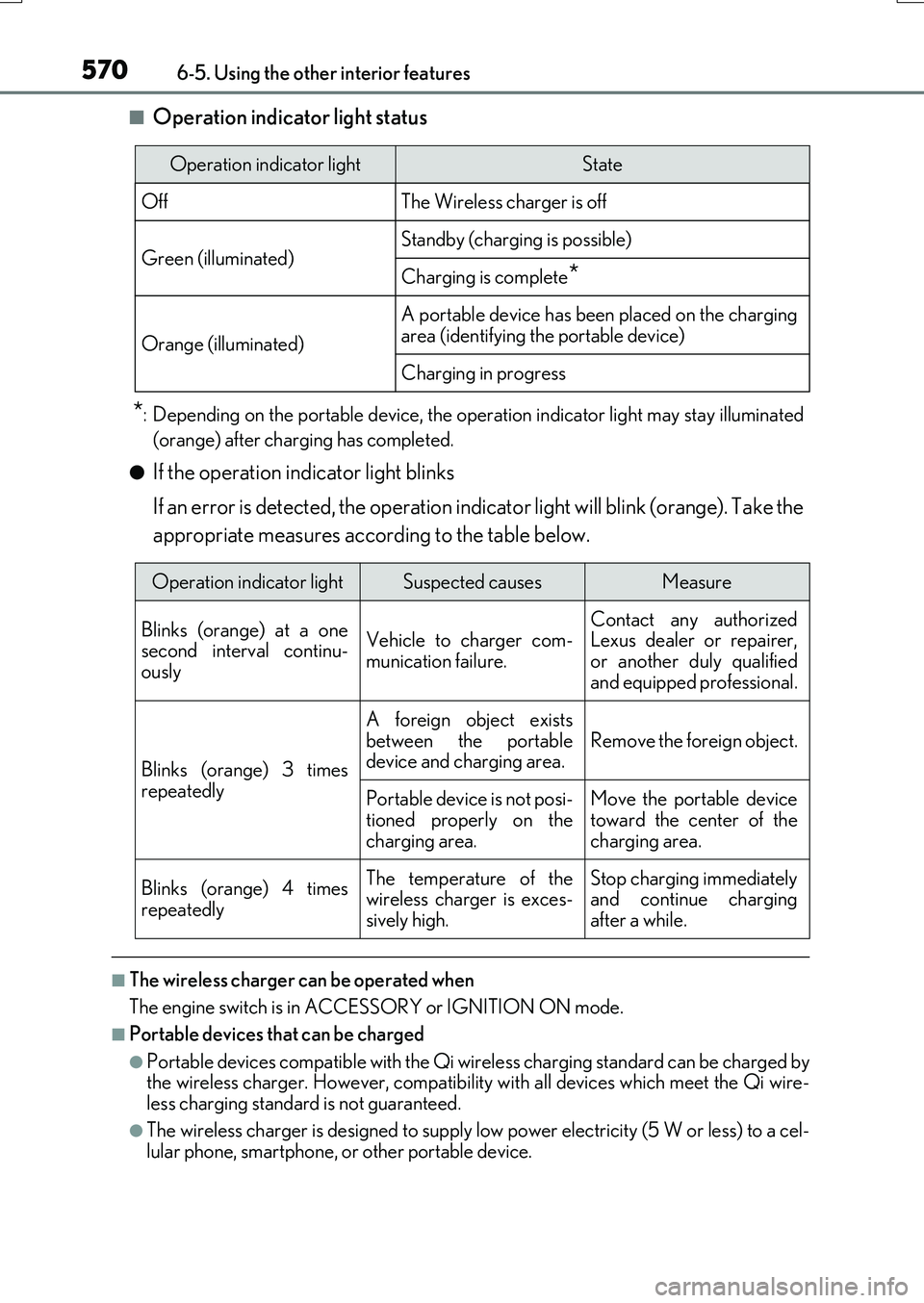
■Operation indicator light status
*: Depending on the portable device, the operation indicator light may stay illuminated
(orange) after charging has completed.
●If the operation indicator light blinks
If an error is detected, the operation indicator light will blink (orange). Take the
appropriate measures according to the table below.
■The wireless charger can be operated when
The engine switch is in ACCESSORY or IGNITION ON mode.
■Portable devices that can be charged
●Portable devices compatible with the Qi wireless charging standard can be charged by the wireless charger. However, compatibility with all devices which meet the Qi wire- less charging standard is not guaranteed.
●The wireless charger is designed to supply low power electricity (5 W or less) to a cel-lular phone, smartphone, or other portable device.
Operation indicator lightState
OffThe Wireless charger is off
Green (illuminated)Standby (charging is possible)
Charging is complete*
Orange (illuminated)
A portable device has been placed on the charging
area (identifying the portable device)
Charging in progress
Operation indicator lightSuspected causesMeasure
Blinks (orange) at a one second interval continu-ously
Vehicle to charger com-
munication failure.
Contact any authorized Lexus dealer or repairer,
or another duly qualified and equipped professional.
Blinks (orange) 3 times
repeatedly
A foreign object exists
between the portable device and charging area. Remove the foreign object.
Portable device is not posi- tioned properly on the
charging area.
Move the portable device toward the center of the
charging area.
Blinks (orange) 4 times
repeatedly
The temperature of the wireless charger is exces-sively high.
Stop charging immediately and continue chargingafter a while.
Page 571 of 776
5716-5. Using the other interior features
6
Interior features
RX350/RX200t_EE_OM48F32E
■If a cover or accessory is attached to the portable device
Do not charge a portable device if a cover or accessory which is not Qi compatible is attached. Depending on the type of cover and/or accessory attached, it may not be pos-
sible to charge the portable device. If the portable device is placed on the charging area and does not charge, remove the cover and/or accessories.
■If interference is heard in AM radio broadcasts while charging
Turn off the wireless charger and check if the noise is reduced. If noise is reduced, press and hold the power supply swit ch of the wireless charger for 2 seconds. The frequency of the wireless charger is changed and noise may be reduced. When the frequency is
changed, the operation indicator light will blink (orange) 2 times.
■Charging precautions
●If the electronic key cannot be detected in the cabin, charging cannot be performed.
When a door is opened and closed, ch arging may be temporarily suspended.
●While charging, the wireless charger and the portable device will become warm. This is not a malfunction.
If a portable device becomes warm while charging and charging stops due to the pro- tection function of the portable device, wait until the portable device cools down and charge it again.
■Sound generated during operation
When the power supply switch is turned on or while a portable device is being identified, operation sounds may be heard. This is not a malfunction.
■Cleaning the wireless charger
P. 590
Page 573 of 776
5736-5. Using the other interior features
6
Interior features
RX350/RX200t_EE_OM48F32E
NOTICE
■Conditions in which the wireless charger may not operate correctly
In the following situations, the wireless charger may not operate correctly:
●When a portable device is fully charged
●When there is a foreign object between the charging area and portable device
●When a portable device becomes hot while charging
●When a portable device is placed on the wireless area with its charging surface fac-
ing up
●When a portable device is not centered on the charging area
●When the vehicle is near a TV tower, electric power plant, gas station, radio station,
large display, airport or othe r facility that generates strong radio waves or electrical noise
●When the portable device is in contact wi th, or is covered by any of the following
metallic objects
• Cards to which aluminum foil is attached • Cigarette boxes that ha ve aluminum foil inside
• Metallic wallets or bags •Coins• Metal hand warmers
• Media such as CDs and DVDs
●When wireless keys (that emit radio waves) other than those of your vehicle are being
used nearby.
If in situations other than above the wireless charger does not operate properly or the operation indicator light is blinking, the wireless charger may be malfunctioning. Con-
tact any authorized Lexus dealer or repair er, or another duly qualified and equipped professional.
■To prevent failure or damage to data
●Do not bring magnetic cards, such as a credit card, or magnetic recording media,close to the wireless charger while chargi ng. Otherwise, data may be erased due to the influence of magnetism.
Additionally, do not bring precision instruments such as wrist watches, close to the wireless charger, as such objects may malfunction.
●Do not leave portable devices in the cabin. The temperature inside the cabin may
become high when parked in the su n, and cause damage to the device.
■To prevent battery discharge
Do not use the wireless charger for a long period of time with the engine is stopped.
Page 577 of 776
5776-5. Using the other interior features
6
Interior features
RX350/RX200t_EE_OM48F32E
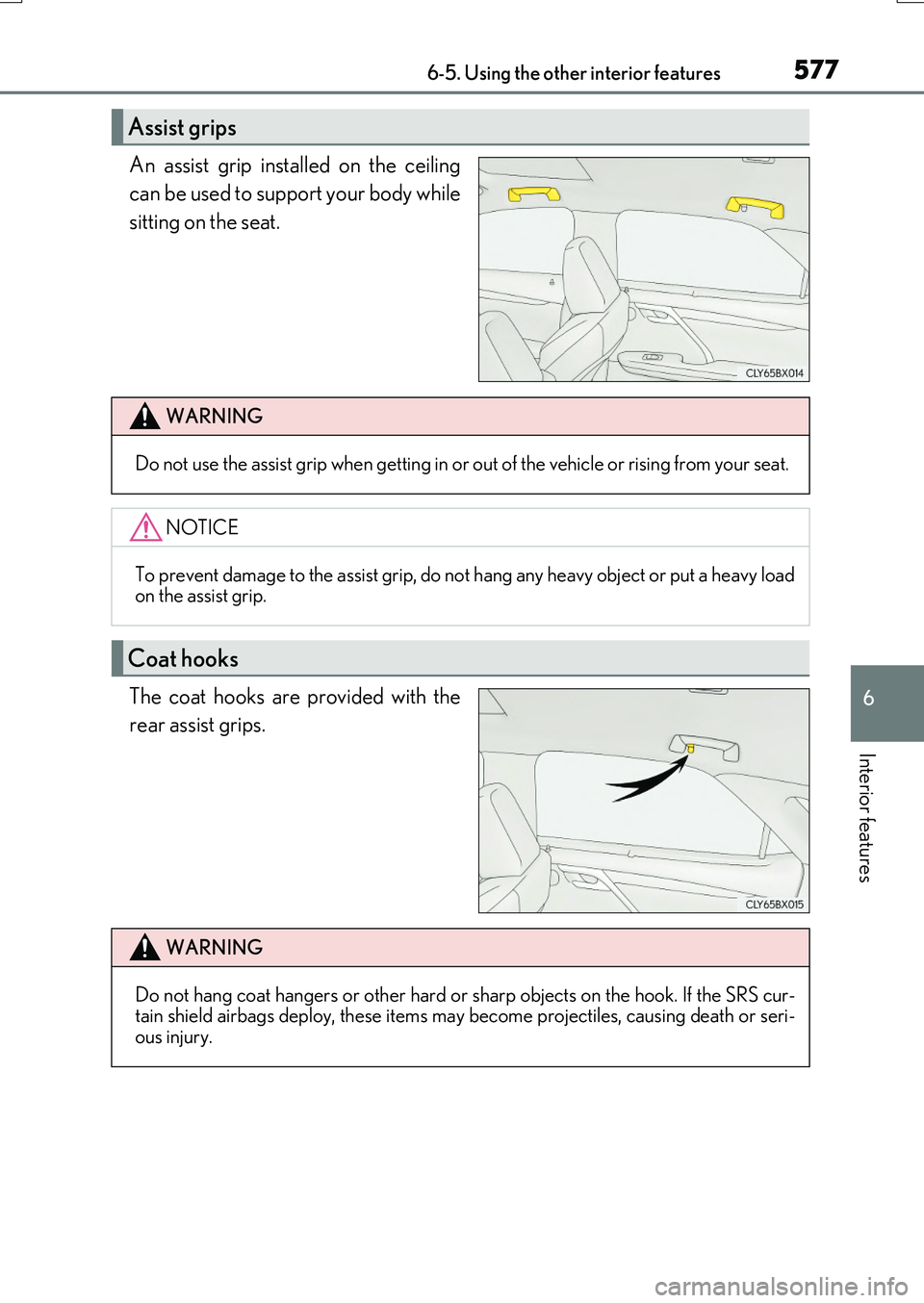
An assist grip installed on the ceiling
can be used to support your body while
sitting on the seat.
The coat hooks are pr ovided with the
rear assist grips.
Assist grips
WARNING
Do not use the assist grip when getting in or out of the vehicle or rising from your seat.
NOTICE
To prevent damage to the assist grip, do not hang any heavy object or put a heavy load on the assist grip.
Coat hooks
WARNING
Do not hang coat hangers or other hard or sharp objects on the hook. If the SRS cur- tain shield airbags deploy, these items may become projectiles, causing death or seri- ous injury.
Page 579 of 776
5796-5. Using the other interior features
6
Interior features
RX350/RX200t_EE_OM48F32E
■Automatic Collision Notification
If any airbag deploys, the system is designed to automatically call the Public
Safety Answering Point (PSAP).* The responding agent receives the vehicle’s
location and attempts to speak with the vehicle occupants to assess the level
of emergency. If the occupants are unable to communicate, the agent auto-
matically treats the call as an emer gency, contacts the nearest emergency
services provider to describe the situation, and requests that assistance be
sent to the location.
*: In some cases, the call cannot be made.( P. 580)
■Emergency Assistance Button (“SOS”)
In the event of an emergency, push the “SOS” button to reach the Public
Safety Answering Point (PSAP). The answering agent will determine your
vehicle’s location, assess the emergency, and dispatch the necessary assis-
tance required.
If you accidentally press the “SOS” button, tell the agent that you are not experi-
encing an emergency.
When the engine switch is turned to IGNITION ON mode, the red indicator
light will illuminate for 10 seconds and then the green indicator light will illumi-
nate for 2 seconds, indicating that the syst em is enabled. The indicator lights indi-
cate the following:
●If the green indicator light illuminates and stays on, the system is enabled.
●If the green indicator light flashes, an emergency call is being made (either
automatically or manually).
●If no indicator lights illuminate, the system is not enabled.
●If the red indicator light illuminates any time other than immediately after the
engine switch is turned to IGNITION ON mode, the system may be malfunc-
tioning or the backup battery may be depleted. Contact any authorized Lexus
dealer or repairer, or another duly qualified and equipped professional.
The service life of the backup battery is 3 years or more.
Emergency Notification Services
Indicator lights
Page 580 of 776
5806-5. Using the other interior features
RX350/RX200t_EE_OM48F32E
WARNING
■When the Emergency Call may not be made
●Any of the followings may occur. In such cases, report to the Public Safety Answering Point (PSAP) by other means such as nearby public phones.
• It may sometimes be difficult to connect to the public Safety Answering Point (PSAP) even in the reception area of the cellular phone due to the reception level,or if the line is busy. In such cases, you may not be able to connect to the Public
Safety Answering Point (PSAP) and thus w ill not be able to make emergency calls and report to the emergency departments even though the system tries to con-nect to the Public Safety Answering Point (PSAP).
• When the vehicle is out of the cellular phone service area, the Emergency Call cannot be made.• When any related equipment (such as th e “SOS” button panel, indicator lights,
microphone, speaker, DCM, antenna, or any wires connecting the equipment.) has an abnormality, is damaged or broken, the Emergency Call cannot be made.• During the Emergency Call, the system makes repeated attempts to connect to
the Public Safety Answering Point (PSAP). However, if it cannot connect to the Public Safety Answering Point (PSAP) due to poor radio wave reception, the sys- tem may not be able to connect to the cellular network and the call may finish with-
out connecting. The red indicator light w ill blink for approximately 30 seconds to indicate this disconnection.• This device may not function if a shock is applied to it.
●If the battery’s voltage decreases or there is a disconnection, the system may not be able to access the Public Safety Answering Point (PSAP).
■When replacing DCM to a new one
ERA-GLONASS have to be activated. Contact any authorized Lexus dealer or repairer, or another duly qualified and equipped professional.