turn signal LEXUS RX200T 2017 User Guide
[x] Cancel search | Manufacturer: LEXUS, Model Year: 2017, Model line: RX200T, Model: LEXUS RX200T 2017Pages: 776, PDF Size: 44.51 MB
Page 320 of 776
3204-5. Using the driving support systems
RX350/RX200t_EE_OM48F32E
■Operation conditions of each function
●Lane departure alert function
This function operates when all of the following conditions are met.
• LKA is turned on.
• Vehicle speed is approximately 50 km/h (32 mph) or more.
• System recognizes white (yellow) lines.
• Width of traffic lane is approximately 3 m (9.8 ft.) or more.
• Turn signal lever is not operated.
• Vehicle is driven on a straight road or around a gentle curve with a radius of more than approximately 150 m (492 ft.).
• No system malfunctions are detected. ( P. 666)
●Lane departure control function
This function operates when all of the follo wing conditions are met in addition to the
operation conditions for the la ne departure alert function.
• Setting for “Steering Assist” in of the multi-information display is set to “On”.
( P. 110)
• Vehicle is not accelerated or decelerated by a fixed amount or more.
• Steering wheel is not operated with a steering force level suitable for changing
lanes.
• ABS, VSC, TRC and PCS are not operating.
• TRC or VSC is not turned off.
• Except for Israel: Hands off steerin g wheel alert is not displayed. (P. 321)
●Vehicle sway warning
This function operates when all of the following conditions are met.
• Setting for “Sway Warning” in of the multi-information display is set to “On”.
( P. 110)
• Vehicle speed is approximately 50 km/h (32 mph) or more.
• Width of traffic lane is approximately 3 m (9.8 ft.) or more.
• No system malfunctions are detected. ( P. 666)
●Lane-keeping assist function
This function operates when all of the following conditions are met.
• LKA is turned on.
• Setting for “Lane Center” in of the mu lti-information display are set to “On”.
( P. 110)
• System recognizes white (yellow) lines.
• Dynamic radar cruise control with full-speed range is operating.
• Width of traffic lane is approximately 2.5 to 4.1 m (8.2 to 13.5 ft.).
• Turn signal lever is not operated.
• Vehicle is driven on a straight road or around a gentle curve with a radius of more
than approximately 200 m (656 ft.).
• No system malfunctions are detected. ( P. 666)
• Vehicle does not accelerate or de celerate by a fixed amount or more.
• Steering wheel is not operated with a steering force level suitable for changing
lanes.
• ABS, VSC, TRC and PCS are not operating.
• TRC or VSC is not turned off.
• Except for Israel: Hands off steering wheel alert ( P. 321) is not displayed.
• Lane departure control function is not operating.
Page 327 of 776
3274-5. Using the driving support systems
4
Driving
RX350/RX200t_EE_OM48F32E
*1: If the turn signal indicator is not operated when changing lanes, the mark does not dis-
play.
*2: Vehicles with a navigation system
In the following situations, the RSA system alerts the driver using a warning dis-
play.
●When the vehicle speed exceeds the speed warning threshold applied to the
speed limit of the sign displayed on the multi-information display, the sign
color becomes inverted.
●If it is detected that your vehicle is overtaking when a no overtaking sign is dis-
played on the multi-information display, the sign flashes.
●Vehicles with a navigation system: When the RSA system recognizes a no-
entry sign and detects that the vehicle has entered a no-entry area based on
the map information of the navigation system, the no-entry sign flashes.
Depending on the situation, traffic environment (traffic direction, speed, unit)
may be detected incorrectly and a warning display may not operate properly.
■Automatic turn-off of RSA sign display
One or more signs automatically turn off in the following situations.
●A new sign is not recognized for a certain distance.
●The road changes due to a left or right turn, etc.
■Conditions in which the function may not operate or detect correctly
In the following situations, RSA does not op erate normally and may not recognize signs,
display the incorrect sign, etc. However, this does not indicate a malfunction.
●The camera sensor is misaligned due to a strong impact being applied to the sensor, etc.
●Dirt, snow, stickers, etc. are on the windshield near the camera sensor.
●In inclement weather such as heavy rain, fog, snow or sand storms
●Light from an oncoming vehicle, the sun, etc. enters the camera sensor.
●The sign is dirty, faded, tilted or bent, and if an electronic sign, the contrast is poor.
●All or part of the sign is hidden by the leaves of a tree, a pole, etc.
●The sign is only visible to the camera sensor for a short amount of time.
●The driving scene (turning, lane change, etc.) is judged incorrectly.
●Even if it is a sign not appropriate for the currently traveled lane, such a sign exists
directly after a freeway branches, or in an adjacent lane just before merging.
●Stickers are attached to the rear of the preceding vehicle.
●A sign resembling a system comp atible sign is recognized.
●The vehicle is driven in a country with a different direction of traffic.
Warning display
Page 356 of 776
3564-5. Using the driving support systems
RX350/RX200t_EE_OM48F32E
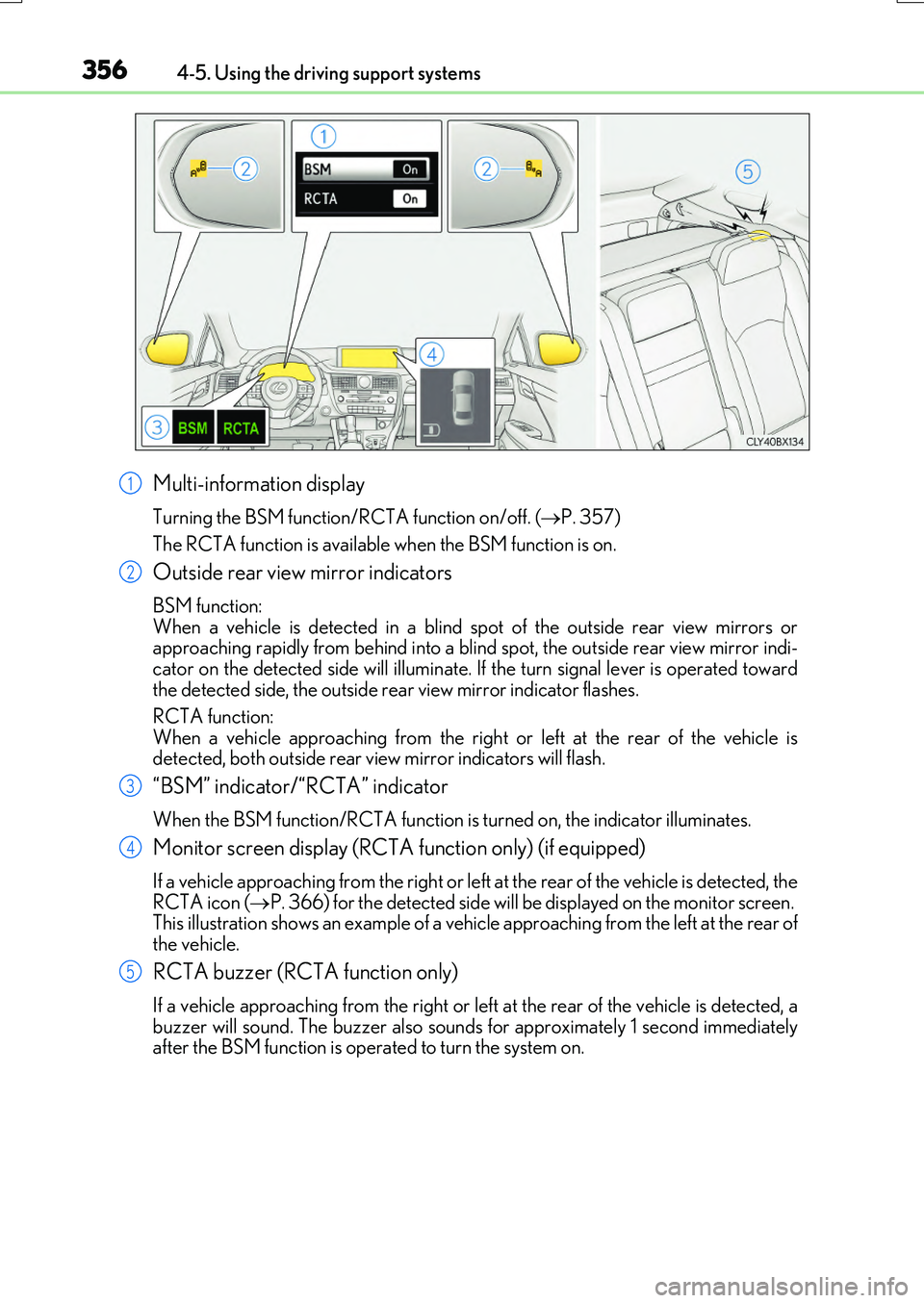
Multi-information display
Turning the BSM function/RCTA function on/off. (P. 357)
The RCTA function is available when the BSM function is on.
Outside rear view mirror indicators
BSM function: When a vehicle is detected in a blind sp ot of the outside rear view mirrors or approaching rapidly from behind into a blin d spot, the outside rear view mirror indi-
cator on the detected side will illuminate. If the turn signal lever is operated toward the detected side, the outside rear view mirror indicator flashes.
RCTA function:
When a vehicle approaching from the right or left at the rear of the vehicle is detected, both outside rear vi ew mirror indicators will flash.
“BSM” indicator/“RCTA” indicator
When the BSM function/RCTA function is turned on, the indicator illuminates.
Monitor screen display (RCTA function only) (if equipped)
If a vehicle approaching from the right or left at the rear of the vehicle is detected, the RCTA icon ( P. 366) for the detected side will be displayed on the monitor screen. This illustration shows an example of a vehicl e approaching from the left at the rear of
the vehicle.
RCTA buzzer (RCTA function only)
If a vehicle approaching from the right or left at the rear of the vehicle is detected, a buzzer will sound. The buzzer also sounds for approximately 1 second immediatelyafter the BSM function is operated to turn the system on.
1
2
3
4
5
Page 414 of 776
4144-5. Using the driving support systems
RX350/RX200t_EE_OM48F32E
The estimated course lines move even though the steering wheel is straight
There is a malfunction in the signals being
output by the steering sensor.
Have the vehicle inspected by any autho- rized Lexus dealer or repairer, or anotherduly qualified and equipped professional.
Guide lines are not displayed
The back door is open.
Close the back door.
If this does not resolve the symptom, have the vehicle inspected by any authorizedLexus dealer or repairer, or another duly
qualified and equipped professional.
The estimated course lines are not displayed
• The steering wheel has been moved while the battery was being reinstalled.• Battery power is low.
• The steering sensor has been rein- stalled.• There is a malfunct ion in the signals
being output by the steering sensor.
Stop the vehicle, and turn the steering wheel as far as it will go to the left andright.
If this does not resolve the symptom, have the vehicle inspected by any authorizedLexus dealer or repairer, or another duly
qualified and equipped professional.
Likely causeSolution
Page 423 of 776
4234-5. Using the driving support systems
4
Driving
RX350/RX200t_EE_OM48F32E
◆EPS (Electric Power Steering)
Employs an electric motor to reduce the amount of effort needed to turn the
steering wheel
◆Dynamic Torque Control AWD system (AWD models)
Automatically switches from front-wheel drive to all-wheel drive (AWD)
according to the driving conditions, helping to ensure reliable handling and
stability. Examples of conditions where the system will switch to AWD are
when cornering, going uphill, starting off or accelerating, and when the road
surface is slippery due to snow, rain, etc.
◆Adaptive Variable Suspension System (if equipped)
Controls the damping force of the shock absorber of each wheel according to
the road and driving conditions, helping achieve a comfortable ride, excellent
driveability and a high level of stability.
If SPORT S+ mode is selected using the driving mode select switch, the
damping force will become more suitable for sporty driving. ( P. 418)
◆VDIM (Vehicle Dynamics Integrated Management) (if equipped)
Provides integrated control of the ABS, brake assist, TRC, VSC, hill-start
assist control and EPS systems
Helps to maintain vehicle stability when swerving on slippery road surfaces by
controlling the brakes and engine output
◆Emergency brake signal
When the brakes are applie d suddenly, the stop lights automatically flash to
alert the vehicle behind.
Page 426 of 776
4264-5. Using the driving support systems
RX350/RX200t_EE_OM48F32E
■Automatic reactivation of TRC and VSC systems
After turning the TRC and VSC systems off, the systems will be automatically re-enabled in the following situations:
●When the engine switch is turned off
●If only the TRC system is turned off, the TR C will turn on when vehicle speed increases
If both the TRC and VSC systems are turned off, automatic re-enabling will not occur
when vehicle speed increases.
■Reduced effectiveness of the EPS system
The effectiveness of the EPS system is redu ced to prevent the system from overheating
when there is frequent steering input over an extended period of time. The steering wheel may feel heavy as a result. Should this occur, refrain from excessive steering input or stop the vehicle and turn the engine off. The EPS system should return to normal
within 10 minutes.
■Operating conditions of emergency brake signal
When the following three conditions are me t, the emergency brake signal will operate:
●The emergency flashers are off.
●Actual vehicle speed is over 55 km/h (35 mph).
●The brake pedal is depressed in a manner that cause the system to judge from the vehi-
cle deceleration that this is a sudden braking operation.
■Automatic system cancelation of emergency brake signal
The emergency brake signal will turn of f in any of the following situations:
●The emergency flashers are turned on.
●The brake pedal is released.
●The system judges from the vehicle deceleration that is not a sudden braking operation.
Page 465 of 776
4655-4. Using the radio
5
Lexus Display Audio system
RX350/RX200t_EE_OM48F32E
■Manual tuning (manual screen)
Turn the “TUNE•SCROLL” knob or turn the controller.
■Station list (preset or station list screen)
Select the desired station by pressi ng the “<” or “>” button, turn the
“TUNE•SCROLL” knob, or turning and pressing the controller.
Radio stations can be preset.
Search for desired stations.
Turn the controller to select one of the stations and then press the controller
until you hear a beep while on the preset selection screen.
The broadcast you are currently listening to can be re-listened to at any time.
Move the controller to the right and then select “Time shift”.
Turn the “TUNE•SCROLL” knob to set the desired offset.
An offset playback time can also be set on the menu screen. ( P. 461)
To cancel the time shift operation while in time shift mode, move the controller to the
left and select “Time shift off”. If the time shift display is left showing “-0’ 00”” for 6 seconds without any operation, the time shift operation will be canceled.
■Reception sensitivity
●Maintaining perfect radio recept ion at all times is difficult due to the continually chang- ing position of the antenna, differences in signal strength and surrounding objects, such
as trains, transmitters, etc.
●The radio antenna is mounted inside the rear window. To maintain clear radio reception, do not attach metallic window tinting or other metallic objects to the antenna wire
mounted inside the rear window.
■Traffic announcement operation
When traffic announcement is set to on, “TP” will appear on the screen and the radio will
begin seeking a TP station. If the radio seeks out a TP station, a pop-up massage is dis- played. To listen the program, select “Continue”. When the program ends, the initial
operation will resume.
Setting station presets (preset screen)
Time shift operation (DAB) (if equipped)
1
2
1
2
Page 487 of 776
4875-7. Connecting Bluetooth®
5
Lexus Display Audio system
RX350/RX200t_EE_OM48F32E
When you register a phone, auto connection will be activated. It is recom-
mended to have the system set to this mode and leave the Bluetooth® phone in a
place where a good connection can be established.
When the engine switch is turned to ACCESSORY or IGNITION ON mode,
the system will search for a nearby cellular phone you have registered.
The system automatically connects with the most recent phone that was con-
nected. The connected result is displayed.
When auto connection has failed or “Bluetooth* power” is turned off, you must
connect the Bluetooth® device manually.
Go to “Bluetooth* setup”: “MENU” button “Setup” “Bluetooth*”
Select the device to connect.
Select “Connect all”, “Connect as a telephone” or “Connect as audio player”.
If the desired Bluetooth® device is not displayed, register the device.
( P. 484)
*: Bluetooth is a registered trademark of Bluetooth SIG, Inc.
■Reconnecting a Bluetooth® phone
If the system cannot connect due to poor signal strength with the engine switch in ACCESSORY or IGNITION ON mode, the syst em will automatically attempt to recon-
nect.
■Connecting a phone while Bluetooth® audio is playing
●Bluetooth® audio will stop temporarily.
●It may take time to connect.
Connecting a Bluetooth® phone
There are two connecting methods available: automatic and manual.
Auto connection
Manual connection
1
2
3
Page 618 of 776
6187-3. Do-it-yourself maintenance
RX350/RX200t_EE_OM48F32E
■Situations in which the tire pressure warning system may not operate properly
●In the following cases, the tire pressure warning system may not operate properly.
• If non-genuine Lexus wheels are used.
• A tire has been replaced with a tire that is not an OE (Original Equipment) tire. • A tire has been replaced with a tire that is not of the specified size.• Tire chains, etc., are equipped.
• If a window tint that affects the radio wave signals is installed. • If there is a lot of snow or ice on the vehi cle, particularly around the wheels or wheel housings.
• If the tire inflation pressure is extr emely higher than the specified level. • If wheel without the tire pressure warning valve and transmitter is used.• If the ID code on the tire pressure warning valves and transmitters is not registered
in the tire pressure warning computer.
●Performance may be affected in the following situations.
• Near a TV tower, electric power plant, gas station, radio station, large display, air- port or other facility that generates st rong radio waves or electrical noise. • When carrying a portable radio, cellular phone, cordless phone or other wireless
communication device. If tire position information is not correctly displayed due to the radio wave conditions, the display may be corrected by driving and changing the radio wave conditions.
●When the vehicle is parked, the time taken for the warning to start or go off could beextended.
●When tire inflation pressure declines rapi dly for example when a tire has burst, the
warning may not function.
■The initialization operation
●Make sure to carry out initialization af ter adjusting the tire inflation pressure.
Also, make sure the tires are cold before carry ing out initialization or tire inflation pres- sure adjustment.
●If you have accidentally turned the engine swit ch off during initialization, it is not neces- sary to restart the initialization again as in itialization will restart automatically when the engine switch has been turned to IGNITION ON mode for the next time.
●If you accidentally restart the initialization when initialization is not necessary, adjust the tire inflation pressure to the specified leve l when the tires are cold, and conduct initial- ization again.
●While the position of each tire is being de termined and the inflation pressures are not being displayed on the multi-information display, if the inflation pressure of a tire drops, the tire pressure warning light will come on.
Page 644 of 776
6447-3. Do-it-yourself maintenance
RX350/RX200t_EE_OM48F32E
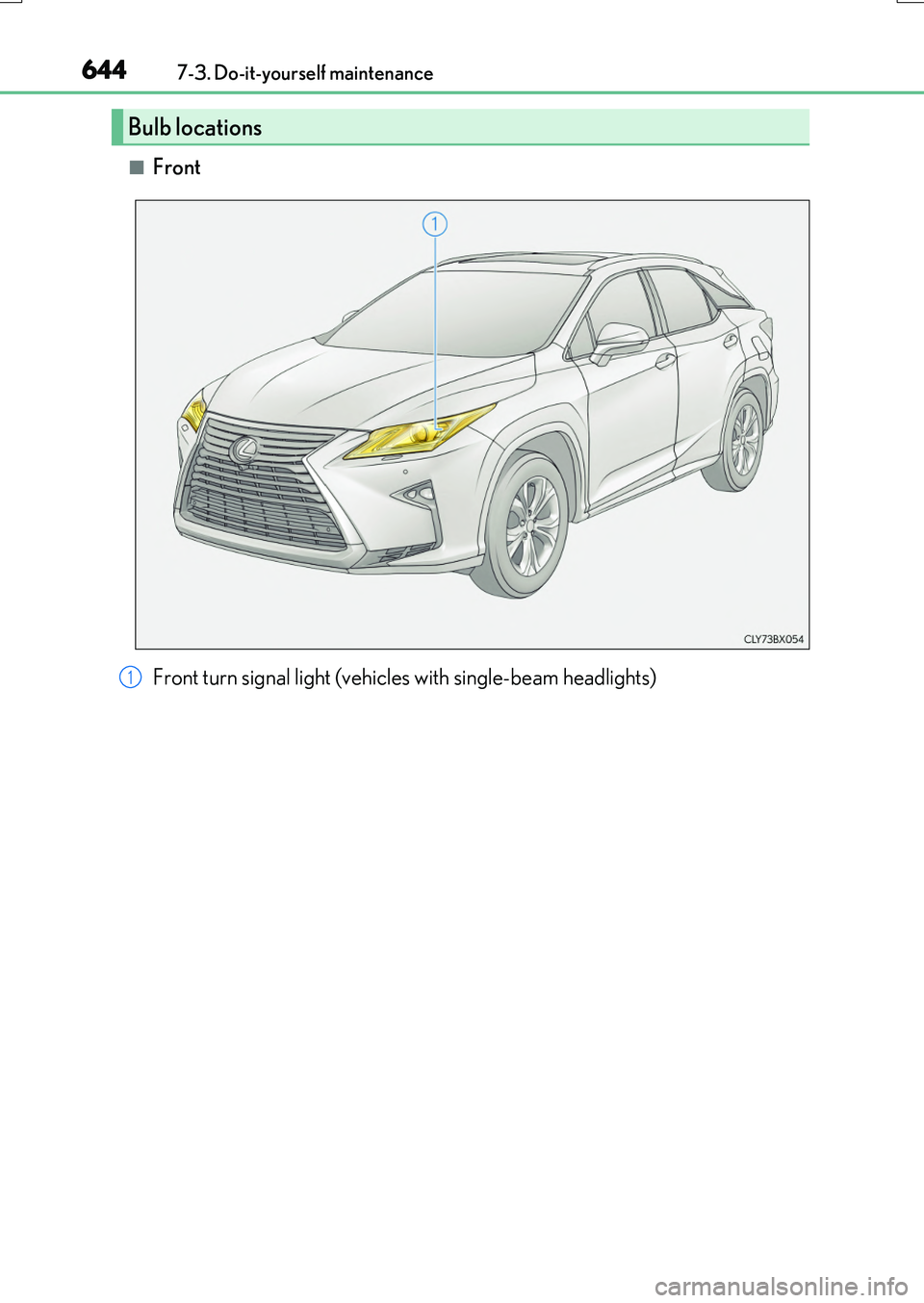
■Front
Bulb locations
Front turn signal light (vehicles with single-beam headlights)1