ECU LEXUS RX200T 2017 Owner's Guide
[x] Cancel search | Manufacturer: LEXUS, Model Year: 2017, Model line: RX200T, Model: LEXUS RX200T 2017Pages: 776, PDF Size: 44.51 MB
Page 76 of 776
761-2. Child safety
RX350/RX200t_EE_OM48F32E
WARNING
■When installing a child restraint system
Observe the following precautions. Failure to do so may result in death or serious injury.
●Firmly attach the top strap and make sure that the belt is not twisted.
●Do not attach the top strap to anything other than the anchor bracket.
●After securing a child restraint system, never adjust the seat.
●Follow all installation instructions provided by the child restraint system manufacturer.
●When installing the child restraint system with the head restraint being raised, after the head restraint has been raised and then the anchor bracket has been fixed, do not
lower the head restraint.
NOTICE
■Anchor brackets (for top strap)
When not in use, make certain to close the lid. If it remains open, the lid may be dam- aged.
Page 77 of 776
77
1
For safety and security
RX350/RX200t_EE_OM48F32E
1-3. Theft deterrent system
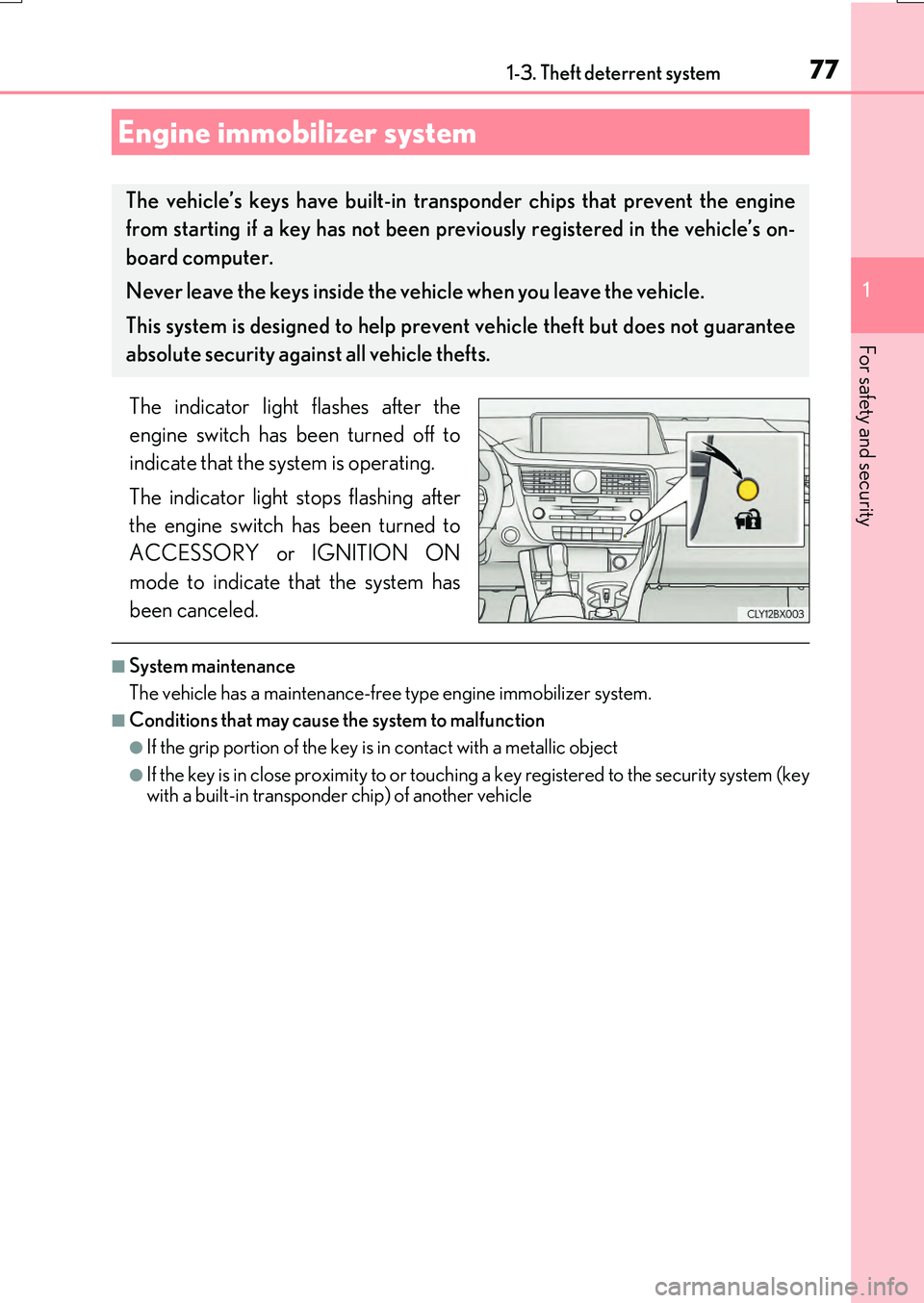
The indicator light flashes after the
engine switch has been turned off to
indicate that the system is operating.
The indicator light stops flashing after
the engine switch has been turned to
ACCESSORY or IGNITION ON
mode to indicate that the system has
been canceled.
■System maintenance
The vehicle has a maintenance-free type engine immobilizer system.
■Conditions that may cause the system to malfunction
●If the grip portion of the key is in contact with a metallic object
●If the key is in close proximity to or touching a key registered to the security system (key with a built-in transponder chip) of another vehicle
Engine immobilizer system
The vehicle’s keys have built-in tran sponder chips that prevent the engine
from starting if a key has not been previously registered in the vehicle’s on-
board computer.
Never leave the keys inside the vehicle when you leave the vehicle.
This system is designed to help prev ent vehicle theft but does not guarantee
absolute security agai nst all vehicle thefts.
Page 79 of 776
791-3. Theft deterrent system
1
For safety and security
RX350/RX200t_EE_OM48F32E
Page 81 of 776
811-3. Theft deterrent system
1
For safety and security
RX350/RX200t_EE_OM48F32E
NOTICE
■To ensure the system operates correctly
Do not modify or remove the system. If modi fied or removed, the proper operation of
the system cannot be guaranteed.
Page 83 of 776

831-3. Theft deterrent system
1
For safety and security
RX350/RX200t_EE_OM48F32E
The alarm uses light and sound to give an alert when an intrusion is detected.
The alarm is triggered in the following situations when the alarm is set:
●A locked door is unlocked or opened in any way other than using the entry
function or wireless remote control. (The doors will lock again automatically.)
●The hood is opened.
●The intrusion sensor detects something moving inside the vehicle. (An
intruder gets in the vehicle.)
●The tilt sensor detects a change of vehicle inclination. (if equipped)
●Any of the windows are broken.
Close the doors and hood, and lock all
the doors using the entry function or
wireless remote control. The system will
be set automatically after 30 seconds.
The indicator light changes from being
on to flashing when the system is set.
Do one of the following to deactivate or stop the alarm.
●Unlock the doors using the entry function or wireless remote control.
●Start the engine. (The alarm will be deactivated or stopped after a few sec-
onds.)
Alarm
: If equipped
The alarm
Setting the alarm system
Deactivating or stopping the alarm
Page 85 of 776

851-3. Theft deterrent system
1
For safety and security
RX350/RX200t_EE_OM48F32E
●The intrusion sensor detects intruders or movement in the vehicle.
●The tilt sensor detects changes in vehicle inclination, such as when the vehicle
is towed away.
This system is designed to deter and pr event vehicle theft but does not guarantee
absolute security against all intrusions.
■Setting the intrusion sensor and tilt sensor
The intrusion sensor and tilt sensor will be set automatically when the alarm is
set. ( P. 83)
■Canceling the intrusion sensor and tilt sensor
If you are leaving pets or other moving things inside the vehicle, make sure to
disable the intrusion sensor and tilt sensor before setting the alarm, as they will
respond to movement inside the vehicle.
Turn the engine switch off.
Press the intrusion sensor and tilt
sensor cancel switch.
A message will be shown on the
multi-information display in the
instrument cluster.
The intrusion sensor and tilt sen-
sor will revert to on each time the
engine switch is turned to IGNI-
TION ON mode.
NOTICE
■To ensure the system operates correctly
Do not modify or remove the system. If modi fied or removed, the proper operation of the system cannot be guaranteed.
Intrusion sensor (if equipped) /Intrusion sensor and tilt sensor
(if equipped)
1
2
Page 87 of 776

871-3. Theft deterrent system
1
For safety and security
RX350/RX200t_EE_OM48F32E
●The vehicle is inside an automatic or high-pressure car wash.
●The vehicle experiences impacts, such as hail, lightning strikes, and other kinds of repeated impacts or vibrations.
■Tilt sensor detection cons iderations (if equipped)
The sensor may trigger the alarm in the following situations:
●The vehicle is transported by a ferry, trailer, train, etc.
●The vehicle is parked in a parking garage.
●The vehicle is inside a car wash that moves the vehicle.
●Any of the tires loses air pressure.
●The vehicle is jacked up.
●An earthquake occurs or the road caves in.
●Cargo is loaded onto or unloaded from the roof luggage carrier.
●The vehicle is parked in a place where extreme vibrations or noises occur, such as in a parkinggarage.
●Ice or snow is removed from the vehicle, caus-ing the vehicle to receive repeated impacts orvibrations.
Page 93 of 776
932. Instrument cluster
2
Instrument cluster
RX350/RX200t_EE_OM48F32E
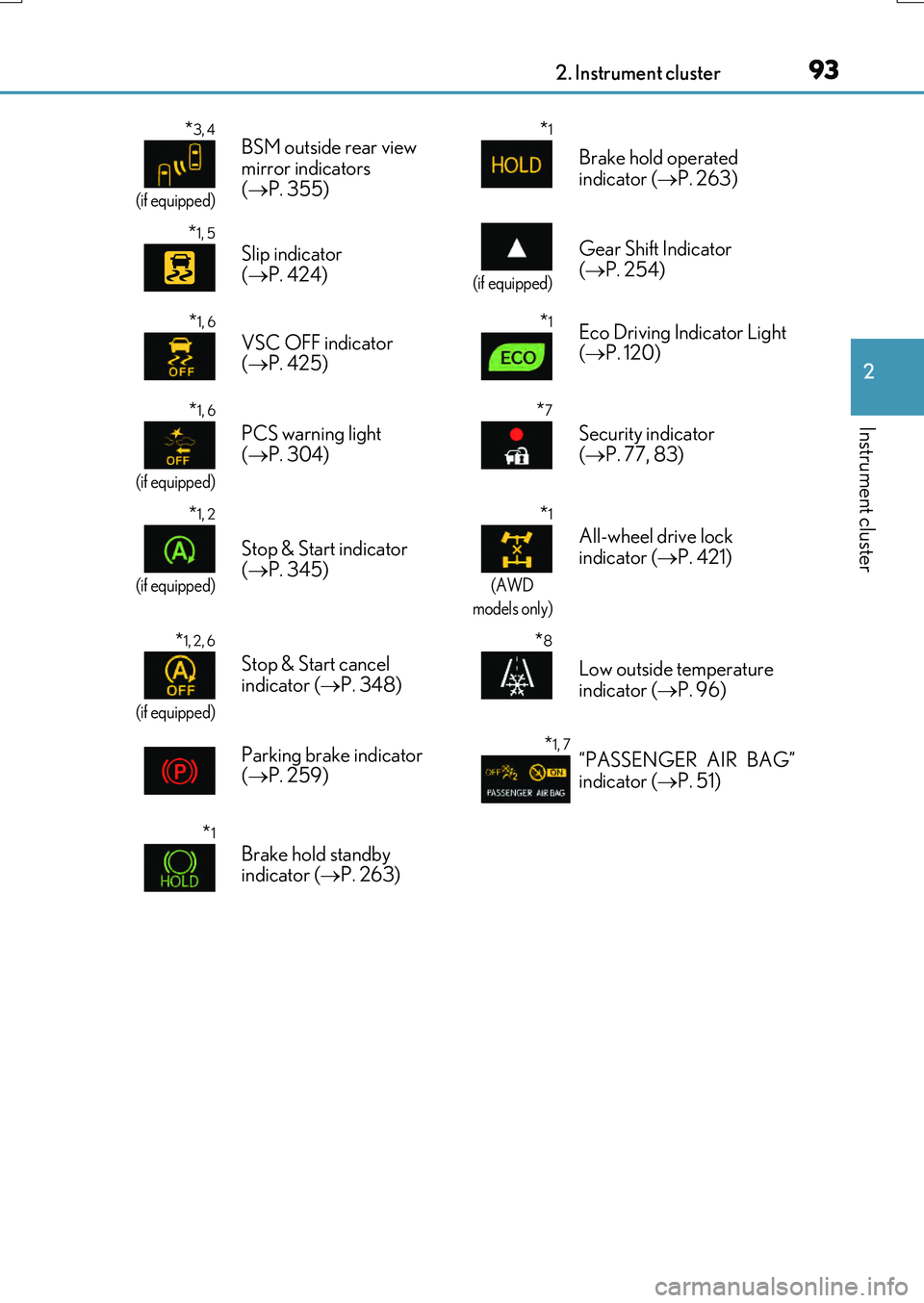
*3, 4
(if equipped)
BSM outside rear view
mirror indicators
( P. 355)*1
Brake hold operated
indicator ( P. 263)
*1, 5
Slip indicator
( P. 424)
(if equipped)
Gear Shift Indicator
( P. 254)
*1, 6
VSC OFF indicator
( P. 425)*1Eco Driving Indicator Light
( P. 120)
*1, 6
(if equipped)
PCS warning light
( P. 304)
*7
Security indicator
( P. 77, 83)
*1, 2
(if equipped)
Stop & Start indicator
( P. 345)
*1
(AWD
models only)
All-wheel drive lock
indicator ( P. 421)
*1, 2, 6
(if equipped)
Stop & Start cancel
indicator ( P. 348)
*8
Low outside temperature
indicator ( P. 96)
Parking brake indicator
( P. 259)
*1, 7“PASSENGER AIR BAG”
indicator ( P. 51)
*1
Brake hold standby
indicator ( P. 263)
Page 140 of 776
140
RX350/RX200t_EE_OM48F32E
3-2. Opening, closing and locking the doors
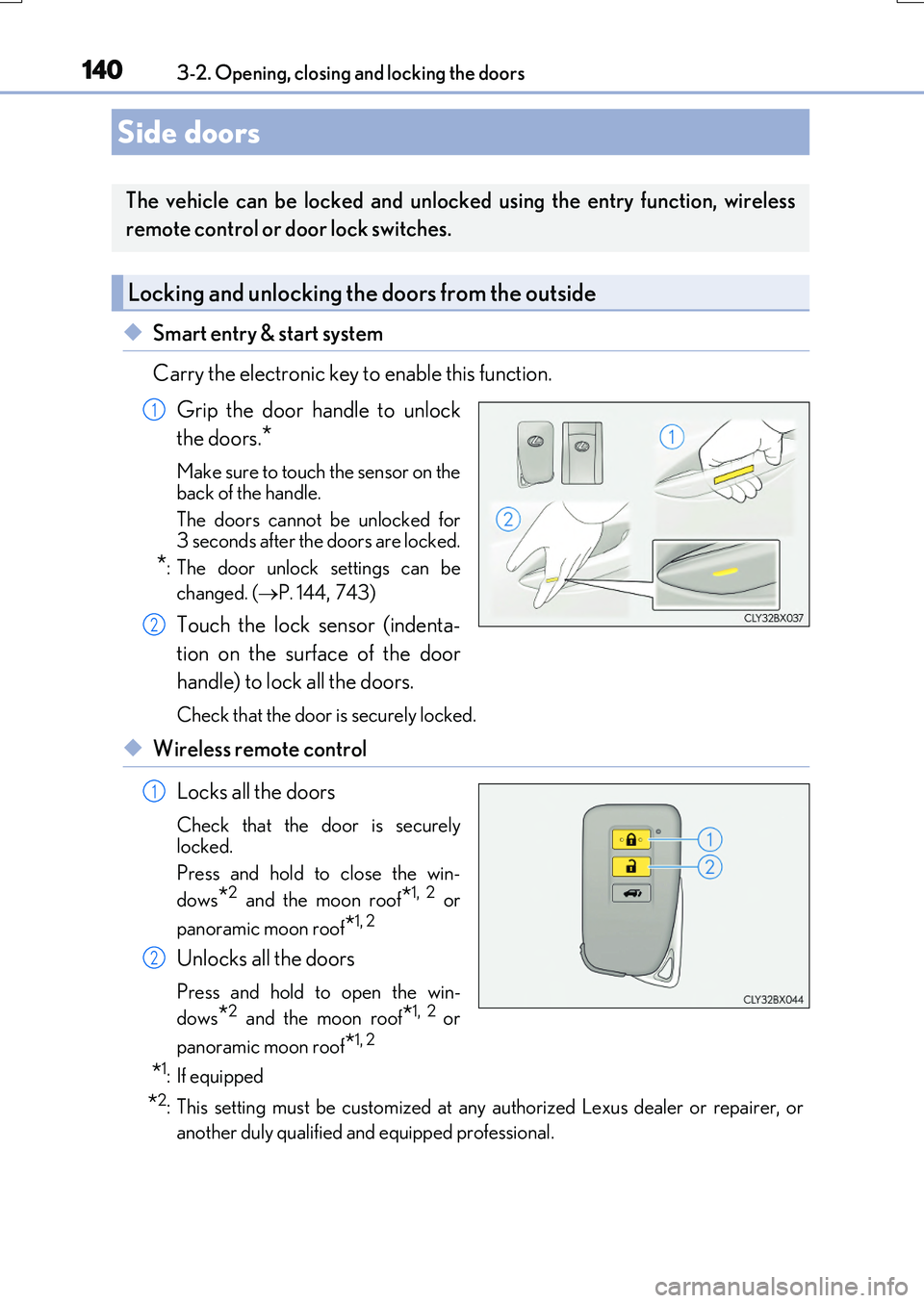
◆Smart entry & start system
Carry the electronic key to enable this function.
Grip the door handle to unlock
the doors.*
Make sure to touch the sensor on the
back of the handle.
The doors cannot be unlocked for 3 seconds after the doors are locked.
*: The door unlock settings can be
changed. ( P. 144,743)
Touch the lock sensor (indenta-
tion on the surface of the door
handle) to lock all the doors.
Check that the door is securely locked.
◆Wireless remote control
Locks all the doors
Check that the door is securely
locked.
Press and hold to close the win-
dows*2 and the moon roof*1, 2 or
panoramic moon roof*1, 2
Unlocks all the doors
Press and hold to open the win-
dows*2 and the moon roof*1, 2 or
panoramic moon roof*1, 2
*1: If equipped
*2: This setting must be customized at any authorized Lexus dealer or repairer, or
another duly qualified and equipped professional.
Side doors
The vehicle can be locked and unlocked using the entry function, wireless
remote control or door lock switches.
Locking and unlocking the doors from the outside
1
2
1
2
Page 141 of 776
1413-2. Opening, closing and locking the doors
3
Operation of each component
RX350/RX200t_EE_OM48F32E
■Operation signals
Doors: The emergency flashers flash to indicate th at the doors have been locked/unlocked. (Locked: Once; Unlocked: Twice)
Windows and moon roof or panoramic moon roof: A buzzer sounds.
■Security feature
If a door is not opened within approximately 30 seconds after the vehicle is unlocked, the security feature automatically locks the vehicle again.
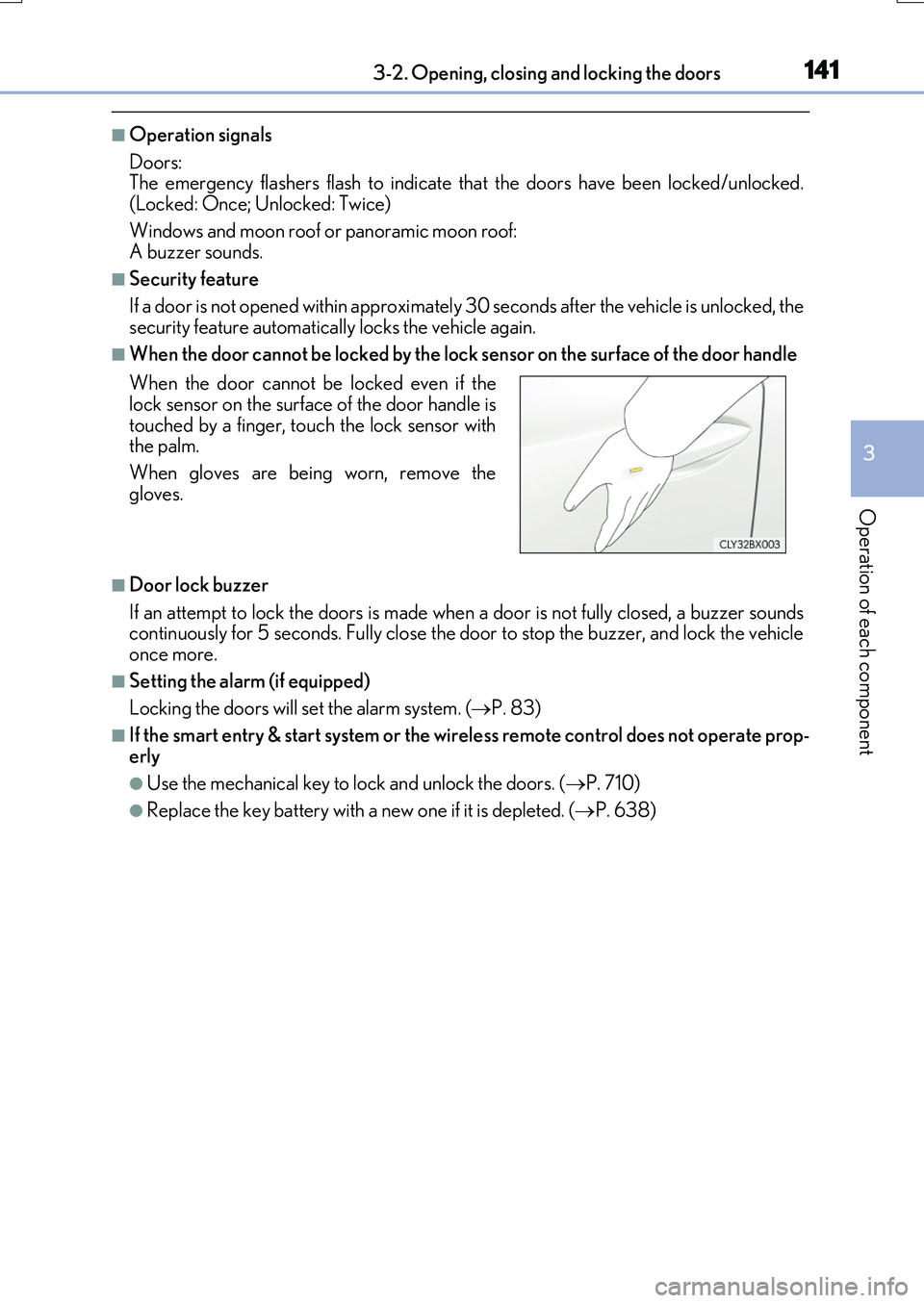
■When the door cannot be locked by the lock sensor on the surface of the door handle
■Door lock buzzer
If an attempt to lock the doors is made when a door is not fully closed, a buzzer sounds continuously for 5 seconds. Fully close the door to stop the buzzer, and lock the vehicleonce more.
■Setting the alarm (if equipped)
Locking the doors will set the alarm system. ( P. 83)
■If the smart entry & start system or the wireless remote control does not operate prop-
erly
●Use the mechanical key to lock and unlock the doors. ( P. 710)
●Replace the key battery with a new one if it is depleted. (P. 638)
When the door cannot be locked even if the lock sensor on the surface of the door handle is
touched by a finger, touch the lock sensor with the palm.
When gloves are being worn, remove the
gloves.