ECO LEXUS RX200T 2017 Workshop Manual
[x] Cancel search | Manufacturer: LEXUS, Model Year: 2017, Model line: RX200T, Model: LEXUS RX200T 2017Pages: 776, PDF Size: 44.51 MB
Page 152 of 776

1523-2. Opening, closing and locking the doors
RX350/RX200t_EE_OM48F32E
Press and hold the switch for approxi-
mately 1 second.
A buzzer will sound and the power back
door will automatically open or close. However, if the power back door islocked, it will not open.
Pressing the switch while the power back door is open ing/closing will stop the operation.
Pressing and holding the switch again for approximately 1 second will operate the power back door in the opposite
direction.
■Back door opener switch
When the power back door is
unlocked: Press the back door
opener switch.
When the power back door is
locked: While carrying an elec-
tronic key, press the back door
opener switch to unlock the power
back door and then press the back
door opener switch again.
A buzzer will sound and the power b ack door will automatically open.
Pressing the switch while the power back door is opening/closing will stop the operation.
■Wireless remote control
P. 151
Opening/closing the power back door from the inside
Opening the power back door from the outside
Page 155 of 776
1553-2. Opening, closing and locking the doors
3
Operation of each component
RX350/RX200t_EE_OM48F32E
The power back door settings can be changed on the multi-information display.
( P. 110)
The position at which the power back door will stop when opened automatically
can be changed.
When setting using the switch
Stop the power back door at the desired position. ( P. 152, 154)
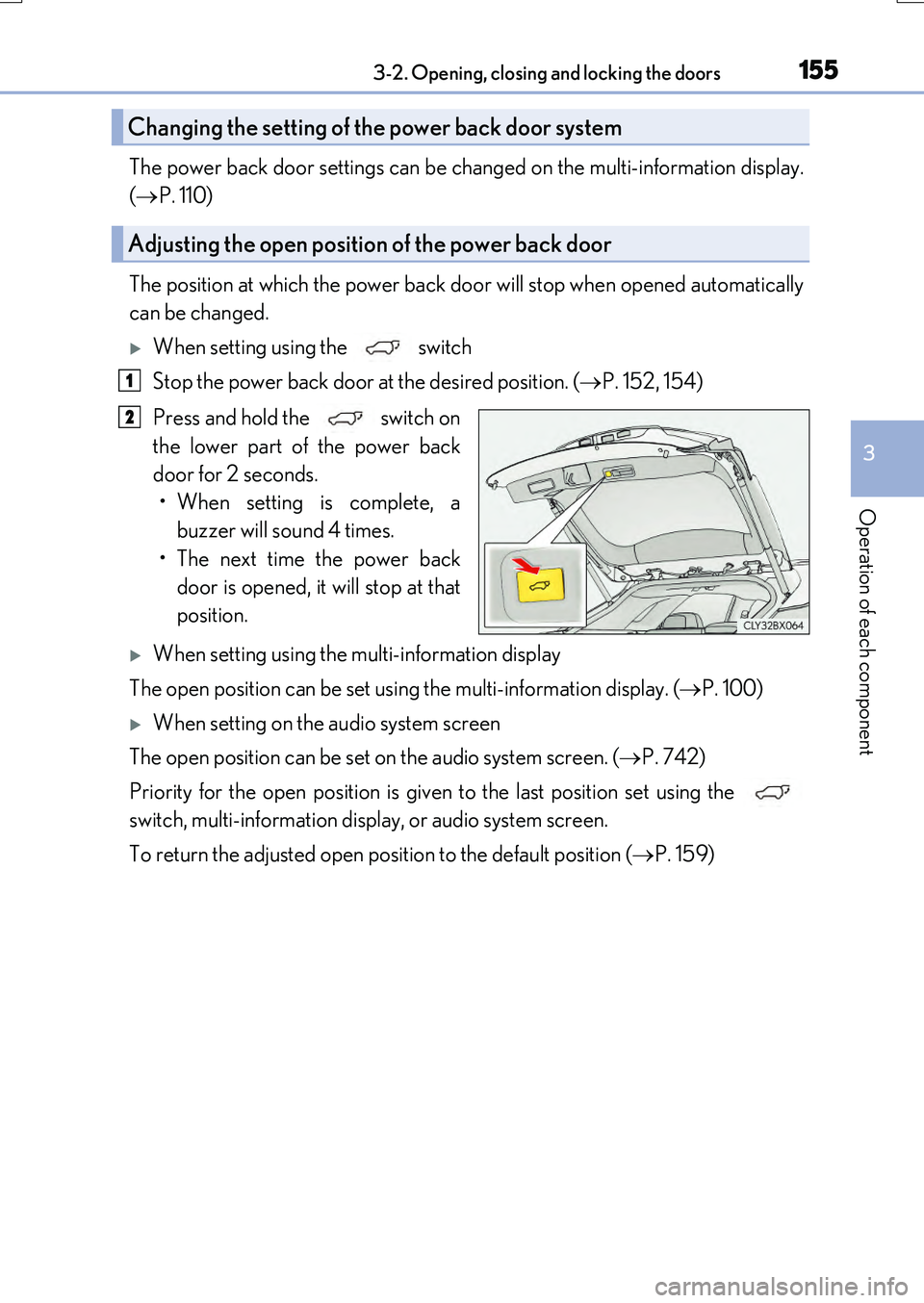
Press and hold the switch on
the lower part of the power back
door for 2 seconds.
• When setting is complete, a buzzer will sound 4 times.
• The next time the power back door is opened, it will stop at that
position.
When setting using the multi-information display
The open position can be set using the multi-information display. ( P. 100)
When setting on the audio system screen
The open position can be set on the audio system screen. ( P. 742)
Priority for the open position is given to the last position set using the
switch, multi-information display, or audio system screen.
To return the adjusted open position to the default position ( P. 159)
Changing the setting of the power back door system
Adjusting the open position of the power back door
1
2
Page 156 of 776
1563-2. Opening, closing and locking the doors
RX350/RX200t_EE_OM48F32E
■Power back door operating conditions
If the following conditions are met with the power back door operation enabled ( P. 115), the power back door can be opened and closed automatically.
●The power back door is unlocked.
●When the engine switch is in IGNITION ON mode, the vehicle speed must be lower than 3 km/h (2 mph) and one of the following conditions must be met in addition to the above condition:
• The parking brake is engaged. • The brake pedal is depressed.• The shift lever is in P.
Touchless sensor (vehicles with a touchless power back door)
The power back door will open automatically when the touchless sensor operation is
enabled ( P. 115) and the following conditions are met:
●The power back door is fully closed.
●The electronic key is within the operational range (P. 168)
■Security feature
If the power back door is not opened within approximately 30 seconds after the vehicle
is unlocked, the security feature will automatically lock the doors again.
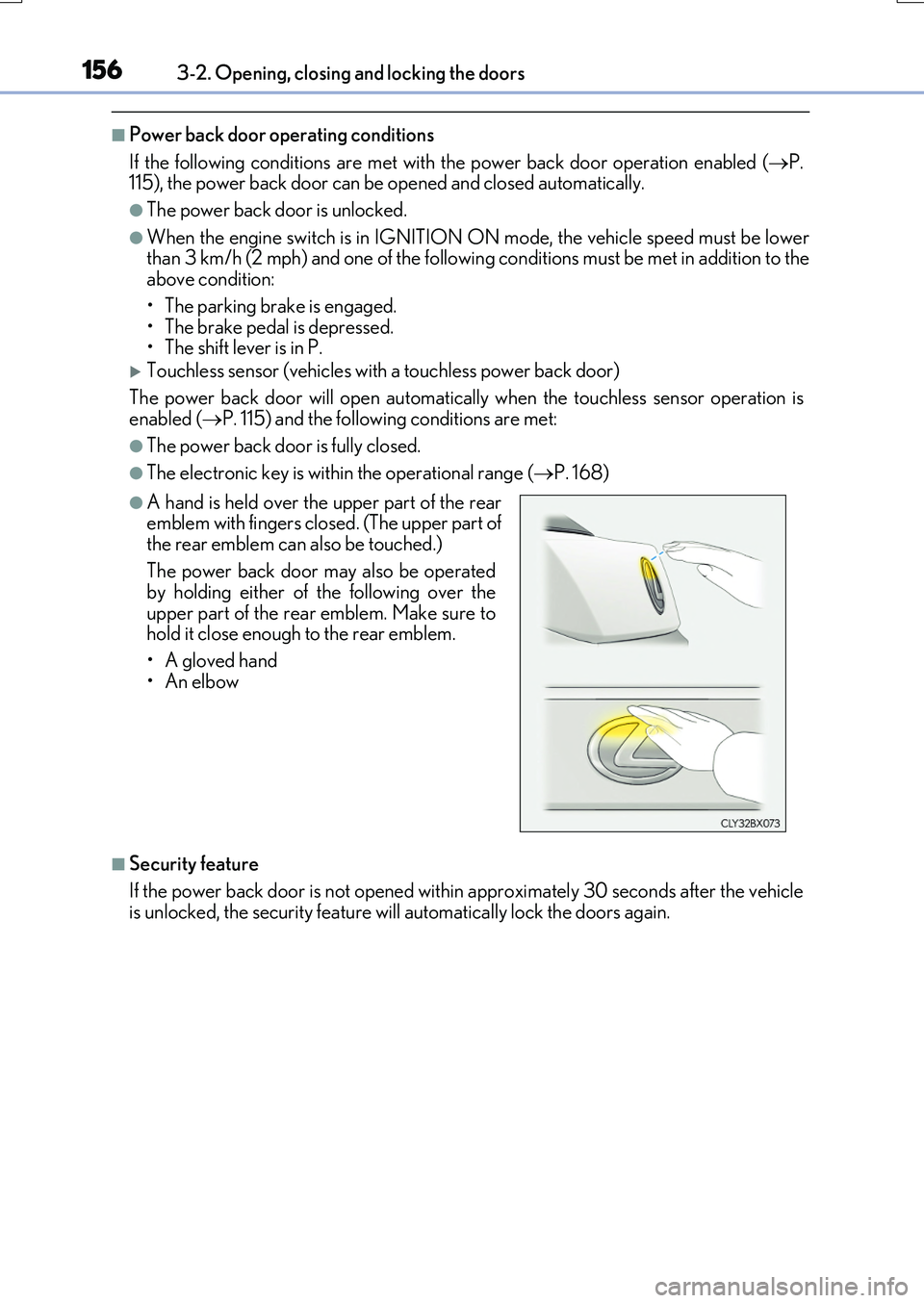
●A hand is held over the upper part of the rear emblem with fingers closed. (The upper part of
the rear emblem can also be touched.)
The power back door may also be operated by holding either of the following over the
upper part of the rear emblem. Make sure to hold it close enough to the rear emblem.
•A gloved hand
•An elbow
Page 159 of 776
1593-2. Opening, closing and locking the doors
3
Operation of each component
RX350/RX200t_EE_OM48F32E
■When reconnecting the battery
To enable the power back door to operate properly, close the power back door manually.
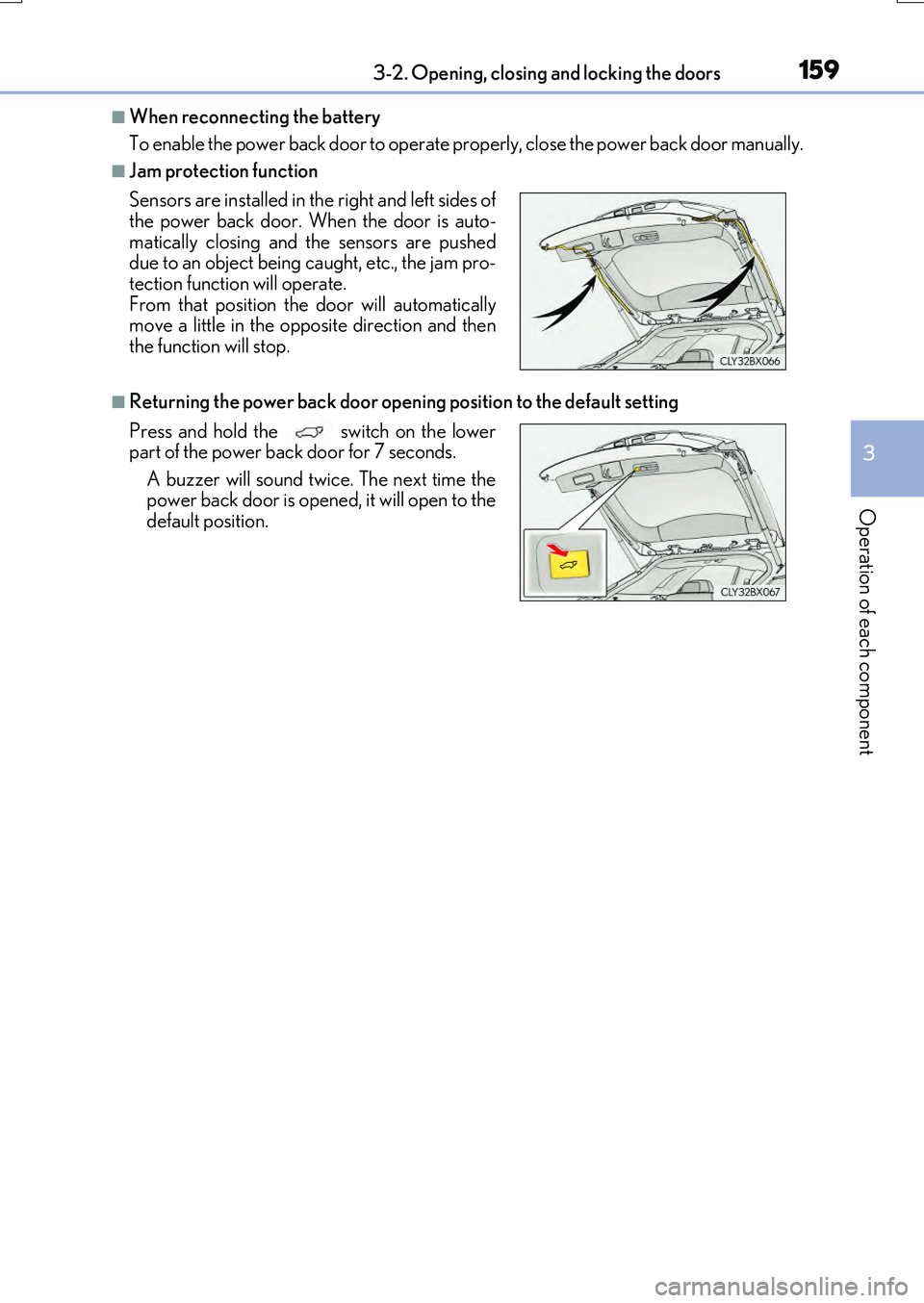
■Jam protection function
■Returning the power back door openin g position to the default setting
Sensors are installed in the right and left sides of the power back door. When the door is auto-
matically closing and the sensors are pushed due to an object being caught, etc., the jam pro-tection function will operate.
From that position the door will automatically move a little in the opposite direction and thenthe function will stop.
Press and hold the switch on the lower part of the power back door for 7 seconds.
A buzzer will sound twice. The next time the power back door is opened, it will open to thedefault position.
Page 160 of 776
1603-2. Opening, closing and locking the doors
RX350/RX200t_EE_OM48F32E
■Situations in which the touchless sensor may malfunction (vehicles with a touchless power back door)
In the following situations, the touchless sensor may operate unintentionally.
To prevent unintentional operation, keep the electronic key out of the operational range or disable the touchless sensor operation. ( P. 115)
●When a large amount of water is applied to the rear emblem, such as in heavy rain
●When the vehicle is being washed and water is applied to the rear emblem
●When dirt is wiped off the rear emblem
●If someone leans toward or against the rear emblem
●When a metal object is brought near the rear emblem
●When a vehicle cover is installed or removed near the rear emblem
■Situations in which the touchless sensor may not operate properly (vehicles with a
touchless power back door)
If the touchless sensor does not operate in the following situations, use the back door opener switch to open the power back door. ( P. 154)
●In the following situations, the sensitivity of the touchless sensor may be temporarily reduced and the touchless sensor may not operate:
• When a large amount of wate r is applied to the rear emblem, such as in heavy rain
• When the vehicle is being washed and water is applied to the rear emblem • For several seconds after dirt is wiped off the rear emblem • When the rear emblem is covered with mud, snow, ice, etc.
• When the vehicle has been parked for a while near objects that may move and con- tact the rear emblem, such as tall grass or trees• When an external radio wave sour ce is near the touchless sensor
●The touchless sensor may not operate in the following situations:
• When an electronic key is not being carried • When an electronic key is no t within the operational range • When an external radio wave source interferes with the communication between
the vehicle and electronic key ( P. 170) • When the power back door is not fully closed• When a hand is held pa rallel to the rear emblem*
*: The detection settings can be changed by any authorized Lexus dealer or repairer,
or another duly qualified and equipped professional. ( P. 742)
■Customization
Some functions can be customized. ( P. 110, 740)
Page 162 of 776
1623-2. Opening, closing and locking the doors
RX350/RX200t_EE_OM48F32E
WARNING
■Operating the power back door
Observe the following precautions.
Failure to do so may cause parts of the body to be caught, resulting in death or serious
injury.
●Remove any heavy loads, such as snow and ice, from the power back door before
opening it. Failure to do so may cause the power back door to suddenly shut again
after it is opened.
●When opening or closing the power back do or, thoroughly check to make sure the
surrounding area is safe.
●If anyone is in the vicinity, make sure they are safe and let them know that the power
back door is about to open or close.
●Use caution when opening or closing the power back door in windy weather as it may
move abruptly in strong wind.
●Do not pull on the back door spindle ( P. 165) to close the power back door, and
do not hang on the back door spindle.
Doing so may cause hands to be caught or the back door spindle to break, causing
an accident.
●If a bicycle carrier or similar heavy object is attached to the power back door, it may
suddenly shut again after being opened, causing someone’s hands, arms, head or
neck to be caught and injured. When installing an accessory part to the power back
door, using a genuine Lexus part is recommended.
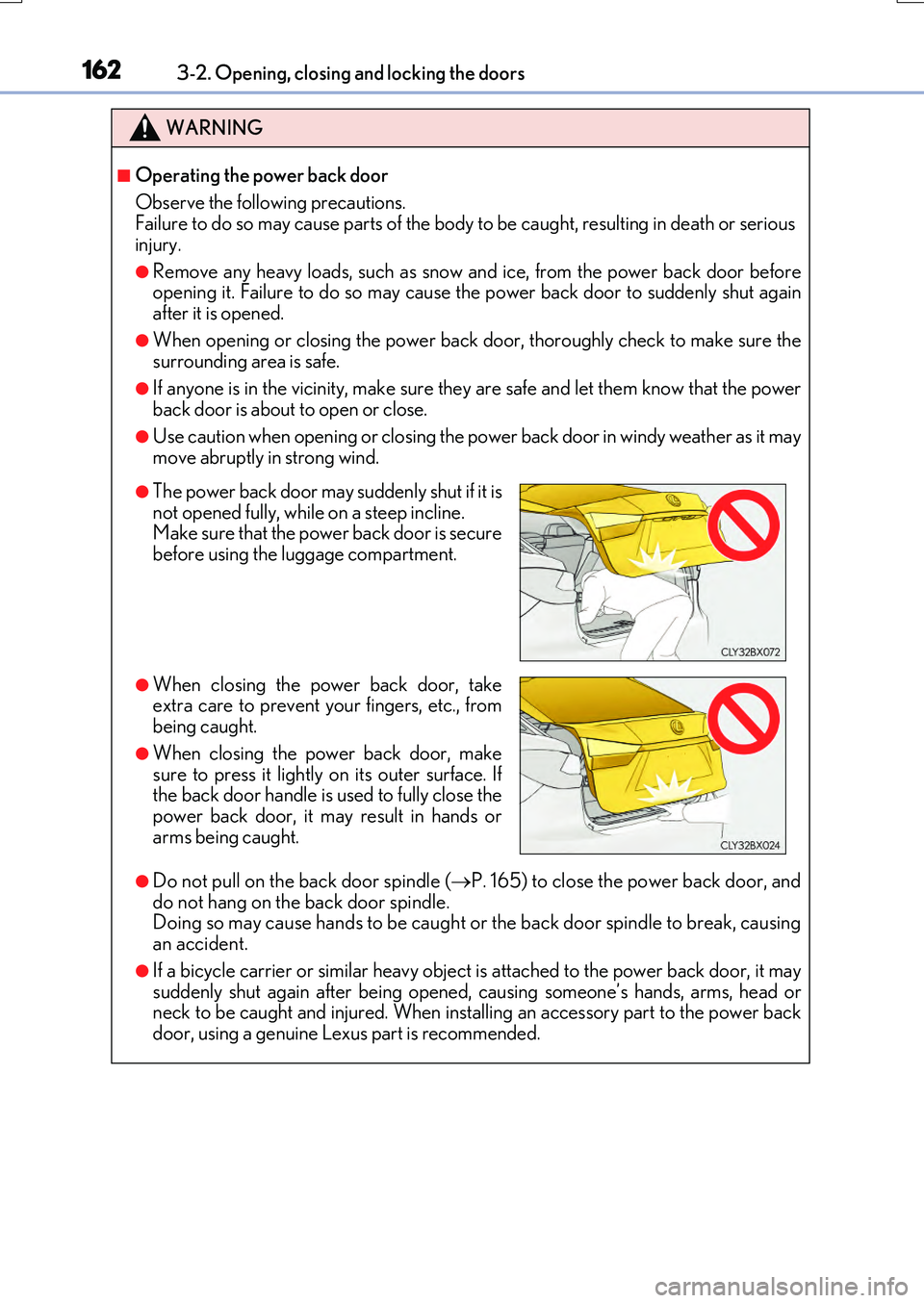
●The power back door may suddenly shut if it is
not opened fully, while on a steep incline.
Make sure that the power back door is secure
before using the luggage compartment.
●When closing the power back door, take
extra care to prevent your fingers, etc., from
being caught.
●When closing the power back door, make
sure to press it lightly on its outer surface. If
the back door handle is used to fully close the
power back door, it may result in hands or
arms being caught.
Page 163 of 776

1633-2. Opening, closing and locking the doors
3
Operation of each component
RX350/RX200t_EE_OM48F32E
WARNING
■Back door closer
●Use caution when using the back door closer as it still operates when the power back door system is disabled.
■Power back door
Observe the following precautions when operating the power back door. Failure to do so may cause death or serious injury.
●Check the safety of the surrounding area to make sure there are no obstacles or any-thing that could cause any of your belongings to get caught.
●If anyone is in the vicinity, make sure they are safe and let them know that the power
back door is about to open or close.
●If the power back door system is disabled ( P. 115) while the power back door is operating, the power back door will stop operating. The power back door must then
be operated manually. Take extra care in th is situation, as the power back door may open or close suddenly.
●If the operating conditions of the power back door (P. 156) are no longer met, a
buzzer may sound and the power back door may stop opening or closing. The power back door must then be operated manually. Take extra care on an incline in this situa-tion, as the power back door may move suddenly.
●On an incline, the power back door may suddenly shut after it opens. Make sure thepower back door is fully open and secure.
●In the following situations, the power back door may detect an abnormality and auto-
matic operation may be stopped. In this case, the power back door must then be operated manually. Take extra care in this situation, as the stopped power back door may suddenly open or close, causing an accident.
• When the power back door contacts an obstacle • When the battery voltage suddenly drops, such as when the engine switch isturned to IGNITION ON mode or the engine is started during automatic opera-
tion
●In the event that the power back door is left
slightly open, the back door closer will auto- matically close it to the fully closed position. Ittakes several seconds before the back door
closer begins to operate. Be careful not to get fingers caught or anything else in the powerback door, as this may cause bone fractures
or other serious injuries.
Page 164 of 776
1643-2. Opening, closing and locking the doors
RX350/RX200t_EE_OM48F32E
WARNING
●If a bicycle carrier or similar heavy object is attached to the power back door, the power back door may not operate, causin g a malfunction, or the power back door may suddenly shut again after being opened, causing someone’s hands, arms, head
or neck to be caught and injured. When installing an accessory part to the power back door, using a genuine Lexus part is recommended.
■Jam protection function
Observe the following precautions. Failure to do so may cause death or serious injury.
●Never use any part of your body to intent ionally activate the jam protection function.
●The jam protection function may not work if something gets caught just before the power back door fully closes. Be careful not to get fingers caught or anything else.
●The jam protection function may not work depending on the shape of the object that
is caught. Be careful not to catch fingers or anything else.
Page 169 of 776
1693-2. Opening, closing and locking the doors
3
Operation of each component
RX350/RX200t_EE_OM48F32E
■Alarms and warning messages
A combination of exterior and interior alarms as well as warning messages shown on the multi-information display are used to prevent theft of the vehicle and accidents resulting
from erroneous operation. Take appropriate measures in response to any warning mes- sage on the multi-information display. ( P. 673)
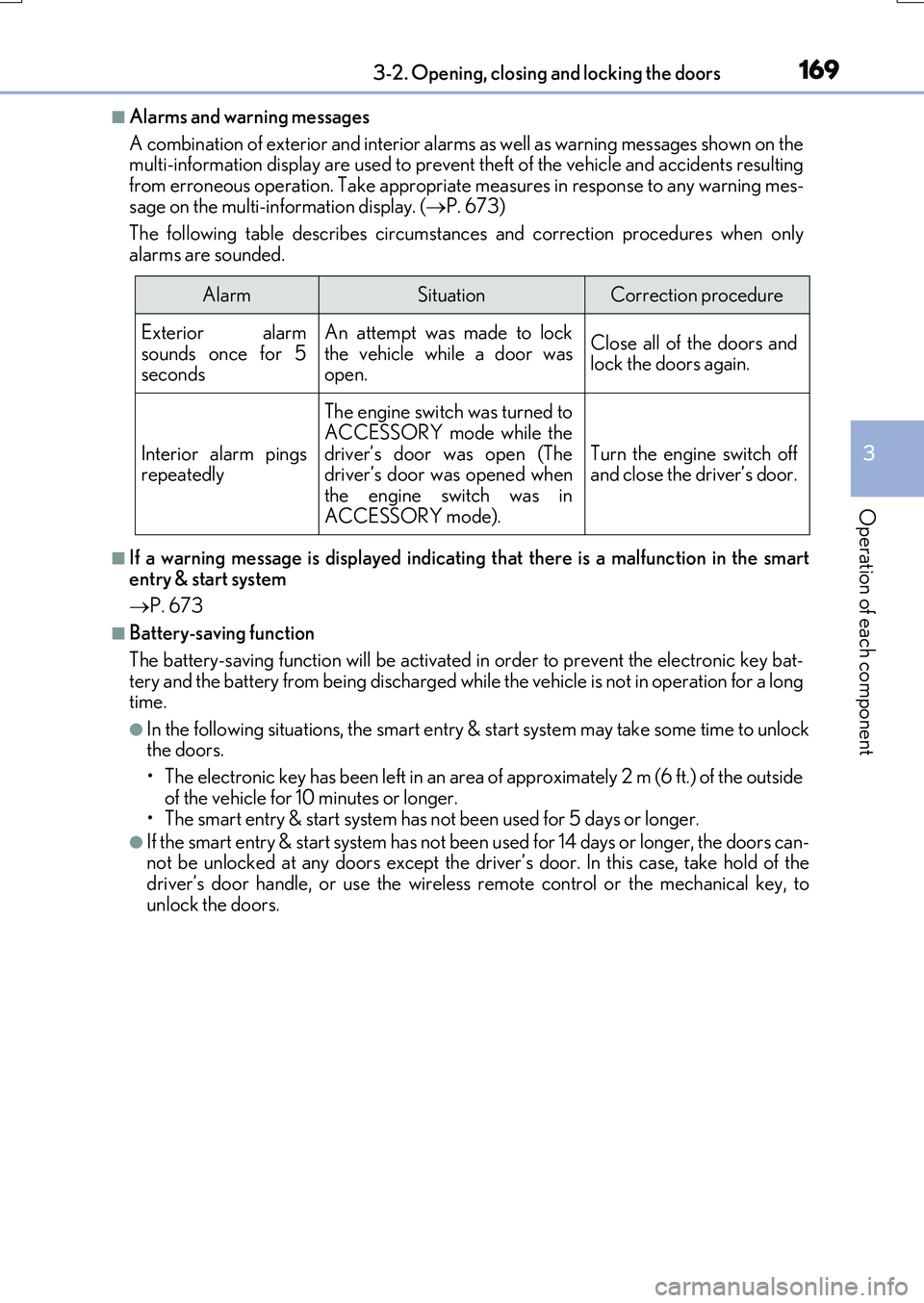
The following table describes circumstances and correction procedures when only
alarms are sounded.
■If a warning message is displayed indicating that there is a malfunction in the smart
entry & start system
P. 673
■Battery-saving function
The battery-saving function will be activated in order to prevent the electronic key bat- tery and the battery from being discharged while the vehicle is not in operation for a longtime.
●In the following situations, the smart entry & start system may take some time to unlockthe doors.
• The electronic key has been left in an area of approximately 2 m (6 ft.) of the outside
of the vehicle for 10 minutes or longer. • The smart entry & start system has no t been used for 5 days or longer.
●If the smart entry & start system has not been used for 14 days or longer, the doors can- not be unlocked at any doors except the driver’s door. In this case, take hold of thedriver’s door handle, or use the wireless remote control or the mechanical key, to
unlock the doors.
AlarmSituationCorrection procedure
Exterior alarm
sounds once for 5 seconds
An attempt was made to lock
the vehicle while a door was open.
Close all of the doors andlock the doors again.
Interior alarm pingsrepeatedly
The engine switch was turned toACCESSORY mode while the
driver’s door was open (The driver’s door was opened whenthe engine switch was in
ACCESSORY mode).
Turn the engine switch off and close the driver’s door.
Page 171 of 776

1713-2. Opening, closing and locking the doors
3
Operation of each component
RX350/RX200t_EE_OM48F32E
■Note for the entry function
●Even when the electronic key is within the effective range (detection areas), the system may not operate properly in the following cases:
• The electronic key is too close to the window or outside door handle, near the ground, or in a high place when the doors are locked or unlocked.• The electronic key is near the ground or in a high place, or too close to the rear
bumper center when the back door is opened. • The electronic key is on the instrument panel, luggage compartment, floor, or in thedoor pockets or glove box when the engine is started or engine switch modes are
changed.
●Do not leave the electronic key on top of th e instrument panel or near the door pockets
when exiting the vehicle. Depending on the radio wave reception conditions, it may be detected by the antenna outside the cabin and the door will become lockable from theoutside, possibly trapping the electronic key inside the vehicle.
●As long as the electronic key is within the effective range, the doors may be locked orunlocked by anyone.
●Even if the electronic key is not inside the vehicle, it may be possible to start the engine
if the electronic key is near the window.
●The doors may unlock if a large amount of wa ter splashes on the door handle, such as in the rain or in a car wash when the electronic key is within the effective range. (The door
will automatically be locked after approx imately 30 seconds if the doors are not opened and closed.)
●If the wireless remote control is used to lock the doors when the electronic key is near
the vehicle, there is a possibility that the d oor may not be unlocked by the entry func- tion. (Use the wireless remote control to unlock the doors.)
●Touching the door lock sensor while wearin g gloves may delay or prevent lock opera-
tion. Remove the gloves and to uch the lock sensor again.
●If the door handle becomes wet while the electronic key is within the effective range,
the door may lock and unlock repeatedly. In that case, follow the following correction
procedures to wash the vehicle:
• Place the electronic key in a location 2 m (6 ft.) or more away from the vehicle. (Take
care to ensure that the key is not stolen.)
• Set the electronic key to battery-saving mode to disable the smart entry & start sys-
tem. ( P. 170)
●If the electronic key is inside the vehicle and a door handle becomes wet during a car wash, a message may be shown on the mult i-information display and a buzzer will
sound outside the vehicle. To turn off the alarm, lock all the doors.
●The lock sensor may not work properly if it comes into contact with ice, snow, mud, etc. Clean the lock sensor and attempt to operate it again.
●A sudden approach to the effective range or door handle may prevent the doors frombeing unlocked. In this case, return the door handle to the original position and check that the doors unlock before pulling the door handle again.
●If there is another electronic key in the de tection area, it may take slightly longer to unlock the doors after the door handle is gripped.
●Fingernails may scrape against the door duri ng operation of the door handle. Be care-
ful not to injure fingernails or damage the surface of the door.