ECO LEXUS RX200T 2017 Service Manual
[x] Cancel search | Manufacturer: LEXUS, Model Year: 2017, Model line: RX200T, Model: LEXUS RX200T 2017Pages: 776, PDF Size: 44.51 MB
Page 132 of 776
1322. Instrument cluster
RX350/RX200t_EE_OM48F32E
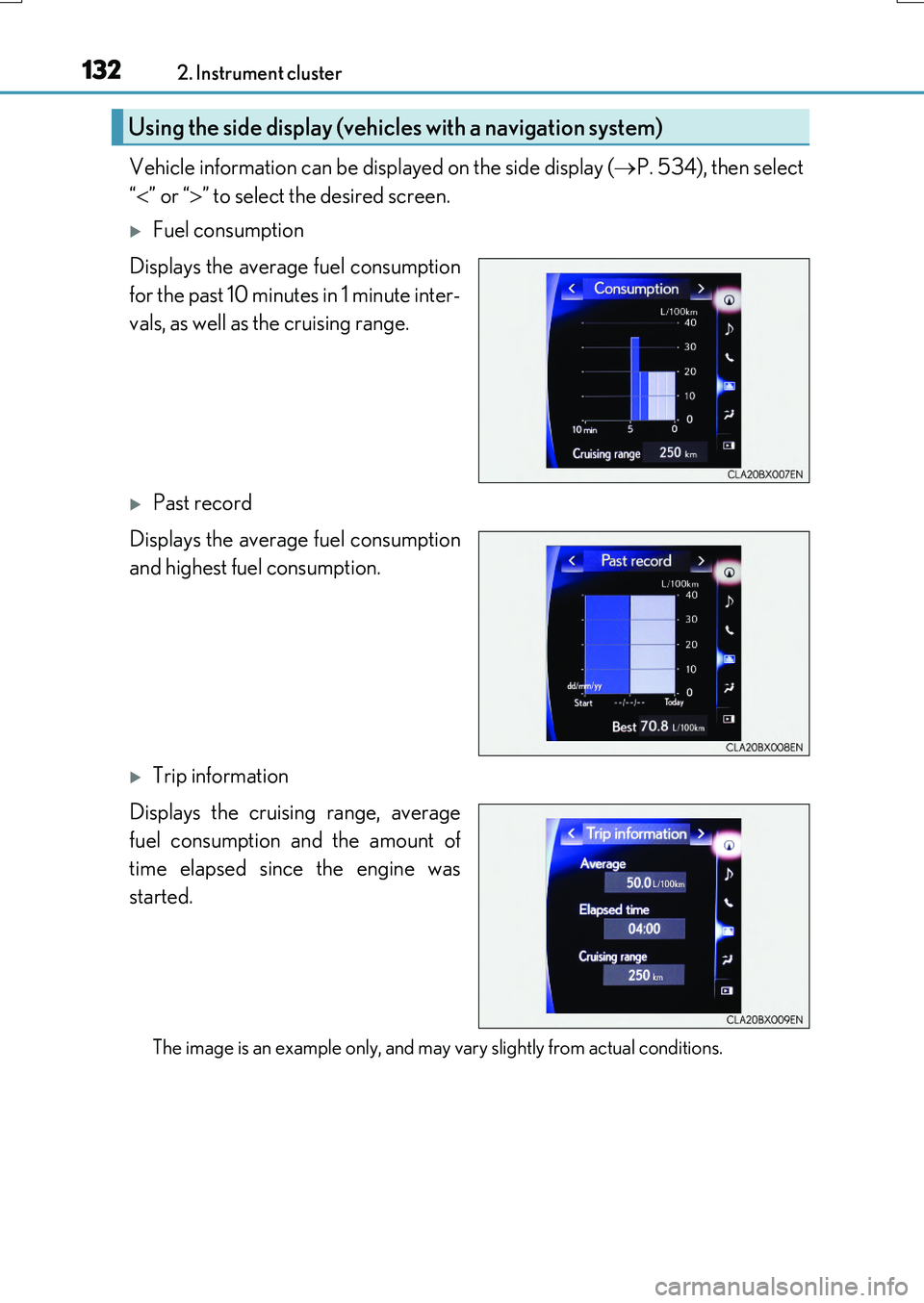
Vehicle information can be displayed on the side display (P. 534), then select
“ ” or “” to select the desired screen.
Fuel consumption
Displays the average fuel consumption
for the past 10 minutes in 1 minute inter-
vals, as well as the cruising range.
Past record
Displays the average fuel consumption
and highest fuel consumption.
Trip information
Displays the cruising range, average
fuel consumption and the amount of
time elapsed since the engine was
started.
The image is an example only, and may vary slightly from actual conditions.
Using the side display (vehicles with a navigation system)
Page 137 of 776
1373-1. Key information
3
Operation of each component
RX350/RX200t_EE_OM48F32E
■Electronic key battery depletion
●The standard battery life is 1 to 2 years. (The card key battery life is about a year and a half.)
●If the battery becomes low, an alarm will soun d in the cabin when the engine is stopped. ( P. 638)
●As the electronic key always receives radio waves, the battery will become depleted
even if the electronic key is not used. The following symptoms indicate that the elec- tronic key battery may be depleted. Replace the battery when necessary. ( P. 638)
• The smart entry & start system or the wireless remote control does not operate.
• The detection area becomes smaller. • The LED indicator on the key surface does not turn on.
●To avoid serious deterioration, do not leave the electronic key within 1 m (3 ft.) of thefollowing electrical appliances that produce a magnetic field:
•TVs
• Personal computers • Cellular phones, cordless phones and battery chargers• Recharging cellular phones or cordless phones
• Induction cookers • Table lamps
■Replacing the battery
P. 638
■Confirmation of the registered key number
The number of keys already registered to the vehicle can be confirmed. Ask any autho-
rized Lexus dealer or repairer, or another du ly qualified and equipped professional for details.
■If a wrong key is used
The key cylinder rotates freely, isolated from the internal mechanism.
Page 139 of 776

1393-1. Key information
3
Operation of each component
RX350/RX200t_EE_OM48F32E
NOTICE
■Handling the card key (if equipped)
●Do not apply excess force when inserting the mechanical key into the card key. Doing so may damage the card key.
●If the battery or card key terminals get wet, the battery may corrode and the card keymay stop working.If the key is dropped into water, or if drinki ng water, etc. is spilled on the key, immedi-
ately remove the battery cover and wipe the battery and terminals. (To remove the battery cover, lightly grasp and pull it.) If the battery is corroded, have any authorized Lexus dealer or repairer, or another duly qualified and equipped professional replace
the battery.
●Do not crush the battery cover or use a screwdriver to remove the battery cover. Forcibly removing the battery co ver may bend or damage the key.
●If the battery cover is frequently removed, the battery cover may become loose.
●When installing the battery, make sure to check the direction of the battery. Installing the battery in the wrong direction may cause the battery to deplete rapidly.
●The surface of the card key may be damaged, or its coating may peel off in the follow- ing situations:
• The card key is carried together with hard objects, such as coins and keys.
• The card key is scraped with a sharp object, such as the tip of a mechanical pencil. • The surface of the card key is wiped with thinner or benzene.
Page 140 of 776
140
RX350/RX200t_EE_OM48F32E
3-2. Opening, closing and locking the doors
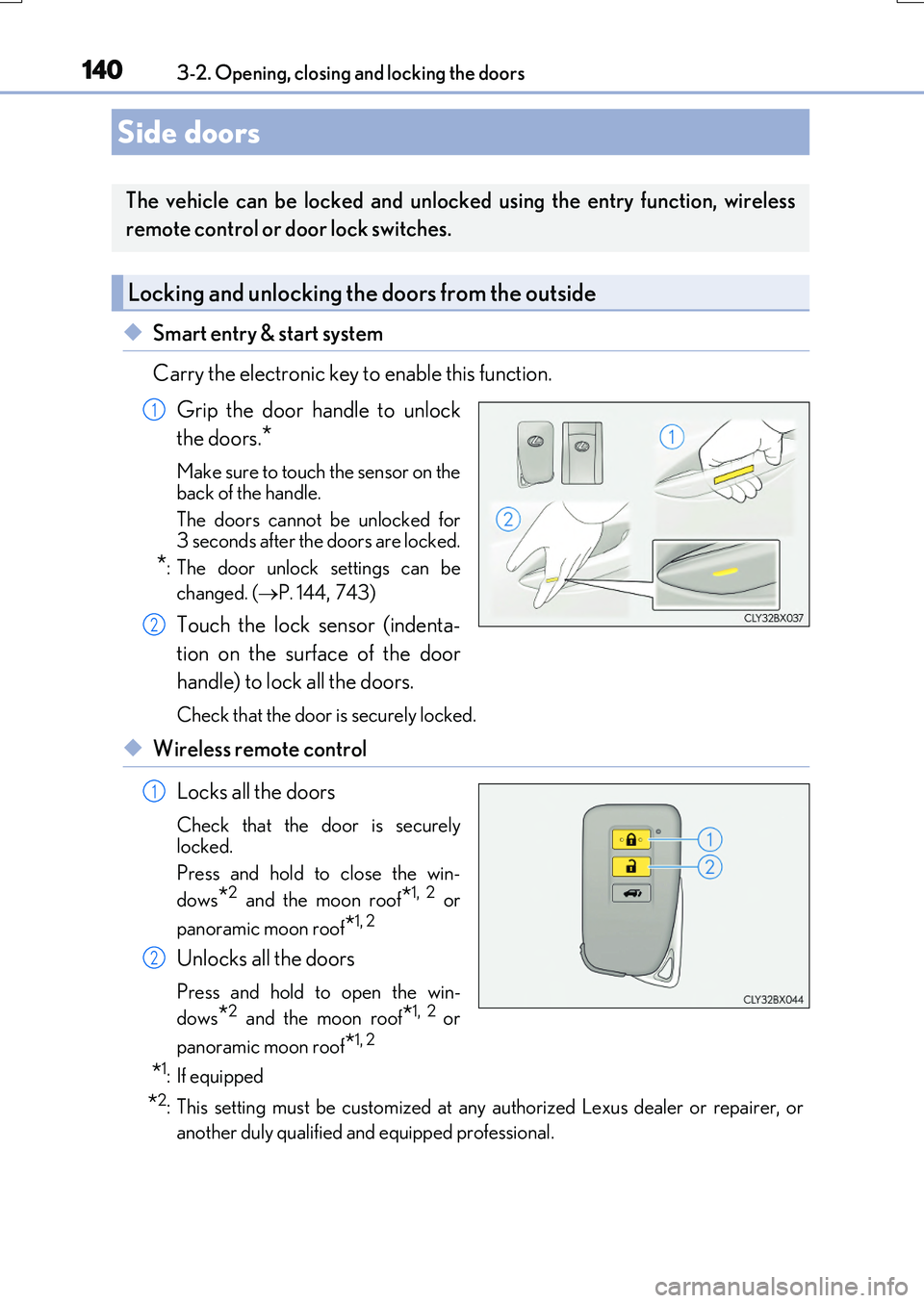
◆Smart entry & start system
Carry the electronic key to enable this function.
Grip the door handle to unlock
the doors.*
Make sure to touch the sensor on the
back of the handle.
The doors cannot be unlocked for 3 seconds after the doors are locked.
*: The door unlock settings can be
changed. ( P. 144,743)
Touch the lock sensor (indenta-
tion on the surface of the door
handle) to lock all the doors.
Check that the door is securely locked.
◆Wireless remote control
Locks all the doors
Check that the door is securely
locked.
Press and hold to close the win-
dows*2 and the moon roof*1, 2 or
panoramic moon roof*1, 2
Unlocks all the doors
Press and hold to open the win-
dows*2 and the moon roof*1, 2 or
panoramic moon roof*1, 2
*1: If equipped
*2: This setting must be customized at any authorized Lexus dealer or repairer, or
another duly qualified and equipped professional.
Side doors
The vehicle can be locked and unlocked using the entry function, wireless
remote control or door lock switches.
Locking and unlocking the doors from the outside
1
2
1
2
Page 141 of 776
1413-2. Opening, closing and locking the doors
3
Operation of each component
RX350/RX200t_EE_OM48F32E
■Operation signals
Doors: The emergency flashers flash to indicate th at the doors have been locked/unlocked. (Locked: Once; Unlocked: Twice)
Windows and moon roof or panoramic moon roof: A buzzer sounds.
■Security feature
If a door is not opened within approximately 30 seconds after the vehicle is unlocked, the security feature automatically locks the vehicle again.
■When the door cannot be locked by the lock sensor on the surface of the door handle
■Door lock buzzer
If an attempt to lock the doors is made when a door is not fully closed, a buzzer sounds continuously for 5 seconds. Fully close the door to stop the buzzer, and lock the vehicleonce more.
■Setting the alarm (if equipped)
Locking the doors will set the alarm system. ( P. 83)
■If the smart entry & start system or the wireless remote control does not operate prop-
erly
●Use the mechanical key to lock and unlock the doors. ( P. 710)
●Replace the key battery with a new one if it is depleted. (P. 638)
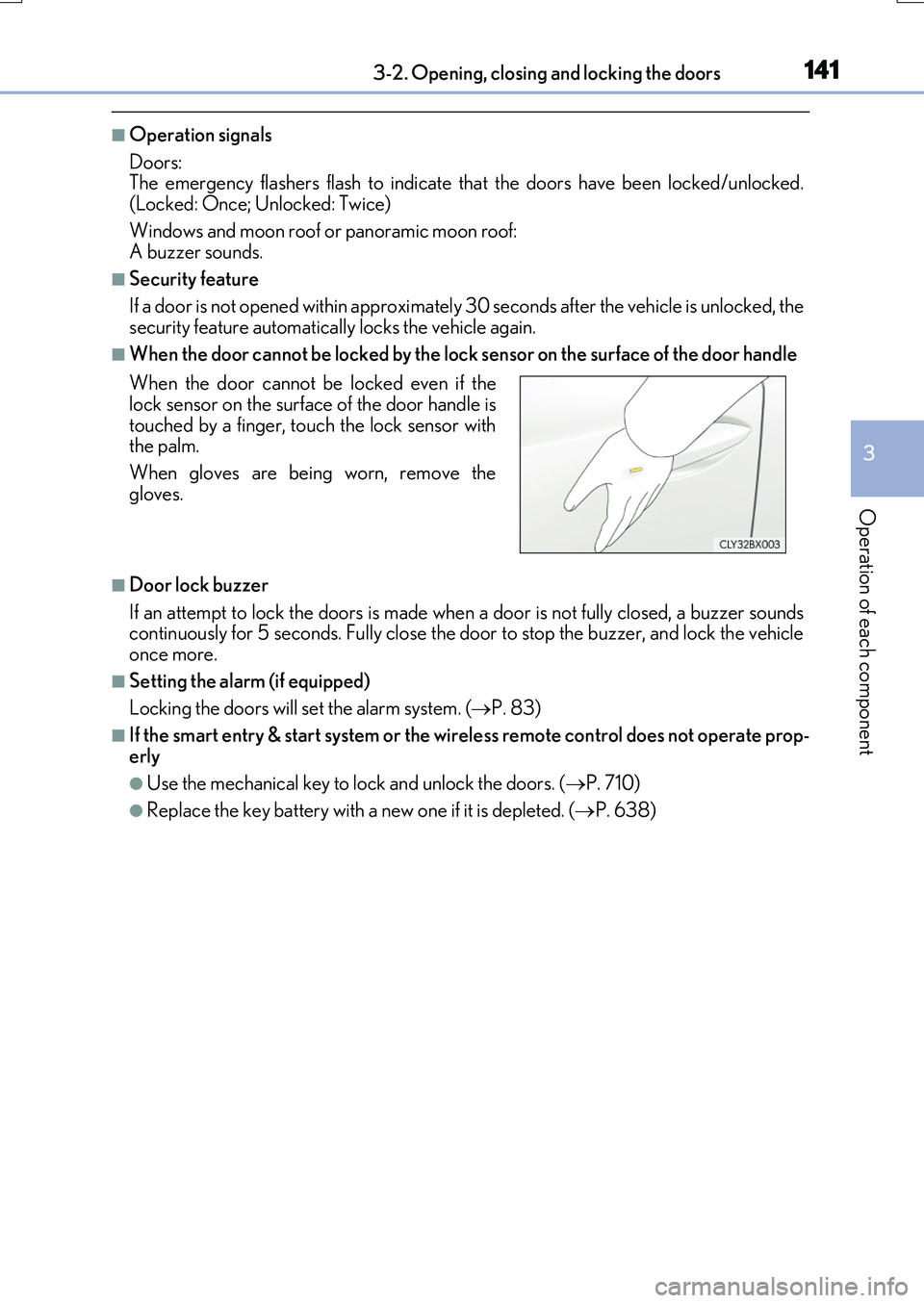
When the door cannot be locked even if the lock sensor on the surface of the door handle is
touched by a finger, touch the lock sensor with the palm.
When gloves are being worn, remove the
gloves.
Page 142 of 776
1423-2. Opening, closing and locking the doors
RX350/RX200t_EE_OM48F32E
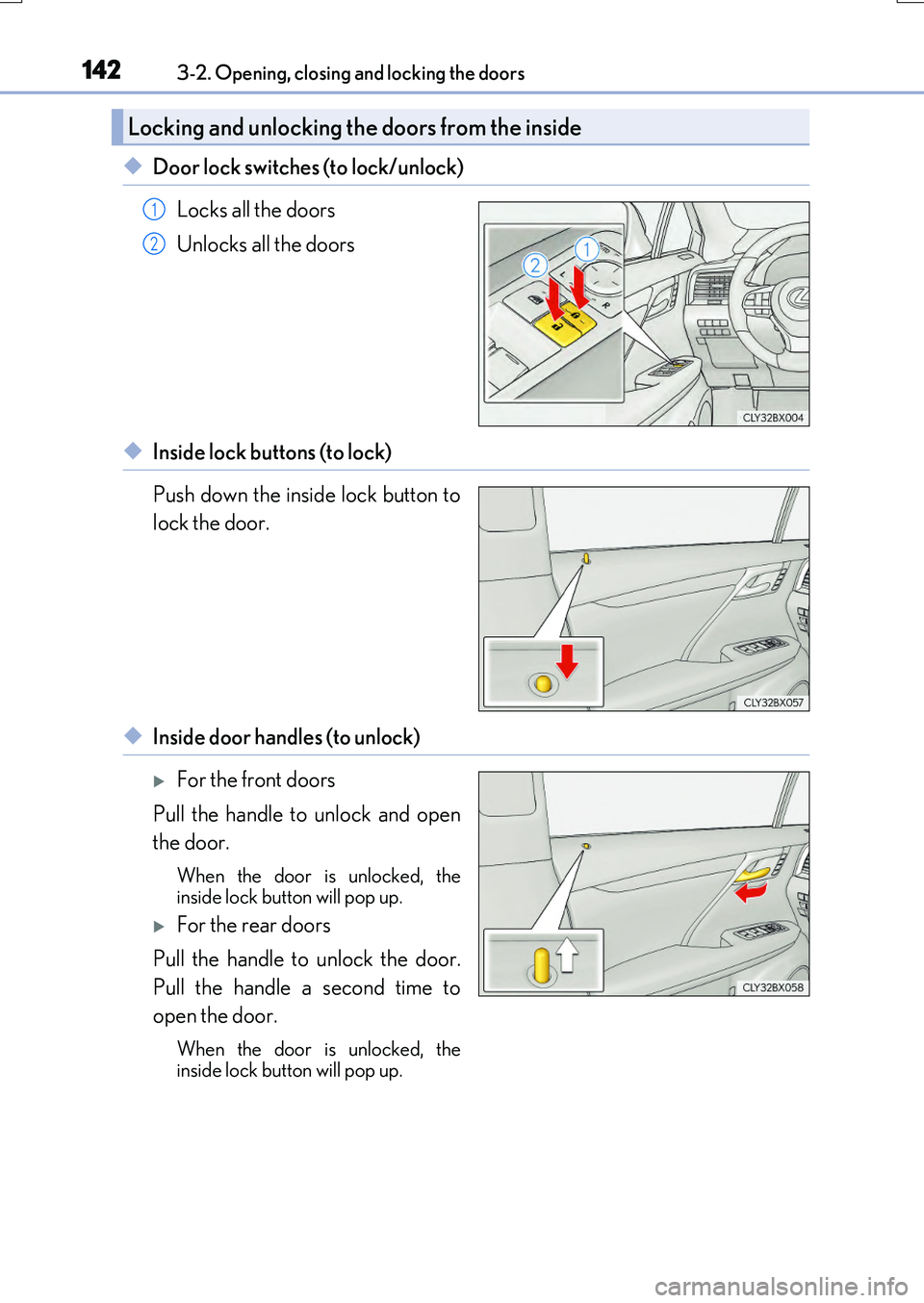
◆Door lock switches (to lock/unlock)
Locks all the doors
Unlocks all the doors
◆Inside lock buttons (to lock)
Push down the inside lock button to
lock the door.
◆Inside door handles (to unlock)
For the front doors
Pull the handle to unlock and open
the door.
When the door is unlocked, the inside lock button will pop up.
For the rear doors
Pull the handle to unlock the door.
Pull the handle a second time to
open the door.
When the door is unlocked, the
inside lock button will pop up.
Locking and unlocking the doors from the inside
1
2
Page 144 of 776
1443-2. Opening, closing and locking the doors
RX350/RX200t_EE_OM48F32E
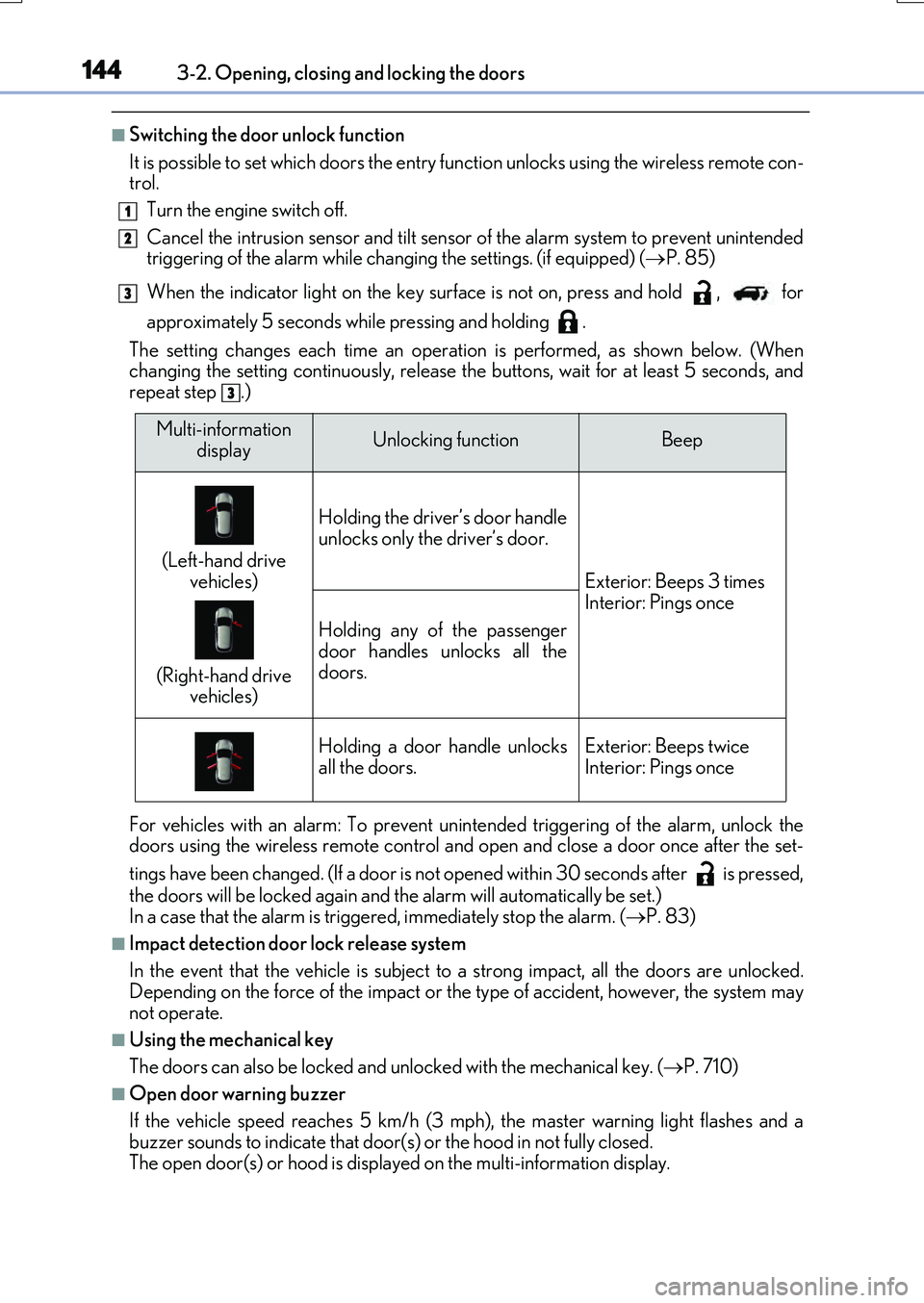
■Switching the door unlock function
It is possible to set which doors the entry function unlocks using the wireless remote con- trol.
Turn the engine switch off.
Cancel the intrusion sensor and tilt sensor of the alarm system to prevent unintended triggering of the alarm while changing the settings. (if equipped) ( P. 85)
When the indicator light on the key surface is not on, press and hold , for
approximately 5 seconds while pressing and holding .
The setting changes each time an operatio n is performed, as shown below. (When changing the setting continuously, release the buttons, wait for at least 5 seconds, andrepeat step .)
For vehicles with an alarm: To prevent unin tended triggering of the alarm, unlock the doors using the wireless remote control and op en and close a door once after the set-
tings have been changed. (If a door is not opened within 30 seconds after is pressed,
the doors will be locked again and the alarm will automatically be set.) In a case that the alarm is triggered, immediately stop the alarm. ( P. 83)
■Impact detection door lock release system
In the event that the vehicle is subject to a strong impact, all the doors are unlocked. Depending on the force of the impact or the type of accident, however, the system may
not operate.
■Using the mechanical key
The doors can also be locked and unlocked with the mechanical key. ( P. 710)
■Open door warning buzzer
If the vehicle speed reaches 5 km/h (3 mph), the master warning light flashes and a buzzer sounds to indicate that door (s) or the hood in not fully closed.
The open door(s) or hood is displa yed on the multi-information display.
1
2
3
3
Multi-information
displayUnlocking functionBeep
(Left-hand drive
vehicles)
(Right-hand drive vehicles)
Holding the driver’s door handle
unlocks only the driver’s door.
Exterior: Beeps 3 times Interior: Pings once
Holding any of the passenger
door handles unlocks all the doors.
Holding a door handle unlocksall the doors.Exterior: Beeps twiceInterior: Pings once
Page 146 of 776
1463-2. Opening, closing and locking the doors
RX350/RX200t_EE_OM48F32E
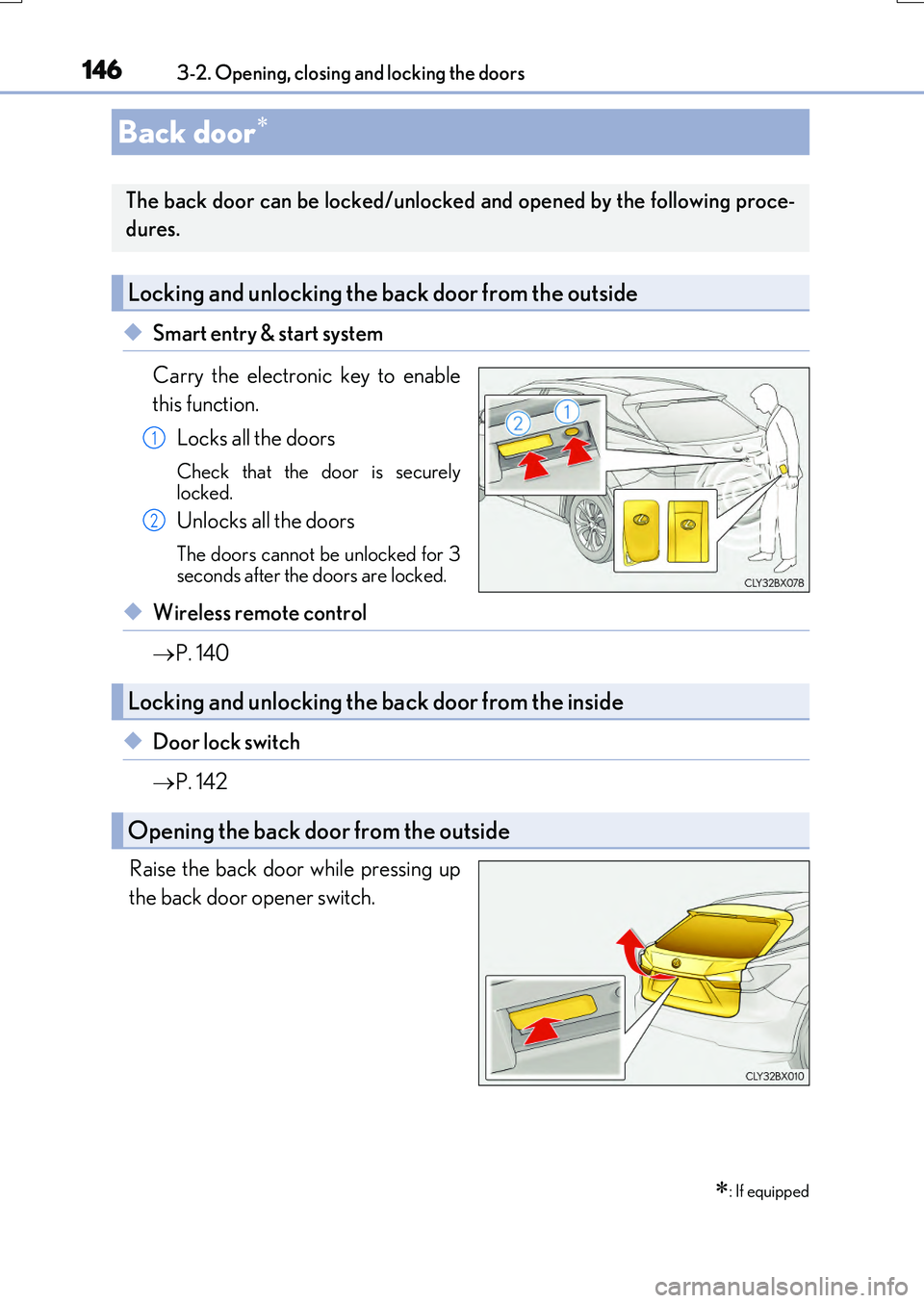
◆Smart entry & start system
Carry the electronic key to enable
this function.
Locks all the doors
Check that the door is securely
locked.
Unlocks all the doors
The doors cannot be unlocked for 3
seconds after the doors are locked.
◆Wireless remote control
P. 140
◆Door lock switch
P. 142
Raise the back door while pressing up
the back door opener switch.
Back door
: If equipped
The back door can be locked/unlocked and opened by the following proce-
dures.
Locking and unlocking the back door from the outside
1
2
Locking and unlocking the back door from the inside
Opening the back door from the outside
Page 149 of 776

1493-2. Opening, closing and locking the doors
3
Operation of each component
RX350/RX200t_EE_OM48F32E
WARNING
■Operating the back door
Observe the following precautions. Failure to do so may cause parts of the body to be caught, resulting in death or serious
injury.
●Remove any heavy loads, such as snow and ic e, from the back door before opening it. Failure to do so may cause the back door to suddenly shut again after it is opened.
●When opening or closing th e back door, thoroughly check to make sure the sur- rounding area is safe.
●If anyone is in the vicinity, make sure they are safe and let them know that the back
door is about to open or close.
●Use caution when opening or closing the b ack door in windy weather as it may move abruptly in strong wind.
●Do not pull on the back door damper stay ( P. 150) to close the back door, and do not hang on the back door damper stay. Doing so may cause hands to be caught or the back door damper stay to break,
causing an accident.
●If a bicycle carrier or similar heavy object is attached to the back door, it may sud- denly shut again after being opened, causing someone’s hands, arms, head or neck to
be caught and injured. When installing an accessory part to the back door, using a genuine Lexus part is recommended.
●The back door may suddenly shut if it is notopened fully. It is more difficult to open or
close the back door on an incline than on a level surface, so beware of the back doorunexpectedly opening or closing by itself.
Make sure that the back door is fully open and secure before using the luggage compart-ment.
●When closing the back door, take extra care
to prevent your fingers, etc., from being caught.
●When closing the back door, make sure to
press it lightly on its outer surface. If the back door handle is used to fully close the backdoor, it may result in hands or arms being
caught.
Page 151 of 776
1513-2. Opening, closing and locking the doors
3
Operation of each component
RX350/RX200t_EE_OM48F32E
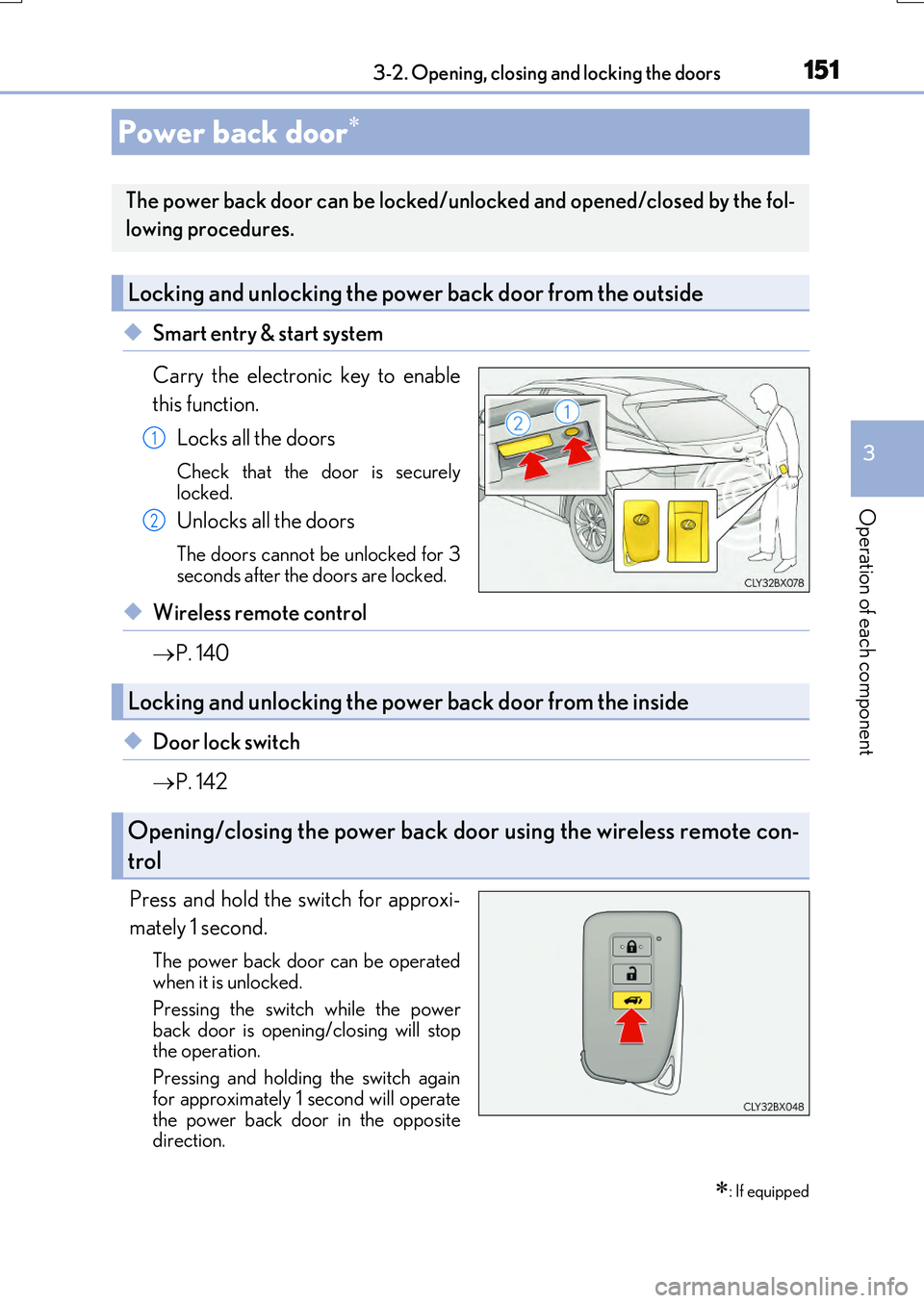
◆Smart entry & start system
Carry the electronic key to enable
this function.
Locks all the doors
Check that the door is securely
locked.
Unlocks all the doors
The doors cannot be unlocked for 3
seconds after the doors are locked.
◆Wireless remote control
P. 140
◆Door lock switch
P. 142
Press and hold the switch for approxi-
mately 1 second.
The power back door can be operated
when it is unlocked.
Pressing the switch while the power
back door is open ing/closing will stop
the operation.
Pressing and holding the switch again
for approximately 1 second will operate
the power back door in the opposite
direction.
Power back door
: If equipped
The power back door can be locked/unlocked and opened/closed by the fol-
lowing procedures.
Locking and unlocking the power back door from the outside
1
2
Locking and unlocking the power back door from the inside
Opening/closing the power back door using the wireless remote con-
trol