ECO LEXUS RX200T 2017 Owner's Manual
[x] Cancel search | Manufacturer: LEXUS, Model Year: 2017, Model line: RX200T, Model: LEXUS RX200T 2017Pages: 776, PDF Size: 44.51 MB
Page 83 of 776

831-3. Theft deterrent system
1
For safety and security
RX350/RX200t_EE_OM48F32E
The alarm uses light and sound to give an alert when an intrusion is detected.
The alarm is triggered in the following situations when the alarm is set:
●A locked door is unlocked or opened in any way other than using the entry
function or wireless remote control. (The doors will lock again automatically.)
●The hood is opened.
●The intrusion sensor detects something moving inside the vehicle. (An
intruder gets in the vehicle.)
●The tilt sensor detects a change of vehicle inclination. (if equipped)
●Any of the windows are broken.
Close the doors and hood, and lock all
the doors using the entry function or
wireless remote control. The system will
be set automatically after 30 seconds.
The indicator light changes from being
on to flashing when the system is set.
Do one of the following to deactivate or stop the alarm.
●Unlock the doors using the entry function or wireless remote control.
●Start the engine. (The alarm will be deactivated or stopped after a few sec-
onds.)
Alarm
: If equipped
The alarm
Setting the alarm system
Deactivating or stopping the alarm
Page 92 of 776

922. Instrument cluster
RX350/RX200t_EE_OM48F32E
*1: These lights turn on when the engine switch is turned to IGNITION ON mode to
indicate that a system check is being performed. They will turn off after the engine is
started, or after a few seconds. There may be a malfunction in a system if a light does
not come on, or turn off. Have the vehicle inspected by any authorized Lexus dealer
or repairer, or another duly qualified and equipped professional.
*2: When the start-up display is displayed on the multi-information display, this light may
not turn on even though the engine swit ch has been turned to IGNITION ON mode.
*3: The light flashes to indicate a malfunction.
*4: This light illuminates on the center panel.
The indicators inform the driver of the operating state of the vehicle’s various sys-
tems.
Indicators
Turn signal indicator ( P. 258)
Cruise control “SET”
indicator ( P. 329, 341)
Tail light indicator
( P. 265)(if equipped)
LKA indicator (P. 313)
Headlight high beam indicator ( P. 265)(if equipped)
LKA indicator (P. 313)
*1
(if equipped)
Automatic High Beam
indicator ( P. 274) Adaptive High-beam System indicator ( P. 269)
*5
(if equipped)
LKA indicator (P. 313)
Front fog light indicator ( P. 278)
(if equipped)
Lexus parking
assist-sensor indicator ( P. 371)
Rear fog light indicator
( P. 278)
*1, 6
(if equipped)
ICS OFF indicator
( P. 383)
Cruise control indicator
( P. 329, 341)(if equipped)
“BSM” indicator (P. 355)
(if equipped)
Radar cruise control indicator ( P. 329) (if equipped)
“RCTA” indicator ( P. 355)
Page 93 of 776
932. Instrument cluster
2
Instrument cluster
RX350/RX200t_EE_OM48F32E
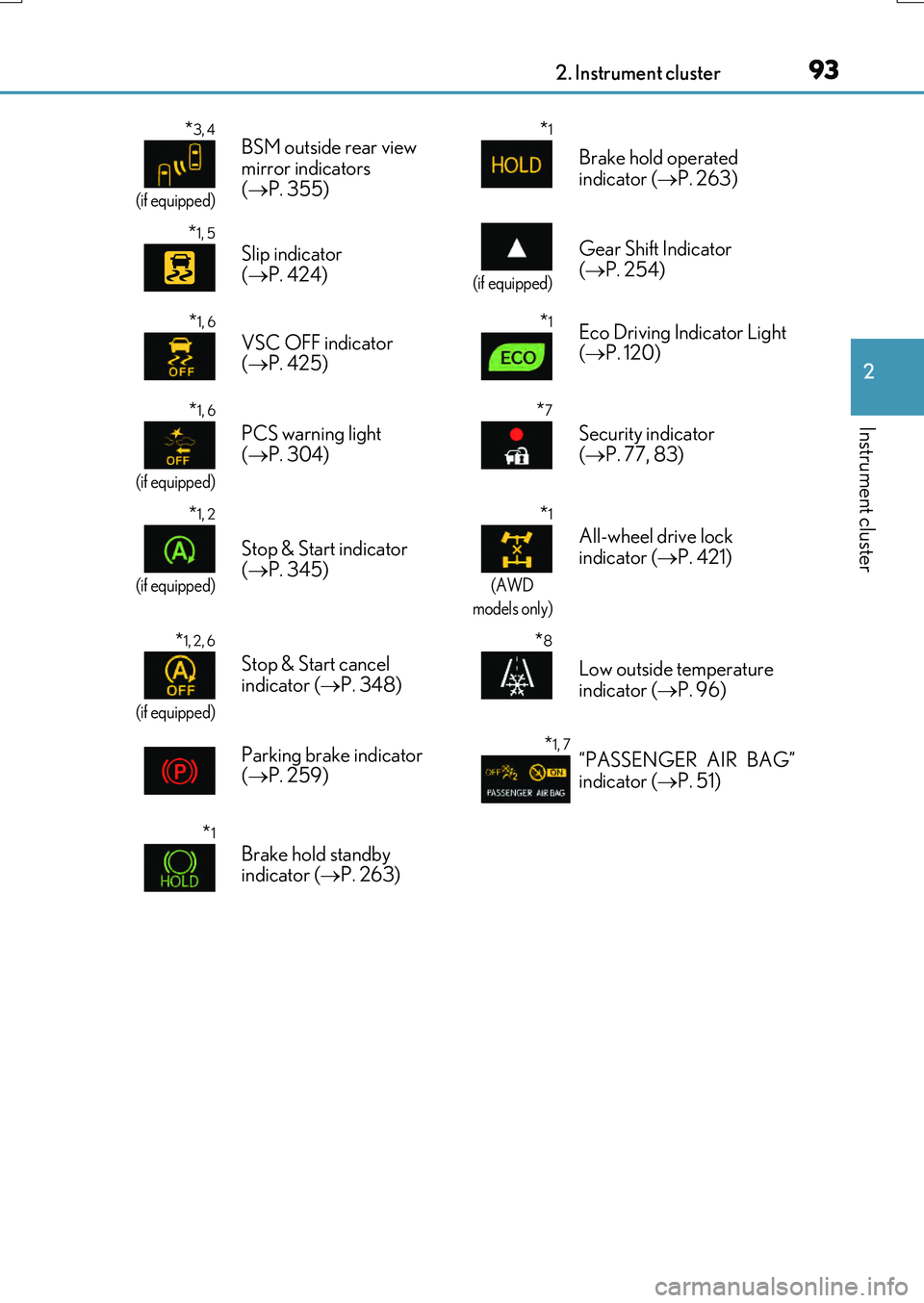
*3, 4
(if equipped)
BSM outside rear view
mirror indicators
( P. 355)*1
Brake hold operated
indicator ( P. 263)
*1, 5
Slip indicator
( P. 424)
(if equipped)
Gear Shift Indicator
( P. 254)
*1, 6
VSC OFF indicator
( P. 425)*1Eco Driving Indicator Light
( P. 120)
*1, 6
(if equipped)
PCS warning light
( P. 304)
*7
Security indicator
( P. 77, 83)
*1, 2
(if equipped)
Stop & Start indicator
( P. 345)
*1
(AWD
models only)
All-wheel drive lock
indicator ( P. 421)
*1, 2, 6
(if equipped)
Stop & Start cancel
indicator ( P. 348)
*8
Low outside temperature
indicator ( P. 96)
Parking brake indicator
( P. 259)
*1, 7“PASSENGER AIR BAG”
indicator ( P. 51)
*1
Brake hold standby
indicator ( P. 263)
Page 94 of 776

942. Instrument cluster
RX350/RX200t_EE_OM48F32E
●Drive mode indicators
Except F SPORT models
F SPORT models
*1: These lights turn on when the engine switch is turned to IGNITION ON mode to indicate that a system check is being performed. They will turn off after the engine is
started, or after a few seconds. There may be a malfunction in a system if a light does
not come on, or turn off. Have the vehicle inspected by any authorized Lexus dealer
or repairer, or another duly qualified and equipped professional.
*2: When the start-up display is displayed on the multi-information display, this light may
not turn on even though the engine swit ch has been turned to IGNITION ON mode.
*3: In order to confirm operation, the BSM outside rear view mirror indicators illuminate
in the following situations:
• When the BSM function is enabled on of the multi-information display, the
engine switch is turned to IGNITION ON mode.
• When the engine switch is in IGNITION ON mode, the BSM function is enabled
on of the multi-information display.
If the system is functioning correctly, the BSM outside rear view mirror indicators will
turn off after a few seconds.
If the BSM outside rear view mirror indicators do not illuminate or do not turn off,
there may be a malfunction in the system.
If this occurs, have the vehicle inspected by any authorized Lexus dealer or repairer,
or another duly qualified and equipped professional. Eco drive mode indicator
( P. 417)
(if equipped)
“SPORT” indicator
( P. 417)
(if equipped)
“SPORT S” indicator
( P. 417)
(if equipped)
“SPORT S+” indicator
( P. 417)
(if equipped)
“Customize” indicator
( P. 417)
Eco drive mode indicator
( P. 417) “SPORT S” indicator
( P. 417)
“SPORT S+” indicator
( P. 417) “CUSTOMIZE” indicator
( P. 417)
Page 95 of 776
952. Instrument cluster
2
Instrument cluster
RX350/RX200t_EE_OM48F32E
*4: This light illuminates on the outside rear view mirrors.
*5: The light flashes to indicate that the system is operating.
*6: The light comes on when the system is turned off.
*7: This light illuminates on the center panel.
*8: When the outside temperature is approximately 3°C (37°F) or lower, the indicator
will flash for approximately 10 seconds, then stay on.
WARNING
■If a safety system warning light does not come on
Should a safety system light such as the ABS and SRS warning lights not come on when you start the engine, this could mean that these systems are not available to help pro-tect you in an accident, which could result in death or serious injury. Have the vehicle
inspected by any authorized Lexus dealer or repairer, or another duly qualified and equipped professional immediately if this occurs.
Page 98 of 776
982. Instrument cluster
RX350/RX200t_EE_OM48F32E
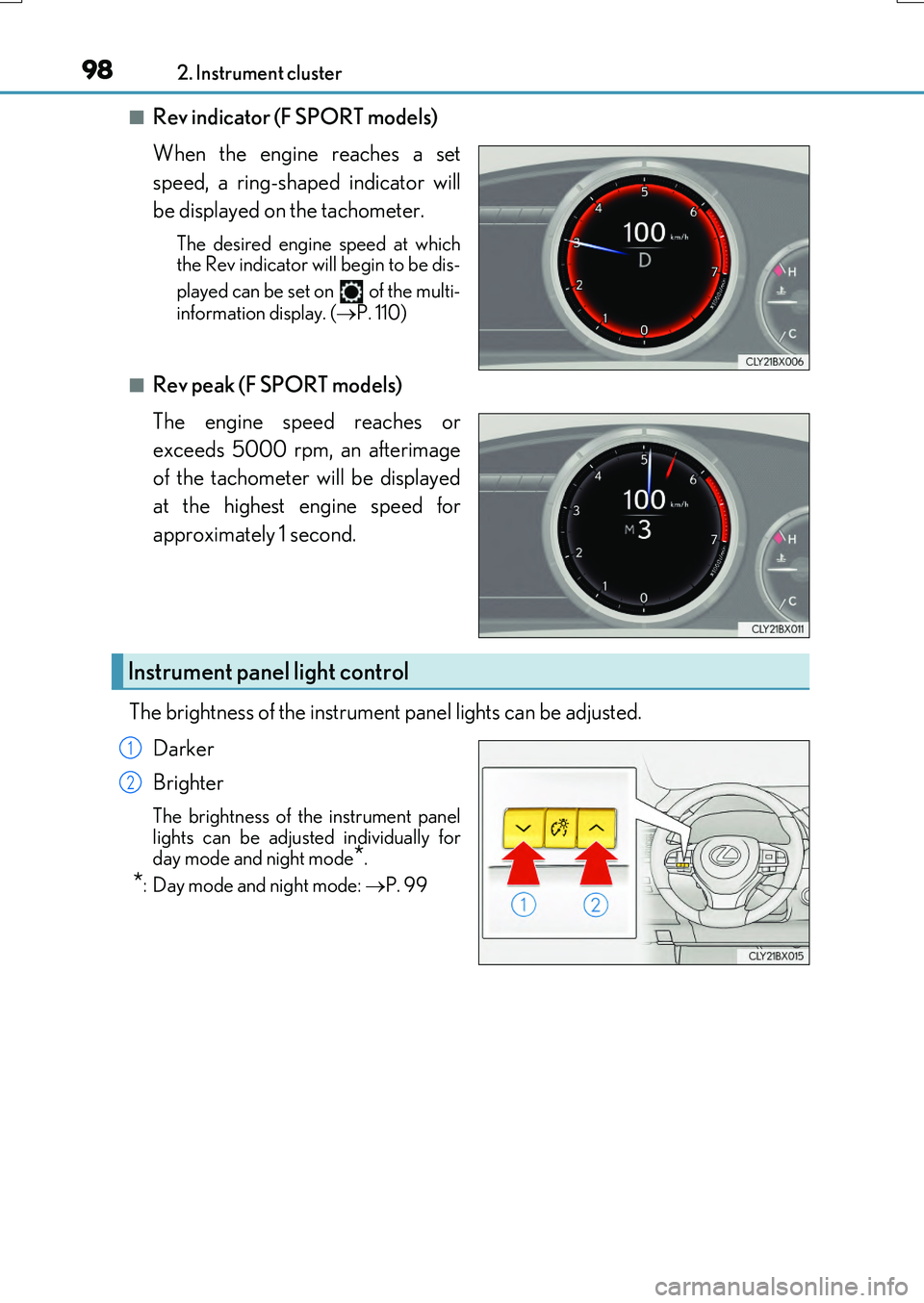
■Rev indicator (F SPORT models)
When the engine reaches a set
speed, a ring-shaped indicator will
be displayed on the tachometer.
The desired engine speed at which the Rev indicator will begin to be dis-
played can be set on of the multi-
information display. ( P. 110)
■Rev peak (F SPORT models)
The engine speed reaches or
exceeds 5000 rpm, an afterimage
of the tachometer will be displayed
at the highest engine speed for
approximately 1 second.
The brightness of the instrument panel lights can be adjusted.
Darker
Brighter
The brightness of the instrument panel lights can be adjusted individually for
day mode and night mode*.
*: Day mode and night mode: P. 99
Instrument panel light control
1
2
Page 103 of 776
1032. Instrument cluster
2
Instrument cluster
RX350/RX200t_EE_OM48F32E
■Registering a top screen
The displayed top screen can be changed to a registered screen of your
choice.
To register a screen as the top screen, display the desired screen and press
and hold .
• A message asking to confirm if registrati on is desired will be displayed. If the
selected screen cannot be registered, a registration failure message will be dis- played.• When no screen has been registered, th e drive information screen will be dis-
played.
■Resetting drive information
To reset the average fuel economy (after reset)/average vehicle speed (after
reset)/elapsed time (after reset) that are displayed on , display the desired
item and press and hold .
If both of the displayed items are rese ttable, a message will be displayed asking which item(s) to reset.
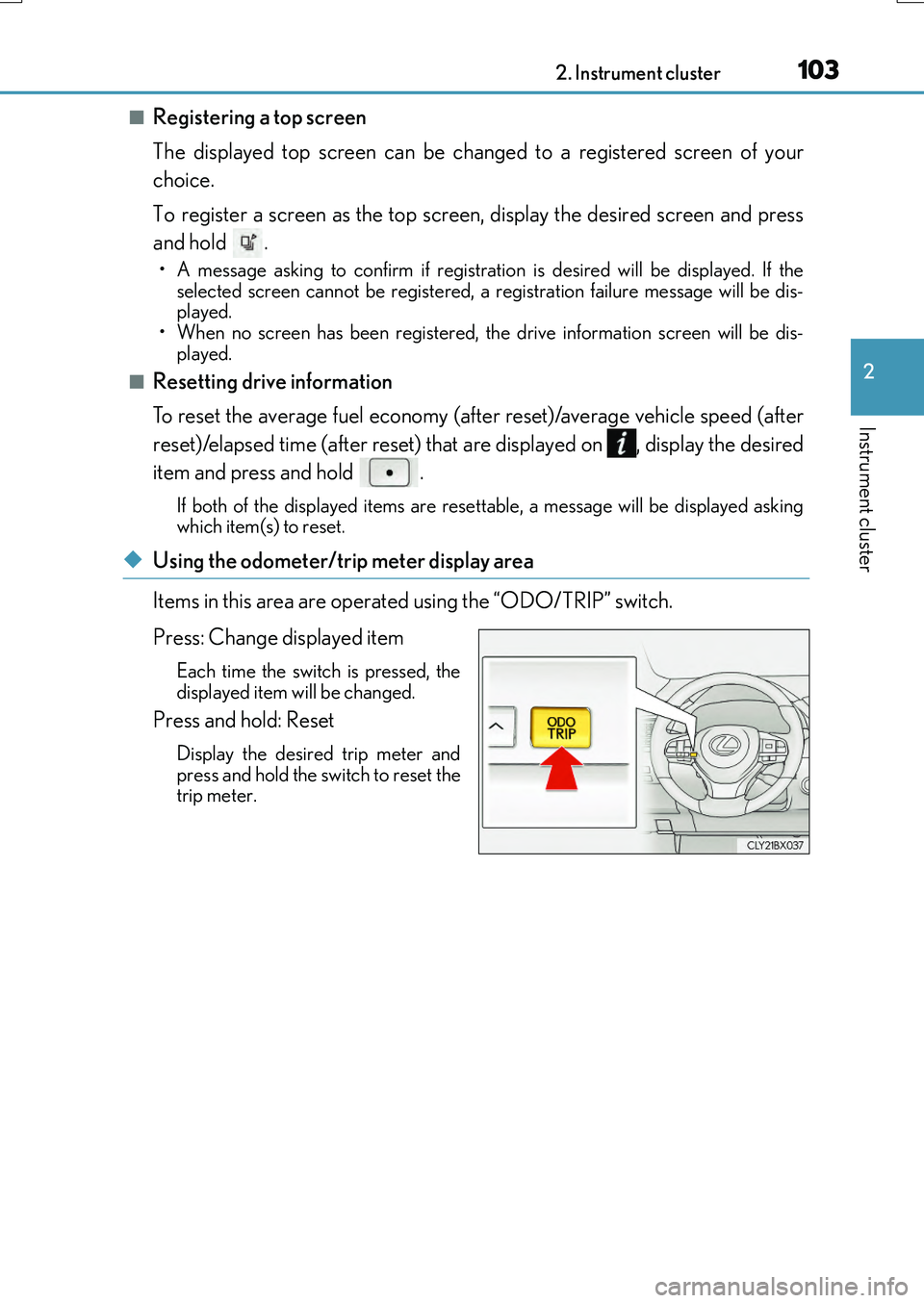
◆Using the odometer/trip meter display area
Items in this area are operated using the “ODO/TRIP” switch.
Press: Change displayed item
Each time the switch is pressed, the displayed item will be changed.
Press and hold: Reset
Display the desired trip meter and
press and hold the switch to reset the trip meter.
Page 105 of 776
1052. Instrument cluster
2
Instrument cluster
RX350/RX200t_EE_OM48F32E
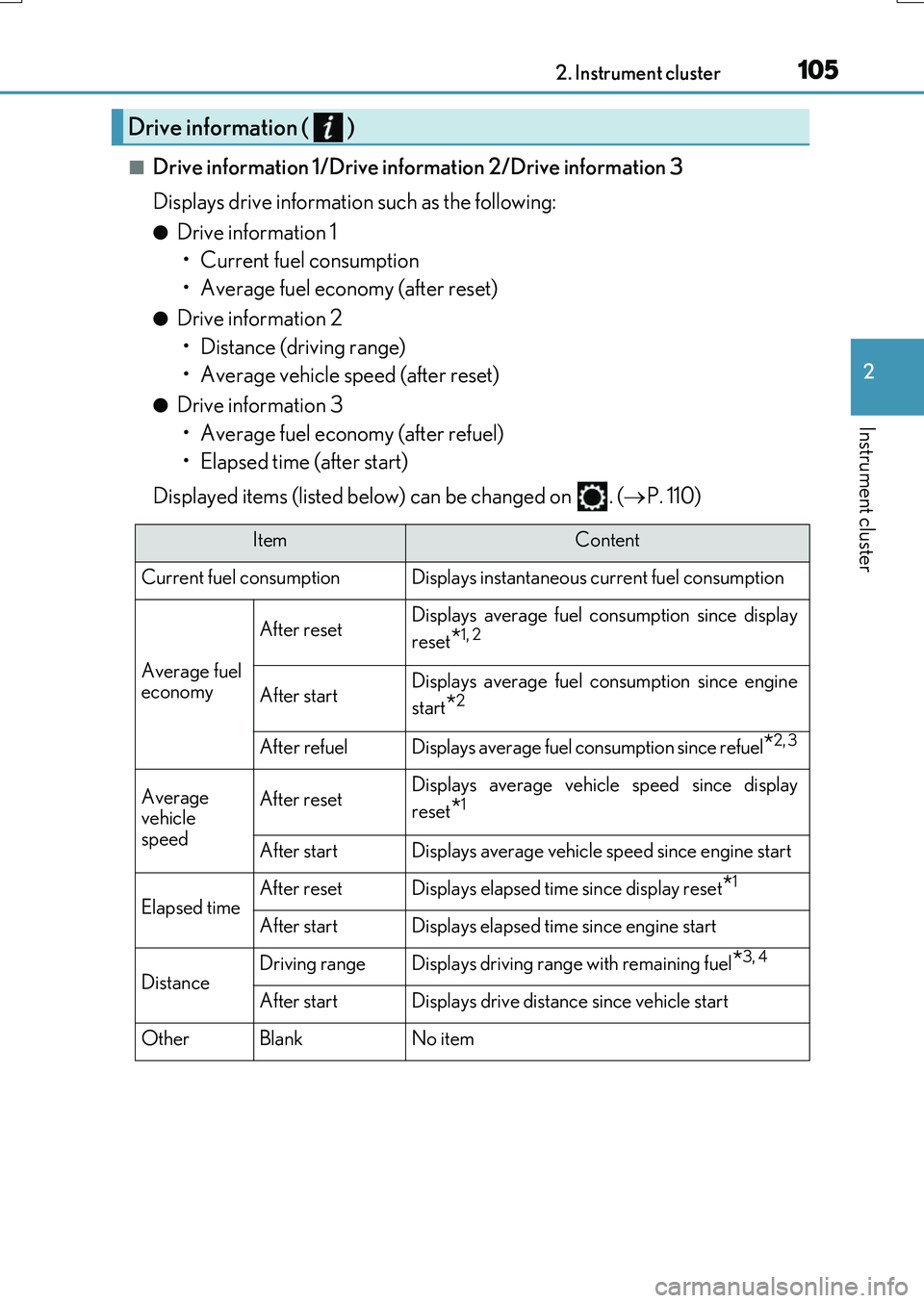
■Drive information 1/Drive information 2/Drive information 3
Displays drive information such as the following:
●Drive information 1 • Current fuel consumption
• Average fuel economy (after reset)
●Drive information 2 • Distance (driving range)
• Average vehicle speed (after reset)
●Drive information 3 • Average fuel economy (after refuel)
• Elapsed time (after start)
Displayed items (listed below) can be changed on . ( P. 110)
Drive information ( )
ItemContent
Current fuel consumption Displays instantaneous current fuel consumption
Average fuel
economy
After resetDisplays average fuel co nsumption since display
reset
*1, 2
After startDisplays average fuel consumption since engine
start
*2
After refuelDisplays average fuel consumption since refuel*2, 3
Average
vehicle
speedAfter resetDisplays average vehicle speed since display
reset
*1
After startDisplays average vehicle speed since engine start
Elapsed timeAfter resetDisplays elapsed time since display reset*1
After startDisplays elapsed time since engine start
DistanceDriving rangeDisplays driving range with remaining fuel*3, 4
After startDisplays drive distance since vehicle start
OtherBlankNo item
Page 106 of 776
1062. Instrument cluster
RX350/RX200t_EE_OM48F32E
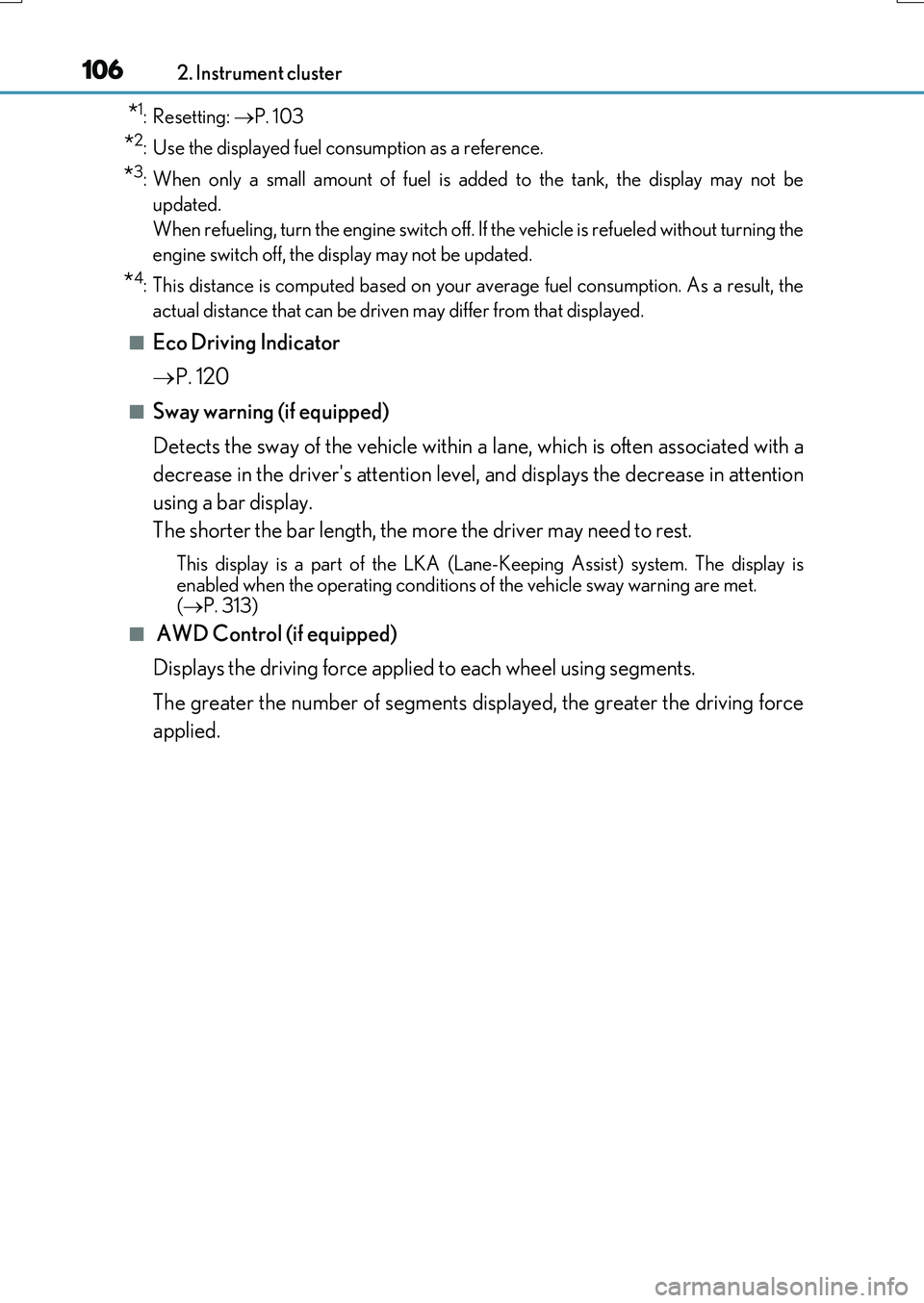
*1: Resetting: P. 103
*2: Use the displayed fuel consumption as a reference.
*3: When only a small amount of fuel is added to the tank, the display may not be
updated.
When refueling, turn the engine switch off. If the vehicle is refueled without turning the
engine switch off, the display may not be updated.
*4: This distance is computed based on your average fuel consumption. As a result, the
actual distance that can be driven may differ from that displayed.
■Eco Driving Indicator
P. 120
■Sway warning (if equipped)
Detects the sway of the vehicle within a lane, which is often associated with a
decrease in the driver's attention level, and displays the decrease in attention
using a bar display.
The shorter the bar length, the more the driver may need to rest.
This display is a part of the LKA (Lan e-Keeping Assist) system. The display is
enabled when the operating conditions of the vehicle sway warning are met. ( P. 313)
■ AWD Control (if equipped)
Displays the driving force applied to each wheel using segments.
The greater the number of segments displayed, the greater the driving force
applied.
Page 107 of 776
1072. Instrument cluster
2
Instrument cluster
RX350/RX200t_EE_OM48F32E
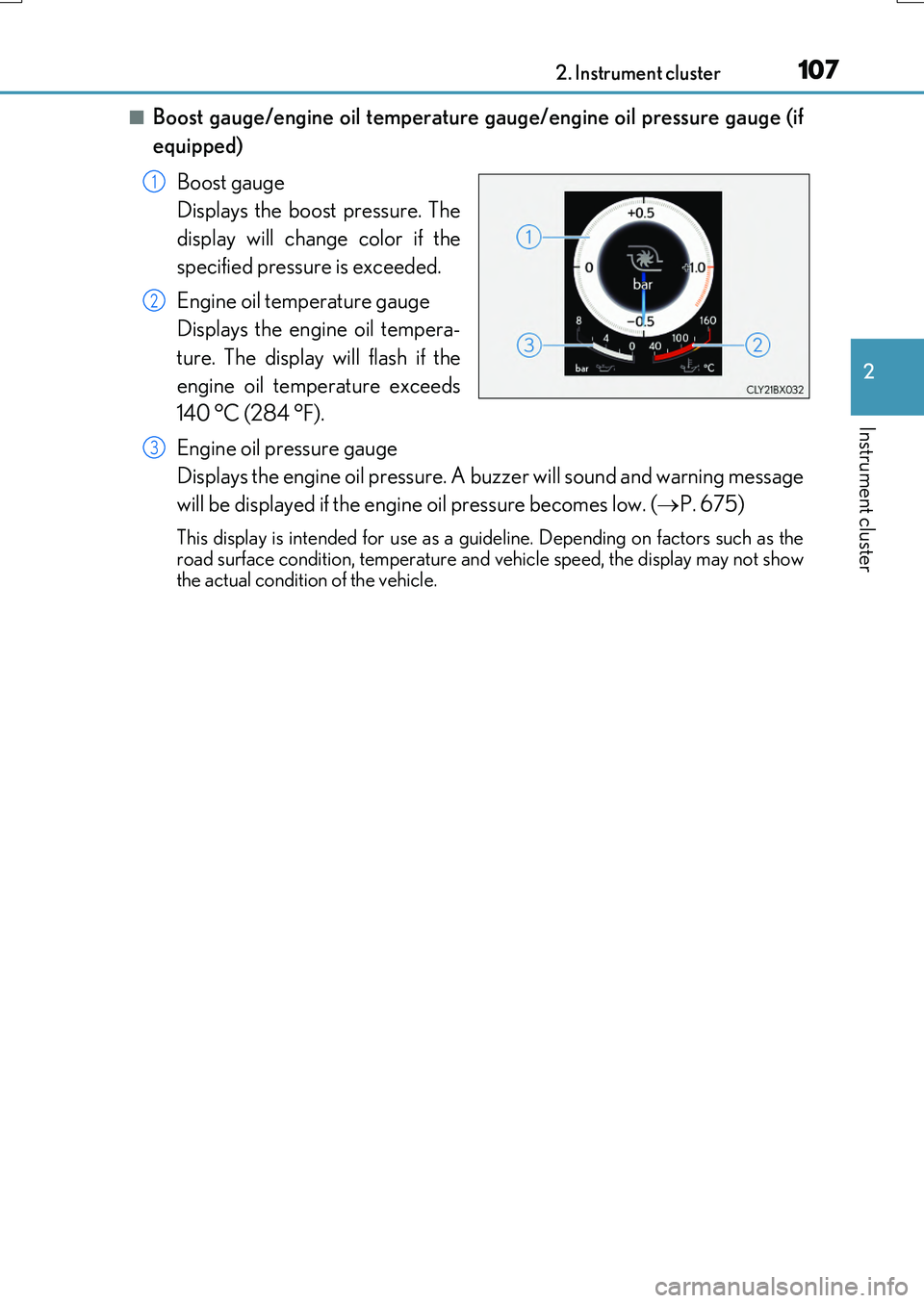
■Boost gauge/engine oil temperature gauge/engine oil pressure gauge (if
equipped)
Boost gauge
Displays the boost pressure. The
display will change color if the
specified pressure is exceeded.
Engine oil temperature gauge
Displays the engine oil tempera-
ture. The display will flash if the
engine oil temperature exceeds
140 °C (284 °F).
Engine oil pressure gauge
Displays the engine oil pressure. A buzzer will sound and warning message
will be displayed if the engine oil pressure becomes low. ( P. 675)
This display is intended for use as a guideline. Depending on factors such as the road surface condition, temperature and vehicle speed, the display may not show
the actual condition of the vehicle.
1
2
3