display LEXUS RX270 2014 User Guide
[x] Cancel search | Manufacturer: LEXUS, Model Year: 2014, Model line: RX270, Model: LEXUS RX270 2014Pages: 652, PDF Size: 48.98 MB
Page 124 of 652
124
1-6. Theft deterrent system
RX350/270_EE
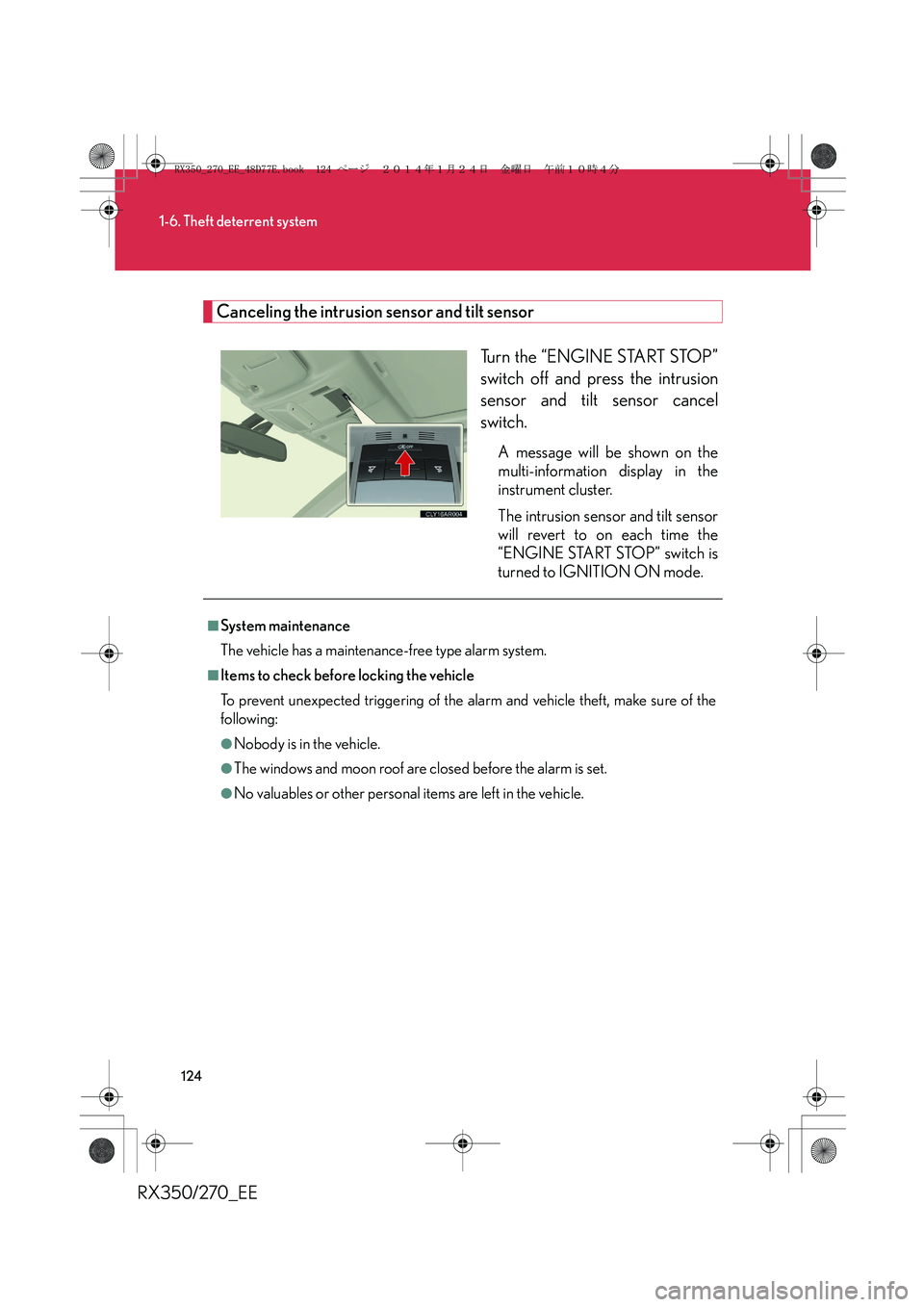
Canceling the intrusion sensor and tilt sensor
Turn the “ENGINE START STOP”
switch off and press the intrusion
sensor and tilt sensor cancel
switch.
A message will be shown on the
multi-information display in the
instrument cluster.
The intrusion sensor and tilt sensor
will revert to on each time the
“ENGINE START STOP” switch is
turned to IGNITION ON mode.
■System maintenance
The vehicle has a maintenance-free type alarm system.
■Items to check before locking the vehicle
To prevent unexpected triggering of the alarm and vehicle theft, make sure of the
following:
●Nobody is in the vehicle.
●The windows and moon roof are closed before the alarm is set.
●No valuables or other personal items are left in the vehicle.
RX350_270_EE_48D77E.book 124 ページ 2014年1月24日 金曜日 午前10時4分
Page 152 of 652
152
1-7. Safety information
RX350/270_EE
Installing child restraints
Follow the child restraint system manufacturer's instructions. Firmly
secure child restraints to the seats using a seat belt or ISOFIX rigid
anchors. Attach the top strap when installing a child restraint.
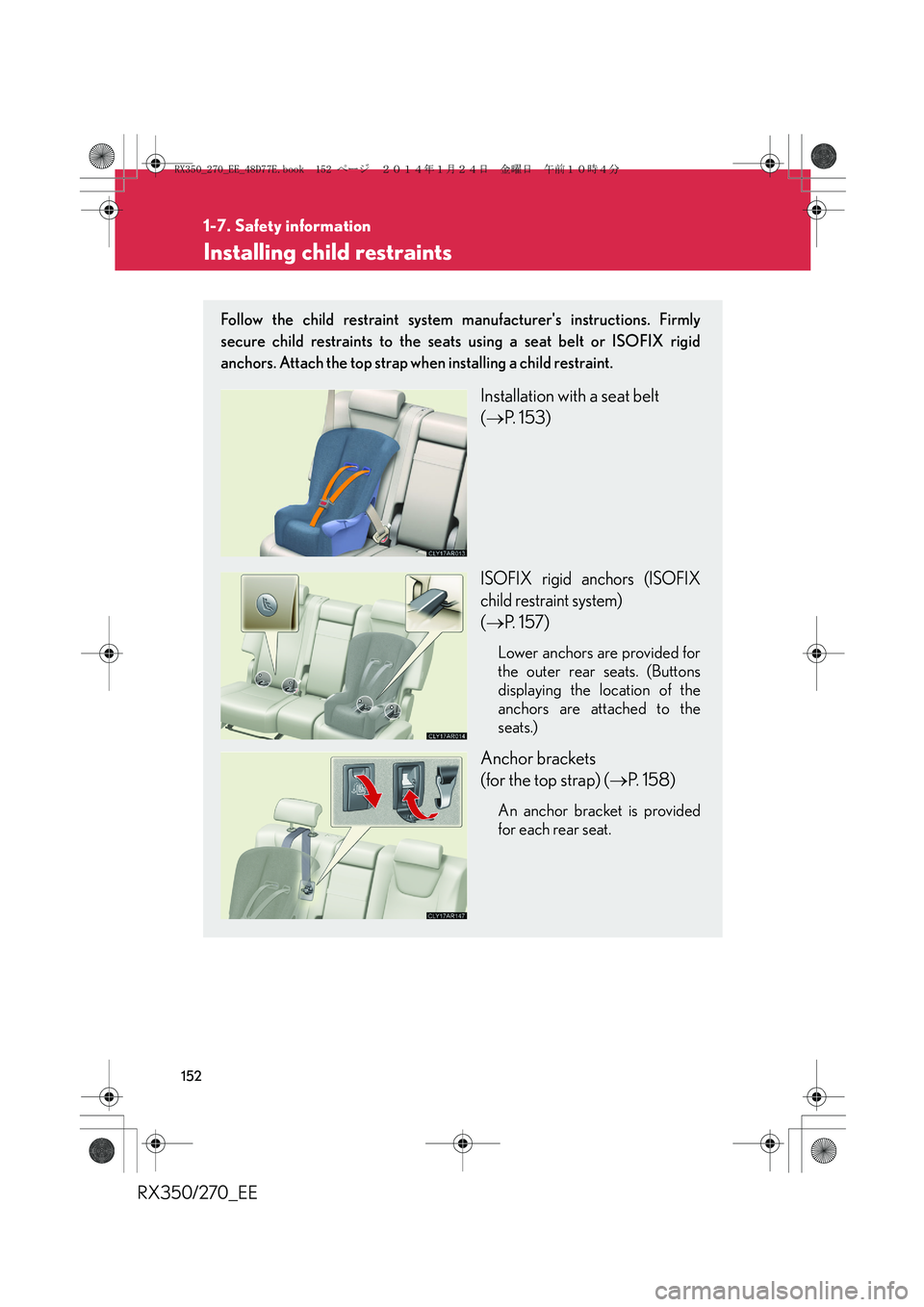
Installation with a seat belt
(→P. 153)
ISOFIX rigid anchors (ISOFIX
child restraint system)
(→P. 157)
Lower anchors are provided for
the outer rear seats. (Buttons
displaying the location of the
anchors are attached to the
seats.)
Anchor brackets
(for the top strap) (→P. 1 5 8 )
An anchor bracket is provided
for each rear seat.
RX350_270_EE_48D77E.book 152 ページ 2014年1月24日 金曜日 午前10時4分
Page 167 of 652
2When driving
167
RX350/270_EE
2-1. Driving procedures
Driving the vehicle ................. 168
Engine (ignition) switch ........ 180
Automatic transmission........ 186
Turn signal lever ...................... 193
Parking brake ........................... 194
Horn ........................................... 195
2-2. Instrument cluster
Gauges and meters ................ 196
Indicators and warning
lights......................................... 198
Multi-information
display .................................... 203
Head-up display ...................... 212
2-3. Operating the lights and
windshield wipers
Headlight switch ...................... 217
Fog light switch ....................... 222
Windshield wipers and
washer .................................... 223
Rear window wiper and
washer ..................................... 227
Headlight cleaner
switch...................................... 2292-4. Using other driving
systems
Cruise control ........................ 230
Dynamic radar cruise
control.................................... 234
Lexus parking
assist-sensor.......................... 248
Electronically modulated
air suspension ....................... 256
Rear view monitor
system ..................................... 263
Driving assist systems ............ 271
All-wheel drive lock
switch ...................................... 277
Hill-start assist control.......... 278
Pre-Crash Safety
system .................................... 280
2-5. Driving information
Utility vehicle
precautions .......................... 289
Cargo and luggage................ 293
Winter driving tips ................. 296
Trailer towing (RX350)....... 300
Trailer towing (RX270) .......... 311
RX350_270_EE_48D77E.book 167 ページ 2014年1月24日 金曜日 午前10時4分
Page 183 of 652
183
2-1. Driving procedures
2
When driving
RX350/270_EE
■If the engine does not start
The engine immobilizer system may not have been deactivated. (→P. 1 1 5 )
Contact any authorized Lexus dealer or repairer, or another duly qualified and
equipped professional immediately.
■Steering lock
After turning the “ENGINE START STOP” switch off and opening and closing the
doors, the steering wheel will be locked due to the steering lock function. Operat-
ing the “ENGINE START STOP” switch again automatically cancels the steering
lock.
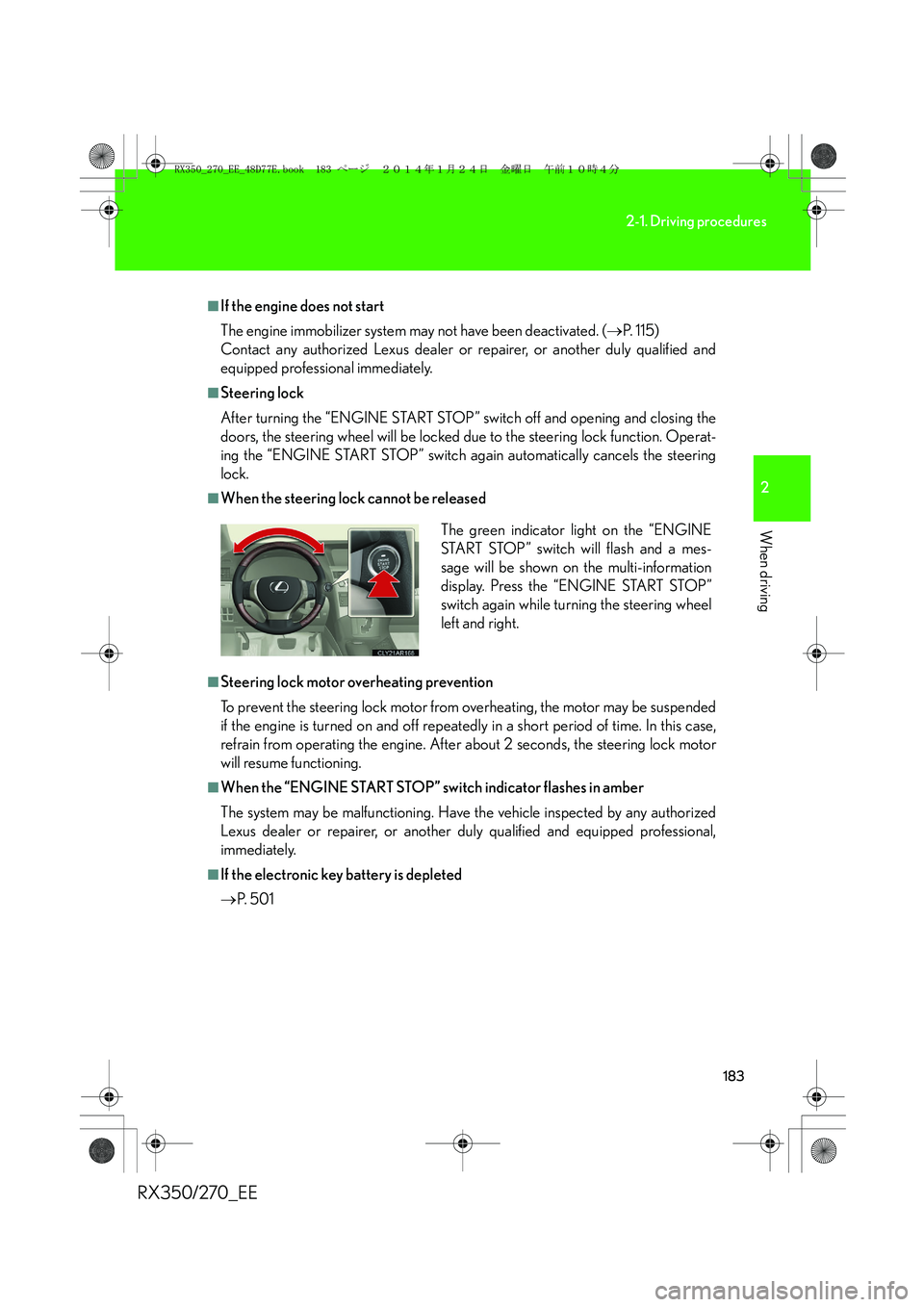
■When the steering lock cannot be released
■Steering lock motor overheating prevention
To prevent the steering lock motor from overheating, the motor may be suspended
if the engine is turned on and off repeatedly in a short period of time. In this case,
refrain from operating the engine. After about 2 seconds, the steering lock motor
will resume functioning.
■When the “ENGINE START STOP” switch indicator flashes in amber
The system may be malfunctioning. Have the vehicle inspected by any authorized
Lexus dealer or repairer, or another duly qualified and equipped professional,
immediately.
■If the electronic key battery is depleted
→P. 5 0 1The green indicator light on the “ENGINE
START STOP” switch will flash and a mes-
sage will be shown on the multi-information
display. Press the “ENGINE START STOP”
switch again while turning the steering wheel
left and right.
RX350_270_EE_48D77E.book 183 ページ 2014年1月24日 金曜日 午前10時4分
Page 188 of 652
188
2-1. Driving procedures
RX350/270_EE
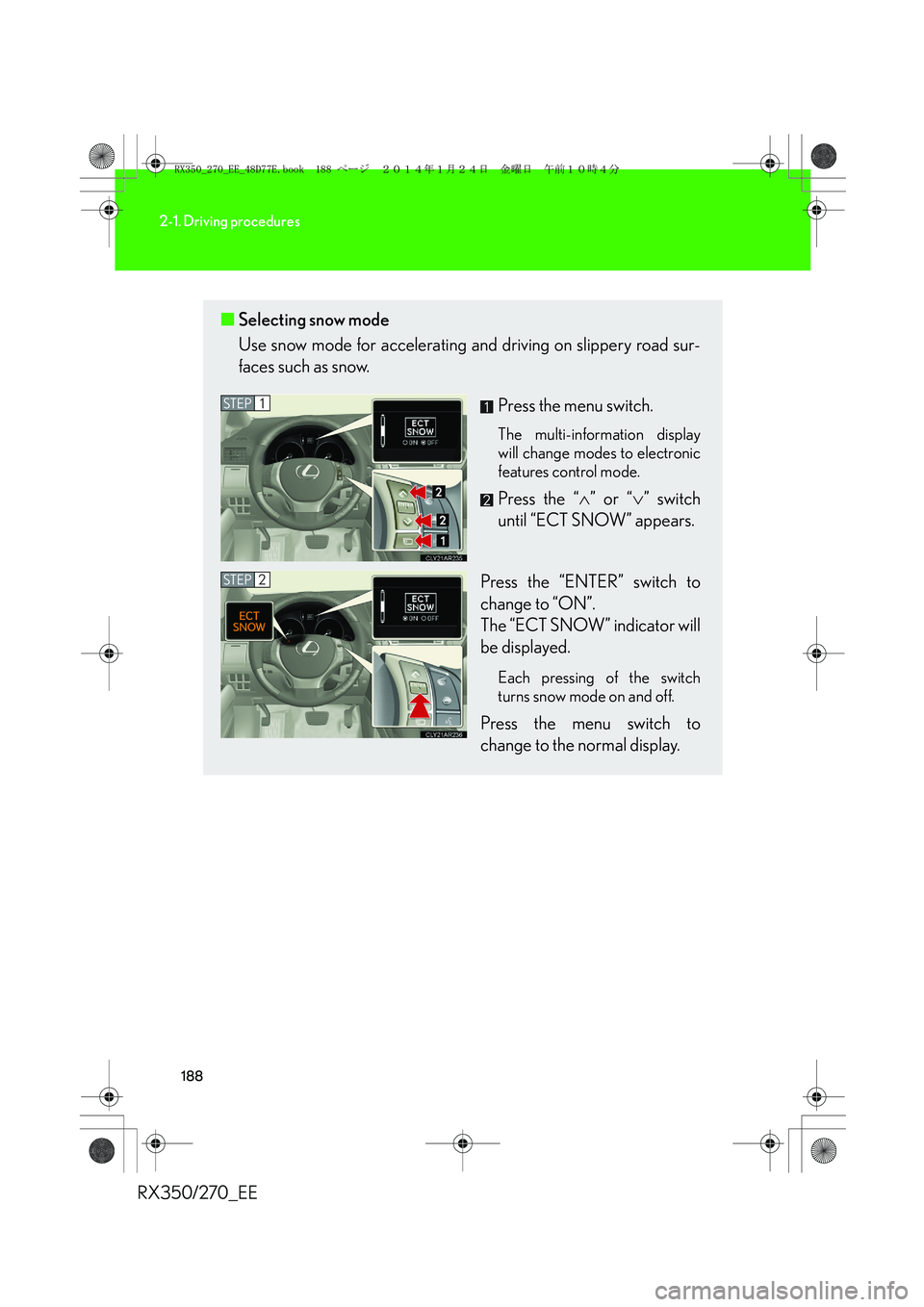
■Selecting snow mode
Use snow mode for accelerating and driving on slippery road sur-
faces such as snow.
Press the menu switch.
The multi-information display
will change modes to electronic
features control mode.
Press the “∧” or “∨” switch
until “ECT SNOW” appears.
Press the “ENTER” switch to
change to “ON”.
The “ECT SNOW” indicator will
be displayed.
Each pressing of the switch
turns snow mode on and off.
Press the menu switch to
change to the normal display.
STEP1
STEP2
RX350_270_EE_48D77E.book 188 ページ 2014年1月24日 金曜日 午前10時4分
Page 196 of 652
196
RX350/270_EE
2-2. Instrument cluster
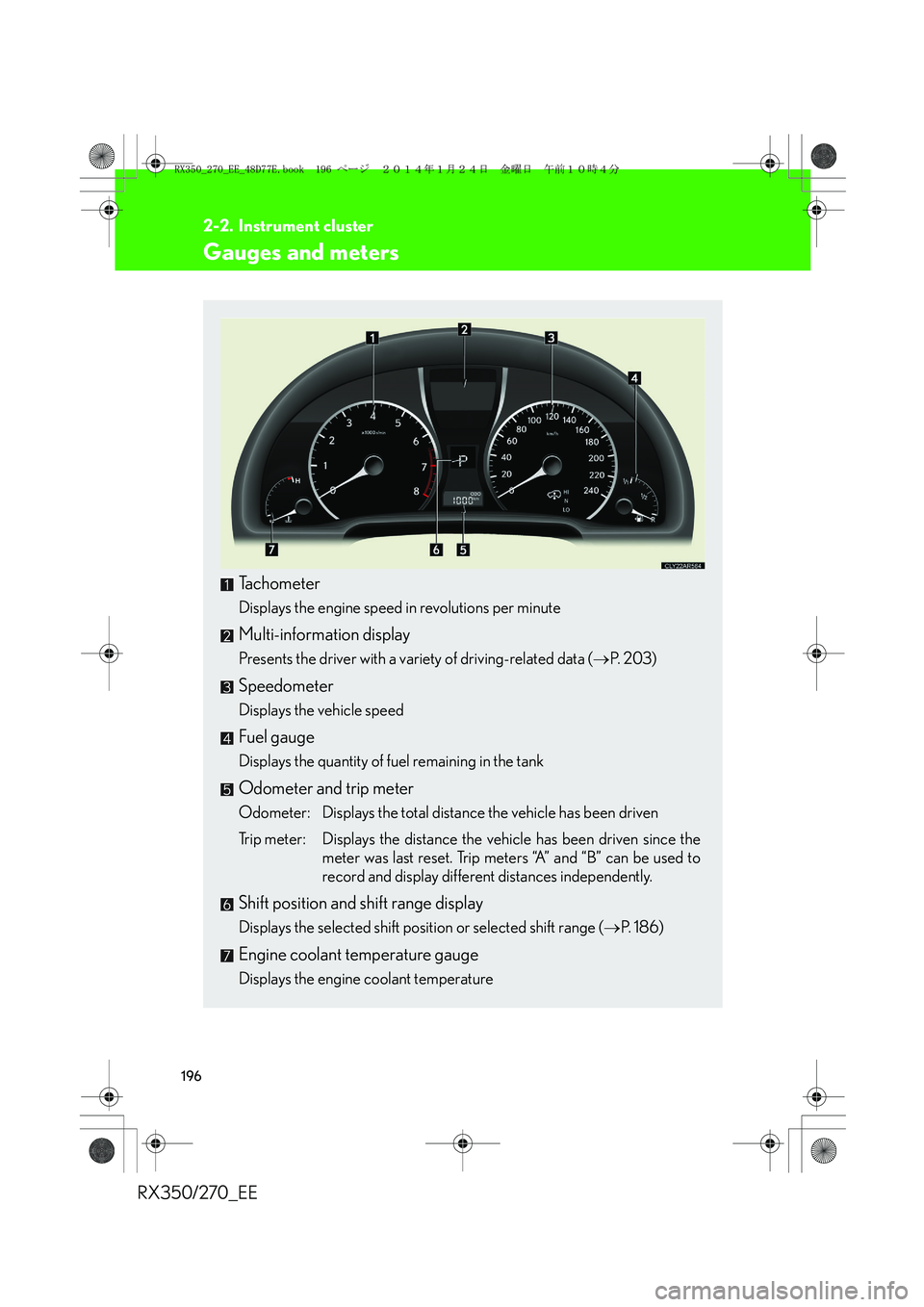
Gauges and meters
Tachometer
Displays the engine speed in revolutions per minute
Multi-information display
Presents the driver with a variety of driving-related data (→P. 2 0 3 )
Speedometer
Displays the vehicle speed
Fuel gauge
Displays the quantity of fuel remaining in the tank
Odometer and trip meter
Odometer: Displays the total distance the vehicle has been driven
Trip meter: Displays the distance the vehicle has been driven since the
meter was last reset. Trip meters “A” and “B” can be used to
record and display different distances independently.
Shift position and shift range display
Displays the selected shift position or selected shift range (→P. 1 8 6 )
Engine coolant temperature gauge
Displays the engine coolant temperature
RX350_270_EE_48D77E.book 196 ページ 2014年1月24日 金曜日 午前10時4分
Page 197 of 652
197
2-2. Instrument cluster
2
When driving
RX350/270_EE
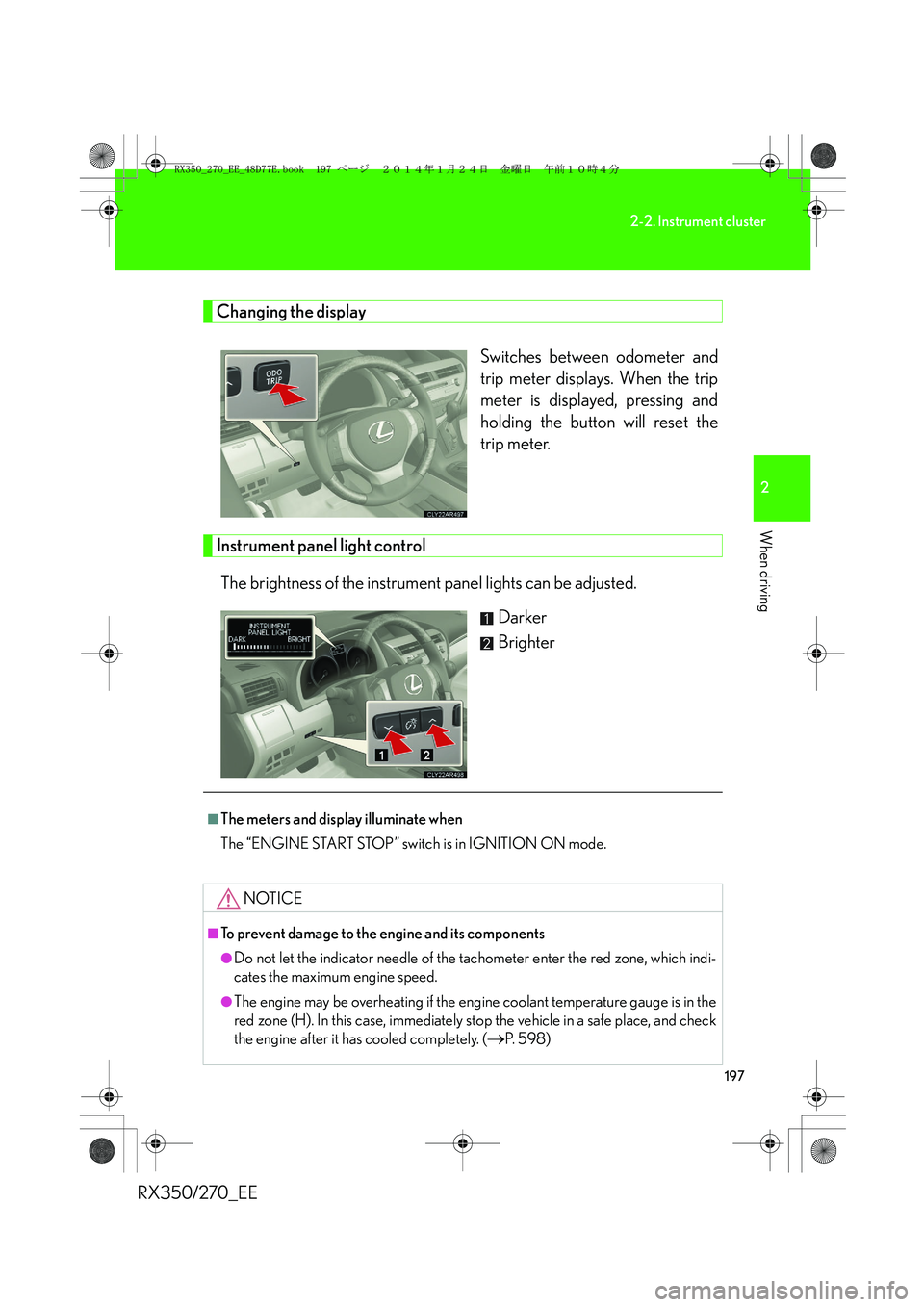
Changing the display
Switches between odometer and
trip meter displays. When the trip
meter is displayed, pressing and
holding the button will reset the
trip meter.
Instrument panel light control
The brightness of the instrument panel lights can be adjusted.
Darker
Brighter
■The meters and display illuminate when
The “ENGINE START STOP” switch is in IGNITION ON mode.
NOTICE
■To prevent damage to the engine and its components
●Do not let the indicator needle of the tachometer enter the red zone, which indi-
cates the maximum engine speed.
●The engine may be overheating if the engine coolant temperature gauge is in the
red zone (H). In this case, immediately stop the vehicle in a safe place, and check
the engine after it has cooled completely. (
→P. 5 9 8 )
RX350_270_EE_48D77E.book 197 ページ 2014年1月24日 金曜日 午前10時4分
Page 198 of 652
198
2-2. Instrument cluster
RX350/270_EE
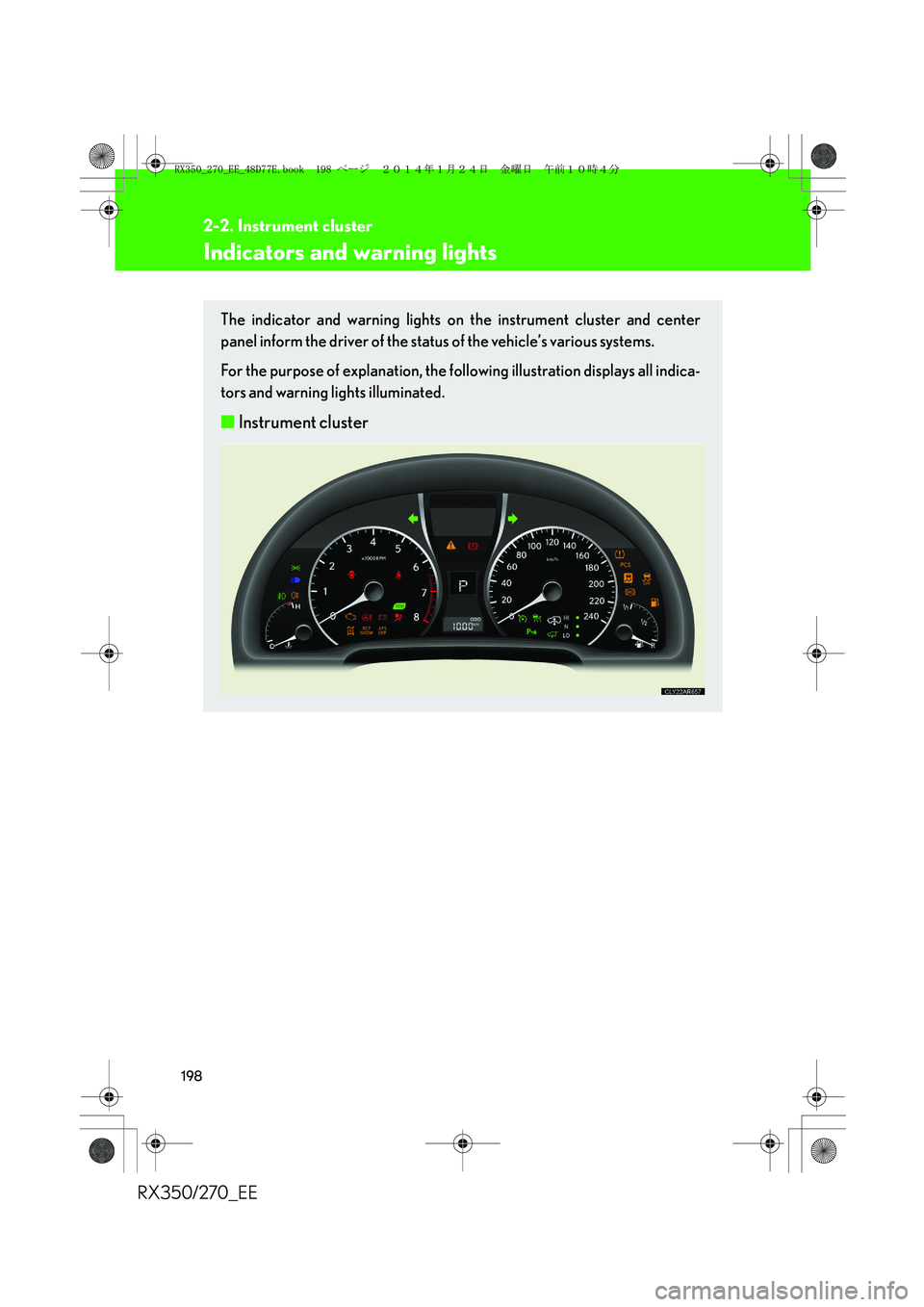
Indicators and warning lights
The indicator and warning lights on the instrument cluster and center
panel inform the driver of the status of the vehicle’s various systems.
For the purpose of explanation, the following illustration displays all indica-
tors and warning lights illuminated.
■Instrument cluster
RX350_270_EE_48D77E.book 198 ページ 2014年1月24日 金曜日 午前10時4分
Page 203 of 652
203
2-2. Instrument cluster
2
When driving
RX350/270_EE
Multi-information display
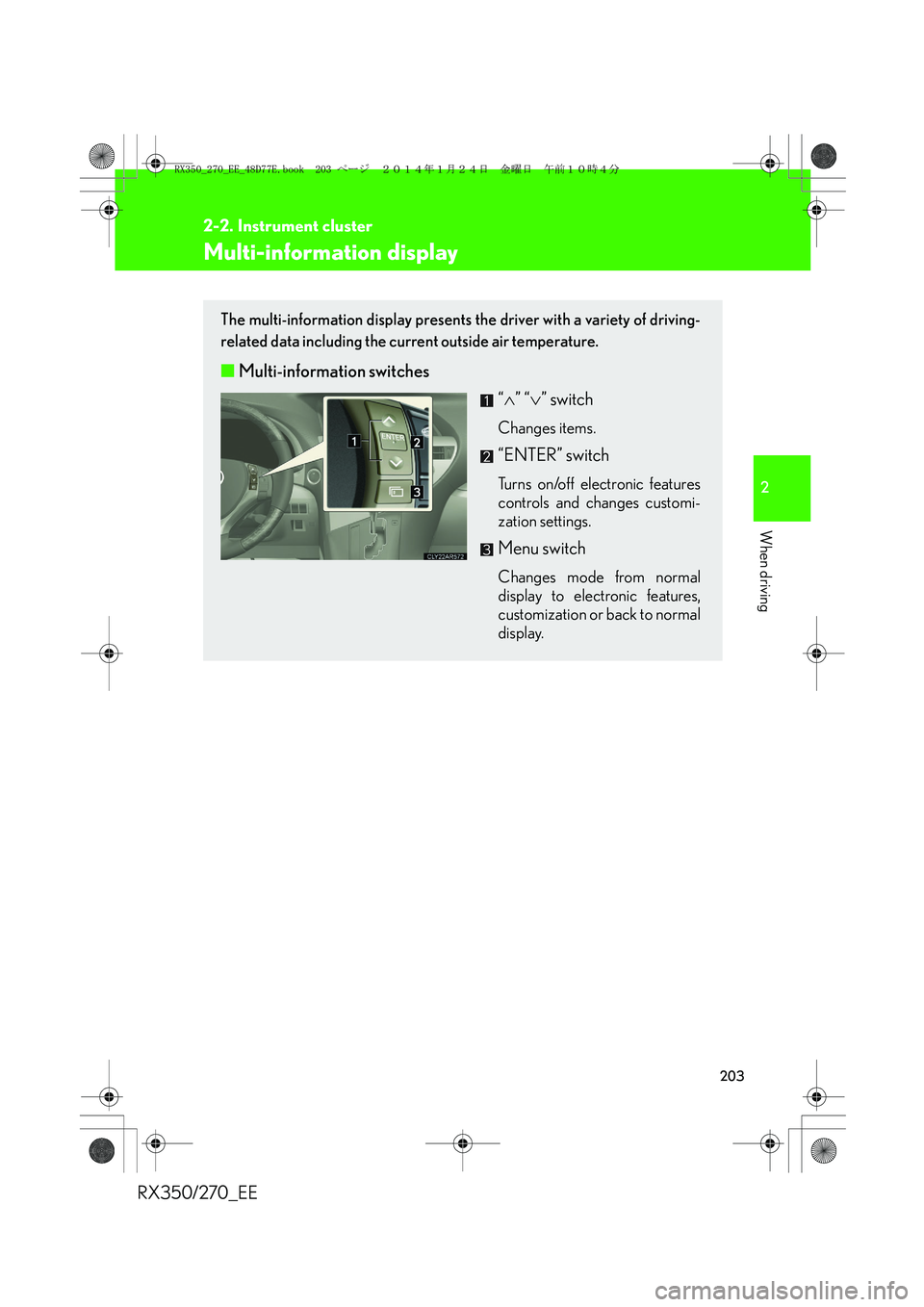
The multi-information display presents the driver with a variety of driving-
related data including the current outside air temperature.
■Multi-information switches
“∧” “∨” switch
Changes items.
“ENTER” switch
Turns on/off electronic features
controls and changes customi-
zation settings.
Menu switch
Changes mode from normal
display to electronic features,
customization or back to normal
display.
RX350_270_EE_48D77E.book 203 ページ 2014年1月24日 金曜日 午前10時4分
Page 204 of 652
204
2-2. Instrument cluster
RX350/270_EE
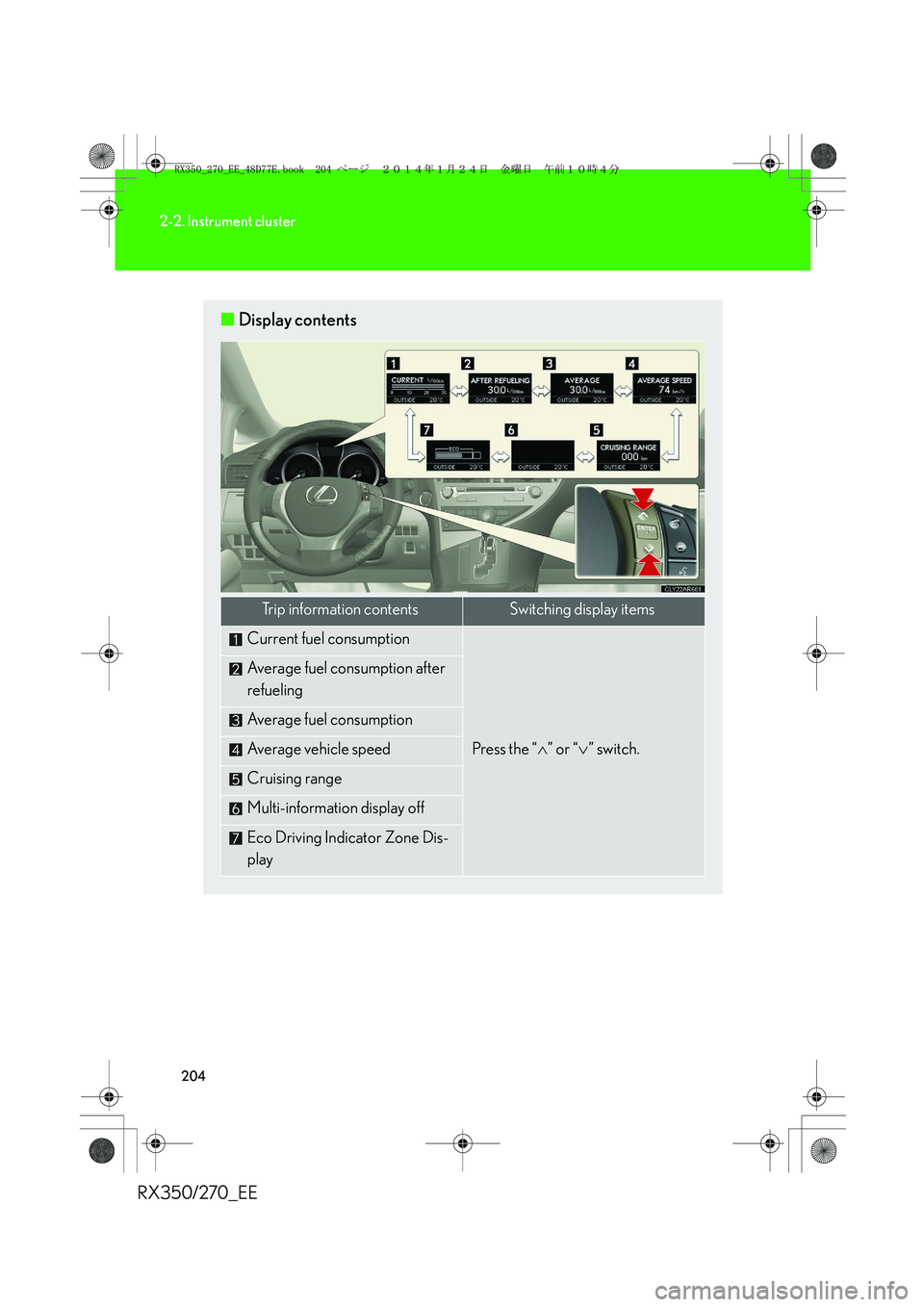
■Display contents
Trip information contentsSwitching display items
Current fuel consumption
Press the “∧” or “∨” switch.
Average fuel consumption after
refueling
Average fuel consumption
Average vehicle speed
Cruising range
Multi-information display off
Eco Driving Indicator Zone Dis-
play
RX350_270_EE_48D77E.book 204 ページ 2014年1月24日 金曜日 午前10時4分