display LEXUS RX270 2014 Service Manual
[x] Cancel search | Manufacturer: LEXUS, Model Year: 2014, Model line: RX270, Model: LEXUS RX270 2014Pages: 652, PDF Size: 48.98 MB
Page 248 of 652
248
2-4. Using other driving systems
RX350/270_EE
Lexus parking assist-sensor∗
The distance to obstacles measured by the sensors is communicated via
the multi-information display and a buzzer when parallel parking or
maneuvering into a garage is conducted. Always check the surrounding
area when using this system.
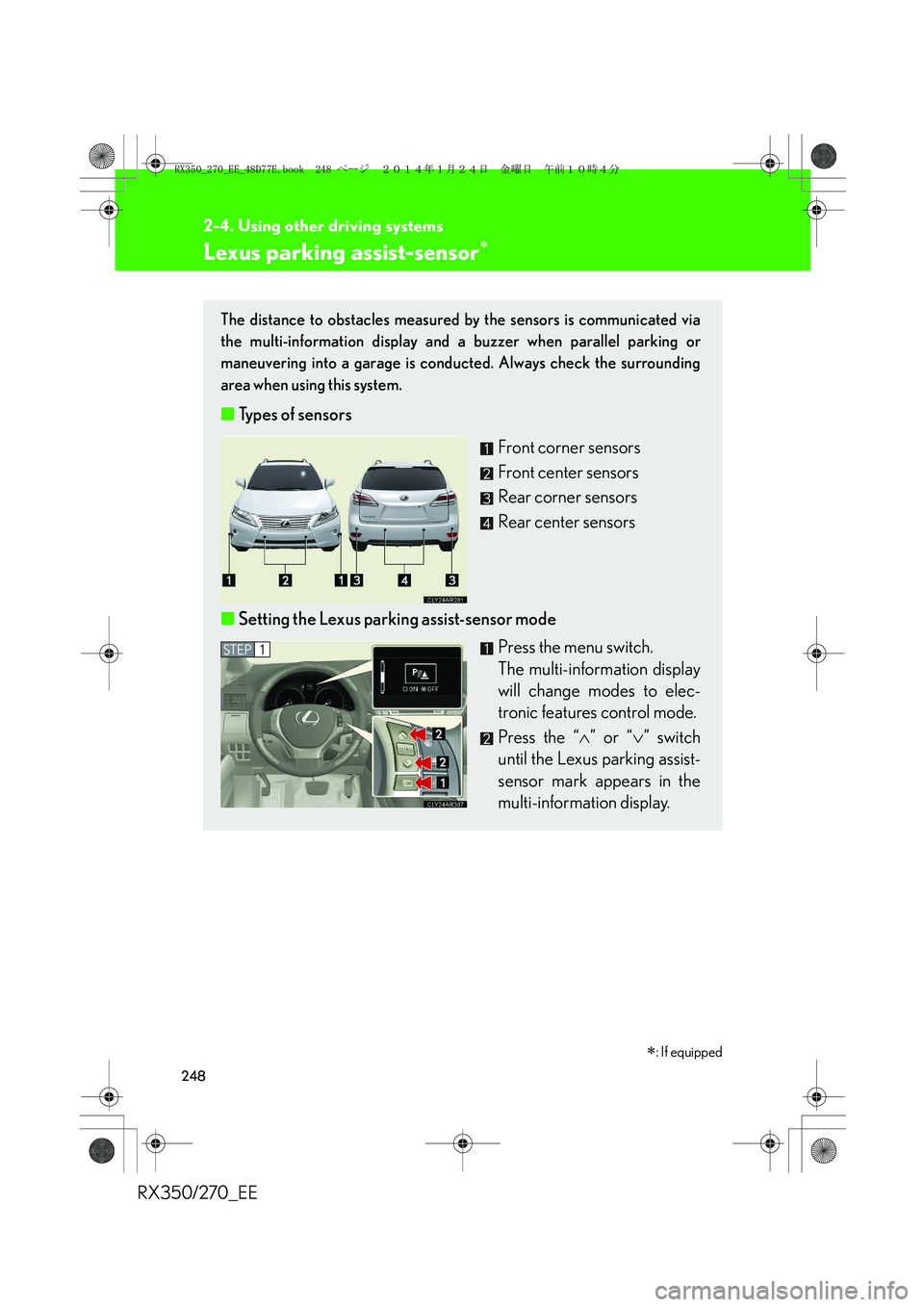
■Types of sensors
Front corner sensors
Front center sensors
Rear corner sensors
Rear center sensors
■Setting the Lexus parking assist-sensor mode
Press the menu switch.
The multi-information display
will change modes to elec-
tronic features control mode.
Press the “∧” or “∨” switch
until the Lexus parking assist-
sensor mark appears in the
multi-information display.
STEP1
∗: If equipped
RX350_270_EE_48D77E.book 248 ページ 2014年1月24日 金曜日 午前10時4分
Page 249 of 652
249
2-4. Using other driving systems
2
When driving
RX350/270_EE
Display
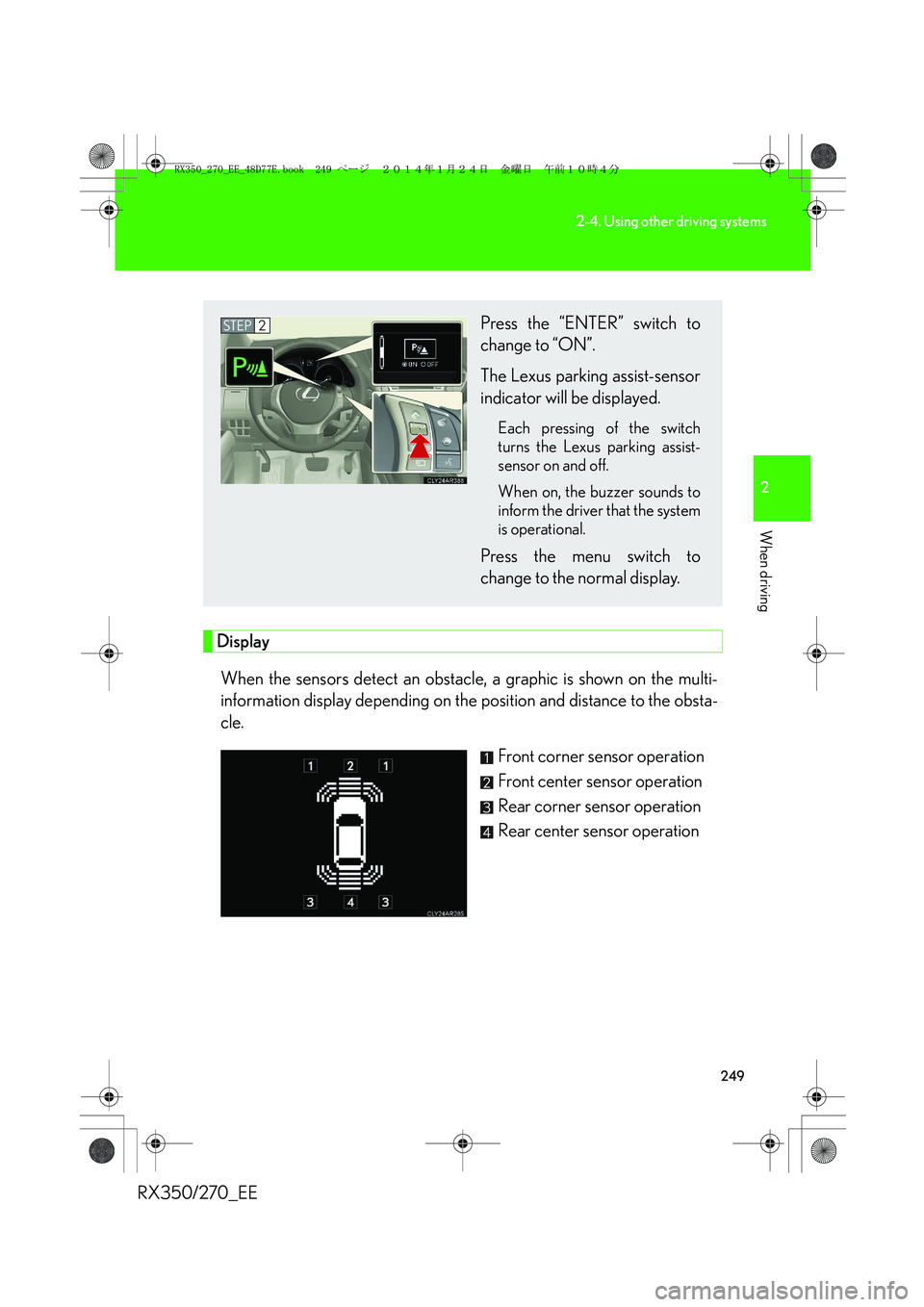
When the sensors detect an obstacle, a graphic is shown on the multi-
information display depending on the position and distance to the obsta-
cle.
Front corner sensor operation
Front center sensor operation
Rear corner sensor operation
Rear center sensor operation
Press the “ENTER” switch to
change to “ON”.
The Lexus parking assist-sensor
indicator will be displayed.
Each pressing of the switch
turns the Lexus parking assist-
sensor on and off.
When on, the buzzer sounds to
inform the driver that the system
is operational.
Press the menu switch to
change to the normal display.
STEP2
RX350_270_EE_48D77E.book 249 ページ 2014年1月24日 金曜日 午前10時4分
Page 250 of 652
250
2-4. Using other driving systems
RX350/270_EE
The distance display and buzzer
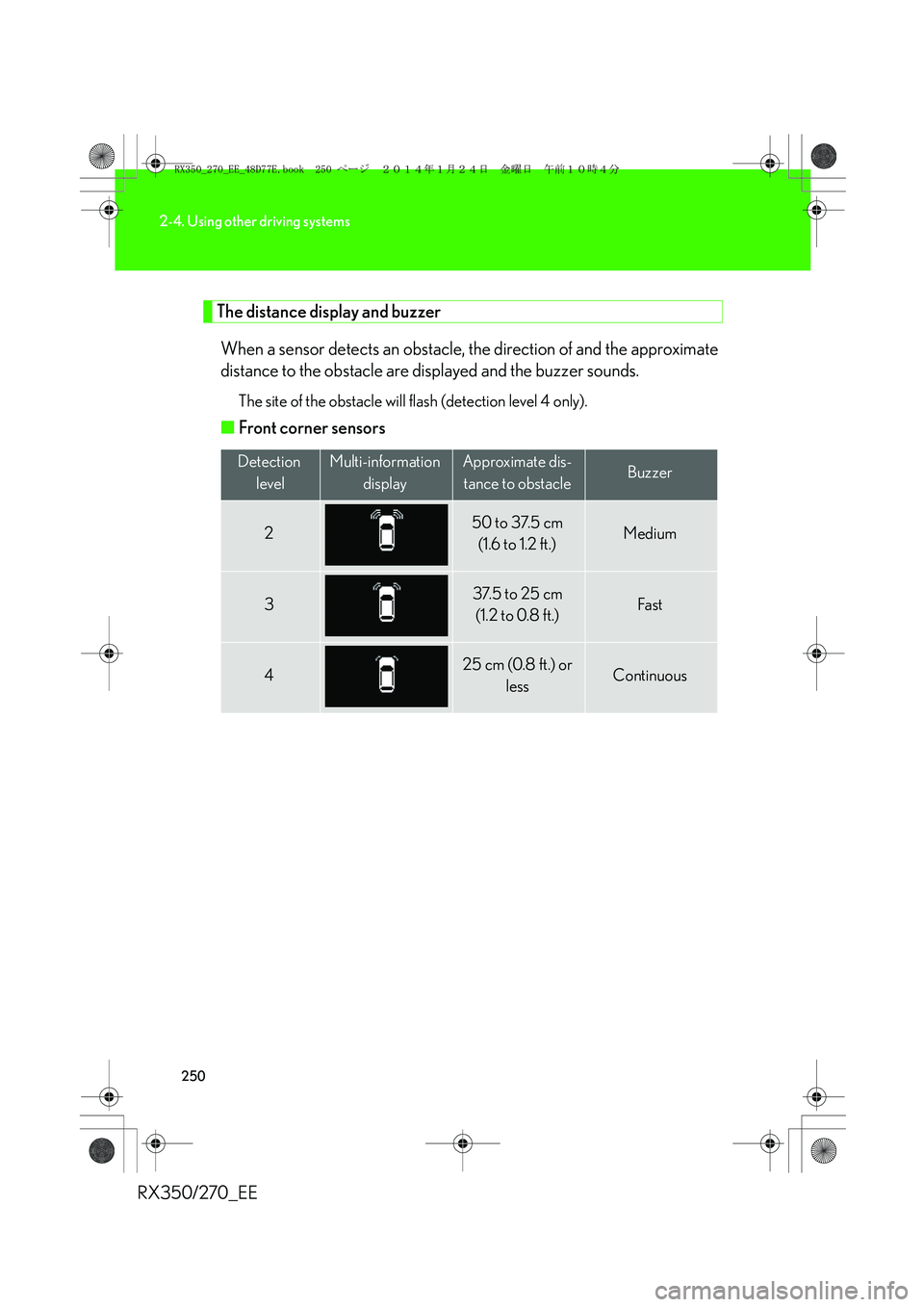
When a sensor detects an obstacle, the direction of and the approximate
distance to the obstacle are displayed and the buzzer sounds.
The site of the obstacle will flash (detection level 4 only).
■Front corner sensors
Detection
levelMulti-information
displayApproximate dis-
tance to obstacleBuzzer
250 to 37.5 cm
(1.6 to 1.2 ft.)Medium
337.5 to 25 cm
(1.2 to 0.8 ft.)Fa st
425 cm (0.8 ft.) or
lessContinuous
RX350_270_EE_48D77E.book 250 ページ 2014年1月24日 金曜日 午前10時4分
Page 251 of 652
251
2-4. Using other driving systems
2
When driving
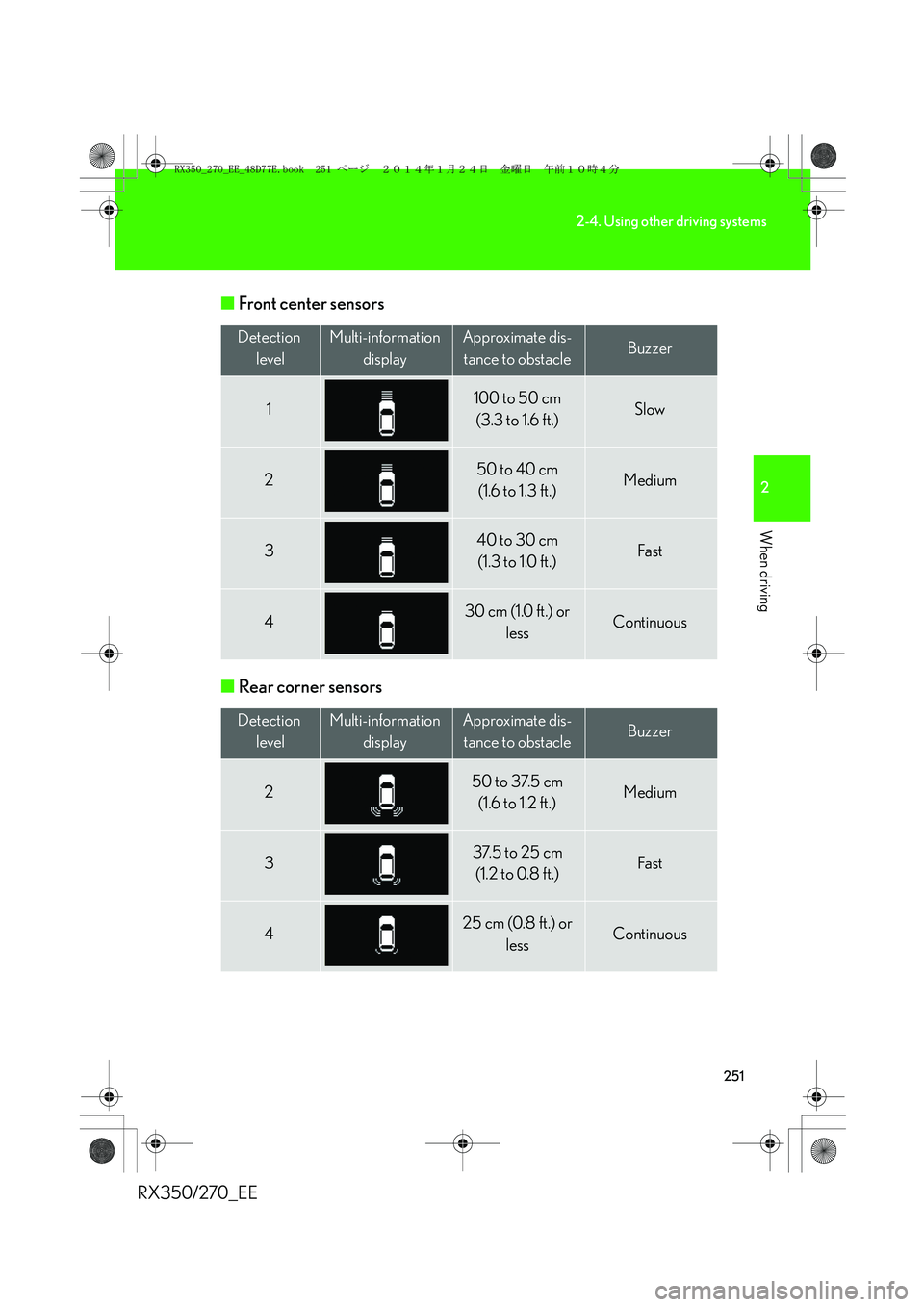
RX350/270_EE■Front center sensors
■Rear corner sensors
Detection
levelMulti-information
displayApproximate dis-
tance to obstacleBuzzer
1100 to 50 cm
(3.3 to 1.6 ft.)Slow
250 to 40 cm
(1.6 to 1.3 ft.)Medium
340 to 30 cm
(1.3 to 1.0 ft.)Fa st
430 cm (1.0 ft.) or
lessContinuous
Detection
levelMulti-information
displayApproximate dis-
tance to obstacleBuzzer
250 to 37.5 cm
(1.6 to 1.2 ft.)Medium
337.5 to 25 cm
(1.2 to 0.8 ft.)Fa st
425 cm (0.8 ft.) or
lessContinuous
RX350_270_EE_48D77E.book 251 ページ 2014年1月24日 金曜日 午前10時4分
Page 252 of 652
252
2-4. Using other driving systems
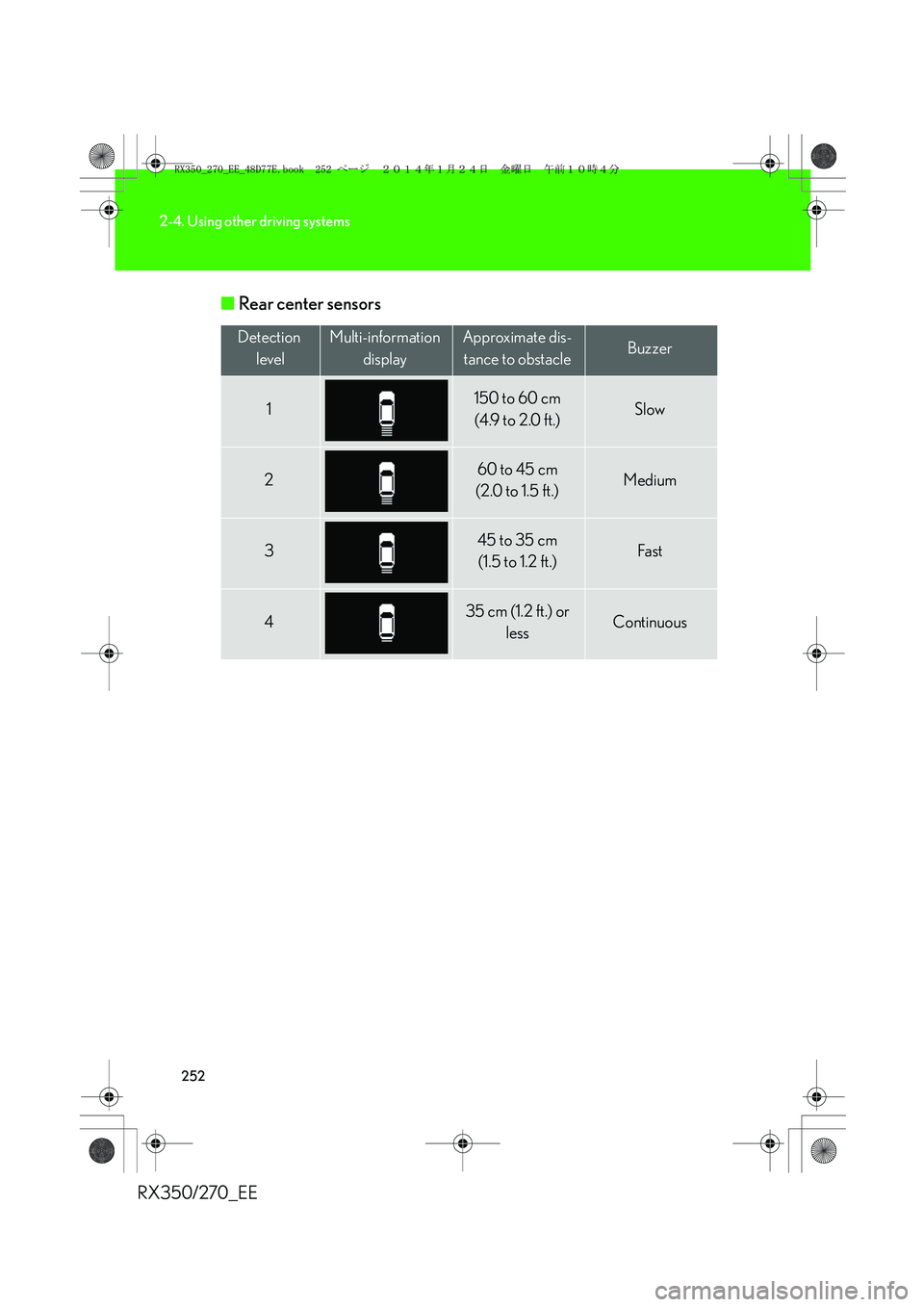
RX350/270_EE■Rear center sensors
Detection
levelMulti-information
displayApproximate dis-
tance to obstacleBuzzer
1150 to 60 cm
(4.9 to 2.0 ft.)Slow
260 to 45 cm
(2.0 to 1.5 ft.)Medium
345 to 35 cm
(1.5 to 1.2 ft.)Fa st
435 cm (1.2 ft.) or
lessContinuous
RX350_270_EE_48D77E.book 252 ページ 2014年1月24日 金曜日 午前10時4分
Page 254 of 652
254
2-4. Using other driving systems
RX350/270_EE
■Sensor detection information
●Certain vehicle conditions and the surrounding environment may affect the
ability of a sensor to correctly detect an obstacle. Particular instances where this
may occur are listed below.
• There is dirt, snow or ice on a sensor.
• A sensor is frozen.
• A sensor is covered in any way.
• The vehicle is leaning considerably to one side.
• On an extremely bumpy road, on an incline, on gravel, or on grass
• The vicinity of the vehicle is noisy due to vehicle horns, motorcycle engines,
air brakes of large vehicles, or other loud noises producing ultrasonic waves.
• There is another vehicle equipped with parking assist sensors in the vicinity.
• A sensor is coated with a sheet of spray or heavy rain.
• The vehicle is equipped with a fender pole or radio antenna.
• Towing eyelets are installed.
• A bumper or sensor receives a strong impact.
• The vehicle is approaching a tall or right-angled curb.
• In harsh sunlight or intense cold weather.
• A non-genuine Lexus suspension (lowered suspension, etc.) is installed.
In addition to the examples above, there are instances in which, because of their
shapes, signs and other objects may be judged by a sensor to be closer than they
are.
●The shape of the obstacle may prevent a sensor from detecting it. Pay particular
attention to the following obstacles:
• Wires, fences, ropes, etc.
• Cotton, snow and other materials that absorb sound waves
• Sharply-angled objects
• Low obstacles
• Tall obstacles with upper sections projecting outwards in the direction of your
vehicle
■If a message is displayed
→P. 5 5 2
■Customization
Settings (e.g. buzzer volume) can be changed.
(Customizable features →P. 6 2 2 )
RX350_270_EE_48D77E.book 254 ページ 2014年1月24日 金曜日 午前10時4分
Page 255 of 652
255
2-4. Using other driving systems
2
When driving
RX350/270_EE
CAUTION
■Caution when using the Lexus parking assist-sensor
Observe the following precautions.
Failing to do so may result in the vehicle being unable to be driven safely and possi-
bly cause an accident.
●Do not use the sensor at speeds in excess of 10 km/h (6 mph).
●Do not attach any accessories within the sensor range.
NOTICE
■Notes when washing the vehicle
Do not apply intensive bursts of water or steam to the sensor area.
Doing so may result in the sensor malfunctioning.
■Conditions possibly indicating system malfunctions
If any of the following occurs, the system may be malfunctioning due to a sensor fail-
ure etc. Have the vehicle inspected by any authorized Lexus dealer or repairer, or
another duly qualified and equipped professional.
●The buzzer does not sound when the Lexus parking assist-sensor mode is set.
●The sensor operation display flashes and the buzzer sounds even when no obsta-
cle is detected.
●An area of the sensors is hit or subjected to a strong impact.
●Either bumper is hit.
●The sensor operation display remains on even though no buzzer sounds.
RX350_270_EE_48D77E.book 255 ページ 2014年1月24日 金曜日 午前10時4分
Page 256 of 652
256
2-4. Using other driving systems
RX350/270_EE
Electronically modulated air suspension∗
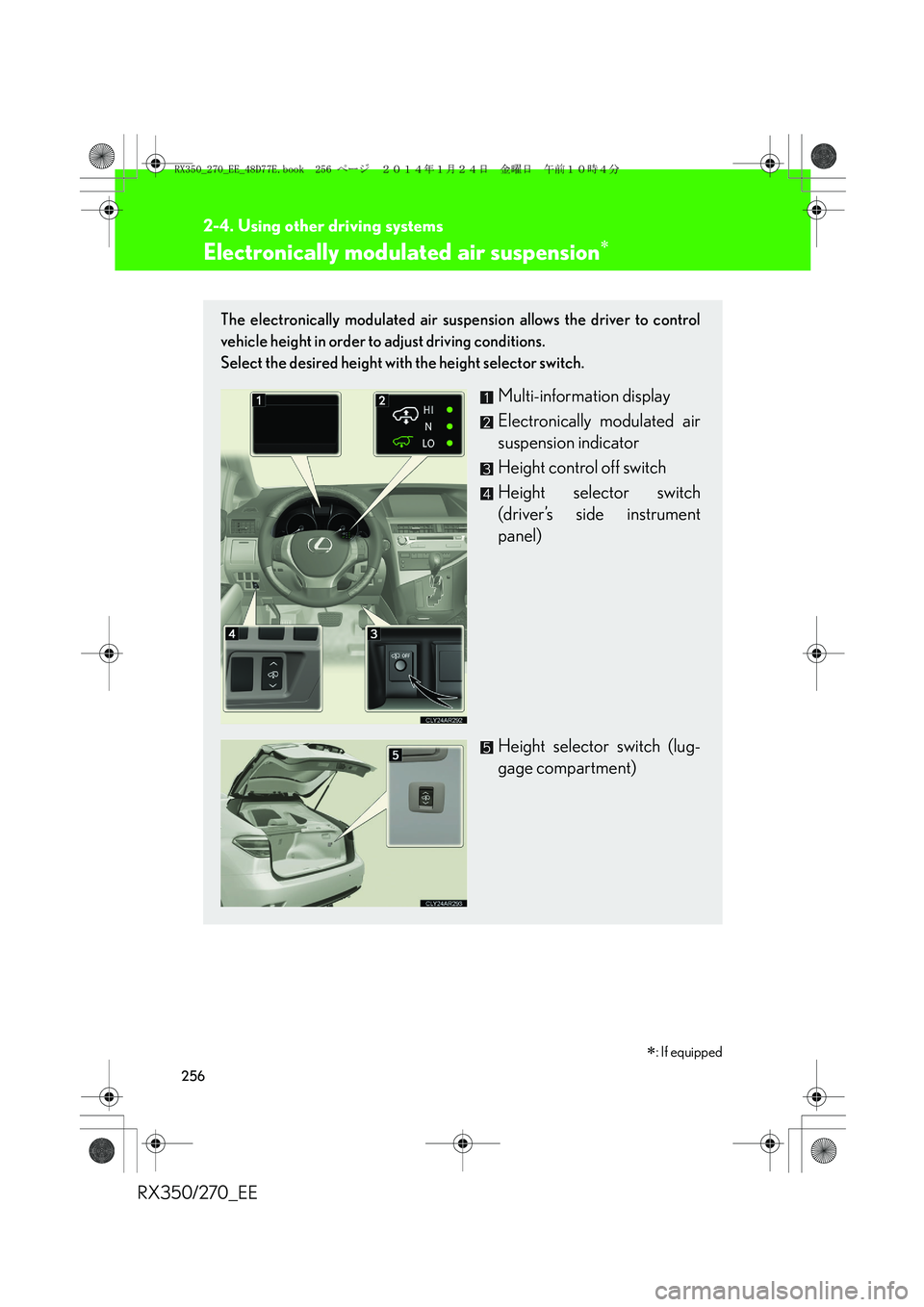
The electronically modulated air suspension allows the driver to control
vehicle height in order to adjust driving conditions.
Select the desired height with the height selector switch.
Multi-information display
Electronically modulated air
suspension indicator
Height control off switch
Height selector switch
(driver’s side instrument
panel)
Height selector switch (lug-
gage compartment)
∗: If equipped
RX350_270_EE_48D77E.book 256 ページ 2014年1月24日 金曜日 午前10時4分
Page 258 of 652
258
2-4. Using other driving systems
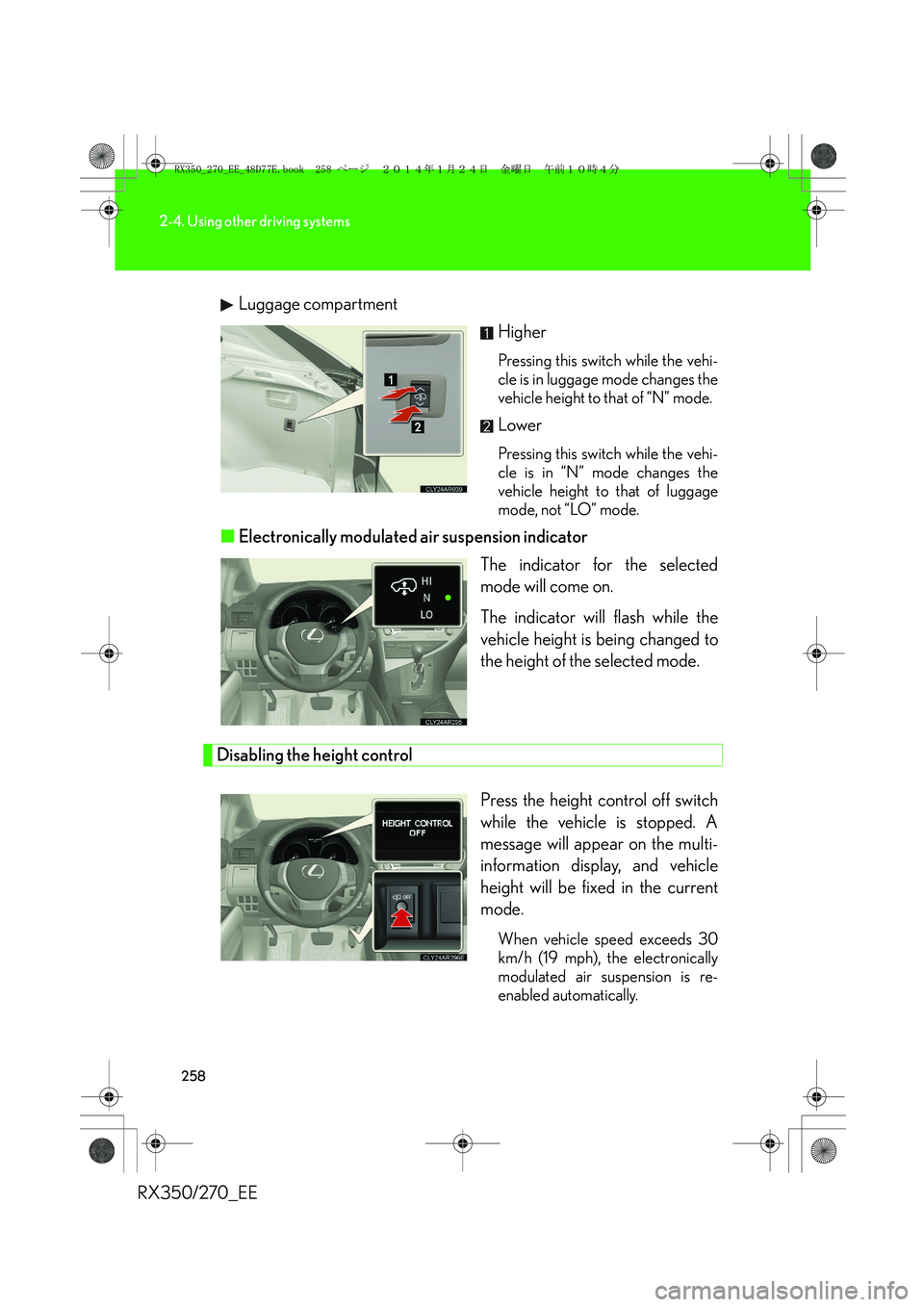
RX350/270_EELuggage compartment
Higher
Pressing this switch while the vehi-
cle is in luggage mode changes the
vehicle height to that of “N” mode.
Lower
Pressing this switch while the vehi-
cle is in “N” mode changes the
vehicle height to that of luggage
mode, not “LO” mode.
■Electronically modulated air suspension indicator
The indicator for the selected
mode will come on.
The indicator will flash while the
vehicle height is being changed to
the height of the selected mode.
Disabling the height control
Press the height control off switch
while the vehicle is stopped. A
message will appear on the multi-
information display, and vehicle
height will be fixed in the current
mode.
When vehicle speed exceeds 30
km/h (19 mph), the electronically
modulated air suspension is re-
enabled automatically.
RX350_270_EE_48D77E.book 258 ページ 2014年1月24日 金曜日 午前10時4分
Page 263 of 652
263
2-4. Using other driving systems
2
When driving
RX350/270_EE
Rear view monitor system (rear view mirror-attached type)∗
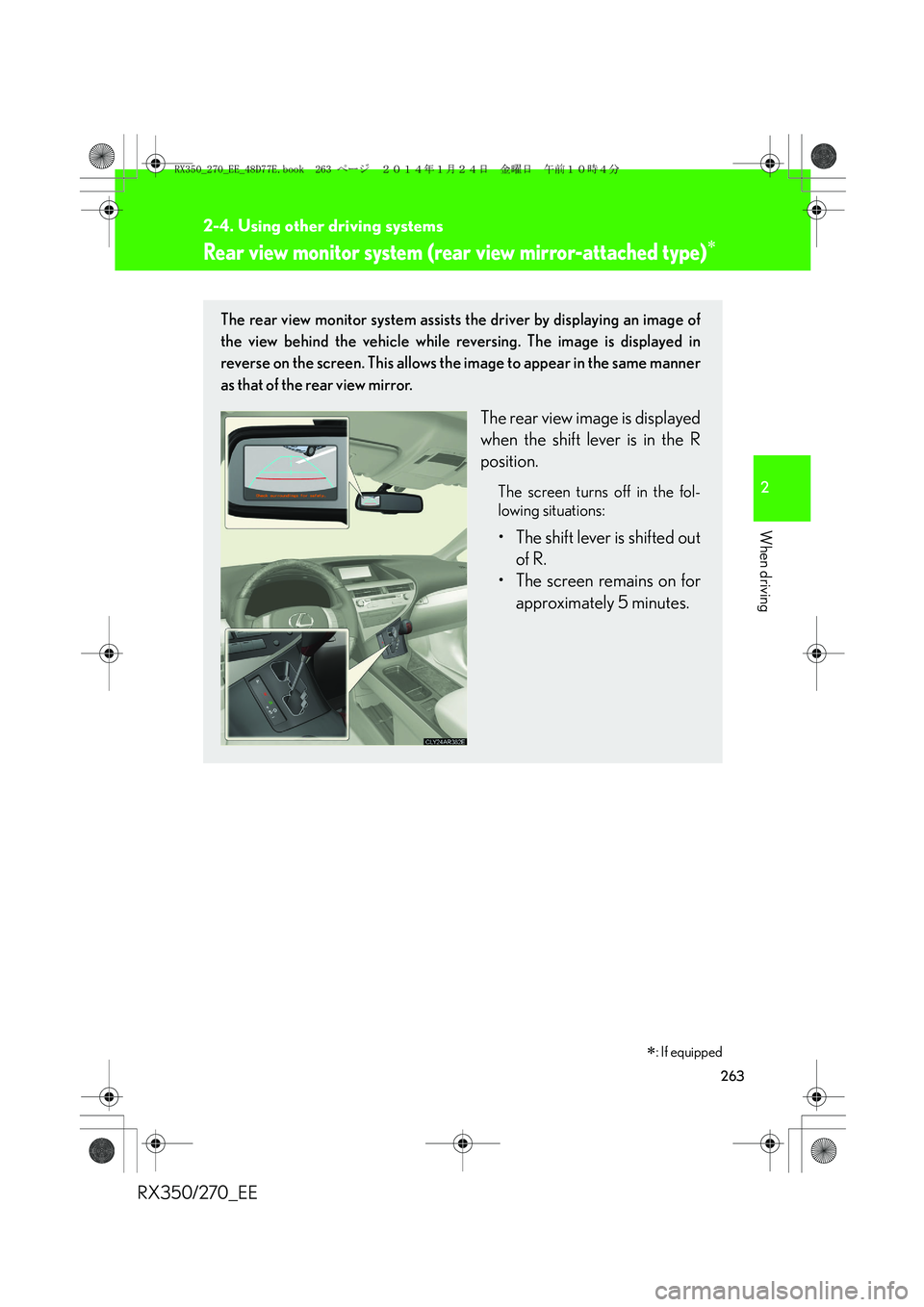
The rear view monitor system assists the driver by displaying an image of
the view behind the vehicle while reversing. The image is displayed in
reverse on the screen. This allows the image to appear in the same manner
as that of the rear view mirror.
The rear view image is displayed
when the shift lever is in the R
position.
The screen turns off in the fol-
lowing situations:
• The shift lever is shifted out
of R.
• The screen remains on for
approximately 5 minutes.
∗: If equipped
RX350_270_EE_48D77E.book 263 ページ 2014年1月24日 金曜日 午前10時4分