display LEXUS RX270 2014 Workshop Manual
[x] Cancel search | Manufacturer: LEXUS, Model Year: 2014, Model line: RX270, Model: LEXUS RX270 2014Pages: 652, PDF Size: 48.98 MB
Page 264 of 652
264
2-4. Using other driving systems
RX350/270_EE
■The rear view monitor system can be operated when
The shift lever is in R, the “ENGINE START STOP” switch is in IGNITION ON
mode.
■Changing display modes
The rear view monitor display mode can be changed while the screen is on.
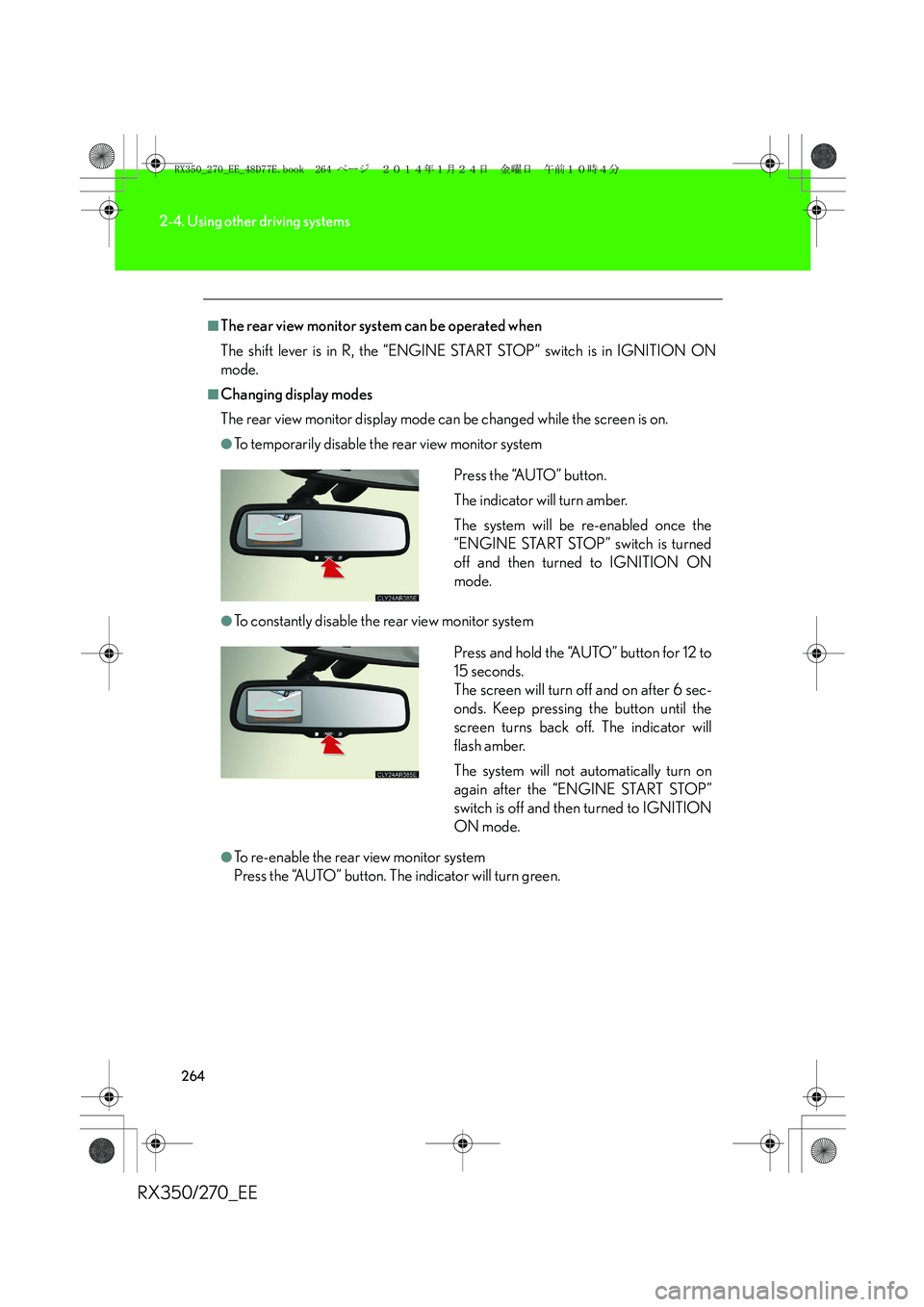
●To temporarily disable the rear view monitor system
●To constantly disable the rear view monitor system
●To re-enable the rear view monitor system
Press the “AUTO” button. The indicator will turn green.Press the “AUTO” button.
The indicator will turn amber.
The system will be re-enabled once the
“ENGINE START STOP” switch is turned
off and then turned to IGNITION ON
mode.
Press and hold the “AUTO” button for 12 to
15 seconds.
The screen will turn off and on after 6 sec-
onds. Keep pressing the button until the
screen turns back off. The indicator will
flash amber.
The system will not automatically turn on
again after the “ENGINE START STOP”
switch is off and then turned to IGNITION
ON mode.
RX350_270_EE_48D77E.book 264 ページ 2014年1月24日 金曜日 午前10時4分
Page 265 of 652
265
2-4. Using other driving systems
2
When driving
RX350/270_EE
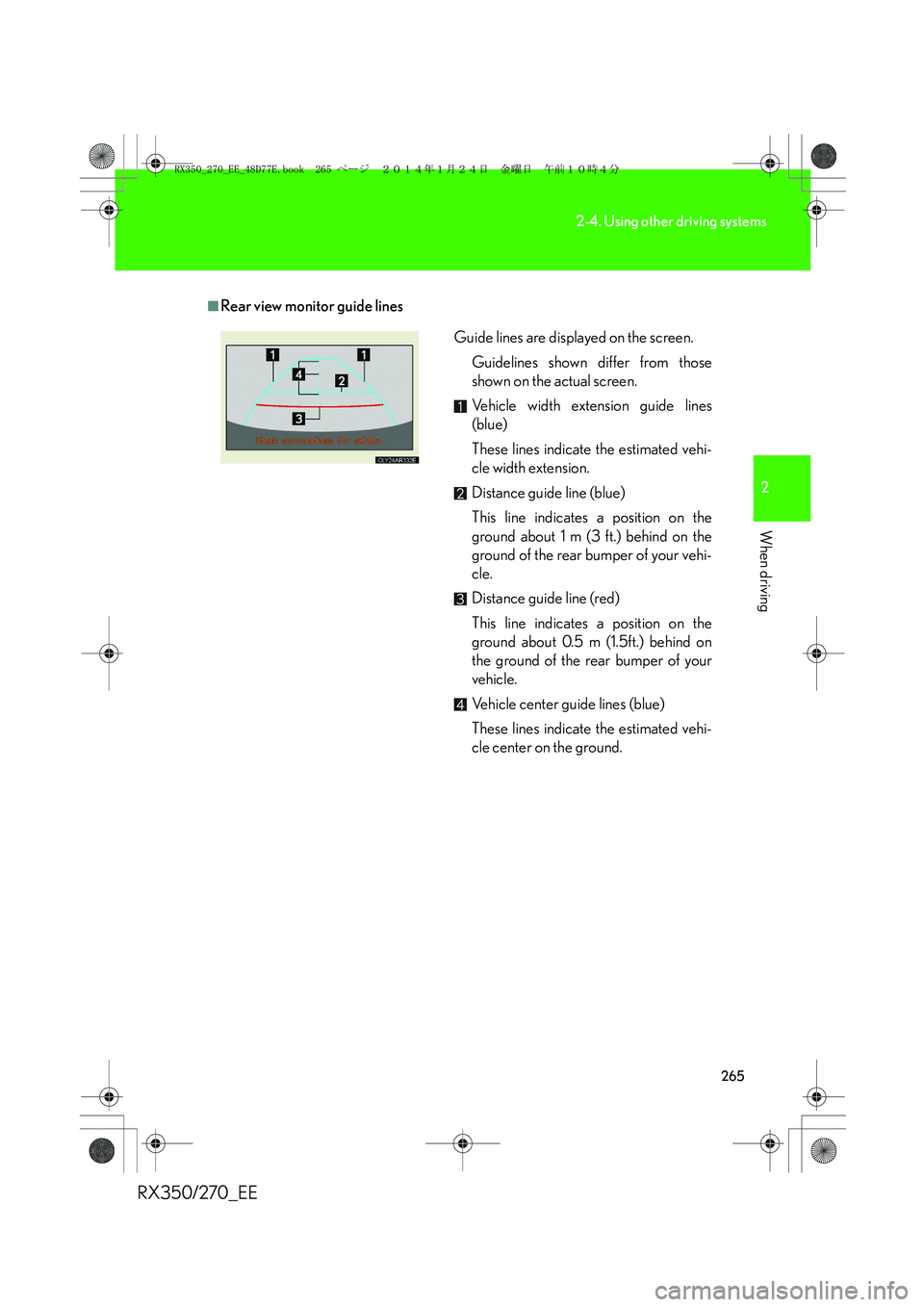
■Rear view monitor guide lines
Guide lines are displayed on the screen.
Guidelines shown differ from those
shown on the actual screen.
Vehicle width extension guide lines
(blue)
These lines indicate the estimated vehi-
cle width extension.
Distance guide line (blue)
This line indicates a position on the
ground about 1 m (3 ft.) behind on the
ground of the rear bumper of your vehi-
cle.
Distance guide line (red)
This line indicates a position on the
ground about 0.5 m (1.5ft.) behind on
the ground of the rear bumper of your
vehicle.
Vehicle center guide lines (blue)
These lines indicate the estimated vehi-
cle center on the ground.
RX350_270_EE_48D77E.book 265 ページ 2014年1月24日 金曜日 午前10時4分
Page 266 of 652
266
2-4. Using other driving systems
RX350/270_EE
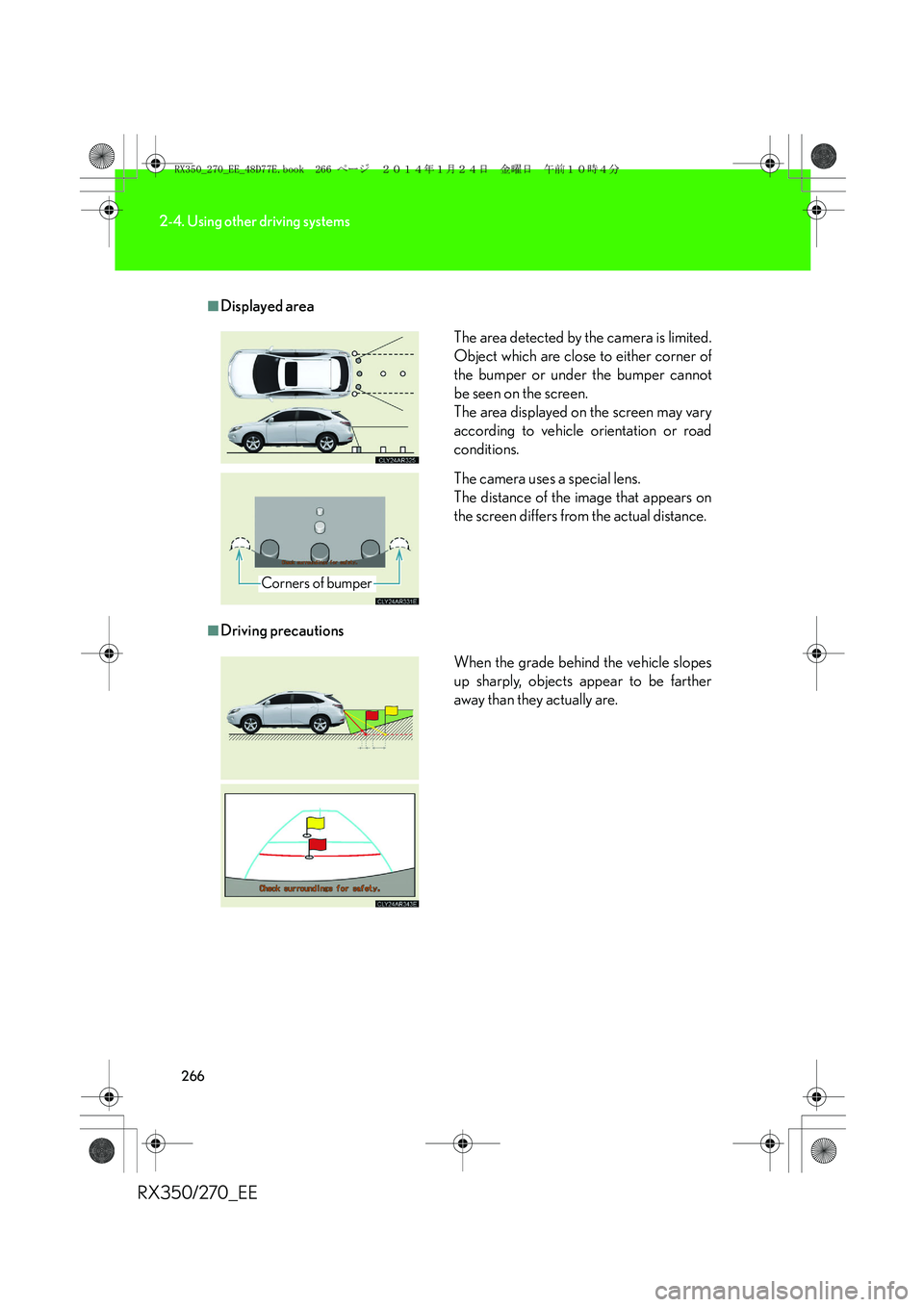
■Displayed area
■Driving precautionsThe area detected by the camera is limited.
Object which are close to either corner of
the bumper or under the bumper cannot
be seen on the screen.
The area displayed on the screen may vary
according to vehicle orientation or road
conditions.
The camera uses a special lens.
The distance of the image that appears on
the screen differs from the actual distance.
Corners of bumper
When the grade behind the vehicle slopes
up sharply, objects appear to be farther
away than they actually are.
RX350_270_EE_48D77E.book 266 ページ 2014年1月24日 金曜日 午前10時4分
Page 269 of 652
269
2-4. Using other driving systems
2
When driving
RX350/270_EE
■Flicker effect
When the camera is used under fluorescent light, sodium lights, or mercury lights
etc., the lights and the illuminated areas may appear to flicker.
CAUTION
■When using the rear view monitor system, observe the following precautions to
avoid an accident that could result in death or serious injuries:
●Never depend solely on the monitor system when reversing.
●Always check visually and with the mirrors to confirm your intended path is clear.
●Use your own eyes to confirm the vehicle’s surroundings, as the displayed image
may become faint or dark, and moving images will be distorted, or not entirely
visible when the outside temperature is low. When backing up, be sure to check
behind and all around the vehicle visually and with the mirrors before proceeding.
●Always check the vehicle surrounding area, because the guide lines are ancillary
lines.
●The guide lines are ancillary lines and do not change even if the steering wheel is
turned.
●Depicted distances between objects and flat surfaces differ from actual dis-
tances.
●Do not use the system if the back door is open.
RX350_270_EE_48D77E.book 269 ページ 2014年1月24日 金曜日 午前10時4分
Page 270 of 652
270
2-4. Using other driving systems
RX350/270_EE
NOTICE
■Conditions which may affect the rear view monitor system
●If the back of the vehicle has been hit, the camera’s position and mounting angle
may have changed. Have the vehicle inspected by any authorized Lexus dealer
or repairer, or another duly qualified and equipped professional.
●Rapid temperature changes, such as when hot water is poured on the vehicle in
cold weather, may cause the system to function abnormally.
●If the camera lens is dirty, it cannot transmit a clear image. Rinse with water and
wipe with a soft cloth. If extremely dirty, wash with a mild cleanser and rinse.
●The displayed image may be darker and moving images may be slightly distorted
when the system is cold.
■Camera precautions
●As the camera has a water proof construction, do not detach, disassemble or
modify it. This may cause incorrect operation.
●Do not subject the camera to a strong impact.
●If the camera lens becomes dirty, it cannot transmit a clear image. If water drop-
lets, snow, or mud adhere to the lens, rinse with water and wipe with a soft cloth. If
the lens is extremely dirty, wash it with a mild cleanser and rinse. Do not rub hard.
●Do not allow organic solvent, car wax, window cleaner or glass coat to adhere to
the camera. If this happens, wipe it off as soon as possible.
●Do not strongly rub the camera lens. If the camera lens is scratched, it cannot
transmit a clear image.
●When washing the vehicle, do not apply intensive bursts of water to the camera
or camera area. Doing so may result in the camera malfunctioning.
●When replacing tires, please consult any authorized Lexus dealer or repairer, or
another duly qualified and equipped professional. If you replace the tires, the area
displayed on the screen may change.
RX350_270_EE_48D77E.book 270 ページ 2014年1月24日 金曜日 午前10時4分
Page 273 of 652
273
2-4. Using other driving systems
2
When driving
RX350/270_EE
Disabling the TRC/VSC systems
If the vehicle gets stuck in fresh snow or mud, the TRC/VSC systems may
reduce power from the engine to the wheels. You may need to turn the
system off to enable you to rock the vehicle in order to free it.
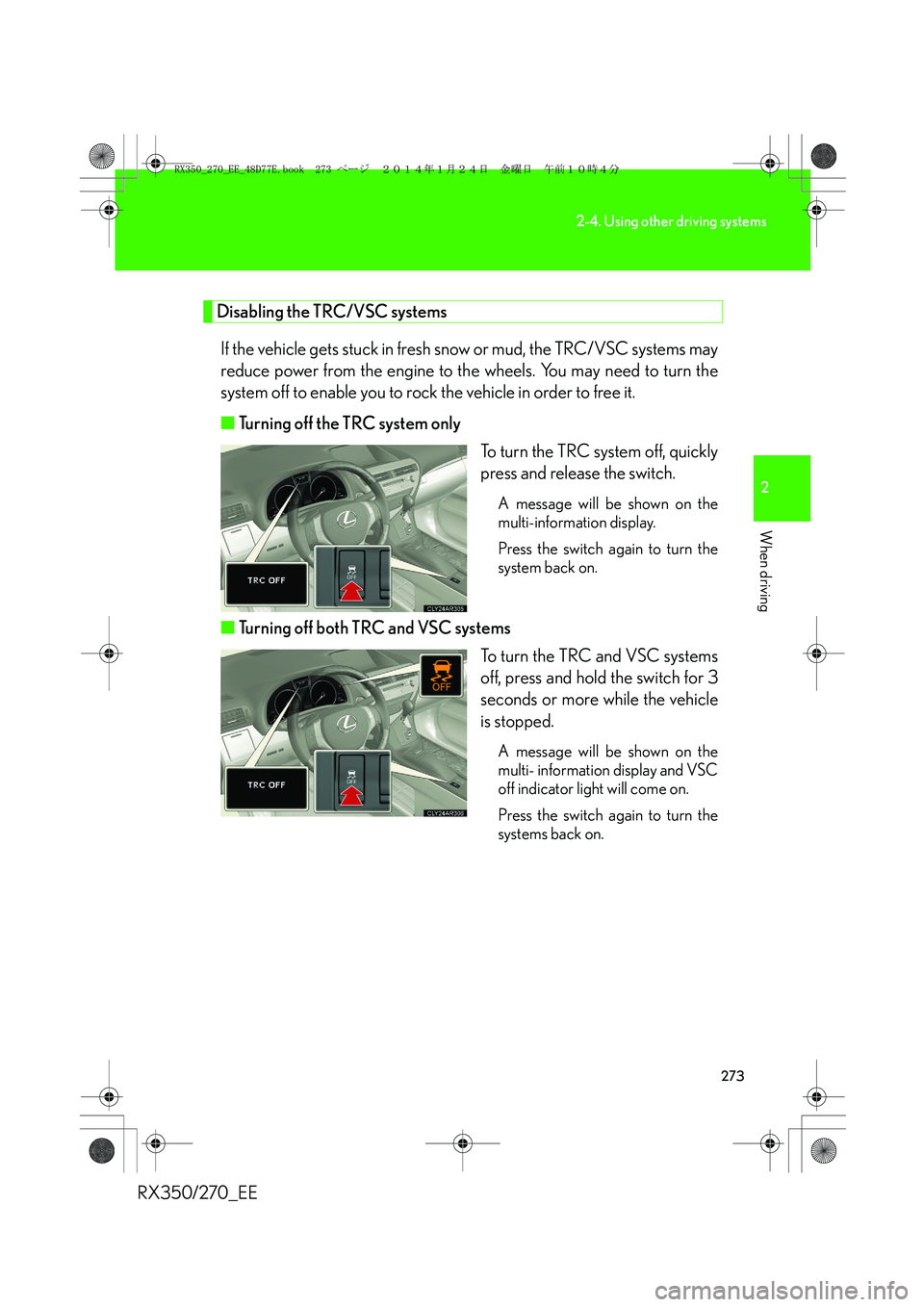
■Turning off the TRC system only
To turn the TRC system off, quickly
press and release the switch.
A message will be shown on the
multi-information display.
Press the switch again to turn the
system back on.
■Turning off both TRC and VSC systems
To turn the TRC and VSC systems
off, press and hold the switch for 3
seconds or more while the vehicle
is stopped.
A message will be shown on the
multi- information display and VSC
off indicator light will come on.
Press the switch again to turn the
systems back on.
RX350_270_EE_48D77E.book 273 ページ 2014年1月24日 金曜日 午前10時4分
Page 274 of 652
274
2-4. Using other driving systems
RX350/270_EE
■When the message is displayed on the multi-information display showing that
TRC has been disabled even if the VSC off switch has not been pressed
TRC and hill-start assist control cannot be operated. Contact your any authorized
Lexus dealer or repairer, or another duly qualified and equipped professional.
■Sounds and vibrations caused by the ABS, VSC, TRC and brake assist
●A sound may be heard from the engine compartment when the engine is
started or just after the vehicle begins to move. This sound does not indicate that
a malfunction has occurred in any of these systems.
●Any of the following conditions may occur when the above systems are operat-
ing. None of these indicates that a malfunction has occurred.
• Vibrations may be felt through the vehicle body and steering.
• A motor sound may be heard after the vehicle comes to a stop.
• The brake pedal may pulsate slightly after the ABS is activated.
• The brake pedal may move down slightly after the ABS is activated.
■EPS operation sound
When the steering wheel is operated, a motor sound (whirring sound) may be
heard. This does not indicate a malfunction.
■Reactivation of the TRC/VSC systems
Turning off the engine after turning off the TRC/VSC systems will automatically
reactivate them.
■Reactivation of the TRC system linked to vehicle speed
When only the TRC system is turned off, the TRC system will turn on when vehicle
speed increases. However, when both TRC and VSC systems are turned off, the
systems will not turn on even when vehicle speed increases.
■Reduced effectiveness of the EPS system
The effectiveness of the EPS system is reduced to prevent the system from over-
heating when there is frequent steering input over an extended period of time. The
steering wheel may feel heavy as a result. Should this occur, refrain from excessive
steering input or stop the vehicle and turn the engine off. The EPS system should
return to normal within 10 minutes.
RX350_270_EE_48D77E.book 274 ページ 2014年1月24日 金曜日 午前10時4分
Page 280 of 652
280
2-4. Using other driving systems
RX350/270_EE
Pre-Crash Safety system∗
When the radar sensor detects the possibility of a frontal collision, the pre-
crash safety system such as the brakes and seat belts are automatically
engaged to lessen impact as well as vehicle damage.
■Pre-crash seat belts (front seat belts only)
If the pre-crash sensor detects that a collision is unavoidable, the pre-
crash safety system will retract the seat belt before the collision occurs.
The same will happen if the driver makes an emergency braking or loses
control of the vehicle. (→P. 9 0 )
However, the system will not operate in the event of skidding when the
VSC system is disabled.
■Pre-crash brake assist
When there is a high possibility of a frontal collision, the system applies
greater braking force in relation to how strongly the brake pedal is
depressed. The system may not warn the driver using a warning light,
warning display and buzzer when the system detects and judges braking
operations.
■Pre-crash braking
When there is a high possibility of a frontal collision, the system warns the
driver using a warning light, warning display and buzzer. If the system
determines that a collision is unavoidable, the brakes are automatically
applied to reduce the collision speed. Pre-crash braking can be disabled
using the pre-crash braking off switch.
∗: If equipped
RX350_270_EE_48D77E.book 280 ページ 2014年1月24日 金曜日 午前10時4分
Page 313 of 652
3Interior features
313
RX350/270_EE
Setting up a Bluetooth®
enabled portable
player...................................... 372
Bluetooth
® audio system
setup ........................................ 376
Optimal use of the audio
system...................................... 377
Using the AUX port............... 379
Using the steering wheel
audio switches....................... 381
Hands-free system
for mobile phones ............... 384
Using the hands-free
system (for mobile
phones) ................................... 391
Making a phone call............... 397
Setting a mobile phone ......... 401
Security and system
setup ....................................... 405
Using the phone book ............. 411
3-3. Using the interior lights
Interior lights list ...................... 417
• Interior lights .......................... 418
• Personal lights ....................... 4183-4. Using the storage
features
List of storage features ........ 420
• Glove box ................................421
• Bottle holders/
door pockets ......................... 422
• Cup holders .......................... 423
• Console box .......................... 426
• Coin holder ............................427
• Auxiliary box......................... 428
• Under tray ............................. 429
3-5. Other interior features
Sun visors ................................. 430
Vanity mirror............................. 431
Clock ........................................ 432
Outside temperature
display .................................... 433
Multi-display light
control.................................... 434
Power outlets........................... 435
Heated steering wheel ......... 437
Seat heaters and
ventilators ............................. 439
Armrest ...................................... 441
Coat hooks ............................... 442
Assist grips .............................. 443
Floor mat................................... 444
Luggage compartment
features .................................. 446
RX350_270_EE_48D77E.book 313 ページ 2014年1月24日 金曜日 午前10時4分
Page 314 of 652
314
RX350/270_EE
3-1. Using the air conditioning system and defogger
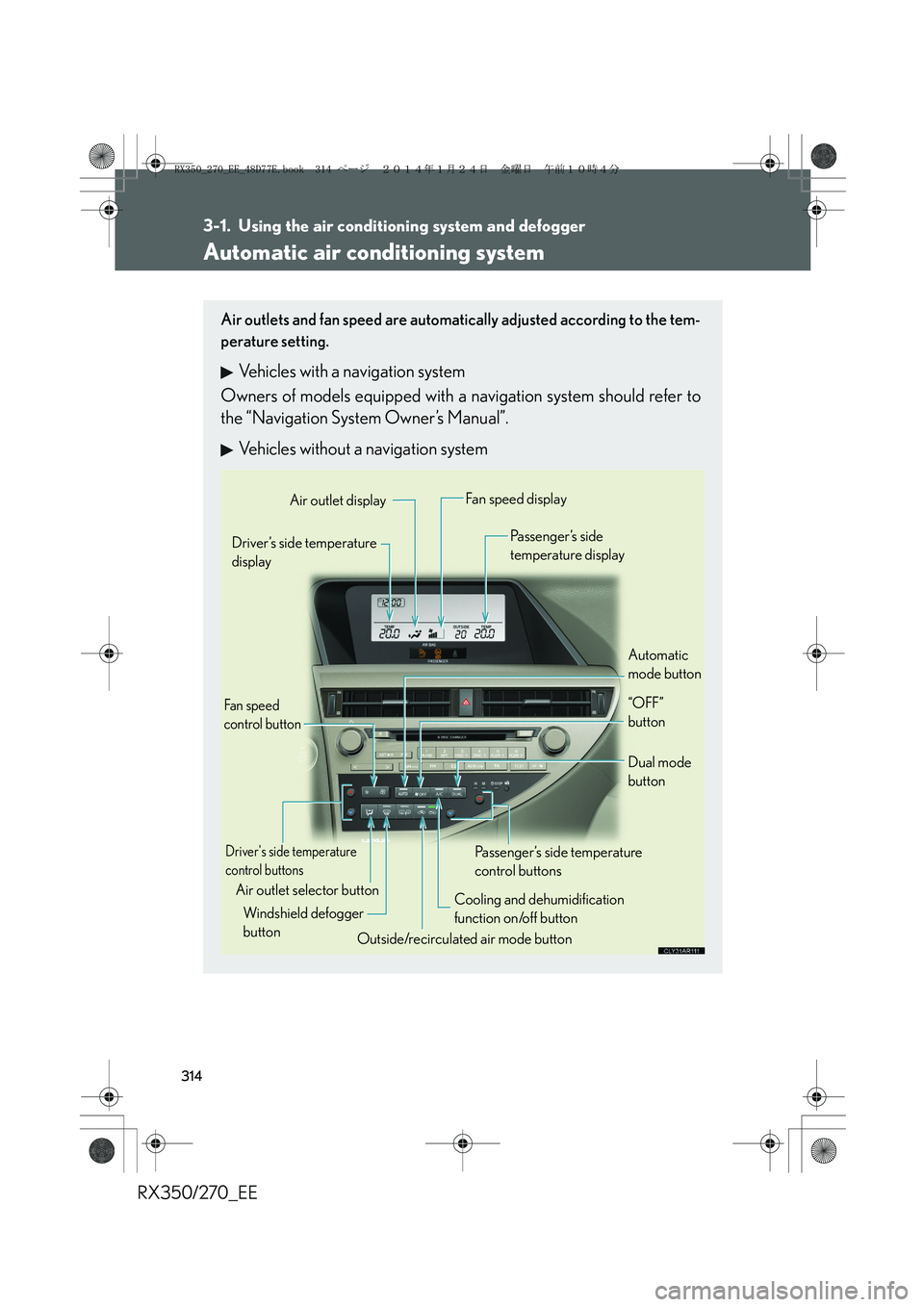
Automatic air conditioning system
Air outlets and fan speed are automatically adjusted according to the tem-
perature setting.
Vehicles with a navigation system
Owners of models equipped with a navigation system should refer to
the “Navigation System Owner’s Manual”.
Vehicles without a navigation system
Automatic
mode button Driver’s side temperature
display
Air outlet selector button
Fan speed
control button
Air outlet displayFan speed display
Passenger’s side
temperature display
Driver's side temperature
control buttons
Cooling and dehumidification
function on/off button
Outside/recirculated air mode button Windshield defogger
buttonPassenger’s side temperature
control buttonsDual mode
button
“OFF”
button
RX350_270_EE_48D77E.book 314 ページ 2014年1月24日 金曜日 午前10時4分