display LEXUS RX270 2014 Owner's Manual
[x] Cancel search | Manufacturer: LEXUS, Model Year: 2014, Model line: RX270, Model: LEXUS RX270 2014Pages: 652, PDF Size: 48.98 MB
Page 205 of 652
205
2-2. Instrument cluster
2
When driving
RX350/270_EE
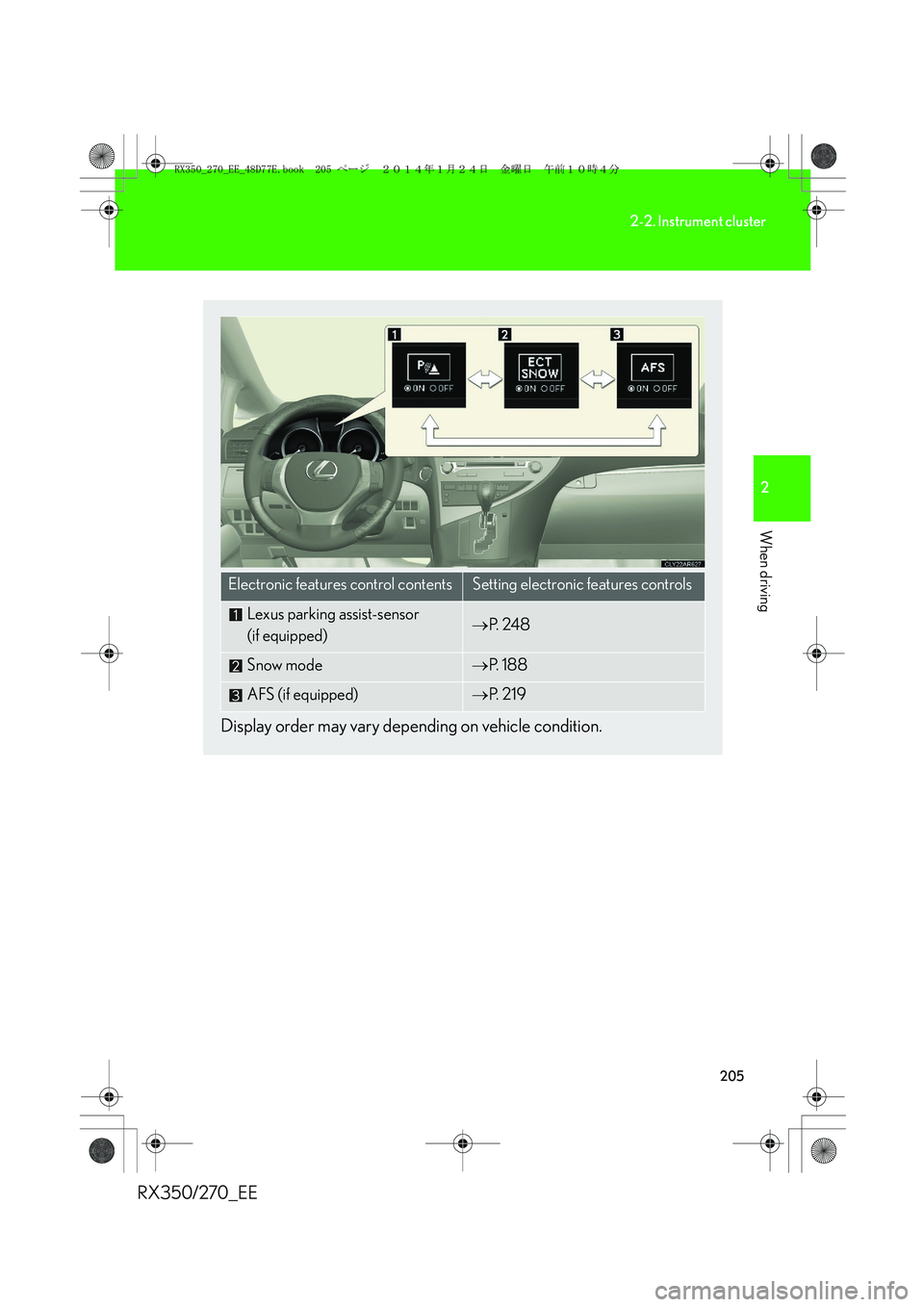
Display order may vary depending on vehicle condition.
Electronic features control contentsSetting electronic features controls
Lexus parking assist-sensor
(if equipped)→P. 2 4 8
Snow mode→P. 1 8 8
AFS (if equipped)→P. 2 1 9
RX350_270_EE_48D77E.book 205 ページ 2014年1月24日 金曜日 午前10時4分
Page 206 of 652
206
2-2. Instrument cluster
RX350/270_EE
Trip information
■Current fuel consumption
Displays the current rate of fuel consumption
■Average fuel consumption after refueling
Displays the average fuel consumption since the vehicle was last refu-
eled
Use the displayed average fuel consumption as a reference.
■Average fuel consumption
Displays the average fuel consumption since the function was reset
• The function can be reset by pushing the “ENTER” switch for longer than
one second when the average fuel consumption is displayed.
• Use the displayed average fuel consumption as a reference.
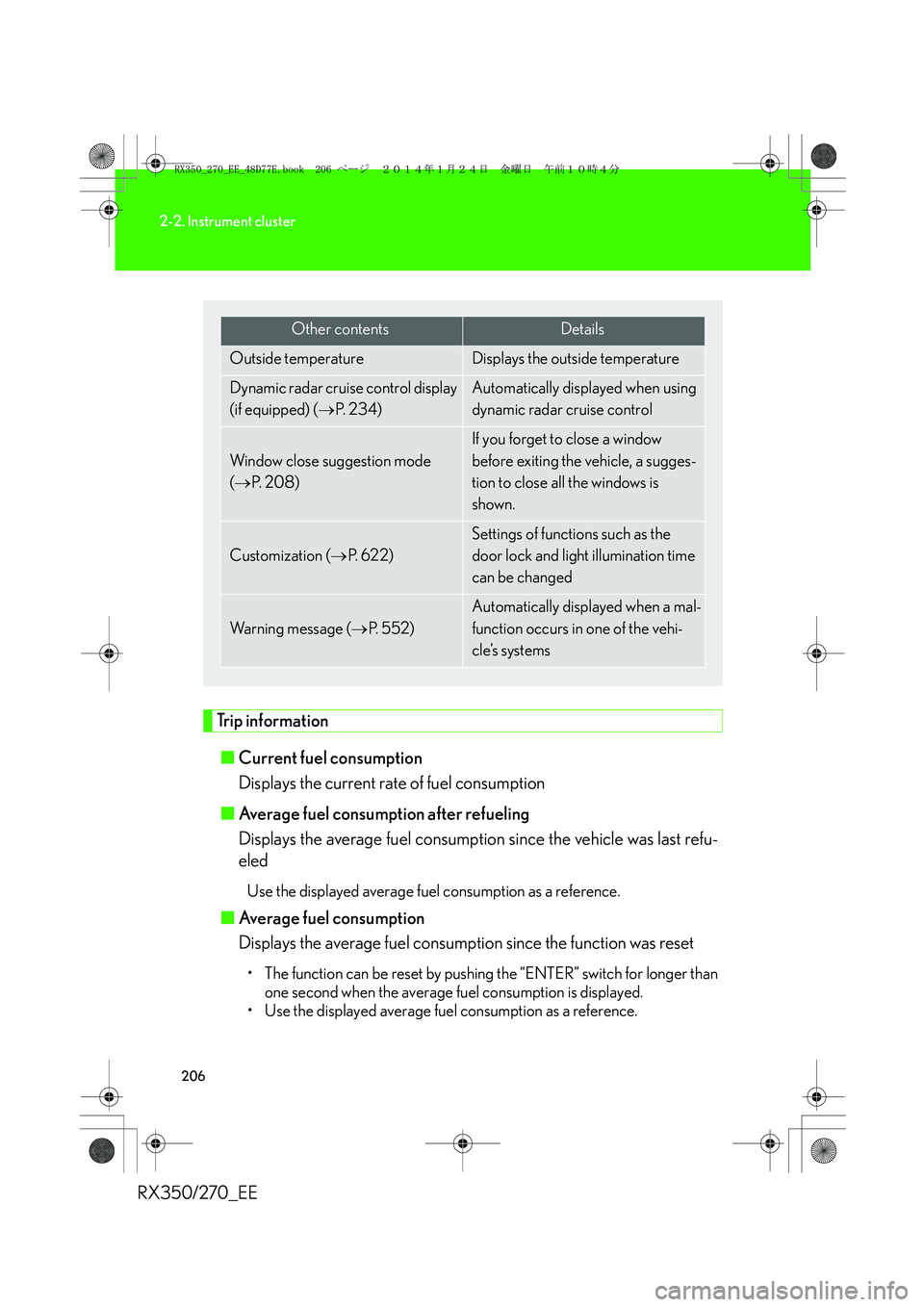
Other contentsDetails
Outside temperature Displays the outside temperature
Dynamic radar cruise control display
(if equipped) (→P. 2 3 4 )Automatically displayed when using
dynamic radar cruise control
Window close suggestion mode
(→P. 2 0 8 )
If you forget to close a window
before exiting the vehicle, a sugges-
tion to close all the windows is
shown.
Customization (→P. 622)
Settings of functions such as the
door lock and light illumination time
can be changed
Wa r n i n g m e s s a g e (→P. 552)
Automatically displayed when a mal-
function occurs in one of the vehi-
cle’s systems
RX350_270_EE_48D77E.book 206 ページ 2014年1月24日 金曜日 午前10時4分
Page 207 of 652
207
2-2. Instrument cluster
2
When driving
RX350/270_EE■Average vehicle speed
Displays the average vehicle speed since the function was reset
The function can be reset by pushing the “ENTER” switch for longer than
one second when the average vehicle speed is displayed.
■Cruising range
Displays the estimated maximum distance that can be driven with the
quantity of fuel remaining
• This distance is computed based on your average fuel consumption. As a
result, the actual distance that can be driven may differ from that dis-
played.
• When only a small amount of fuel is added to the tank, the display may
not be updated.
When refueling, turn the “ENGINE START STOP” switch off. If the vehi-
cle is refueled without turning the “ENGINE START STOP” switch off,
the display may not be updated.
■Eco Driving Indicator Zone Display
→P. 210
RX350_270_EE_48D77E.book 207 ページ 2014年1月24日 金曜日 午前10時4分
Page 208 of 652
208
2-2. Instrument cluster
RX350/270_EE
Window close suggestion mode
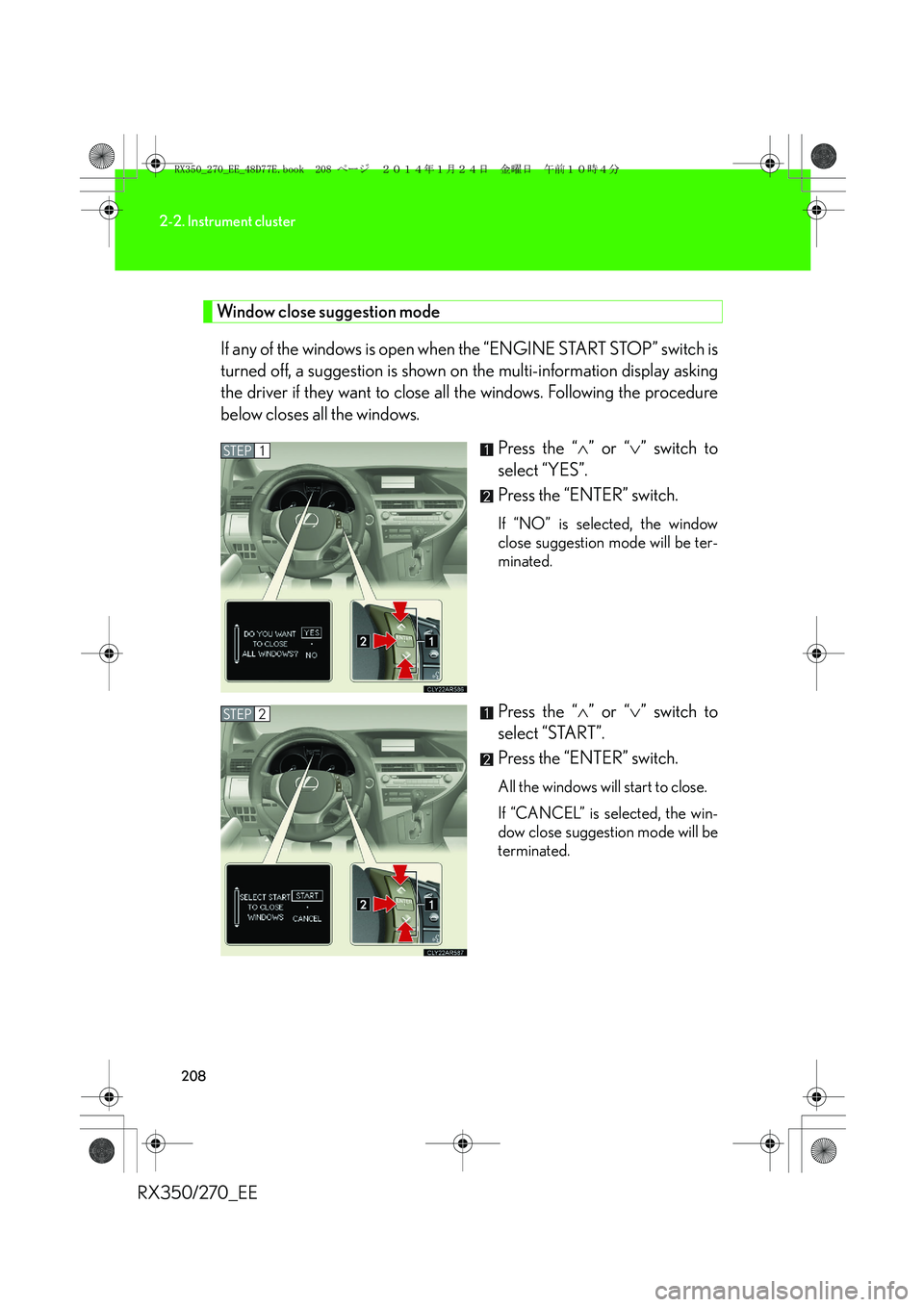
If any of the windows is open when the “ENGINE START STOP” switch is
turned off, a suggestion is shown on the multi-information display asking
the driver if they want to close all the windows. Following the procedure
below closes all the windows.
Press the “∧” or “∨” switch to
select “YES”.
Press the “ENTER” switch.
If “NO” is selected, the window
close suggestion mode will be ter-
minated.
Press the “∧” or “∨” switch to
select “START”.
Press the “ENTER” switch.
All the windows will start to close.
If “CANCEL” is selected, the win-
dow close suggestion mode will be
terminated.
STEP1
STEP2
RX350_270_EE_48D77E.book 208 ページ 2014年1月24日 金曜日 午前10時4分
Page 209 of 652
209
2-2. Instrument cluster
2
When driving
RX350/270_EE
■Electronic features control can be turned on/off when
The “ENGINE START STOP” switch is in IGNITION ON mode.
■Conditions for ending electronic features control
In the following situations, the electronic features control will end:
●The menu switch is pressed.
●The dynamic radar cruise control is operated (if equipped).
●Lexus parking assist-sensor starts operating (if equipped).
●No action is performed for some time after the electronic features control
screen is displayed.
●A warning message appears after the electronic features control screen is dis-
played.
■Window close suggestion mode
●In the following situations, the window close suggestion mode will not operate:
• A warning message appears on the multi-information display.
• The window lock switch is on.
• All the windows are closed.
• The window close suggestion mode has been disabled in the customized set-
tings.
• The driver's or front passenger's door is open.
●In the following situations, the window close suggestion mode will end:
• The “ENGINE START STOP” switch is turned to IGNITION ON mode.
• About 20 seconds have passed since the “ENGINE START STOP” switch
was turned off.
• A warning message appears on the multi-information display.
• All the windows are closed.
• The window lock switch is turned on.
• The menu switch is pressed.
• The driver's or front passenger's door is opened.
• The windows were opened or closed by the wireless remote control.
RX350_270_EE_48D77E.book 209 ページ 2014年1月24日 金曜日 午前10時4分
Page 210 of 652
210
2-2. Instrument cluster
RX350/270_EE
●In the following situations, the window close operation will stop partway:
• The “ENGINE START STOP” switch is turned to IGNITION ON mode.
• The “ENTER” switch was pressed.
• The window lock switch was turned on.
• The jam protection function was activated.
• The windows were opened or closed by the wireless remote control.
If the power window switch of any of the door is operated while in windows close
suggestion mode, the windows close operation of that door will stop partway.
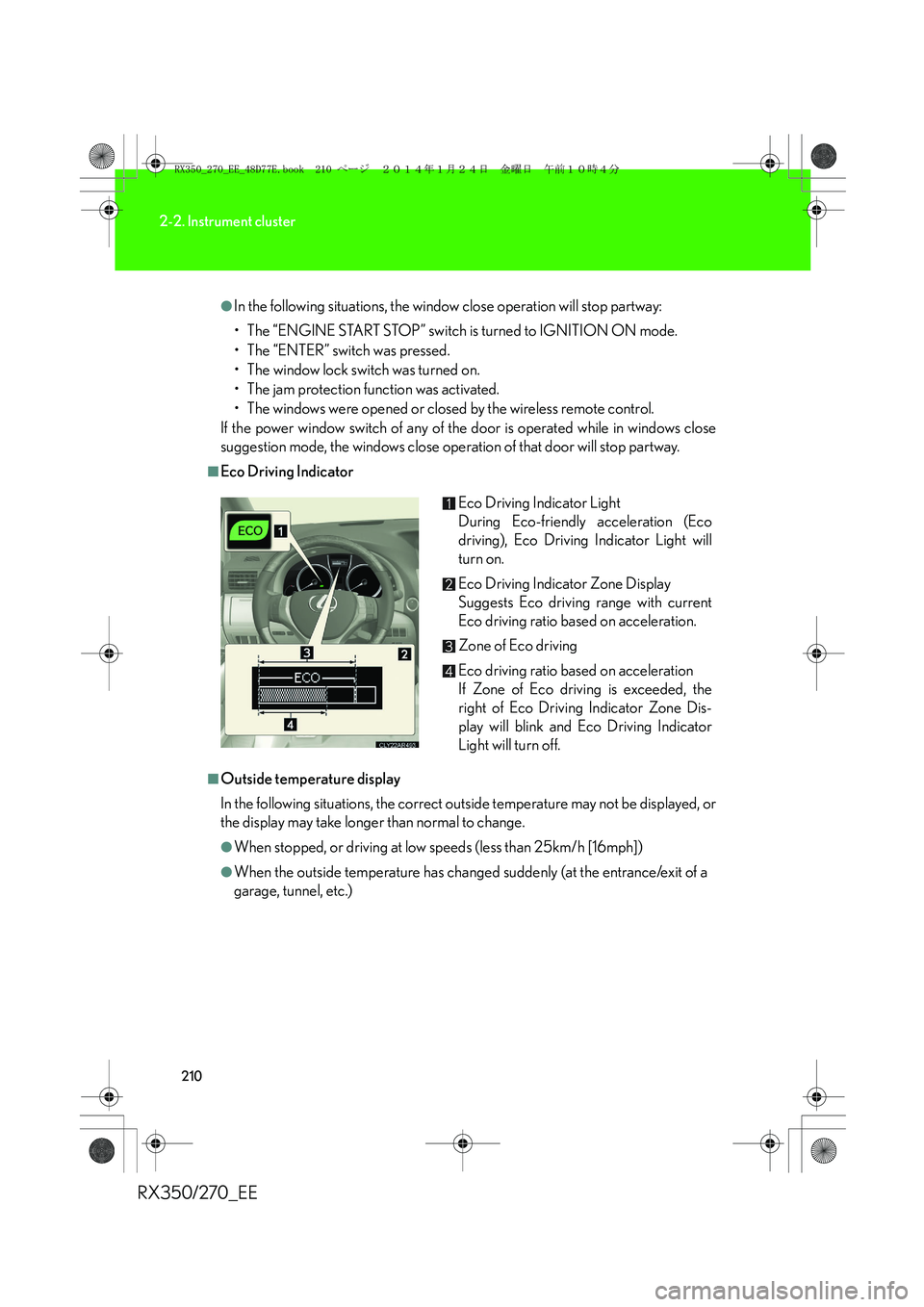
■Eco Driving Indicator
■Outside temperature display
In the following situations, the correct outside temperature may not be displayed, or
the display may take longer than normal to change.
●When stopped, or driving at low speeds (less than 25km/h [16mph])
●When the outside temperature has changed suddenly (at the entrance/exit of a
garage, tunnel, etc.)Eco Driving Indicator Light
During Eco-friendly acceleration (Eco
driving), Eco Driving Indicator Light will
turn on.
Eco Driving Indicator Zone Display
Suggests Eco driving range with current
Eco driving ratio based on acceleration.
Zone of Eco driving
Eco driving ratio based on acceleration
If Zone of Eco driving is exceeded, the
right of Eco Driving Indicator Zone Dis-
play will blink and Eco Driving Indicator
Light will turn off.
RX350_270_EE_48D77E.book 210 ページ 2014年1月24日 金曜日 午前10時4分
Page 211 of 652
211
2-2. Instrument cluster
2
When driving
RX350/270_EE
■The multi-information display at low temperatures
Allow the interior of the vehicle to warm up before using the liquid crystal informa-
tion display. At extremely low temperatures, the information display monitor may
respond slowly, and display changes may be delayed.
■Customization
Settings (e.g. available languages) can be changed.
(Customizable features →P. 6 2 2 )
CAUTION
■Operating the windows close suggestion mode
●Before closing the windows, ensure that there are no objects in the surrounding
area that could become caught in the windows.
●Check that all the windows are closed when exiting the vehicle, as window close
suggestion mode may not operate under certain conditions.
■Caution while driving
When operating the electronic features control while driving, take extra notice of
the vehicle’s surrounding area.
RX350_270_EE_48D77E.book 211 ページ 2014年1月24日 金曜日 午前10時4分
Page 212 of 652
212
2-2. Instrument cluster
RX350/270_EE
Head-up display∗
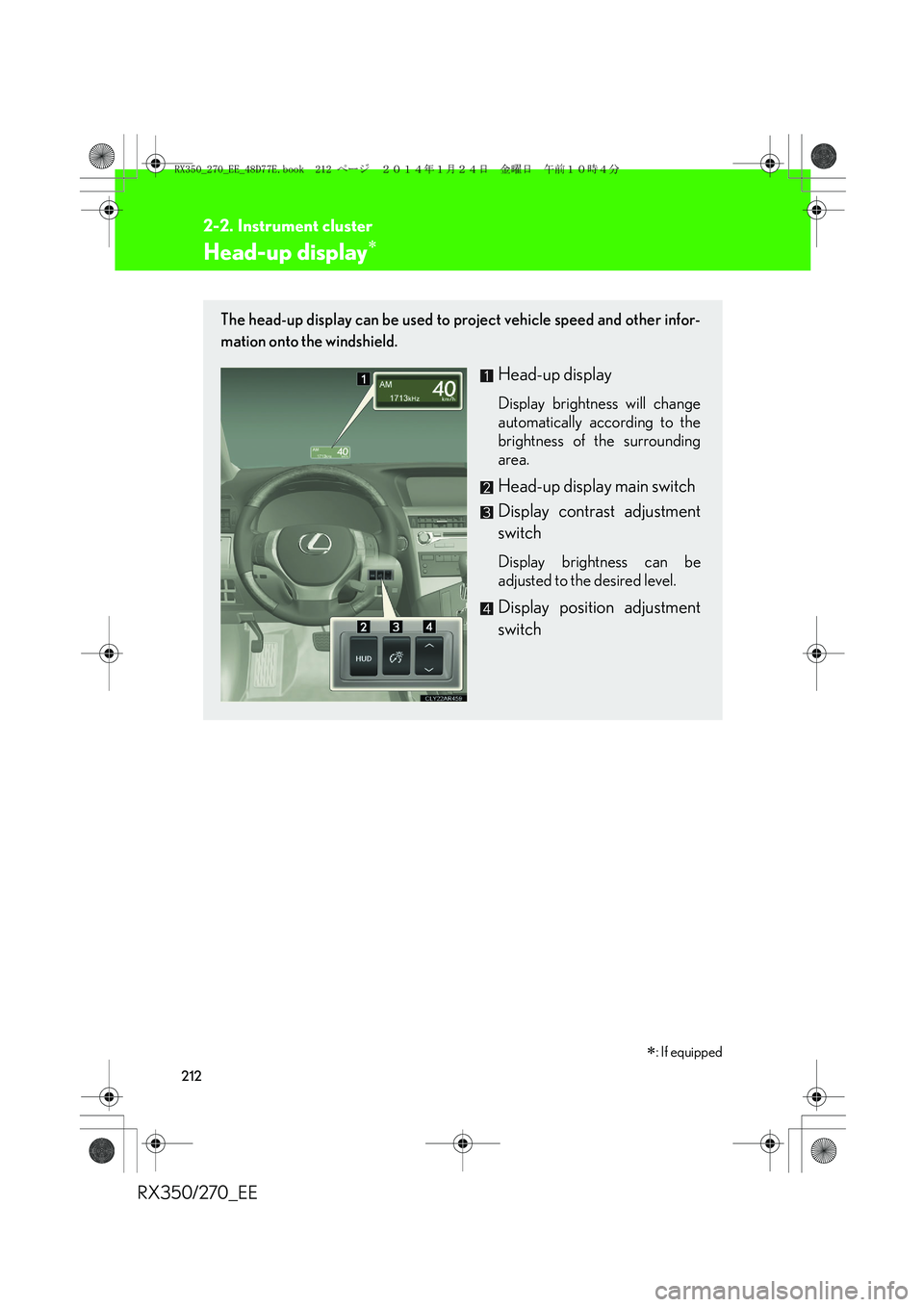
The head-up display can be used to project vehicle speed and other infor-
mation onto the windshield.
Head-up display
Display brightness will change
automatically according to the
brightness of the surrounding
area.
Head-up display main switch
Display contrast adjustment
switch
Display brightness can be
adjusted to the desired level.
Display position adjustment
switch
∗: If equipped
RX350_270_EE_48D77E.book 212 ページ 2014年1月24日 金曜日 午前10時4分
Page 213 of 652
213
2-2. Instrument cluster
2
When driving
RX350/270_EE
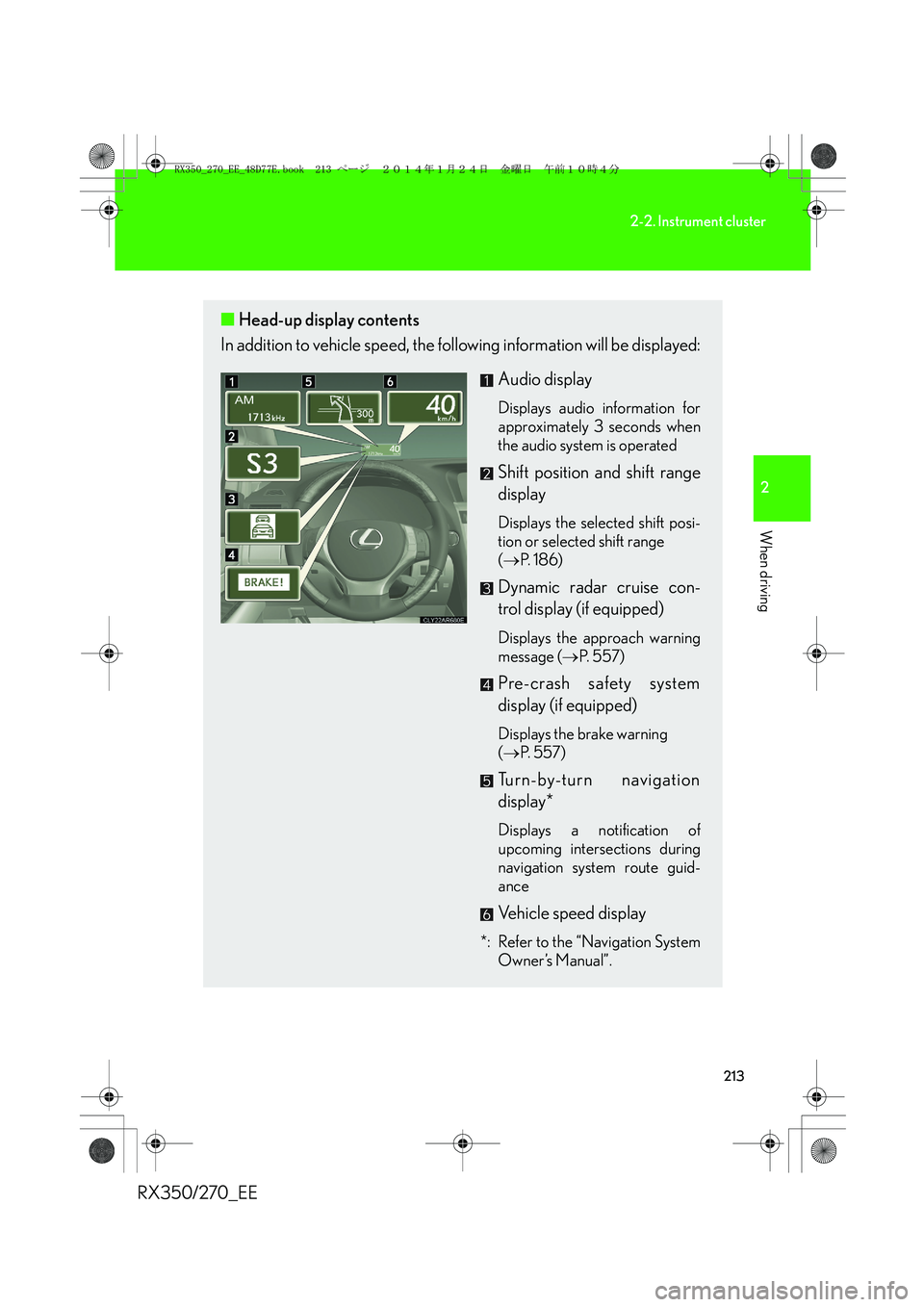
■Head-up display contents
In addition to vehicle speed, the following information will be displayed:
Audio display
Displays audio information for
approximately 3 seconds when
the audio system is operated
Shift position and shift range
display
Displays the selected shift posi-
tion or selected shift range
(→P. 1 8 6 )
Dynamic radar cruise con-
trol display (if equipped)
Displays the approach warning
message (→P. 5 5 7 )
Pre-crash safety system
display (if equipped)
Displays the brake warning
(→P. 5 5 7 )
Turn-by-turn navigation
display*
Displays a notification of
upcoming intersections during
navigation system route guid-
ance
Vehicle speed display
*: Refer to the “Navigation System
Owner’s Manual”.
RX350_270_EE_48D77E.book 213 ページ 2014年1月24日 金曜日 午前10時4分
Page 214 of 652
214
2-2. Instrument cluster
RX350/270_EE
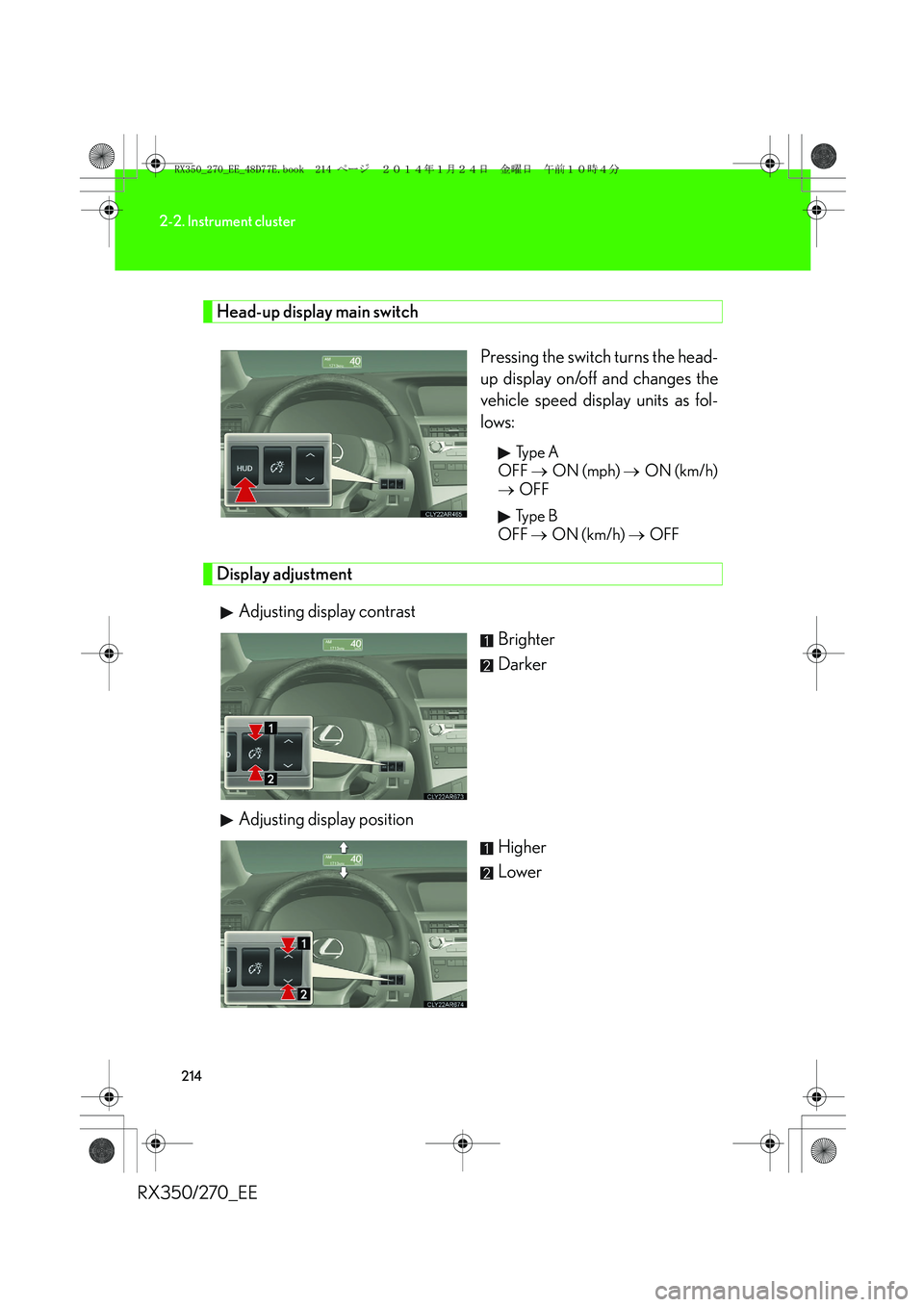
Head-up display main switch
Pressing the switch turns the head-
up display on/off and changes the
vehicle speed display units as fol-
lows:
Ty p e A
OFF → ON (mph) → ON (km/h)
→ OFF
Ty p e B
OFF → ON (km/h) → OFF
Display adjustment
Adjusting display contrast
Brighter
Darker
Adjusting display position
Higher
Lower
RX350_270_EE_48D77E.book 214 ページ 2014年1月24日 金曜日 午前10時4分