change LEXUS RX270 2014 Service Manual
[x] Cancel search | Manufacturer: LEXUS, Model Year: 2014, Model line: RX270, Model: LEXUS RX270 2014Pages: 652, PDF Size: 48.98 MB
Page 258 of 652
258
2-4. Using other driving systems
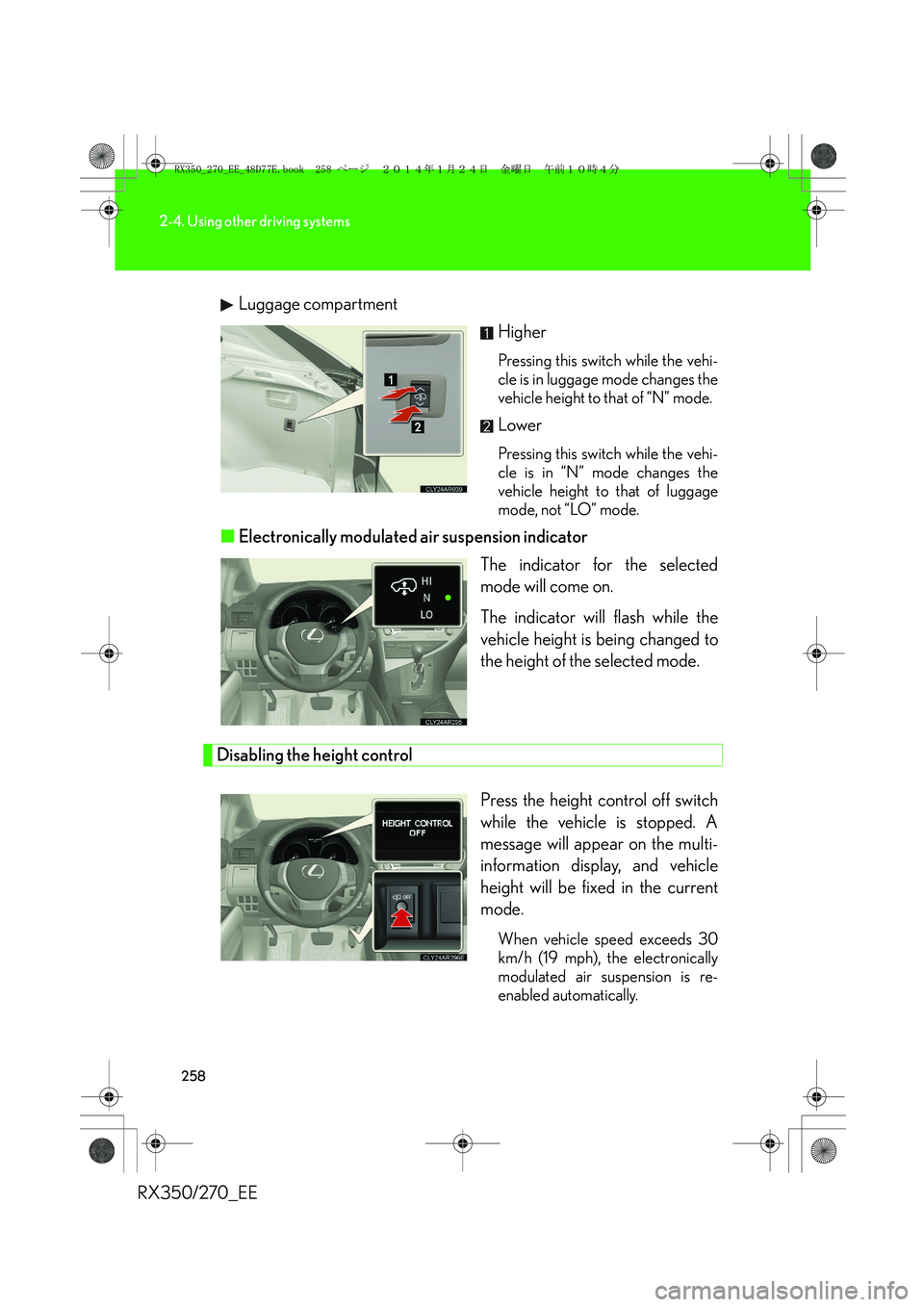
RX350/270_EELuggage compartment
Higher
Pressing this switch while the vehi-
cle is in luggage mode changes the
vehicle height to that of “N” mode.
Lower
Pressing this switch while the vehi-
cle is in “N” mode changes the
vehicle height to that of luggage
mode, not “LO” mode.
■Electronically modulated air suspension indicator
The indicator for the selected
mode will come on.
The indicator will flash while the
vehicle height is being changed to
the height of the selected mode.
Disabling the height control
Press the height control off switch
while the vehicle is stopped. A
message will appear on the multi-
information display, and vehicle
height will be fixed in the current
mode.
When vehicle speed exceeds 30
km/h (19 mph), the electronically
modulated air suspension is re-
enabled automatically.
RX350_270_EE_48D77E.book 258 ページ 2014年1月24日 金曜日 午前10時4分
Page 259 of 652
259
2-4. Using other driving systems
2
When driving
RX350/270_EE
■Operating conditions
After stopping the engine, the vehicle will remain lowered for a maximum of 60
seconds.
●Height selector switch (driver's side instrument panel)
• While the engine is running, any vehicle height mode can be selected.
• Luggage mode can only be selected when the shift lever is in P position.
●Height selector switch (luggage compartment)
• When the engine is running and the shift lever is in the P position, any vehicle
height other than “LO” mode can be selected.
• When the “ENGINE START STOP” switch is turned off, the vehicle height
can only be lowered (only the “∨” side of the switch can be operated).
This switch can only be operated when the back door is open.
●Height control off switch
When the vehicle is stopped with the “ENGINE START STOP” switch in IGNI-
TION ON mode, vehicle height control can be disabled/re-enabled.
■When changing vehicle height modes
Before operating the height selector switch to raise/lower the vehicle height,
ensure that there are no objects in the surrounding area that could damage the
vehicle.
■When “N” mode is selected
During high speed driving, the vehicle height will automatically change to that of
“LO” mode.
■When “HI” mode is selected
The vehicle height will change to that of “N” mode when vehicle speed reaches 50
km/h (31 mph) or when vehicle speed has exceeded 30 km/h (19 mph) for approx-
imately 10 seconds. Even if vehicle speed is reduced below 30 km/h (19 mph), the
vehicle height will not automatically return to “HI” mode.
■When “LO” mode is selected
The vehicle height will change to that of “N” mode when the engine is restarted.
RX350_270_EE_48D77E.book 259 ページ 2014年1月24日 金曜日 午前10時4分
Page 260 of 652
260
2-4. Using other driving systems
RX350/270_EE
■When luggage mode is selected
If the vehicle begins to move while still in luggage mode, the vehicle will automati-
cally change to “N” mode once speed exceeds 8 km/h (5 mph). Even if vehicle
speed is reduced below 8 km/h (5 mph), the vehicle height will not automatically
return to luggage mode.
■Operating sound of the air suspension
When the vehicle height is lowered, such as when entering and loading the vehicle,
or when the height selector switch is operated, the sound of the compressor oper-
ating or the mode changing may be heard. This does not indicate a malfunction.
■Automatic leveling function
Regardless of the number of occupants and the luggage load, vehicle height in any
mode is always adjusted to a fixed height by the automatic leveling function.
■Vehicle height mode change time
●If the height control is operated continuously to lower the vehicle, the suspen-
sion air tank may become full, causing operation of the vehicle height lowering
control to become slow.
●To protect the compressor, the system will only raise the vehicle for a total of
100 consecutive seconds. If it takes longer than this to reach the selected
height, operation may be suspended shortly and then restart. However, it may
not be possible to change the vehicle's height mode at this time.
■The electronically modulated air suspension will not operate when
The vehicle height control may not be able to change modes when the vehicle runs
over a high curb or other rugged surfaces where the suspension is stretched.
RX350_270_EE_48D77E.book 260 ページ 2014年1月24日 金曜日 午前10時4分
Page 261 of 652
261
2-4. Using other driving systems
2
When driving
RX350/270_EE
CAUTION
■The electronically modulated air suspension must be turned off when
The electronically modulated air suspension must be turned off in the following situ-
ations as vehicle height may change due to the automatic leveling function, and, you
may catch part of your body in the vehicle and cause an accident, resulting in death
or serious injury.
●Any of the wheels is stuck in a ditch.
●It is necessary to jack up the vehicle.
●It is necessary to tow the vehicle with part of it lifted.
●When connecting/disconnecting a trailer
For safety, stop the engine if necessary.
■“HI” mode
●“HI” mode should only be used when driving on rough roads, for example when
driving off-road. Because the vehicle's center of gravity will become higher when
in the mode, the vehicle may become unstable when turning abruptly and cause
an accident, resulting in death or serious injury.
●Do not select “HI” mode when loading cargo on the roof luggage carrier.
Because the vehicle's center of gravity will become higher when in the mode, the
vehicle may become unstable when turning abruptly, and cause an accident,
resulting in death or serious injury.
RX350_270_EE_48D77E.book 261 ページ 2014年1月24日 金曜日 午前10時4分
Page 262 of 652
262
2-4. Using other driving systems
RX350/270_EE
NOTICE
■Do not select “LO” mode when driving on bumpy roads.
If the underbody of the vehicle touches a rugged road surface, the vehicle may be
damaged. Also be careful when driving while the vehicle is automatically returning
from luggage or “LO” mode to “N” mode.
■Automatic return to “N” mode
In the following situations, the height of the vehicle will automatically increase. Be
careful in any place where overhead space is limited.
●The vehicle begins to move while still in luggage mode.
●The engine is restarted while the vehicle is in “LO” mode.
■Vehicle height while parked
If the temperature changes or the vehicle is parked for a long time, the vehicle
height may decrease.
RX350_270_EE_48D77E.book 262 ページ 2014年1月24日 金曜日 午前10時4分
Page 264 of 652
264
2-4. Using other driving systems
RX350/270_EE
■The rear view monitor system can be operated when
The shift lever is in R, the “ENGINE START STOP” switch is in IGNITION ON
mode.
■Changing display modes
The rear view monitor display mode can be changed while the screen is on.
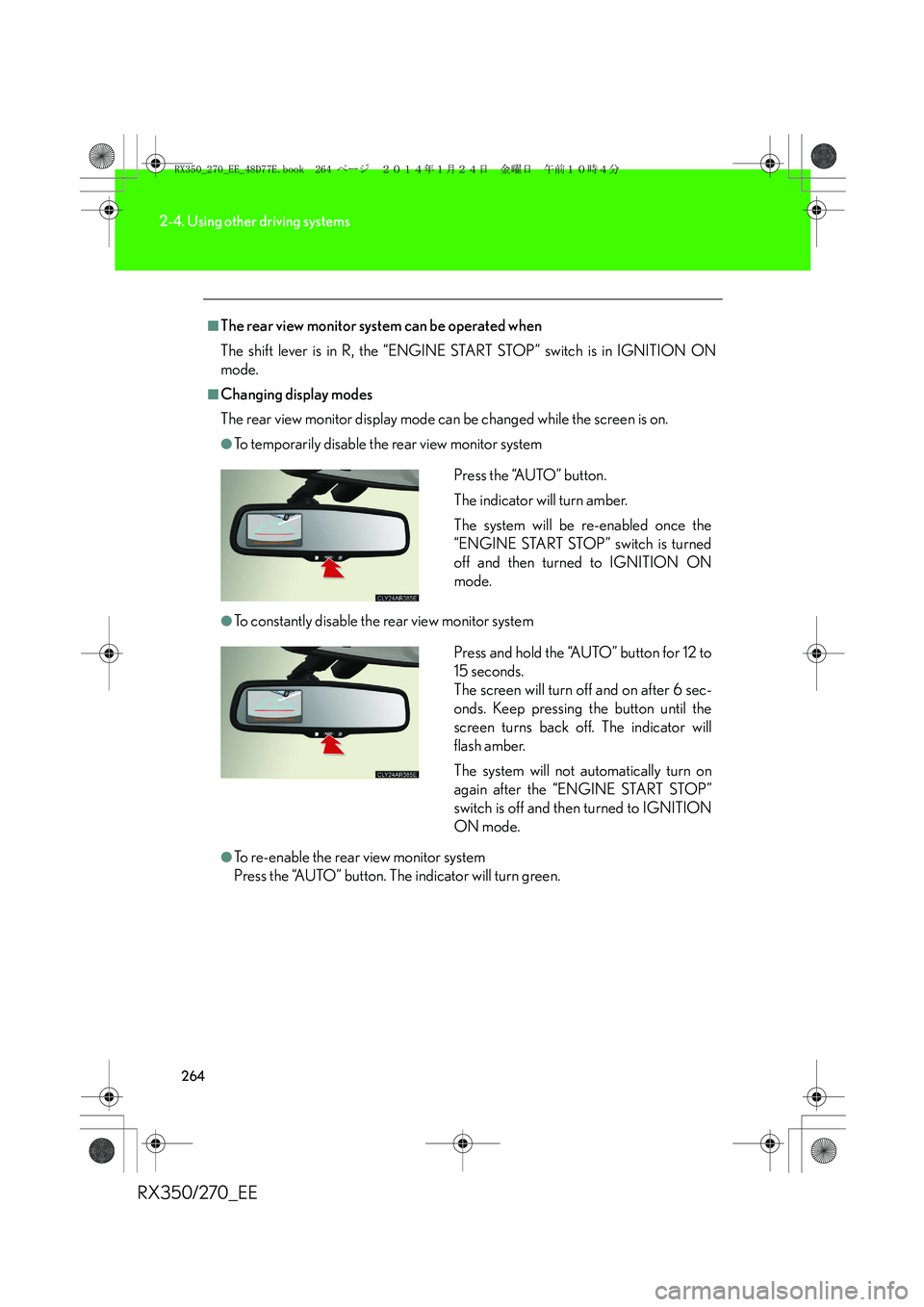
●To temporarily disable the rear view monitor system
●To constantly disable the rear view monitor system
●To re-enable the rear view monitor system
Press the “AUTO” button. The indicator will turn green.Press the “AUTO” button.
The indicator will turn amber.
The system will be re-enabled once the
“ENGINE START STOP” switch is turned
off and then turned to IGNITION ON
mode.
Press and hold the “AUTO” button for 12 to
15 seconds.
The screen will turn off and on after 6 sec-
onds. Keep pressing the button until the
screen turns back off. The indicator will
flash amber.
The system will not automatically turn on
again after the “ENGINE START STOP”
switch is off and then turned to IGNITION
ON mode.
RX350_270_EE_48D77E.book 264 ページ 2014年1月24日 金曜日 午前10時4分
Page 269 of 652
269
2-4. Using other driving systems
2
When driving
RX350/270_EE
■Flicker effect
When the camera is used under fluorescent light, sodium lights, or mercury lights
etc., the lights and the illuminated areas may appear to flicker.
CAUTION
■When using the rear view monitor system, observe the following precautions to
avoid an accident that could result in death or serious injuries:
●Never depend solely on the monitor system when reversing.
●Always check visually and with the mirrors to confirm your intended path is clear.
●Use your own eyes to confirm the vehicle’s surroundings, as the displayed image
may become faint or dark, and moving images will be distorted, or not entirely
visible when the outside temperature is low. When backing up, be sure to check
behind and all around the vehicle visually and with the mirrors before proceeding.
●Always check the vehicle surrounding area, because the guide lines are ancillary
lines.
●The guide lines are ancillary lines and do not change even if the steering wheel is
turned.
●Depicted distances between objects and flat surfaces differ from actual dis-
tances.
●Do not use the system if the back door is open.
RX350_270_EE_48D77E.book 269 ページ 2014年1月24日 金曜日 午前10時4分
Page 270 of 652
270
2-4. Using other driving systems
RX350/270_EE
NOTICE
■Conditions which may affect the rear view monitor system
●If the back of the vehicle has been hit, the camera’s position and mounting angle
may have changed. Have the vehicle inspected by any authorized Lexus dealer
or repairer, or another duly qualified and equipped professional.
●Rapid temperature changes, such as when hot water is poured on the vehicle in
cold weather, may cause the system to function abnormally.
●If the camera lens is dirty, it cannot transmit a clear image. Rinse with water and
wipe with a soft cloth. If extremely dirty, wash with a mild cleanser and rinse.
●The displayed image may be darker and moving images may be slightly distorted
when the system is cold.
■Camera precautions
●As the camera has a water proof construction, do not detach, disassemble or
modify it. This may cause incorrect operation.
●Do not subject the camera to a strong impact.
●If the camera lens becomes dirty, it cannot transmit a clear image. If water drop-
lets, snow, or mud adhere to the lens, rinse with water and wipe with a soft cloth. If
the lens is extremely dirty, wash it with a mild cleanser and rinse. Do not rub hard.
●Do not allow organic solvent, car wax, window cleaner or glass coat to adhere to
the camera. If this happens, wipe it off as soon as possible.
●Do not strongly rub the camera lens. If the camera lens is scratched, it cannot
transmit a clear image.
●When washing the vehicle, do not apply intensive bursts of water to the camera
or camera area. Doing so may result in the camera malfunctioning.
●When replacing tires, please consult any authorized Lexus dealer or repairer, or
another duly qualified and equipped professional. If you replace the tires, the area
displayed on the screen may change.
RX350_270_EE_48D77E.book 270 ページ 2014年1月24日 金曜日 午前10時4分
Page 283 of 652
283
2-4. Using other driving systems
2
When driving
RX350/270_EE
■Conditions that may trigger the system even if there is no possibility of collision
●When there is an object by the roadside at the entrance to a curve
●When passing an oncoming vehicle on a curve
●When driving over a narrow iron bridge
●When there is a metal object on the road surface
●When driving on an uneven road surface
●When passing an oncoming vehicle on a left-turn
●When your vehicle rapidly closes on the vehicle in front
●When a grade separation/interchange, sign, billboard, or other structure
appears to be directly in the vehicle’s line of travel
●When climbing a steep hill causes an overhead billboard or other metallic struc-
ture to appear directly in the vehicle’s line of travel
●When an extreme change in vehicle height occurs
●When the axis of the radar is out of adjustment
●When passing through certain toll gates
●When driving on a bridge
●When passing through a tunnel
When the system is activated in the situations described above, there is also a possi-
bility that the seat belts will retract quickly and the brakes will be applied with a force
greater than normal. When the seat belt is locked in the retracted position, stop the
vehicle in a safe place, release the seat belt and refasten it.
■Obstacles not detected
The sensor cannot detect plastic obstacles such as traffic cones. There may also be
occasions when the sensor cannot detect pedestrians, animals, bicycles, motorcy-
cles, trees, or snowdrifts.
RX350_270_EE_48D77E.book 283 ページ 2014年1月24日 金曜日 午前10時4分
Page 284 of 652
284
2-4. Using other driving systems
RX350/270_EE
■Situations in which the pre-crash safety system does not function properly
The system may not function effectively in situations such as the following:
●On roads with sharp bends or uneven surfaces
●If a vehicle suddenly moves in front of your vehicle, such as at an intersection
●If a vehicle suddenly cuts in front of your vehicle, such as when overtaking
●In inclement weather such as heavy rain, fog, snow or sand storms
●When your vehicle is skidding with the VSC system off
●When an extreme change in vehicle height occurs
●When the axis of the radar is out of adjustment
■Automatic cancelation of the pre-crash safety system
When a malfunction occurs due to sensor contamination, etc. that results in the
sensors being unable to detect obstacles, the pre-crash safety system will be auto-
matically disabled. In this case, the system will not activate even if there is a collision
possibility.
■When there is a malfunction in the system, or if the system is temporarily unus-
able
Warning lights and/or warning messages will turn on or flash. (→P. 5 4 3 , 5 5 2 )
RX350_270_EE_48D77E.book 284 ページ 2014年1月24日 金曜日 午前10時4分