torque LEXUS SC400 1991 Service Manual Online
[x] Cancel search | Manufacturer: LEXUS, Model Year: 1991, Model line: SC400, Model: LEXUS SC400 1991Pages: 4087, PDF Size: 75.75 MB
Page 1004 of 4087

2. INSTALL DUST BOOTS AND SLIDING PINS
(a) Using a 19 mm socket and hammer, tap in 2 new dust bootsinto the torque plate.
(b) Confirm that the metal plate portion of the dust boot fits
snugly in the torque plate.
(c) Insert 2 sliding pins into the torque plate.
NOTICE: Insert the sliding pin with sliding bushing A into the
upper part, and insert the sliding pin with sliding bushing B
into the lower part.
3. INSTALL PISTON SEALS AND PISTONS IN CALIPER
4. INSTALL CYLINDER BOOTS AND CYLINDER BOOT SET RINGS
CALIPER INSTALLATION
BR046±0C
1. INSTALL FOLLOWING PARTS:
(a) 2 brake pads
(b) 2 anti±squeal springs
±
BRAKE SYSTEM FRONT BRAKE (SC400)BR±35
WhereEverybodyKnowsYourName
Page 1005 of 4087

2. INSTALL CALIPER
(a) Temporarily install the caliper on the torque plate with 2installation bolts.
(b) Hold the sliding pin and torque the installation bolt.
Torque: 34 N Vm (350 kgf Vcm, 25 ft Vlbf)
3. CONNECT FLEXIBLE HOSE
Install the flexible hose on the caliper with 2 new gaskets.
Torque: 30 N Vm (310 kgf Vcm, 22 ft Vlbf)
HINT: Insert the flexible hose lock securely in the lock hole in
the caliper.
4. FILL BRAKE R ESERVOIR WITH BRAKE FLUID AND
BLEED BRAKE SYSTEM
(See page BR±8)
5. CHECK FOR LEAKS
BR±36
±
BRAKE SYSTEM FRONT BRAKE (SC400)
WhereEverybodyKnowsYourName
Page 1008 of 4087

8. INSTALL NEW PADS
(a) Apply disc brake grease to both sides of the inner anti±squeal
shim.
(b) Install the 2 anti±squeal shims on each pad.
(c) Install the inner pad with the pad wear indicator plates facing
downward.
(d) Install the outer pad.
NOTICE: There should be no oil or grease adhering to the fric-
tion surfaces of the pads or the disc.
(e) Install the 2 anti±squeal springs.
9. INSTALL CALIPER
(a) Draw out a small amount of brake fluid from the reservoir.
(b) P re ss in th e pisto n with wa te r pu mp plie rs or simila r implement.
HINT: If the piston is difficult to push in, loosen the bleeder
plug and push in the piston while letting some brake fluid es-
cape.
(c) Install the caliper.
(d) Hold the sliding pin and torque the installation bolt.
Torque: 34 N Vm (350 kgf Vcm, 25 ft Vlbf)
10. INSTALL REAR WHEEL
11. CHECK THAT FLUID LEVEL IS AT MAX LINE
CALIPER REMOVAL
BR0EN±04
1. DISCONNECT FLEXIBLE HOSE
(a) Remove the union bolt and 2 gaskets from the caliper, then
disconnect the flexible hose from the caliper.
(b) Use a container to catch the brake fluid as it drains out.
2. REMOVE CALIPER
(a) Hold the sliding pin and loosen the 2 installation bolts.
(b) Remove the 2 installation bolts.
(c) Remove the caliper from the torque plate.
±
BRAKE SYSTEM REAR BRAKE (Disc Brake)BR±39
WhereEverybodyKnowsYourName
Page 1009 of 4087

3. REMOVE FOLLOWING PARTS:
(a) 2 anti±squeal springs
(b) 2 brake pads
CALIPER DISASSEMBLY
BR0EP±04
1. REMOVE CYLINDER BOOT SET RING AND CYLINDERBOOT
Using a screwdriver, remove the cylinder boot set ring and
cylinder boot from the caliper.
2. REMOVE PISTON
(a) Place a piece of cloth or similar article between the piston and
the caliper.
(b) Use compressed air to remove the piston from the caliper.
CAUTION: Do not place your fingers in front of the piston when
using compressed air.
3. REMOVE PISTON SEAL Using a screwdriver, remove the piston seal from the caliper.
4. REMOVE SLIDING PINS AND DUST BOOTS
(a) Remove the 2 sliding pins from the torque plate.
BR±40
±
BRAKE SYSTEM REAR BRAKE (Disc Brake)
WhereEverybodyKnowsYourName
Page 1010 of 4087

(b) Using a screwdriver and hammer, tap out the 2 dust boots.
REAR BRAKE COMPONENTS
INSPECTION AND REPAIR
BR04B±06
1. MEASURE PAD LINING THICKNESSUsing a ruler, measure the pad lining thickness.
Standard thickness:
10.0 mm (0.394 in.)
Minimum thickness: 1.0 mm (0.039 in.)
Replace the pad if the pad's thickness is at the minimum
thickness or less, or if the pad has severely uneven wear.
2. MEASURE DISC THICKNESS
Using a micrometer, measure the disc thickness.
Standard thickness:
16.0 mm (0.630 in.)
Minimum thickness:
15.0 mm (0.591 in.)
Replace the disc if the thickness of the disc is at the minimum
thickness or less. Replace the disc or grind it on a lathe if it
is scored or is worn unevenly.
3. MEASURE DISC RUNOUT
Measure the disc runout at 10 mm (0.39 in.) from the outer
edge of the disc.
Maximum disc runout:
0.05 mm (0.0020 in.)
If the disc's runout is at the maximum value or greater, check
the bearing play in the axial direction and check the axle hub
runout (See page SA±52). If the bearing play and axle hub
runout are not abnormal, adjust the disc runout.
4. IF NECESSARY, ADJUST DISC RUNOUT
(a) Remove the 2 bolt and torque plate from the carrier.
(b) Remove the hub nuts and the disc. Reinstall the disc 1/5 of
a turn round from its original position on the hub. Install and
torque the hub nuts.
Torque: 103 N Vm (1,050 kgf Vcm, 76 ft Vlbf)
Remeasure the disc runout. Make a note of the runout and
the disc's position on the hub.
±
BRAKE SYSTEM REAR BRAKE (Disc Brake)BR±41
WhereEverybodyKnowsYourName
Page 1011 of 4087

(c) Repeat (b) until the disc has been installed on the 3remaining hub positions.
(d) If the minimum runout recorded in (b) and (c) is less than 0.05
mm (0.0020 in.), install the disc in that position.
(e) If the minimum runout recorded in (b) and (c) is greater than 0.05 mm (0.0020 in.), replace the disc and repeat step 3.
(f) Install the torque plate and tighten the 2 bolts.
Torque: 104 N Vm (1,065 kgf Vcm, 77 ft Vlbf)
CALIPER ASSEMBLY
BR0EQ±04
1. APPLY LITHIUM SOAP BASE GLYCOL GREASE TO
PARTS INDICATED WITH ARROWS
2. INSTALL DUST BOOTS AND SLIDING PINS
(a) Using a 19 mm socket and hammer, tap in 2 new dust boots into the torque plate.
(b) Confirm that the metal plate portion of the dust boot fits snugly in the torque plate.
(c) Insert 2 sliding pins into the torque plate.
NOTICE: Insert the sliding pin with the sliding bushing into the
bottom side.
BR±42±
BRAKE SYSTEM REAR BRAKE (Disc Brake)
WhereEverybodyKnowsYourName
Page 1012 of 4087

3. INSTALL PISTON SEAL AND PISTON IN CALIPER
4. INSTALL CYLINDER BOOT AND CYLINDER BOOT SETRING
CALIPER INSTALLATION
BR0ER±04
1. INSTALL FOLLOWING PARTS:
(a) 2 brake pads
(b) 2 anti±squeal springs
2. INSTALL CALIPER
(a) Temporarily install the caliper on the torque plate with 2installation bolts.
(b) Hold the sliding pin and torque the installation bolts.
Torque: 34 N Vm (350 kgf Vcm, 25 ft Vlbf)
3. CONNECT FLEXIBLE HOSE
Install the flexible hose on the caliper with 2 new gaskets.
Torque: 30 N Vm (310 kgf Vcm, 22 ft Vlbf)
HINT: Install the flexible hose lock securely in the lock hole
in the caliper.
4. FILL BRAKE R ESERVOIR WITH BRAKE FLUID AND
BLEED BRAKE SYSTEM
(See page BR±8)
5. CHECK FOR LEAKS
±
BRAKE SYSTEM REAR BRAKE (Disc Brake)BR±43
WhereEverybodyKnowsYourName
Page 1018 of 4087

6. INSTALL SHOE STRUT WITH SPRINGInstall the strut with the spring forward.
7. INSTALL SHOE RETURN SPRINGS Using needle±nose pliers, install the front shoe return spring
and then install the rear shoe return spring.
8. INSTALL DISC
(a) Before installing, polish the disc and shoe surfaces with sandpaper.
(b) Align the matchmarks and install the disc. HINT: If there are no matchmarks, temporarily install the disc,
then measure the disc runout and install the disc in the posi-
tion.
(See page BR±41)
9. ADJUST PARKING BRAKE SHOE CLEARANCE
(a) Temporarily install the hub nuts.
(b) Remove the hole plug.
(c) Turn the adjuster and expand the shoes until the disc locks.
(d) Return the adjuster 8 notches.
(e) Install the hole plug.
10. INSTALL REAR DISC BRAKE ASSEMBLY Install the disc brake assembly and torque the 2 mounting
bolts.
Torque: 104 N Vm (1,065 kgf Vcm, 77 ft Vlbf)
11. INSTALL REAR WHEEL
±
BRAKE SYSTEM REAR BRAKE (Parking Brake)BR±49
WhereEverybodyKnowsYourName
Page 1032 of 4087
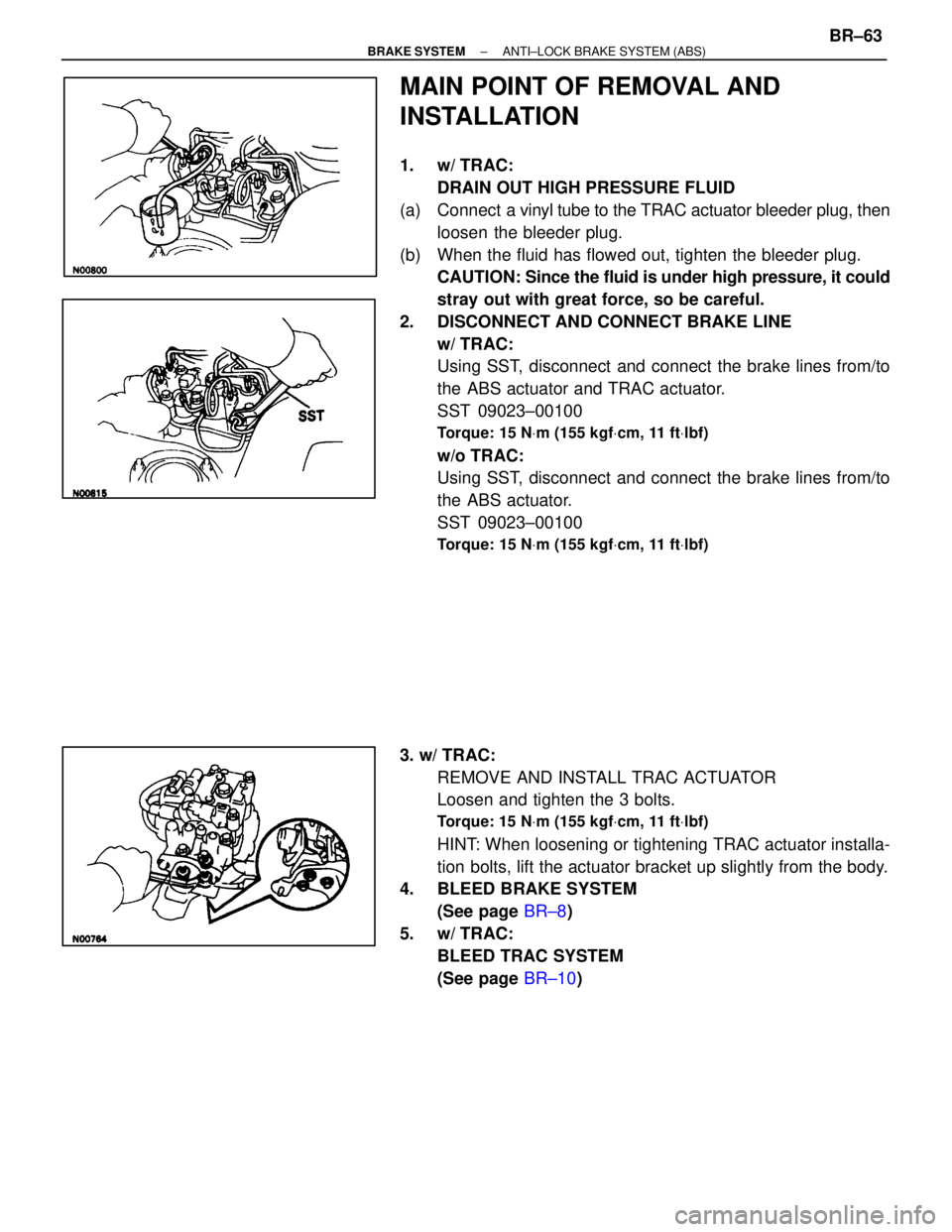
MAIN POINT OF REMOVAL AND
INSTALLATION
1. w/ TRAC:DRAIN OUT HIGH PRESSURE FLUID
(a) Connect a vinyl t ube to the TRAC actuator bleeder plug, then
loosen the bleeder plug.
(b) When the fluid has flowed out, tighten the bleeder plug. CAUTION: Since the fluid is under high pressure, it could
stray out with great force, so be careful.
2. DISCONNECT AND CONNECT BRAKE LINE w/ TRAC:
Using SST, disconnect and connect the brake lines from/to
the ABS actuator and TRAC actuator.
SST 09023±00100
Torque: 15 N Vm (155 kgf Vcm, 11 ft Vlbf)
w/o TRAC:
Using SST, disconnect and connect the brake lines from/to
the ABS actuator.
SST 09023±00100
Torque: 15 N Vm (155 kgf Vcm, 11 ft Vlbf)
3. w/ TRAC:
REMOVE AND INSTALL TRAC ACTUATOR
Loosen and tighten the 3 bolts.
Torque: 15 N Vm (155 kgf Vcm, 11 ft Vlbf)
HINT: When loosening or tightening TRAC actuator installa-
tion bolts, lift the actuator bracket up slightly from the body.
4. BLEED BRAKE SYSTEM
(See page BR±8)
5. w/ TRAC: BLEED TRAC SYSTEM
(See page BR±10)
±
BRAKE SYSTEM ANTI±LOCK BRAKE SYSTEM (ABS)BR±63
WhereEverybodyKnowsYourName
Page 1122 of 4087

TRACTION CONTROL SYSTEM (TRAC)
DESCRIPTION
BR0F3±01
The TRAC (Traction Control) system totally controls the engine torque and the braking of the driving wheels
(rear wheels). It helps avoid slippage of the driving wheels that tends to h\
appen during starting and accel-
eration and to maintain an optimal driving force according to the road surface conditions. The syst\
em elimi-
nates the need for a subtle accelerator pedal operation and improves veh\
icle stability when starting, accel-
erating or turning on slippery roads.
The TRAC system is an option.
SYSTEM PARTS LOCATION
BR0F4±01
±
BRAKE SYSTEM TRACTION CONTROL SYSTEM (TRAC)BR±153
WhereEverybodyKnowsYourName