phone LINCOLN AVIATOR 2021 Owner's Guide
[x] Cancel search | Manufacturer: LINCOLN, Model Year: 2021, Model line: AVIATOR, Model: LINCOLN AVIATOR 2021Pages: 667, PDF Size: 7.01 MB
Page 368 of 667
E-mail
Fax
Phone
Customer Relationship Center
[email protected]
N/A
+1-800-841-3673
Puerto Rico and U.S. Virgin Islands
[email protected]
N/A
N/A
Sub-Saharan Africa
[email protected] [email protected]
N/A
+82-02-1600-6003
South Korea
If you buy your vehicle in North America and
then relocate to any of the above locations,
register your vehicle identification number
(VIN) and new address with Ford Global
Trade Services by emailing,
[email protected].
If you are in another foreign country, contact
the nearest authorized dealer. In the event
your inquiry is unresolved, communicate your
concern with the dealership ’s Sales Manager,
Service Manager or Customer Relations
Manager. If you require additional assistance
or clarification, please contact the respective
Customer Relationship Center as previously
listed.
Customers in the U.S. should call
1-800-392-3673. ORDERING ADDITIONAL OWNER'S
LITERATURE
To order the publications in this portfolio,
contact Helm, LLC at:
HELM, LLC
47911 Halyard Drive, Suite 200
Plymouth, Michigan 48170
Attention: Customer Service
Or to order a free publication catalog, call
toll free: 1-800-782-4356
Monday-Friday 8:00 a.m. - 6:00 p.m. EST
Helm, LLC can also be reached by their
website:
www.helminc.com(Items in this catalog may be purchased by
credit card, check or money order.)
Obtaining a French Owner’
s Manual
French Owner’ s Manual can be obtained
from your authorized dealer or by contacting
Helm, LLC using the contact information
listed previously in this section.
365
Aviator (CTV) Canada/United States of America, enUSA, Edition date: 202007, Second-Printing Customer Assistance
Page 369 of 667
REPORTING SAFETY DEFECTS
(U.S. ONLY)
If you believe that your vehicle has a
defect which could cause a crash or
could cause injury or death, you should
immediately inform the National
Highway Traffic Safety Administration
(NHTSA) in addition to notifying Ford
Motor Company.
If NHTSA receives similar complaints, it
may open an investigation, and if it finds
that a safety defect exists in a group of
vehicles, it may order a recall and
remedy campaign. However, NHTSA
cannot become involved in individual
problems between you, your dealer, or
Ford Motor Company.
To contact NHTSA, you may call the
Vehicle Safety Hotline toll-free at
1-888-327-4236 (TTY: 1-800-424-9153);
go to www .safercar . gov ; or write to:
Administrator
1200 New Jersey Avenue, Southeast Washington, D.C. 20590
You can also obtain other information
about motor vehicle safety from
www .safercar . gov .
REPORTING SAFETY DEFECTS
(CANADA ONLY)
If you believe that your vehicle has a defect
which could cause a crash or could cause
injury or death, you should immediately
inform Transport Canada and Ford of
Canada. Transport Canada Contact Information
http://www.tc.gc.ca/eng/motorvehiclesafety/reporting-defects-motor-vehicles.html (Englis\
h)
Website
http://www.tc.gc.ca/fra/securiteautomobile/signaler-defauts-vehicules-automobiles.html (\
French)
Website
1-800-333-0510
Phone
366
Aviator (CTV) Canada/United States of America, enUSA, Edition date: 202007, Second-Printing Customer Assistance
Page 370 of 667
Ford of Canada Contact Information
www.ford.ca
Website
1-800-565-3673
Phone
367
Aviator (CTV) Canada/United States of America, enUSA, Edition date: 202007, Second-Printing Customer Assistance
Page 480 of 667

Possible Cause and Resolution
Symptom
•If your vehicle has metallic tinting on the windows and the windshield, \
open the
windows that are facing the hotspot.
• If your vehicle is in a garage and you have the garage door closed, open\
the garage
door.
I cannot see a network in the list of available
networks that I expect to see. –
Hidden network.
•Make the network visible and try again.
I cannot see the Wi-Fi Hotspot name when I
search for Wi-Fi networks on my cell phone
or other device. –
System limitation.
•Make sure Wi-Fi hotspot visibility is on.
• The system does not provide a Wi-Fi hotspot at this time.
– Weak network signal
•Move your vehicle closer to the Wi-Fi hotspot or to a place where the ne\
twork signal
is not obstructed.
– Wi-Fi hotspot in high demand or has a slow Internet connection.
•Use a more reliable Wi-Fi hotspot.
Software downloads take too long.
–No software update available.
– Wi-Fi network requires a subscription or acceptance of terms and conditi\
ons.
•Test the connection using another device. If the network requires a subscription or
acceptance of terms and conditions, contact the network service provider\
.
The system seems to connect to a Wi-Fi
network and the signal strength is excellent
but the software does not update.
477
Aviator (CTV) Canada/United States of America, enUSA, Edition date: 202007, Second-Printing Network Connectivity
Page 487 of 667
Switching the Audio Control On and
Off
Adjusting the Volume
Touch the arrow buttons to adjust the
volume.
Using Seek, Fast Forward and Reverse
In radio mode, select a frequency band and
touch either button. The system stops at the
first station it finds in that direction.
In satellite radio mode, touch to select the
next or previous satellite radio station. If you
select a specific category, such as jazz, rock
or news, touch to find the next or previous
station in that category. Rear Audio Control Lock Message
A message displays when the controls are
locked through the front and you try to
operate them.
Note:
The controls also lock when a voice
session or phone call is active.
DIGITAL RADIO
Note: HD Radio broadcasts are not available
in all markets.
HD Radio technology is the digital evolution
of analog AM/FM radio. Your system has a
special receiver that allows it to receive
digital broadcasts, where available, in
addition to the analog broadcasts, it already
receives. Digital broadcasts provide a better
sound quality than analog broadcasts with
free, crystal-clear audio and no static or
distortion. For more information, and a guide
to available stations and programming,
please visit www.hdradio.com. When HD Radio is on and you tune to a
station broadcasting HD Radio technology,
you may notice the HD Radio logo on your
screen. When this logo is available, you may
also see Title and Artist fields on-screen.
The multicast indicator appears in FM mode,
only, if the current station is broadcasting
multiple digital broadcasts. The highlighted
numbers signify available digital channels
where new or different content is available.
HD1 signifies the main programming status
and is available in analog and digital
broadcasts. Other multicast stations, HD2
through HD7, are only available digitally.
When HD Radio broadcasts are active, you
can access the following functions:
•
Memory presets allow you to save an
active channel as a memory preset.
Touch and hold a memory preset slot
until the sound returns. There is a brief
mute while the radio saves the station.
Sound returns when finished. When
switching to an HD2 or HD3 memory
preset, the sound mutes before the
digital audio plays, because the system
has to reacquire the digital signal.
484
Aviator (CTV) Canada/United States of America, enUSA, Edition date: 202007, Second-Printing Audio System
Page 495 of 667
GENERAL INFORMATION
WARNING: Driving while distracted
can result in loss of vehicle control, crash
and injury. We strongly recommend that
you use extreme caution when using any
device that may take your focus off the
road. Your primary responsibility is the safe
operation of your vehicle. We recommend
against the use of any hand-held device
while driving and encourage the use of
voice-operated systems when possible.
Make sure you are aware of all applicable
local laws that may affect the use of
electronic devices while driving.
About SYNC
The system allows you to interact with the
entertainment, information and
communication systems on your vehicle
using voice commands and a touchscreen.
The system provides easy interaction with
audio, phone, navigation, mobile apps and
settings. Note:
You can switch the system on and use
it for up to an hour without switching the
ignition on.
Note: You can use the system after you
switch the ignition off for up to 10 minutes or
until you open a door.
Note: For your safety, some features are
speed-dependent. Their use is limited to
when your vehicle speed is less than 3 mph
(5 km/h)
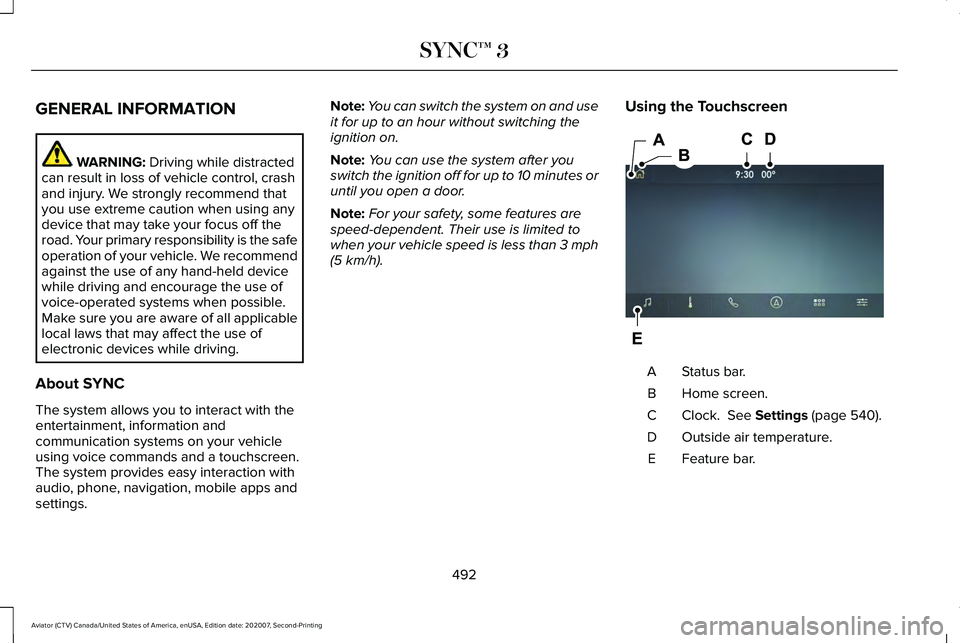
. Using the Touchscreen Status bar.
A
Home screen.
B
Clock.
See Settings (page 540).
C
Outside air temperature.
D
Feature bar.
E
492
Aviator (CTV) Canada/United States of America, enUSA, Edition date: 202007, Second-Printing SYNC™ 3E297844
Page 496 of 667
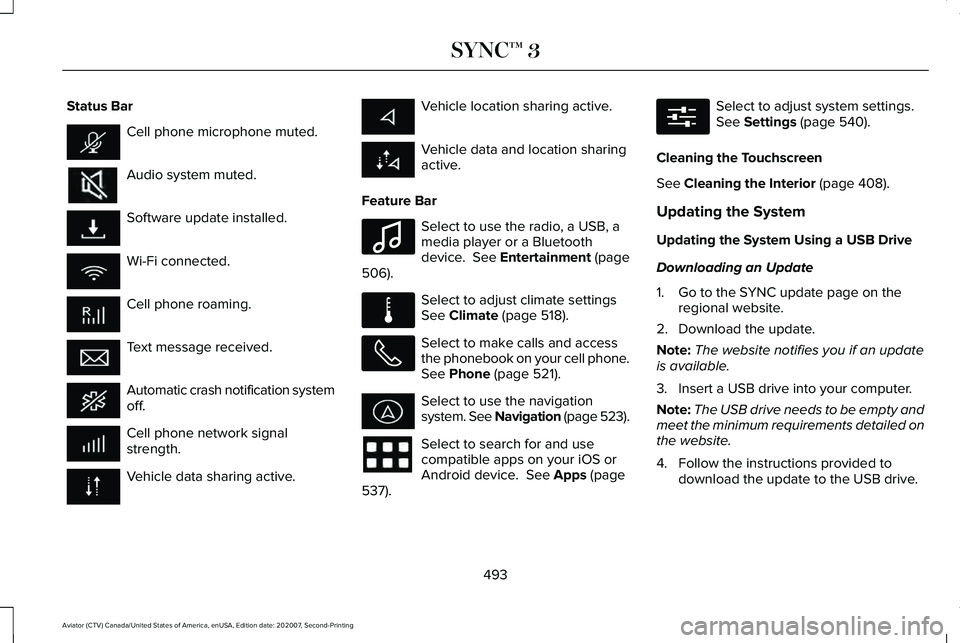
Status Bar
Cell phone microphone muted.
Audio system muted.
Software update installed.
Wi-Fi connected.
Cell phone roaming.
Text message received.
Automatic crash notification system
off.
Cell phone network signal
strength.
Vehicle data sharing active. Vehicle location sharing active.
Vehicle data and location sharing
active.
Feature Bar Select to use the radio, a USB, a
media player or a Bluetooth
device. See Entertainment (page
506). Select to adjust climate settings
See
Climate (page 518).
Select to make calls and access
the phonebook on your cell phone.
See
Phone (page 521).
Select to use the navigation
system. See Navigation (page 523).
Select to search for and use
compatible apps on your iOS or
Android device.
See Apps (page
537). Select to adjust system settings.
See
Settings (page 540).
Cleaning the Touchscreen
See
Cleaning the Interior (page 408).
Updating the System
Updating the System Using a USB Drive
Downloading an Update
1. Go to the SYNC update page on the regional website.
2. Download the update.
Note: The website notifies you if an update
is available.
3. Insert a USB drive into your computer.
Note: The USB drive needs to be empty and
meet the minimum requirements detailed on
the website.
4. Follow the instructions provided to download the update to the USB drive.
493
Aviator (CTV) Canada/United States of America, enUSA, Edition date: 202007, Second-Printing SYNC™ 3 E100027 E283811 E280315
Page 502 of 667
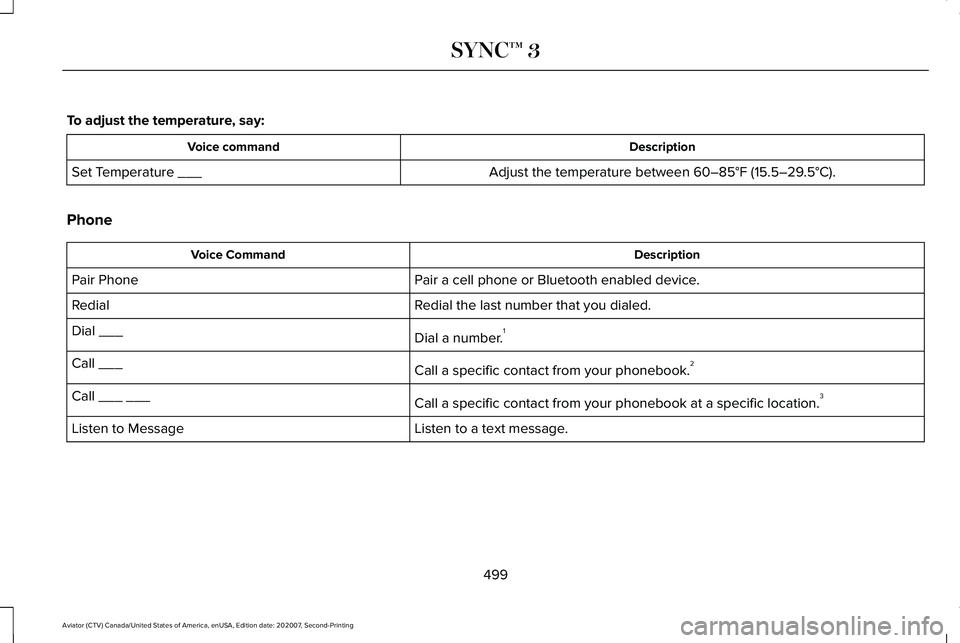
To adjust the temperature, say:
Description
Voice command
Adjust the temperature between 60–85°F (15.5–29.5°C).
Set Temperature ___
Phone Description
Voice Command
Pair a cell phone or Bluetooth enabled device.
Pair Phone
Redial the last number that you dialed.
Redial
Dial a number.1
Dial ___
Call a specific contact from your phonebook.2
Call ___
Call a specific contact from your phonebook at a specific location. 3
Call ___ ___
Listen to a text message.
Listen to Message
499
Aviator (CTV) Canada/United States of America, enUSA, Edition date: 202007, Second-Printing SYNC™ 3
Page 503 of 667
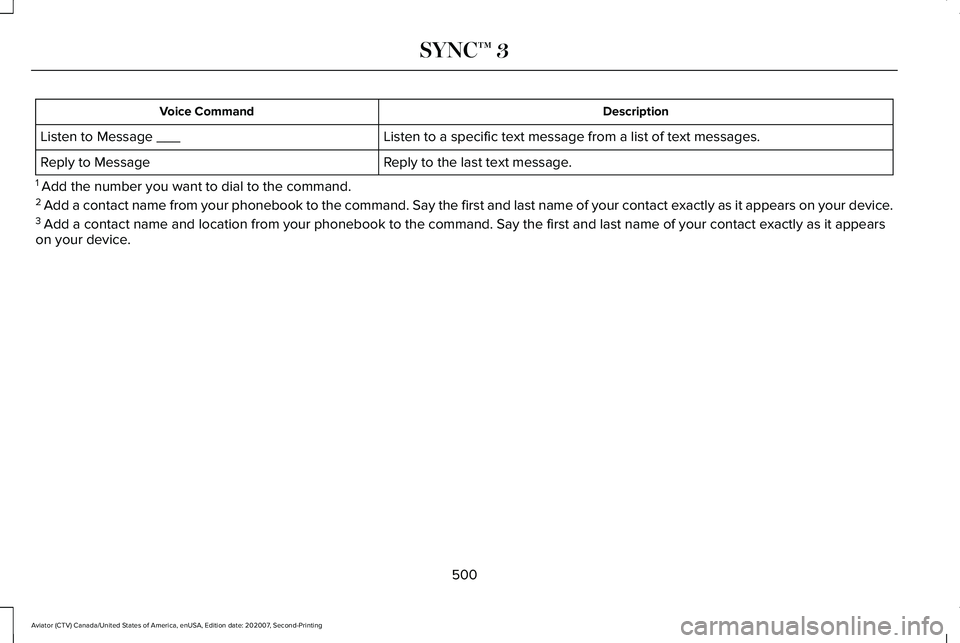
Description
Voice Command
Listen to a specific text message from a list of text messages.
Listen to Message ___
Reply to the last text message.
Reply to Message
1 Add the number you want to dial to the command.
2 Add a contact name from your phonebook to the command. Say the first and\
last name of your contact exactly as it appears on your device .
3 Add a contact name and location from your phonebook to the command. Say \
the first and last name of your contact exactly as it appears
on your device.
500
Aviator (CTV) Canada/United States of America, enUSA, Edition date: 202007, Second-Printing SYNC™ 3
Page 507 of 667
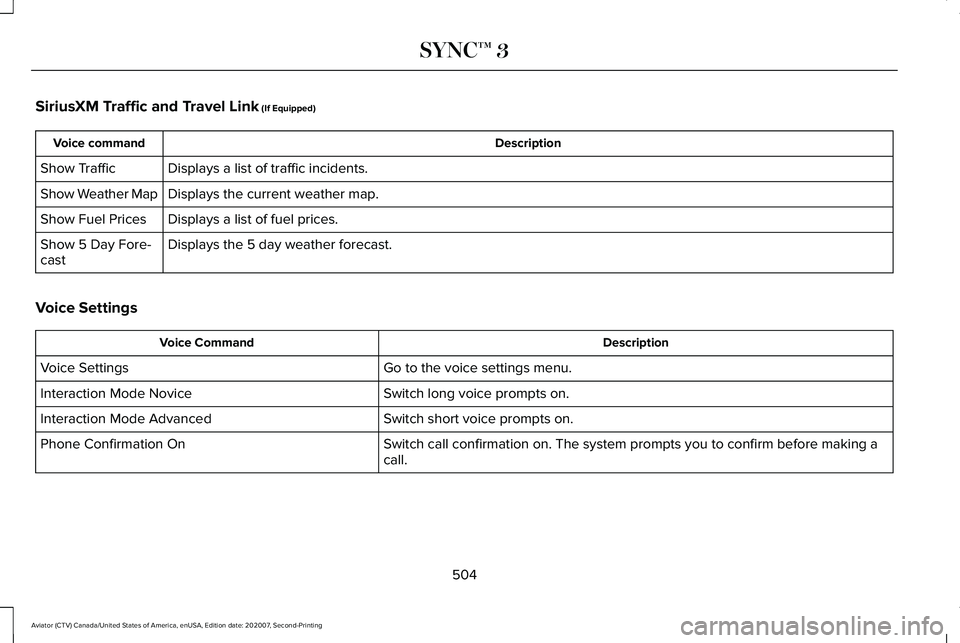
SiriusXM Traffic and Travel Link (If Equipped)
Description
Voice command
Displays a list of traffic incidents.
Show Traffic
Displays the current weather map.
Show Weather Map
Displays a list of fuel prices.
Show Fuel Prices
Displays the 5 day weather forecast.
Show 5 Day Fore-
cast
Voice Settings Description
Voice Command
Go to the voice settings menu.
Voice Settings
Switch long voice prompts on.
Interaction Mode Novice
Switch short voice prompts on.
Interaction Mode Advanced
Switch call confirmation on. The system prompts you to confirm before mak\
ing a
call.
Phone Confirmation On
504
Aviator (CTV) Canada/United States of America, enUSA, Edition date: 202007, Second-Printing SYNC™ 3