reset LINCOLN AVIATOR 2023 Owner's Guide
[x] Cancel search | Manufacturer: LINCOLN, Model Year: 2023, Model line: AVIATOR, Model: LINCOLN AVIATOR 2023Pages: 681, PDF Size: 9.33 MB
Page 232 of 681
6. Remove any debris from the fuel tank
filler valve.
7. Fully insert a fuel pump nozzle or the fuel
filler funnel provided with your vehicle
into the fuel filler pipe. See Fuel Filler
Funnel Location (page 224). This action
should dislodge any debris that may be
preventing the fuel tank filler valve from
fully closing.
8. Remove the fuel pump nozzle or fuel filler
funnel from the fuel filler pipe.
9. Fully close the fuel filler door.
Note:The message may not immediately
reset. If the message continues to appear
and a warning lamp illuminates, see your
authorized dealer as soon as possible.REFUELING - PLUG-IN HYBRID
ELECTRIC VEHICLE (PHEV)
WARNING: When refueling always
shut the engine off and never allow sparks
or open flames near the fuel tank filler
valve. Never smoke or use a cell phone
while refueling. Fuel vapor is extremely
hazardous under certain conditions. Avoid
inhaling excess fumes.
WARNING: The fuel system may be
under pressure. If you hear a hissing sound
near the fuel filler inlet, do not refuel until
the sound stops. Otherwise, fuel may spray
out, which could cause serious personal
injury.
WARNING: Do not pry open the fuel
tank filler valve. This could damage the fuel
system. Failure to follow this instruction
could result in fire, personal injury or death.
WARNING: Do not remove the fuel
pump nozzle from its fully inserted position
when refueling.
WARNING: Stop refueling when the
fuel pump nozzle automatically shuts off
for the first time. Failure to follow this will
fill the expansion space in the fuel tank and
could lead to fuel overflowing.
WARNING: Do not overfill the fuel
tank. The pressure in an overfilled tank
may cause leakage and lead to fuel spray
and fire.
WARNING: Wait at least five seconds
before removing the fuel pump nozzle to
allow any residual fuel to drain into the fuel
tank.
WARNING: Read and follow all the
instructions on the pump island.
1. When you stop your vehicle, shift into
park (P) and switch the ignition off.
229
Fuel and Refueling
Page 236 of 681
E297793E297793
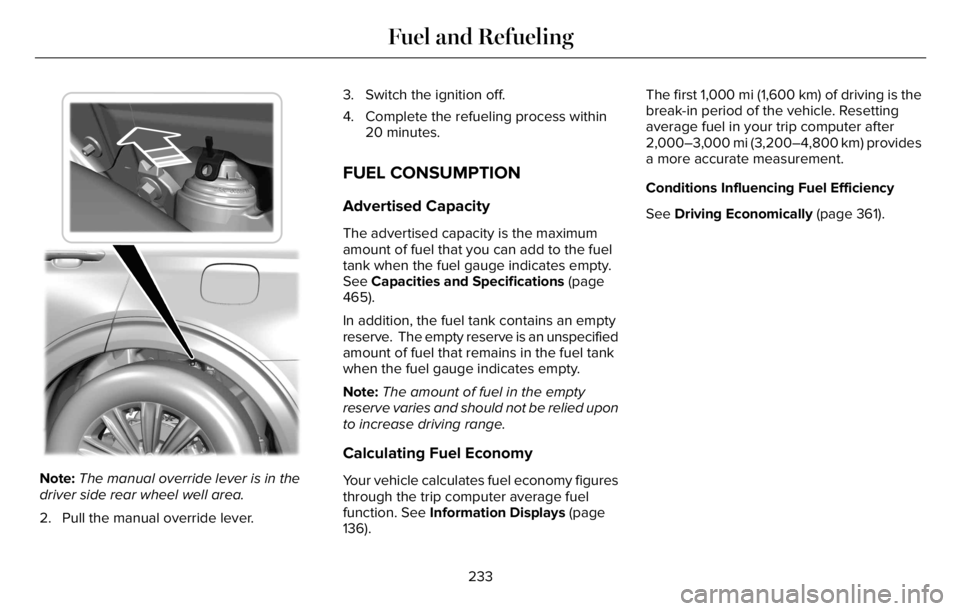
Note:The manual override lever is in the
driver side rear wheel well area.
2. Pull the manual override lever.3. Switch the ignition off.
4. Complete the refueling process within
20 minutes.
FUEL CONSUMPTION
Advertised Capacity
The advertised capacity is the maximum
amount of fuel that you can add to the fuel
tank when the fuel gauge indicates empty.
See Capacities and Specifications (page
465).
In addition, the fuel tank contains an empty
reserve. The empty reserve is an unspecified
amount of fuel that remains in the fuel tank
when the fuel gauge indicates empty.
Note:The amount of fuel in the empty
reserve varies and should not be relied upon
to increase driving range.
Calculating Fuel Economy
Your vehicle calculates fuel economy figures
through the trip computer average fuel
function. See Information Displays (page
136).The first 1,000 mi (1,600 km) of driving is the
break-in period of the vehicle. Resetting
average fuel in your trip computer after
2,000–3,000 mi (3,200–4,800 km) provides
a more accurate measurement.
Conditions Influencing Fuel Efficiency
See Driving Economically (page 361).
233
Fuel and Refueling
Page 319 of 681
Note:Under certain conditions, the system
may not adjust the vehicle speed until after
your vehicle passes the speed limit sign.
ADJUSTING THE SET SPEED
TOLERANCE
You can set a permanent speed tolerance
that is above or below the detected speed
limit.
1. Press Settings on the touchscreen.
2. Press Driver Assistance.
3. Press Cruise Control.4. Press Intelligent.
5. Press Tolerance.
6. Use + and - to set the tolerance.
Note:You cannot set the tolerance more
than 20 mph (30 km/h) above or below the
recognized speed.
ADAPTIVE CRUISE CONTROL –
TROUBLESHOOTING
ADAPTIVE CRUISE CONTROL –
INFORMATION MESSAGES - VEHICLES
WITH: ADAPTIVE CRUISE CONTROL
WITH LANE CENTERING
Note:Depending on your vehicle options
and instrument cluster type, not all messages
display or are available.
Note:The system could abbreviate or
shorten certain messages depending upon
which cluster type you have.
Action Message
Return your hands to the steering wheel and provide steering input to cancel the message. Keep Hands on Steering Wheel
To reset the feature when the vehicle is stationary, return the gear selector to park and turn the
vehicle off. Restart the vehicle with your foot on the brake pedal. Lane Centering Assist Not Available
You must immediately take full control of the vehicle. Resume Control
Resume adaptive cruise control with lane centering by applying foot pressure on the accelerator
pedal. You can also resume the feature by pressing the resume button on the steering wheel. Press Accelerator Pedal to Resume
316
Adaptive Cruise Control (If Equipped)
Page 323 of 681
USING DRIVER ALERT
Switching the System On and Off
Switch the system on or off using the
information display. See General
Information (page 136).
When active, the system monitors your
alertness level based upon your driving
behavior in relation to the lane markings, and
other factors.
System Warnings
Note:The system does not issue warnings
below approximately 40 mph (64 km/h).
Note:If you receive a warning you should
consider resting, even if the current
assessment is within the typical range.
The warning system has two stages. At first,
the system issues a temporary warning that
you need to take a rest. This message only
appears for a short time. If the system
detects further reduction in driving alertness,
it may issue another warning that remains in
the information display for a longer time. You
can press OK on the steering wheel control
to clear the warning.Resetting the System
You can reset the system by either:
• Switching the ignition off and on.
• Stopping the vehicle and then opening
and closing the driver’s door.
LANE KEEPING SYSTEM
WARNING: You are responsible for
controlling your vehicle at all times. The
system is designed to be an aid and does
not relieve you of your responsibility to
drive with due care and attention. Failure
to follow this instruction could result in the
loss of control of your vehicle, personal
injury or death.
WARNING: Always drive with due
care and attention when using and
operating the controls and features on your
vehicle.
WARNING: In cold and severe
weather conditions the system may not
function. Rain, snow and spray can all limit
sensor performance.
WARNING: Large contrasts in outside
lighting can limit sensor performance.
WARNING: The system will not
operate if the sensor cannot track the road
lane markings.
WARNING: The sensor may
incorrectly track lane markings as other
structures or objects. This can result in a
false or missed warning.
WARNING: The system may not
operate properly if the sensor is blocked.
Keep the windshield free from obstruction.
WARNING: If damage occurs in the
immediate area surrounding the sensor,
have your vehicle checked as soon as
possible.
320
Driving Aids
Page 385 of 681
FUSE SPECIFICATION CHART
Engine Compartment Fuse Box
WARNING: Always disconnect the
battery before servicing high current fuses.
WARNING: To reduce risk of
electrical shock, always replace the cover
to the power distribution box before
reconnecting the battery or refilling fluid
reservoirs.The engine compartment fuse box is under
the driver side leaf screen in the engine
compartment. It has high-current fuses that
protect the vehicle's main electrical systems
from overloads.
If you disconnect and reconnect the battery,
you need to reset some features. See
Changing the 12V Battery (page 410).
Note: Replace fuses with the same type and
rating. See Changing a Fuse (page 395).
382
Fuses
Page 405 of 681
Do not use supplemental engine oil
additives. They could cause engine damage
that the vehicle warranty may not cover.
1. Clean the area surrounding the engine
oil filler cap before you remove it.
2. Remove the engine oil filler cap.
3. Add engine oil that meets our
specifications. See Capacities and
Specifications (page 465).
4. Reinstall the engine oil filler cap. Turn it
clockwise until you feel a strong
resistance.
Note: Do not add oil further than the
maximum mark. Oil levels above the
maximum mark may cause engine damage.
Note:Soak up any spillage with an
absorbent cloth immediately.
OIL CHANGE INDICATOR RESET
Use the information display controls on the
steering wheel to reset the oil change
indicator.From the main menu scroll to:
Action and description Message
Press the right arrow button,
then from this menu scroll to
the following message. Settings
Press the right arrow button,
then from this menu scroll to
the following message. Vehicle
Press the right arrow button,
then from this menu scroll to
the following message. Oil Life
Press and hold the OK button
until the instrument cluster
displays the following
message. Hold OK to
Reset
Reset Successful
When the oil change indicator
resets the instrument cluster
displays 100%.
Remaining Life
{00}%
Action and description Message
If the instrument cluster
displays one of the following
messages, repeat the
process.
Not Reset
Reset Cancelled
CHANGING THE ENGINE AIR
FILTER
WARNING: To reduce the risk of
vehicle damage and personal burn injuries,
do not start your engine with the air
cleaner removed and do not remove it
while the engine is running.
When changing the engine air filter, do not
allow debris or foreign material to enter the
air induction system. Engine components
are susceptible to damage not covered by
the vehicle Warranty.
402
Maintenance
Page 409 of 681
Recycled Coolant
We do not recommend the use of recycled
coolant as an approved recycling process is
not yet available.
Note:Dispose of used coolant in the
appropriate manner.
Follow your community's regulations and
standards for recycling and disposing of
automotive fluids.
Severe Climates
If you drive in extremely cold climates:
• It may be necessary to increase the
coolant concentration above 50%.
• A coolant concentration of 60% provides
improved freeze point protection.
• Coolant concentrations above 60%
decrease the overheat protection
characteristics of the coolant and may
cause engine damage.If you drive in extremely hot climates:
• You can decrease the coolant
concentration to 40%.
• A coolant concentration of 40% provides
improved overheat protection.
• Coolant concentrations below 40%
decrease the overheat and corrosion
protection characteristics of the coolant
and may cause engine damage.
Vehicles driven year-round in non-extreme
climates should use prediluted coolant for
optimum cooling system and engine
protection.
Coolant Change
At specific mileage intervals, as listed in the
scheduled maintenance information, the
coolant should be changed. Add prediluted
coolant approved to the correct specification.
See Capacities and Specifications (page
460).
Fail-Safe Cooling
Fail-safe cooling allows you to temporarily
drive your vehicle before any incremental
component damage occurs. The fail-safe
distance depends on ambient temperature,
vehicle load and terrain.
How Fail-Safe Cooling Works
If the engine begins to overheat,
the coolant temperature gauge
moves toward the red zone:
A warning lamp illuminates and a
message may appear in the
information display.
If the engine reaches a preset
over-temperature condition, the engine
automatically switches to alternating cylinder
operation. Each disabled cylinder acts as an
air pump and cools the engine.
When this occurs, your vehicle still operates,
however:
• Engine power is limited.
• The air conditioning system turns off.
406
Maintenance
Page 414 of 681
For longer, trouble-free operation, keep the
top of the battery clean and dry and the
battery cables tightly fastened to the battery
terminals. If any corrosion is present on the
battery or terminals, remove the cables from
the terminals and clean with a wire brush.
You can neutralize the acid with a solution
of baking soda and water.
We recommend that you disconnect the
negative battery cable terminal from the
battery if you plan to store your vehicle for
an extended period.
Note:If you only disconnect the negative
battery cable terminal, make sure it is
isolated or placed away from the battery
terminal to avoid unintended connection or
arcing.
If you replace the battery make sure it
matches the electrical requirements of your
vehicle.If you disconnect or replace the battery and
your vehicle has an automatic transmission,
it must relearn its adaptive strategy. Because
of this, the transmission may shift firmly when
first driven. This is normal operation while
the transmission fully updates its operation
to optimum shift feel.
Battery Sensor Reset
When you install a new battery, reset the
battery sensor by doing the following:
1. Switch the ignition on, and leave the
engine off.
Note:Complete Steps 2 and 3 within 10
seconds.
2. Flash the high beam headlamps five
times, ending with the high beams off.
3. Press and release the brake pedal three
times.
The battery warning lamp flashes three times
to confirm that the reset is successful.
Battery Management System (If Equipped)
The system monitors battery conditions and
takes actions to extend battery life. If
excessive battery drain is detected, the
system temporarily disables some electrical
systems to protect the battery.
Systems included are:
• Heated rear window.
• Heated seats.
• Climate control.
• Heated steering wheel.
• Audio unit.
• Navigation system.
A message may appear in the information
display to alert you that battery protection
actions are active. This message is only for
notification that an action is taking place, and
not intended to indicate an electrical problem
or that the battery requires replacement.
411
Maintenance
Page 415 of 681
After battery replacement, or in some cases
after charging the battery with an external
charger, the battery management system
requires eight hours of vehicle sleep time to
relearn the battery state of charge. During
this time, your vehicle must remain fully
locked with the ignition switched off.
Note:Prior to relearning the battery state of
charge, the battery management system
may temporarily disable some electrical
systems.
Electrical Accessory Installation
To make sure the battery management
system works correctly, do not connect an
electrical device ground connection directly
to the battery negative post. This can cause
inaccurate measurements of the battery
condition and potential incorrect system
operation.
Note:If you add electrical accessories or
components to the vehicle, it may adversely
affect battery performance and durability.
This may also affect the performance of
other electrical systems in the vehicle.Remove and Reinstall the Battery
Install a battery approved for use by our
specifications. See Capacities and
Specifications (page 460).
To disconnect or remove the battery, do the
following:
1. Apply the parking brake and switch the
ignition off.
2. Switch all electrical equipment off, for
example lights and radio.
3. Wait a minimum of two minutes before
disconnecting the battery.
Note:The engine management system has
a power hold function and remains powered
for a period of time after you switch the
ignition off. This is to allow the system to
store diagnostic and adaptive tables.
Disconnecting the battery without waiting
can cause damage not covered by the
vehicle warranty.
4. Disconnect the negative battery cable
terminal.
5. Disconnect the positive battery cable
terminal.6. Remove the battery securing clamp.
7. Remove the battery.
8. To install, reverse the removal procedure.
Note:Before reconnecting the battery, make
sure the ignition remains switched off.
Note:Make sure to fully tighten the battery
cables.
If you disconnect or replace the vehicle
battery, you must reset the following
features:
• Window bounce-back. See Power
Windows (page 121).
• Clock Settings.
• Pre-set radio stations.
Battery Disposal
E107998
Make sure that you dispose of old
batteries in an environmentally
friendly way. Seek advice from
your local authority about recycling old
batteries.
412
Maintenance
Page 417 of 681
39E371794
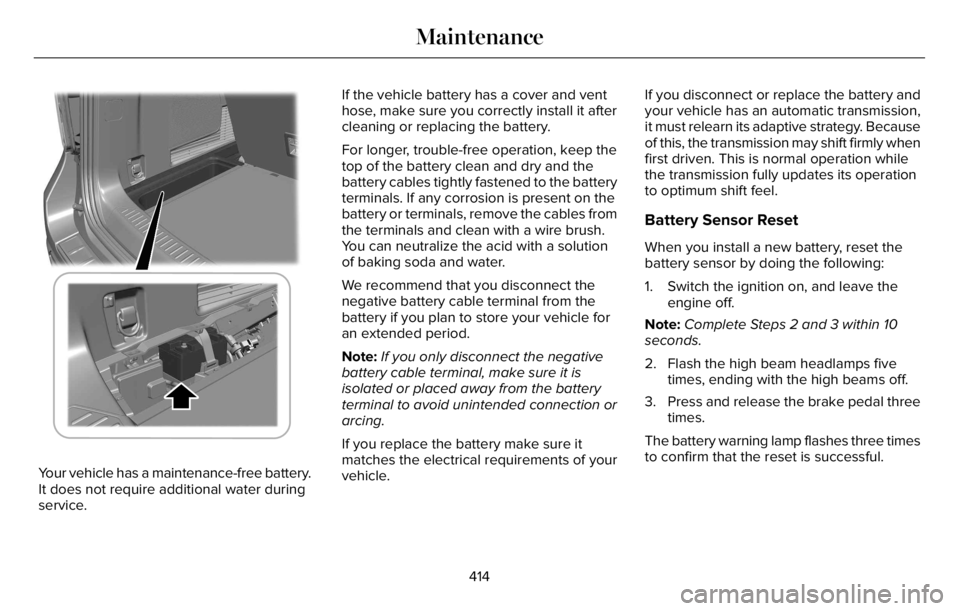
Your vehicle has a maintenance-free battery.
It does not require additional water during
service.If the vehicle battery has a cover and vent
hose, make sure you correctly install it after
cleaning or replacing the battery.
For longer, trouble-free operation, keep the
top of the battery clean and dry and the
battery cables tightly fastened to the battery
terminals. If any corrosion is present on the
battery or terminals, remove the cables from
the terminals and clean with a wire brush.
You can neutralize the acid with a solution
of baking soda and water.
We recommend that you disconnect the
negative battery cable terminal from the
battery if you plan to store your vehicle for
an extended period.
Note:If you only disconnect the negative
battery cable terminal, make sure it is
isolated or placed away from the battery
terminal to avoid unintended connection or
arcing.
If you replace the battery make sure it
matches the electrical requirements of your
vehicle.If you disconnect or replace the battery and
your vehicle has an automatic transmission,
it must relearn its adaptive strategy. Because
of this, the transmission may shift firmly when
first driven. This is normal operation while
the transmission fully updates its operation
to optimum shift feel.
Battery Sensor Reset
When you install a new battery, reset the
battery sensor by doing the following:
1. Switch the ignition on, and leave the
engine off.
Note:Complete Steps 2 and 3 within 10
seconds.
2. Flash the high beam headlamps five
times, ending with the high beams off.
3. Press and release the brake pedal three
times.
The battery warning lamp flashes three times
to confirm that the reset is successful.
414
Maintenance