steering LINCOLN CONTINENTAL 1996 Customer Assistance Guide
[x] Cancel search | Manufacturer: LINCOLN, Model Year: 1996, Model line: CONTINENTAL, Model: LINCOLN CONTINENTAL 1996Pages: 320, PDF Size: 1.8 MB
Page 87 of 320

If the autolamp is active, the headlamp system
will come on immediately after starting your
vehicle. If your vehicle is running before you
activate the autolamp, there may be a 15 second
delay before the headlights illuminate.
2.Turn the ignition key to ON or start your
vehicle.
3.Find the autolamp switch to the left of the
steering wheel on the instrument panel.
4. Push the autolamp switch up toward the
MAX position. As you press this switch, the
autolamp system's status will be displayed in
the message center. The system can be
turned OFF or can be set to provide light for
up to three (3) minutes after you turn your
vehicle off.
84Do not put any articles on top of the photocell
that is located in the top left corner of the
instrument panel. This photocell controls the
autolamp. If you cover it, the photocell reacts
as if it is nighttime, and the lamps turn on.
To turn the autolamp off, push the switch down
until the message center display reaches OFF.
Turning On Interior
Lights/Instrument Panel Illumination
You can brighten or dim the lights in the
instrument panel and the compass display
in the inside rearview mirror (if
equipped) with the PANEL DIM switch
located on the instrument panel.
Page 92 of 320
Steering Column ControlsThe controls on the steering column and wheel
are designed to give you easy access to the
controls while you are driving.
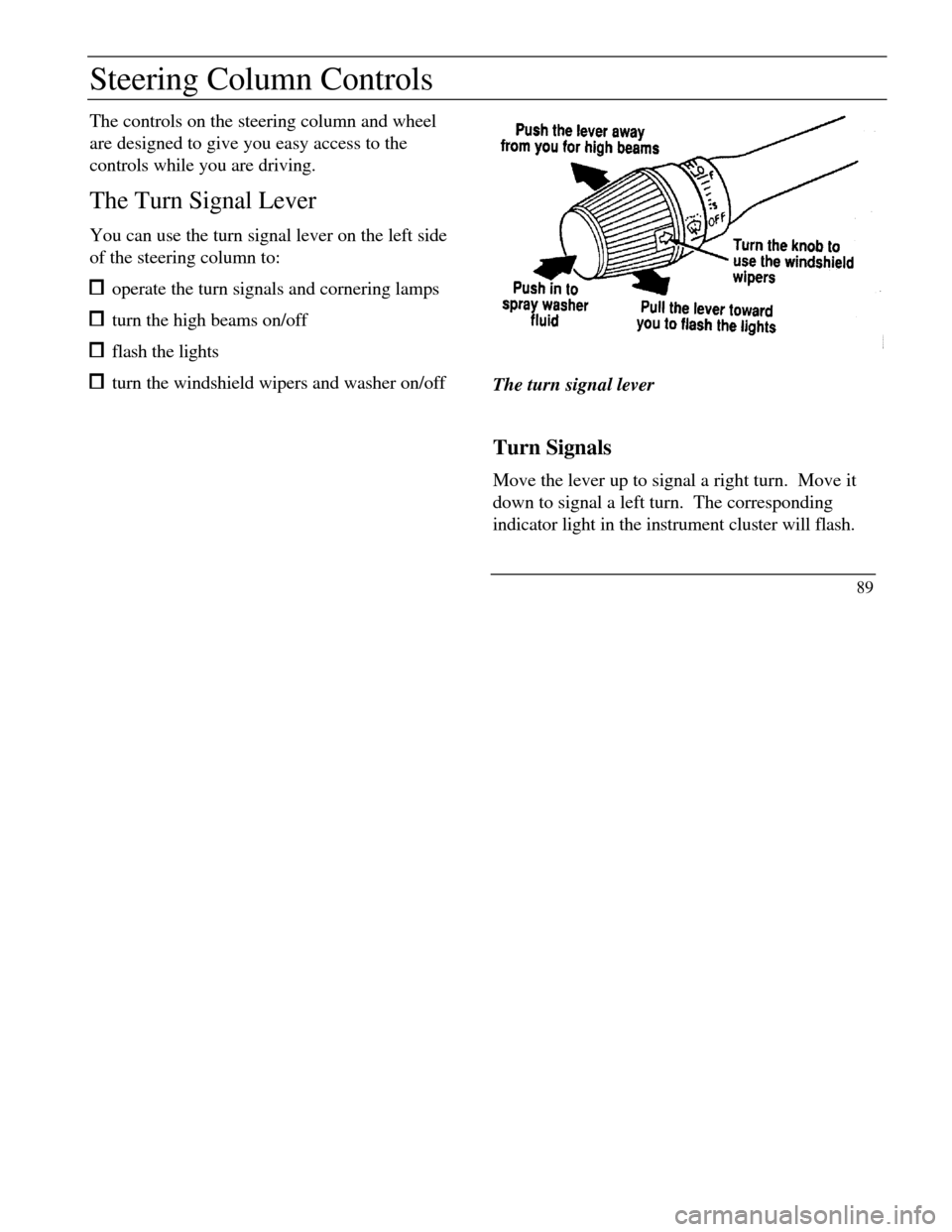
The Turn Signal Lever
You can use the turn signal lever on the left side
of the steering column to: operate the turn signals and cornering lamps turn the high beams on/off flash the lights turn the windshield wipers and washer on/offThe turn signal lever
Turn Signals
Move the lever up to signal a right turn. Move it
down to signal a left turn. The corresponding
indicator light in the instrument cluster will flash.
89
Page 96 of 320
Steering wheel
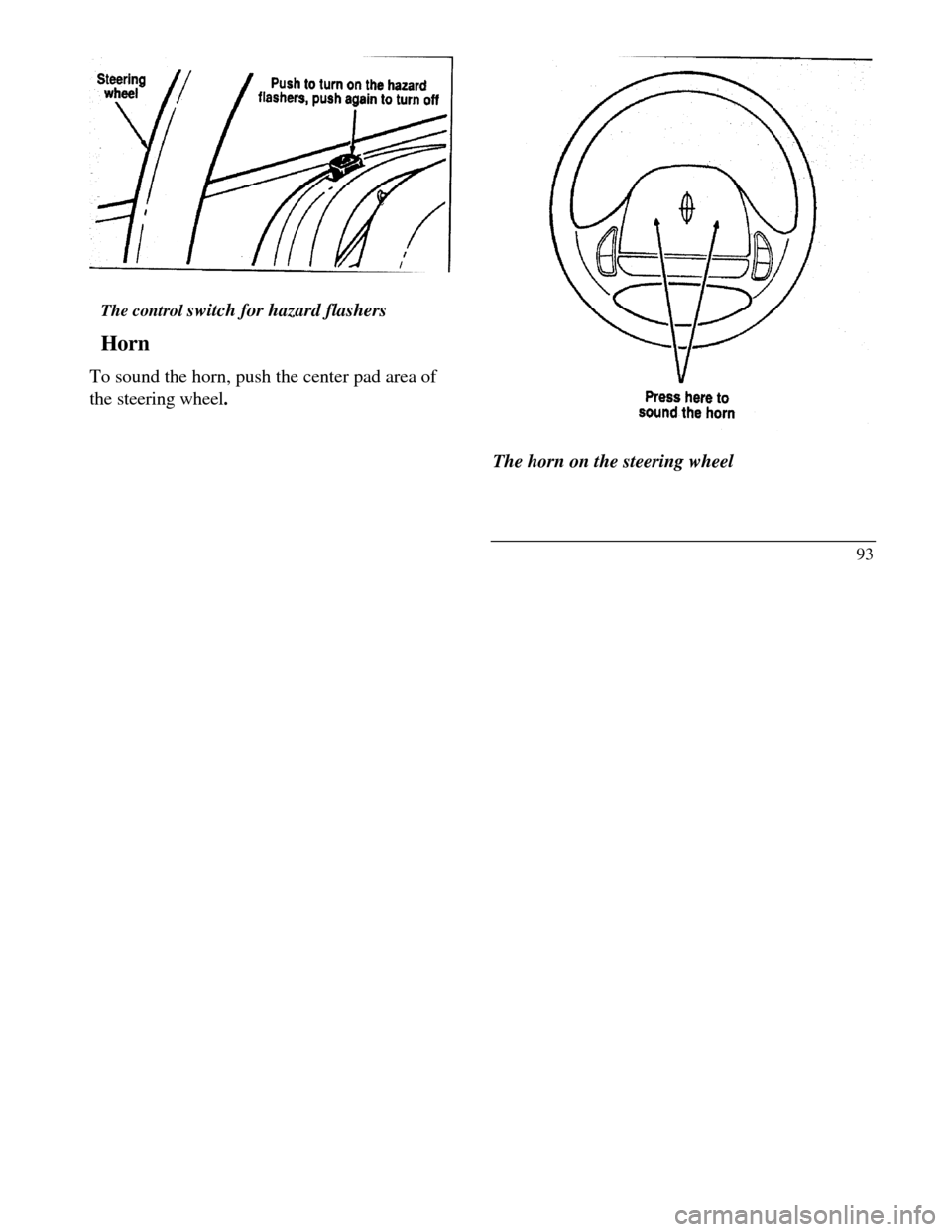
The control switch for hazard flashers
Horn
To sound the horn, push the center pad area of
the steering wheel.Press here to sound the horn
The horn on the steering wheel
93
Page 97 of 320
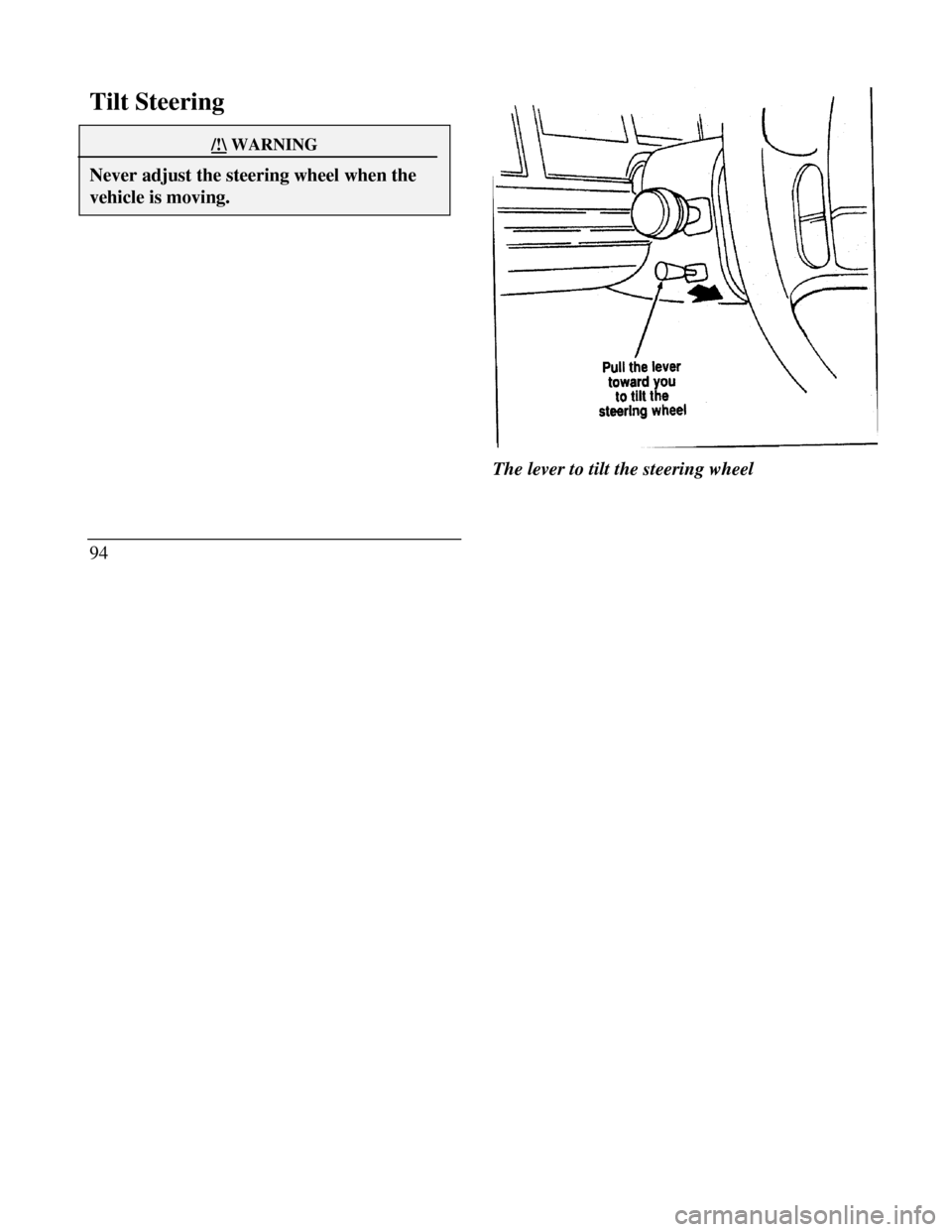
Tilt Steering/!\ WARNINGNever adjust the steering wheel when thevehicle is moving.94The lever to tilt the steering wheel
Page 98 of 320

To change the position of the steering wheel, pull
the release lever on the column toward you. Tip
the steering wheel to the desired position.
Release the lever to lock the steering wheel in
place.
Speed Control
Your vehicle has speed control, so you can
automatically maintain a constant speed above 30
mph (48 km/h). The switches to operate the
speed control are on the steering wheel.
Use of radio transmitting equipment that is not
Federal Communications Commission (FCC) or
in Canada the Canadian Radio and
Telecommunications Commission (CRTC)
approved may cause the speed control to
malfunction. Therefore, use only properly
installed FCC (CRTC in Canada) approved radio
transmitting equipment in your vehicle.NOTE: Since your vehicle has an Automatic
Overdrive Transaxle, you may want to drive in D
(Drive) when driving in hilly terrain, at higher
altitudes, or when pulling a trailer. This will
improve speed control performance.
NOTE: Do not shift to N (Neutral) when using
the speed control. This will cause the engine to
overspeed.
95
Page 99 of 320
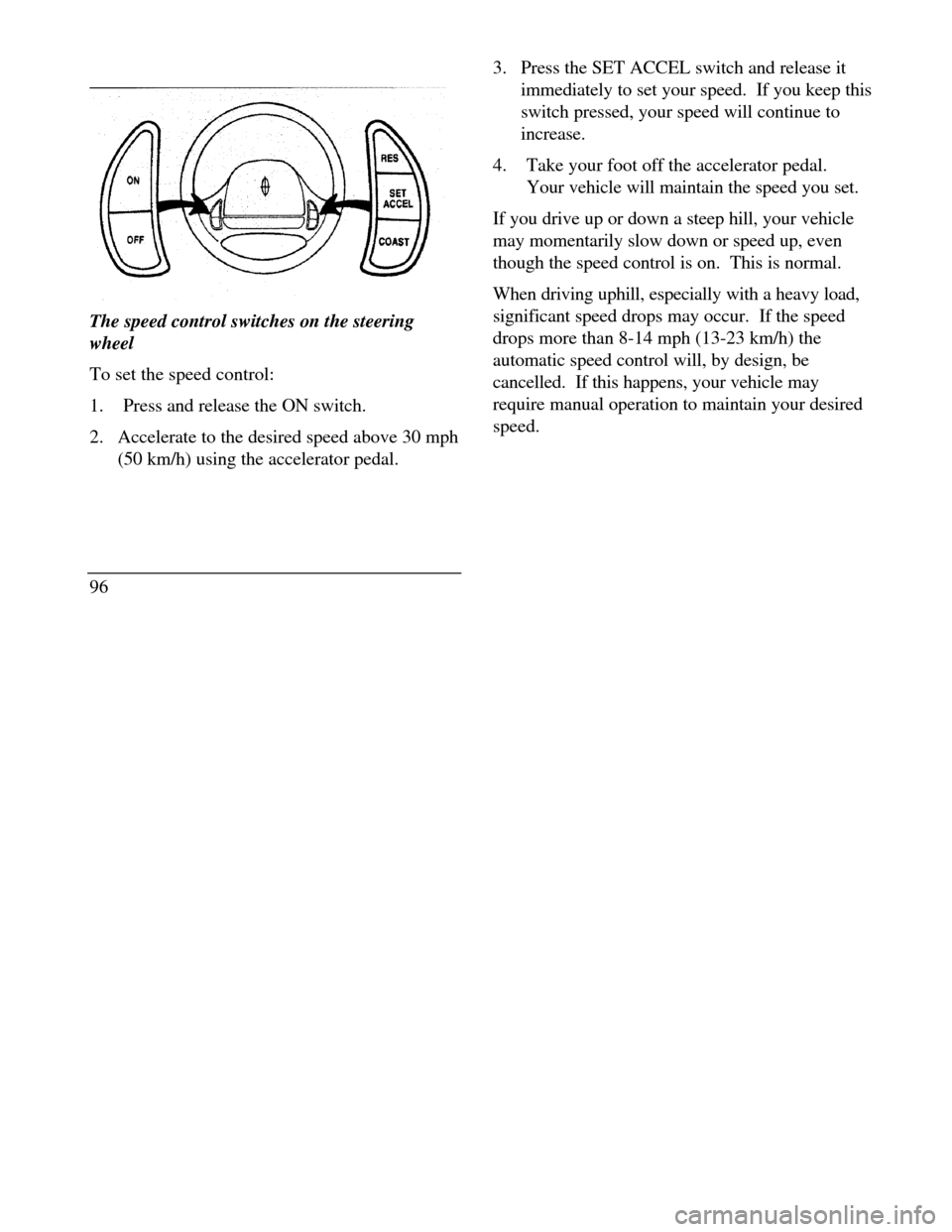
The speed control switches on the steering
wheel
To set the speed control:
1.Press and release the ON switch.
2. Accelerate to the desired speed above 30 mph
(50 km/h) using the accelerator pedal.
963. Press the SET ACCEL switch and release it
immediately to set your speed. If you keep this
switch pressed, your speed will continue to
increase.
4.Take your foot off the accelerator pedal.
Your vehicle will maintain the speed you set.
If you drive up or down a steep hill, your vehicle
may momentarily slow down or speed up, even
though the speed control is on. This is normal.
When driving uphill, especially with a heavy load,
significant speed drops may occur. If the speed
drops more than 8-14 mph (13-23 km/h) the
automatic speed control will, by design, be
cancelled. If this happens, your vehicle may
require manual operation to maintain your desired
speed.
Page 122 of 320
Memory Profile System
The Personality Memory Feature customizes your
Continental for up to two (2) drivers. The
following features are automatically recalled when
unlocking the doors using the remote entry
transmitter, keyless entry keypad, or by pressing
the Memory 1 or Memory 2 switches on the
driver's door: All driver's seat positions except power lumbar
and head restraint. Both left and right outside mirror settings. Radio station presets including the last selected
station and band and 0 preset preferences on
FMI, FM2, and AM. Instrument panel dimming setting. Autolamp delay time-out setting. Ride/Steering menu setting. Feature Menu settingsThe Ride/Steering menu is located in the
Message Center. The RIDE display allows you
to adjust the suspension feel to FIRM,
NORMAL, or PLUSH.
Pressing the Ride/Steering menu switch again
brings the STEERING display. This allows you
to adjust steering effort to LOW, NORMAL, or
HIGH.
For more information on ride/steering options,
see Road Calibrated Suspension later in this
chapter.
Personality Memory also allows you to
customize settings from the Feature menu
located in the Message Center. The Feature
menu contains five (5) features that you can
enable or disable. The features are listed in the
order they appear in the Feature menu. EXPRESS WINDOW - for one tap down
operation of the driver's window.
119
Page 126 of 320

Road Calibrated Suspension
Your Continental is equipped with a ride control
system that is designed to read disturbances in the
road surface every six inches at 60 mph (100 km/h)
to provide you with optimal driving response.
Ride control allows you to chose both a ride feel
and steering effort that best flts your personal
driving style. These options may be selected by
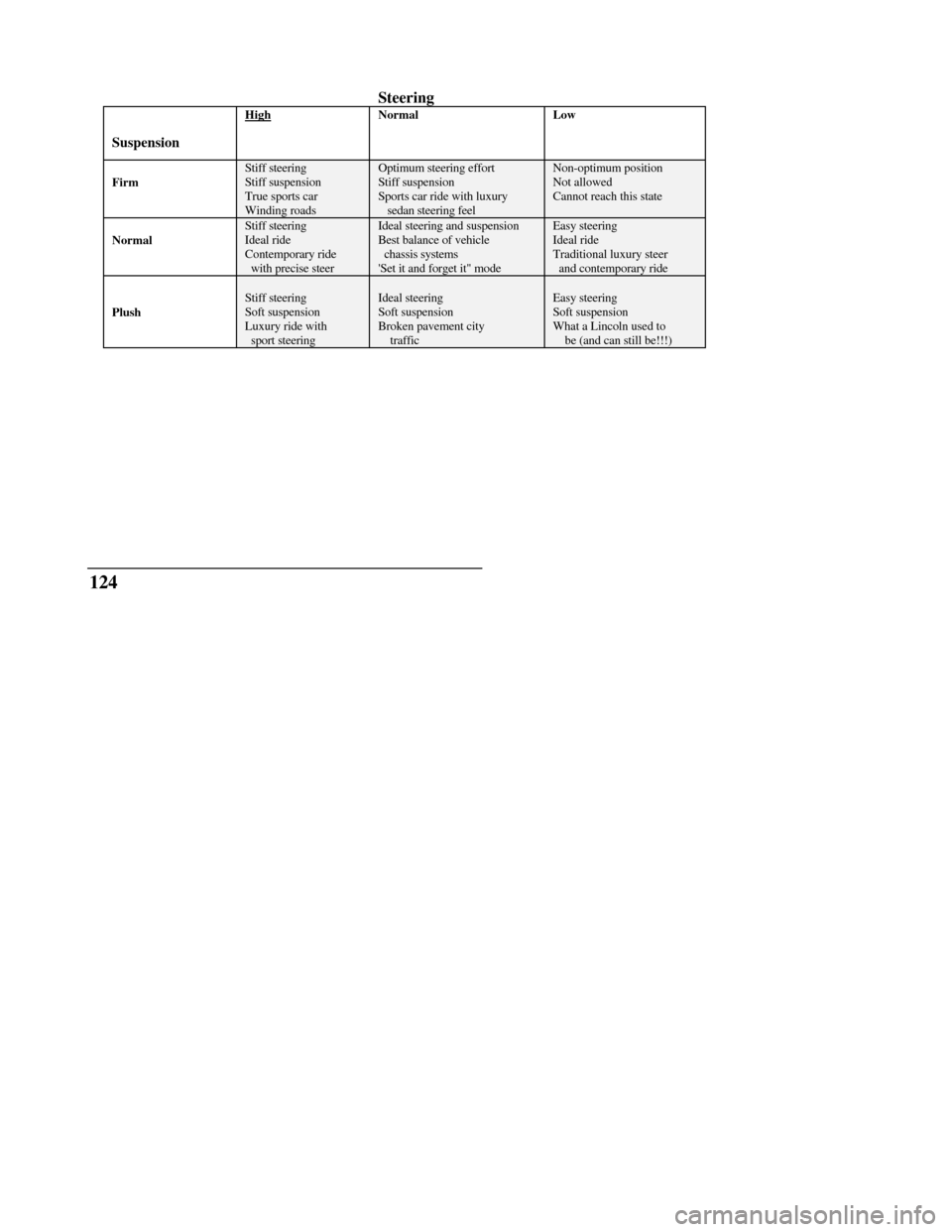
using the RIDE/STEER Message Center button.Pressing this button once will allow you to adjust
your RIDE CONTROL settings, between
NORMAL, PLUSH and FIRM. The settings are
changed by pressing the SELECT button while
RIDE CONTROL is displayed.
Pressing the RIDE/STEER button a second time
will allow you to adjust the STEERING
EFFORT settings between NORMAL, LOW,
and HIGH. The settings are changed by pressing
the SELECT button while STEERING EFFORT
is displayed.
123
Page 127 of 320
Steering
SuspensionHighNormalLowFirmStiff steeringStiff suspensionTrue sports carWinding roadsOptimum steering effortStiff suspensionSports car ride with luxury sedan steering feelNon-optimum positionNot allowedCannot reach this stateNormalStiff steeringIdeal rideContemporary ride with precise steerIdeal steering and suspensionBest balance of vehicle chassis systems'Set it and forget it" modeEasy steeringIdeal rideTraditional luxury steer and contemporary ridePlushStiff steeringSoft suspensionLuxury ride with sport steeringIdeal steeringSoft suspensionBroken pavement city trafficEasy steeringSoft suspensionWhat a Lincoln used to be (and can still be!!!)124
Page 128 of 320
NOTE: The combination of FIRM RIDE
CONTROL and LOW STEERING EFFORT is
undesirable and cannot be selected.
Mirrors
Automatic Dimming Inside Rearview
Mirror (If equipped)
Some vehicles are equipped with an inside rearview
mirror and an outside driver's side mirror which have
an Auto-Dimming function. These electronic
day/night mirrors will change from the normal state
to the non-glare state when bright lights (glare)
reach the mirrors. These mirrors function at night,
and have a limited function at dusk or dawn. From
the non-glare state, the mirrors will return to the
normal state after a short delay. The delay starts
when glare goes away. The delay prevents
excessive changing of the mirrors as traffic moves
behind and around the vehicle, or on rolling hills and
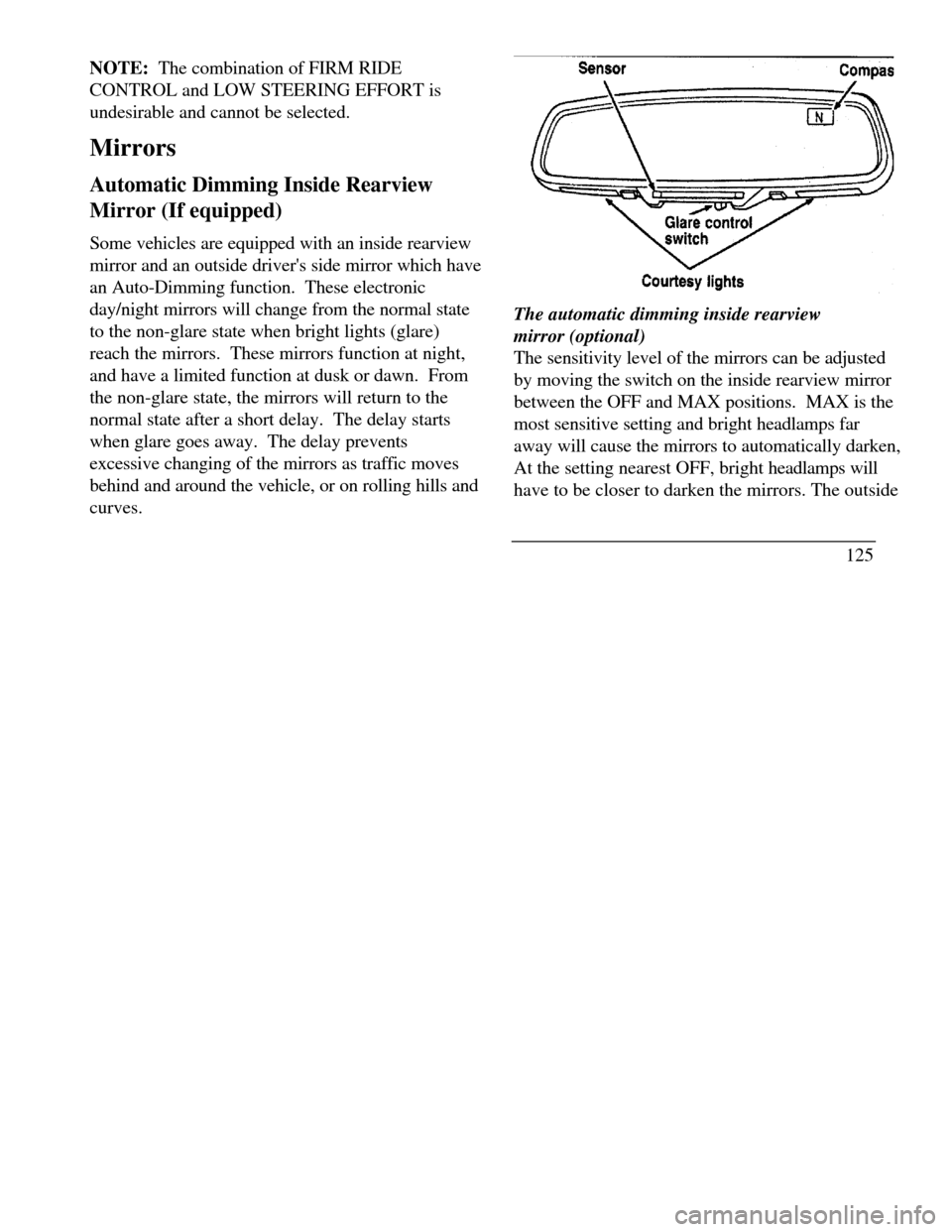
curves.The automatic dimming inside rearview
mirror (optional)
The sensitivity level of the mirrors can be adjusted
by moving the switch on the inside rearview mirror
between the OFF and MAX positions. MAX is the
most sensitive setting and bright headlamps far
away will cause the mirrors to automatically darken,
At the setting nearest OFF, bright headlamps will
have to be closer to darken the mirrors. The outside
125