display LINCOLN CORSAIR 2020 Owner's Manual
[x] Cancel search | Manufacturer: LINCOLN, Model Year: 2020, Model line: CORSAIR, Model: LINCOLN CORSAIR 2020Pages: 591, PDF Size: 6 MB
Page 113 of 591
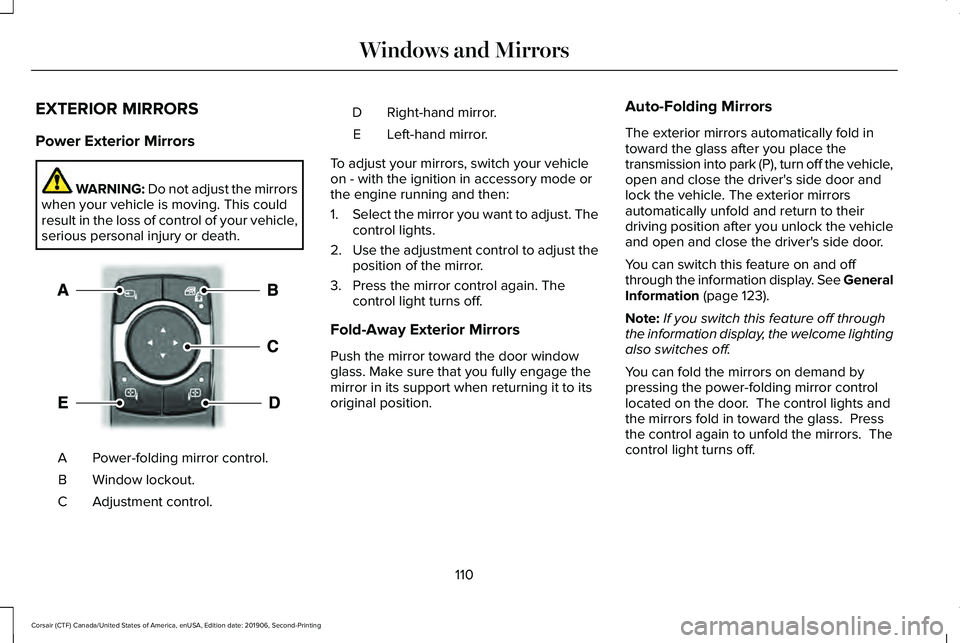
EXTERIOR MIRRORS
Power Exterior Mirrors
WARNING: Do not adjust the mirrors
when your vehicle is moving. This could
result in the loss of control of your vehicle,
serious personal injury or death. Power-folding mirror control.
A
Window lockout.
B
Adjustment control.
C Right-hand mirror.
D
Left-hand mirror.
E
To adjust your mirrors, switch your vehicle
on - with the ignition in accessory mode or
the engine running and then:
1. Select the mirror you want to adjust. The
control lights.
2. Use the adjustment control to adjust the
position of the mirror.
3. Press the mirror control again. The control light turns off.
Fold-Away Exterior Mirrors
Push the mirror toward the door window
glass. Make sure that you fully engage the
mirror in its support when returning it to its
original position. Auto-Folding Mirrors
The exterior mirrors automatically fold in
toward the glass after you place the
transmission into park (P), turn off the vehicle,
open and close the driver's side door and
lock the vehicle. The exterior mirrors
automatically unfold and return to their
driving position after you unlock the vehicle
and open and close the driver's side door.
You can switch this feature on and off
through the information display. See General
Information (page 123).
Note: If you switch this feature off through
the information display, the welcome lighting
also switches off.
You can fold the mirrors on demand by
pressing the power-folding mirror control
located on the door. The control lights and
the mirrors fold in toward the glass. Press
the control again to unfold the mirrors. The
control light turns off.
110
Corsair (CTF) Canada/United States of America, enUSA, Edition date: 201906, Second-Printing Windows and MirrorsE295322
Page 117 of 591
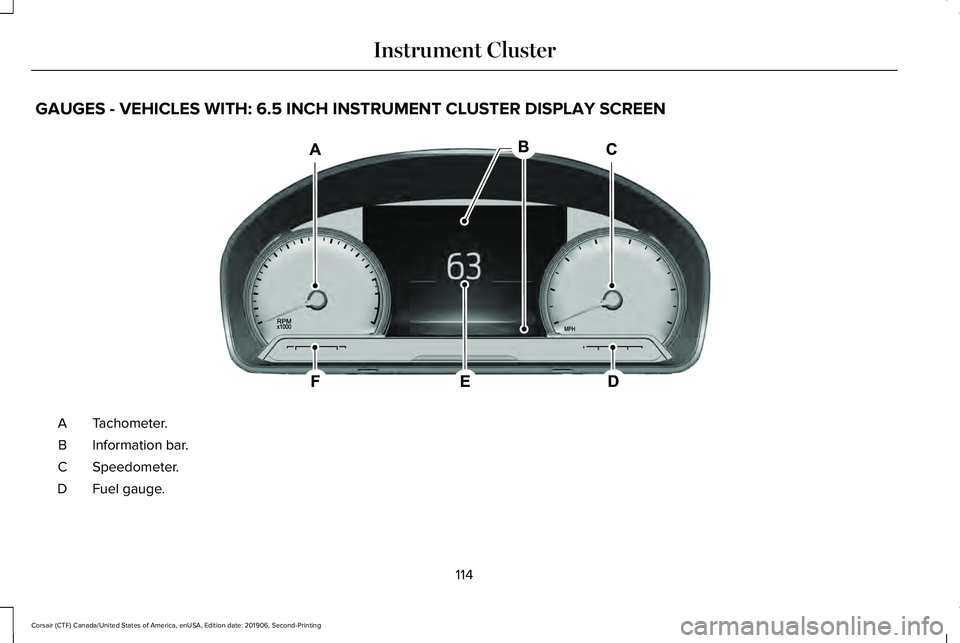
GAUGES - VEHICLES WITH: 6.5 INCH INSTRUMENT CLUSTER DISPLAY SCREEN
Tachometer.
A
Information bar.
B
Speedometer.
C
Fuel gauge.
D
114
Corsair (CTF) Canada/United States of America, enUSA, Edition date: 201906, Second-Printing Instrument ClusterE282067
Page 118 of 591
Information display.
E
Engine coolant temperature gauge.
F
Information Bar
Displays information related to the
navigation, outside air temperature,
odometer and distance to empty.
Distance to Empty - Indicates the
approximate distance your vehicle can travel
on the fuel remaining in the tank. Changes
in driving pattern can cause the value to not
only decrease but also increase or stay
constant for periods of time.
Information Display
Information that appears depends on your
vehicle settings. See General Information
(page 123). Engine Coolant Temperature Gauge
Shows the temperature of the engine
coolant. At normal operating temperature,
the needle remains in the center section. If
the needle enters the red section, the engine
is overheating. Stop the engine, switch the
ignition off and determine the cause once
the engine has cooled down.
Note:
Do not restart the engine until the
cause of the overheating has been resolved. WARNING:
Do not remove the
coolant reservoir cap when the engine is
on or the cooling system is hot. Wait 10
minutes for the cooling system to cool
down. Cover the coolant reservoir cap with
a thick cloth to prevent the possibility of
scalding and slowly remove the cap.
Failure to follow this instruction could result
in personal injury. Fuel Gauge
The fuel gauge indicates about how much
fuel is in the fuel tank.
The arrow adjacent to the fuel pump symbol
indicates on which side of your vehicle the
fuel filler door is located.
Note:
The fuel gauge may vary slightly when
your vehicle is moving or on a slope.
Low Fuel Reminder
A low fuel level reminder displays and
sounds when the distance to empty reaches
75 mi (120 km) to empty for MyKey, and at
50 mi (80 km), 25 mi (40 km), 10 mi (20 km)
and 0 mi (0 km) for all vehicle keys.
Note: The low fuel reminder can appear at
different fuel gauge positions depending on
fuel economy conditions. This variation is
normal.
115
Corsair (CTF) Canada/United States of America, enUSA, Edition date: 201906, Second-Printing Instrument Cluster
Page 119 of 591
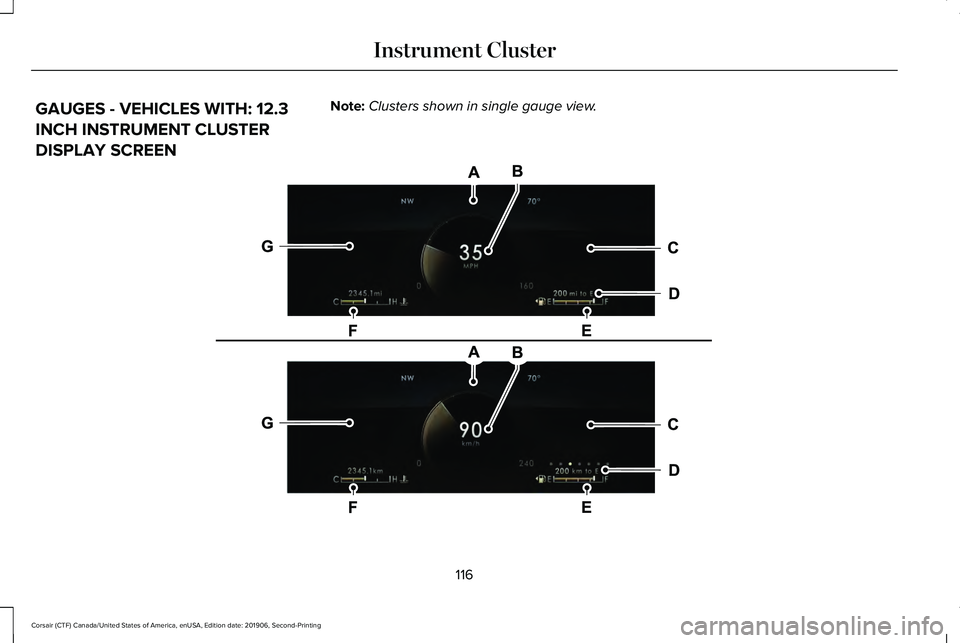
GAUGES - VEHICLES WITH: 12.3
INCH INSTRUMENT CLUSTER
DISPLAY SCREEN
Note:
Clusters shown in single gauge view. 116
Corsair (CTF) Canada/United States of America, enUSA, Edition date: 201906, Second-Printing Instrument ClusterE297320
Page 120 of 591
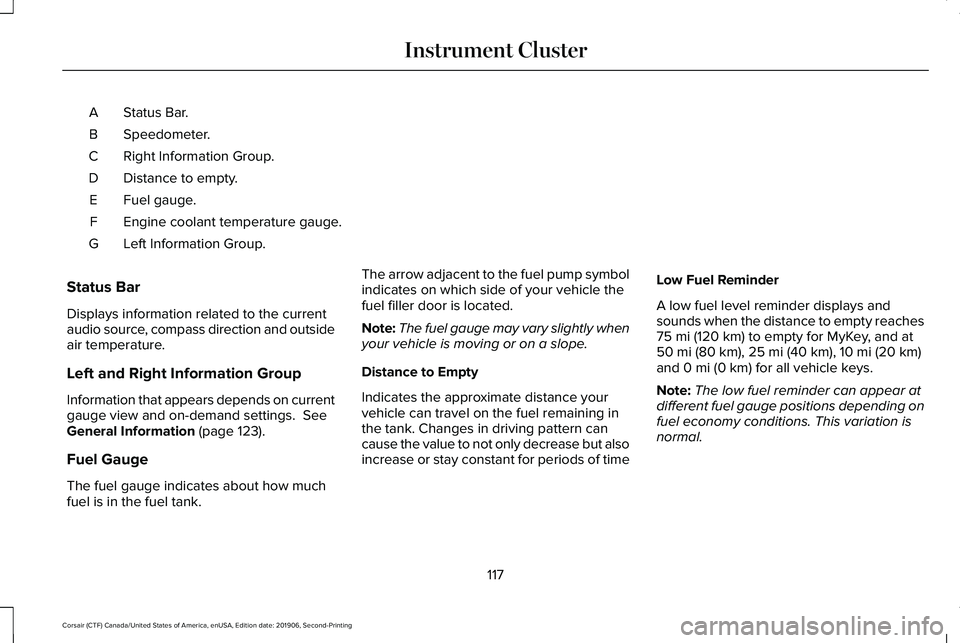
Status Bar.
A
Speedometer.
B
Right Information Group.
C
Distance to empty.
D
Fuel gauge.
E
Engine coolant temperature gauge.
F
Left Information Group.
G
Status Bar
Displays information related to the current
audio source, compass direction and outside
air temperature.
Left and Right Information Group
Information that appears depends on current
gauge view and on-demand settings. See
General Information (page 123).
Fuel Gauge
The fuel gauge indicates about how much
fuel is in the fuel tank. The arrow adjacent to the fuel pump symbol
indicates on which side of your vehicle the
fuel filler door is located.
Note:
The fuel gauge may vary slightly when
your vehicle is moving or on a slope.
Distance to Empty
Indicates the approximate distance your
vehicle can travel on the fuel remaining in
the tank. Changes in driving pattern can
cause the value to not only decrease but also
increase or stay constant for periods of time Low Fuel Reminder
A low fuel level reminder displays and
sounds when the distance to empty reaches
75 mi (120 km)
to empty for MyKey, and at
50 mi (80 km), 25 mi (40 km), 10 mi (20 km)
and 0 mi (0 km) for all vehicle keys.
Note: The low fuel reminder can appear at
different fuel gauge positions depending on
fuel economy conditions. This variation is
normal.
117
Corsair (CTF) Canada/United States of America, enUSA, Edition date: 201906, Second-Printing Instrument Cluster
Page 121 of 591
Engine Coolant Temperature Gauge
WARNING: Do not remove the
coolant reservoir cap when the engine is
on or the cooling system is hot. Wait 10
minutes for the cooling system to cool
down. Cover the coolant reservoir cap with
a thick cloth to prevent the possibility of
scalding and slowly remove the cap.
Failure to follow this instruction could result
in personal injury.
Indicates engine coolant temperature. At
normal operating temperature, the level
indicator will be in the normal range. If the
engine coolant temperature exceeds the
normal range, stop your vehicle as soon as
safely possible, switch off the engine and let
the engine cool. WARNING LAMPS AND
INDICATORS
The following warning lamps and indicators
alert you to a vehicle condition that may
become serious. Some lamps illuminate
when you start your vehicle to make sure
they work. If any lamps remain on after
starting your vehicle, refer to the respective
system warning lamp for further information.
Note:
Some warning indicators appear in
the information display and function the
same as a warning lamp, but do not display
when you start your vehicle.
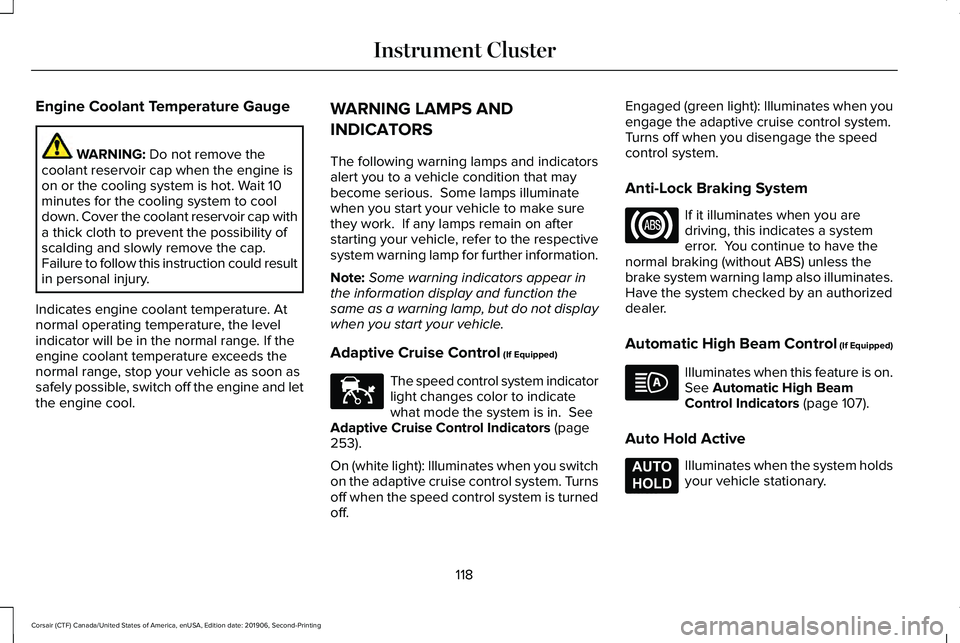
Adaptive Cruise Control
(If Equipped) The speed control system indicator
light changes color to indicate
what mode the system is in.
See
Adaptive Cruise Control Indicators (page
253).
On (white light): Illuminates when you switch
on the adaptive cruise control system. Turns
off when the speed control system is turned
off. Engaged (green light): Illuminates when you
engage the adaptive cruise control system.
Turns off when you disengage the speed
control system.
Anti-Lock Braking System
If it illuminates when you are
driving, this indicates a system
error. You continue to have the
normal braking (without ABS) unless the
brake system warning lamp also illuminates.
Have the system checked by an authorized
dealer.
Automatic High Beam Control (If Equipped) Illuminates when this feature is on.
See
Automatic High Beam
Control Indicators (page 107).
Auto Hold Active Illuminates when the system holds
your vehicle stationary.
118
Corsair (CTF) Canada/United States of America, enUSA, Edition date: 201906, Second-Printing Instrument ClusterE144524 E197933
Page 126 of 591
GENERAL INFORMATION
WARNING: Driving while distracted
can result in loss of vehicle control, crash
and injury. We strongly recommend that
you use extreme caution when using any
device that may take your focus off the
road. Your primary responsibility is the safe
operation of your vehicle. We recommend
against the use of any hand-held device
while driving and encourage the use of
voice-operated systems when possible.
Make sure you are aware of all applicable
local laws that may affect the use of
electronic devices while driving.
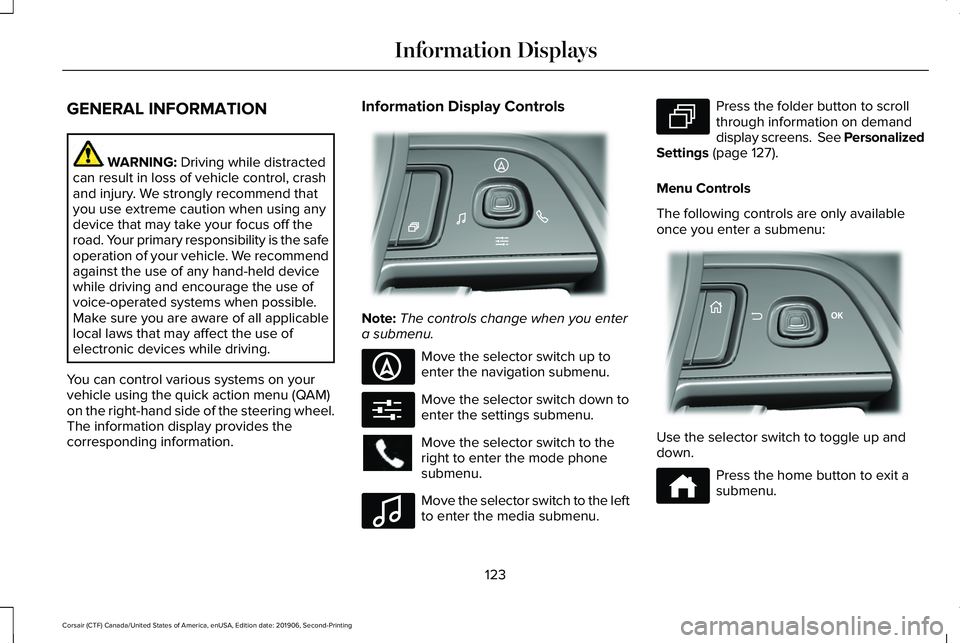
You can control various systems on your
vehicle using the quick action menu (QAM)
on the right-hand side of the steering wheel.
The information display provides the
corresponding information. Information Display Controls
Note:
The controls change when you enter
a submenu. Move the selector switch up to
enter the navigation submenu.
Move the selector switch down to
enter the settings submenu.
Move the selector switch to the
right to enter the mode phone
submenu.
Move the selector switch to the left
to enter the media submenu. Press the folder button to scroll
through information on demand
display screens. See Personalized
Settings (page 127).
Menu Controls
The following controls are only available
once you enter a submenu: Use the selector switch to toggle up and
down.
Press the home button to exit a
submenu.
123
Corsair (CTF) Canada/United States of America, enUSA, Edition date: 201906, Second-Printing Information DisplaysE281220 E281481 E280315 E100027 E281483 E299701 E272621
Page 127 of 591
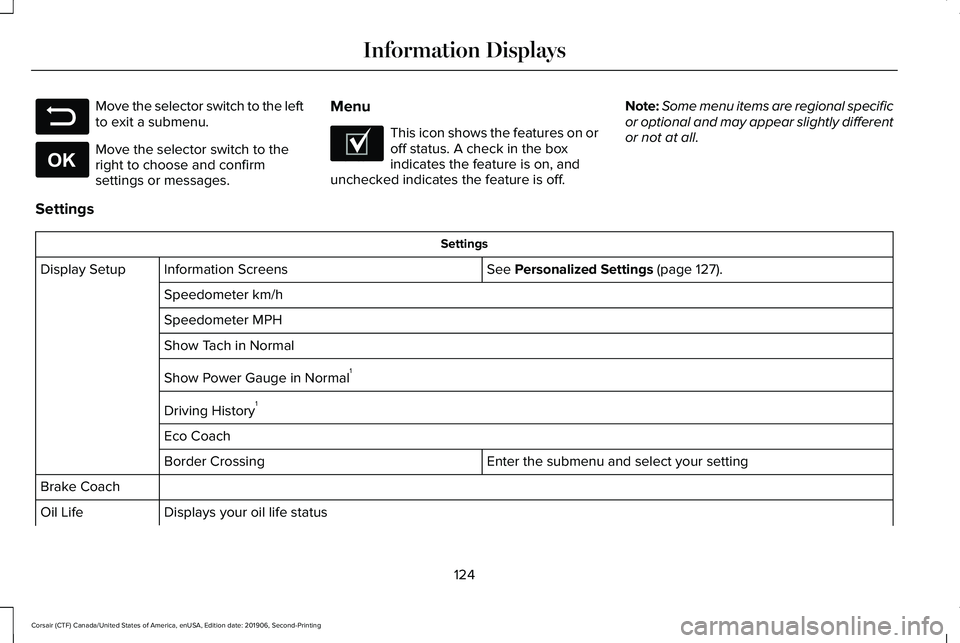
Move the selector switch to the left
to exit a submenu.
Move the selector switch to the
right to choose and confirm
settings or messages.
Menu This icon shows the features on or
off status. A check in the box
indicates the feature is on, and
unchecked indicates the feature is off. Note:
Some menu items are regional specific
or optional and may appear slightly different
or not at all.
Settings Settings
See Personalized Settings (page 127).
Information Screens
Display Setup
Speedometer km/h
Speedometer MPH
Show Tach in Normal
Show Power Gauge in Normal 1
Driving History 1
Eco Coach Enter the submenu and select your setting
Border Crossing
Brake Coach Displays your oil life status
Oil Life
124
Corsair (CTF) Canada/United States of America, enUSA, Edition date: 201906, Second-Printing Information DisplaysE281480 E265041 E204495
Page 128 of 591
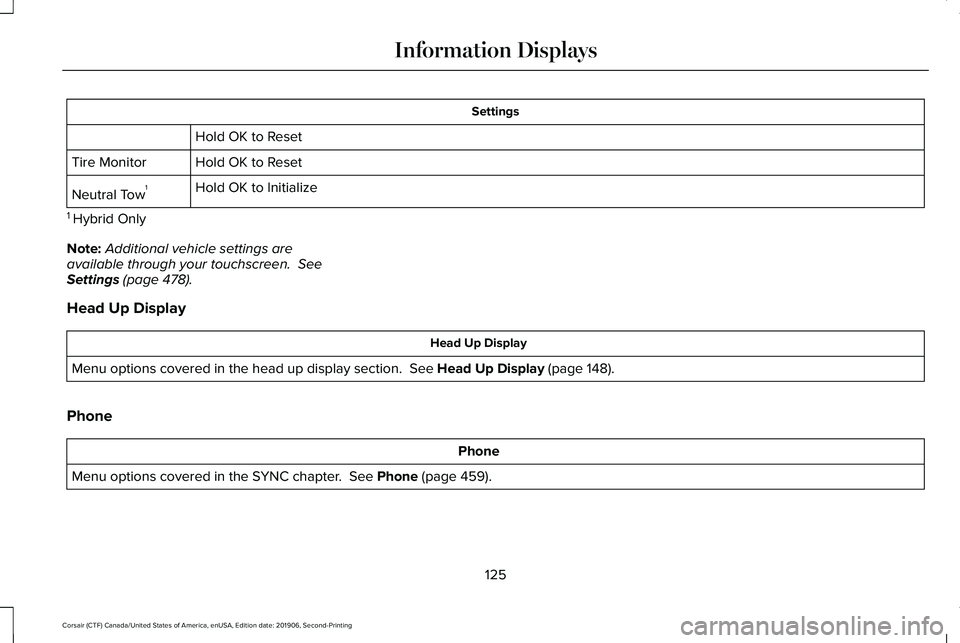
Settings
Hold OK to Reset
Hold OK to Reset
Tire Monitor
Hold OK to Initialize
Neutral Tow 1
1 Hybrid Only
Note: Additional vehicle settings are
available through your touchscreen. See
Settings (page 478).
Head Up Display Head Up Display
Menu options covered in the head up display section.
See Head Up Display (page 148).
Phone Phone
Menu options covered in the SYNC chapter.
See Phone (page 459).
125
Corsair (CTF) Canada/United States of America, enUSA, Edition date: 201906, Second-Printing Information Displays
Page 129 of 591
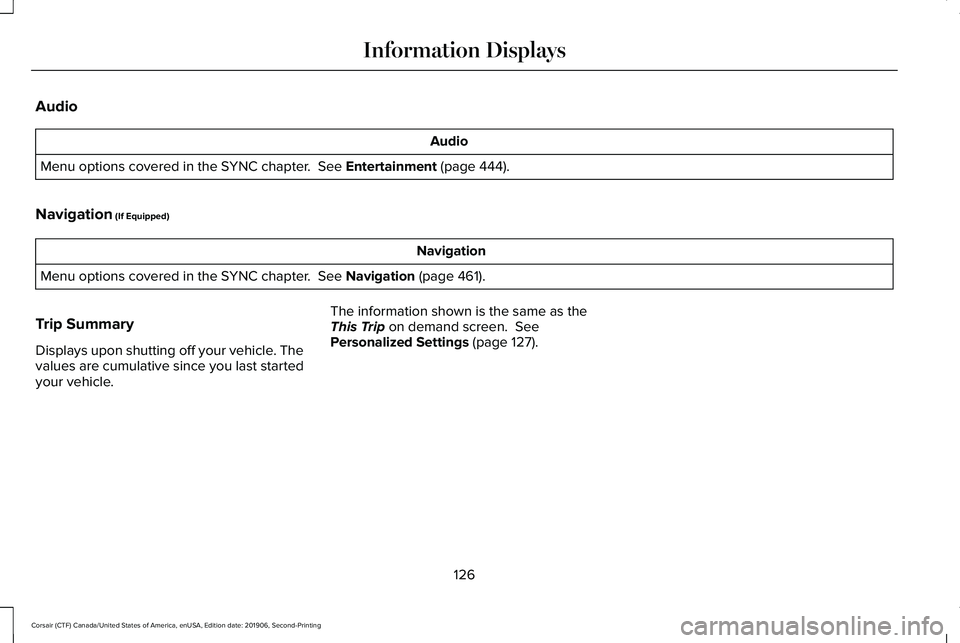
Audio
Audio
Menu options covered in the SYNC chapter. See Entertainment (page 444).
Navigation
(If Equipped) Navigation
Menu options covered in the SYNC chapter.
See Navigation (page 461).
Trip Summary
Displays upon shutting off your vehicle. The
values are cumulative since you last started
your vehicle. The information shown is the same as the
This Trip
on demand screen. See
Personalized Settings (page 127).
126
Corsair (CTF) Canada/United States of America, enUSA, Edition date: 201906, Second-Printing Information Displays