lock LINCOLN CORSAIR 2023 User Guide
[x] Cancel search | Manufacturer: LINCOLN, Model Year: 2023, Model line: CORSAIR, Model: LINCOLN CORSAIR 2023Pages: 690, PDF Size: 15.04 MB
Page 52 of 690
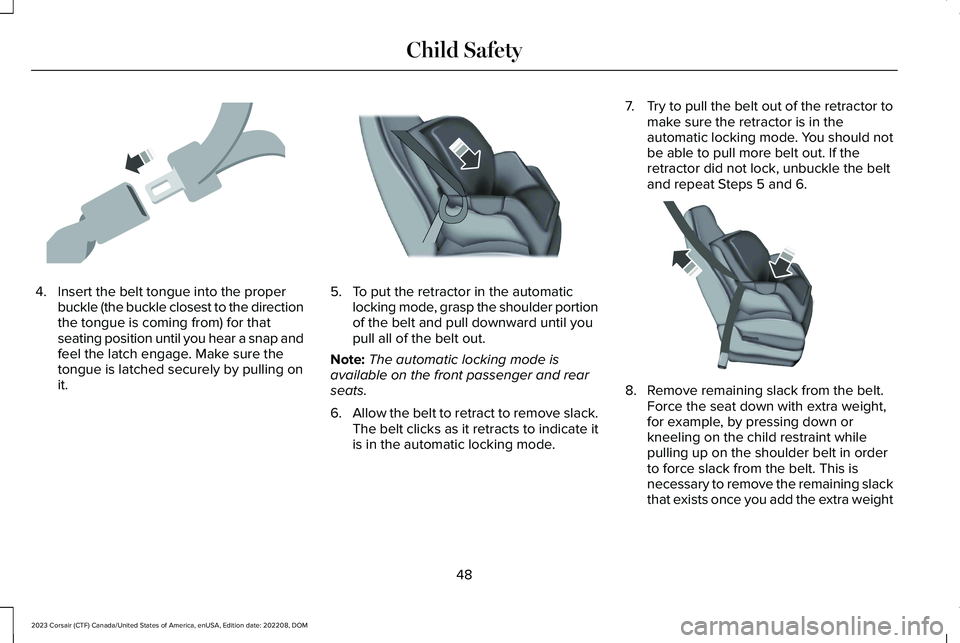
4.Insert the belt tongue into the properbuckle (the buckle closest to the directionthe tongue is coming from) for thatseating position until you hear a snap andfeel the latch engage. Make sure thetongue is latched securely by pulling onit.
5.To put the retractor in the automaticlocking mode, grasp the shoulder portionof the belt and pull downward until youpull all of the belt out.
Note:The automatic locking mode isavailable on the front passenger and rearseats.
6.Allow the belt to retract to remove slack.The belt clicks as it retracts to indicate itis in the automatic locking mode.
7.Try to pull the belt out of the retractor tomake sure the retractor is in theautomatic locking mode. You should notbe able to pull more belt out. If theretractor did not lock, unbuckle the beltand repeat Steps 5 and 6.
8.Remove remaining slack from the belt.Force the seat down with extra weight,for example, by pressing down orkneeling on the child restraint whilepulling up on the shoulder belt in orderto force slack from the belt. This isnecessary to remove the remaining slackthat exists once you add the extra weight
48
2023 Corsair (CTF) Canada/United States of America, enUSA, Edition date: 202208, DOMChild SafetyE142531 E142875 E142533
Page 53 of 690
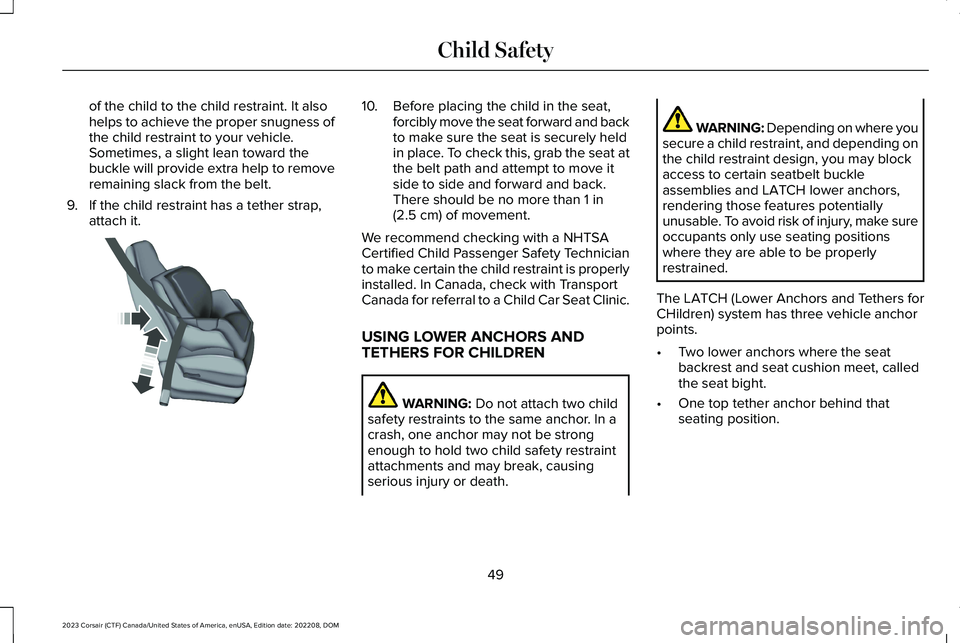
of the child to the child restraint. It alsohelps to achieve the proper snugness ofthe child restraint to your vehicle.Sometimes, a slight lean toward thebuckle will provide extra help to removeremaining slack from the belt.
9.If the child restraint has a tether strap,attach it.
10.Before placing the child in the seat,forcibly move the seat forward and backto make sure the seat is securely heldin place. To check this, grab the seat atthe belt path and attempt to move itside to side and forward and back.There should be no more than 1 in(2.5 cm) of movement.
We recommend checking with a NHTSACertified Child Passenger Safety Technicianto make certain the child restraint is properlyinstalled. In Canada, check with TransportCanada for referral to a Child Car Seat Clinic.
USING LOWER ANCHORS ANDTETHERS FOR CHILDREN
WARNING: Do not attach two childsafety restraints to the same anchor. In acrash, one anchor may not be strongenough to hold two child safety restraintattachments and may break, causingserious injury or death.
WARNING: Depending on where yousecure a child restraint, and depending onthe child restraint design, you may blockaccess to certain seatbelt buckleassemblies and LATCH lower anchors,rendering those features potentiallyunusable. To avoid risk of injury, make sureoccupants only use seating positionswhere they are able to be properlyrestrained.
The LATCH (Lower Anchors and Tethers forCHildren) system has three vehicle anchorpoints.
•Two lower anchors where the seatbackrest and seat cushion meet, calledthe seat bight.
•One top tether anchor behind thatseating position.
49
2023 Corsair (CTF) Canada/United States of America, enUSA, Edition date: 202208, DOMChild SafetyE142534
Page 59 of 690
If the booster seat slides on the vehicle seatupon which it is being used, placing arubberized mesh sold as shelf or carpet linerunder the booster seat may improve thiscondition. Do not use any item thicker thanthis under the booster seat. Check with thebooster seat manufacturer's instructions.
CHILD SAFETY LOCKS
WARNING: You cannot open the reardoors from inside if you have put the childsafety locks on.
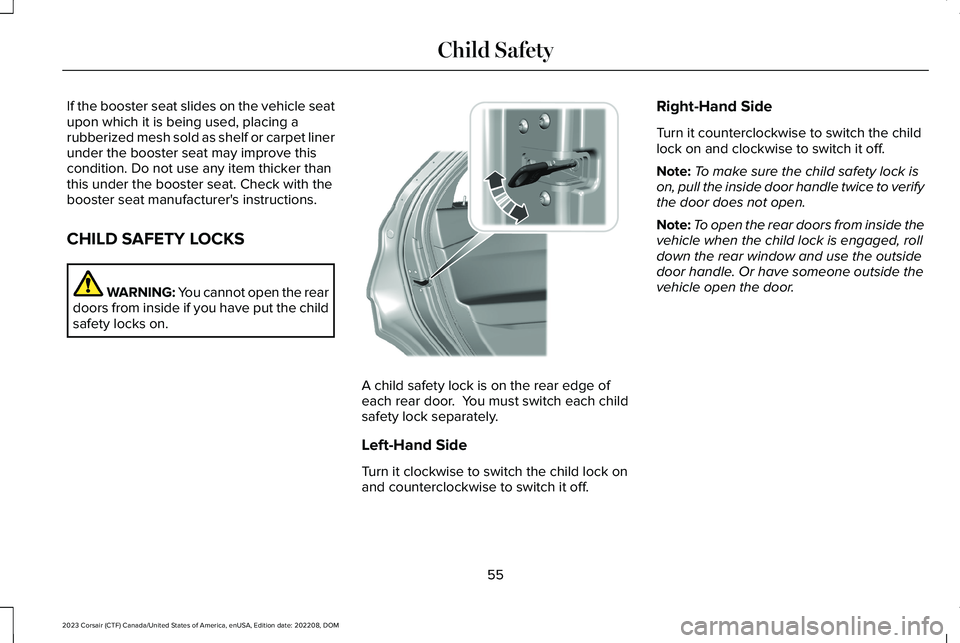
A child safety lock is on the rear edge ofeach rear door. You must switch each childsafety lock separately.
Left-Hand Side
Turn it clockwise to switch the child lock onand counterclockwise to switch it off.
Right-Hand Side
Turn it counterclockwise to switch the childlock on and clockwise to switch it off.
Note:To make sure the child safety lock ison, pull the inside door handle twice to verifythe door does not open.
Note:To open the rear doors from inside thevehicle when the child lock is engaged, rolldown the rear window and use the outsidedoor handle. Or have someone outside thevehicle open the door.
55
2023 Corsair (CTF) Canada/United States of America, enUSA, Edition date: 202208, DOMChild SafetyE300933
Page 61 of 690
The seatbelt system consists of:
•Lap and shoulder seatbelts.
•A shoulder seatbelt with automaticlocking mode, except driver seatbelt.
•Height adjusters at the front outermostseating positions.
•Seatbelt pretensioners at the frontoutermost and second row outermostseating positions.
•Belt tension sensor at the front outermostpassenger seating position.
A seatbelt warning light and tone.
Crash sensors and monitoringsystem with readiness indicator.
The seatbelt pretensioners are designed totighten the seatbelts when activated. Infrontal and near-frontal crashes, the seatbeltpretensioners may be activated alone or, ifthe crash is of sufficient severity, togetherwith the front airbags. The pretensioners mayalso activate when a Safety Canopy airbagdeploys.
FASTENING THE SEATBELTS
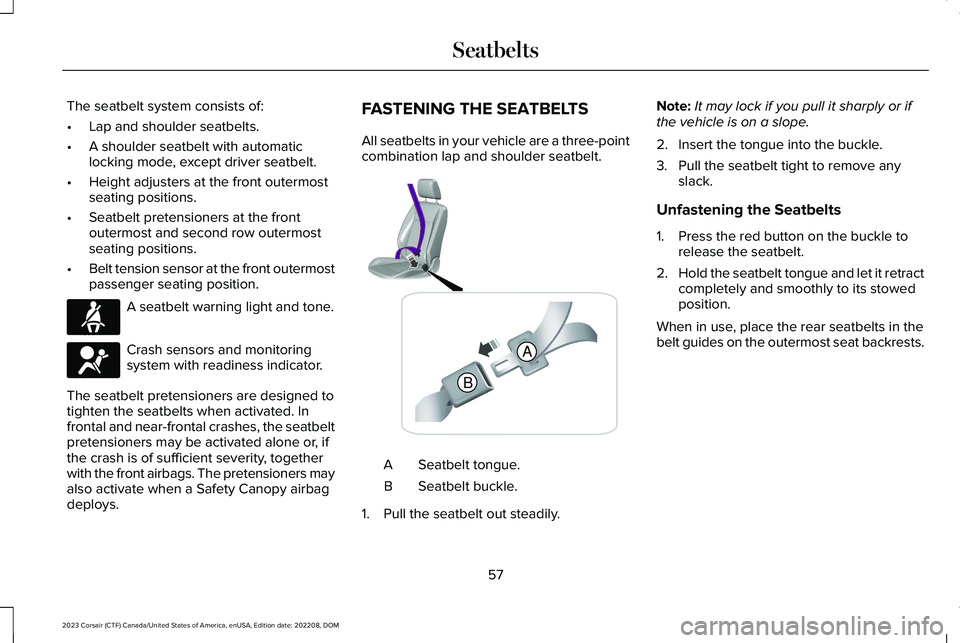
All seatbelts in your vehicle are a three-pointcombination lap and shoulder seatbelt.
Seatbelt tongue.A
Seatbelt buckle.B
1.Pull the seatbelt out steadily.
Note:It may lock if you pull it sharply or ifthe vehicle is on a slope.
2.Insert the tongue into the buckle.
3.Pull the seatbelt tight to remove anyslack.
Unfastening the Seatbelts
1.Press the red button on the buckle torelease the seatbelt.
2.Hold the seatbelt tongue and let it retractcompletely and smoothly to its stowedposition.
When in use, place the rear seatbelts in thebelt guides on the outermost seat backrests.
57
2023 Corsair (CTF) Canada/United States of America, enUSA, Edition date: 202208, DOMSeatbeltsE71880 E67017 BA E338014
Page 62 of 690
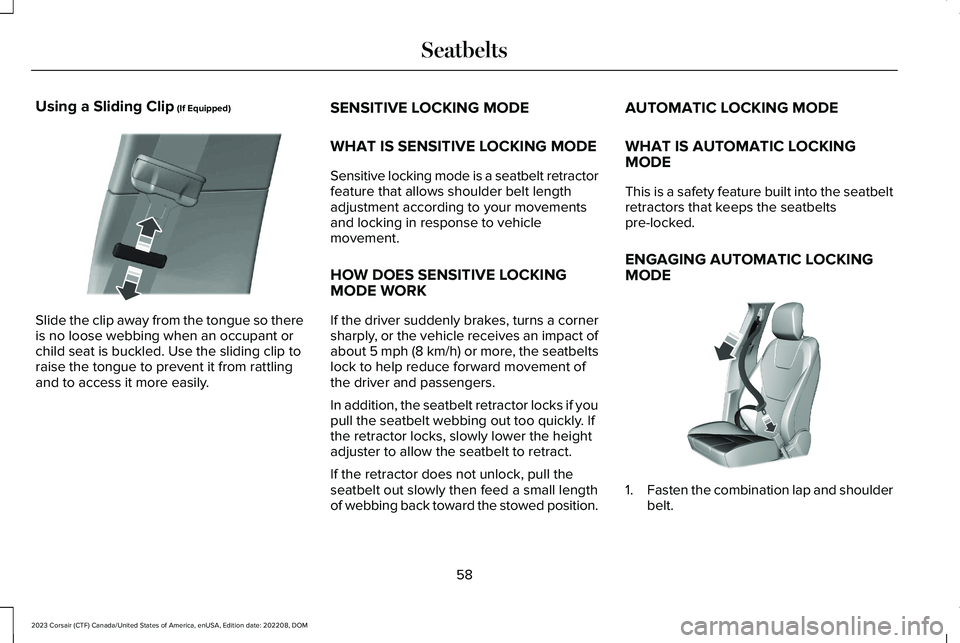
Using a Sliding Clip (If Equipped)
Slide the clip away from the tongue so thereis no loose webbing when an occupant orchild seat is buckled. Use the sliding clip toraise the tongue to prevent it from rattlingand to access it more easily.
SENSITIVE LOCKING MODE
WHAT IS SENSITIVE LOCKING MODE
Sensitive locking mode is a seatbelt retractorfeature that allows shoulder belt lengthadjustment according to your movementsand locking in response to vehiclemovement.
HOW DOES SENSITIVE LOCKINGMODE WORK
If the driver suddenly brakes, turns a cornersharply, or the vehicle receives an impact ofabout 5 mph (8 km/h) or more, the seatbeltslock to help reduce forward movement ofthe driver and passengers.
In addition, the seatbelt retractor locks if youpull the seatbelt webbing out too quickly. Ifthe retractor locks, slowly lower the heightadjuster to allow the seatbelt to retract.
If the retractor does not unlock, pull theseatbelt out slowly then feed a small lengthof webbing back toward the stowed position.
AUTOMATIC LOCKING MODE
WHAT IS AUTOMATIC LOCKINGMODE
This is a safety feature built into the seatbeltretractors that keeps the seatbeltspre-locked.
ENGAGING AUTOMATIC LOCKINGMODE
1.Fasten the combination lap and shoulderbelt.
58
2023 Corsair (CTF) Canada/United States of America, enUSA, Edition date: 202208, DOMSeatbeltsE200788 E142591
Page 63 of 690
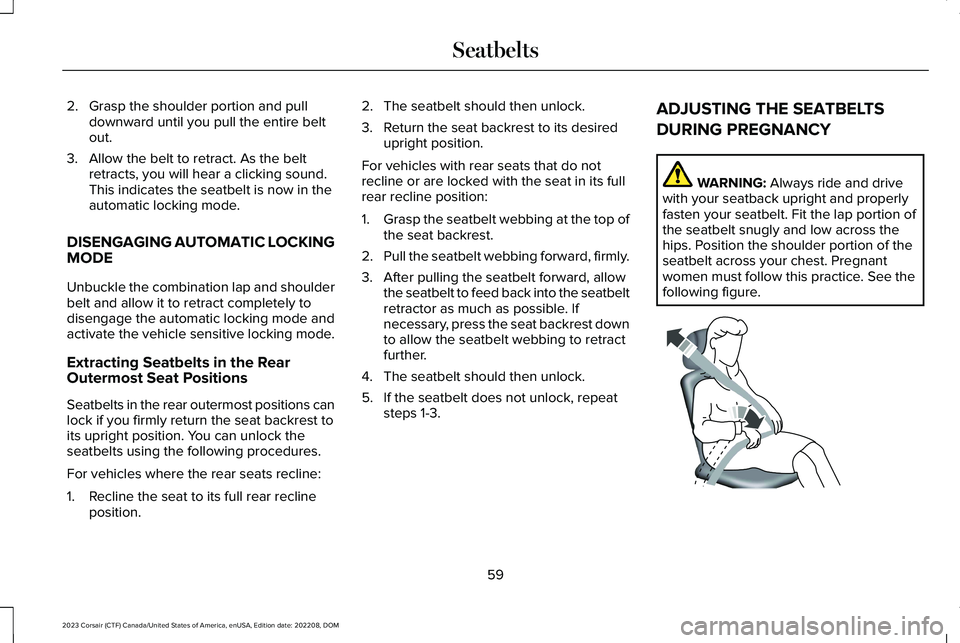
2.Grasp the shoulder portion and pulldownward until you pull the entire beltout.
3.Allow the belt to retract. As the beltretracts, you will hear a clicking sound.This indicates the seatbelt is now in theautomatic locking mode.
DISENGAGING AUTOMATIC LOCKINGMODE
Unbuckle the combination lap and shoulderbelt and allow it to retract completely todisengage the automatic locking mode andactivate the vehicle sensitive locking mode.
Extracting Seatbelts in the RearOutermost Seat Positions
Seatbelts in the rear outermost positions canlock if you firmly return the seat backrest toits upright position. You can unlock theseatbelts using the following procedures.
For vehicles where the rear seats recline:
1.Recline the seat to its full rear reclineposition.
2.The seatbelt should then unlock.
3.Return the seat backrest to its desiredupright position.
For vehicles with rear seats that do notrecline or are locked with the seat in its fullrear recline position:
1.Grasp the seatbelt webbing at the top ofthe seat backrest.
2.Pull the seatbelt webbing forward, firmly.
3.After pulling the seatbelt forward, allowthe seatbelt to feed back into the seatbeltretractor as much as possible. Ifnecessary, press the seat backrest downto allow the seatbelt webbing to retractfurther.
4.The seatbelt should then unlock.
5.If the seatbelt does not unlock, repeatsteps 1-3.
ADJUSTING THE SEATBELTS
DURING PREGNANCY
WARNING: Always ride and drivewith your seatback upright and properlyfasten your seatbelt. Fit the lap portion ofthe seatbelt snugly and low across thehips. Position the shoulder portion of theseatbelt across your chest. Pregnantwomen must follow this practice. See thefollowing figure.
59
2023 Corsair (CTF) Canada/United States of America, enUSA, Edition date: 202208, DOMSeatbeltsE142590
Page 64 of 690
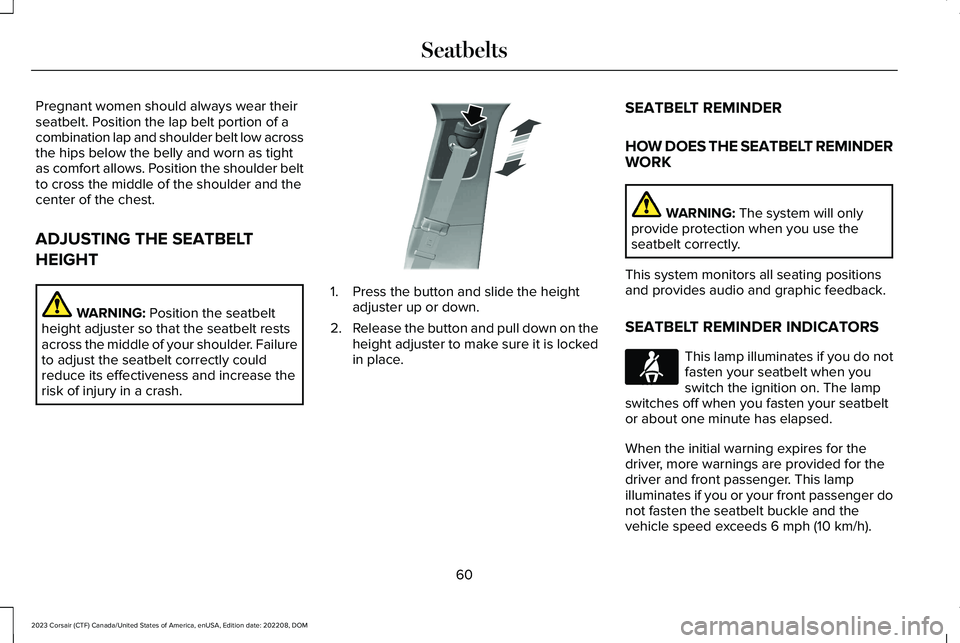
Pregnant women should always wear theirseatbelt. Position the lap belt portion of acombination lap and shoulder belt low acrossthe hips below the belly and worn as tightas comfort allows. Position the shoulder beltto cross the middle of the shoulder and thecenter of the chest.
ADJUSTING THE SEATBELT
HEIGHT
WARNING: Position the seatbeltheight adjuster so that the seatbelt restsacross the middle of your shoulder. Failureto adjust the seatbelt correctly couldreduce its effectiveness and increase therisk of injury in a crash.
1.Press the button and slide the heightadjuster up or down.
2.Release the button and pull down on theheight adjuster to make sure it is lockedin place.
SEATBELT REMINDER
HOW DOES THE SEATBELT REMINDERWORK
WARNING: The system will onlyprovide protection when you use theseatbelt correctly.
This system monitors all seating positionsand provides audio and graphic feedback.
SEATBELT REMINDER INDICATORS
This lamp illuminates if you do notfasten your seatbelt when youswitch the ignition on. The lampswitches off when you fasten your seatbeltor about one minute has elapsed.
When the initial warning expires for thedriver, more warnings are provided for thedriver and front passenger. This lampilluminates if you or your front passenger donot fasten the seatbelt buckle and thevehicle speed exceeds 6 mph (10 km/h).
60
2023 Corsair (CTF) Canada/United States of America, enUSA, Edition date: 202208, DOMSeatbeltsE200161 E71880
Page 82 of 690
REMOTE CONTROL LIMITATIONS
WARNING: Changes or modificationsnot expressively approved by the partyresponsible for compliance could void theuser's authority to operate the equipment.The term "IC:" before the radio certificationnumber only signifies that Industry Canadatechnical specifications were met.
This device complies with Part 15 of the FCCRules and with Industry Canadalicense-exempt RSS standard(s). Operationis subject to the following two conditions: (1)This device may not cause harmfulinterference, and (2) This device must acceptany interference received, includinginterference that may cause undesiredoperation.
Make sure a valid remote control is within3 ft (1 m) from the front door handles and rearof vehicle.
The system may not function if:
•The remote control remains stationaryfor about a minute.
•The vehicle battery has no charge.
•The remote control battery has nocharge.
•There is interference causing issues withthe remote control frequencies.
•The remote control is too close to metalobjects or electronic devices, for examplekeys or a cell phone.
USING THE REMOTE CONTROL
Use your remote control to access variousvehicle systems.
Note:The buttons on your remote may varydepending on the vehicle region or options.
Unlock
Press the button to unlock alldoors. See Unlocking andLocking the Doors Using theRemote Control (page 87).
Lock
Press the button to lock all doors.See Unlocking and Locking theDoors Using the Remote Control(page 87).
Remote Start (If Equipped)
Press the button to remote start.See Remotely Starting andStopping the Vehicle (page 165).
Liftgate (If Equipped)
Press the button to open or closethe liftgate. See Opening theLiftgate (page 100).
Panic Alarm (If Equipped)
Press the button to sound thepanic alarm. See Sounding thePanic Alarm (page 79).
78
2023 Corsair (CTF) Canada/United States of America, enUSA, Edition date: 202208, DOMKeys and Remote ControlsE138629 E138623 E138625 E267940 E138624
Page 83 of 690
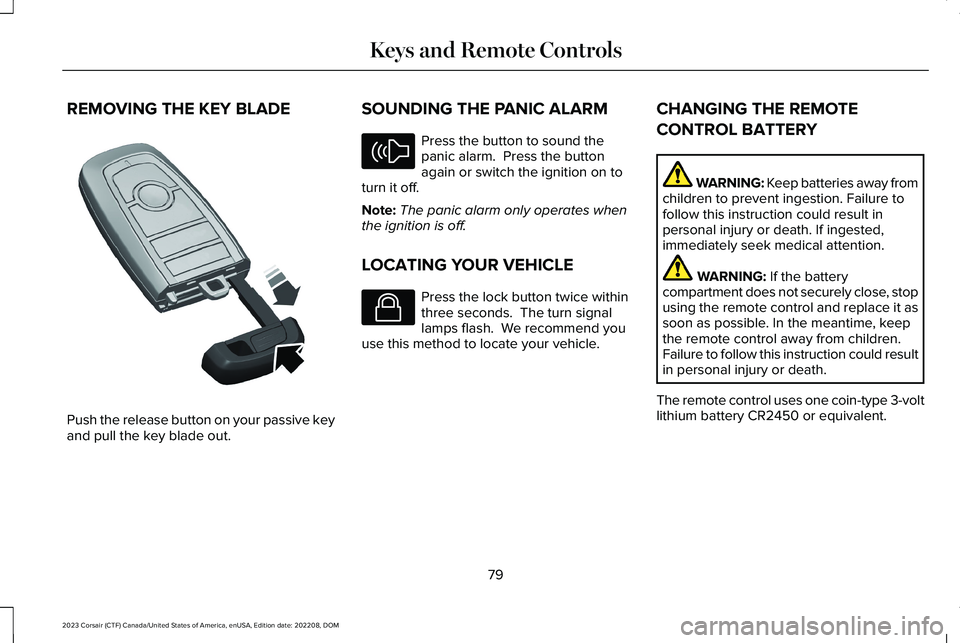
REMOVING THE KEY BLADE
Push the release button on your passive keyand pull the key blade out.
SOUNDING THE PANIC ALARM
Press the button to sound thepanic alarm. Press the buttonagain or switch the ignition on toturn it off.
Note:The panic alarm only operates whenthe ignition is off.
LOCATING YOUR VEHICLE
Press the lock button twice withinthree seconds. The turn signallamps flash. We recommend youuse this method to locate your vehicle.
CHANGING THE REMOTE
CONTROL BATTERY
WARNING: Keep batteries away fromchildren to prevent ingestion. Failure tofollow this instruction could result inpersonal injury or death. If ingested,immediately seek medical attention.
WARNING: If the batterycompartment does not securely close, stopusing the remote control and replace it assoon as possible. In the meantime, keepthe remote control away from children.Failure to follow this instruction could resultin personal injury or death.
The remote control uses one coin-type 3-voltlithium battery CR2450 or equivalent.
79
2023 Corsair (CTF) Canada/United States of America, enUSA, Edition date: 202208, DOMKeys and Remote ControlsE322866 E138624 E138623
Page 87 of 690
WHAT IS PHONE AS A KEY
Phone as a Key allows you to use your phonein place of a passive key.
You can use your phone for the followingfunctions:
•Remote locking and unlocking.
•Passive entry and exit.
•Passive start and drive the vehicle.
•Remote start.
•Memory function recall.
PHONE AS A KEY LIMITATIONS
Limitations can vary based on the make andmodel of your phone, phone location andphysical obstructions.
The following items could impact Phone asa Key performance or prevent functionalityin some cases:
•The typical operating range for Phone asa Key is 131 ft (40 m).
•Your Bluetooth® connection is notenabled, is disrupted, or out of range.
•Your Phone as a Key is not active orenabled on at least one phone.
•Your vehicle battery has depleted.
•Your phone battery has depleted.
•Interference from other devices usingradio frequencies or physicalobstructions.
•Your phone is too close to metal objectsor other electronic devices.
Note:Do not leave a duplicate coded keyin the vehicle. Always take your keys andphone and lock all doors when leaving thevehicle.
PROGRAMMING YOUR PHONE
To program your smartphone as phone as akey:
1.Visit your device's app store to downloadthe Lincoln Way app.
2.Create a new account or sign in to anexisting account on the Lincoln Way app.
3.Add the vehicle identification number toyour account and follow the prompts inthe Lincoln Way app to complete theSync Connect Authorization process.
4.After the authorization is complete, youcan set up phone as a key following theprompts in the Lincoln Way app.
5.After phone as a key is set up, you canset up the backup start passcode byfollowing the prompts on yourtouchscreen.
Note:Keep your new backup start passcodewith you in case of an emergency.
Resetting Phone as a Key
1.Press Settings on the touchscreen.
2.Press General.
3.Press Reset.
4.Press the app connect reset option.
5.Press Phone as a Key Reset.
6.Confirm you would like to continue witherasing all phone as a key, keys andbackup start passcodes.
7.Press Continue.
83
2023 Corsair (CTF) Canada/United States of America, enUSA, Edition date: 202208, DOMPhone as a Key (If Equipped)