steering LINCOLN CORSAIR 2023 Manual Online
[x] Cancel search | Manufacturer: LINCOLN, Model Year: 2023, Model line: CORSAIR, Model: LINCOLN CORSAIR 2023Pages: 690, PDF Size: 15.04 MB
Page 413 of 690
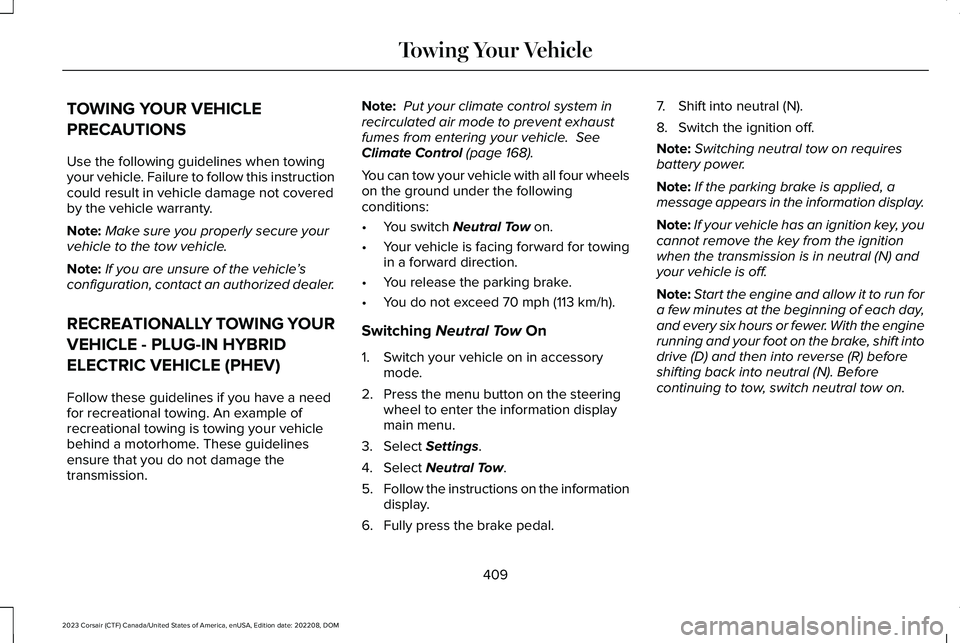
TOWING YOUR VEHICLE
PRECAUTIONS
Use the following guidelines when towingyour vehicle. Failure to follow this instructioncould result in vehicle damage not coveredby the vehicle warranty.
Note:Make sure you properly secure yourvehicle to the tow vehicle.
Note:If you are unsure of the vehicle’sconfiguration, contact an authorized dealer.
RECREATIONALLY TOWING YOUR
VEHICLE - PLUG-IN HYBRID
ELECTRIC VEHICLE (PHEV)
Follow these guidelines if you have a needfor recreational towing. An example ofrecreational towing is towing your vehiclebehind a motorhome. These guidelinesensure that you do not damage thetransmission.
Note: Put your climate control system inrecirculated air mode to prevent exhaustfumes from entering your vehicle. SeeClimate Control (page 168).
You can tow your vehicle with all four wheelson the ground under the followingconditions:
•You switch Neutral Tow on.
•Your vehicle is facing forward for towingin a forward direction.
•You release the parking brake.
•You do not exceed 70 mph (113 km/h).
Switching Neutral Tow On
1.Switch your vehicle on in accessorymode.
2.Press the menu button on the steeringwheel to enter the information displaymain menu.
3.Select Settings.
4.Select Neutral Tow.
5.Follow the instructions on the informationdisplay.
6.Fully press the brake pedal.
7.Shift into neutral (N).
8.Switch the ignition off.
Note:Switching neutral tow on requiresbattery power.
Note:If the parking brake is applied, amessage appears in the information display.
Note:If your vehicle has an ignition key, youcannot remove the key from the ignitionwhen the transmission is in neutral (N) andyour vehicle is off.
Note:Start the engine and allow it to run fora few minutes at the beginning of each day,and every six hours or fewer. With the enginerunning and your foot on the brake, shift intodrive (D) and then into reverse (R) beforeshifting back into neutral (N). Beforecontinuing to tow, switch neutral tow on.
409
2023 Corsair (CTF) Canada/United States of America, enUSA, Edition date: 202208, DOMTowing Your Vehicle
Page 414 of 690
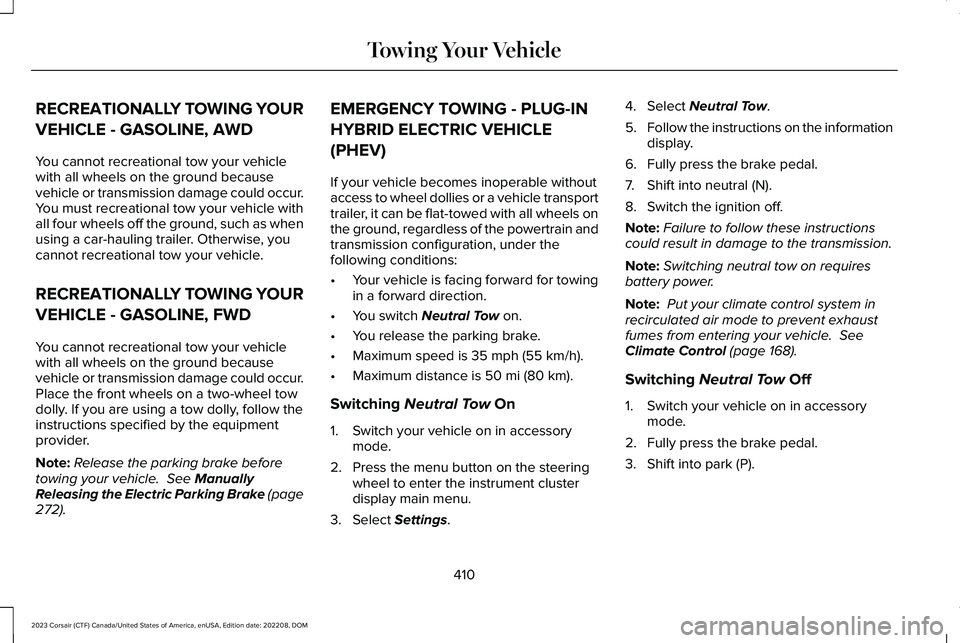
RECREATIONALLY TOWING YOUR
VEHICLE - GASOLINE, AWD
You cannot recreational tow your vehiclewith all wheels on the ground becausevehicle or transmission damage could occur.You must recreational tow your vehicle withall four wheels off the ground, such as whenusing a car-hauling trailer. Otherwise, youcannot recreational tow your vehicle.
RECREATIONALLY TOWING YOUR
VEHICLE - GASOLINE, FWD
You cannot recreational tow your vehiclewith all wheels on the ground becausevehicle or transmission damage could occur.Place the front wheels on a two-wheel towdolly. If you are using a tow dolly, follow theinstructions specified by the equipmentprovider.
Note:Release the parking brake beforetowing your vehicle. See ManuallyReleasing the Electric Parking Brake (page272).
EMERGENCY TOWING - PLUG-IN
HYBRID ELECTRIC VEHICLE
(PHEV)
If your vehicle becomes inoperable withoutaccess to wheel dollies or a vehicle transporttrailer, it can be flat-towed with all wheels onthe ground, regardless of the powertrain andtransmission configuration, under thefollowing conditions:
•Your vehicle is facing forward for towingin a forward direction.
•You switch Neutral Tow on.
•You release the parking brake.
•Maximum speed is 35 mph (55 km/h).
•Maximum distance is 50 mi (80 km).
Switching Neutral Tow On
1.Switch your vehicle on in accessorymode.
2.Press the menu button on the steeringwheel to enter the instrument clusterdisplay main menu.
3.Select Settings.
4.Select Neutral Tow.
5.Follow the instructions on the informationdisplay.
6.Fully press the brake pedal.
7.Shift into neutral (N).
8.Switch the ignition off.
Note:Failure to follow these instructionscould result in damage to the transmission.
Note:Switching neutral tow on requiresbattery power.
Note: Put your climate control system inrecirculated air mode to prevent exhaustfumes from entering your vehicle. SeeClimate Control (page 168).
Switching Neutral Tow Off
1.Switch your vehicle on in accessorymode.
2.Fully press the brake pedal.
3.Shift into park (P).
410
2023 Corsair (CTF) Canada/United States of America, enUSA, Edition date: 202208, DOMTowing Your Vehicle
Page 421 of 690
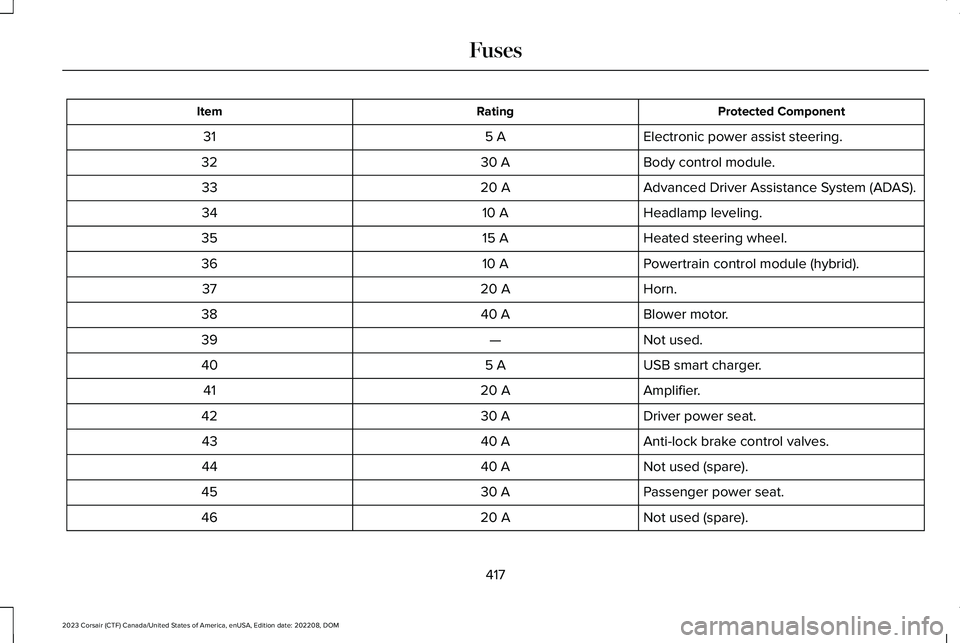
Protected ComponentRatingItem
Electronic power assist steering.5 A31
Body control module.30 A32
Advanced Driver Assistance System (ADAS).20 A33
Headlamp leveling.10 A34
Heated steering wheel.15 A35
Powertrain control module (hybrid).10 A36
Horn.20 A37
Blower motor.40 A38
Not used.—39
USB smart charger.5 A40
Amplifier.20 A41
Driver power seat.30 A42
Anti-lock brake control valves.40 A43
Not used (spare).40 A44
Passenger power seat.30 A45
Not used (spare).20 A46
417
2023 Corsair (CTF) Canada/United States of America, enUSA, Edition date: 202208, DOMFuses
Page 428 of 690
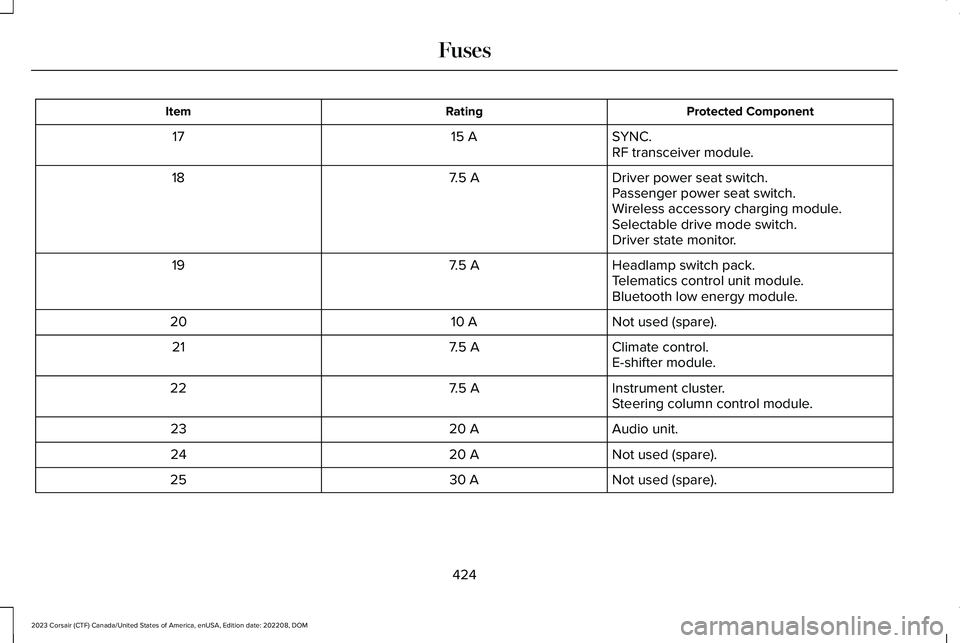
Protected ComponentRatingItem
SYNC.15 A17RF transceiver module.
Driver power seat switch.7.5 A18Passenger power seat switch.Wireless accessory charging module.Selectable drive mode switch.Driver state monitor.
Headlamp switch pack.7.5 A19Telematics control unit module.Bluetooth low energy module.
Not used (spare).10 A20
Climate control.7.5 A21E-shifter module.
Instrument cluster.7.5 A22Steering column control module.
Audio unit.20 A23
Not used (spare).20 A24
Not used (spare).30 A25
424
2023 Corsair (CTF) Canada/United States of America, enUSA, Edition date: 202208, DOMFuses
Page 437 of 690
Do not use supplemental engine oil additivesbecause they are unnecessary and couldlead to engine damage that the vehiclewarranty may not cover.
1.Clean the area surrounding the engineoil filler cap before you remove it.
2.Remove the engine oil filler cap.
3.Add engine oil that meets ourspecifications. See Capacities andSpecifications (page 495).
4.Reinstall the engine oil filler cap. Turn itclockwise until you feel a strongresistance.
Note: Do not add oil further than themaximum mark. Oil levels above themaximum mark may cause engine damage.
Note:Immediately soak up any oil spillagewith an absorbent cloth.
INTELLIGENT OIL LIFE MONITOR
Under certain conditions the vehicle’sintelligent oil life monitor may determine youroil requires replacement prior to your generalservice. Should this occur it is recommendedyou replace your oil within two weeks or500 mi (800 km) of being alerted.
Your authorized dealer will be able to adviseyou whether only an engine oil and filterchange is recommended or whether youshould complete your general serviceinclusive of oil and oil Filter.
RESETTING THE INTELLIGENT OIL LIFEMONITOR
Use the information display controls on thesteering wheel to reset the oil changeindicator.
From the main menu scroll to:
Action and descriptionMessage
Press the right arrow button,then from this menu scroll tothe following message.
Settings
Press the right arrow button,then from this menu scroll tothe following message.
Vehicle
Press the right arrow button,then from this menu scroll tothe following message.
Oil Life
Press and hold the OK buttonuntil the instrument clusterdisplays the followingmessage.
Hold OK toReset
Reset Successful
When the oil change indicatorresets the instrument clusterdisplays 100%.
Remaining Life
{00}%
433
2023 Corsair (CTF) Canada/United States of America, enUSA, Edition date: 202208, DOMMaintenance
Page 447 of 690
WARNING: This vehicle may havemore than one battery. Removing thebattery cables from only one battery doesnot disconnect your vehicle electricalsystem. Make sure you disconnect thebattery cables from all batteries whendisconnecting power. Failure to do so maycause serious personal injury or propertydamage.
WARNING: For vehicles withAuto-Start-Stop the battery requirement isdifferent. You must replace the battery withone of exactly the same specification.
WHAT IS THE BATTERYMANAGEMENT SYSTEM
The battery management system monitorsbattery conditions and takes actions toextend battery life.
HOW DOES THE BATTERYMANAGEMENT SYSTEM WORK
If excessive battery drain is detected, thesystem temporarily disables some electricalsystems to protect the battery.
Systems included are:
•Heated rear window.
•Heated seats.
•Climate control.
•Heated steering wheel.
•Audio unit.
•Navigation system.
A message could appear in the informationdisplay to alert you that battery protectionactions are active. This message is only fornotification that an action is taking place, andnot intended to indicate an electrical problemor that the battery requires replacement.
BATTERY MANAGEMENT SYSTEMLIMITATIONS
After battery replacement, or in some casesafter charging the battery with an externalcharger, the battery management systemrequires eight hours of vehicle sleep time torelearn the battery state of charge. Duringthis time, your vehicle must remain fullylocked with the ignition switched off.
Note:Prior to relearning the battery state ofcharge, the battery management systemcould temporarily disable some electricalsystems.
Electrical Accessory Installation
To make sure the battery managementsystem works correctly, do not connect anelectrical device ground connection directlyto the battery negative post. This can causeinaccurate measurements of the batterycondition and potential incorrect systemoperation.
443
2023 Corsair (CTF) Canada/United States of America, enUSA, Edition date: 202208, DOMMaintenance
Page 458 of 690
•Use a spray with a 40° wide spray anglepattern.
•Keep the nozzle at a 12 in (305 mm)distance and 90° angle to your vehicle'ssurface.
•Do not use water pressure higher than2,000 psi (14,000 kPa).
•Do not use water hotter than 179°F (82°C).
Note:Holding the pressure washer nozzleat an angle to the vehicle's surface maydamage graphics and cause the edges topeel away from the vehicle's surface.
CLEANING CAMERA LENSES ANDSENSORS
We recommend that you only use lukewarmor cold water and a soft cloth to clean thecamera lens and sensors.
Note:Do not pressure wash camera lensand sensors.
CLEANING THE UNDERBODY
Flush the complete underside of your vehiclefrequently. Keep body and door drain holesfree from packed dirt.
Rear suspension components may requireregular cleaning with a power washer or athorough rinse with a strong stream of waterif the vehicle is operated in dusty or muddyenvironments. Rear leaf springs or othersuspension components may emit squeakingor popping noises while operating thevehicle if particles, such as dirt, rocks, orother debris, are present in the components.
CLEANING THE INTERIOR
CLEANING THE INSTRUMENT PANEL
WARNING: Do not use chemicalsolvents or strong detergents whencleaning the steering wheel or instrumentpanel to avoid contamination of the airbagsystem.
We recommend that you only clean theinstrument panel and cluster lens with adamp soft cloth. Dry the area with a clean,soft cloth.
For additional information and assistance,we recommend that you contact anauthorized dealer.
Note:Avoid cleaners or polishes thatincrease the gloss of the upper portion ofthe instrument panel. The dull finish in thisarea helps protect you from undesirablewindshield reflection.
CLEANING PLASTIC
We recommend that you only use a mildsoap and water solution on a soft cloth. Drythe area with a clean, soft cloth.
CLEANING DISPLAYS AND SCREENS
We recommend that you only use amicrofiber cloth in a circular motion to cleanoff the fingerprint or dust.
454
2023 Corsair (CTF) Canada/United States of America, enUSA, Edition date: 202208, DOMVehicle Care
Page 473 of 690
USING SNOW CHAINS
WARNING: Do not exceed 30 mph(50 km/h). Failure to follow this instructioncould result in the loss of control of yourvehicle, personal injury or death.
WARNING: Do not use snow chainson snow-free roads.
WARNING: Only fit snow chains tospecified tires.
WARNING: If your vehicle is fittedwith wheel trims, remove them beforefitting snow chains.
WARNING: If you are driving inslippery conditions that require tire chainsor cables, then it is critical that you drivecautiously. Keep speeds down, allow forlonger stopping distances and avoidaggressive steering to reduce the chancesof a loss of vehicle control which can leadto serious injury or death. If the rear endof your vehicle slides while cornering, steerin the direction of the slide until you regaincontrol of your vehicle.
WARNING: Remember that evenadvanced technology cannot defy the lawsof physics. It's always possible to losecontrol of a vehicle due to inappropriatedriver input for the conditions. Aggressivedriving on any road condition can causeyou to lose control of your vehicleincreasing the risk of personal injury orproperty damage. Activation of theelectronic stability control system is an
indication that at least some of the tireshave exceeded their ability to grip theroad; this could reduce the operator'sability to control the vehicle potentiallyresulting in a loss of vehicle control, vehiclerollover, personal injury and death.
WARNING: Wheels and tires mustbe the same size, load index and speedrating as those originally fitted on thevehicle. Use of any other tire or wheel canaffect the safety and performance of yourvehicle. Additionally, the use ofnon-recommended tires and wheels cancause steering, suspension, axle, transfercase or power transfer unit failure. Followthe recommended tire inflation pressuresfound on the Safety ComplianceCertification label, or the Tire Label on theB-Pillar or the edge of the driver door.Failure to follow this instruction could resultin loss of vehicle control, vehicle rollover,or personal injury or death.
469
2023 Corsair (CTF) Canada/United States of America, enUSA, Edition date: 202208, DOMWheel and Tire Information
Page 479 of 690
WHAT IS THE TIRE SEALANT AND
INFLATOR KIT
The kit consists of an air compressor tore-inflate the tire and a canister of sealingcompound that effectively seals mostpunctures. This kit provides a temporary tirerepair allowing you to drive your vehicle upto 120 mi (200 km) at a maximum speed of50 mph (80 km/h) to reach a tire servicelocation.
Note:The temporary mobility kit containsenough sealant compound in the canisterfor one tire repair only. See an authorizeddealer for replacement sealant canisters.
TIRE SEALANT AND INFLATOR KIT
PRECAUTIONS
WARNING: Failure to follow theseguidelines could result in an increased riskof loss of vehicle control, injury or death.
WARNING: Do not run the enginewhen operating the air compressor unlessthe vehicle is outdoors or in awell-ventilated area.
Note:Do not use the kit if a tire has becomeseverely damaged. Only punctures locatedwithin the tire tread can be sealed with thekit.
Do not attempt to repair punctures largerthan 0.24 in (6 mm) or damage to the tire'ssidewall. The tire may not completely seal.
•Drive carefully and avoid abrupt steeringmaneuvers.
•Periodically monitor tire inflation pressurein the affected tire; if the tire is losingpressure, have the vehicle towed.
•Read the information in the Tips for Useof the Kit section to make sure safeoperation of the kit and your vehicle.
After sealant use, the tire pressuremonitoring system sensor and valve stem onthe wheel must be replaced by an authorizeddealer.
LOCATING THE TIRE SEALANT
AND INFLATOR KIT
The kit is located under the load floor in therear of the vehicle.
475
2023 Corsair (CTF) Canada/United States of America, enUSA, Edition date: 202208, DOMTire Sealant and Inflator Kit - Plug-In Hybrid Electric Vehicle (PHEV)
Page 525 of 690
AUDIO SYSTEM PRECAUTIONS
WARNING: Driving while distractedcan result in loss of vehicle control, crashand injury. We strongly recommend thatyou use extreme caution when using anydevice that may take your focus off theroad. Your primary responsibility is the safeoperation of your vehicle. We recommendagainst the use of any hand-held devicewhile driving and encourage the use ofvoice-operated systems when possible.Make sure you are aware of all applicablelocal laws that may affect the use ofelectronic devices while driving.
Listening to loud audio for long periods oftime could damage your hearing.
SWITCHING THE AUDIO UNIT ON
AND OFF
Press the button on the volumecontrol.
SELECTING THE AUDIO SOURCE
Audio Unit
Press the button to open the mediasource menu.
You can press this multiple times to changeto the audio source or scroll through themedia sources.
Touchscreen
Press Sources on the touchscreen to openthe media source menu.
PLAYING OR PAUSING THE AUDIO
SOURCE
Touchscreen
Press to pause playback. Pressagain to resume playback.
Note:Not all sources can be paused.
ADJUSTING THE VOLUME
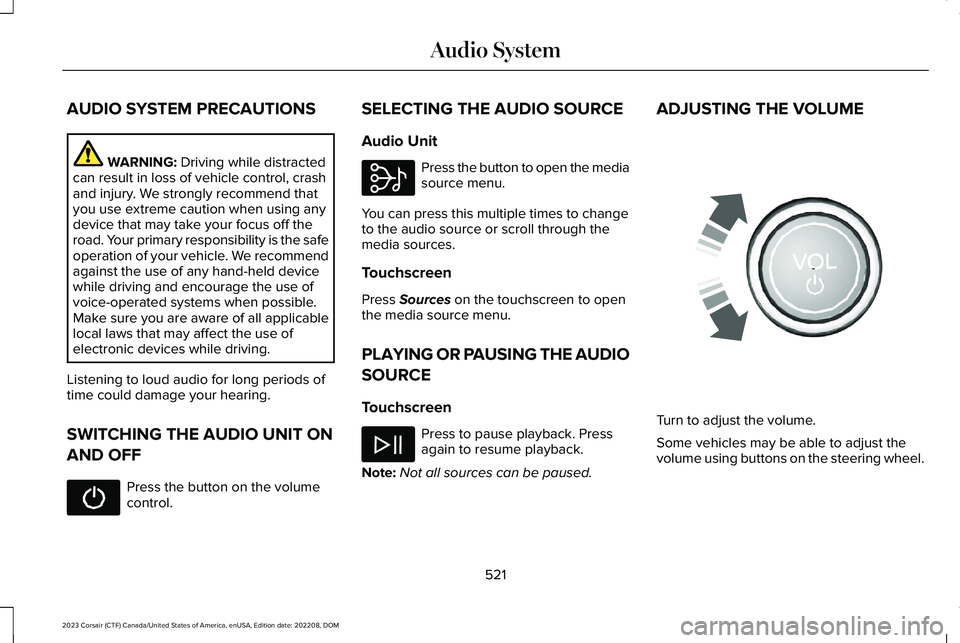
Turn to adjust the volume.
Some vehicles may be able to adjust thevolume using buttons on the steering wheel.
521
2023 Corsair (CTF) Canada/United States of America, enUSA, Edition date: 202208, DOMAudio System E308143 E248939