position LINCOLN MARK VIII 1997 Owner's Manual
[x] Cancel search | Manufacturer: LINCOLN, Model Year: 1997, Model line: MARK VIII, Model: LINCOLN MARK VIII 1997Pages: 315, PDF Size: 2.18 MB
Page 91 of 315

86For lane changes, move the lever far enough to
signal but not to latch. The lever will return to the
off position when you release it.
When the turn signal is used when the headlamps
are on, the cornering lamps will automatically light
on either the right or left side depending on the
direction of the turn.High BeamsTo turn on the high beams, turn the headlamp
control switch to the headlamp ON position (or
activate the autolamp feature) and pull the turn
signal lever toward you until it latches. When the
high beams are ON, the high beam indicator light
on the instrument cluster comes on.
To turn off the high beams, push the lever away
from you until it latches. The high beam indicator
light turns off.NOTE:When the headlamps are on low beam, the
outer two headlamps are on. When the headlamps
are on high beam, the two outer headlamps will
turn off and the inner headlamps turn on.
Flashing the LightsTo flash the headlamps, pull the lever toward you
for a moment and then release it. The headlamps
will flash whether the headlamp knob is in the on
or off position.Windshield Wipers and WasherThe wiper system is controlled by the windshield
wiper control module. The windshield wiper will
operate with the ignition switch in the ACC or ON
position or in the delayed accessory mode. The
wiper system functions are as follows:
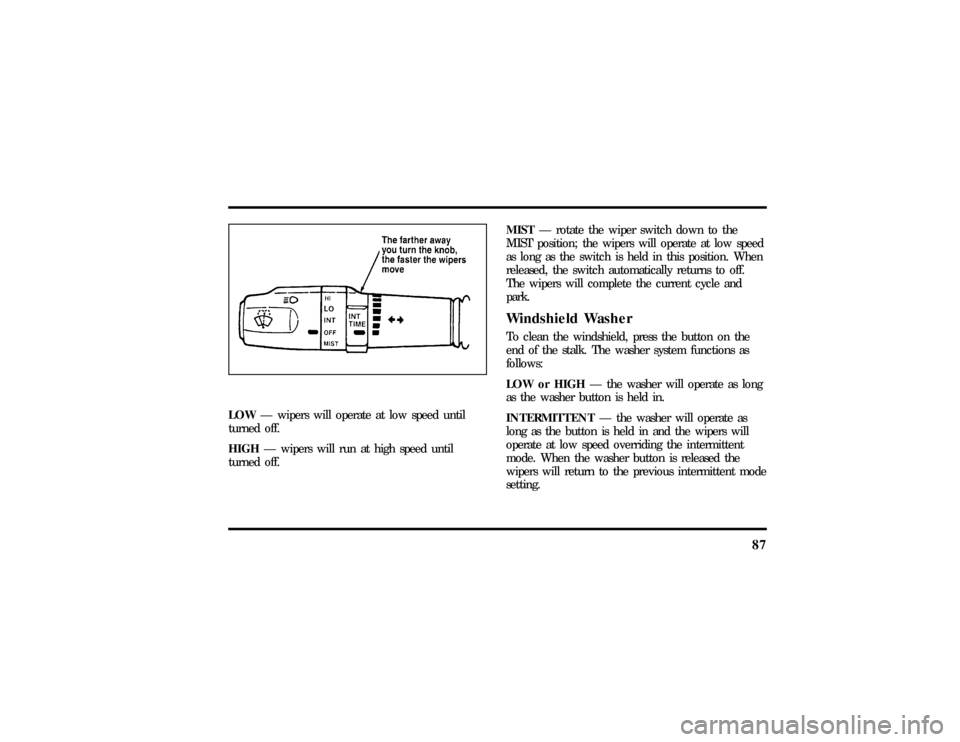
INTERMITTENTÐ Wipers run at low speed at
intervals set by rotating the barrel of the wiper
switch. The interval can be adjusted between one
to twenty seconds.
File:05fncf8.ex
Update:Thu Jun 27 10:02:20 1996
Page 92 of 315
87
LOWÐ wipers will operate at low speed until
turned off.
HIGHÐ wipers will run at high speed until
turned off.MISTÐ rotate the wiper switch down to the
MIST position; the wipers will operate at low speed
as long as the switch is held in this position. When
released, the switch automatically returns to off.
The wipers will complete the current cycle and
park.
Windshield WasherTo clean the windshield, press the button on the
end of the stalk. The washer system functions as
follows:
LOW or HIGHÐ the washer will operate as long
as the washer button is held in.
INTERMITTENTÐ the washer will operate as
long as the button is held in and the wipers will
operate at low speed overriding the intermittent
mode. When the washer button is released the
wipers will return to the previous intermittent mode
setting.
File:05fncf8.ex
Update:Thu Jun 27 10:02:20 1996
Page 97 of 315

92During autoglide operation the column will move to
the full in and up position. The column will return
when autoglide is completed.
During easy exit (if activated through the Message
Center) operation the column will move to the full
in and up position. When the key is inserted into
the ignition switch the column will return to the
previous setting. When you remove the key the
column will move away.
If the steering column adjustment switch is pressed
during memory recall the switch position will cancel
automatic operation and the column will respond to
manual adjustment of the switch.
The manual adjustment of the steering column is
adjustable with the ignition switch on or off.
The steering column can be adjusted manually by
using the four-way rocker adjustment switch located
on the multi-function switch below the turnsignal/wiper switch stalk. The switch will adjust the
column as long as held or until the column reaches
the end of travel.
The telescope function is adjusted by pulling the
switch towards the driver to telescope out and
pushing the switch towards the instrument panel to
telescope in.
The tilt function is adjusted by pressing the switch
up to tilt the column up or pressing the switch
down to tilt the column down.
NOTE:If attempting to manually adjust the
steering column and it does not respond see your
local dealer for service.
File:05fncf8.ex
Update:Thu Jun 27 10:02:20 1996
Page 102 of 315
97
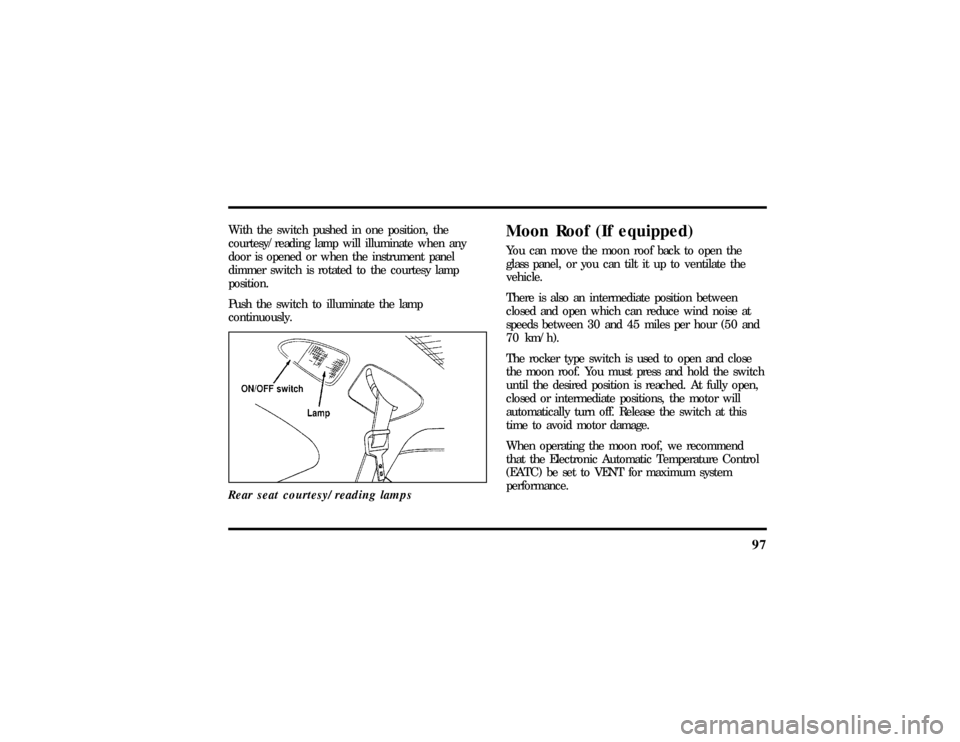
With the switch pushed in one position, the
courtesy/reading lamp will illuminate when any
door is opened or when the instrument panel
dimmer switch is rotated to the courtesy lamp
position.
Push the switch to illuminate the lamp
continuously.
Rear seat courtesy/reading lamps
Moon Roof (If equipped)You can move the moon roof back to open the
glass panel, or you can tilt it up to ventilate the
vehicle.
There is also an intermediate position between
closed and open which can reduce wind noise at
speeds between 30 and 45 miles per hour (50 and
70 km/h).
The rocker type switch is used to open and close
the moon roof. You must press and hold the switch
until the desired position is reached. At fully open,
closed or intermediate positions, the motor will
automatically turn off. Release the switch at this
time to avoid motor damage.
When operating the moon roof, we recommend
that the Electronic Automatic Temperature Control
(EATC) be set to VENT for maximum system
performance.
File:05fncf8.ex
Update:Thu Jun 27 10:02:20 1996
Page 103 of 315
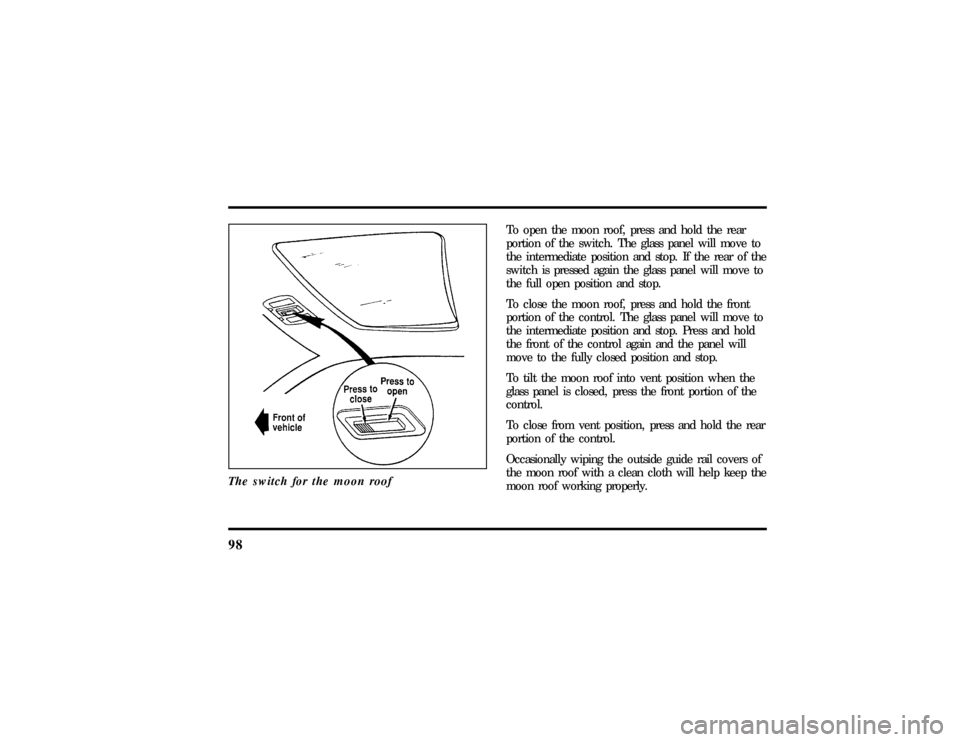
98The switch for the moon roof
To open the moon roof, press and hold the rear
portion of the switch. The glass panel will move to
the intermediate position and stop. If the rear of the
switch is pressed again the glass panel will move to
the full open position and stop.
To close the moon roof, press and hold the front
portion of the control. The glass panel will move to
the intermediate position and stop. Press and hold
the front of the control again and the panel will
move to the fully closed position and stop.
To tilt the moon roof into vent position when the
glass panel is closed, press the front portion of the
control.
To close from vent position, press and hold the rear
portion of the control.
Occasionally wiping the outside guide rail covers of
the moon roof with a clean cloth will help keep the
moon roof working properly.
File:05fncf8.ex
Update:Thu Jun 27 10:02:20 1996
Page 105 of 315
100short delay. The delay starts when glare goes away.
The delay prevents excessive changing of the
mirrors as traffic moves behind and around the
vehicle, or on rolling hills and curves.
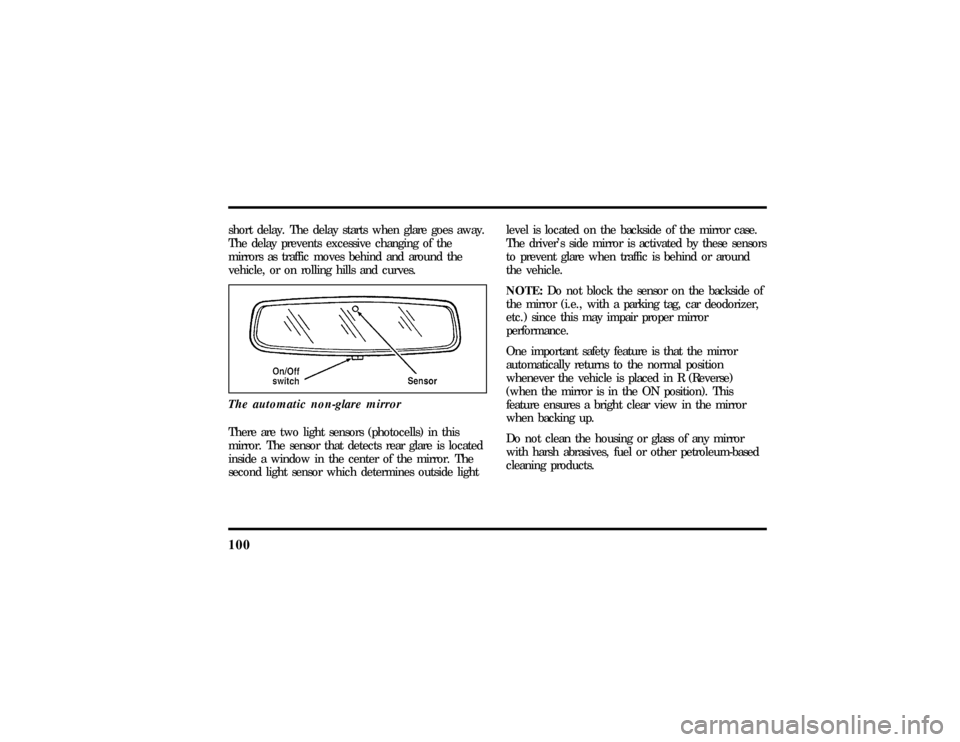
The automatic non-glare mirrorThere are two light sensors (photocells) in this
mirror. The sensor that detects rear glare is located
inside a window in the center of the mirror. The
second light sensor which determines outside lightlevel is located on the backside of the mirror case.
The driver's side mirror is activated by these sensors
to prevent glare when traffic is behind or around
the vehicle.
NOTE:Do not block the sensor on the backside of
the mirror (i.e., with a parking tag, car deodorizer,
etc.) since this may impair proper mirror
performance.
One important safety feature is that the mirror
automatically returns to the normal position
whenever the vehicle is placed in R (Reverse)
(when the mirror is in the ON position). This
feature ensures a bright clear view in the mirror
when backing up.
Do not clean the housing or glass of any mirror
with harsh abrasives, fuel or other petroleum-based
cleaning products.
File:05fncf8.ex
Update:Thu Jun 27 10:02:20 1996
Page 112 of 315
107
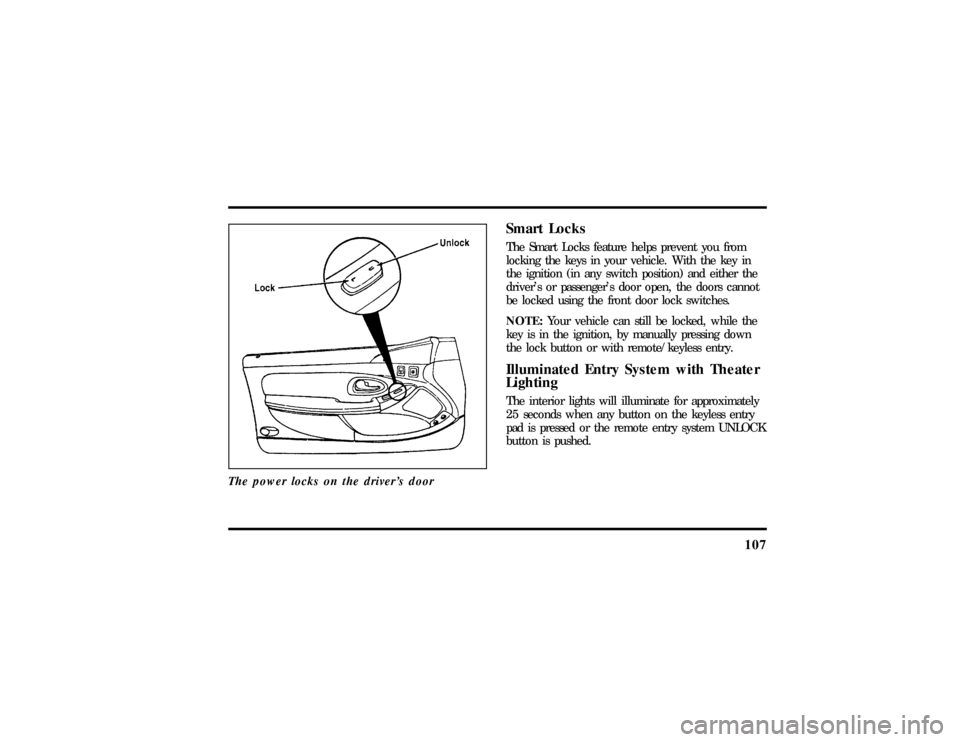
The power locks on the driver's door
Smart LocksThe Smart Locks feature helps prevent you from
locking the keys in your vehicle. With the key in
the ignition (in any switch position) and either the
driver's or passenger's door open, the doors cannot
be locked using the front door lock switches.
NOTE:Your vehicle can still be locked, while the
key is in the ignition, by manually pressing down
the lock button or with remote/keyless entry.Illuminated Entry System with Theater
LightingThe interior lights will illuminate for approximately
25 seconds when any button on the keyless entry
pad is pressed or the remote entry system UNLOCK
button is pushed.
File:05fncf8.ex
Update:Thu Jun 27 10:02:20 1996
Page 114 of 315
109
There is also an Express Down feature on the
driver's power window. This feature can be
activated through the menu functions of your
Message Center.
For conventional operation press the driver's
window control to the first detent in the down
position. For express down operation press the
control to the second detent in the down position.
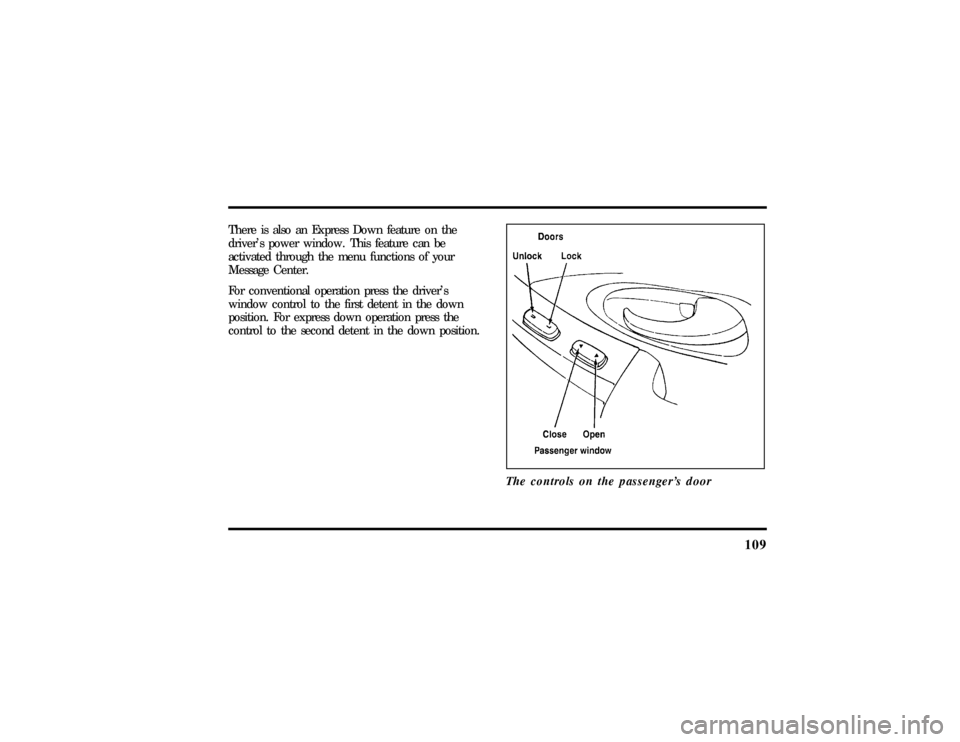
The controls on the passenger's door
File:05fncf8.ex
Update:Thu Jun 27 10:02:20 1996
Page 115 of 315

110Memory Profile System
(If equipeed)The Personality Memory Feature customizes your
Mark VIII for up to two (2) drivers. The following
features are automatically recalled when unlocking
the doors using the remote entry transmitter,
keyless entry keypad, or by pressing the Memory 1
or Memory 2 switches on the driver's door:q
All driver's seat positions except power lumbar
and head restraint.
q
Both left and right outside mirror settings.
q
Steering column position.
q
Seven Driver Menu settings
Personality Memory also allows you to customize
settings from the Driver menu located in the
Message Center. Refer to the Message Center for
more information.
Recalling Personality MemoryAll of these settings are automatically recalled when
the driver unlocks the door using the remote entry
transmitter, keyless entry keypad or presses either
Memory 1 or Memory 2 switch inside the driver's
door. The vehicle must be in PARK or NEUTRAL to
recall Personality Memory settings.Remote EntryPressing the UNLOCK button on the remote entry
transmitter unlocks the driver's door and recalls all
of the Personality Memory settings. Two
transmitters are delivered with the vehicle. One is
programmed to always recall Memory 1 and the
other will always recall Memory 2. Personality
Memory 1 or 2 is indicated on the back of the
transmitter.
File:05fncf8.ex
Update:Thu Jun 27 10:02:20 1996
Page 116 of 315

111
Personality Memory recall from the remote
transmitter can be disabled. This is done by sliding
the switch on the back of the transmitter to OFF.
Personality Memory can still be recalled using
keyless entry code or the Memory 1 or Memory 2
switches.Keyless EntryUp to three unique keyless entry codes can be
programmed by the customer. Two of the codes
can be assigned to recall Personality Memory 1 or
Memory 2. Each time the 5-digit code is entered on
the keypad, the driver's door will unlock and
Personality Memory 1 or Memory 2 will be
recalled.
NOTE:Please note that even though the driver's
Personality Memory may be recalled using remote
or keyless entry, the seats and mirrors will not
move to the driver's set positions until the driver's
door is opened. The steering column will move
when the key is inserted.
Memory SwitchesPressing either the Memory 1 or Memory 2 switch
on the driver's door will also recall the Personality
Memory settings as selected, providing your vehicle
is in P (Park) or N (Neutral).Auto SaveAny change made by the driver to one of the above
Personality Memory settings will be updated and
saved automatically. The display, DRIVER 1 (or 2)
SETTING SAVED, will appear on the Message
Center for five (5) seconds as a confirmation of the
update to Personality Memory.
If the driver does not use the remote entry
transmitter, or keyless entry keypad to unlock the
doors upon entering or does not press the Memory
1 or Memory 2 switch, then any change to one of
the Personality Memory settings will not be
automatically saved. Instead the driver will be
prompted by the Message Center. ªIDENTIFY
DRIVER TO SAVEº. Press select button (located on
File:05fncf8.ex
Update:Thu Jun 27 10:02:20 1996