display LINCOLN MKT 2019 Owners Manual
[x] Cancel search | Manufacturer: LINCOLN, Model Year: 2019, Model line: MKT, Model: LINCOLN MKT 2019Pages: 575, PDF Size: 4.66 MB
Page 396 of 575
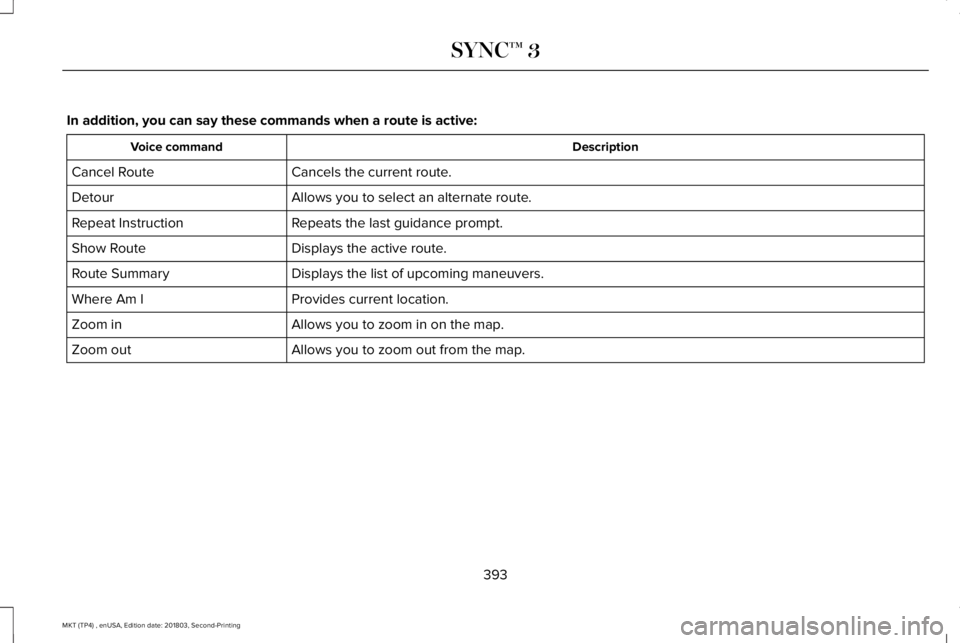
In addition, you can say these commands when a route is active:
DescriptionVoice command
Cancels the current route.Cancel Route
Allows you to select an alternate route.Detour
Repeats the last guidance prompt.Repeat Instruction
Displays the active route.Show Route
Displays the list of upcoming maneuvers.Route Summary
Provides current location.Where Am I
Allows you to zoom in on the map.Zoom in
Allows you to zoom out from the map.Zoom out
393
MKT (TP4) , enUSA, Edition date: 201803, Second-Printing
SYNC™ 3
Page 398 of 575
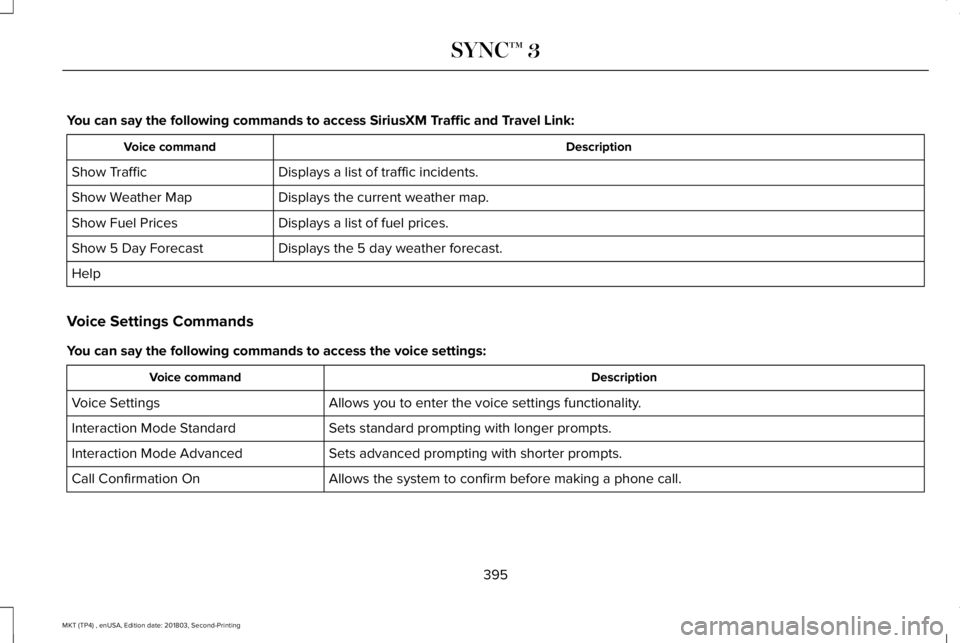
You can say the following commands to access SiriusXM Traffic and Travel Link:
DescriptionVoice command
Displays a list of traffic incidents.Show Traffic
Displays the current weather map.Show Weather Map
Displays a list of fuel prices.Show Fuel Prices
Displays the 5 day weather forecast.Show 5 Day Forecast
Help
Voice Settings Commands
You can say the following commands to access the voice settings:
DescriptionVoice command
Allows you to enter the voice settings functionality.Voice Settings
Sets standard prompting with longer prompts.Interaction Mode Standard
Sets advanced prompting with shorter prompts.Interaction Mode Advanced
Allows the system to confirm before making a phone call.Call Confirmation On
395
MKT (TP4) , enUSA, Edition date: 201803, Second-Printing
SYNC™ 3
Page 399 of 575
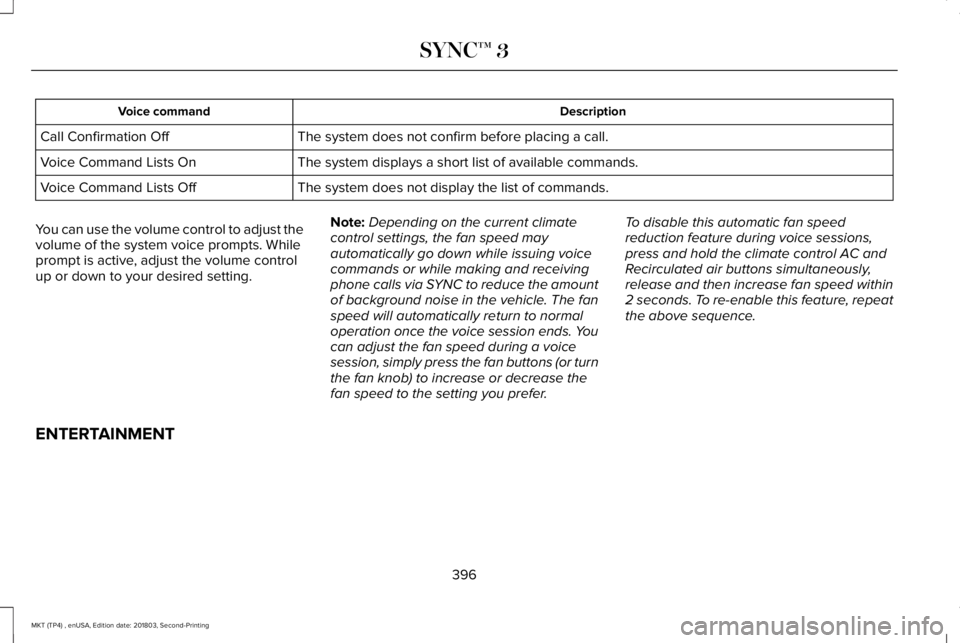
DescriptionVoice command
The system does not confirm before placing a call.Call Confirmation Off
The system displays a short list of available commands.Voice Command Lists On
The system does not display the list of commands.Voice Command Lists Off
You can use the volume control to adjust thevolume of the system voice prompts. Whileprompt is active, adjust the volume controlup or down to your desired setting.
Note:Depending on the current climatecontrol settings, the fan speed mayautomatically go down while issuing voicecommands or while making and receivingphone calls via SYNC to reduce the amountof background noise in the vehicle. The fanspeed will automatically return to normaloperation once the voice session ends. Youcan adjust the fan speed during a voicesession, simply press the fan buttons (or turnthe fan knob) to increase or decrease thefan speed to the setting you prefer.
To disable this automatic fan speedreduction feature during voice sessions,press and hold the climate control AC andRecirculated air buttons simultaneously,release and then increase fan speed within2 seconds. To re-enable this feature, repeatthe above sequence.
ENTERTAINMENT
396
MKT (TP4) , enUSA, Edition date: 201803, Second-Printing
SYNC™ 3
Page 401 of 575
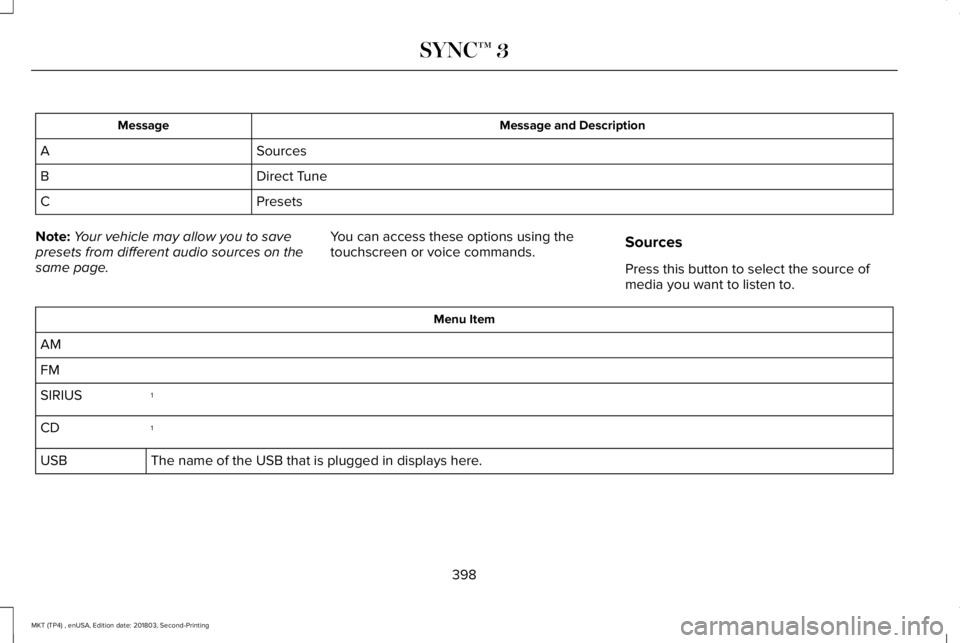
Message and DescriptionMessage
SourcesA
Direct TuneB
PresetsC
Note:Your vehicle may allow you to savepresets from different audio sources on thesame page.
You can access these options using thetouchscreen or voice commands.Sources
Press this button to select the source ofmedia you want to listen to.
Menu Item
AM
FM
1SIRIUS
1CD
The name of the USB that is plugged in displays here.USB
398
MKT (TP4) , enUSA, Edition date: 201803, Second-Printing
SYNC™ 3
Page 402 of 575
Menu Item
Bluetooth Stereo
If you have SYNC 3 compatible apps on your connected smart phone, they display here as individual source selections.Apps
1 This feature may not be available in all markets and requires an active subscription.
AM/FM Radio
Tuning a Station
You can use the tune or seek controls on theradio bezel to select a station.
To tune a station using the touchscreen,select:
Menu Item
Direct Tune
A pop up appears, allowing you to type inthe frequency of a station. You can only entera valid station for the source you arecurrently listening to.
You can press the backspace button todelete the previously entered number.
Once you have entered the station's callnumbers, you can select:
Action and Descrip-tionMenu Item
Press to beginplaying the stationyou have entered.
Enter
Press to exit withoutchanging the station.Cancel
Presets
To set a new preset, tune to the station andthen press and hold one of the memorypreset buttons. The audio mutes briefly whilethe system saves the station and thenreturns.
There are two preset banks available for AMand three banks for FM. To access additionalpresets, tap the preset button. The indicatoron the preset button shows which bank ofpresets you are currently viewing.
SiriusXM® Satellite Radio (If Activated)
Note: This feature may not be available inall markets and requires an activesubscription.
399
MKT (TP4) , enUSA, Edition date: 201803, Second-Printing
SYNC™ 3E234451
Page 405 of 575
SiriusXM Satellite Radio Reception Factors and Troubleshooting
Potential Reception Issues
For optimal reception performance, keep the antenna clear of snow and ice build-up and keepluggage and other materials as far away from the antenna as possible.Antenna obstructions
Hills, mountains, tall buildings, bridges, tunnels, freeway overpasses, parking garages, dense treefoliage and thunderstorms can interfere with your reception.Terrain
When you pass a ground-based broadcast-repeating tower, a stronger signal may overtake aweaker one and the audio system may mute.Station overload
Your display may show ACQUIRING... to indicate the interference and the audio system may mute.Satellite radio signal interference
Troubleshooting Tips
ActionCauseMessage
No action required. This message should disap-pear shortly.Radio requires more than two seconds to produceaudio for the selected channel.Acquiring Signal
If this message does not clear shortly, or with anignition key cycle, your receiver may have a fault.See an authorized dealer for service.
There is an internal module or system failurepresent.Satellite antenna fault
SIRIUS system failure
Tune to another channel or choose another preset.The channel is no longer available.Invalid Channel
402
MKT (TP4) , enUSA, Edition date: 201803, Second-Printing
SYNC™ 3
Page 410 of 575
Website
http://hdradio.com/stations/feedback
HD Radio Technology manufactured underlicense from iBiquity Digital Corporation andforeign patents. HD Radio and the HD andHD Radio logos are proprietary trademarksof DTS. The vehicle manufacturer and DTSare not responsible for the content sent usingHD Radio technology. Content may bechanged, added or deleted at any time atthe station owner's discretion.
CD (If equipped)
Once you select this option, the systemreturns you to the main audio screen.
The current audio information appears onthe screen.
The following buttons are also available:
FunctionButton
You can use the browse button to select a track.Browse
Select this button and a small number one displays to indicate the track is set to repeat.RepeatFor MP3 CDs, this button allows you to toggle through repeat off, repeat one track (a small numberone displays), and repeat current folder (a small folder displays).
Select the shuffle symbol to have the audio on the disk play in random order.Shuffle
407
MKT (TP4) , enUSA, Edition date: 201803, Second-Printing
SYNC™ 3
Page 412 of 575
FunctionButton
If available, displays the list of tracks in the Now Playing playlist.Browse
This option, which is available under browse, allows you to play alltracks or to filter the available media into one of the below categories.New Search
Play All
Playlists
Artist
Albums
Songs
Genres
Podcasts
Audio books
Composers
This button allows you to choose a specific letter to view within thecategory you are browsing.A-Z Jump
If available, this allows you to browse the folders and files on yourUSB device.Explore Device
409
MKT (TP4) , enUSA, Edition date: 201803, Second-Printing
SYNC™ 3
Page 415 of 575
Driver temperature: Touch up ordown to adjust the temperature.A
Heated steering wheel: Touch theheated steering wheel icon toswitch the heated steering wheelon and off (if equipped).
B
Defrost: A pop up appears on thescreen to display the defrostoptions.
C
MAX Defrost: Touch the button tomaximize defrosting. Outside airflows through the windshield vents,the fan automatically adjusts to thehighest speed and the temperaturedial returns to the full heat position.You can use this setting to defogor clear a thin covering of ice fromthe windshield. The heated rearwindow also automatically turns onwhen you select MAX Defrost.
Defrost: Touch to clear thewindshield of fog and thin ice.Touch again to return to theprevious airflow selection. Whenon, defrost provides outside air toreduce window fogging anddistributes air through thewindshield defroster vents anddemister vents.
Note: To prevent window fogging,you cannot select recirculated airwhen Defrost is on.
Heated rear window: Turns theheated rear window on and off.See the Heated Windows andMirrors chapter in your ownermanual.
AUTO: Touch the button to switchon automatic operation. Select thedesired temperature using thetemperature control. The systemadjusts fan speed, air distribution,air conditioning operation, andselects outside air or recirculatedair to heat or cool the vehicle inorder to maintain the desiredtemperature.
D
Power: Touch the button to switchthe system on and off. Switchingoff the climate control systemprevents outside air from enteringthe vehicle.
E
DUAL: This button lights up whenthe passenger controls are active.To switch the dual zone operationoff and link the passengertemperature to the drivertemperature, touch the DUALbutton to switch it off.
F
Passenger temperature: Touch upor down to adjust the temperature.G
412
MKT (TP4) , enUSA, Edition date: 201803, Second-Printing
SYNC™ 3
Page 416 of 575
Passenger heated and climatecontrolled seats:H
Touch the heated seat icon toadjust the heated seat off and on(if equipped).
Touch the climate-controlled seaticon to adjust theclimate-controlled seat off and on(if equipped).
Fan speed: Touch up or down toincrease or decrease the volumeof air circulated in your vehicle.
I
Rear: A pop up appears on thescreen to display the rear controloptions.
J
Touch the power icon to switch therear climate control functions offand on.
Touch Rear Control to allow therear seat passengers to adjust therear climate settings. Touch itagain to prevent the rear seatpassengers from adjusting thesettings. Rear Controlautomatically turns off when youuse the touchscreen to adjust therear climate settings.
If your vehicle has automaticclimate controls, select Auto toconnect the rear climate settingsto the Auto settings of the driver.
Touch the up and down arrows toadjust the temperature.
Manual airflow distributioncontrols: Select these controlsindividually or together to directthe air flow to the desired area.
K
Panel: Distributes air through theinstrument panel vents.
Floor: Distributes air through thedemister vents, floor vents and rearseat floor vents.
A/C: A pop-up appears on thescreen to display the airconditioning options.
L
MAX A/C: Touch to cool yourvehicle with recirculated air. Touchagain for normal A/C operation.MAX A/C distributes air throughinstrument panel vents and mayhelp reduce odors from enteringyour vehicle. MAX A/C is moreeconomical and efficient thannormal A/C mode.
A/C: Touch to switch the airconditioning on or off. Use A/Cwith recirculated air to improvecooling performance andefficiency. A/C engagesautomatically in MAX A/C, defrostand footwell/defrost.
Recirculated air: Touch to switchthe recirculated air on or off whichmay reduce the amount of timeneeded to cool down the interiorand help reduce odors fromreaching the interior. Recirculated
413
MKT (TP4) , enUSA, Edition date: 201803, Second-Printing
SYNC™ 3