display LINCOLN MKT 2019 Manual PDF
[x] Cancel search | Manufacturer: LINCOLN, Model Year: 2019, Model line: MKT, Model: LINCOLN MKT 2019Pages: 575, PDF Size: 4.66 MB
Page 224 of 575
If the system detects a degradedperformance condition, a message warningof a blocked sensor will appear in theinformation display. Also the system alertindicators will remain ON and the system willno longer provide any vehicle warnings. Youcan clear the information display warning butthe alert indicators will remain illuminated.
A "blocked" condition can be cleared in twoways:
•After the blockage in front of the sensorsis removed or the rainfall/snowfall ratedecreases or stops, drive for a fewminutes in traffic to allow the sensors todetect passing vehicles.
•By cycling the ignition from ON to OFFand then back ON.
Note:When towing a trailer, the sensors maydetect the trailer thus causing a false alert.It may be desirable to turn the Blind SpotInformation System off if the false alertsbecome annoying.
System Errors
If the system senses a problem with the leftor right sensor, the telltale will illuminate anda message will appear in the informationdisplay. See Information Messages (page112).
System Limitations
The system does have its limitations;situations such as severe weather conditionsor debris build-up on the sensor may limitvehicle detection.
The following are other situations that maylimit the system:
•Certain maneuvering of vehicles enteringand exiting the blind zone.
•Vehicles passing through the blind zoneat very fast rates.
•When several vehicles forming a convoypass through the blind zone.
Switching the System Off and On
You can temporarily switch the Blind SpotInformation System off in the informationdisplay. See General Information (page 105).When the Blind Spot Information Systemswitches off, you will not receive alerts andthe information display shows a system offmessage. The telltale in the cluster alsoilluminates. When you switch the Blind SpotInformation System on or off, the alertindicators flash twice.
Note:The system switches back on everytime you start your vehicle.
You can also have the Blind Spot InformationSystem switched off permanently at anauthorized dealer. Once switched offpermanently, the system can only beswitched back on at an authorized dealer.
221
MKT (TP4) , enUSA, Edition date: 201803, Second-Printing
Driving Aids
Page 227 of 575
System Lights, Messages and AudibleAlerts
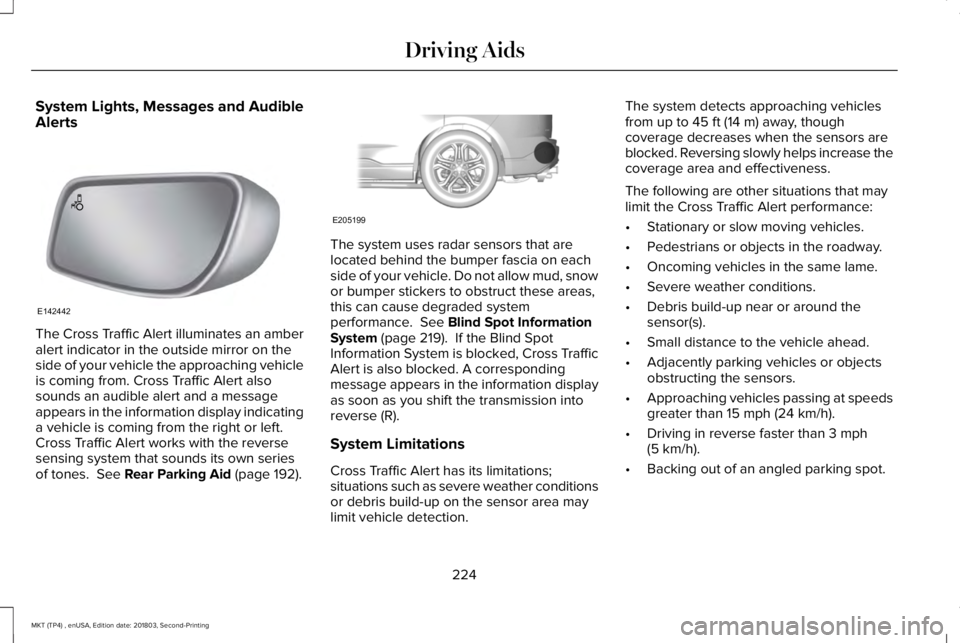
The Cross Traffic Alert illuminates an amberalert indicator in the outside mirror on theside of your vehicle the approaching vehicleis coming from. Cross Traffic Alert alsosounds an audible alert and a messageappears in the information display indicatinga vehicle is coming from the right or left.Cross Traffic Alert works with the reversesensing system that sounds its own seriesof tones. See Rear Parking Aid (page 192).
The system uses radar sensors that arelocated behind the bumper fascia on eachside of your vehicle. Do not allow mud, snowor bumper stickers to obstruct these areas,this can cause degraded systemperformance. See Blind Spot InformationSystem (page 219). If the Blind SpotInformation System is blocked, Cross TrafficAlert is also blocked. A correspondingmessage appears in the information displayas soon as you shift the transmission intoreverse (R).
System Limitations
Cross Traffic Alert has its limitations;situations such as severe weather conditionsor debris build-up on the sensor area maylimit vehicle detection.
The system detects approaching vehiclesfrom up to 45 ft (14 m) away, thoughcoverage decreases when the sensors areblocked. Reversing slowly helps increase thecoverage area and effectiveness.
The following are other situations that maylimit the Cross Traffic Alert performance:
•Stationary or slow moving vehicles.
•Pedestrians or objects in the roadway.
•Oncoming vehicles in the same lame.
•Severe weather conditions.
•Debris build-up near or around thesensor(s).
•Small distance to the vehicle ahead.
•Adjacently parking vehicles or objectsobstructing the sensors.
•Approaching vehicles passing at speedsgreater than 15 mph (24 km/h).
•Driving in reverse faster than 3 mph(5 km/h).
•Backing out of an angled parking spot.
224
MKT (TP4) , enUSA, Edition date: 201803, Second-Printing
Driving AidsE142442 E205199
Page 228 of 575
If the rear end of the vehicle is hit ordamaged, the radar sensing zone may bealtered causing missed or false collisionwarnings. See your authorized dealer to haveyour collision warning radar checked forproper coverage and operation.
False Alerts
Note:When towing a trailer, the sensors maydetect the trailer thus causing a false alert.It may be desirable to turn the Blind SpotInformation System off if the false alertsbecome annoying.
There may be certain instances when thereis a false alert by the Cross Traffic Alertsystem that illuminates the alert indicatorwith no vehicle in the coverage zone. Someamount of false alerts are normal; they aretemporary and self-correct.
System Errors
If Cross Traffic Alert senses a problem withthe left or right sensor a message will appearin the information display. See InformationMessages (page 112).
Switching the System Off and On
You can temporarily switch Cross Traffic Alertoff in the information display. SeeInformation Messages (page 112). When youswitch Cross Traffic Alert off, you will notreceive alerts and the information displaywill display a system off message.
Note:The Cross Traffic Alert switches onwhenever the ignition is switched on andready to provide appropriate alerts whenthe transmission is in reverse (R). CrossTraffic Alert will not remember the lastselected on or off setting.
You can also have Cross Traffic Alertswitched off permanently at an authorizeddealer. Once switched off permanently, thesystem can only be switched back on at anauthorized dealer.
STEERING
Electric Power Steering
WARNING: The electric powersteering system has diagnostic checks thatcontinuously monitor the system. If a faultis detected, a message displays in theinformation display. Stop your vehicle assoon as it is safe to do so. Switch theignition off. After at least 10 seconds,switch the ignition on and watch theinformation display for a steering systemwarning message. If a steering systemwarning message returns, have the systemchecked by an authorized dealer.
WARNING: If the system detects anerror, you may not feel a difference in thesteering, however a serious condition mayexist. Obtain immediate service from anauthorized dealer, failure to do so mayresult in loss of steering control.
Your vehicle has an electric power steeringsystem. There is no fluid reservoir. Nomaintenance is required.
225
MKT (TP4) , enUSA, Edition date: 201803, Second-Printing
Driving Aids
Page 230 of 575
Note:The collision warning system is activeat speeds above approximately 5 mph(8 km/h).
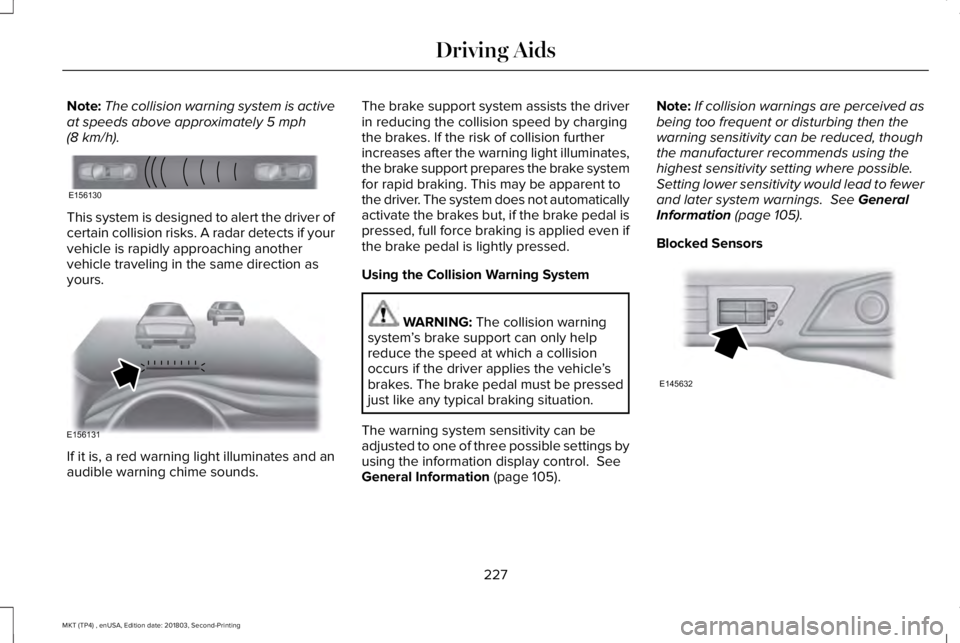
This system is designed to alert the driver ofcertain collision risks. A radar detects if yourvehicle is rapidly approaching anothervehicle traveling in the same direction asyours.
If it is, a red warning light illuminates and anaudible warning chime sounds.
The brake support system assists the driverin reducing the collision speed by chargingthe brakes. If the risk of collision furtherincreases after the warning light illuminates,the brake support prepares the brake systemfor rapid braking. This may be apparent tothe driver. The system does not automaticallyactivate the brakes but, if the brake pedal ispressed, full force braking is applied even ifthe brake pedal is lightly pressed.
Using the Collision Warning System
WARNING: The collision warningsystem’s brake support can only helpreduce the speed at which a collisionoccurs if the driver applies the vehicle’sbrakes. The brake pedal must be pressedjust like any typical braking situation.
The warning system sensitivity can beadjusted to one of three possible settings byusing the information display control. SeeGeneral Information (page 105).
Note:If collision warnings are perceived asbeing too frequent or disturbing then thewarning sensitivity can be reduced, thoughthe manufacturer recommends using thehighest sensitivity setting where possible.Setting lower sensitivity would lead to fewerand later system warnings. See GeneralInformation (page 105).
Blocked Sensors
227
MKT (TP4) , enUSA, Edition date: 201803, Second-Printing
Driving AidsE156130 E156131 E145632
Page 231 of 575
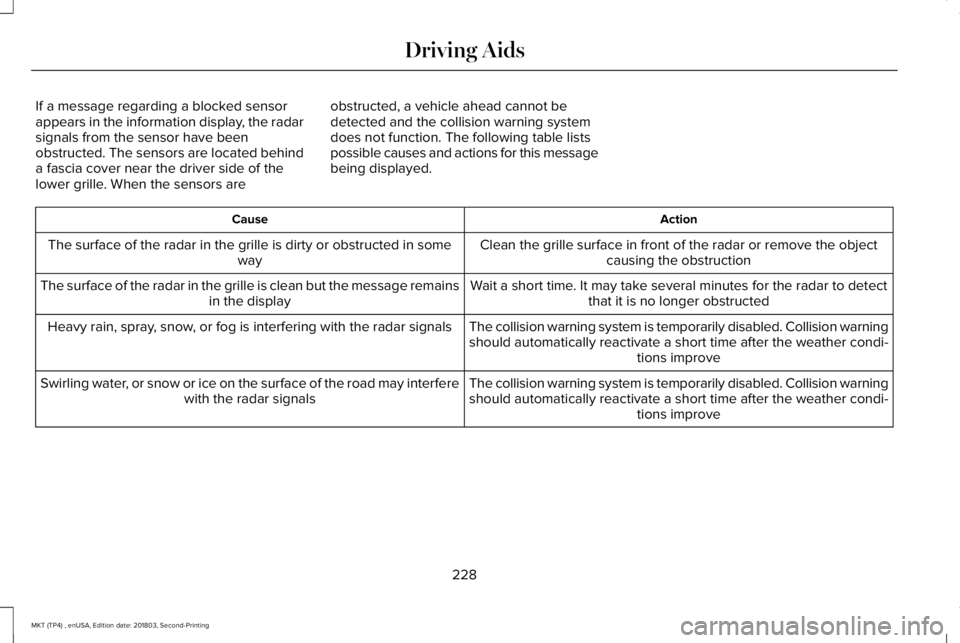
If a message regarding a blocked sensorappears in the information display, the radarsignals from the sensor have beenobstructed. The sensors are located behinda fascia cover near the driver side of thelower grille. When the sensors are
obstructed, a vehicle ahead cannot bedetected and the collision warning systemdoes not function. The following table listspossible causes and actions for this messagebeing displayed.
ActionCause
Clean the grille surface in front of the radar or remove the objectcausing the obstructionThe surface of the radar in the grille is dirty or obstructed in someway
Wait a short time. It may take several minutes for the radar to detectthat it is no longer obstructedThe surface of the radar in the grille is clean but the message remainsin the display
The collision warning system is temporarily disabled. Collision warningshould automatically reactivate a short time after the weather condi-tions improve
Heavy rain, spray, snow, or fog is interfering with the radar signals
The collision warning system is temporarily disabled. Collision warningshould automatically reactivate a short time after the weather condi-tions improve
Swirling water, or snow or ice on the surface of the road may interferewith the radar signals
228
MKT (TP4) , enUSA, Edition date: 201803, Second-Printing
Driving Aids
Page 232 of 575
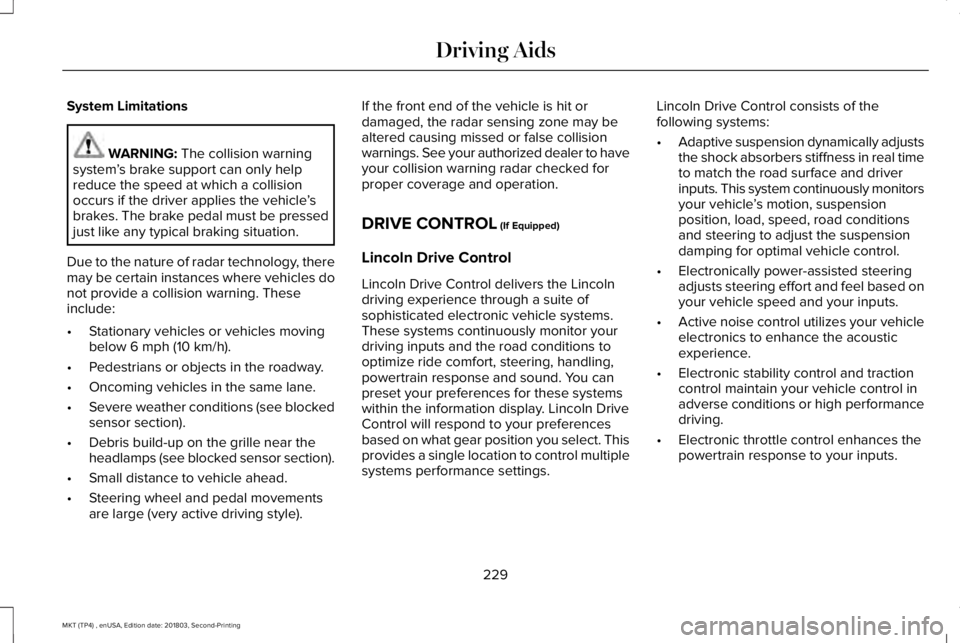
System Limitations
WARNING: The collision warningsystem’s brake support can only helpreduce the speed at which a collisionoccurs if the driver applies the vehicle’sbrakes. The brake pedal must be pressedjust like any typical braking situation.
Due to the nature of radar technology, theremay be certain instances where vehicles donot provide a collision warning. Theseinclude:
•Stationary vehicles or vehicles movingbelow 6 mph (10 km/h).
•Pedestrians or objects in the roadway.
•Oncoming vehicles in the same lane.
•Severe weather conditions (see blockedsensor section).
•Debris build-up on the grille near theheadlamps (see blocked sensor section).
•Small distance to vehicle ahead.
•Steering wheel and pedal movementsare large (very active driving style).
If the front end of the vehicle is hit ordamaged, the radar sensing zone may bealtered causing missed or false collisionwarnings. See your authorized dealer to haveyour collision warning radar checked forproper coverage and operation.
DRIVE CONTROL (If Equipped)
Lincoln Drive Control
Lincoln Drive Control delivers the Lincolndriving experience through a suite ofsophisticated electronic vehicle systems.These systems continuously monitor yourdriving inputs and the road conditions tooptimize ride comfort, steering, handling,powertrain response and sound. You canpreset your preferences for these systemswithin the information display. Lincoln DriveControl will respond to your preferencesbased on what gear position you select. Thisprovides a single location to control multiplesystems performance settings.
Lincoln Drive Control consists of thefollowing systems:
•Adaptive suspension dynamically adjuststhe shock absorbers stiffness in real timeto match the road surface and driverinputs. This system continuously monitorsyour vehicle’s motion, suspensionposition, load, speed, road conditionsand steering to adjust the suspensiondamping for optimal vehicle control.
•Electronically power-assisted steeringadjusts steering effort and feel based onyour vehicle speed and your inputs.
•Active noise control utilizes your vehicleelectronics to enhance the acousticexperience.
•Electronic stability control and tractioncontrol maintain your vehicle control inadverse conditions or high performancedriving.
•Electronic throttle control enhances thepowertrain response to your inputs.
229
MKT (TP4) , enUSA, Edition date: 201803, Second-Printing
Driving Aids
Page 233 of 575
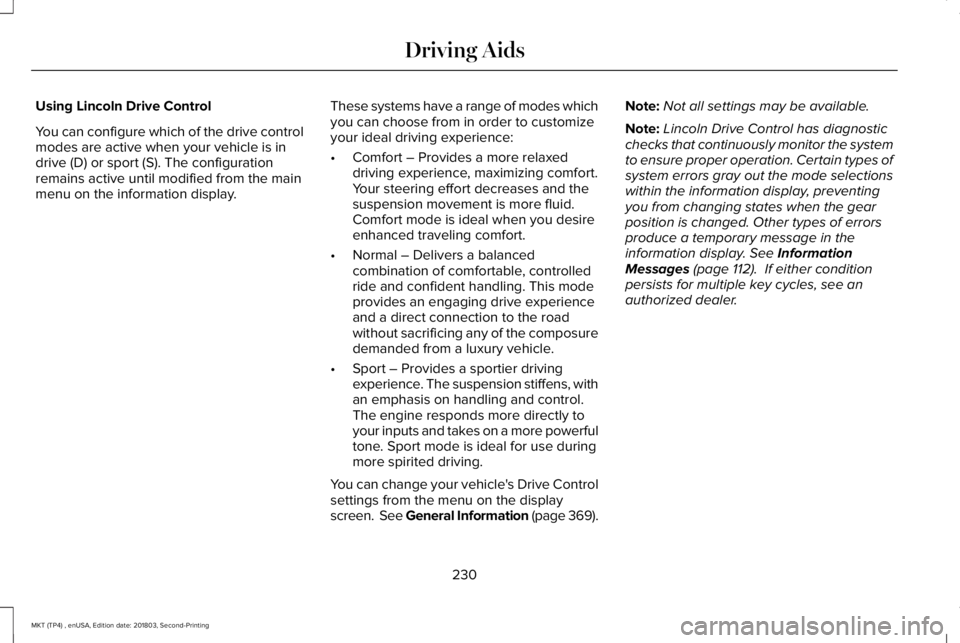
Using Lincoln Drive Control
You can configure which of the drive controlmodes are active when your vehicle is indrive (D) or sport (S). The configurationremains active until modified from the mainmenu on the information display.
These systems have a range of modes whichyou can choose from in order to customizeyour ideal driving experience:
•Comfort – Provides a more relaxeddriving experience, maximizing comfort.Your steering effort decreases and thesuspension movement is more fluid.Comfort mode is ideal when you desireenhanced traveling comfort.
•Normal – Delivers a balancedcombination of comfortable, controlledride and confident handling. This modeprovides an engaging drive experienceand a direct connection to the roadwithout sacrificing any of the composuredemanded from a luxury vehicle.
•Sport – Provides a sportier drivingexperience. The suspension stiffens, withan emphasis on handling and control.The engine responds more directly toyour inputs and takes on a more powerfultone. Sport mode is ideal for use duringmore spirited driving.
You can change your vehicle's Drive Controlsettings from the menu on the displayscreen. See General Information (page 369).
Note:Not all settings may be available.
Note:Lincoln Drive Control has diagnosticchecks that continuously monitor the systemto ensure proper operation. Certain types ofsystem errors gray out the mode selectionswithin the information display, preventingyou from changing states when the gearposition is changed. Other types of errorsproduce a temporary message in theinformation display. See InformationMessages (page 112). If either conditionpersists for multiple key cycles, see anauthorized dealer.
230
MKT (TP4) , enUSA, Edition date: 201803, Second-Printing
Driving Aids
Page 241 of 575
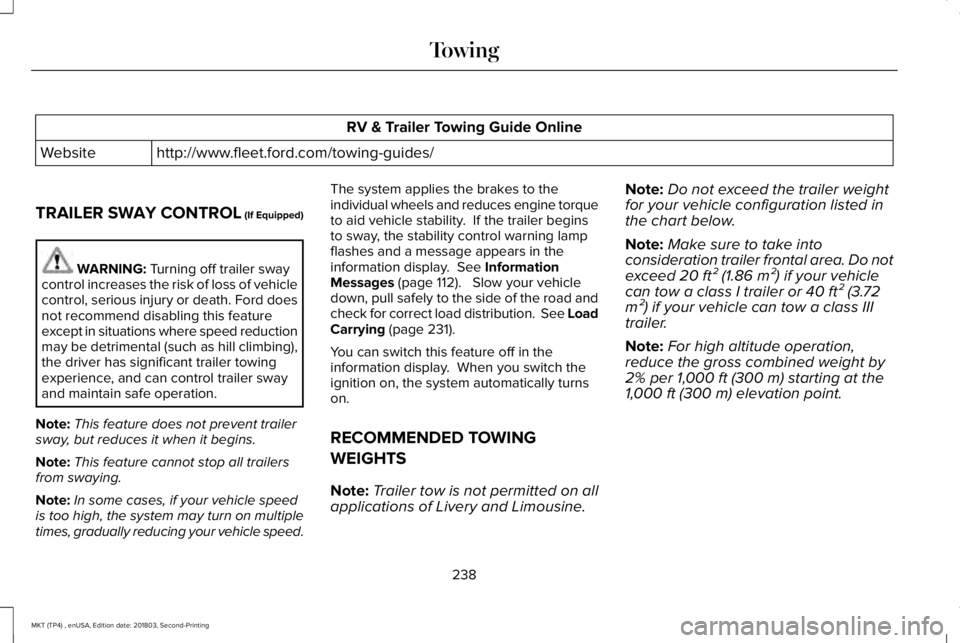
RV & Trailer Towing Guide Online
http://www.fleet.ford.com/towing-guides/Website
TRAILER SWAY CONTROL (If Equipped)
WARNING: Turning off trailer swaycontrol increases the risk of loss of vehiclecontrol, serious injury or death. Ford doesnot recommend disabling this featureexcept in situations where speed reductionmay be detrimental (such as hill climbing),the driver has significant trailer towingexperience, and can control trailer swayand maintain safe operation.
Note:This feature does not prevent trailersway, but reduces it when it begins.
Note:This feature cannot stop all trailersfrom swaying.
Note:In some cases, if your vehicle speedis too high, the system may turn on multipletimes, gradually reducing your vehicle speed.
The system applies the brakes to theindividual wheels and reduces engine torqueto aid vehicle stability. If the trailer beginsto sway, the stability control warning lampflashes and a message appears in theinformation display. See InformationMessages (page 112). Slow your vehicledown, pull safely to the side of the road andcheck for correct load distribution. See LoadCarrying (page 231).
You can switch this feature off in theinformation display. When you switch theignition on, the system automatically turnson.
RECOMMENDED TOWING
WEIGHTS
Note:Trailer tow is not permitted on allapplications of Livery and Limousine.
Note:Do not exceed the trailer weightfor your vehicle configuration listed inthe chart below.
Note:Make sure to take intoconsideration trailer frontal area. Do notexceed 20 ft² (1.86 m²) if your vehiclecan tow a class I trailer or 40 ft² (3.72m²) if your vehicle can tow a class IIItrailer.
Note:For high altitude operation,reduce the gross combined weight by2% per 1,000 ft (300 m) starting at the1,000 ft (300 m) elevation point.
238
MKT (TP4) , enUSA, Edition date: 201803, Second-Printing
Towing
Page 277 of 575
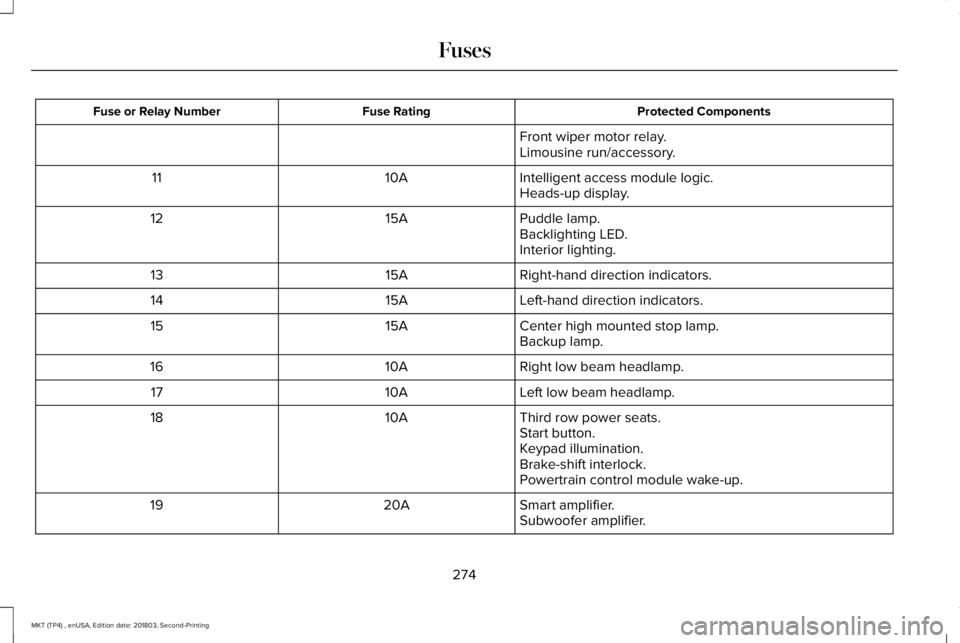
Protected ComponentsFuse RatingFuse or Relay Number
Front wiper motor relay.Limousine run/accessory.
Intelligent access module logic.10A11Heads-up display.
Puddle lamp.15A12Backlighting LED.Interior lighting.
Right-hand direction indicators.15A13
Left-hand direction indicators.15A14
Center high mounted stop lamp.15A15Backup lamp.
Right low beam headlamp.10A16
Left low beam headlamp.10A17
Third row power seats.10A18Start button.Keypad illumination.Brake-shift interlock.Powertrain control module wake-up.
Smart amplifier.20A19Subwoofer amplifier.
274
MKT (TP4) , enUSA, Edition date: 201803, Second-Printing
Fuses
Page 279 of 575
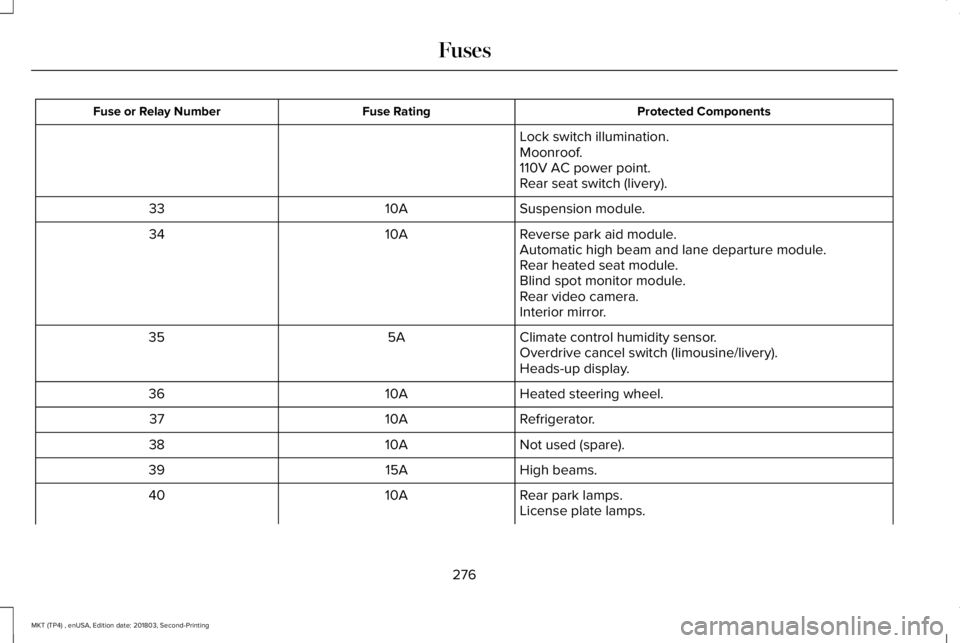
Protected ComponentsFuse RatingFuse or Relay Number
Lock switch illumination.Moonroof.110V AC power point.Rear seat switch (livery).
Suspension module.10A33
Reverse park aid module.10A34Automatic high beam and lane departure module.Rear heated seat module.Blind spot monitor module.Rear video camera.Interior mirror.
Climate control humidity sensor.5A35Overdrive cancel switch (limousine/livery).Heads-up display.
Heated steering wheel.10A36
Refrigerator.10A37
Not used (spare).10A38
High beams.15A39
Rear park lamps.10A40License plate lamps.
276
MKT (TP4) , enUSA, Edition date: 201803, Second-Printing
Fuses